Artificial Intelligence Scripts
Script Structure
Each AI script must start from importing tank.js library. It contains core mechanism that will be required to program the tank. Importing of any other libraries is not allowed.
importScripts('lib/tank.js');Next, it is a good place to define all global variables and functions that will be used to control the tank. After that, it is time to initialize the tank. This step is optional so if you don't need to perform any actions at the beginning of the battle you can skip it. Callback passed to tank.init() is called only once, at the beginning of the battle and it has two arguments: settings and info
tank.init(function(settings, info) {

})
Heart of AI logic is put in a callback that is passed to tank.loop(). This function will be called at each step of battle's simulation. (usually several times per second). The time between calls of tank.loop() may vary and depends on such factors as speed of simulation or performance of the machine that runs the app.
There are two parameters passed to loop callback: state and control.
- state - contains information about the tank (e.g. position, amount of energy, radar data, …)
- control - contains instructions used to control the behavior of the tank (e.g. throttle, turning, shooting, …)
tank.loop(function(state, control) {

});
Example Script
Here is a very simple example of an AI script. It will keep turning clockwise and shoot bullets around. To make it more interesting, the tank will use a different power of bullets in each battle.
importScripts('lib/tank.js');
var bulletPower;

tank.init(function(settings, info) {
  // use different power of bullets for each battle
  bulletPower = Math.randomRange(0.1, 1);
})

tank.loop(function(state, control) {
  control.TURN = 1;
  control.SHOOT = bulletPower;
});
Debugging
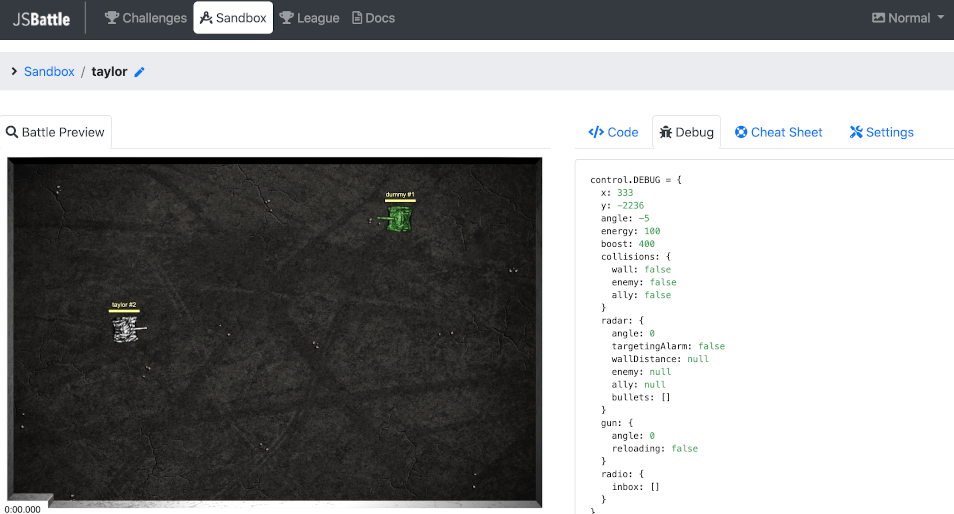
To make debugging of your AI scripts easier, it is possible to pass some data from the script and display it in the battle window. It can be achieved by setting DEBUG field of control object. The value of control.DEBUG can be anything: from objects, arrays, numbers to strings.