# tabularis
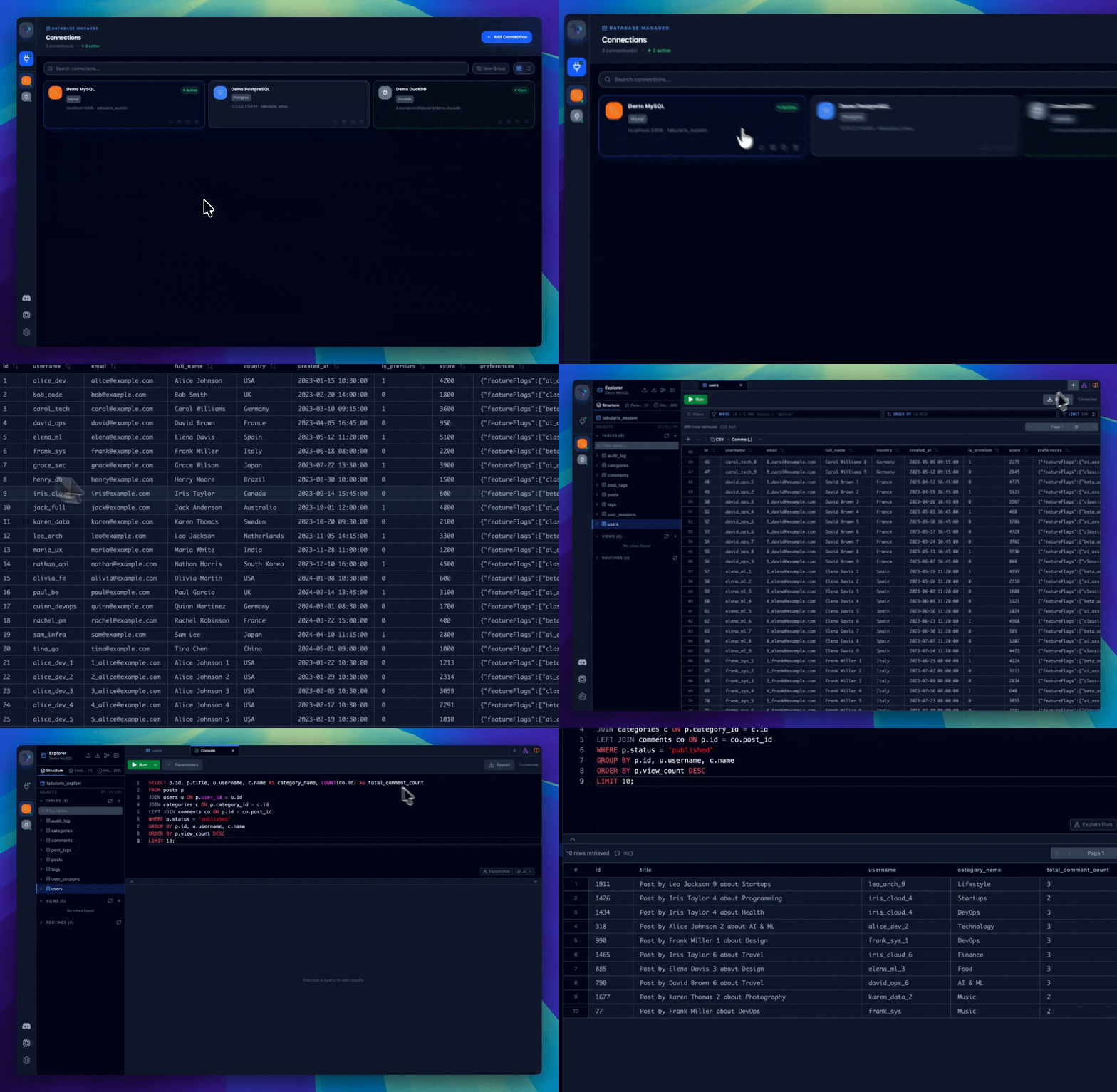
Tabularis is an open-source desktop SQL workspace for PostgreSQL, MySQL/MariaDB, SQLite and 15+ more databases like DuckDB, ClickHouse, Redis and Firestore.
Its built-in MCP server lets Claude, Cursor and Devin (formerly Windsurf) read your schema and run queries in the same app you already use.
README:
English |
Italiano |
Español |
中文 |
Français |
Deutsch |
日本語 |
Русский |
Tagalog |
한국어 |
Português (Brasil)




[](https://discord.com/invite/K2hmhfHRSt)
[](https://gitster.dev/repo/TabularisDB/tabularis)





## Download
```bash
winget install Debba.Tabularis # Windows
brew tap TabularisDB/tabularis && brew install --cask tabularis # macOS
sudo snap install tabularis # Linux
```
Or grab an installer directly:
[](https://github.com/TabularisDB/tabularis/releases/download/v0.17.0/tabularis_0.17.0_x64-setup.exe) [](https://github.com/TabularisDB/tabularis/releases/download/v0.17.0/tabularis_0.17.0_aarch64.dmg) [](https://github.com/TabularisDB/tabularis/releases/download/v0.17.0/tabularis_0.17.0_x64.dmg) [](https://github.com/TabularisDB/tabularis/releases/download/v0.17.0/tabularis_0.17.0_amd64.AppImage) [](https://github.com/TabularisDB/tabularis/releases/download/v0.17.0/tabularis_0.17.0_amd64.deb) [](https://github.com/TabularisDB/tabularis/releases/download/v0.17.0/tabularis-0.17.0-1.x86_64.rpm)
The app UI is available in English, Italian, Spanish, Chinese (Simplified), French, German, Japanese, Russian, Tagalog and Portuguese (Brazilian).
**Discord:** [Join our Discord server](https://discord.com/invite/K2hmhfHRSt) to talk with the maintainers, share feedback, and get help from the community.
## Table of Contents
- [Why tabularis?](#why-tabularis)
- [Database support](#database-support)
- [Installation](#installation)
- [Windows](#windows)
- [macOS](#macos)
- [Linux (Snap)](#linux-snap)
- [Linux (Flatpak)](#linux-flatpak)
- [Linux (AppImage)](#linux-appimage)
- [Arch Linux (AUR)](#arch-linux-aur)
- [Updates](#updates)
- [Discord](#discord)
- [Changelog](#changelog)
- [Features](#features)
- [Connection Management](#connection-management)
- [Database Explorer](#database-explorer)
- [SQL Editor](#sql-editor)
- [SQL Notebooks](#sql-notebooks)
- [Keyboard Shortcuts](#keyboard-shortcuts)
- [Visual Query Builder](#visual-query-builder)
- [Visual EXPLAIN](#visual-explain)
- [Data Grid](#data-grid)
- [Logging](#logging)
- [Plugin System](#plugin-system)
- [Configuration Storage](#configuration-storage)
- [AI Features (Optional)](#ai-features-optional)
- [MCP Server: AI Agent Integration](#mcp-server-ai-agent-integration)
- [Tech Stack](#tech-stack)
- [Development](#development)
- [Roadmap](#roadmap)
- [Contributing](#contributing)
- [Sponsors](#sponsors)
- [Origin Story](#origin-story)
- [License](#license)
## Why tabularis?
| | **tabularis** | DBeaver CE | TablePlus | Beekeeper Studio |
|---|---|---|---|---|
| License | Apache 2.0, free | Apache 2.0, free (Pro is paid) | Commercial | GPLv3 (paid editions) |
| SQL notebooks (SQL + Markdown cells, cross-cell variables, charts) | ✅ | ❌ | ❌ | ❌ |
| Built-in MCP server for AI agents | ✅ | ❌ | ❌ | ❌ |
| Plugins in **any language** (JSON-RPC over stdio) | ✅ | Java/Eclipse plugins | JavaScript plugins | ❌ |
| AI text-to-SQL with **local models** (Ollama) | ✅ | Cloud-based AI assistant | ❌ | ❌ |
| Visual EXPLAIN with interactive plan graphs | ✅ | ✅ | ❌ | ❌ |
| Databases out of the box | 3 built-in + 16 official plugins | 100+ | 20+ | ~10 |
> Comparison as of June 2026; features in other tools may have changed since. If you need dozens of drivers, use DBeaver. Tabularis focuses on doing a few databases well.
### Database support
PostgreSQL, MySQL/MariaDB and SQLite ship built in. Everything else is a plugin. Current coverage, mirroring the [driver & plugin coverage](https://tabularis.dev/#driver-coverage) on the website:
[ClickHouse](https://github.com/TabularisDB/tabularis-clickhouse-plugin) (shipped), [Cloudflare D1](https://github.com/josejorge/tabularis_cloudflare_d1_plugin) (shipped), [DM / Dameng](https://github.com/haos666/tabularis-dameng-plugin) (shipped), [DuckDB](https://github.com/TabularisDB/tabularis-duckdb-plugin) (shipped), [DynamoDB](https://github.com/TabularisDB/tabularis-dynamodb-plugin) (shipped), [Elasticsearch](https://github.com/TabularisDB/tabularis-elasticsearch-plugin) (shipped), [Firestore](https://codeberg.org/NewtTheWolf/firestore-tabularis) (shipped), [IBM Db2](https://github.com/TabularisDB/tabularis-db2-plugin) (shipped), [IBM Informix](https://github.com/danielnuld/tabularis-informix-plugin) (shipped), [MongoDB](https://github.com/danielnuld/tabularis-mongodb-plugin) (shipped), Redis (shipped, in [Go](https://github.com/gzamboni/tabularis-redis-plugin-go) and [Rust](https://github.com/nicholas-papachriston/tabularis-redis-plugin)), [CSV Folder](https://github.com/TabularisDB/tabularis-csv-plugin) (shipped), [Google Sheets](https://github.com/TabularisDB/tabularis-google-sheets-plugin) (shipped), [HackerNews](https://github.com/TabularisDB/tabularis-hackernews-plugin) (shipped), Google BigQuery (claimed), [LibSQL / Turso](https://github.com/TabularisDB/tabularis-libsql-plugin) (claimed), Meilisearch (claimed), [Oracle](https://github.com/TabularisDB/tabularis-oracle-plugin) (claimed), [SQL Server](https://github.com/TabularisDB/tabularis-sqlserver-plugin) (claimed), Amazon Redshift (scoped), CockroachDB (scoped), TiDB (scoped), Snowflake (coming soon), Cassandra (open), Etcd (open), Firebird (open), ScyllaDB (open), SQL Anywhere (open), SurrealDB (open), Trino / Presto (open).
> **Shipped** drivers are installable from the [plugin registry](https://tabularis.dev/plugins). Everything else is on the [bounty board](https://tabularis.dev/plugins/bounties): claim one, sponsor one, or [request a database](https://github.com/TabularisDB/tabularis/discussions). The SQL Server driver is in active development in its own repository, [tabularis-sqlserver-plugin](https://github.com/TabularisDB/tabularis-sqlserver-plugin).
## Installation
### Windows
#### WinGet (Recommended)
```bash
winget install Debba.Tabularis
```
#### Direct Download
Download the installer from the [Releases page](https://github.com/TabularisDB/tabularis/releases) and run it:
```
tabularis_x.x.x_x64-setup.exe
```
Follow the on-screen instructions to complete the installation.
### macOS
#### Homebrew (Recommended)
To add our tap, run:
```bash
brew tap TabularisDB/tabularis
```
Then install:
```bash
brew install --cask tabularis
```
[](https://github.com/debba/homebrew-tabularis)
#### Direct Download
Builds from **v0.13.1** onward are signed and notarized by Apple, so they open without any extra steps.
The notes below only apply to **older releases (before v0.13.1)** downloaded directly:
- You need to allow accessibility access (Privacy & Security) to the tabularis app. If you are upgrading and already have tabularis on the allowed list, remove it manually before accessibility access can be granted to the new version.
- You may need to run `xattr -c /Applications/tabularis.app` after copying the app to the Applications directory.
### Linux (Snap)
```bash
sudo snap install tabularis
```
[](https://snapcraft.io/tabularis)
### Linux (Flatpak)
```bash
flatpak remote-add --if-not-exists flatpark https://dl.flatpark.org/flatpark.flatpakrepo
flatpak install flatpark dev.tabularis.Tabularis
```
[](https://flatpark.org/apps/dev.tabularis.Tabularis/)
### Linux (AppImage)
Download the `.AppImage` file from the [Releases page](https://github.com/TabularisDB/tabularis/releases), make it executable and run it:
```bash
chmod +x tabularis_x.x.x_amd64.AppImage
./tabularis_x.x.x_amd64.AppImage
```
### Arch Linux (AUR)
```bash
yay -S tabularis-bin
```
## Updates
Tabularis checks for updates automatically on startup and notifies you when a new version is available. You can also download the latest version directly from the [Releases page](https://github.com/TabularisDB/tabularis/releases).
## Discord
Join our [Discord server](https://discord.com/invite/K2hmhfHRSt) to talk with the maintainers, share feedback, suggest features, or get help from the community.
## [Changelog](./CHANGELOG.md)
## Features
### Connection Management
> [Full reference on tabularis.dev →](https://tabularis.dev/wiki/connections)
- Support for **MySQL/MariaDB**, **PostgreSQL** (with multi-schema support) and **SQLite**, with multi-database selection per connection.
- Save, manage, and clone connection profiles, with optional secure password storage in the system **Keychain**.
- **SSH Tunneling** with automatic readiness detection.
- **Per-Connection Appearance:** override the icon ([Lucide](https://lucide.dev/icons/), emoji, or custom image) and accent color of each saved connection.
### Database Explorer
> [Full reference on tabularis.dev →](https://tabularis.dev/wiki/schema-management)
- **Tree View:** Browse tables, columns, keys, indexes, views, and stored routines, with inline editing from the sidebar.
- **ER Diagram:** Interactive Entity-Relationship visualization (pan, zoom, layout) with selective table diagram generation.
- **Context Actions:** Show data, count rows, modify schema, duplicate/delete tables.
- **SQL Dump & Import:** Export and restore databases with a single flow.
### SQL Editor
> [Full reference on tabularis.dev →](https://tabularis.dev/wiki/editor)
- **Monaco Editor** with syntax highlighting and auto-completion, in a tabbed interface with isolated connections per tab and resizable **split view**.
- **Multi-Statement Execution:** Run All, Run Selected, or pick individual queries. Results appear in separate tabs with independent pagination.
- **Smart Query Splitting:** Correctly handles stored procedures, functions, and `$$`-delimited blocks.
- **Saved Queries** and an **AI assist overlay** directly in the editor.
### SQL Notebooks
> [Full reference on tabularis.dev →](https://tabularis.dev/wiki/notebooks)
- **Multi-Cell Workspace:** Combine SQL and Markdown cells in a single document, with inline results and bar/line/pie charts.
- **Cross-Cell Variables:** Reference another cell's full result as a table with `{{cell_N}}` (expanded to a CTE at run time), plus global `@paramName` parameters.
- **Run All:** Sequential execution with stop-on-error option and completion summary.
- **Persistence & Export:** Auto-saved as `.tabularis-notebook` files; export as HTML, CSV, or JSON.
- Outline panel, drag & drop cell reordering, and AI-generated cell names.
### Keyboard Shortcuts
> [Full reference on tabularis.dev →](https://tabularis.dev/wiki/keyboard-shortcuts)
- **Built-in shortcuts** for navigation, editor, and data grid actions, platform-aware (`Cmd` on macOS, `Ctrl` on Windows/Linux).
- **Fully customizable:** Remap any non-locked shortcut from **Settings → Keyboard Shortcuts**; overrides persist to `keybindings.json`.
- Hold `Ctrl+Shift` in the sidebar to reveal numbered badges (1–9) for instant connection switching.
### Visual Query Builder
> [Full reference on tabularis.dev →](https://tabularis.dev/wiki/visual-query-builder)
- **Drag-and-Drop:** Build queries visually with ReactFlow.
- **Visual JOINs:** Connect tables to create relationships.
- **Advanced Logic:** WHERE/HAVING filters, aggregates (COUNT, SUM, AVG), sorting, and limits.
- **Real-time SQL:** Instant code generation.
### Visual EXPLAIN
> [Full reference on tabularis.dev →](https://tabularis.dev/wiki/visual-explain)
- **Interactive Plan Graphs:** Inspect execution plans as navigable node graphs instead of raw text.
- **Table, Raw, and AI Views:** Switch between exact node metrics, original database output, and optional AI-assisted analysis.
- **Cross-Database Support:** Works with PostgreSQL, MySQL/MariaDB, and SQLite using the best available `EXPLAIN` format per driver.
- **Faster Optimization Loops:** Spot expensive scans, estimate gaps, join behavior, and optimizer choices without leaving the editor.
### Data Grid
> [Full reference on tabularis.dev →](https://tabularis.dev/wiki/data-grid)
- **Inline & Batch Editing:** Modify cells and commit multiple changes at once; create, delete, and multi-select rows.
- **Export:** Save results as CSV or JSON, or copy selected rows straight to the clipboard.
- **JSON & JSONB Cells:** Syntax-highlighted in the grid, with a dedicated editor window (Tree / Monaco / Raw modes).
- **Spatial Data:** Initial GEOMETRY support for MySQL.
### Plugin System
> [Full reference on tabularis.dev →](https://tabularis.dev/wiki/plugins)
Tabularis is **hackable with an external plugin system**. Plugins are standalone executables that communicate with the app over **JSON-RPC 2.0 via stdin/stdout**, and can be written in any language.
- **Install Plugins:** Browse and install community drivers from **Settings → Available Plugins**, no restart required.
- **Manage Drivers:** View all registered drivers (built-in and plugins) in **Settings → Installed Drivers** and uninstall plugins with one click.
- **Any Database:** Add support for DuckDB, MongoDB, or any other database by writing or installing a plugin.
- **Plugin Registry:** Official plugins are listed in [`plugins/registry.json`](./plugins/registry.json).
- **Developer Guide:** See [`plugins/PLUGIN_GUIDE.md`](./plugins/PLUGIN_GUIDE.md) to build your own driver in any language.
### Logging
- Real-time log viewer in Settings, with level filtering and export to `.log` files.
- Automatically expand and inspect SQL queries in logs.
- **CLI Debug Mode:** Start with `tabularis --debug` for verbose logging from launch.
### Configuration Storage
> [Full reference on tabularis.dev →](https://tabularis.dev/wiki/configuration)
Configuration is stored in `~/.config/tabularis/` (Linux), `~/Library/Application Support/tabularis/` (macOS), or `%APPDATA%\tabularis\` (Windows): connection profiles, saved queries, app settings (`config.json`), custom themes, and per-connection editor preferences. Tabs and queries are restored when you reopen a connection. The wiki covers the full file layout and every `config.json` option, including custom AI model overrides.
### AI Features (Optional)
> [Full reference on tabularis.dev →](https://tabularis.dev/wiki/ai-assistant)
Optional Text-to-SQL and query explanation powered by **OpenAI**, **Anthropic**, **MiniMax**, **OpenRouter**, **Ollama** (local models, no API key, full privacy), and any **OpenAI-compatible API** (Groq, Perplexity, Azure OpenAI, LocalAI, ...). Model lists are fetched from your provider and cached locally; custom models can be configured per provider.
### MCP Server: AI Agent Integration
> [Full reference on tabularis.dev →](https://tabularis.dev/wiki/mcp-server)
Tabularis includes a built-in **MCP (Model Context Protocol) server** that lets AI agents read your database schema and execute queries directly from their chat interface.
```bash
tabularis --mcp
```
**One-click setup** for Claude Desktop, Cursor, and Windsurf: open **Settings → MCP Server Integration**, click **Install Config** next to your client, and restart it. Manual configuration is covered in the wiki.
#### Available tools
Once connected, your AI agent can:
| Tool | Description |
|------|-------------|
| `list_connections` | List all saved database connections |
| `list_databases` | List all databases available for a connection |
| `list_tables` | List tables in a connection (with optional schema filter) |
| `describe_table` | Get full schema: columns, indexes, foreign keys |
| `run_query` | Execute any SQL query and return results |
#### Example prompts
> "Show me all tables in my production database and describe the `orders` table"
> "Write and run a query to find the top 10 customers by total order value this month"
> "Check if there are any missing indexes on the `users` table"
## Tech Stack
- **Frontend:** React 19, TypeScript, Tailwind CSS v4.
- **Backend:** Rust, Tauri v2, SQLx.
## Development
### Setup
```bash
pnpm install
pnpm tauri dev
```
### Build
```bash
pnpm tauri build
```
## Roadmap
- [x] [[Feat]: Allow loading of multiple Databases per connection](https://github.com/TabularisDB/tabularis/issues/47)
- [x] [JSON/JSONB Editor & Viewer](https://github.com/TabularisDB/tabularis/issues/24)
- [x] [Visual Explain Analyze](https://github.com/TabularisDB/tabularis/issues/22)
- [x] [Plugin System](https://github.com/TabularisDB/tabularis/issues/19)
- [x] [Query History](https://github.com/TabularisDB/tabularis/issues/18)
- [ ] [Plugin registry platform: OAuth publishing, release sync, download analytics](https://github.com/TabularisDB/tabularis/issues/196)
- [ ] [UI design system & visual identity: call for contributors](https://github.com/TabularisDB/tabularis/issues/195)
- [ ] [SQL Server driver plugin, in development in its own repository](https://github.com/TabularisDB/tabularis-sqlserver-plugin)
- [ ] [Feature: Remote Control](https://github.com/TabularisDB/tabularis/issues/46)
- [ ] [Command Palette](https://github.com/TabularisDB/tabularis/issues/25)
- [ ] [SQL Formatting / Prettier](https://github.com/TabularisDB/tabularis/issues/23)
- [ ] [Data Compare / Diff Tool](https://github.com/TabularisDB/tabularis/issues/21)
- [ ] [Team Collaboration](https://github.com/TabularisDB/tabularis/issues/20)
- [ ] [Better SQLite Support](https://github.com/TabularisDB/tabularis/issues/17)
- [ ] [Better PostgreSQL Support](https://github.com/TabularisDB/tabularis/issues/16)
## Contributing
Contributions are welcome, see [CONTRIBUTING.md](./CONTRIBUTING.md). Good places to start:
- [SQL Server driver plugin: test the driver and claim open issues](https://github.com/TabularisDB/tabularis-sqlserver-plugin)
- [UI design system & visual identity: call for contributors](https://github.com/TabularisDB/tabularis/issues/195)
- Write a driver plugin in any language with the [Plugin Guide](./plugins/PLUGIN_GUIDE.md)
## Sponsors
-  **[turboSMTP](https://www.serversmtp.com/?utm_source=tabularis&utm_medium=referral&utm_campaign=sponsor)** — Professional SMTP relay — your emails delivered straight to the inbox, never to spam
-
**[turboSMTP](https://www.serversmtp.com/?utm_source=tabularis&utm_medium=referral&utm_campaign=sponsor)** — Professional SMTP relay — your emails delivered straight to the inbox, never to spam
-  **[Kilo Code](https://www.kilo.ai/?utm_source=tabularis&utm_medium=referral&utm_campaign=sponsor)** — Open source AI coding agent — build, ship, and iterate faster with 500+ models
-
**[Kilo Code](https://www.kilo.ai/?utm_source=tabularis&utm_medium=referral&utm_campaign=sponsor)** — Open source AI coding agent — build, ship, and iterate faster with 500+ models
-  **[DigitalOcean](https://m.do.co/c/f6ab3d158275?utm_source=tabularis&utm_medium=referral&utm_campaign=sponsor)** — Simple, predictable cloud infrastructure for developers and growing teams.
-
**[DigitalOcean](https://m.do.co/c/f6ab3d158275?utm_source=tabularis&utm_medium=referral&utm_campaign=sponsor)** — Simple, predictable cloud infrastructure for developers and growing teams.
-  **[Vercel](https://vercel.com/?utm_source=tabularis&utm_medium=referral&utm_campaign=sponsor)** — The platform for the modern web — ship, preview, and scale frontend apps with zero config.
-
**[Vercel](https://vercel.com/?utm_source=tabularis&utm_medium=referral&utm_campaign=sponsor)** — The platform for the modern web — ship, preview, and scale frontend apps with zero config.
-  **[Usero](https://usero.io/?utm_source=tabularis&utm_medium=referral&utm_campaign=sponsor)** — Feedback becomes code. Automatically.
-
**[Usero](https://usero.io/?utm_source=tabularis&utm_medium=referral&utm_campaign=sponsor)** — Feedback becomes code. Automatically.
-  **[DevGlobe](https://devglobe.app/?utm_source=tabularis&utm_medium=referral&utm_campaign=sponsor)** — Connect your IDE, show up on the globe, and showcase your projects to a community of builders.
-
**[DevGlobe](https://devglobe.app/?utm_source=tabularis&utm_medium=referral&utm_campaign=sponsor)** — Connect your IDE, show up on the globe, and showcase your projects to a community of builders.
-  **[Tolgee](https://tolgee.io/?utm_source=tabularis&utm_medium=referral&utm_campaign=sponsor)** — Open-source localization platform — translate your app in context, without the spreadsheet chaos.
-
**[Tolgee](https://tolgee.io/?utm_source=tabularis&utm_medium=referral&utm_campaign=sponsor)** — Open-source localization platform — translate your app in context, without the spreadsheet chaos.
-  **[1Password](https://1password.com/developers?utm_source=tabularis&utm_medium=referral&utm_campaign=sponsor)** — The password and secrets manager developers trust — free for open-source projects.
-
**[1Password](https://1password.com/developers?utm_source=tabularis&utm_medium=referral&utm_campaign=sponsor)** — The password and secrets manager developers trust — free for open-source projects.
-  **[JetBrains](https://www.jetbrains.com/?utm_source=tabularis&utm_medium=referral&utm_campaign=sponsor)** — Professional developer tools — IntelliJ IDEA, WebStorm, DataGrip and the rest of the All Products Pack.
-
**[JetBrains](https://www.jetbrains.com/?utm_source=tabularis&utm_medium=referral&utm_campaign=sponsor)** — Professional developer tools — IntelliJ IDEA, WebStorm, DataGrip and the rest of the All Products Pack.
-  **[SignPath](https://signpath.io/?utm_source=tabularis&utm_medium=referral&utm_campaign=sponsor)** — Code signing for open source — signed Windows releases without the certificate bill.
_[Become a sponsor →](https://tabularis.dev/sponsors)_
## Origin Story
Tabularis started as an experiment: how far could AI-assisted development get in building a working tool from scratch? Further than expected: it's now an actively maintained project with regular releases and a plugin ecosystem.
## License
Apache License 2.0
---
**[SignPath](https://signpath.io/?utm_source=tabularis&utm_medium=referral&utm_campaign=sponsor)** — Code signing for open source — signed Windows releases without the certificate bill.
_[Become a sponsor →](https://tabularis.dev/sponsors)_
## Origin Story
Tabularis started as an experiment: how far could AI-assisted development get in building a working tool from scratch? Further than expected: it's now an actively maintained project with regular releases and a plugin ecosystem.
## License
Apache License 2.0
---
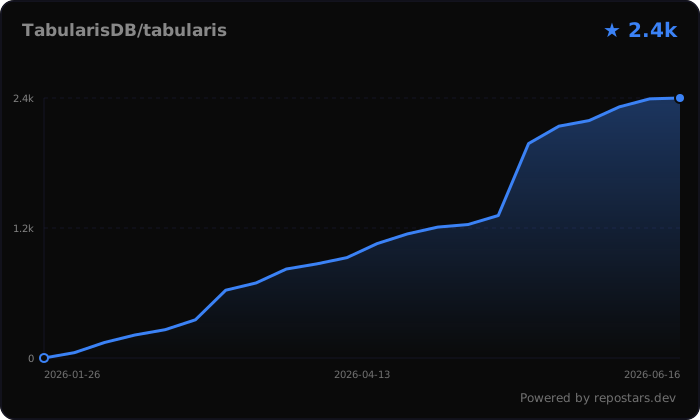
Like tabularis? Star the repo ⭐, it helps the project a lot.