OpenCrust
เฟรมเวิร์ค AI Agent แบบ open-source ที่ปลอดภัยและเบาที่สุด


เริ่มต้นใช้งาน ·
ทำไมต้อง OpenCrust? ·
ฟีเจอร์ ·
ความปลอดภัย ·
สถาปัตยกรรม ·
ย้ายจาก OpenClaw ·
การมีส่วนร่วม
🇺🇸 English ·
🇹🇭 ไทย ·
🇨🇳 简体中文 ·
🇮🇳 हिन्दी
---
binary ขนาด 16 MB ที่รัน AI agent ของคุณผ่าน Telegram, Discord, Slack, WhatsApp, WhatsApp Web, LINE, WeChat, iMessage และ MQTT — พร้อมการจัดเก็บ credential แบบเข้ารหัส, hot-reload config และใช้ RAM เพียง 13 MB ขณะ idle สร้างด้วย Rust เพื่อความปลอดภัยและความเสถียรที่ AI agent ต้องการ
## เริ่มต้นใช้งาน
```bash
# ติดตั้ง (Linux, macOS)
curl -fsSL https://raw.githubusercontent.com/opencrust-org/opencrust/main/install.sh | sh
# ตั้งค่าแบบ interactive - เลือก LLM provider และช่องทาง
opencrust init
# เริ่มใช้งาน - เมื่อได้รับข้อความแรก agent จะแนะนำตัวและเรียนรู้ความชอบของคุณ
opencrust start
# ตรวจสอบ config, connectivity และ database health
opencrust doctor
```
Build จาก source
```bash
# ต้องใช้ Rust 1.85+
cargo build --release
./target/release/opencrust init
./target/release/opencrust start
# รองรับ WASM plugin (optional)
cargo build --release --features plugins
```
### Web Chat
เมื่อ gateway รันแล้ว เปิดเบราว์เซอร์ที่:
```
http://127.0.0.1:3888
```
Web UI ในตัวช่วยให้คุณแชทกับ agent สลับ LLM provider, จัดการ MCP server และตรวจสอบ channel ที่เชื่อมต่ออยู่ — โดยไม่ต้องรีสตาร์ท
> **Authentication** — ถ้าตั้งค่า `api_key` ไว้ใน `config.yml` UI จะขอ gateway key ก่อนเชื่อมต่อ
### แชทผ่าน Terminal
คุยกับ agent โดยตรงจาก terminal โดยไม่ต้องเปิดเบราว์เซอร์
> **ต้องเปิด gateway ก่อน** รัน `opencrust init` (ครั้งแรกเท่านั้น) จากนั้น `opencrust start` ก่อนใช้ `opencrust chat`
```bash
# ตั้งค่าครั้งแรก
opencrust init
opencrust start # หรือ: opencrust start -d (daemon mode)
# เปิด terminal chat
opencrust chat
opencrust chat --agent coder # เริ่มด้วย agent ที่กำหนด
opencrust chat --url http://host:3888 # เชื่อมกับ gateway อื่น
```
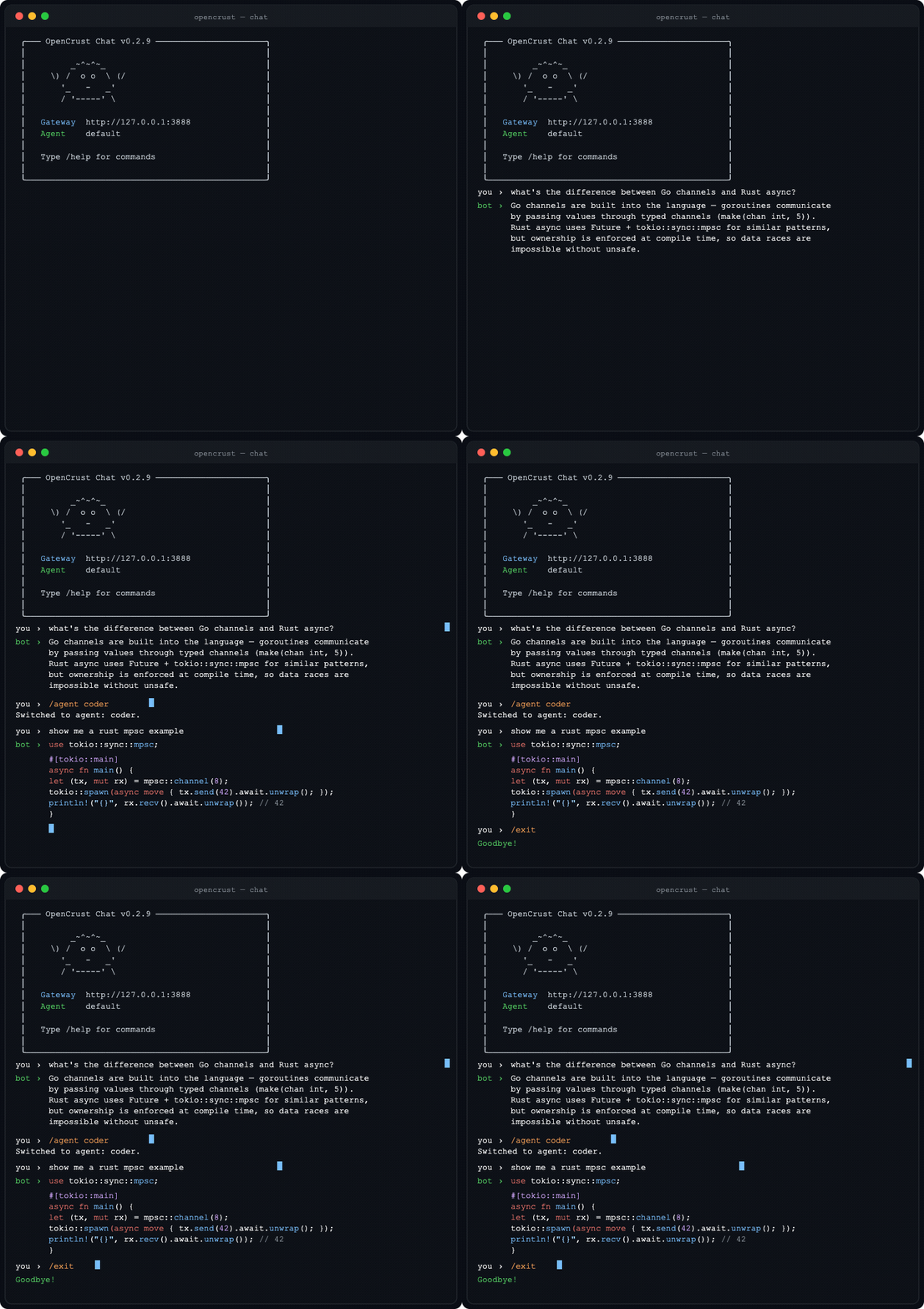 **คำสั่งใน chat:** `/help` · `/new` (เริ่ม session ใหม่) · `/agent ` · `/clear` · `/exit`
binary สำหรับ Linux (x86_64, aarch64), macOS (Intel, Apple Silicon) และ Windows (x86_64) ดาวน์โหลดได้ที่ [GitHub Releases](https://github.com/opencrust-org/opencrust/releases)
## ทำไมต้อง OpenCrust?
| | |
|---|---|
| **ขนาด binary** | 16 MB single binary |
| **RAM ขณะ idle** | 13 MB |
| **Cold start** | 3 ms |
| **เก็บ credential** | vault เข้ารหัส AES-256-GCM |
| **Auth ค่าเริ่มต้น** | เปิดใช้ (WebSocket pairing) |
| **Scheduling** | Cron, interval, one-shot |
| **Multi-agent routing** | ใช่ (named agents) |
| **Session orchestration** | ใช่ |
| **MCP support** | Stdio + HTTP |
| **ช่องทาง** | 9 |
| **LLM provider** | 15 |
| **Pre-compiled binary** | ใช่ |
| **Config hot-reload** | ใช่ |
| **Plugin system** | WASM (sandboxed) |
| **Self-update** | ใช่ (`opencrust update`) |
| **Security scan** | ✅ ตรวจ prompt-injection ทุก skill ก่อนติดตั้ง |
| **Self-improvement** | ✅ cross-session patterns, skill lifecycle, confidence gate |
*วัดผลบน DigitalOcean droplet 1 vCPU, 1 GB RAM [ทดสอบเองได้](../bench/)*
## ความปลอดภัย
OpenCrust ถูกออกแบบสำหรับ AI agent ที่ทำงานตลอดเวลาและเข้าถึงข้อมูลส่วนตัว
- **Encrypted credential vault** - API key และ token จัดเก็บด้วย AES-256-GCM ที่ `~/.opencrust/credentials/vault.json` ไม่มี plaintext บนดิสก์
- **Authentication ค่าเริ่มต้น** - WebSocket gateway ต้องใช้ pairing code ไม่มีการเข้าถึงโดยไม่ผ่านการยืนยันตัวตน
- **User allowlist** - allowlist แยกตามช่องทางควบคุมว่าใครสามารถโต้ตอบกับ agent ได้ ข้อความที่ไม่ได้รับอนุญาตจะถูกละทิ้งโดยไม่แจ้ง
- **Per-channel authorization policies** - DM policy (open, pairing, allowlist) และ group policy (open, mention-only, disabled) แยกตามช่องทาง ข้อความที่ไม่ได้รับอนุญาตจะถูกละทิ้งโดยไม่แจ้ง
- **ตรวจจับ prompt injection** - ตรวจสอบและ sanitize input ก่อนส่งถึง LLM
- **Rate limiting** - จำกัดจำนวน message ต่อผู้ใช้แบบ sliding-window พร้อม cooldown ป้องกันการใช้งานเกินขีดจำกัด
- **Token budgets** - กำหนด token สูงสุดต่อ session, ต่อวัน และต่อเดือน เพื่อควบคุมต้นทุน LLM ต่อผู้ใช้
- **Tool allowlists** - จำกัด tool ที่ agent เรียกใช้ได้ต่อ session พร้อมกำหนดจำนวนครั้งสูงสุด
- **Log secret redaction** - API key และ token ถูก redact จาก log output อัตโนมัติ
- **WASM sandboxing** - sandbox plugin แบบ optional ผ่าน WebAssembly runtime (compile ด้วย `--features plugins`)
- **Bind เฉพาะ localhost** - gateway bind กับ `127.0.0.1` ค่าเริ่มต้น ไม่ใช่ `0.0.0.0`
## ฟีเจอร์
### LLM Provider
**Native providers:**
- **Anthropic Claude** - streaming (SSE), tool use
- **OpenAI** - GPT-4o, Azure, รองรับ endpoint แบบ OpenAI-compatible ผ่าน `base_url`
- **Ollama** - โมเดลในเครื่องพร้อม streaming
**OpenAI-compatible providers:**
- **Sansa** - regional LLM ผ่าน [sansaml.com](https://sansaml.com)
- **DeepSeek** - DeepSeek Chat
- **Mistral** - Mistral Large
- **Gemini** - Google Gemini ผ่าน OpenAI-compatible API
- **Falcon** - TII Falcon 180B (AI71)
- **Jais** - Core42 Jais 70B
- **Qwen** - Alibaba Qwen Plus
- **Yi** - 01.AI Yi Large
- **Cohere** - Command R Plus
- **MiniMax** - MiniMax Text 01
- **Moonshot** - Kimi K2
- **vLLM** - โมเดล self-hosted ผ่าน vLLM's OpenAI-compatible server
### เสียง I/O
- **TTS (Text-to-Speech)** — Kokoro (self-hosted ผ่าน kokoro-fastapi), OpenAI TTS (`tts-1`, `tts-1-hd`), รองรับ endpoint แบบ OpenAI-compatible
- **STT (Speech-to-Text)** — Whisper ในเครื่อง (faster-whisper-server), OpenAI Whisper API
- `auto_reply_voice: true` แปลงทุกข้อความตอบกลับเป็นเสียงอัตโนมัติ
- `tts_max_chars` จำกัดความยาวข้อความที่ส่งสังเคราะห์เสียง ตัดและแจ้งเตือนเมื่อเกินกำหนด
- ส่งแยกตามช่องทาง: Discord (ไฟล์แนบ), WeChat (Customer Service voice API), Telegram/LINE (เสียงแบบ native), Slack (ตกสำรองเป็นข้อความ)
### ช่องทาง
- **Telegram** - streaming responses, MarkdownV2, bot commands, typing indicators, user allowlist พร้อม pairing code, รองรับรูปภาพ/vision, voice message (Whisper STT), TTS ตอบกลับอัตโนมัติ, จัดการไฟล์/เอกสาร
- **Discord** - slash commands, event-driven message handling, session management, voice response (ไฟล์แนบ TTS)
- **Slack** - Socket Mode, streaming responses, allowlist/pairing
- **WhatsApp** - Meta Cloud API webhooks, allowlist/pairing
- **WhatsApp Web** - QR code pairing ผ่าน Baileys Node.js sidecar, ไม่ต้องมี Meta Business account, บันทึกสถานะ auth
- **LINE** - Messaging API webhooks, reply/push fallback, รองรับกลุ่ม/ห้องแชท, allowlist/pairing, voice response (TTS ตกสำรองเป็นข้อความ)
- **WeChat** - Official Account Platform webhooks, ตรวจสอบลายเซ็น SHA-1, ตอบกลับ XML แบบ synchronous, รองรับรูปภาพ/เสียง/วิดีโอ/ตำแหน่ง, Customer Service API push, voice message (TTS), allowlist/pairing
- **iMessage** - macOS native ผ่าน chat.db polling, group chat, AppleScript sending ([คู่มือตั้งค่า](../docs/imessage-setup.md))
- **MQTT** - MQTT broker client แบบ native (Mosquitto, EMQX, HiveMQ), Mode A (plain text ต่อช่องทาง) และ Mode B (JSON `{"user_id","text"}` แยก session ต่ออุปกรณ์), auto-detect, reconnect backoff, QoS 0/1/2, รองรับ TLS (`mqtts://`)
### MCP (Model Context Protocol)
- เชื่อมต่อ MCP server ใดก็ได้ (filesystem, GitHub, databases, web search)
- รองรับทั้ง stdio และ HTTP transport
- tool ปรากฏเป็น native agent tool พร้อม namespace (`server.tool`)
- รองรับ resource tool และ server instructions
- ตั้งค่าใน `config.yml` หรือ `~/.opencrust/mcp.json` (รองรับ Claude Desktop)
- CLI: `opencrust mcp list`, `opencrust mcp inspect `
### Personality (DNA)
- เมื่อได้รับข้อความแรก agent จะแนะนำตัวและถามคำถามเพื่อเรียนรู้ความชอบ
- เขียน `~/.opencrust/dna.md` พร้อมชื่อ รูปแบบการสื่อสาร แนวทาง และ identity ของ bot
- ไม่ต้องแก้ config file หรือกรอก wizard — แค่พูดคุย
- Hot-reload เมื่อแก้ไข — เปลี่ยน `dna.md` แล้ว agent ปรับตัวทันที
- ย้ายจาก OpenClaw? `opencrust migrate openclaw` นำเข้า `SOUL.md` ที่มีอยู่
### Agent Runtime
- Tool execution loop — bash, file_read, file_write, web_fetch, web_search (Brave หรือ Google Custom Search), doc_search, handoff, schedule_heartbeat, cancel_heartbeat, list_heartbeats, mcp_resources (สูงสุด 10 รอบ)
- หน่วยความจำบทสนทนาบน SQLite พร้อม vector search (sqlite-vec + Cohere embeddings)
- จัดการ context window — สรุปบทสนทนาแบบ rolling ที่ 75% ของ context window
- Scheduled task — cron, interval และ one-shot scheduling
### Document RAG
นำเข้าเอกสารเข้าสู่ฐานความรู้ของ agent — agent จะดึงและอ้างอิงตอนที่เกี่ยวข้องโดยอัตโนมัติเมื่อตอบคำถาม โดยไม่ต้องสั่งเพิ่มเติม
**นำเข้าเอกสาร:**
ส่งไฟล์ไปยัง channel ใดก็ได้ แล้วพิมพ์ `!ingest` เพื่อบันทึก ใช้ `!ingest replace` เพื่อแทนที่เวอร์ชันที่มีอยู่
```bash
# ผ่าน REST API
curl -X POST http://localhost:8080/api/ingest \
-F "file=@report.pdf" \
-F "session_id=default"
```
**ประเภทไฟล์ที่รองรับ:** PDF, Markdown, plain text, CSV, JSON, HTML และ source code (`.rs`, `.py`, `.js`, `.ts`, `.go`, `.java`, `.toml`, `.yaml`)
**การทำงาน:**
1. เอกสารถูกแบ่งเป็น chunk และเก็บใน SQLite (`~/.opencrust/data/documents.db`)
2. แต่ละ chunk ถูก embed ผ่าน embedding provider ที่ตั้งค่าไว้ (Cohere เป็นค่าเริ่มต้น)
3. ทุกข้อความ จะมีการค้นหาแบบ **hybrid** (vector + keyword, top 3 chunk, similarity threshold 0.42) อัตโนมัติ
4. Chunk ที่ตรงจะถูก inject เข้าในข้อความของผู้ใช้ก่อนที่ LLM จะเห็น
5. Agent อ้างอิงชื่อเอกสารต้นทางและ relevance score ในคำตอบ
**ค้นหาด้วยตัวเอง:**
ใช้ tool `doc_search` โดยตรง: `doc_search("annual report revenue")`
**Embedding provider (ไม่บังคับ):**
หากไม่มี embedding provider RAG จะ fallback เป็นการค้นหาแบบ keyword อย่างเดียว เพิ่ม Cohere ใน `config.yml` เพื่อใช้ semantic (vector) retrieval:
```yaml
embeddings:
provider: cohere
api_key: your-cohere-key
```
### Skills
- กำหนด agent skill เป็นไฟล์ Markdown (SKILL.md) พร้อม YAML frontmatter
- auto-discovery จาก `~/.opencrust/skills/` — inject เข้า system prompt อัตโนมัติ
- Hot-reload — skill พร้อมใช้ทันทีหลัง `create_skill` หรือ `skill install` โดยไม่ต้อง restart
- CLI: `opencrust skill list`, `opencrust skill install `, `opencrust skill remove `
- **Self-learning & self-improvement** — agent ติดตาม tool-call pattern ข้ามหลาย session; เมื่อ workflow ซ้ำกัน 5 ครั้งขึ้นไปจะ save เป็น skill อัตโนมัติ (rate-limited เพื่อลด noise); เมื่อนำ skill ที่มีอยู่มาใช้ agent จะประเมินตัวเองและ patch อัตโนมัติหากพบช่องว่าง (ต้องผ่าน confidence gate ก่อน patch; version จะ bump และ CHANGELOG.md อัพเดตทุกครั้งที่ patch)
- **Automatic skill lifecycle** — skill ที่ไม่ได้ใช้งานนานกว่า 30 วันจะถูก archive อัตโนมัติ (เปลี่ยนชื่อเป็น `.archived`); ข้อมูล trajectory ที่เก่ากว่า 90 วันจะถูก compress ทุกวันโดย LLM โดยยังเก็บ skill candidate ไว้สำหรับ pattern detection ต่อไป
- ปิดได้ด้วย `agent.self_learning: false` ใน `config.yml`
- Quality control 3 ชั้น: prompt guidance, mechanical limits (สูงสุด 30 skills, min body length, duplicate guard) และ `rationale` บังคับที่เก็บไว้ใน skill file เพื่อตรวจสอบได้
- **รองรับ [agentskills.io](https://agentskills.io)** — ติดตั้ง community skill จาก hub สาธารณะใดก็ได้ด้วย `opencrust skill install ` รองรับทั้ง flat (`skill-name.md`) และ folder (`skill-name/SKILL.md`) layout พร้อมกันโดยไม่ต้อง migrate
- **Security scan** — ทุก skill ถูกตรวจหา prompt-injection ก่อน install ไม่ว่าจะมาจาก URL, ไฟล์ local หรือ agent สร้างเอง
- **Agent แก้ไข skill ได้** — agent สามารถ `patch` skill ที่มีอยู่ (แก้ body, description หรือ triggers) และ `write_file` เพื่อเพิ่มไฟล์ `.md` เสริมใน skill folder
### Multi-Agent Orchestration
กำหนด named agents ใน `config.yml` แล้วส่งงานระหว่าง agent ด้วย `handoff` tool ในตัว:
```yaml
agents:
router:
provider: main # ใช้ llm: key ไหน
system_prompt: |
วิเคราะห์คำขอแล้ว delegate ด้วย handoff tool:
- handoff(agent_id='coder') สำหรับโค้ด, สคริปต์, โปรแกรมมิ่ง
- handoff(agent_id='assistant') สำหรับคำถามทั่วไป
ใช้ handoff เสมอ — ห้ามตอบโดยตรง
coder:
provider: main
system_prompt: คุณเป็น specialist coding agent ตอบสั้นและตรงประเด็น
tools: [bash, file_read, file_write] # จำกัด tool ที่ agent นี้เรียกได้
dna_file: dna-coder.md # ไฟล์ persona เฉพาะ agent นี้ (optional)
skills_dir: skills/coder/ # โฟลเดอร์ skills เฉพาะ agent นี้ (optional)
assistant:
provider: main
system_prompt: คุณเป็น general-purpose assistant ที่มีประโยชน์
max_tokens: 2048
max_context_tokens: 32000
```
**ฟิลด์ `agents:`:**
| ฟิลด์ | ประเภท | คำอธิบาย |
|---|---|---|
| `provider` | string | `llm:` key ที่จะใช้ (เช่น `main`, `claude`) ค่าเริ่มต้นคือ provider แรกที่ลงทะเบียน |
| `model` | string | Override model เฉพาะ agent นี้ |
| `system_prompt` | string | System prompt เฉพาะ agent นี้ (แทนที่ global) |
| `max_tokens` | int | จำนวน token สูงสุดของ response |
| `max_context_tokens` | int | ขีดจำกัด context window |
| `tools` | list | Allowlist ของ tool ว่างเปล่า = อนุญาตทุก tool |
| `dna_file` | path | ไฟล์ DNA/persona เฉพาะ agent (แทนที่ global `dna.md`) |
| `skills_dir` | path | โฟลเดอร์ skills เฉพาะ agent (แทนที่ global `skills/`) |
**Handoff tool:**
`handoff` tool พร้อมใช้งานอัตโนมัติสำหรับทุก agent เมื่อเรียก จะรัน target agent ใน ephemeral session แยกต่างหากแล้วส่งผลลัพธ์กลับมา:
```
handoff(agent_id="coder", message="เขียน fibonacci function ใน Python")
# → "[coder]: นี่คือ implementation…"
```
- Depth limit 3 ชั้น ป้องกัน loop ไม่สิ้นสุด A→B→A
- แต่ละ handoff session แยกอิสระ — ไม่มี history รั่วข้าม agent
- Target agent ได้รับ tools, DNA และ skills overrides ของตัวเอง
**การใช้งานผ่าน API:**
สร้าง session ผูกกับ agent เฉพาะ แล้ว message ถัดไปจะใช้ agent นั้นโดยอัตโนมัติ:
```bash
# สร้าง session ผูกกับ "router" agent
SESSION=$(curl -s -X POST http://localhost:3888/api/sessions \
-H "X-API-Key: your-key" \
-H "Content-Type: application/json" \
-d '{"agent_id": "router"}' | jq -r '.session_id')
# ทุก message ใน session นี้ผ่าน router อัตโนมัติ
curl -X POST "http://localhost:3888/api/sessions/$SESSION/messages" \
-H "X-API-Key: your-key" \
-H "Content-Type: application/json" \
-d '{"content": "เขียน hello world ใน Python"}'
# Override ต่อ message ได้ถ้าต้องการ
curl -X POST "http://localhost:3888/api/sessions/$SESSION/messages" \
-H "X-API-Key: your-key" \
-H "Content-Type: application/json" \
-d '{"content": "...", "agent_id": "coder"}'
```
### Infrastructure
- **Config hot-reload** - แก้ `config.yml` แล้วการเปลี่ยนแปลงมีผลทันทีโดยไม่ต้อง restart
- **Daemonization** - `opencrust start --daemon` พร้อม PID management
- **Self-update** - `opencrust update` ดาวน์โหลด release ล่าสุดพร้อมตรวจสอบ SHA-256, `opencrust rollback` เพื่อย้อนกลับ
- **Restart** - `opencrust restart` หยุดและเริ่มใหม่แบบ graceful
- **Runtime provider switching** - เพิ่มหรือเปลี่ยน LLM provider ผ่าน webchat UI หรือ REST API โดยไม่ต้อง restart
- **Migration tool** - `opencrust migrate openclaw` นำเข้า skills, channels และ credentials
- **Conversation summarization** - rolling summary ที่ 75% context window, บันทึก session summary ข้ามการ restart
- **Interactive setup** - wizard `opencrust init` สำหรับตั้งค่า provider และช่องทาง
- **Diagnostics** - `opencrust doctor` ตรวจสอบ config, data directory, credential vault, ความสามารถเข้าถึง LLM provider, credentials ของ channel, ความสามารถเชื่อมต่อ MCP server และ database integrity
## ย้ายจาก OpenClaw?
คำสั่งเดียวนำเข้า skills, channel config, credentials (เข้ารหัสเข้า vault) และ personality (`SOUL.md` เป็น `dna.md`):
```bash
opencrust migrate openclaw
```
ใช้ `--dry-run` เพื่อดูตัวอย่างก่อน commit ใช้ `--source /path/to/openclaw` เพื่อระบุ directory config ของ OpenClaw
## การตั้งค่า
OpenCrust อ่าน config จาก `~/.opencrust/config.yml`:
```yaml
gateway:
host: "127.0.0.1"
port: 3888
# api_key: "your-secret-key" # ไม่บังคับ: ป้องกัน /api/* เมื่อเปิดให้เข้าถึงสาธารณะ
# สร้างด้วย: openssl rand -hex 32
llm:
claude:
provider: anthropic
model: claude-sonnet-4-5-20250929
# api_key อ่านจาก: vault > config > ANTHROPIC_API_KEY env var
ollama-local:
provider: ollama
model: llama3.1
base_url: "http://localhost:11434"
channels:
telegram:
type: telegram
enabled: true
bot_token: "your-bot-token" # หรือ TELEGRAM_BOT_TOKEN env var
line:
type: line
enabled: true
channel_access_token: "your-access-token" # หรือ LINE_CHANNEL_ACCESS_TOKEN env var
channel_secret: "your-secret" # หรือ LINE_CHANNEL_SECRET env var
dm_policy: pairing # open | pairing | allowlist (default: pairing)
group_policy: mention # open | mention | disabled (default: open)
agent:
# Personality ตั้งค่าผ่าน ~/.opencrust/dna.md (สร้างอัตโนมัติเมื่อได้รับข้อความแรก)
max_tokens: 4096
max_context_tokens: 100000
guardrails:
max_input_chars: 16000 # ปฏิเสธ message ที่ยาวเกิน (default: 16000)
max_output_chars: 32000 # ตัด response ที่ยาวเกิน (default: 32000)
token_budget_session: 10000 # tokens สูงสุดต่อ session
token_budget_user_daily: 100000 # tokens สูงสุดต่อผู้ใช้ต่อวัน
token_budget_user_monthly: 500000 # tokens สูงสุดต่อผู้ใช้ต่อเดือน
allowed_tools: # null = ทุก tool; [] = ห้ามใช้ tool
- web_search
- file_read
session_tool_call_budget: 15 # จำนวนครั้ง tool call สูงสุดต่อ session
gateway:
rate_limit:
per_user_per_minute: 10 # จำกัด message ต่อผู้ใช้ต่อนาที
cooldown_secs: 30 # cooldown หลังเกินขีดจำกัด
memory:
enabled: true
# MCP server สำหรับ external tools
mcp:
filesystem:
command: npx
args: ["-y", "@modelcontextprotocol/server-filesystem", "/tmp"]
```
ดู [full configuration reference](../docs/) สำหรับ options ทั้งหมด รวมถึง Discord, Slack, WhatsApp, iMessage, embeddings และ MCP server
## สถาปัตยกรรม
```
crates/
opencrust-cli/ # CLI, init wizard, daemon management
opencrust-gateway/ # WebSocket gateway, HTTP API, sessions
opencrust-config/ # YAML/TOML loading, hot-reload, MCP config
opencrust-channels/ # Discord, Telegram, Slack, WhatsApp, WhatsApp Web, iMessage, LINE, WeChat, MQTT
opencrust-agents/ # LLM providers, tools, MCP client, agent runtime
opencrust-db/ # SQLite memory, vector search (sqlite-vec)
opencrust-plugins/ # WASM plugin sandbox (wasmtime)
opencrust-media/ # TTS (Kokoro, OpenAI), STT (Whisper), การประมวลผลสื่อ
opencrust-security/ # Credential vault, allowlists, pairing, validation
opencrust-skills/ # SKILL.md parser, scanner, installer
opencrust-common/ # Shared types, errors, utilities
```
| Component | สถานะ |
|-----------|--------|
| Gateway (WebSocket, HTTP, sessions) | ใช้งานได้ |
| Telegram (streaming, commands, pairing, photos, voice, documents) | ใช้งานได้ |
| Discord (slash commands, sessions) | ใช้งานได้ |
| Slack (Socket Mode, streaming) | ใช้งานได้ |
| WhatsApp (webhooks) | ใช้งานได้ |
| WhatsApp Web (QR code, Baileys sidecar) | ใช้งานได้ |
| LINE (webhooks, reply/push fallback) | ใช้งานได้ |
| WeChat (Official Account webhooks, media dispatch) | ใช้งานได้ |
| iMessage (macOS, group chats) | ใช้งานได้ |
| MQTT (broker client, Mode A/B auto-detect, reconnect, QoS 0/1/2) | ใช้งานได้ |
| LLM providers (15: Anthropic, OpenAI, Ollama + 12 OpenAI-compatible) | ใช้งานได้ |
| Agent tools (bash, file_read, file_write, web_fetch, web_search, doc_search, schedule_heartbeat, cancel_heartbeat, list_heartbeats, mcp_resources) | ใช้งานได้ |
| MCP client (stdio, HTTP, tool bridging, resources, instructions) | ใช้งานได้ |
| A2A protocol (Agent-to-Agent) | ใช้งานได้ |
| Multi-agent routing (named agents) | ใช้งานได้ |
| Skills (SKILL.md, auto-discovery) | ใช้งานได้ |
| Config (YAML/TOML, hot-reload) | ใช้งานได้ |
| Personality (DNA bootstrap, hot-reload) | ใช้งานได้ |
| Memory (SQLite, vector search, summarization) | ใช้งานได้ |
| Security (vault, allowlist, pairing, per-channel policies, log redaction) | ใช้งานได้ |
| Scheduling (cron, interval, one-shot) | ใช้งานได้ |
| CLI (init, start/stop/restart, update, migrate, mcp, skills, doctor) | ใช้งานได้ |
| Plugin system (WASM sandbox) | Scaffolded |
| TTS (Kokoro, OpenAI) + STT (Whisper, OpenAI) | ใช้งานได้ |
## การมีส่วนร่วม
OpenCrust เป็น open source ภายใต้ MIT license เข้าร่วม [Discord](https://discord.gg/97jTJEUz4) เพื่อพูดคุยกับผู้ร่วมพัฒนา ถามคำถาม หรือแชร์สิ่งที่คุณกำลังสร้าง ดู [CONTRIBUTING.md](../CONTRIBUTING.md) สำหรับคำแนะนำการตั้งค่า แนวทางการเขียนโค้ด และ crate overview
### ลำดับความสำคัญปัจจุบัน
| ลำดับ | Issue | คำอธิบาย |
|-------|-------|-----------|
| **P0** | [#99](https://github.com/opencrust-org/opencrust/issues/99) | Brand facelift: logo, images, visual identity |
| **P1** | [#150](https://github.com/opencrust-org/opencrust/issues/150) | Fallback model chain: auto-retry with backup providers |
| **P1** | [#152](https://github.com/opencrust-org/opencrust/issues/152) | Token usage tracking and cost reporting |
| **P1** | [#153](https://github.com/opencrust-org/opencrust/issues/153) | `opencrust doctor` diagnostic command |
| **P1** | [#146](https://github.com/opencrust-org/opencrust/issues/146) | Guardrails: safety, rate limits, and cost controls |
| **P2** | [#185](https://github.com/opencrust-org/opencrust/issues/185) | MCP: Apps support (interactive HTML interfaces) |
| **P2** | [#158](https://github.com/opencrust-org/opencrust/issues/158) | Auto-backup config files before changes |
| **P2** | [#142](https://github.com/opencrust-org/opencrust/issues/142) | Web-based setup wizard at /setup |
ดู [issues ทั้งหมด](https://github.com/opencrust-org/opencrust/issues) หรือกรองด้วย [`good-first-issue`](https://github.com/opencrust-org/opencrust/issues?q=label%3Agood-first-issue+is%3Aopen) เพื่อหาจุดเริ่มต้น
## ผู้มีส่วนร่วม
**คำสั่งใน chat:** `/help` · `/new` (เริ่ม session ใหม่) · `/agent ` · `/clear` · `/exit`
binary สำหรับ Linux (x86_64, aarch64), macOS (Intel, Apple Silicon) และ Windows (x86_64) ดาวน์โหลดได้ที่ [GitHub Releases](https://github.com/opencrust-org/opencrust/releases)
## ทำไมต้อง OpenCrust?
| | |
|---|---|
| **ขนาด binary** | 16 MB single binary |
| **RAM ขณะ idle** | 13 MB |
| **Cold start** | 3 ms |
| **เก็บ credential** | vault เข้ารหัส AES-256-GCM |
| **Auth ค่าเริ่มต้น** | เปิดใช้ (WebSocket pairing) |
| **Scheduling** | Cron, interval, one-shot |
| **Multi-agent routing** | ใช่ (named agents) |
| **Session orchestration** | ใช่ |
| **MCP support** | Stdio + HTTP |
| **ช่องทาง** | 9 |
| **LLM provider** | 15 |
| **Pre-compiled binary** | ใช่ |
| **Config hot-reload** | ใช่ |
| **Plugin system** | WASM (sandboxed) |
| **Self-update** | ใช่ (`opencrust update`) |
| **Security scan** | ✅ ตรวจ prompt-injection ทุก skill ก่อนติดตั้ง |
| **Self-improvement** | ✅ cross-session patterns, skill lifecycle, confidence gate |
*วัดผลบน DigitalOcean droplet 1 vCPU, 1 GB RAM [ทดสอบเองได้](../bench/)*
## ความปลอดภัย
OpenCrust ถูกออกแบบสำหรับ AI agent ที่ทำงานตลอดเวลาและเข้าถึงข้อมูลส่วนตัว
- **Encrypted credential vault** - API key และ token จัดเก็บด้วย AES-256-GCM ที่ `~/.opencrust/credentials/vault.json` ไม่มี plaintext บนดิสก์
- **Authentication ค่าเริ่มต้น** - WebSocket gateway ต้องใช้ pairing code ไม่มีการเข้าถึงโดยไม่ผ่านการยืนยันตัวตน
- **User allowlist** - allowlist แยกตามช่องทางควบคุมว่าใครสามารถโต้ตอบกับ agent ได้ ข้อความที่ไม่ได้รับอนุญาตจะถูกละทิ้งโดยไม่แจ้ง
- **Per-channel authorization policies** - DM policy (open, pairing, allowlist) และ group policy (open, mention-only, disabled) แยกตามช่องทาง ข้อความที่ไม่ได้รับอนุญาตจะถูกละทิ้งโดยไม่แจ้ง
- **ตรวจจับ prompt injection** - ตรวจสอบและ sanitize input ก่อนส่งถึง LLM
- **Rate limiting** - จำกัดจำนวน message ต่อผู้ใช้แบบ sliding-window พร้อม cooldown ป้องกันการใช้งานเกินขีดจำกัด
- **Token budgets** - กำหนด token สูงสุดต่อ session, ต่อวัน และต่อเดือน เพื่อควบคุมต้นทุน LLM ต่อผู้ใช้
- **Tool allowlists** - จำกัด tool ที่ agent เรียกใช้ได้ต่อ session พร้อมกำหนดจำนวนครั้งสูงสุด
- **Log secret redaction** - API key และ token ถูก redact จาก log output อัตโนมัติ
- **WASM sandboxing** - sandbox plugin แบบ optional ผ่าน WebAssembly runtime (compile ด้วย `--features plugins`)
- **Bind เฉพาะ localhost** - gateway bind กับ `127.0.0.1` ค่าเริ่มต้น ไม่ใช่ `0.0.0.0`
## ฟีเจอร์
### LLM Provider
**Native providers:**
- **Anthropic Claude** - streaming (SSE), tool use
- **OpenAI** - GPT-4o, Azure, รองรับ endpoint แบบ OpenAI-compatible ผ่าน `base_url`
- **Ollama** - โมเดลในเครื่องพร้อม streaming
**OpenAI-compatible providers:**
- **Sansa** - regional LLM ผ่าน [sansaml.com](https://sansaml.com)
- **DeepSeek** - DeepSeek Chat
- **Mistral** - Mistral Large
- **Gemini** - Google Gemini ผ่าน OpenAI-compatible API
- **Falcon** - TII Falcon 180B (AI71)
- **Jais** - Core42 Jais 70B
- **Qwen** - Alibaba Qwen Plus
- **Yi** - 01.AI Yi Large
- **Cohere** - Command R Plus
- **MiniMax** - MiniMax Text 01
- **Moonshot** - Kimi K2
- **vLLM** - โมเดล self-hosted ผ่าน vLLM's OpenAI-compatible server
### เสียง I/O
- **TTS (Text-to-Speech)** — Kokoro (self-hosted ผ่าน kokoro-fastapi), OpenAI TTS (`tts-1`, `tts-1-hd`), รองรับ endpoint แบบ OpenAI-compatible
- **STT (Speech-to-Text)** — Whisper ในเครื่อง (faster-whisper-server), OpenAI Whisper API
- `auto_reply_voice: true` แปลงทุกข้อความตอบกลับเป็นเสียงอัตโนมัติ
- `tts_max_chars` จำกัดความยาวข้อความที่ส่งสังเคราะห์เสียง ตัดและแจ้งเตือนเมื่อเกินกำหนด
- ส่งแยกตามช่องทาง: Discord (ไฟล์แนบ), WeChat (Customer Service voice API), Telegram/LINE (เสียงแบบ native), Slack (ตกสำรองเป็นข้อความ)
### ช่องทาง
- **Telegram** - streaming responses, MarkdownV2, bot commands, typing indicators, user allowlist พร้อม pairing code, รองรับรูปภาพ/vision, voice message (Whisper STT), TTS ตอบกลับอัตโนมัติ, จัดการไฟล์/เอกสาร
- **Discord** - slash commands, event-driven message handling, session management, voice response (ไฟล์แนบ TTS)
- **Slack** - Socket Mode, streaming responses, allowlist/pairing
- **WhatsApp** - Meta Cloud API webhooks, allowlist/pairing
- **WhatsApp Web** - QR code pairing ผ่าน Baileys Node.js sidecar, ไม่ต้องมี Meta Business account, บันทึกสถานะ auth
- **LINE** - Messaging API webhooks, reply/push fallback, รองรับกลุ่ม/ห้องแชท, allowlist/pairing, voice response (TTS ตกสำรองเป็นข้อความ)
- **WeChat** - Official Account Platform webhooks, ตรวจสอบลายเซ็น SHA-1, ตอบกลับ XML แบบ synchronous, รองรับรูปภาพ/เสียง/วิดีโอ/ตำแหน่ง, Customer Service API push, voice message (TTS), allowlist/pairing
- **iMessage** - macOS native ผ่าน chat.db polling, group chat, AppleScript sending ([คู่มือตั้งค่า](../docs/imessage-setup.md))
- **MQTT** - MQTT broker client แบบ native (Mosquitto, EMQX, HiveMQ), Mode A (plain text ต่อช่องทาง) และ Mode B (JSON `{"user_id","text"}` แยก session ต่ออุปกรณ์), auto-detect, reconnect backoff, QoS 0/1/2, รองรับ TLS (`mqtts://`)
### MCP (Model Context Protocol)
- เชื่อมต่อ MCP server ใดก็ได้ (filesystem, GitHub, databases, web search)
- รองรับทั้ง stdio และ HTTP transport
- tool ปรากฏเป็น native agent tool พร้อม namespace (`server.tool`)
- รองรับ resource tool และ server instructions
- ตั้งค่าใน `config.yml` หรือ `~/.opencrust/mcp.json` (รองรับ Claude Desktop)
- CLI: `opencrust mcp list`, `opencrust mcp inspect `
### Personality (DNA)
- เมื่อได้รับข้อความแรก agent จะแนะนำตัวและถามคำถามเพื่อเรียนรู้ความชอบ
- เขียน `~/.opencrust/dna.md` พร้อมชื่อ รูปแบบการสื่อสาร แนวทาง และ identity ของ bot
- ไม่ต้องแก้ config file หรือกรอก wizard — แค่พูดคุย
- Hot-reload เมื่อแก้ไข — เปลี่ยน `dna.md` แล้ว agent ปรับตัวทันที
- ย้ายจาก OpenClaw? `opencrust migrate openclaw` นำเข้า `SOUL.md` ที่มีอยู่
### Agent Runtime
- Tool execution loop — bash, file_read, file_write, web_fetch, web_search (Brave หรือ Google Custom Search), doc_search, handoff, schedule_heartbeat, cancel_heartbeat, list_heartbeats, mcp_resources (สูงสุด 10 รอบ)
- หน่วยความจำบทสนทนาบน SQLite พร้อม vector search (sqlite-vec + Cohere embeddings)
- จัดการ context window — สรุปบทสนทนาแบบ rolling ที่ 75% ของ context window
- Scheduled task — cron, interval และ one-shot scheduling
### Document RAG
นำเข้าเอกสารเข้าสู่ฐานความรู้ของ agent — agent จะดึงและอ้างอิงตอนที่เกี่ยวข้องโดยอัตโนมัติเมื่อตอบคำถาม โดยไม่ต้องสั่งเพิ่มเติม
**นำเข้าเอกสาร:**
ส่งไฟล์ไปยัง channel ใดก็ได้ แล้วพิมพ์ `!ingest` เพื่อบันทึก ใช้ `!ingest replace` เพื่อแทนที่เวอร์ชันที่มีอยู่
```bash
# ผ่าน REST API
curl -X POST http://localhost:8080/api/ingest \
-F "file=@report.pdf" \
-F "session_id=default"
```
**ประเภทไฟล์ที่รองรับ:** PDF, Markdown, plain text, CSV, JSON, HTML และ source code (`.rs`, `.py`, `.js`, `.ts`, `.go`, `.java`, `.toml`, `.yaml`)
**การทำงาน:**
1. เอกสารถูกแบ่งเป็น chunk และเก็บใน SQLite (`~/.opencrust/data/documents.db`)
2. แต่ละ chunk ถูก embed ผ่าน embedding provider ที่ตั้งค่าไว้ (Cohere เป็นค่าเริ่มต้น)
3. ทุกข้อความ จะมีการค้นหาแบบ **hybrid** (vector + keyword, top 3 chunk, similarity threshold 0.42) อัตโนมัติ
4. Chunk ที่ตรงจะถูก inject เข้าในข้อความของผู้ใช้ก่อนที่ LLM จะเห็น
5. Agent อ้างอิงชื่อเอกสารต้นทางและ relevance score ในคำตอบ
**ค้นหาด้วยตัวเอง:**
ใช้ tool `doc_search` โดยตรง: `doc_search("annual report revenue")`
**Embedding provider (ไม่บังคับ):**
หากไม่มี embedding provider RAG จะ fallback เป็นการค้นหาแบบ keyword อย่างเดียว เพิ่ม Cohere ใน `config.yml` เพื่อใช้ semantic (vector) retrieval:
```yaml
embeddings:
provider: cohere
api_key: your-cohere-key
```
### Skills
- กำหนด agent skill เป็นไฟล์ Markdown (SKILL.md) พร้อม YAML frontmatter
- auto-discovery จาก `~/.opencrust/skills/` — inject เข้า system prompt อัตโนมัติ
- Hot-reload — skill พร้อมใช้ทันทีหลัง `create_skill` หรือ `skill install` โดยไม่ต้อง restart
- CLI: `opencrust skill list`, `opencrust skill install `, `opencrust skill remove `
- **Self-learning & self-improvement** — agent ติดตาม tool-call pattern ข้ามหลาย session; เมื่อ workflow ซ้ำกัน 5 ครั้งขึ้นไปจะ save เป็น skill อัตโนมัติ (rate-limited เพื่อลด noise); เมื่อนำ skill ที่มีอยู่มาใช้ agent จะประเมินตัวเองและ patch อัตโนมัติหากพบช่องว่าง (ต้องผ่าน confidence gate ก่อน patch; version จะ bump และ CHANGELOG.md อัพเดตทุกครั้งที่ patch)
- **Automatic skill lifecycle** — skill ที่ไม่ได้ใช้งานนานกว่า 30 วันจะถูก archive อัตโนมัติ (เปลี่ยนชื่อเป็น `.archived`); ข้อมูล trajectory ที่เก่ากว่า 90 วันจะถูก compress ทุกวันโดย LLM โดยยังเก็บ skill candidate ไว้สำหรับ pattern detection ต่อไป
- ปิดได้ด้วย `agent.self_learning: false` ใน `config.yml`
- Quality control 3 ชั้น: prompt guidance, mechanical limits (สูงสุด 30 skills, min body length, duplicate guard) และ `rationale` บังคับที่เก็บไว้ใน skill file เพื่อตรวจสอบได้
- **รองรับ [agentskills.io](https://agentskills.io)** — ติดตั้ง community skill จาก hub สาธารณะใดก็ได้ด้วย `opencrust skill install ` รองรับทั้ง flat (`skill-name.md`) และ folder (`skill-name/SKILL.md`) layout พร้อมกันโดยไม่ต้อง migrate
- **Security scan** — ทุก skill ถูกตรวจหา prompt-injection ก่อน install ไม่ว่าจะมาจาก URL, ไฟล์ local หรือ agent สร้างเอง
- **Agent แก้ไข skill ได้** — agent สามารถ `patch` skill ที่มีอยู่ (แก้ body, description หรือ triggers) และ `write_file` เพื่อเพิ่มไฟล์ `.md` เสริมใน skill folder
### Multi-Agent Orchestration
กำหนด named agents ใน `config.yml` แล้วส่งงานระหว่าง agent ด้วย `handoff` tool ในตัว:
```yaml
agents:
router:
provider: main # ใช้ llm: key ไหน
system_prompt: |
วิเคราะห์คำขอแล้ว delegate ด้วย handoff tool:
- handoff(agent_id='coder') สำหรับโค้ด, สคริปต์, โปรแกรมมิ่ง
- handoff(agent_id='assistant') สำหรับคำถามทั่วไป
ใช้ handoff เสมอ — ห้ามตอบโดยตรง
coder:
provider: main
system_prompt: คุณเป็น specialist coding agent ตอบสั้นและตรงประเด็น
tools: [bash, file_read, file_write] # จำกัด tool ที่ agent นี้เรียกได้
dna_file: dna-coder.md # ไฟล์ persona เฉพาะ agent นี้ (optional)
skills_dir: skills/coder/ # โฟลเดอร์ skills เฉพาะ agent นี้ (optional)
assistant:
provider: main
system_prompt: คุณเป็น general-purpose assistant ที่มีประโยชน์
max_tokens: 2048
max_context_tokens: 32000
```
**ฟิลด์ `agents:`:**
| ฟิลด์ | ประเภท | คำอธิบาย |
|---|---|---|
| `provider` | string | `llm:` key ที่จะใช้ (เช่น `main`, `claude`) ค่าเริ่มต้นคือ provider แรกที่ลงทะเบียน |
| `model` | string | Override model เฉพาะ agent นี้ |
| `system_prompt` | string | System prompt เฉพาะ agent นี้ (แทนที่ global) |
| `max_tokens` | int | จำนวน token สูงสุดของ response |
| `max_context_tokens` | int | ขีดจำกัด context window |
| `tools` | list | Allowlist ของ tool ว่างเปล่า = อนุญาตทุก tool |
| `dna_file` | path | ไฟล์ DNA/persona เฉพาะ agent (แทนที่ global `dna.md`) |
| `skills_dir` | path | โฟลเดอร์ skills เฉพาะ agent (แทนที่ global `skills/`) |
**Handoff tool:**
`handoff` tool พร้อมใช้งานอัตโนมัติสำหรับทุก agent เมื่อเรียก จะรัน target agent ใน ephemeral session แยกต่างหากแล้วส่งผลลัพธ์กลับมา:
```
handoff(agent_id="coder", message="เขียน fibonacci function ใน Python")
# → "[coder]: นี่คือ implementation…"
```
- Depth limit 3 ชั้น ป้องกัน loop ไม่สิ้นสุด A→B→A
- แต่ละ handoff session แยกอิสระ — ไม่มี history รั่วข้าม agent
- Target agent ได้รับ tools, DNA และ skills overrides ของตัวเอง
**การใช้งานผ่าน API:**
สร้าง session ผูกกับ agent เฉพาะ แล้ว message ถัดไปจะใช้ agent นั้นโดยอัตโนมัติ:
```bash
# สร้าง session ผูกกับ "router" agent
SESSION=$(curl -s -X POST http://localhost:3888/api/sessions \
-H "X-API-Key: your-key" \
-H "Content-Type: application/json" \
-d '{"agent_id": "router"}' | jq -r '.session_id')
# ทุก message ใน session นี้ผ่าน router อัตโนมัติ
curl -X POST "http://localhost:3888/api/sessions/$SESSION/messages" \
-H "X-API-Key: your-key" \
-H "Content-Type: application/json" \
-d '{"content": "เขียน hello world ใน Python"}'
# Override ต่อ message ได้ถ้าต้องการ
curl -X POST "http://localhost:3888/api/sessions/$SESSION/messages" \
-H "X-API-Key: your-key" \
-H "Content-Type: application/json" \
-d '{"content": "...", "agent_id": "coder"}'
```
### Infrastructure
- **Config hot-reload** - แก้ `config.yml` แล้วการเปลี่ยนแปลงมีผลทันทีโดยไม่ต้อง restart
- **Daemonization** - `opencrust start --daemon` พร้อม PID management
- **Self-update** - `opencrust update` ดาวน์โหลด release ล่าสุดพร้อมตรวจสอบ SHA-256, `opencrust rollback` เพื่อย้อนกลับ
- **Restart** - `opencrust restart` หยุดและเริ่มใหม่แบบ graceful
- **Runtime provider switching** - เพิ่มหรือเปลี่ยน LLM provider ผ่าน webchat UI หรือ REST API โดยไม่ต้อง restart
- **Migration tool** - `opencrust migrate openclaw` นำเข้า skills, channels และ credentials
- **Conversation summarization** - rolling summary ที่ 75% context window, บันทึก session summary ข้ามการ restart
- **Interactive setup** - wizard `opencrust init` สำหรับตั้งค่า provider และช่องทาง
- **Diagnostics** - `opencrust doctor` ตรวจสอบ config, data directory, credential vault, ความสามารถเข้าถึง LLM provider, credentials ของ channel, ความสามารถเชื่อมต่อ MCP server และ database integrity
## ย้ายจาก OpenClaw?
คำสั่งเดียวนำเข้า skills, channel config, credentials (เข้ารหัสเข้า vault) และ personality (`SOUL.md` เป็น `dna.md`):
```bash
opencrust migrate openclaw
```
ใช้ `--dry-run` เพื่อดูตัวอย่างก่อน commit ใช้ `--source /path/to/openclaw` เพื่อระบุ directory config ของ OpenClaw
## การตั้งค่า
OpenCrust อ่าน config จาก `~/.opencrust/config.yml`:
```yaml
gateway:
host: "127.0.0.1"
port: 3888
# api_key: "your-secret-key" # ไม่บังคับ: ป้องกัน /api/* เมื่อเปิดให้เข้าถึงสาธารณะ
# สร้างด้วย: openssl rand -hex 32
llm:
claude:
provider: anthropic
model: claude-sonnet-4-5-20250929
# api_key อ่านจาก: vault > config > ANTHROPIC_API_KEY env var
ollama-local:
provider: ollama
model: llama3.1
base_url: "http://localhost:11434"
channels:
telegram:
type: telegram
enabled: true
bot_token: "your-bot-token" # หรือ TELEGRAM_BOT_TOKEN env var
line:
type: line
enabled: true
channel_access_token: "your-access-token" # หรือ LINE_CHANNEL_ACCESS_TOKEN env var
channel_secret: "your-secret" # หรือ LINE_CHANNEL_SECRET env var
dm_policy: pairing # open | pairing | allowlist (default: pairing)
group_policy: mention # open | mention | disabled (default: open)
agent:
# Personality ตั้งค่าผ่าน ~/.opencrust/dna.md (สร้างอัตโนมัติเมื่อได้รับข้อความแรก)
max_tokens: 4096
max_context_tokens: 100000
guardrails:
max_input_chars: 16000 # ปฏิเสธ message ที่ยาวเกิน (default: 16000)
max_output_chars: 32000 # ตัด response ที่ยาวเกิน (default: 32000)
token_budget_session: 10000 # tokens สูงสุดต่อ session
token_budget_user_daily: 100000 # tokens สูงสุดต่อผู้ใช้ต่อวัน
token_budget_user_monthly: 500000 # tokens สูงสุดต่อผู้ใช้ต่อเดือน
allowed_tools: # null = ทุก tool; [] = ห้ามใช้ tool
- web_search
- file_read
session_tool_call_budget: 15 # จำนวนครั้ง tool call สูงสุดต่อ session
gateway:
rate_limit:
per_user_per_minute: 10 # จำกัด message ต่อผู้ใช้ต่อนาที
cooldown_secs: 30 # cooldown หลังเกินขีดจำกัด
memory:
enabled: true
# MCP server สำหรับ external tools
mcp:
filesystem:
command: npx
args: ["-y", "@modelcontextprotocol/server-filesystem", "/tmp"]
```
ดู [full configuration reference](../docs/) สำหรับ options ทั้งหมด รวมถึง Discord, Slack, WhatsApp, iMessage, embeddings และ MCP server
## สถาปัตยกรรม
```
crates/
opencrust-cli/ # CLI, init wizard, daemon management
opencrust-gateway/ # WebSocket gateway, HTTP API, sessions
opencrust-config/ # YAML/TOML loading, hot-reload, MCP config
opencrust-channels/ # Discord, Telegram, Slack, WhatsApp, WhatsApp Web, iMessage, LINE, WeChat, MQTT
opencrust-agents/ # LLM providers, tools, MCP client, agent runtime
opencrust-db/ # SQLite memory, vector search (sqlite-vec)
opencrust-plugins/ # WASM plugin sandbox (wasmtime)
opencrust-media/ # TTS (Kokoro, OpenAI), STT (Whisper), การประมวลผลสื่อ
opencrust-security/ # Credential vault, allowlists, pairing, validation
opencrust-skills/ # SKILL.md parser, scanner, installer
opencrust-common/ # Shared types, errors, utilities
```
| Component | สถานะ |
|-----------|--------|
| Gateway (WebSocket, HTTP, sessions) | ใช้งานได้ |
| Telegram (streaming, commands, pairing, photos, voice, documents) | ใช้งานได้ |
| Discord (slash commands, sessions) | ใช้งานได้ |
| Slack (Socket Mode, streaming) | ใช้งานได้ |
| WhatsApp (webhooks) | ใช้งานได้ |
| WhatsApp Web (QR code, Baileys sidecar) | ใช้งานได้ |
| LINE (webhooks, reply/push fallback) | ใช้งานได้ |
| WeChat (Official Account webhooks, media dispatch) | ใช้งานได้ |
| iMessage (macOS, group chats) | ใช้งานได้ |
| MQTT (broker client, Mode A/B auto-detect, reconnect, QoS 0/1/2) | ใช้งานได้ |
| LLM providers (15: Anthropic, OpenAI, Ollama + 12 OpenAI-compatible) | ใช้งานได้ |
| Agent tools (bash, file_read, file_write, web_fetch, web_search, doc_search, schedule_heartbeat, cancel_heartbeat, list_heartbeats, mcp_resources) | ใช้งานได้ |
| MCP client (stdio, HTTP, tool bridging, resources, instructions) | ใช้งานได้ |
| A2A protocol (Agent-to-Agent) | ใช้งานได้ |
| Multi-agent routing (named agents) | ใช้งานได้ |
| Skills (SKILL.md, auto-discovery) | ใช้งานได้ |
| Config (YAML/TOML, hot-reload) | ใช้งานได้ |
| Personality (DNA bootstrap, hot-reload) | ใช้งานได้ |
| Memory (SQLite, vector search, summarization) | ใช้งานได้ |
| Security (vault, allowlist, pairing, per-channel policies, log redaction) | ใช้งานได้ |
| Scheduling (cron, interval, one-shot) | ใช้งานได้ |
| CLI (init, start/stop/restart, update, migrate, mcp, skills, doctor) | ใช้งานได้ |
| Plugin system (WASM sandbox) | Scaffolded |
| TTS (Kokoro, OpenAI) + STT (Whisper, OpenAI) | ใช้งานได้ |
## การมีส่วนร่วม
OpenCrust เป็น open source ภายใต้ MIT license เข้าร่วม [Discord](https://discord.gg/97jTJEUz4) เพื่อพูดคุยกับผู้ร่วมพัฒนา ถามคำถาม หรือแชร์สิ่งที่คุณกำลังสร้าง ดู [CONTRIBUTING.md](../CONTRIBUTING.md) สำหรับคำแนะนำการตั้งค่า แนวทางการเขียนโค้ด และ crate overview
### ลำดับความสำคัญปัจจุบัน
| ลำดับ | Issue | คำอธิบาย |
|-------|-------|-----------|
| **P0** | [#99](https://github.com/opencrust-org/opencrust/issues/99) | Brand facelift: logo, images, visual identity |
| **P1** | [#150](https://github.com/opencrust-org/opencrust/issues/150) | Fallback model chain: auto-retry with backup providers |
| **P1** | [#152](https://github.com/opencrust-org/opencrust/issues/152) | Token usage tracking and cost reporting |
| **P1** | [#153](https://github.com/opencrust-org/opencrust/issues/153) | `opencrust doctor` diagnostic command |
| **P1** | [#146](https://github.com/opencrust-org/opencrust/issues/146) | Guardrails: safety, rate limits, and cost controls |
| **P2** | [#185](https://github.com/opencrust-org/opencrust/issues/185) | MCP: Apps support (interactive HTML interfaces) |
| **P2** | [#158](https://github.com/opencrust-org/opencrust/issues/158) | Auto-backup config files before changes |
| **P2** | [#142](https://github.com/opencrust-org/opencrust/issues/142) | Web-based setup wizard at /setup |
ดู [issues ทั้งหมด](https://github.com/opencrust-org/opencrust/issues) หรือกรองด้วย [`good-first-issue`](https://github.com/opencrust-org/opencrust/issues?q=label%3Agood-first-issue+is%3Aopen) เพื่อหาจุดเริ่มต้น
## ผู้มีส่วนร่วม
 ## License
MIT
## License
MIT