OpenCrust
The secure, lightweight open-source AI agent framework.


🇺🇸 English ·
🇹🇭 ไทย ·
🇨🇳 简体中文 ·
🇮🇳 हिन्दी
Quick Start ·
Why OpenCrust? ·
Features ·
Security ·
Architecture ·
Migrate from OpenClaw ·
Contributing
---
A single 16 MB binary that runs your AI agents across Telegram, Discord, Slack, WhatsApp, WhatsApp Web, LINE, WeChat, iMessage and MQTT - with encrypted credential storage, config hot-reload, and 13 MB of RAM at idle. Built in Rust for the security and reliability that AI agents demand.
## Quick Start
```bash
# Install (Linux, macOS)
curl -fsSL https://raw.githubusercontent.com/opencrust-org/opencrust/main/install.sh | sh
# Interactive setup - pick your LLM provider and channels
opencrust init
# Start - on first message, the agent will introduce itself and learn your preferences
opencrust start
# Diagnose configuration, connectivity, and database health
opencrust doctor
```
Build from source
```bash
# Requires Rust 1.85+
cargo build --release
./target/release/opencrust init
./target/release/opencrust start
# Optional: include WASM plugin support
cargo build --release --features plugins
```
### Web Chat
Once the gateway is running, open your browser at:
```
http://127.0.0.1:3888
```
The built-in web UI lets you chat with your agent, switch LLM providers on the fly, manage MCP servers, and monitor connected channels — all without restarting.
> **Authentication** — if `api_key` is set in `config.yml`, the UI will prompt for the gateway key before connecting.
### Terminal Chat
Chat with your agent directly from the terminal — no browser needed.
> **Requires a running gateway.** Run `opencrust init` (first time only) then `opencrust start` before using `opencrust chat`.
```bash
# First-time setup
opencrust init
opencrust start # or: opencrust start -d (daemon mode)
# Open terminal chat
opencrust chat
opencrust chat --agent coder # start with a named agent
opencrust chat --url http://host:3888 # connect to a remote gateway
```
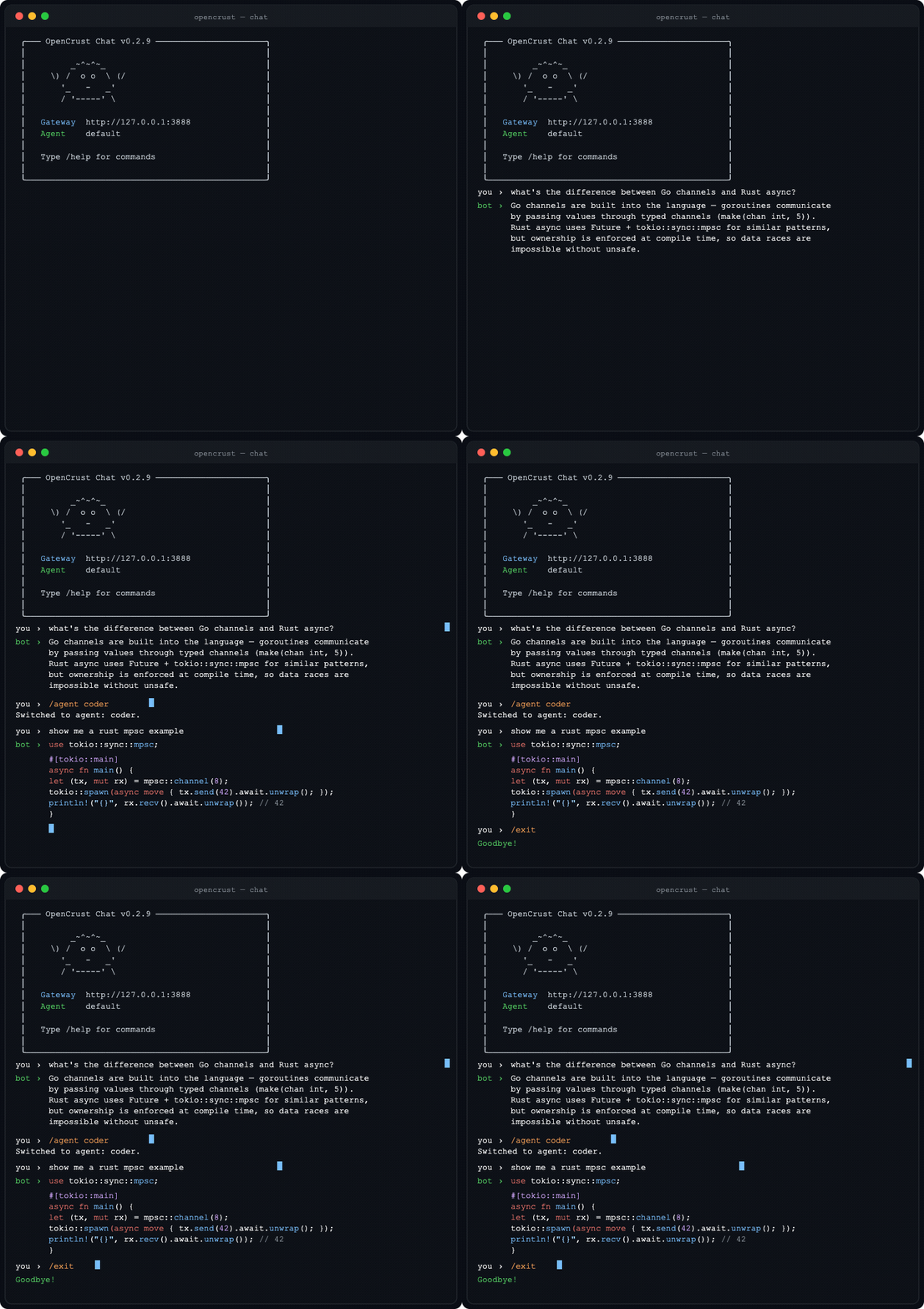 **Chat commands:** `/help` · `/new` (fresh session) · `/agent ` · `/clear` · `/exit`
Pre-compiled binaries for Linux (x86_64, aarch64), macOS (Intel, Apple Silicon), and Windows (x86_64) are available on [GitHub Releases](https://github.com/opencrust-org/opencrust/releases).
## Why OpenCrust?
| | |
|---|---|
| **Binary size** | 16 MB single binary |
| **Memory at idle** | 13 MB |
| **Cold start** | 3 ms |
| **Credential storage** | AES-256-GCM encrypted vault |
| **Auth default** | Enabled (WebSocket pairing) |
| **Scheduling** | Cron, interval, one-shot |
| **Multi-agent routing** | Yes (named agents) |
| **Session orchestration** | Yes |
| **MCP support** | Stdio + HTTP |
| **Channels** | 9 |
| **LLM providers** | 15 |
| **Pre-compiled binaries** | Yes |
| **Config hot-reload** | Yes |
| **Plugin system** | WASM (sandboxed) |
| **Self-update** | Yes (`opencrust update`) |
| **Security scan** | ✅ skills prompt-injection scan before install |
| **Self-improvement** | ✅ cross-session patterns, skill lifecycle, confidence gate |
*Benchmarks measured on a 1 vCPU, 1 GB RAM DigitalOcean droplet.*
## Security
OpenCrust is built for the security requirements of always-on AI agents that access private data and communicate externally.
- **Encrypted credential vault** - API keys and tokens stored with AES-256-GCM encryption at `~/.opencrust/credentials/vault.json`. Never plaintext on disk.
- **Authentication by default** - WebSocket gateway requires pairing codes. No unauthenticated access out of the box.
- **Per-channel authorization policies** - DM policies (open, pairing, allowlist) and group policies (open, mention-only, disabled) per channel. Unauthorized messages are silently dropped.
- **Prompt injection detection** - input validation and sanitization before content reaches the LLM.
- **Rate limiting** - per-user sliding-window rate limits with configurable cooldown to prevent abuse.
- **Token budgets** - per-session, daily, and monthly token caps to control LLM cost per user.
- **Tool allowlists** - restrict which tools an agent may call per session, with a per-session call budget cap.
- **Log secret redaction** - API keys and tokens automatically redacted from log output.
- **WASM sandboxing** - optional plugin sandbox via WebAssembly runtime with controlled host access (compile with `--features plugins`).
- **Localhost-only binding** - gateway binds to `127.0.0.1` by default, not `0.0.0.0`.
## Features
### LLM Providers
**Native providers:**
- **Anthropic Claude** - streaming (SSE), tool use
- **OpenAI** - GPT-4o, Azure, any OpenAI-compatible endpoint via `base_url`
- **Ollama** - local models with streaming
**OpenAI-compatible providers:**
- **Sansa** - regional LLM via [sansaml.com](https://sansaml.com)
- **DeepSeek** - DeepSeek Chat
- **Mistral** - Mistral Large
- **Gemini** - Google Gemini via OpenAI-compatible API
- **Falcon** - TII Falcon 180B (AI71)
- **Jais** - Core42 Jais 70B
- **Qwen** - Alibaba Qwen Plus
- **Yi** - 01.AI Yi Large
- **Cohere** - Command R Plus
- **MiniMax** - MiniMax Text 01
- **Moonshot** - Kimi K2
- **vLLM** - self-hosted models via vLLM's OpenAI-compatible server
### Voice I/O
- **TTS (Text-to-Speech)** — Kokoro (self-hosted via kokoro-fastapi), OpenAI TTS (`tts-1`, `tts-1-hd`), any OpenAI-compatible endpoint
- **STT (Speech-to-Text)** — local Whisper (faster-whisper-server), OpenAI Whisper API
- `auto_reply_voice: true` synthesizes every text response as audio automatically
- `tts_max_chars` limits synthesis length; long responses are truncated with a warning
- Per-channel delivery: Discord (file attachment), WeChat (Customer Service voice API), Telegram/LINE (native audio), Slack (text fallback)
### Channels
- **Telegram** - streaming responses, MarkdownV2, bot commands, typing indicators, user allowlist with pairing codes, photo/vision support, voice messages (Whisper STT), TTS auto-reply, document/file handling
- **Discord** - slash commands, event-driven message handling, session management, voice responses (TTS file attachment)
- **Slack** - Socket Mode, streaming responses, allowlist/pairing
- **WhatsApp** - Meta Cloud API webhooks, allowlist/pairing
- **WhatsApp Web** - QR code pairing via Baileys Node.js sidecar, no Meta Business account required, auth state persistence
- **iMessage** - macOS native via chat.db polling, group chats, AppleScript sending ([setup guide](docs/src/channels/imessage.md))
- **LINE** - Messaging API webhooks, reply/push fallback, group/room support, allowlist/pairing, voice responses (TTS, falls back to text)
- **WeChat** - Official Account Platform webhooks, SHA-1 signature verification, synchronous XML reply, image/voice/video/location dispatch, Customer Service API push, voice responses (TTS), allowlist/pairing
- **MQTT** - native broker client (Mosquitto, EMQX, HiveMQ), Mode A (plain text, one session per channel) and Mode B (JSON `{"user_id","text"}`, one session per device), auto-detection, exponential backoff reconnect, QoS 0/1/2, optional TLS (`mqtts://`)
### MCP (Model Context Protocol)
- Connect any MCP-compatible server (filesystem, GitHub, databases, web search)
- Stdio and HTTP (Streamable HTTP) transport
- Tools appear as native agent tools with namespaced names (`server_tool`)
- Resource tool - LLM can list and read MCP server resources on demand
- Server instructions captured from handshake and appended to system prompt
- Health monitor with 30s ping and auto-reconnect
- Configure in `config.yml` or `~/.opencrust/mcp.json` (Claude Desktop compatible)
- CLI: `opencrust mcp list`, `opencrust mcp inspect `, `opencrust mcp resources `, `opencrust mcp prompts `
### Personality (DNA)
- On first message, the agent introduces itself and asks a few questions to learn your preferences
- Writes `~/.opencrust/dna.md` with your name, communication style, guidelines, and the bot's own identity
- No config files to edit, no wizard sections to fill out - just a conversation
- Hot-reloads on edit - change `dna.md` and the agent adapts immediately
- Migrating from OpenClaw? `opencrust migrate openclaw` imports your existing `SOUL.md`
### Agent Runtime
- Tool execution loop - bash, file_read, file_write, web_fetch, web_search (Brave or Google Custom Search), doc_search, handoff, schedule_heartbeat, cancel_heartbeat, list_heartbeats, mcp_resources (up to 10 iterations)
- SQLite-backed conversation memory with vector search (sqlite-vec + Cohere embeddings)
- Context window management - rolling conversation summarization at 75% context window
- Scheduled tasks - cron, interval, and one-shot scheduling
### Document RAG
Ingest documents into the agent's knowledge base — the agent automatically retrieves and cites relevant excerpts when answering questions, with no extra commands needed.
**Ingesting a document:**
Send a file to any channel, then reply `!ingest` to store it. Use `!ingest replace` to overwrite an existing version.
```bash
# Via REST API
curl -X POST http://localhost:8080/api/ingest \
-F "file=@report.pdf" \
-F "session_id=default"
```
**Supported file types:** PDF, Markdown, plain text, CSV, JSON, HTML, and source code (`.rs`, `.py`, `.js`, `.ts`, `.go`, `.java`, `.toml`, `.yaml`)
**How it works:**
1. Document is chunked and stored in SQLite (`~/.opencrust/data/documents.db`)
2. Each chunk is embedded via the configured embedding provider (Cohere by default)
3. On every message, a **hybrid search** (vector + keyword, top 3 chunks, similarity threshold 0.42) runs automatically
4. Matching chunks are injected into the user message before the LLM sees it
5. The agent cites the source document name and relevance score in its reply
**Manual search:**
Use the `doc_search` tool directly: `doc_search("annual report revenue")`
**Embedding provider (optional):**
Without an embedding provider, RAG falls back to keyword-only search. Add Cohere to `config.yml` for semantic (vector) retrieval:
```yaml
embeddings:
provider: cohere
api_key: your-cohere-key
```
### Skills
- Define agent skills as Markdown files (SKILL.md) with YAML frontmatter
- Auto-discovery from `~/.opencrust/skills/` - injected into the system prompt
- Hot-reload — skills are active immediately after `create_skill` or `skill install`, no restart needed
- CLI: `opencrust skill list`, `opencrust skill install `, `opencrust skill remove `
- **Self-learning & self-improvement** — the agent tracks tool-call sequences across sessions; once a workflow repeats 5+ times it automatically saves a new skill (rate-limited to avoid noise); when reusing an existing skill it silently self-assesses and patches it if a gap is found (confidence gate prevents low-signal patches; version is bumped and CHANGELOG.md updated on every patch)
- **Automatic skill lifecycle** — skills unused for 30+ days are archived automatically (renamed to `.archived`); session trajectory data older than 90 days is compressed daily by the LLM, with skill candidates preserved for continued pattern detection
- `agent.self_learning: false` in `config.yml` to disable
- 3-layer quality control: prompt guidance, mechanical limits (max 30 skills, min body length, duplicate guard), and required `rationale` field stored in the skill file for auditability
- **[agentskills.io](https://agentskills.io) compatible** — install community skills from any public hub with `opencrust skill install `; flat (`skill-name.md`) and folder (`skill-name/SKILL.md`) layouts coexist automatically, no migration needed
- **Security scan** — every skill is scanned for prompt-injection patterns before installation, whether from a URL, local file, or agent-created
- **Agent skill editing** — agent can `patch` an existing skill (update body, description, or triggers) and `write_file` to add supplementary `.md` files inside a skill folder
### Multi-Agent Orchestration
Define named agents in `config.yml` and route tasks between them using the built-in `handoff` tool:
```yaml
agents:
router:
provider: main # which llm: key to use
system_prompt: |
Analyse the user's request and delegate using the handoff tool:
- handoff(agent_id='coder') for code, scripts, programming
- handoff(agent_id='assistant') for general questions
Always use handoff — never answer directly.
coder:
provider: main
system_prompt: You are a specialist coding agent. Be concise.
tools: [bash, file_read, file_write] # restrict which tools this agent may call
dna_file: dna-coder.md # optional: agent-specific persona
skills_dir: skills/coder/ # optional: agent-specific skill set
assistant:
provider: main
system_prompt: You are a helpful general-purpose assistant.
max_tokens: 2048
max_context_tokens: 32000
```
**`agents:` config fields:**
| Field | Type | Description |
|---|---|---|
| `provider` | string | Which `llm:` key to use (e.g. `main`, `claude`). Defaults to the first registered provider. |
| `model` | string | Model override for this agent only. |
| `system_prompt` | string | Agent-specific system prompt (replaces the global one). |
| `max_tokens` | int | Max response tokens for this agent. |
| `max_context_tokens` | int | Context window cap for this agent. |
| `tools` | list | Tool allowlist. Empty list = all tools permitted. |
| `dna_file` | path | Path to an agent-specific DNA/persona file (overrides global `dna.md`). |
| `skills_dir` | path | Path to an agent-specific skills directory (overrides global `skills/`). |
**Handoff tool:**
The `handoff` tool is automatically available to all agents. When called, it runs the target agent in an isolated ephemeral session and returns its response:
```
handoff(agent_id="coder", message="Write a fibonacci function in Python")
# → "[coder]: Here's the implementation…"
```
- Depth limit of 3 prevents infinite A→B→A loops
- Each handoff session is isolated — no history bleed between agents
- The target agent inherits its own tools, DNA, and skills overrides
**API usage:**
Create a session pinned to a specific agent; subsequent messages use that agent automatically:
```bash
# Create a session bound to the "router" agent
SESSION=$(curl -s -X POST http://localhost:3888/api/sessions \
-H "X-API-Key: your-key" \
-H "Content-Type: application/json" \
-d '{"agent_id": "router"}' | jq -r '.session_id')
# All messages in this session go through the router
curl -X POST "http://localhost:3888/api/sessions/$SESSION/messages" \
-H "X-API-Key: your-key" \
-H "Content-Type: application/json" \
-d '{"content": "Write hello world in Python"}'
# Override per-message if needed
curl -X POST "http://localhost:3888/api/sessions/$SESSION/messages" \
-H "X-API-Key: your-key" \
-H "Content-Type: application/json" \
-d '{"content": "...", "agent_id": "coder"}'
```
### Infrastructure
- **Config hot-reload** - edit `config.yml`, changes apply without restart
- **Daemonization** - `opencrust start --daemon` with PID management
- **Self-update** - `opencrust update` downloads the latest release with SHA-256 verification, `opencrust rollback` to revert
- **Restart** - `opencrust restart` gracefully stops and starts the daemon
- **Runtime provider switching** - add or switch LLM providers via the webchat UI or REST API without restarting
- **Migration tool** - `opencrust migrate openclaw` imports skills, channels, and credentials
- **Conversation summarization** - rolling summary at 75% context window, session summaries persisted across restarts
- **Interactive setup** - `opencrust init` wizard for provider and channel configuration
- **Diagnostics** - `opencrust doctor` checks config, data directory, credential vault, LLM provider reachability, channel credentials, MCP server connectivity, and database integrity
## Migrating from OpenClaw?
One command imports your skills, channel configs, credentials (encrypted into the vault), and personality (`SOUL.md` as `dna.md`):
```bash
opencrust migrate openclaw
```
Use `--dry-run` to preview changes before committing. Use `--source /path/to/openclaw` to specify a custom OpenClaw config directory.
## Configuration
OpenCrust looks for config at `~/.opencrust/config.yml`:
```yaml
gateway:
host: "127.0.0.1"
port: 3888
# api_key: "your-secret-key" # optional: protects /api/* endpoints when exposed publicly
# generate with: openssl rand -hex 32
llm:
claude:
provider: anthropic
model: claude-sonnet-4-5-20250929
# api_key resolved from: vault > config > ANTHROPIC_API_KEY env var
ollama-local:
provider: ollama
model: llama3.1
base_url: "http://localhost:11434"
channels:
telegram:
type: telegram
enabled: true
bot_token: "your-bot-token" # or TELEGRAM_BOT_TOKEN env var
line:
type: line
enabled: true
channel_access_token: "your-access-token" # or LINE_CHANNEL_ACCESS_TOKEN env var
channel_secret: "your-secret" # or LINE_CHANNEL_SECRET env var
dm_policy: pairing # open | pairing | allowlist (default: pairing)
group_policy: mention # open | mention | disabled (default: open)
agent:
# Personality is configured via ~/.opencrust/dna.md (auto-created on first message)
max_tokens: 4096
max_context_tokens: 100000
guardrails:
max_input_chars: 16000 # reject messages longer than this (default: 16000)
max_output_chars: 32000 # truncate responses longer than this (default: 32000)
token_budget_session: 10000 # max input+output tokens per session
token_budget_user_daily: 100000 # max tokens per user per day
token_budget_user_monthly: 500000 # max tokens per user per month
allowed_tools: # null = all tools allowed; [] = no tools allowed
- web_search
- file_read
session_tool_call_budget: 15 # max tool calls per session
gateway:
rate_limit:
per_user_per_minute: 10 # per-user message rate limit
cooldown_secs: 30 # cooldown period after limit is exceeded
memory:
enabled: true
# MCP servers for external tools
mcp:
filesystem:
command: npx
args: ["-y", "@modelcontextprotocol/server-filesystem", "/tmp"]
remote-server:
transport: http
url: "https://mcp.example.com/sse"
```
See the [full configuration reference](https://opencrust-org.github.io/opencrust/) for all options including Discord, Slack, WhatsApp, WhatsApp Web, iMessage, embeddings, and MCP server setup.
## Architecture
```
crates/
opencrust-cli/ # CLI, init wizard, daemon management
opencrust-gateway/ # WebSocket gateway, HTTP API, sessions
opencrust-config/ # YAML/TOML loading, hot-reload, MCP config
opencrust-channels/ # Discord, Telegram, Slack, WhatsApp, WhatsApp Web, iMessage, LINE, WeChat, MQTT
opencrust-agents/ # LLM providers, tools, MCP client, agent runtime
opencrust-db/ # SQLite memory, vector search (sqlite-vec)
opencrust-plugins/ # WASM plugin sandbox (wasmtime)
opencrust-media/ # TTS (Kokoro, OpenAI), STT (Whisper), media processing
opencrust-security/ # Credential vault, allowlists, pairing, validation
opencrust-skills/ # SKILL.md parser, scanner, installer
opencrust-common/ # Shared types, errors, utilities
```
| Component | Status |
|-----------|--------|
| Gateway (WebSocket, HTTP, sessions) | Working |
| Telegram (streaming, commands, pairing, photos, voice, documents) | Working |
| Discord (slash commands, sessions) | Working |
| Slack (Socket Mode, streaming) | Working |
| WhatsApp (webhooks) | Working |
| WhatsApp Web (QR code, Baileys sidecar) | Working |
| iMessage (macOS, group chats) | Working |
| LINE (webhooks, reply/push fallback) | Working |
| WeChat (Official Account webhooks, media dispatch) | Working |
| MQTT (broker client, Mode A/B auto-detect, reconnect, QoS 0/1/2) | Working |
| LLM providers (15: Anthropic, OpenAI, Ollama + 12 OpenAI-compatible) | Working |
| Agent tools (bash, file_read, file_write, web_fetch, web_search, doc_search, schedule_heartbeat, cancel_heartbeat, list_heartbeats, mcp_resources) | Working |
| MCP client (stdio, HTTP, tool bridging, resources, instructions) | Working |
| A2A protocol (Agent-to-Agent) | Working |
| Multi-agent routing (named agents) | Working |
| Skills (SKILL.md, auto-discovery) | Working |
| Config (YAML/TOML, hot-reload) | Working |
| Personality (DNA bootstrap, hot-reload) | Working |
| Memory (SQLite, vector search, summarization) | Working |
| Security (vault, allowlist, pairing, per-channel policies, log redaction) | Working |
| Scheduling (cron, interval, one-shot) | Working |
| CLI (init, start/stop/restart, update, migrate, mcp, skills, doctor) | Working |
| Plugin system (WASM sandbox) | Scaffolded |
| TTS (Kokoro, OpenAI) + STT (Whisper, OpenAI) | Working |
## Contributing
OpenCrust is open source under the MIT license. Join the [Discord](https://discord.gg/97jTJEUz4) to chat with contributors, ask questions, or share what you're building. See [CONTRIBUTING.md](CONTRIBUTING.md) for setup instructions, code guidelines, and the crate overview.
### Current priorities
| Priority | Issue | Description |
|----------|-------|-------------|
| **P0** | [#99](https://github.com/opencrust-org/opencrust/issues/99) | Brand facelift: logo, images, visual identity |
| **P1** | [#150](https://github.com/opencrust-org/opencrust/issues/150) | Fallback model chain: auto-retry with backup providers |
| **P1** | [#152](https://github.com/opencrust-org/opencrust/issues/152) | Token usage tracking and cost reporting |
| **P1** | [#153](https://github.com/opencrust-org/opencrust/issues/153) | `opencrust doctor` diagnostic command |
| **P1** | [#146](https://github.com/opencrust-org/opencrust/issues/146) | Guardrails: safety, rate limits, and cost controls |
| **P2** | [#185](https://github.com/opencrust-org/opencrust/issues/185) | MCP: Apps support (interactive HTML interfaces) |
| **P2** | [#158](https://github.com/opencrust-org/opencrust/issues/158) | Auto-backup config files before changes |
| **P2** | [#142](https://github.com/opencrust-org/opencrust/issues/142) | Web-based setup wizard at /setup |
Browse all [open issues](https://github.com/opencrust-org/opencrust/issues) or filter by [`good-first-issue`](https://github.com/opencrust-org/opencrust/issues?q=label%3Agood-first-issue+is%3Aopen) to find a place to start.
## Contributors
**Chat commands:** `/help` · `/new` (fresh session) · `/agent ` · `/clear` · `/exit`
Pre-compiled binaries for Linux (x86_64, aarch64), macOS (Intel, Apple Silicon), and Windows (x86_64) are available on [GitHub Releases](https://github.com/opencrust-org/opencrust/releases).
## Why OpenCrust?
| | |
|---|---|
| **Binary size** | 16 MB single binary |
| **Memory at idle** | 13 MB |
| **Cold start** | 3 ms |
| **Credential storage** | AES-256-GCM encrypted vault |
| **Auth default** | Enabled (WebSocket pairing) |
| **Scheduling** | Cron, interval, one-shot |
| **Multi-agent routing** | Yes (named agents) |
| **Session orchestration** | Yes |
| **MCP support** | Stdio + HTTP |
| **Channels** | 9 |
| **LLM providers** | 15 |
| **Pre-compiled binaries** | Yes |
| **Config hot-reload** | Yes |
| **Plugin system** | WASM (sandboxed) |
| **Self-update** | Yes (`opencrust update`) |
| **Security scan** | ✅ skills prompt-injection scan before install |
| **Self-improvement** | ✅ cross-session patterns, skill lifecycle, confidence gate |
*Benchmarks measured on a 1 vCPU, 1 GB RAM DigitalOcean droplet.*
## Security
OpenCrust is built for the security requirements of always-on AI agents that access private data and communicate externally.
- **Encrypted credential vault** - API keys and tokens stored with AES-256-GCM encryption at `~/.opencrust/credentials/vault.json`. Never plaintext on disk.
- **Authentication by default** - WebSocket gateway requires pairing codes. No unauthenticated access out of the box.
- **Per-channel authorization policies** - DM policies (open, pairing, allowlist) and group policies (open, mention-only, disabled) per channel. Unauthorized messages are silently dropped.
- **Prompt injection detection** - input validation and sanitization before content reaches the LLM.
- **Rate limiting** - per-user sliding-window rate limits with configurable cooldown to prevent abuse.
- **Token budgets** - per-session, daily, and monthly token caps to control LLM cost per user.
- **Tool allowlists** - restrict which tools an agent may call per session, with a per-session call budget cap.
- **Log secret redaction** - API keys and tokens automatically redacted from log output.
- **WASM sandboxing** - optional plugin sandbox via WebAssembly runtime with controlled host access (compile with `--features plugins`).
- **Localhost-only binding** - gateway binds to `127.0.0.1` by default, not `0.0.0.0`.
## Features
### LLM Providers
**Native providers:**
- **Anthropic Claude** - streaming (SSE), tool use
- **OpenAI** - GPT-4o, Azure, any OpenAI-compatible endpoint via `base_url`
- **Ollama** - local models with streaming
**OpenAI-compatible providers:**
- **Sansa** - regional LLM via [sansaml.com](https://sansaml.com)
- **DeepSeek** - DeepSeek Chat
- **Mistral** - Mistral Large
- **Gemini** - Google Gemini via OpenAI-compatible API
- **Falcon** - TII Falcon 180B (AI71)
- **Jais** - Core42 Jais 70B
- **Qwen** - Alibaba Qwen Plus
- **Yi** - 01.AI Yi Large
- **Cohere** - Command R Plus
- **MiniMax** - MiniMax Text 01
- **Moonshot** - Kimi K2
- **vLLM** - self-hosted models via vLLM's OpenAI-compatible server
### Voice I/O
- **TTS (Text-to-Speech)** — Kokoro (self-hosted via kokoro-fastapi), OpenAI TTS (`tts-1`, `tts-1-hd`), any OpenAI-compatible endpoint
- **STT (Speech-to-Text)** — local Whisper (faster-whisper-server), OpenAI Whisper API
- `auto_reply_voice: true` synthesizes every text response as audio automatically
- `tts_max_chars` limits synthesis length; long responses are truncated with a warning
- Per-channel delivery: Discord (file attachment), WeChat (Customer Service voice API), Telegram/LINE (native audio), Slack (text fallback)
### Channels
- **Telegram** - streaming responses, MarkdownV2, bot commands, typing indicators, user allowlist with pairing codes, photo/vision support, voice messages (Whisper STT), TTS auto-reply, document/file handling
- **Discord** - slash commands, event-driven message handling, session management, voice responses (TTS file attachment)
- **Slack** - Socket Mode, streaming responses, allowlist/pairing
- **WhatsApp** - Meta Cloud API webhooks, allowlist/pairing
- **WhatsApp Web** - QR code pairing via Baileys Node.js sidecar, no Meta Business account required, auth state persistence
- **iMessage** - macOS native via chat.db polling, group chats, AppleScript sending ([setup guide](docs/src/channels/imessage.md))
- **LINE** - Messaging API webhooks, reply/push fallback, group/room support, allowlist/pairing, voice responses (TTS, falls back to text)
- **WeChat** - Official Account Platform webhooks, SHA-1 signature verification, synchronous XML reply, image/voice/video/location dispatch, Customer Service API push, voice responses (TTS), allowlist/pairing
- **MQTT** - native broker client (Mosquitto, EMQX, HiveMQ), Mode A (plain text, one session per channel) and Mode B (JSON `{"user_id","text"}`, one session per device), auto-detection, exponential backoff reconnect, QoS 0/1/2, optional TLS (`mqtts://`)
### MCP (Model Context Protocol)
- Connect any MCP-compatible server (filesystem, GitHub, databases, web search)
- Stdio and HTTP (Streamable HTTP) transport
- Tools appear as native agent tools with namespaced names (`server_tool`)
- Resource tool - LLM can list and read MCP server resources on demand
- Server instructions captured from handshake and appended to system prompt
- Health monitor with 30s ping and auto-reconnect
- Configure in `config.yml` or `~/.opencrust/mcp.json` (Claude Desktop compatible)
- CLI: `opencrust mcp list`, `opencrust mcp inspect `, `opencrust mcp resources `, `opencrust mcp prompts `
### Personality (DNA)
- On first message, the agent introduces itself and asks a few questions to learn your preferences
- Writes `~/.opencrust/dna.md` with your name, communication style, guidelines, and the bot's own identity
- No config files to edit, no wizard sections to fill out - just a conversation
- Hot-reloads on edit - change `dna.md` and the agent adapts immediately
- Migrating from OpenClaw? `opencrust migrate openclaw` imports your existing `SOUL.md`
### Agent Runtime
- Tool execution loop - bash, file_read, file_write, web_fetch, web_search (Brave or Google Custom Search), doc_search, handoff, schedule_heartbeat, cancel_heartbeat, list_heartbeats, mcp_resources (up to 10 iterations)
- SQLite-backed conversation memory with vector search (sqlite-vec + Cohere embeddings)
- Context window management - rolling conversation summarization at 75% context window
- Scheduled tasks - cron, interval, and one-shot scheduling
### Document RAG
Ingest documents into the agent's knowledge base — the agent automatically retrieves and cites relevant excerpts when answering questions, with no extra commands needed.
**Ingesting a document:**
Send a file to any channel, then reply `!ingest` to store it. Use `!ingest replace` to overwrite an existing version.
```bash
# Via REST API
curl -X POST http://localhost:8080/api/ingest \
-F "file=@report.pdf" \
-F "session_id=default"
```
**Supported file types:** PDF, Markdown, plain text, CSV, JSON, HTML, and source code (`.rs`, `.py`, `.js`, `.ts`, `.go`, `.java`, `.toml`, `.yaml`)
**How it works:**
1. Document is chunked and stored in SQLite (`~/.opencrust/data/documents.db`)
2. Each chunk is embedded via the configured embedding provider (Cohere by default)
3. On every message, a **hybrid search** (vector + keyword, top 3 chunks, similarity threshold 0.42) runs automatically
4. Matching chunks are injected into the user message before the LLM sees it
5. The agent cites the source document name and relevance score in its reply
**Manual search:**
Use the `doc_search` tool directly: `doc_search("annual report revenue")`
**Embedding provider (optional):**
Without an embedding provider, RAG falls back to keyword-only search. Add Cohere to `config.yml` for semantic (vector) retrieval:
```yaml
embeddings:
provider: cohere
api_key: your-cohere-key
```
### Skills
- Define agent skills as Markdown files (SKILL.md) with YAML frontmatter
- Auto-discovery from `~/.opencrust/skills/` - injected into the system prompt
- Hot-reload — skills are active immediately after `create_skill` or `skill install`, no restart needed
- CLI: `opencrust skill list`, `opencrust skill install `, `opencrust skill remove `
- **Self-learning & self-improvement** — the agent tracks tool-call sequences across sessions; once a workflow repeats 5+ times it automatically saves a new skill (rate-limited to avoid noise); when reusing an existing skill it silently self-assesses and patches it if a gap is found (confidence gate prevents low-signal patches; version is bumped and CHANGELOG.md updated on every patch)
- **Automatic skill lifecycle** — skills unused for 30+ days are archived automatically (renamed to `.archived`); session trajectory data older than 90 days is compressed daily by the LLM, with skill candidates preserved for continued pattern detection
- `agent.self_learning: false` in `config.yml` to disable
- 3-layer quality control: prompt guidance, mechanical limits (max 30 skills, min body length, duplicate guard), and required `rationale` field stored in the skill file for auditability
- **[agentskills.io](https://agentskills.io) compatible** — install community skills from any public hub with `opencrust skill install `; flat (`skill-name.md`) and folder (`skill-name/SKILL.md`) layouts coexist automatically, no migration needed
- **Security scan** — every skill is scanned for prompt-injection patterns before installation, whether from a URL, local file, or agent-created
- **Agent skill editing** — agent can `patch` an existing skill (update body, description, or triggers) and `write_file` to add supplementary `.md` files inside a skill folder
### Multi-Agent Orchestration
Define named agents in `config.yml` and route tasks between them using the built-in `handoff` tool:
```yaml
agents:
router:
provider: main # which llm: key to use
system_prompt: |
Analyse the user's request and delegate using the handoff tool:
- handoff(agent_id='coder') for code, scripts, programming
- handoff(agent_id='assistant') for general questions
Always use handoff — never answer directly.
coder:
provider: main
system_prompt: You are a specialist coding agent. Be concise.
tools: [bash, file_read, file_write] # restrict which tools this agent may call
dna_file: dna-coder.md # optional: agent-specific persona
skills_dir: skills/coder/ # optional: agent-specific skill set
assistant:
provider: main
system_prompt: You are a helpful general-purpose assistant.
max_tokens: 2048
max_context_tokens: 32000
```
**`agents:` config fields:**
| Field | Type | Description |
|---|---|---|
| `provider` | string | Which `llm:` key to use (e.g. `main`, `claude`). Defaults to the first registered provider. |
| `model` | string | Model override for this agent only. |
| `system_prompt` | string | Agent-specific system prompt (replaces the global one). |
| `max_tokens` | int | Max response tokens for this agent. |
| `max_context_tokens` | int | Context window cap for this agent. |
| `tools` | list | Tool allowlist. Empty list = all tools permitted. |
| `dna_file` | path | Path to an agent-specific DNA/persona file (overrides global `dna.md`). |
| `skills_dir` | path | Path to an agent-specific skills directory (overrides global `skills/`). |
**Handoff tool:**
The `handoff` tool is automatically available to all agents. When called, it runs the target agent in an isolated ephemeral session and returns its response:
```
handoff(agent_id="coder", message="Write a fibonacci function in Python")
# → "[coder]: Here's the implementation…"
```
- Depth limit of 3 prevents infinite A→B→A loops
- Each handoff session is isolated — no history bleed between agents
- The target agent inherits its own tools, DNA, and skills overrides
**API usage:**
Create a session pinned to a specific agent; subsequent messages use that agent automatically:
```bash
# Create a session bound to the "router" agent
SESSION=$(curl -s -X POST http://localhost:3888/api/sessions \
-H "X-API-Key: your-key" \
-H "Content-Type: application/json" \
-d '{"agent_id": "router"}' | jq -r '.session_id')
# All messages in this session go through the router
curl -X POST "http://localhost:3888/api/sessions/$SESSION/messages" \
-H "X-API-Key: your-key" \
-H "Content-Type: application/json" \
-d '{"content": "Write hello world in Python"}'
# Override per-message if needed
curl -X POST "http://localhost:3888/api/sessions/$SESSION/messages" \
-H "X-API-Key: your-key" \
-H "Content-Type: application/json" \
-d '{"content": "...", "agent_id": "coder"}'
```
### Infrastructure
- **Config hot-reload** - edit `config.yml`, changes apply without restart
- **Daemonization** - `opencrust start --daemon` with PID management
- **Self-update** - `opencrust update` downloads the latest release with SHA-256 verification, `opencrust rollback` to revert
- **Restart** - `opencrust restart` gracefully stops and starts the daemon
- **Runtime provider switching** - add or switch LLM providers via the webchat UI or REST API without restarting
- **Migration tool** - `opencrust migrate openclaw` imports skills, channels, and credentials
- **Conversation summarization** - rolling summary at 75% context window, session summaries persisted across restarts
- **Interactive setup** - `opencrust init` wizard for provider and channel configuration
- **Diagnostics** - `opencrust doctor` checks config, data directory, credential vault, LLM provider reachability, channel credentials, MCP server connectivity, and database integrity
## Migrating from OpenClaw?
One command imports your skills, channel configs, credentials (encrypted into the vault), and personality (`SOUL.md` as `dna.md`):
```bash
opencrust migrate openclaw
```
Use `--dry-run` to preview changes before committing. Use `--source /path/to/openclaw` to specify a custom OpenClaw config directory.
## Configuration
OpenCrust looks for config at `~/.opencrust/config.yml`:
```yaml
gateway:
host: "127.0.0.1"
port: 3888
# api_key: "your-secret-key" # optional: protects /api/* endpoints when exposed publicly
# generate with: openssl rand -hex 32
llm:
claude:
provider: anthropic
model: claude-sonnet-4-5-20250929
# api_key resolved from: vault > config > ANTHROPIC_API_KEY env var
ollama-local:
provider: ollama
model: llama3.1
base_url: "http://localhost:11434"
channels:
telegram:
type: telegram
enabled: true
bot_token: "your-bot-token" # or TELEGRAM_BOT_TOKEN env var
line:
type: line
enabled: true
channel_access_token: "your-access-token" # or LINE_CHANNEL_ACCESS_TOKEN env var
channel_secret: "your-secret" # or LINE_CHANNEL_SECRET env var
dm_policy: pairing # open | pairing | allowlist (default: pairing)
group_policy: mention # open | mention | disabled (default: open)
agent:
# Personality is configured via ~/.opencrust/dna.md (auto-created on first message)
max_tokens: 4096
max_context_tokens: 100000
guardrails:
max_input_chars: 16000 # reject messages longer than this (default: 16000)
max_output_chars: 32000 # truncate responses longer than this (default: 32000)
token_budget_session: 10000 # max input+output tokens per session
token_budget_user_daily: 100000 # max tokens per user per day
token_budget_user_monthly: 500000 # max tokens per user per month
allowed_tools: # null = all tools allowed; [] = no tools allowed
- web_search
- file_read
session_tool_call_budget: 15 # max tool calls per session
gateway:
rate_limit:
per_user_per_minute: 10 # per-user message rate limit
cooldown_secs: 30 # cooldown period after limit is exceeded
memory:
enabled: true
# MCP servers for external tools
mcp:
filesystem:
command: npx
args: ["-y", "@modelcontextprotocol/server-filesystem", "/tmp"]
remote-server:
transport: http
url: "https://mcp.example.com/sse"
```
See the [full configuration reference](https://opencrust-org.github.io/opencrust/) for all options including Discord, Slack, WhatsApp, WhatsApp Web, iMessage, embeddings, and MCP server setup.
## Architecture
```
crates/
opencrust-cli/ # CLI, init wizard, daemon management
opencrust-gateway/ # WebSocket gateway, HTTP API, sessions
opencrust-config/ # YAML/TOML loading, hot-reload, MCP config
opencrust-channels/ # Discord, Telegram, Slack, WhatsApp, WhatsApp Web, iMessage, LINE, WeChat, MQTT
opencrust-agents/ # LLM providers, tools, MCP client, agent runtime
opencrust-db/ # SQLite memory, vector search (sqlite-vec)
opencrust-plugins/ # WASM plugin sandbox (wasmtime)
opencrust-media/ # TTS (Kokoro, OpenAI), STT (Whisper), media processing
opencrust-security/ # Credential vault, allowlists, pairing, validation
opencrust-skills/ # SKILL.md parser, scanner, installer
opencrust-common/ # Shared types, errors, utilities
```
| Component | Status |
|-----------|--------|
| Gateway (WebSocket, HTTP, sessions) | Working |
| Telegram (streaming, commands, pairing, photos, voice, documents) | Working |
| Discord (slash commands, sessions) | Working |
| Slack (Socket Mode, streaming) | Working |
| WhatsApp (webhooks) | Working |
| WhatsApp Web (QR code, Baileys sidecar) | Working |
| iMessage (macOS, group chats) | Working |
| LINE (webhooks, reply/push fallback) | Working |
| WeChat (Official Account webhooks, media dispatch) | Working |
| MQTT (broker client, Mode A/B auto-detect, reconnect, QoS 0/1/2) | Working |
| LLM providers (15: Anthropic, OpenAI, Ollama + 12 OpenAI-compatible) | Working |
| Agent tools (bash, file_read, file_write, web_fetch, web_search, doc_search, schedule_heartbeat, cancel_heartbeat, list_heartbeats, mcp_resources) | Working |
| MCP client (stdio, HTTP, tool bridging, resources, instructions) | Working |
| A2A protocol (Agent-to-Agent) | Working |
| Multi-agent routing (named agents) | Working |
| Skills (SKILL.md, auto-discovery) | Working |
| Config (YAML/TOML, hot-reload) | Working |
| Personality (DNA bootstrap, hot-reload) | Working |
| Memory (SQLite, vector search, summarization) | Working |
| Security (vault, allowlist, pairing, per-channel policies, log redaction) | Working |
| Scheduling (cron, interval, one-shot) | Working |
| CLI (init, start/stop/restart, update, migrate, mcp, skills, doctor) | Working |
| Plugin system (WASM sandbox) | Scaffolded |
| TTS (Kokoro, OpenAI) + STT (Whisper, OpenAI) | Working |
## Contributing
OpenCrust is open source under the MIT license. Join the [Discord](https://discord.gg/97jTJEUz4) to chat with contributors, ask questions, or share what you're building. See [CONTRIBUTING.md](CONTRIBUTING.md) for setup instructions, code guidelines, and the crate overview.
### Current priorities
| Priority | Issue | Description |
|----------|-------|-------------|
| **P0** | [#99](https://github.com/opencrust-org/opencrust/issues/99) | Brand facelift: logo, images, visual identity |
| **P1** | [#150](https://github.com/opencrust-org/opencrust/issues/150) | Fallback model chain: auto-retry with backup providers |
| **P1** | [#152](https://github.com/opencrust-org/opencrust/issues/152) | Token usage tracking and cost reporting |
| **P1** | [#153](https://github.com/opencrust-org/opencrust/issues/153) | `opencrust doctor` diagnostic command |
| **P1** | [#146](https://github.com/opencrust-org/opencrust/issues/146) | Guardrails: safety, rate limits, and cost controls |
| **P2** | [#185](https://github.com/opencrust-org/opencrust/issues/185) | MCP: Apps support (interactive HTML interfaces) |
| **P2** | [#158](https://github.com/opencrust-org/opencrust/issues/158) | Auto-backup config files before changes |
| **P2** | [#142](https://github.com/opencrust-org/opencrust/issues/142) | Web-based setup wizard at /setup |
Browse all [open issues](https://github.com/opencrust-org/opencrust/issues) or filter by [`good-first-issue`](https://github.com/opencrust-org/opencrust/issues?q=label%3Agood-first-issue+is%3Aopen) to find a place to start.
## Contributors
 ## License
MIT
## License
MIT