OpenCrust
सुरक्षित और हल्का ओपन-सोर्स AI Agent फ्रेमवर्क।


शुरुआत करें ·
OpenCrust क्यों? ·
विशेषताएं ·
सुरक्षा ·
आर्किटेक्चर ·
OpenClaw से माइग्रेट करें ·
योगदान
🇺🇸 English ·
🇹🇭 ไทย ·
🇨🇳 简体中文 ·
🇮🇳 हिन्दी
---
16 MB का एक standalone binary जो Telegram, Discord, Slack, WhatsApp, WhatsApp Web, LINE, WeChat, iMessage और MQTT पर आपका AI agent चलाता है — एन्क्रिप्टेड credential स्टोरेज, hot-reload config के साथ और idle में केवल 13 MB RAM उपयोग करता है। Rust में बनाया गया है — AI agent को जो सुरक्षा और स्थिरता चाहिए उसके लिए।
## शुरुआत करें
```bash
# इंस्टॉल करें (Linux, macOS)
curl -fsSL https://raw.githubusercontent.com/opencrust-org/opencrust/main/install.sh | sh
# इंटरेक्टिव सेटअप — LLM provider और channel चुनें
opencrust init
# शुरू करें — पहला संदेश मिलने पर agent खुद परिचय देगा और आपकी प्राथमिकताएं सीखेगा
opencrust start
# config, connectivity और database health जांचें
opencrust doctor
```
Source से Build करें
```bash
# Rust 1.85+ आवश्यक है
cargo build --release
./target/release/opencrust init
./target/release/opencrust start
# WASM plugin सपोर्ट (optional)
cargo build --release --features plugins
```
### Web Chat
Gateway चालू होने के बाद, browser में खोलें:
```
http://127.0.0.1:3888
```
Built-in Web UI से आप agent से chat कर सकते हैं, LLM provider बदल सकते हैं, MCP server manage कर सकते हैं और connected channels देख सकते हैं — बिना restart किए।
> **Authentication** — अगर `config.yml` में `api_key` सेट है, तो UI connect करने से पहले gateway key मांगेगा।
### Terminal Chat
Browser खोले बिना सीधे terminal से agent से बात करें।
> **Gateway चालू होना ज़रूरी है।** पहली बार `opencrust init` चलाएं, फिर `opencrust start`, उसके बाद `opencrust chat` उपयोग करें।
```bash
# पहली बार setup
opencrust init
opencrust start # या: opencrust start -d (daemon mode)
# Terminal chat खोलें
opencrust chat
opencrust chat --agent coder # किसी agent के साथ शुरू करें
opencrust chat --url http://host:3888 # दूसरे gateway से जुड़ें
```
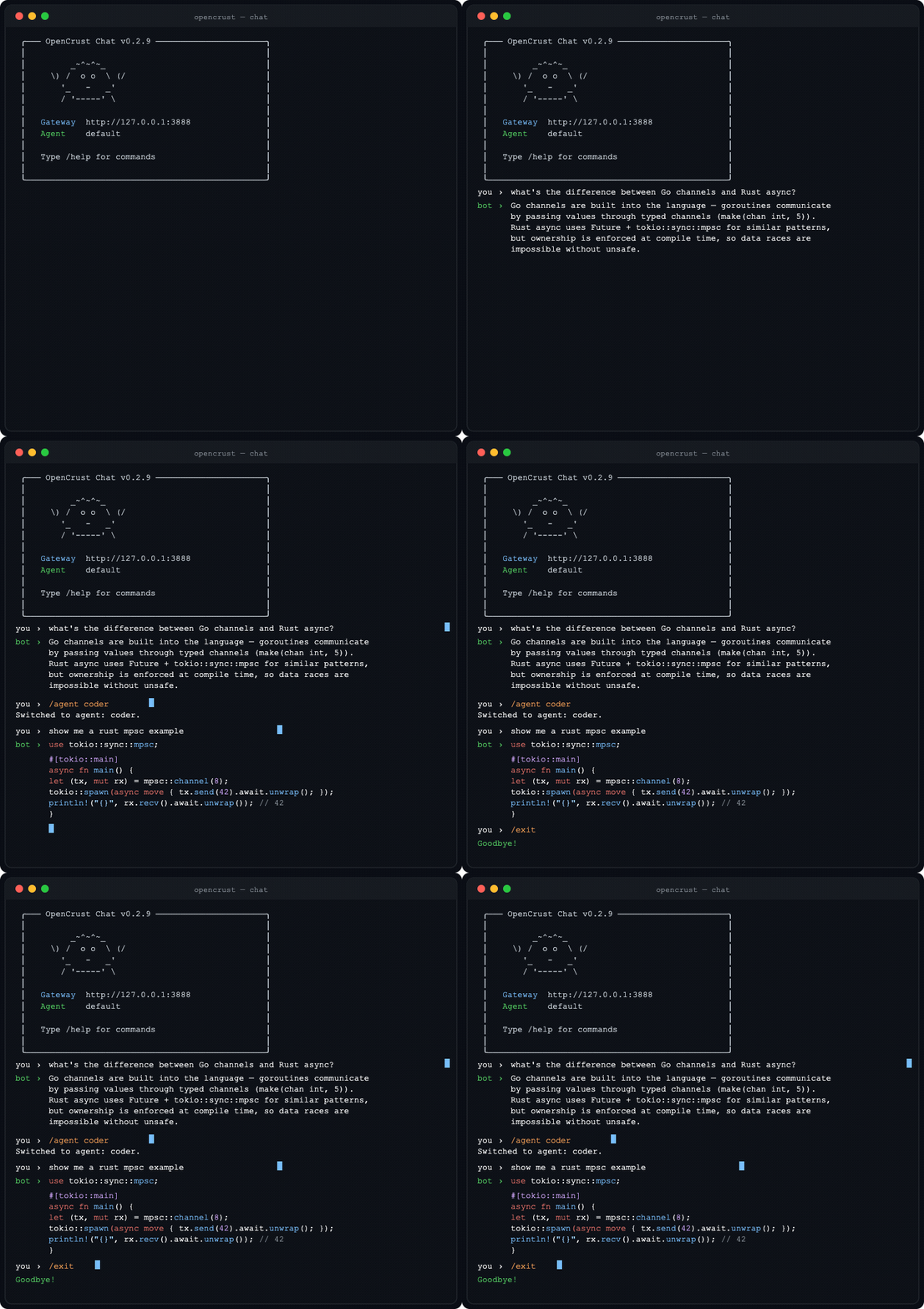 **Chat commands:** `/help` · `/new` (नया session) · `/agent ` · `/clear` · `/exit`
Linux (x86_64, aarch64), macOS (Intel, Apple Silicon) और Windows (x86_64) के लिए binary [GitHub Releases](https://github.com/opencrust-org/opencrust/releases) पर उपलब्ध हैं।
## OpenCrust क्यों?
| | |
|---|---|
| **Binary आकार** | 16 MB single binary |
| **Idle RAM** | 13 MB |
| **Cold start** | 3 ms |
| **Credential स्टोरेज** | AES-256-GCM encrypted vault |
| **डिफ़ॉल्ट Auth** | चालू (WebSocket pairing) |
| **Scheduling** | Cron, interval, one-shot |
| **Multi-agent routing** | हाँ (named agents) |
| **Session orchestration** | हाँ |
| **MCP support** | Stdio + HTTP |
| **Channels** | 9 |
| **LLM providers** | 15 |
| **Pre-compiled binary** | हाँ |
| **Config hot-reload** | हाँ |
| **Plugin system** | WASM (sandboxed) |
| **Self-update** | हाँ (`opencrust update`) |
| **Security scan** | ✅ install से पहले हर skill में prompt-injection scan |
| **Self-improvement** | ✅ cross-session patterns, skill lifecycle, confidence gate |
*DigitalOcean droplet 1 vCPU, 1 GB RAM पर मापा गया — [खुद टेस्ट करें](../bench/)*
## सुरक्षा
OpenCrust को हमेशा चलने वाले AI agents के लिए डिज़ाइन किया गया है जो संवेदनशील डेटा तक पहुंचते हैं।
- **Encrypted credential vault** — API key और token AES-256-GCM के साथ `~/.opencrust/credentials/vault.json` पर संग्रहीत, disk पर कोई plaintext नहीं
- **डिफ़ॉल्ट Authentication** — WebSocket gateway को pairing code की आवश्यकता है, बिना authentication के कोई access नहीं
- **User allowlist** — per-channel allowlist नियंत्रित करता है कि agent से कौन interact कर सकता है, अनधिकृत संदेश चुपचाप छोड़ दिए जाते हैं
- **Per-channel authorization policies** — प्रत्येक channel के लिए DM policy (open, pairing, allowlist) और group policy (open, mention-only, disabled)। अनधिकृत संदेश चुपचाप छोड़ दिए जाते हैं।
- **Prompt injection detection** — LLM तक पहुंचने से पहले input को validate और sanitize किया जाता है
- **Rate limiting** — प्रति user sliding-window message rate limit, abuse रोकने के लिए configurable cooldown के साथ
- **Token budgets** — प्रति session, प्रति दिन और प्रति माह token cap, प्रति user LLM लागत नियंत्रित करने के लिए
- **Tool allowlists** — प्रति session agent द्वारा call किए जा सकने वाले tools को सीमित करें, साथ ही call budget cap
- **Log secret redaction** — API key और token log output से automatically redact होते हैं
- **WASM sandboxing** — WebAssembly runtime के माध्यम से optional plugin sandboxing (`--features plugins` के साथ compile करें)
- **Localhost-only binding** — gateway डिफ़ॉल्ट रूप से `0.0.0.0` नहीं बल्कि `127.0.0.1` से bind होता है
## विशेषताएं
### LLM Provider
**Native providers:**
- **Anthropic Claude** — streaming (SSE), tool use
- **OpenAI** — GPT-4o, Azure, `base_url` के माध्यम से OpenAI-compatible endpoints
- **Ollama** — streaming के साथ local models
**OpenAI-compatible providers:**
- **Sansa** — [sansaml.com](https://sansaml.com) के माध्यम से regional LLM
- **DeepSeek** — DeepSeek Chat
- **Mistral** — Mistral Large
- **Gemini** — OpenAI-compatible API के माध्यम से Google Gemini
- **Falcon** — TII Falcon 180B (AI71)
- **Jais** — Core42 Jais 70B
- **Qwen** — Alibaba Qwen Plus
- **Yi** — 01.AI Yi Large
- **Cohere** — Command R Plus
- **MiniMax** — MiniMax Text 01
- **Moonshot** — Kimi K2
- **vLLM** — vLLM के OpenAI-compatible server के माध्यम से self-hosted models
### Voice I/O
- **TTS (Text-to-Speech)** — Kokoro (kokoro-fastapi के माध्यम से self-hosted), OpenAI TTS (`tts-1`, `tts-1-hd`), कोई भी OpenAI-compatible endpoint
- **STT (Speech-to-Text)** — local Whisper (faster-whisper-server), OpenAI Whisper API
- `auto_reply_voice: true` हर text response को automatically audio में synthesize करता है
- `tts_max_chars` synthesis length को limit करता है; लंबे response truncate होते हैं और warning log होती है
- Per-channel delivery: Discord (file attachment), WeChat (Customer Service voice API), Telegram/LINE (native audio), Slack (text fallback)
### Channels
- **Telegram** — streaming responses, MarkdownV2, bot commands, typing indicators, pairing code के साथ user allowlist, image/vision सपोर्ट, voice message (Whisper STT), TTS auto-reply, file/document handling
- **Discord** — slash commands, event-driven message handling, session management, voice responses (TTS file attachment)
- **Slack** — Socket Mode, streaming responses, allowlist/pairing
- **WhatsApp** — Meta Cloud API webhooks, allowlist/pairing
- **WhatsApp Web** — Baileys Node.js sidecar के माध्यम से QR code pairing, Meta Business account की जरूरत नहीं, auth state persistence
- **LINE** — Messaging API webhooks, reply/push fallback, group/room chat सपोर्ट, allowlist/pairing, voice responses (TTS, text पर fallback)
- **WeChat** — Official Account Platform webhooks, SHA-1 signature verification, synchronous XML reply, image/voice/video/location dispatch, Customer Service API push, voice messages (TTS), allowlist/pairing
- **iMessage** — chat.db polling के माध्यम से macOS native, group chat, AppleScript sending ([सेटअप गाइड](../docs/imessage-setup.md))
- **MQTT** — native MQTT broker client (Mosquitto, EMQX, HiveMQ), Mode A (plain text, प्रति channel एक session) और Mode B (JSON `{"user_id","text"}`, प्रति device अलग session), auto-detection, exponential backoff reconnect, QoS 0/1/2, TLS सपोर्ट (`mqtts://`)
### MCP (Model Context Protocol)
- किसी भी MCP server से connect करें (filesystem, GitHub, databases, web search)
- stdio और HTTP transport दोनों को support करता है
- Tools native agent tools के रूप में namespace के साथ दिखाई देते हैं (`server.tool`)
- Resource tool और server instructions को support करता है
- `config.yml` या `~/.opencrust/mcp.json` में configure करें (Claude Desktop compatible)
- CLI: `opencrust mcp list`, `opencrust mcp inspect `
### Personality (DNA)
- पहला संदेश मिलने पर agent खुद परिचय देता है और प्राथमिकताएं सीखने के लिए सवाल पूछता है
- `~/.opencrust/dna.md` लिखता है जिसमें bot का नाम, communication style, guidelines और identity होती है
- कोई config file edit नहीं, कोई wizard नहीं — बस बात करें
- Hot-reload on edit — `dna.md` बदलें और agent तुरंत adapt हो जाता है
- OpenClaw से माइग्रेट हो रहे हैं? `opencrust migrate openclaw` मौजूदा `SOUL.md` को import करता है
### Agent Runtime
- Tool execution loop — bash, file_read, file_write, web_fetch, web_search (Brave या Google Custom Search), doc_search, handoff, schedule_heartbeat, cancel_heartbeat, list_heartbeats, mcp_resources (अधिकतम 10 rounds)
- vector search के साथ SQLite पर conversation memory (sqlite-vec + Cohere embeddings)
- Context window management — context window के 75% पर rolling conversation summarization
- Scheduled tasks — cron, interval और one-shot scheduling
### Document RAG
Documents को agent के knowledge base में ingest करें — agent सवालों के जवाब देते समय automatically relevant excerpts retrieve करके cite करता है, कोई extra command की जरूरत नहीं।
**Document ingest करना:**
किसी भी channel पर file भेजें, फिर store करने के लिए `!ingest` reply करें। Existing version को overwrite करने के लिए `!ingest replace` use करें।
```bash
# REST API के through
curl -X POST http://localhost:8080/api/ingest \
-F "file=@report.pdf" \
-F "session_id=default"
```
**Supported file types:** PDF, Markdown, plain text, CSV, JSON, HTML, और source code (`.rs`, `.py`, `.js`, `.ts`, `.go`, `.java`, `.toml`, `.yaml`)
**कैसे काम करता है:**
1. Document chunks में divide होकर SQLite में store होता है (`~/.opencrust/data/documents.db`)
2. हर chunk configured embedding provider (default Cohere) के through embed होता है
3. हर message पर automatically **hybrid search** (vector + keyword, top 3 chunks, similarity threshold 0.42) run होती है
4. Matching chunks LLM को दिखने से पहले user message में inject होते हैं
5. Agent अपने reply में source document name और relevance score cite करता है
**Manual search:**
`doc_search` tool directly use करें: `doc_search("annual report revenue")`
**Embedding provider (optional):**
Embedding provider के बिना, RAG keyword-only search पर fallback करता है। Semantic (vector) retrieval के लिए `config.yml` में Cohere add करें:
```yaml
embeddings:
provider: cohere
api_key: your-cohere-key
```
### Skills
- Agent skills को YAML frontmatter के साथ Markdown files (SKILL.md) के रूप में define करें
- `~/.opencrust/skills/` से auto-discovery — system prompt में automatically inject होती हैं
- Hot-reload — `create_skill` या `skill install` के बाद skills तुरंत active हो जाती हैं, restart की जरूरत नहीं
- CLI: `opencrust skill list`, `opencrust skill install `, `opencrust skill remove `
- **Self-learning & self-improvement** — agent multiple sessions में tool-call patterns track करता है; जब कोई workflow 5+ बार repeat होती है तो automatically skill save होती है (noise कम करने के लिए rate-limited); मौजूदा skill reuse करने पर agent चुपचाप self-assess करके gap मिलने पर autonomously patch करता है (low-signal patches रोकने के लिए confidence gate; हर patch पर version bump और CHANGELOG.md update होता है)
- **Automatic skill lifecycle** — 30+ दिन से unused skills automatically archive हो जाती हैं (`.archived` के रूप में rename होती हैं); 90 दिन से पुराना trajectory data daily LLM द्वारा compress होता है, skill candidates pattern detection के लिए preserve रहते हैं
- `config.yml` में `agent.self_learning: false` से disable करें
- 3-layer quality control: prompt guidance, mechanical limits (अधिकतम 30 skills, min body length, duplicate guard), और auditability के लिए skill file में stored required `rationale` field
- **[agentskills.io](https://agentskills.io) compatible** — `opencrust skill install ` से किसी भी public hub की community skills install करें; flat (`skill-name.md`) और folder (`skill-name/SKILL.md`) दोनों layouts एक साथ काम करते हैं, migration की जरूरत नहीं
- **Security scan** — हर skill को install से पहले prompt-injection patterns के लिए scan किया जाता है, चाहे URL, local file या agent-created हो
- **Agent skill editing** — agent `patch` से existing skill का body, description या triggers update कर सकता है और `write_file` से skill folder में supplementary `.md` files जोड़ सकता है
### Multi-Agent Orchestration
`config.yml` में named agents define करें और built-in `handoff` tool से उनके बीच tasks route करें:
```yaml
agents:
router:
provider: main
system_prompt: |
User की request analyze करें और handoff tool से delegate करें:
- handoff(agent_id='coder') code, scripts, programming के लिए
- handoff(agent_id='assistant') general questions के लिए
हमेशा handoff use करें — directly जवाब न दें।
coder:
provider: main
system_prompt: आप एक specialist coding agent हैं। संक्षिप्त जवाब दें।
tools: [bash, file_read, file_write] # इस agent को कौन-से tools मिलेंगे
dna_file: dna-coder.md # agent-specific persona file (optional)
skills_dir: skills/coder/ # agent-specific skills directory (optional)
assistant:
provider: main
system_prompt: आप एक helpful general-purpose assistant हैं।
max_tokens: 2048
max_context_tokens: 32000
```
**`agents:` config fields:**
| Field | Type | विवरण |
|---|---|---|
| `provider` | string | कौन-सा `llm:` key use करना है (जैसे `main`, `claude`)। Default: पहला registered provider। |
| `model` | string | सिर्फ इस agent के लिए model override। |
| `system_prompt` | string | इस agent का system prompt (global को replace करता है)। |
| `max_tokens` | int | इस agent के response के लिए max tokens। |
| `max_context_tokens` | int | इस agent के लिए context window limit। |
| `tools` | list | Tool allowlist। Empty = सभी tools allowed। |
| `dna_file` | path | Agent-specific DNA/persona file path (global `dna.md` को override करता है)। |
| `skills_dir` | path | Agent-specific skills directory path (global `skills/` को override करता है)। |
**Handoff tool:**
`handoff` tool सभी agents को automatically उपलब्ध है। Call करने पर target agent को isolated ephemeral session में run करता है और response return करता है:
```
handoff(agent_id="coder", message="Python में fibonacci function लिखो")
# → "[coder]: यहाँ implementation है…"
```
- Depth limit 3 — A→B→A infinite loops से बचाता है
- हर handoff का अलग isolated session होता है — agents के बीच history leak नहीं होती
- Target agent को अपने tools, DNA और skills overrides मिलते हैं
### Infrastructure
- **Config hot-reload** — `config.yml` बदलें और restart किए बिना changes तुरंत लागू होते हैं
- **Daemonization** — PID management के साथ `opencrust start --daemon`
- **Self-update** — `opencrust update` SHA-256 verification के साथ latest release download करता है, rollback के लिए `opencrust rollback`
- **Restart** — `opencrust restart` gracefully stop और restart करता है
- **Runtime provider switching** — restart किए बिना webchat UI या REST API के माध्यम से LLM provider जोड़ें या बदलें
- **Migration tool** — `opencrust migrate openclaw` skills, channels और credentials import करता है
- **Conversation summarization** — 75% context window पर rolling summary, restart के बाद session summary persist होती है
- **Interactive setup** — provider और channels configure करने के लिए `opencrust init` wizard
- **Diagnostics** — `opencrust doctor` config, data directory, credential vault, LLM provider reachability, channel credentials, MCP server connectivity और database integrity जांचता है
## OpenClaw से माइग्रेट करें?
एक command में skills, channel config, credentials (vault में encrypt) और personality (`SOUL.md` से `dna.md`) import करें:
```bash
opencrust migrate openclaw
```
commit करने से पहले preview के लिए `--dry-run` उपयोग करें, OpenClaw config directory specify करने के लिए `--source /path/to/openclaw` उपयोग करें।
## Configuration
OpenCrust `~/.opencrust/config.yml` से config पढ़ता है:
```yaml
gateway:
host: "127.0.0.1"
port: 3888
# api_key: "your-secret-key" # वैकल्पिक: सार्वजनिक रूप से उजागर होने पर /api/* की सुरक्षा करता है
# generate करें: openssl rand -hex 32
llm:
claude:
provider: anthropic
model: claude-sonnet-4-5-20250929
# api_key: vault > config > ANTHROPIC_API_KEY env var से पढ़ा जाता है
ollama-local:
provider: ollama
model: llama3.1
base_url: "http://localhost:11434"
channels:
telegram:
type: telegram
enabled: true
bot_token: "your-bot-token" # या TELEGRAM_BOT_TOKEN env var
line:
type: line
enabled: true
channel_access_token: "your-access-token" # या LINE_CHANNEL_ACCESS_TOKEN env var
channel_secret: "your-secret" # या LINE_CHANNEL_SECRET env var
dm_policy: pairing # open | pairing | allowlist (डिफ़ॉल्ट: pairing)
group_policy: mention # open | mention | disabled (डिफ़ॉल्ट: open)
agent:
# Personality ~/.opencrust/dna.md के माध्यम से configure होती है
max_tokens: 4096
max_context_tokens: 100000
guardrails:
max_input_chars: 16000 # इससे लंबे message reject होंगे (default: 16000)
max_output_chars: 32000 # इससे लंबे response truncate होंगे (default: 32000)
token_budget_session: 10000 # प्रति session अधिकतम token
token_budget_user_daily: 100000 # प्रति user प्रति दिन अधिकतम token
token_budget_user_monthly: 500000 # प्रति user प्रति माह अधिकतम token
allowed_tools: # null = सभी tools; [] = कोई tool नहीं
- web_search
- file_read
session_tool_call_budget: 15 # प्रति session अधिकतम tool calls
gateway:
rate_limit:
per_user_per_minute: 10 # प्रति user message rate limit
cooldown_secs: 30 # limit exceed होने पर cooldown
memory:
enabled: true
# External tools के लिए MCP servers
mcp:
filesystem:
command: npx
args: ["-y", "@modelcontextprotocol/server-filesystem", "/tmp"]
```
सभी options के लिए [full configuration reference](../docs/) देखें, जिसमें Discord, Slack, WhatsApp, iMessage, embeddings और MCP servers शामिल हैं।
## आर्किटेक्चर
```
crates/
opencrust-cli/ # CLI, init wizard, daemon management
opencrust-gateway/ # WebSocket gateway, HTTP API, sessions
opencrust-config/ # YAML/TOML loading, hot-reload, MCP config
opencrust-channels/ # Discord, Telegram, Slack, WhatsApp, WhatsApp Web, iMessage, LINE, WeChat, MQTT
opencrust-agents/ # LLM providers, tools, MCP client, agent runtime
opencrust-db/ # SQLite memory, vector search (sqlite-vec)
opencrust-plugins/ # WASM plugin sandbox (wasmtime)
opencrust-media/ # TTS (Kokoro, OpenAI), STT (Whisper), media processing
opencrust-security/ # Credential vault, allowlists, pairing, validation
opencrust-skills/ # SKILL.md parser, scanner, installer
opencrust-common/ # Shared types, errors, utilities
```
| Component | स्थिति |
|-----------|--------|
| Gateway (WebSocket, HTTP, sessions) | उपलब्ध |
| Telegram (streaming, commands, pairing, photos, voice, documents) | उपलब्ध |
| Discord (slash commands, sessions) | उपलब्ध |
| Slack (Socket Mode, streaming) | उपलब्ध |
| WhatsApp (webhooks) | उपलब्ध |
| WhatsApp Web (QR code, Baileys sidecar) | उपलब्ध |
| LINE (webhooks, reply/push fallback) | उपलब्ध |
| WeChat (Official Account webhooks, media dispatch) | उपलब्ध |
| iMessage (macOS, group chats) | उपलब्ध |
| MQTT (broker client, Mode A/B auto-detect, reconnect, QoS 0/1/2) | उपलब्ध |
| LLM providers (15: Anthropic, OpenAI, Ollama + 12 OpenAI-compatible) | उपलब्ध |
| Agent tools (bash, file_read, file_write, web_fetch, web_search, doc_search, schedule_heartbeat, cancel_heartbeat, list_heartbeats, mcp_resources) | उपलब्ध |
| MCP client (stdio, HTTP, tool bridging, resources, instructions) | उपलब्ध |
| A2A protocol (Agent-to-Agent) | उपलब्ध |
| Multi-agent routing (named agents) | उपलब्ध |
| Skills (SKILL.md, auto-discovery) | उपलब्ध |
| Config (YAML/TOML, hot-reload) | उपलब्ध |
| Personality (DNA bootstrap, hot-reload) | उपलब्ध |
| Memory (SQLite, vector search, summarization) | उपलब्ध |
| Security (vault, allowlist, pairing, per-channel policies, log redaction) | उपलब्ध |
| Scheduling (cron, interval, one-shot) | उपलब्ध |
| CLI (init, start/stop/restart, update, migrate, mcp, skills, doctor) | उपलब्ध |
| Plugin system (WASM sandbox) | Scaffolded |
| TTS (Kokoro, OpenAI) + STT (Whisper, OpenAI) | उपलब्ध |
## योगदान
OpenCrust MIT license के तहत open source है। contributors के साथ बात करने, सवाल पूछने या जो आप बना रहे हैं उसे share करने के लिए [Discord](https://discord.gg/97jTJEUz4) join करें। setup instructions, coding guidelines और crate overview के लिए [CONTRIBUTING.md](../CONTRIBUTING.md) देखें।
### वर्तमान प्राथमिकताएं
| प्राथमिकता | Issue | विवरण |
|-----------|-------|--------|
| **P0** | [#99](https://github.com/opencrust-org/opencrust/issues/99) | Brand facelift: logo, images, visual identity |
| **P1** | [#150](https://github.com/opencrust-org/opencrust/issues/150) | Fallback model chain: auto-retry with backup providers |
| **P1** | [#152](https://github.com/opencrust-org/opencrust/issues/152) | Token usage tracking and cost reporting |
| **P1** | [#153](https://github.com/opencrust-org/opencrust/issues/153) | `opencrust doctor` diagnostic command |
| **P1** | [#146](https://github.com/opencrust-org/opencrust/issues/146) | Guardrails: safety, rate limits, and cost controls |
| **P2** | [#185](https://github.com/opencrust-org/opencrust/issues/185) | MCP: Apps support (interactive HTML interfaces) |
| **P2** | [#158](https://github.com/opencrust-org/opencrust/issues/158) | Auto-backup config files before changes |
| **P2** | [#142](https://github.com/opencrust-org/opencrust/issues/142) | Web-based setup wizard at /setup |
शुरुआत के लिए [सभी issues](https://github.com/opencrust-org/opencrust/issues) देखें या [`good-first-issue`](https://github.com/opencrust-org/opencrust/issues?q=label%3Agood-first-issue+is%3Aopen) से filter करें।
## Contributors
**Chat commands:** `/help` · `/new` (नया session) · `/agent ` · `/clear` · `/exit`
Linux (x86_64, aarch64), macOS (Intel, Apple Silicon) और Windows (x86_64) के लिए binary [GitHub Releases](https://github.com/opencrust-org/opencrust/releases) पर उपलब्ध हैं।
## OpenCrust क्यों?
| | |
|---|---|
| **Binary आकार** | 16 MB single binary |
| **Idle RAM** | 13 MB |
| **Cold start** | 3 ms |
| **Credential स्टोरेज** | AES-256-GCM encrypted vault |
| **डिफ़ॉल्ट Auth** | चालू (WebSocket pairing) |
| **Scheduling** | Cron, interval, one-shot |
| **Multi-agent routing** | हाँ (named agents) |
| **Session orchestration** | हाँ |
| **MCP support** | Stdio + HTTP |
| **Channels** | 9 |
| **LLM providers** | 15 |
| **Pre-compiled binary** | हाँ |
| **Config hot-reload** | हाँ |
| **Plugin system** | WASM (sandboxed) |
| **Self-update** | हाँ (`opencrust update`) |
| **Security scan** | ✅ install से पहले हर skill में prompt-injection scan |
| **Self-improvement** | ✅ cross-session patterns, skill lifecycle, confidence gate |
*DigitalOcean droplet 1 vCPU, 1 GB RAM पर मापा गया — [खुद टेस्ट करें](../bench/)*
## सुरक्षा
OpenCrust को हमेशा चलने वाले AI agents के लिए डिज़ाइन किया गया है जो संवेदनशील डेटा तक पहुंचते हैं।
- **Encrypted credential vault** — API key और token AES-256-GCM के साथ `~/.opencrust/credentials/vault.json` पर संग्रहीत, disk पर कोई plaintext नहीं
- **डिफ़ॉल्ट Authentication** — WebSocket gateway को pairing code की आवश्यकता है, बिना authentication के कोई access नहीं
- **User allowlist** — per-channel allowlist नियंत्रित करता है कि agent से कौन interact कर सकता है, अनधिकृत संदेश चुपचाप छोड़ दिए जाते हैं
- **Per-channel authorization policies** — प्रत्येक channel के लिए DM policy (open, pairing, allowlist) और group policy (open, mention-only, disabled)। अनधिकृत संदेश चुपचाप छोड़ दिए जाते हैं।
- **Prompt injection detection** — LLM तक पहुंचने से पहले input को validate और sanitize किया जाता है
- **Rate limiting** — प्रति user sliding-window message rate limit, abuse रोकने के लिए configurable cooldown के साथ
- **Token budgets** — प्रति session, प्रति दिन और प्रति माह token cap, प्रति user LLM लागत नियंत्रित करने के लिए
- **Tool allowlists** — प्रति session agent द्वारा call किए जा सकने वाले tools को सीमित करें, साथ ही call budget cap
- **Log secret redaction** — API key और token log output से automatically redact होते हैं
- **WASM sandboxing** — WebAssembly runtime के माध्यम से optional plugin sandboxing (`--features plugins` के साथ compile करें)
- **Localhost-only binding** — gateway डिफ़ॉल्ट रूप से `0.0.0.0` नहीं बल्कि `127.0.0.1` से bind होता है
## विशेषताएं
### LLM Provider
**Native providers:**
- **Anthropic Claude** — streaming (SSE), tool use
- **OpenAI** — GPT-4o, Azure, `base_url` के माध्यम से OpenAI-compatible endpoints
- **Ollama** — streaming के साथ local models
**OpenAI-compatible providers:**
- **Sansa** — [sansaml.com](https://sansaml.com) के माध्यम से regional LLM
- **DeepSeek** — DeepSeek Chat
- **Mistral** — Mistral Large
- **Gemini** — OpenAI-compatible API के माध्यम से Google Gemini
- **Falcon** — TII Falcon 180B (AI71)
- **Jais** — Core42 Jais 70B
- **Qwen** — Alibaba Qwen Plus
- **Yi** — 01.AI Yi Large
- **Cohere** — Command R Plus
- **MiniMax** — MiniMax Text 01
- **Moonshot** — Kimi K2
- **vLLM** — vLLM के OpenAI-compatible server के माध्यम से self-hosted models
### Voice I/O
- **TTS (Text-to-Speech)** — Kokoro (kokoro-fastapi के माध्यम से self-hosted), OpenAI TTS (`tts-1`, `tts-1-hd`), कोई भी OpenAI-compatible endpoint
- **STT (Speech-to-Text)** — local Whisper (faster-whisper-server), OpenAI Whisper API
- `auto_reply_voice: true` हर text response को automatically audio में synthesize करता है
- `tts_max_chars` synthesis length को limit करता है; लंबे response truncate होते हैं और warning log होती है
- Per-channel delivery: Discord (file attachment), WeChat (Customer Service voice API), Telegram/LINE (native audio), Slack (text fallback)
### Channels
- **Telegram** — streaming responses, MarkdownV2, bot commands, typing indicators, pairing code के साथ user allowlist, image/vision सपोर्ट, voice message (Whisper STT), TTS auto-reply, file/document handling
- **Discord** — slash commands, event-driven message handling, session management, voice responses (TTS file attachment)
- **Slack** — Socket Mode, streaming responses, allowlist/pairing
- **WhatsApp** — Meta Cloud API webhooks, allowlist/pairing
- **WhatsApp Web** — Baileys Node.js sidecar के माध्यम से QR code pairing, Meta Business account की जरूरत नहीं, auth state persistence
- **LINE** — Messaging API webhooks, reply/push fallback, group/room chat सपोर्ट, allowlist/pairing, voice responses (TTS, text पर fallback)
- **WeChat** — Official Account Platform webhooks, SHA-1 signature verification, synchronous XML reply, image/voice/video/location dispatch, Customer Service API push, voice messages (TTS), allowlist/pairing
- **iMessage** — chat.db polling के माध्यम से macOS native, group chat, AppleScript sending ([सेटअप गाइड](../docs/imessage-setup.md))
- **MQTT** — native MQTT broker client (Mosquitto, EMQX, HiveMQ), Mode A (plain text, प्रति channel एक session) और Mode B (JSON `{"user_id","text"}`, प्रति device अलग session), auto-detection, exponential backoff reconnect, QoS 0/1/2, TLS सपोर्ट (`mqtts://`)
### MCP (Model Context Protocol)
- किसी भी MCP server से connect करें (filesystem, GitHub, databases, web search)
- stdio और HTTP transport दोनों को support करता है
- Tools native agent tools के रूप में namespace के साथ दिखाई देते हैं (`server.tool`)
- Resource tool और server instructions को support करता है
- `config.yml` या `~/.opencrust/mcp.json` में configure करें (Claude Desktop compatible)
- CLI: `opencrust mcp list`, `opencrust mcp inspect `
### Personality (DNA)
- पहला संदेश मिलने पर agent खुद परिचय देता है और प्राथमिकताएं सीखने के लिए सवाल पूछता है
- `~/.opencrust/dna.md` लिखता है जिसमें bot का नाम, communication style, guidelines और identity होती है
- कोई config file edit नहीं, कोई wizard नहीं — बस बात करें
- Hot-reload on edit — `dna.md` बदलें और agent तुरंत adapt हो जाता है
- OpenClaw से माइग्रेट हो रहे हैं? `opencrust migrate openclaw` मौजूदा `SOUL.md` को import करता है
### Agent Runtime
- Tool execution loop — bash, file_read, file_write, web_fetch, web_search (Brave या Google Custom Search), doc_search, handoff, schedule_heartbeat, cancel_heartbeat, list_heartbeats, mcp_resources (अधिकतम 10 rounds)
- vector search के साथ SQLite पर conversation memory (sqlite-vec + Cohere embeddings)
- Context window management — context window के 75% पर rolling conversation summarization
- Scheduled tasks — cron, interval और one-shot scheduling
### Document RAG
Documents को agent के knowledge base में ingest करें — agent सवालों के जवाब देते समय automatically relevant excerpts retrieve करके cite करता है, कोई extra command की जरूरत नहीं।
**Document ingest करना:**
किसी भी channel पर file भेजें, फिर store करने के लिए `!ingest` reply करें। Existing version को overwrite करने के लिए `!ingest replace` use करें।
```bash
# REST API के through
curl -X POST http://localhost:8080/api/ingest \
-F "file=@report.pdf" \
-F "session_id=default"
```
**Supported file types:** PDF, Markdown, plain text, CSV, JSON, HTML, और source code (`.rs`, `.py`, `.js`, `.ts`, `.go`, `.java`, `.toml`, `.yaml`)
**कैसे काम करता है:**
1. Document chunks में divide होकर SQLite में store होता है (`~/.opencrust/data/documents.db`)
2. हर chunk configured embedding provider (default Cohere) के through embed होता है
3. हर message पर automatically **hybrid search** (vector + keyword, top 3 chunks, similarity threshold 0.42) run होती है
4. Matching chunks LLM को दिखने से पहले user message में inject होते हैं
5. Agent अपने reply में source document name और relevance score cite करता है
**Manual search:**
`doc_search` tool directly use करें: `doc_search("annual report revenue")`
**Embedding provider (optional):**
Embedding provider के बिना, RAG keyword-only search पर fallback करता है। Semantic (vector) retrieval के लिए `config.yml` में Cohere add करें:
```yaml
embeddings:
provider: cohere
api_key: your-cohere-key
```
### Skills
- Agent skills को YAML frontmatter के साथ Markdown files (SKILL.md) के रूप में define करें
- `~/.opencrust/skills/` से auto-discovery — system prompt में automatically inject होती हैं
- Hot-reload — `create_skill` या `skill install` के बाद skills तुरंत active हो जाती हैं, restart की जरूरत नहीं
- CLI: `opencrust skill list`, `opencrust skill install `, `opencrust skill remove `
- **Self-learning & self-improvement** — agent multiple sessions में tool-call patterns track करता है; जब कोई workflow 5+ बार repeat होती है तो automatically skill save होती है (noise कम करने के लिए rate-limited); मौजूदा skill reuse करने पर agent चुपचाप self-assess करके gap मिलने पर autonomously patch करता है (low-signal patches रोकने के लिए confidence gate; हर patch पर version bump और CHANGELOG.md update होता है)
- **Automatic skill lifecycle** — 30+ दिन से unused skills automatically archive हो जाती हैं (`.archived` के रूप में rename होती हैं); 90 दिन से पुराना trajectory data daily LLM द्वारा compress होता है, skill candidates pattern detection के लिए preserve रहते हैं
- `config.yml` में `agent.self_learning: false` से disable करें
- 3-layer quality control: prompt guidance, mechanical limits (अधिकतम 30 skills, min body length, duplicate guard), और auditability के लिए skill file में stored required `rationale` field
- **[agentskills.io](https://agentskills.io) compatible** — `opencrust skill install ` से किसी भी public hub की community skills install करें; flat (`skill-name.md`) और folder (`skill-name/SKILL.md`) दोनों layouts एक साथ काम करते हैं, migration की जरूरत नहीं
- **Security scan** — हर skill को install से पहले prompt-injection patterns के लिए scan किया जाता है, चाहे URL, local file या agent-created हो
- **Agent skill editing** — agent `patch` से existing skill का body, description या triggers update कर सकता है और `write_file` से skill folder में supplementary `.md` files जोड़ सकता है
### Multi-Agent Orchestration
`config.yml` में named agents define करें और built-in `handoff` tool से उनके बीच tasks route करें:
```yaml
agents:
router:
provider: main
system_prompt: |
User की request analyze करें और handoff tool से delegate करें:
- handoff(agent_id='coder') code, scripts, programming के लिए
- handoff(agent_id='assistant') general questions के लिए
हमेशा handoff use करें — directly जवाब न दें।
coder:
provider: main
system_prompt: आप एक specialist coding agent हैं। संक्षिप्त जवाब दें।
tools: [bash, file_read, file_write] # इस agent को कौन-से tools मिलेंगे
dna_file: dna-coder.md # agent-specific persona file (optional)
skills_dir: skills/coder/ # agent-specific skills directory (optional)
assistant:
provider: main
system_prompt: आप एक helpful general-purpose assistant हैं।
max_tokens: 2048
max_context_tokens: 32000
```
**`agents:` config fields:**
| Field | Type | विवरण |
|---|---|---|
| `provider` | string | कौन-सा `llm:` key use करना है (जैसे `main`, `claude`)। Default: पहला registered provider। |
| `model` | string | सिर्फ इस agent के लिए model override। |
| `system_prompt` | string | इस agent का system prompt (global को replace करता है)। |
| `max_tokens` | int | इस agent के response के लिए max tokens। |
| `max_context_tokens` | int | इस agent के लिए context window limit। |
| `tools` | list | Tool allowlist। Empty = सभी tools allowed। |
| `dna_file` | path | Agent-specific DNA/persona file path (global `dna.md` को override करता है)। |
| `skills_dir` | path | Agent-specific skills directory path (global `skills/` को override करता है)। |
**Handoff tool:**
`handoff` tool सभी agents को automatically उपलब्ध है। Call करने पर target agent को isolated ephemeral session में run करता है और response return करता है:
```
handoff(agent_id="coder", message="Python में fibonacci function लिखो")
# → "[coder]: यहाँ implementation है…"
```
- Depth limit 3 — A→B→A infinite loops से बचाता है
- हर handoff का अलग isolated session होता है — agents के बीच history leak नहीं होती
- Target agent को अपने tools, DNA और skills overrides मिलते हैं
### Infrastructure
- **Config hot-reload** — `config.yml` बदलें और restart किए बिना changes तुरंत लागू होते हैं
- **Daemonization** — PID management के साथ `opencrust start --daemon`
- **Self-update** — `opencrust update` SHA-256 verification के साथ latest release download करता है, rollback के लिए `opencrust rollback`
- **Restart** — `opencrust restart` gracefully stop और restart करता है
- **Runtime provider switching** — restart किए बिना webchat UI या REST API के माध्यम से LLM provider जोड़ें या बदलें
- **Migration tool** — `opencrust migrate openclaw` skills, channels और credentials import करता है
- **Conversation summarization** — 75% context window पर rolling summary, restart के बाद session summary persist होती है
- **Interactive setup** — provider और channels configure करने के लिए `opencrust init` wizard
- **Diagnostics** — `opencrust doctor` config, data directory, credential vault, LLM provider reachability, channel credentials, MCP server connectivity और database integrity जांचता है
## OpenClaw से माइग्रेट करें?
एक command में skills, channel config, credentials (vault में encrypt) और personality (`SOUL.md` से `dna.md`) import करें:
```bash
opencrust migrate openclaw
```
commit करने से पहले preview के लिए `--dry-run` उपयोग करें, OpenClaw config directory specify करने के लिए `--source /path/to/openclaw` उपयोग करें।
## Configuration
OpenCrust `~/.opencrust/config.yml` से config पढ़ता है:
```yaml
gateway:
host: "127.0.0.1"
port: 3888
# api_key: "your-secret-key" # वैकल्पिक: सार्वजनिक रूप से उजागर होने पर /api/* की सुरक्षा करता है
# generate करें: openssl rand -hex 32
llm:
claude:
provider: anthropic
model: claude-sonnet-4-5-20250929
# api_key: vault > config > ANTHROPIC_API_KEY env var से पढ़ा जाता है
ollama-local:
provider: ollama
model: llama3.1
base_url: "http://localhost:11434"
channels:
telegram:
type: telegram
enabled: true
bot_token: "your-bot-token" # या TELEGRAM_BOT_TOKEN env var
line:
type: line
enabled: true
channel_access_token: "your-access-token" # या LINE_CHANNEL_ACCESS_TOKEN env var
channel_secret: "your-secret" # या LINE_CHANNEL_SECRET env var
dm_policy: pairing # open | pairing | allowlist (डिफ़ॉल्ट: pairing)
group_policy: mention # open | mention | disabled (डिफ़ॉल्ट: open)
agent:
# Personality ~/.opencrust/dna.md के माध्यम से configure होती है
max_tokens: 4096
max_context_tokens: 100000
guardrails:
max_input_chars: 16000 # इससे लंबे message reject होंगे (default: 16000)
max_output_chars: 32000 # इससे लंबे response truncate होंगे (default: 32000)
token_budget_session: 10000 # प्रति session अधिकतम token
token_budget_user_daily: 100000 # प्रति user प्रति दिन अधिकतम token
token_budget_user_monthly: 500000 # प्रति user प्रति माह अधिकतम token
allowed_tools: # null = सभी tools; [] = कोई tool नहीं
- web_search
- file_read
session_tool_call_budget: 15 # प्रति session अधिकतम tool calls
gateway:
rate_limit:
per_user_per_minute: 10 # प्रति user message rate limit
cooldown_secs: 30 # limit exceed होने पर cooldown
memory:
enabled: true
# External tools के लिए MCP servers
mcp:
filesystem:
command: npx
args: ["-y", "@modelcontextprotocol/server-filesystem", "/tmp"]
```
सभी options के लिए [full configuration reference](../docs/) देखें, जिसमें Discord, Slack, WhatsApp, iMessage, embeddings और MCP servers शामिल हैं।
## आर्किटेक्चर
```
crates/
opencrust-cli/ # CLI, init wizard, daemon management
opencrust-gateway/ # WebSocket gateway, HTTP API, sessions
opencrust-config/ # YAML/TOML loading, hot-reload, MCP config
opencrust-channels/ # Discord, Telegram, Slack, WhatsApp, WhatsApp Web, iMessage, LINE, WeChat, MQTT
opencrust-agents/ # LLM providers, tools, MCP client, agent runtime
opencrust-db/ # SQLite memory, vector search (sqlite-vec)
opencrust-plugins/ # WASM plugin sandbox (wasmtime)
opencrust-media/ # TTS (Kokoro, OpenAI), STT (Whisper), media processing
opencrust-security/ # Credential vault, allowlists, pairing, validation
opencrust-skills/ # SKILL.md parser, scanner, installer
opencrust-common/ # Shared types, errors, utilities
```
| Component | स्थिति |
|-----------|--------|
| Gateway (WebSocket, HTTP, sessions) | उपलब्ध |
| Telegram (streaming, commands, pairing, photos, voice, documents) | उपलब्ध |
| Discord (slash commands, sessions) | उपलब्ध |
| Slack (Socket Mode, streaming) | उपलब्ध |
| WhatsApp (webhooks) | उपलब्ध |
| WhatsApp Web (QR code, Baileys sidecar) | उपलब्ध |
| LINE (webhooks, reply/push fallback) | उपलब्ध |
| WeChat (Official Account webhooks, media dispatch) | उपलब्ध |
| iMessage (macOS, group chats) | उपलब्ध |
| MQTT (broker client, Mode A/B auto-detect, reconnect, QoS 0/1/2) | उपलब्ध |
| LLM providers (15: Anthropic, OpenAI, Ollama + 12 OpenAI-compatible) | उपलब्ध |
| Agent tools (bash, file_read, file_write, web_fetch, web_search, doc_search, schedule_heartbeat, cancel_heartbeat, list_heartbeats, mcp_resources) | उपलब्ध |
| MCP client (stdio, HTTP, tool bridging, resources, instructions) | उपलब्ध |
| A2A protocol (Agent-to-Agent) | उपलब्ध |
| Multi-agent routing (named agents) | उपलब्ध |
| Skills (SKILL.md, auto-discovery) | उपलब्ध |
| Config (YAML/TOML, hot-reload) | उपलब्ध |
| Personality (DNA bootstrap, hot-reload) | उपलब्ध |
| Memory (SQLite, vector search, summarization) | उपलब्ध |
| Security (vault, allowlist, pairing, per-channel policies, log redaction) | उपलब्ध |
| Scheduling (cron, interval, one-shot) | उपलब्ध |
| CLI (init, start/stop/restart, update, migrate, mcp, skills, doctor) | उपलब्ध |
| Plugin system (WASM sandbox) | Scaffolded |
| TTS (Kokoro, OpenAI) + STT (Whisper, OpenAI) | उपलब्ध |
## योगदान
OpenCrust MIT license के तहत open source है। contributors के साथ बात करने, सवाल पूछने या जो आप बना रहे हैं उसे share करने के लिए [Discord](https://discord.gg/97jTJEUz4) join करें। setup instructions, coding guidelines और crate overview के लिए [CONTRIBUTING.md](../CONTRIBUTING.md) देखें।
### वर्तमान प्राथमिकताएं
| प्राथमिकता | Issue | विवरण |
|-----------|-------|--------|
| **P0** | [#99](https://github.com/opencrust-org/opencrust/issues/99) | Brand facelift: logo, images, visual identity |
| **P1** | [#150](https://github.com/opencrust-org/opencrust/issues/150) | Fallback model chain: auto-retry with backup providers |
| **P1** | [#152](https://github.com/opencrust-org/opencrust/issues/152) | Token usage tracking and cost reporting |
| **P1** | [#153](https://github.com/opencrust-org/opencrust/issues/153) | `opencrust doctor` diagnostic command |
| **P1** | [#146](https://github.com/opencrust-org/opencrust/issues/146) | Guardrails: safety, rate limits, and cost controls |
| **P2** | [#185](https://github.com/opencrust-org/opencrust/issues/185) | MCP: Apps support (interactive HTML interfaces) |
| **P2** | [#158](https://github.com/opencrust-org/opencrust/issues/158) | Auto-backup config files before changes |
| **P2** | [#142](https://github.com/opencrust-org/opencrust/issues/142) | Web-based setup wizard at /setup |
शुरुआत के लिए [सभी issues](https://github.com/opencrust-org/opencrust/issues) देखें या [`good-first-issue`](https://github.com/opencrust-org/opencrust/issues?q=label%3Agood-first-issue+is%3Aopen) से filter करें।
## Contributors
 ## License
MIT
## License
MIT