MWT adopts a modular approach to build up pages. This approach has proven to be particularly successfull for the mobile web: the code to be rendered is divided into small blocks, each block is a widget, providing a specific functionality. By reusing widgets, pages content can be easily controlled and pages can be kept smaller.
In MWT a page is a simple structure that is defined by the list of its building blocks: the widgets. A widget is a php script, and it's what actually contains the code to be rendered. The script normally contains two sections:
- widget code: this is the first section, it can be plain XHTML/PHP code or taglib CODE
-
configuration XML: a XML fragment that defines the configuration parameters of the widget and a description
Note
The configuration section follows the widget code and can be omitted if the widget doesn't have any configuration parameter
Besides specifying the list of internal widgets a page can provide the configuration for each internal widget. Therefore each widget can have a configuration that is page-specific, and this enables you to reuse a widget in different pages with a page-dependant behaviour.
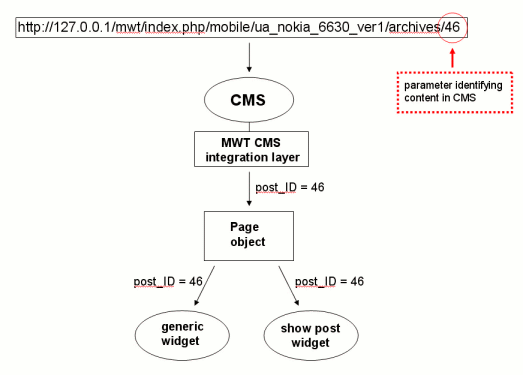
A part from being a container for the widgets, a page is also the interface between the CMS and the widgets. MWT provides a CMS integration layer allowing easily integration of the framework in any CMS. The integration layer is responsible for instantiating pages depending on the requested URL. When instantiating a page object the CMS layer passes to it a set of parameters that are needed to identify the content to be diplayed, the page object itself is responsible to make these parameters available to its inner widgets.
The dispatching process is illustrated in the diagram below where the requested URL maps a Wordpress post in MWT:
The Mobile site map term is used to classify all the pages making up the mobile version of a website.
In the case of MWT as a Wordpress plugin, there can be three different kind of pages in the Mobile site map:
- Content display pages: pages with pre-defined names responsible to display all type of content from CMS (in the case of Wordpress: posts, pages, comments, etc.)
- Wordpress pages: pages that map directly to wordpress pages
- User pages: user created pages that are only present in the mobile version of the site
As already described, for each content type in the CMS there is a corrisponding content display page.
The page receives a set of parameters that uniquely identifies the content to display from the CMS integration layer, and forwards the parameters to its inner widgets.
The table below displays information about content display pages for Wordpress:
| Content | Page name | Parameters | URL-mapping |
|---|---|---|---|
| home | */mobile/start | ||
| post | single_post | p (post ID) | /archives/postID |
| page | single_page | page_uri (page path) | /pages/page_path |
| category | category | category (category ID) | /archives/category/catID |
| page list | page_list | /pages | |
| comment list | comment_list | post_id (post ID) | /archives/comments/postID |
Values in the URL-mapping column are relative URLs (part of the URL after the device ID, see section URL rewriting).
*Home is the only URL that doesn't contain the device ID, if the URL of Wordpress blog is http://127.0.0.1/mwt, the complete URL for the home of the mobile version is http://127.0.0.1/mwt/index.php/mobile/start
In order to let users create a portion of the mobile site that is unrelated to the content in the CMS, MWT provides the ability to create user pages. A user page is a generic page that doesn't map content in the CMS. The url mapping of user pages is the following:
/generic/page_name
As an example, a page called mypage will be accessible from:
http://127.0.0.1/mwt/index.php/mobile/ua_id/generic/mypage
Widgets are reusable building blocks that make up pages. A widget is normally just a code snippet providing a specific functionality or displaying content from the CMS.
Every page defines an ordered list of widgets, whenthe pages object is created the inner widgets are rendered consecutively. The widget file can contain a section that defines the configuration options for the widget. To enhance reusability, widget behaviour can be page-dependant, as widgets can be configured differently from page to page.
Widget configuration is a XML fragment placed at the bottom of the widget file. The XML syntax is the following:
Example 1.1. An example XML definition for widgets configuration
<config>
	<description>widget description</description>
	<param name="param1_name" type="param1_type">
	<values default="default_value">value1,value2,value3</values>
	<description>param1 description</description>
	</param>
	<param name="param2_name" type="param2_type">
	<values default="default_values">value1,value2,value3</values>
	<description>param2 description</description>
	</param>
</config>
It's possible define as many configuration parameters as needed. Each parameter has a name, a type, a default value, a list of possible values and a description. The only obligatory field is the parameter name, all the fields will default to blank values.
Widgets can be placed in pages and configured in the MWT Editor. The configuration parameter type defines the form element used to set the parameter value in the editor. Valid types are:
- text (default)
- select:
- radio:
- checkbox:
- textarea:
- htmlarea:
Of course it only makes sense to provide a comma-separated list of possible values if the parameter type is select or radio.
Note
If you want to specify parameters values dynamically, you can provide a callback function instead of the comma-separated list of values:Example 1.2. Using a callback function to specify values of configuration parameters in widgets
	<param name="param_name" type="select">
	<values default="default_values">call_user_func(GetValues);</values>
	<description>The category of the posts to show</description>
	</param>
The widget body is the actual code of the widget. The code can simply display some graphics (e.g. a header widget) or informations (e.g. a weather widget) or provide some funcionality (e.g. a search widget). To write code for a widget you have to choices:
- write a normal PHP/XHTML script
- use taglibs (described in chapter 2)
The second choice, as explained in chapter 2, offers many advantages and it is therefore advised. It's always possible to adopt both choices in the same widget but it's better to focus on one approach.
When coding a widget you have access to a set of API that are grouped for clarity in the following classes:
- device control APIs: to list the supported device models and brands, get informations about the current device, force MWT to perform a device switch (described in chapter 1)
- url generation APIs: to be used when linking pages, this APIs generate URL for pages and content based on the current device ID
- widget state and configuration APIs: to retrieve input parameters that are needed to identify the content to display, to get the widget configuration, to retrieve the configuration of the current theme (see next paragraph), to get informations about the rendering page etc.
- helper APIs: this is a set of helper functions provided by MWT to facilitate the writing of widgets.
MWT APIs are described in detail in paragraph MWT APIs