# yoyo-pi


一个为 [pi](https://pi.dev) 打磨的扩展包,让终端里的 coding-agent 工作流更快、更清爽,也更顺手。
这是 Kenx 日常使用的 pi 配置,并封装成可复用的 GitHub 安装包:Vim 风格提示词编辑、自定义 TUI 主题和状态栏、Grok 风格 Agent 状态变体、右侧文件/待办覆盖层、交互式选择器、上下文快照,以及只读规划模式。
## 亮点
- **Vim 提示词编辑** — 使用 `/vim` 切换普通/插入/可视风格的提示词控制,包含状态提示和外部编辑器兜底。
- **自定义 TUI 外观** — 通过 `/theme`、`/theme-bg` 和 `/switch-statusbar` 切换主题、全屏背景覆盖,以及 8 种状态栏/输入框布局。
- **Grok 风格 Agent 状态** — `/switch-agentStatus <1-9|v1-v9>` 可切换 9 种终端原生的 thinking/executing/reading/writing 状态视图,显示最新 assistant 文本或最新工具日志以及当前文件;edit/write 渲染器会隐藏 diff 和文件内容。启用该 UI 时会隐藏重复的 thinking 占位提示。
- **苏格拉底式 QA 工作流** — `/qa-agent ` 位于现有 gr0k-hack 扩展内,会先澄清问题,再委托 `qa-knowledge`、`qa-web-research` 和 `qa-critic` 三个子 Agent 做求真式综合。
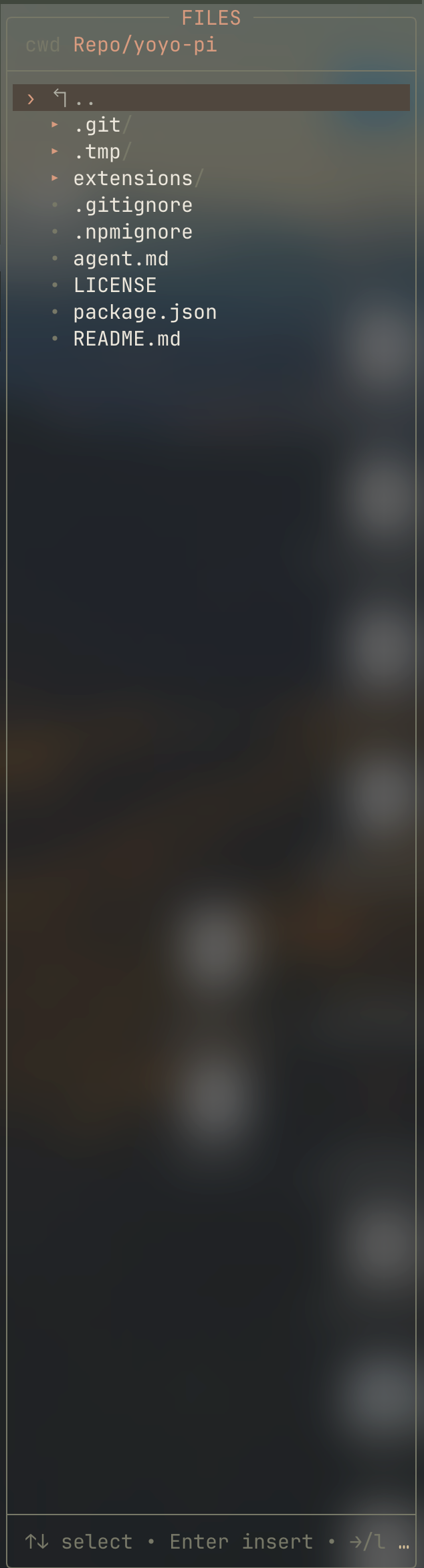
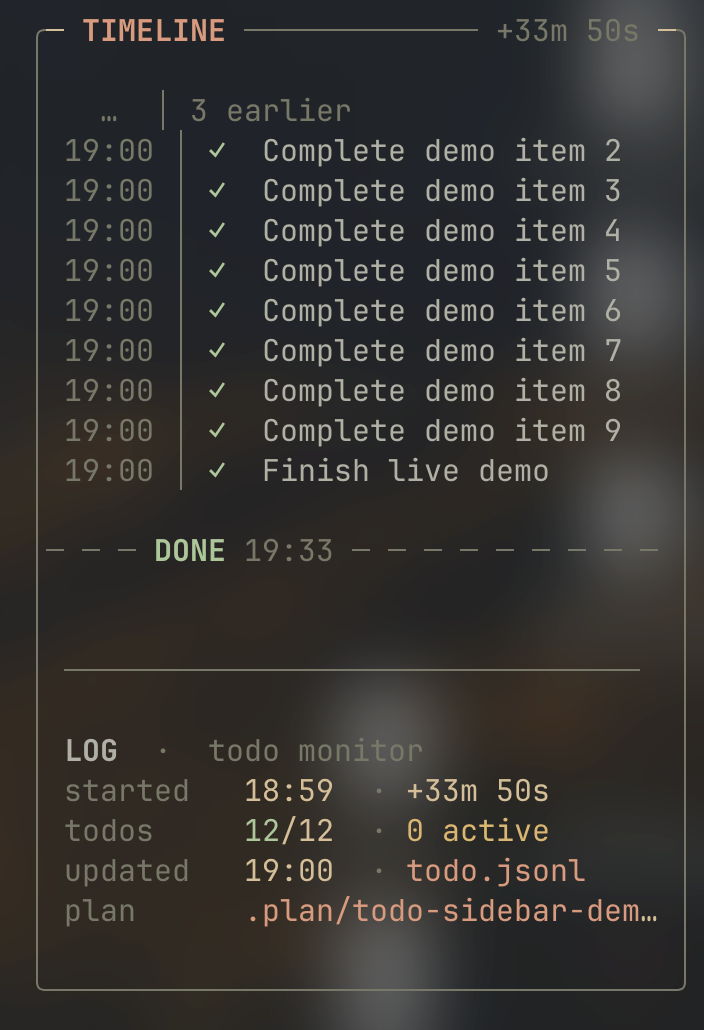
- **文件树 / 待办覆盖层** — 使用 `/filetree` 或 `Ctrl+Shift+F` 打开右侧文件选择器;使用 `/todo` 或 `Ctrl+Shift+T` 监控 `.plan/*.jsonl` 待办。
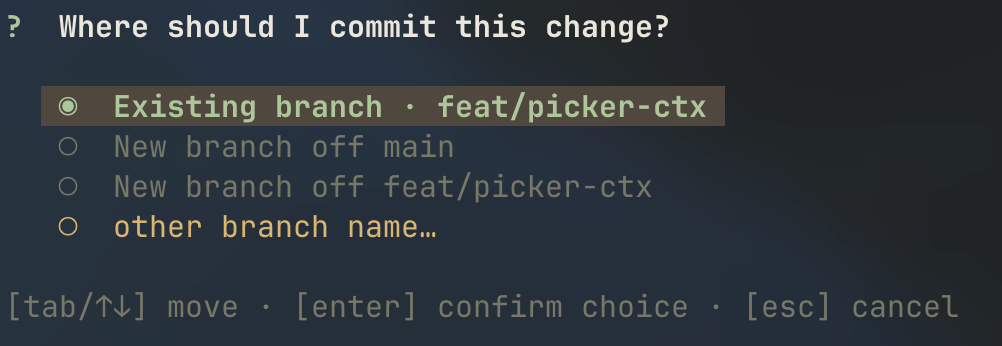
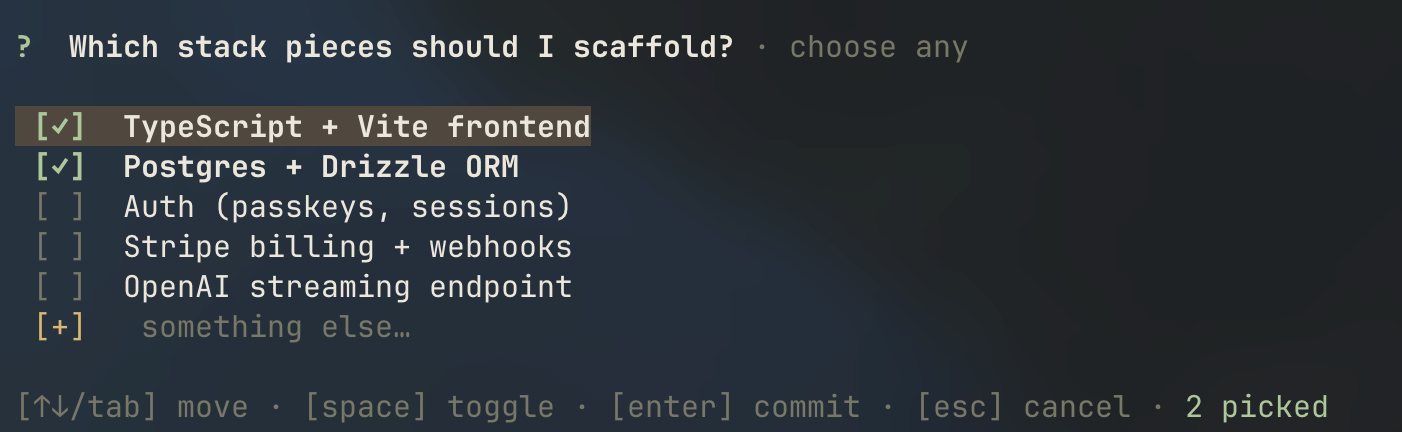
- **对 Agent 友好的选择器** — `single_choice`、`multiple_choice` 和 `choice_questions` 让模型可以用结构化方式向用户确认决策。
- **上下文快照** — `/clear` 保存当前分支上下文,然后用 `/restore ` 在之后恢复。
- **规划模式** — `/plan` 提供沙盒化的 `plan_agent`,用于在 `.plan/` 下编写实现计划和待办;退出前会预览 plan,批准后只把原始 prompt 和 plan 作为后续上下文交接。
## 预览
### 状态栏与输入框变化
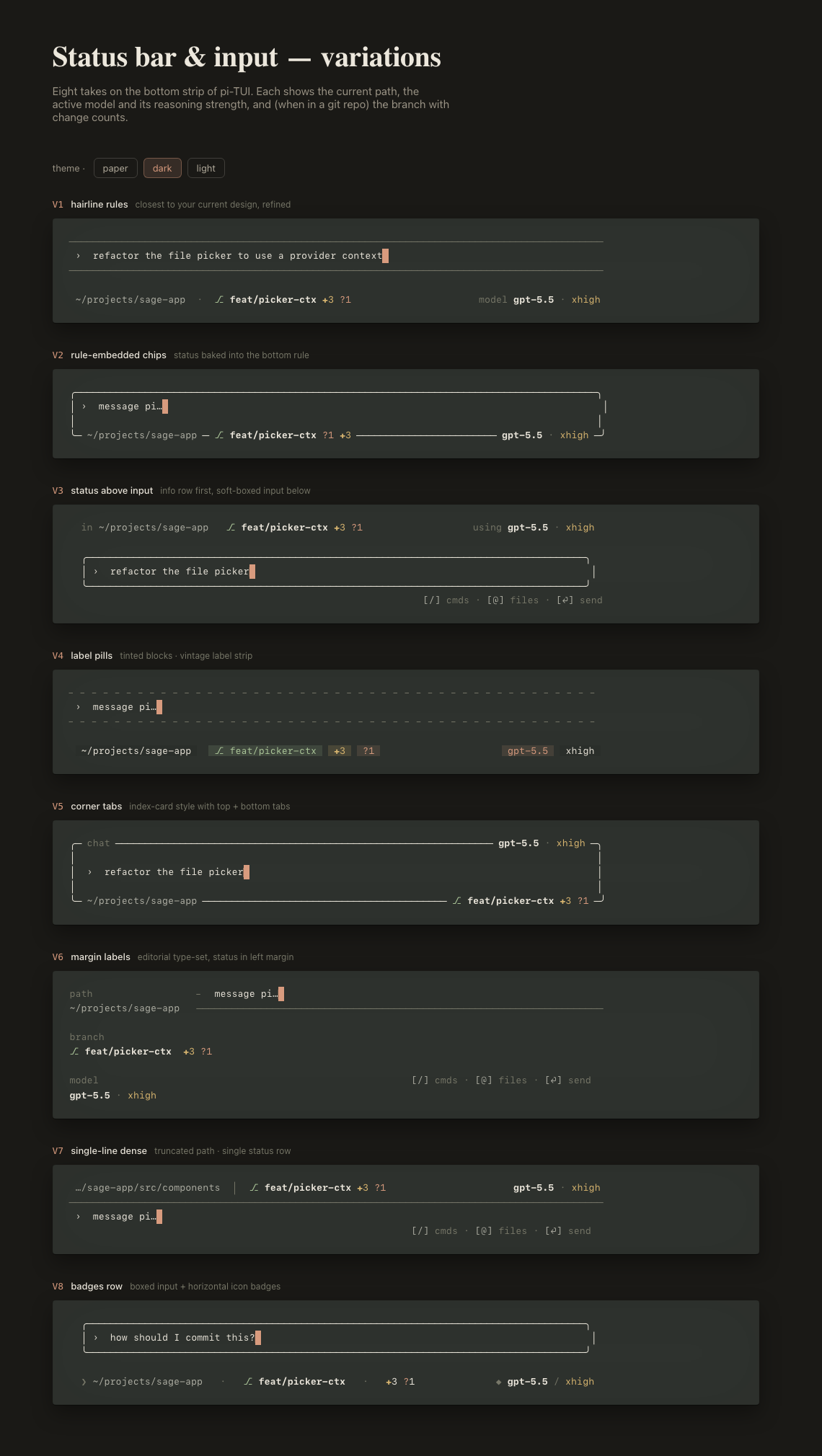 交互式 HTML 预览:[打开状态栏 playground](https://htmlpreview.github.io/?https://github.com/kenxcomp/yoyo-pi/blob/main/docs/previews/pi-tui-status-bar.html?v=9d4f442)。
### Agent 状态变化
交互式 HTML 预览:[打开状态栏 playground](https://htmlpreview.github.io/?https://github.com/kenxcomp/yoyo-pi/blob/main/docs/previews/pi-tui-status-bar.html?v=9d4f442)。
### Agent 状态变化
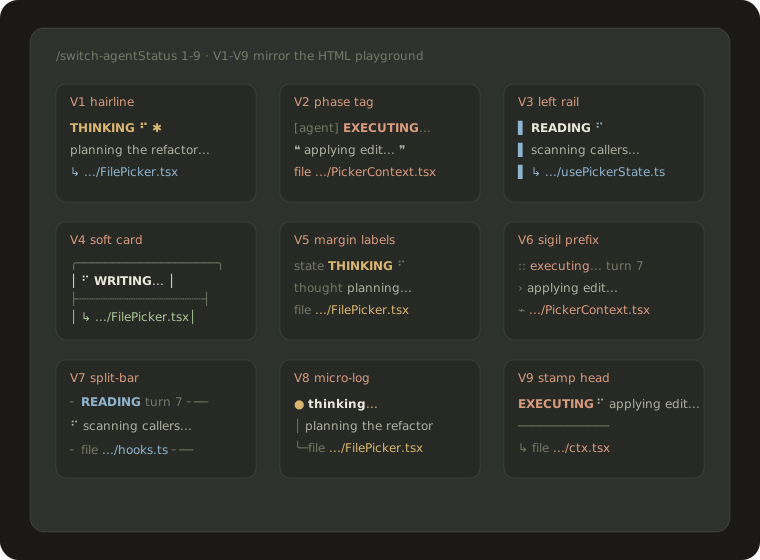 交互式 HTML 预览:[打开 Agent status playground](https://htmlpreview.github.io/?https://github.com/kenxcomp/yoyo-pi/blob/main/docs/previews/pi-tui-agent-status.html?v=gr0k-hack-3#v1)。
直接跳转:[V1](https://htmlpreview.github.io/?https://github.com/kenxcomp/yoyo-pi/blob/main/docs/previews/pi-tui-agent-status.html?v=gr0k-hack-3#v1) · [V2 phase tag](https://htmlpreview.github.io/?https://github.com/kenxcomp/yoyo-pi/blob/main/docs/previews/pi-tui-agent-status.html?v=gr0k-hack-3#v2) · [V3](https://htmlpreview.github.io/?https://github.com/kenxcomp/yoyo-pi/blob/main/docs/previews/pi-tui-agent-status.html?v=gr0k-hack-3#v3) · [V4](https://htmlpreview.github.io/?https://github.com/kenxcomp/yoyo-pi/blob/main/docs/previews/pi-tui-agent-status.html?v=gr0k-hack-3#v4) · [V5](https://htmlpreview.github.io/?https://github.com/kenxcomp/yoyo-pi/blob/main/docs/previews/pi-tui-agent-status.html?v=gr0k-hack-3#v5) · [V6](https://htmlpreview.github.io/?https://github.com/kenxcomp/yoyo-pi/blob/main/docs/previews/pi-tui-agent-status.html?v=gr0k-hack-3#v6) · [V7](https://htmlpreview.github.io/?https://github.com/kenxcomp/yoyo-pi/blob/main/docs/previews/pi-tui-agent-status.html?v=gr0k-hack-3#v7) · [V8](https://htmlpreview.github.io/?https://github.com/kenxcomp/yoyo-pi/blob/main/docs/previews/pi-tui-agent-status.html?v=gr0k-hack-3#v8) · [V9](https://htmlpreview.github.io/?https://github.com/kenxcomp/yoyo-pi/blob/main/docs/previews/pi-tui-agent-status.html?v=gr0k-hack-3#v9)。
### 文件树覆盖层
交互式 HTML 预览:[打开 Agent status playground](https://htmlpreview.github.io/?https://github.com/kenxcomp/yoyo-pi/blob/main/docs/previews/pi-tui-agent-status.html?v=gr0k-hack-3#v1)。
直接跳转:[V1](https://htmlpreview.github.io/?https://github.com/kenxcomp/yoyo-pi/blob/main/docs/previews/pi-tui-agent-status.html?v=gr0k-hack-3#v1) · [V2 phase tag](https://htmlpreview.github.io/?https://github.com/kenxcomp/yoyo-pi/blob/main/docs/previews/pi-tui-agent-status.html?v=gr0k-hack-3#v2) · [V3](https://htmlpreview.github.io/?https://github.com/kenxcomp/yoyo-pi/blob/main/docs/previews/pi-tui-agent-status.html?v=gr0k-hack-3#v3) · [V4](https://htmlpreview.github.io/?https://github.com/kenxcomp/yoyo-pi/blob/main/docs/previews/pi-tui-agent-status.html?v=gr0k-hack-3#v4) · [V5](https://htmlpreview.github.io/?https://github.com/kenxcomp/yoyo-pi/blob/main/docs/previews/pi-tui-agent-status.html?v=gr0k-hack-3#v5) · [V6](https://htmlpreview.github.io/?https://github.com/kenxcomp/yoyo-pi/blob/main/docs/previews/pi-tui-agent-status.html?v=gr0k-hack-3#v6) · [V7](https://htmlpreview.github.io/?https://github.com/kenxcomp/yoyo-pi/blob/main/docs/previews/pi-tui-agent-status.html?v=gr0k-hack-3#v7) · [V8](https://htmlpreview.github.io/?https://github.com/kenxcomp/yoyo-pi/blob/main/docs/previews/pi-tui-agent-status.html?v=gr0k-hack-3#v8) · [V9](https://htmlpreview.github.io/?https://github.com/kenxcomp/yoyo-pi/blob/main/docs/previews/pi-tui-agent-status.html?v=gr0k-hack-3#v9)。
### 文件树覆盖层
 ### Todo 时间线侧边栏
 ### 选择器
 ## 安装
发布到 npm 后可以这样安装:
```bash
pi install npm:yoyo-pi
```
也可以继续直接从 GitHub 安装:
```bash
pi install git:git@github.com:kenxcomp/yoyo-pi.git
```
不安装的临时测试方式:
```bash
pi -e git:git@github.com:kenxcomp/yoyo-pi.git
```
未固定版本的 Git URL 会在你运行 `pi update` 时跟随 `main`。只有在需要可复现版本时才固定 tag,例如 `git:git@github.com:kenxcomp/yoyo-pi.git@v0.1.5`。
安装本包后,请删除或移走 `~/.pi/agent/extensions/` 下旧的本地副本,避免重复注册 slash commands。
## 命令与工具
| 区域 | 命令 / 工具 | 提供能力 |
| --- | --- | --- |
| 上下文快照 | `/clear`, `/restore ` | 将当前分支上下文保存到 `.tmp/.jsonl`,之后可恢复。 |
| Vim 提示词模式 | `/vim [on\|off\|status]` | 类 Vim 的模态提示词编辑器,带外部编辑器兜底。 |
| 选择器 | `single_choice`, `multiple_choice`, `choice_questions`, `/choice-demo [multi\|questions]` | 行内胶囊单选、紧凑多选,以及分 tab 的批量问题。 |
| TUI 基础设施 | `/theme `, `/theme-bg `, `/filetree`, `Ctrl+Shift+F`, `/switch-statusbar <1-8\|0>` | 主题、可选全 TUI 背景填充、右侧文件选择覆盖层,以及自定义状态栏/输入框 UI。运行时偏好存储在 `~/.pi/agent/state/kenx-infra.json`。 |
| Agent 状态 UI | `/switch-agentStatus <1-9\|v1-v9\|0\|off\|status>` | 9 种 Grok 风格 thinking/executing/reading/writing 状态组件,以及紧凑的内置工具渲染器。V2 使用有意义的 `[agent]` phase tag,不再显示模拟步数。可在 [HTML playground](https://htmlpreview.github.io/?https://github.com/kenxcomp/yoyo-pi/blob/main/docs/previews/pi-tui-agent-status.html?v=gr0k-hack-3#v1) 查看对应预览。edit/write 只显示改动文件名,不显示 diff、文件内容和重复的 hidden-thinking 占位;偏好存储在 `~/.pi/agent/state/gr0k-hack.json`。 |
| gr0k-hack QA | `/qa-agent `, `subagent`, `qa_web_search` | 位于 `extensions/gr0k-hack/` 内的苏格拉底式 QA:先澄清,再运行内置 `extensions/gr0k-hack/agents/qa-*.md` Agent(`qa-knowledge` 无工具、`qa-web-research` 仅可用 `qa_web_search`、`qa-critic` 无工具)。`qa_web_search` 是只读搜索工具,可能需要 `JINA_API_KEY`/`JINA_AUTH_TOKEN`;没有可用 provider 时会明确说明限制。 |
| 规划 / Todo 工作流 | `/plan`, `/todo `, `/todo [show\|off\|status]`, `Ctrl+Shift+T`, `plan_agent` | 只读规划模式会委托 `agents/plan-agent.md` 进行规划;退出前展示 plan,并让用户选择开始执行、先搁置或继续修改。批准退出后,活跃 LLM 上下文会剪裁为原始 prompt + plan 交接;todo 模式会写入/监控 `.plan/todo.jsonl`,并要求 agent 在执行过程中持续更新状态。 |
## 开发
本包有意将 Pi 核心包列为可选 `peerDependencies`,因为 Pi 会在运行时提供它们。
`pi.extensions` manifest 会显式列出入口,因此 `extensions/plan-mode/sandbox.ts` 不会被当作普通扩展自动加载;它只会由子级 plan-agent 进程加载。QA 工作流属于 `./extensions/gr0k-hack/index.ts`;`extensions/gr0k-hack/agents/` 下的 helper/prompt 不应作为独立 `pi.extensions` 入口注册。
如果当前运行的 Pi 加载的是 `npm:yoyo-pi` 或 git package 缓存,而不是这个工作区,请先重新安装/同步包或用本地路径启动,再执行 `/reload` 来验证新的 gr0k-hack 命令与工具。
## 安装
发布到 npm 后可以这样安装:
```bash
pi install npm:yoyo-pi
```
也可以继续直接从 GitHub 安装:
```bash
pi install git:git@github.com:kenxcomp/yoyo-pi.git
```
不安装的临时测试方式:
```bash
pi -e git:git@github.com:kenxcomp/yoyo-pi.git
```
未固定版本的 Git URL 会在你运行 `pi update` 时跟随 `main`。只有在需要可复现版本时才固定 tag,例如 `git:git@github.com:kenxcomp/yoyo-pi.git@v0.1.5`。
安装本包后,请删除或移走 `~/.pi/agent/extensions/` 下旧的本地副本,避免重复注册 slash commands。
## 命令与工具
| 区域 | 命令 / 工具 | 提供能力 |
| --- | --- | --- |
| 上下文快照 | `/clear`, `/restore ` | 将当前分支上下文保存到 `.tmp/.jsonl`,之后可恢复。 |
| Vim 提示词模式 | `/vim [on\|off\|status]` | 类 Vim 的模态提示词编辑器,带外部编辑器兜底。 |
| 选择器 | `single_choice`, `multiple_choice`, `choice_questions`, `/choice-demo [multi\|questions]` | 行内胶囊单选、紧凑多选,以及分 tab 的批量问题。 |
| TUI 基础设施 | `/theme `, `/theme-bg `, `/filetree`, `Ctrl+Shift+F`, `/switch-statusbar <1-8\|0>` | 主题、可选全 TUI 背景填充、右侧文件选择覆盖层,以及自定义状态栏/输入框 UI。运行时偏好存储在 `~/.pi/agent/state/kenx-infra.json`。 |
| Agent 状态 UI | `/switch-agentStatus <1-9\|v1-v9\|0\|off\|status>` | 9 种 Grok 风格 thinking/executing/reading/writing 状态组件,以及紧凑的内置工具渲染器。V2 使用有意义的 `[agent]` phase tag,不再显示模拟步数。可在 [HTML playground](https://htmlpreview.github.io/?https://github.com/kenxcomp/yoyo-pi/blob/main/docs/previews/pi-tui-agent-status.html?v=gr0k-hack-3#v1) 查看对应预览。edit/write 只显示改动文件名,不显示 diff、文件内容和重复的 hidden-thinking 占位;偏好存储在 `~/.pi/agent/state/gr0k-hack.json`。 |
| gr0k-hack QA | `/qa-agent `, `subagent`, `qa_web_search` | 位于 `extensions/gr0k-hack/` 内的苏格拉底式 QA:先澄清,再运行内置 `extensions/gr0k-hack/agents/qa-*.md` Agent(`qa-knowledge` 无工具、`qa-web-research` 仅可用 `qa_web_search`、`qa-critic` 无工具)。`qa_web_search` 是只读搜索工具,可能需要 `JINA_API_KEY`/`JINA_AUTH_TOKEN`;没有可用 provider 时会明确说明限制。 |
| 规划 / Todo 工作流 | `/plan`, `/todo `, `/todo [show\|off\|status]`, `Ctrl+Shift+T`, `plan_agent` | 只读规划模式会委托 `agents/plan-agent.md` 进行规划;退出前展示 plan,并让用户选择开始执行、先搁置或继续修改。批准退出后,活跃 LLM 上下文会剪裁为原始 prompt + plan 交接;todo 模式会写入/监控 `.plan/todo.jsonl`,并要求 agent 在执行过程中持续更新状态。 |
## 开发
本包有意将 Pi 核心包列为可选 `peerDependencies`,因为 Pi 会在运行时提供它们。
`pi.extensions` manifest 会显式列出入口,因此 `extensions/plan-mode/sandbox.ts` 不会被当作普通扩展自动加载;它只会由子级 plan-agent 进程加载。QA 工作流属于 `./extensions/gr0k-hack/index.ts`;`extensions/gr0k-hack/agents/` 下的 helper/prompt 不应作为独立 `pi.extensions` 入口注册。
如果当前运行的 Pi 加载的是 `npm:yoyo-pi` 或 git package 缓存,而不是这个工作区,请先重新安装/同步包或用本地路径启动,再执行 `/reload` 来验证新的 gr0k-hack 命令与工具。