
Connect AI to Your Database with Natural Language — Enhanced Fork
An enhanced fork of Anarkh-Lee/universal-db-mcp, adding multi-database configuration, SSH tunneling, connection pooling, and improved MongoDB support on top of the original universal database MCP connector.




Enhancements • Features • Quick Start • Databases • Docs • Contributing
--- ## 🔀 Fork Origin & Enhancements > This project is forked from [Anarkh-Lee/universal-db-mcp](https://github.com/Anarkh-Lee/universal-db-mcp) (upstream v2.14.0). We are grateful to the original author for building such an excellent universal database MCP connector. This fork is published on npm as [`universal-db-mcp-plus`](https://www.npmjs.com/package/universal-db-mcp-plus). ### What's Different from Upstream | Category | Enhancement | Description | |----------|-------------|-------------| | **Multi-Database Config** | `databases.json` / `databases.yaml` | Configure and manage multiple database connections in a single file, with `${ENV_VAR}` support for secrets | | **SSH Tunneling** | SSH tunnel service | Access remote databases through SSH bastion hosts with automatic port forwarding | | **Connection Pooling** | Pool management service | Reusable adapter pool with health checks, auto-reconnection, and graceful shutdown | | **MongoDB Enhancements** | URI & Replica Set support | Full MongoDB connection string support, replica set through SSH tunnels, improved JSON query parsing with better error messages | | **Tool Descriptions** | Dynamic per-database-type | MCP tool descriptions are dynamically generated based on connected database type (SQL vs MongoDB vs Redis), giving AI better context | | **MySQL Optimization** | `BASE TABLE` filter | Restrict schema fetching to base tables only, avoiding views and system tables | | **MCP Verification** | `scripts/verify-mcp.js` | Automated MCP stdio protocol verification script | ### New Files Added - `src/services/config-service.ts` — Multi-database configuration management - `src/services/connection-pool.ts` — Database adapter pool with health monitoring - `src/services/ssh-tunnel.ts` — SSH tunnel creation and lifecycle management - `src/utils/tool-descriptions.ts` — Dynamic MCP tool descriptions per database type - `databases.json.example` / `databases.yaml.example` — Example multi-database config files - `scripts/verify-mcp.js` — MCP protocol verification utility --- ## Why Universal DB MCP? Imagine asking your AI assistant: *"Show me the top 10 customers by order value this month"* and getting instant results from your database - no SQL writing required. Universal DB MCP makes this possible by bridging AI assistants with your databases through the Model Context Protocol (MCP) and HTTP API. ``` You: "What's the average order value for users who signed up in the last 30 days?" AI: Let me query that for you... ┌─────────────────────────────────────┐ │ Average Order Value: $127.45 │ │ Total New Users: 1,247 │ │ Users with Orders: 892 (71.5%) │ └─────────────────────────────────────┘ ``` ## ✨ Features - **17 Database Support** - MySQL, PostgreSQL, Redis, Oracle, SQL Server, MongoDB, SQLite, and 10 Chinese domestic databases - **55+ Platform Integrations** - Works with Claude Desktop, Cursor, VS Code, ChatGPT, Dify, and [50+ other platforms](#-supported-platforms) - **Flexible Architecture** - 2 startup modes (stdio/http) with 4 access methods: MCP stdio, MCP SSE, MCP Streamable HTTP, and REST API - **Security First** - Read-only mode by default prevents accidental data modifications - **Intelligent Caching** - Schema caching with configurable TTL for blazing-fast performance - **Batch Query Optimization** - Up to 100x faster schema retrieval for large databases - **Schema Enhancement** - Table comments, implicit relationship inference for better Text2SQL accuracy - **Multi-Schema Support** - Automatic discovery of all user schemas (PostgreSQL, SQL Server, Oracle, DM, and more) - **Data Masking** - Automatic sensitive data protection (phone, email, ID card, bank card, etc.) - **Connection Stability** - Connection pooling, TCP Keep-Alive, and automatic reconnection for long-running sessions ### Performance Improvements | Tables | Before | After | Improvement | |--------|--------|-------|-------------| | 50 tables | ~5s | ~200ms | **25x faster** | | 100 tables | ~10s | ~300ms | **33x faster** | | 500 tables | ~50s | ~500ms | **100x faster** | ## 🚀 Quick Start ### Installation ```bash npm install -g universal-db-mcp-plus ``` ### MCP Mode (Claude Desktop) Add to your Claude Desktop configuration file: - **macOS**: `~/Library/Application Support/Claude/claude_desktop_config.json` - **Windows**: `%APPDATA%\Claude\claude_desktop_config.json` ```json { "mcpServers": { "my-database": { "command": "npx", "args": [ "universal-db-mcp-plus", "--type", "mysql", "--host", "localhost", "--port", "3306", "--user", "root", "--password", "your_password", "--database", "your_database" ] } } } ``` Restart Claude Desktop and start asking questions: - *"Show me the structure of the users table"* - *"Count orders from the last 7 days"* - *"Find the top 5 products by sales"* ### HTTP API Mode ```bash # Set environment variables export MODE=http export HTTP_PORT=3000 export API_KEYS=your-secret-key # Start the server npx universal-db-mcp-plus ``` ```bash # Test the API curl http://localhost:3000/api/health ``` ### MCP SSE Mode (Dify and Remote Access) When running in HTTP mode, the server also exposes MCP protocol endpoints via SSE (Server-Sent Events) and Streamable HTTP. This allows platforms like Dify to connect using the MCP protocol directly. **SSE Endpoint (Legacy):** ``` GET http://localhost:3000/sse?type=mysql&host=localhost&port=3306&user=root&password=xxx&database=mydb ``` **Streamable HTTP Endpoint (MCP 2025 Spec, Recommended):** ``` POST http://localhost:3000/mcp Headers: X-DB-Type: mysql X-DB-Host: localhost X-DB-Port: 3306 X-DB-User: root X-DB-Password: your_password X-DB-Database: your_database Body: MCP JSON-RPC request ``` | Endpoint | Method | Description | |----------|--------|-------------| | `/sse` | GET | Establish SSE connection (legacy) | | `/sse/message` | POST | Send message to SSE session | | `/mcp` | POST | Streamable HTTP endpoint (recommended) | | `/mcp` | GET | SSE stream for Streamable HTTP | | `/mcp` | DELETE | Close session | See [Dify Integration Guide](./docs/integrations/DIFY.md) for detailed setup instructions. ## 📊 Supported Databases | Database | Type | Default Port | Category | |----------|------|--------------|----------| | MySQL | `mysql` | 3306 | Open Source | | PostgreSQL | `postgres` | 5432 | Open Source | | Redis | `redis` | 6379 | NoSQL | | Oracle | `oracle` | 1521 | Commercial | | SQL Server | `sqlserver` | 1433 | Commercial | | MongoDB | `mongodb` | 27017 | NoSQL | | SQLite | `sqlite` | - | Embedded | | Dameng (达梦) | `dm` | 5236 | Chinese | | KingbaseES | `kingbase` | 54321 | Chinese | | GaussDB | `gaussdb` | 5432 | Chinese (Huawei) | | OceanBase | `oceanbase` | 2881 | Chinese (Ant) | | TiDB | `tidb` | 4000 | Distributed | | ClickHouse | `clickhouse` | 8123 | OLAP | | PolarDB | `polardb` | 3306 | Cloud (Alibaba) | | Vastbase | `vastbase` | 5432 | Chinese | | HighGo | `highgo` | 5866 | Chinese | | GoldenDB | `goldendb` | 3306 | Chinese (ZTE) | ## 🏗️ Architecture ``` ┌─────────────────────────────────────────────────────────────────────────┐ │ Universal DB MCP │ ├─────────────────────────────────────────────────────────────────────────┤ │ │ │ Startup Modes: │ │ ┌────────────────────────────┬────────────────────────────────────┐ │ │ │ stdio mode │ http mode │ │ │ │ (npm run start:mcp) │ (npm run start:http) │ │ │ └─────────────┬──────────────┴───────────────┬────────────────────┘ │ │ │ │ │ │ ▼ ▼ │ │ ┌─────────────────────────┐ ┌───────────────────────────────────┐ │ │ │ MCP Protocol │ │ HTTP Server │ │ │ │ (stdio transport) │ │ │ │ │ │ │ │ ┌─────────────────────────────┐ │ │ │ │ Tools: │ │ │ MCP Protocol │ │ │ │ │ • execute_query │ │ │ (SSE / Streamable HTTP) │ │ │ │ │ • get_schema │ │ │ │ │ │ │ │ • get_table_info │ │ │ Tools: (same as stdio) │ │ │ │ │ • clear_cache │ │ │ • execute_query │ │ │ │ │ • get_enum_values │ │ │ • get_schema │ │ │ │ │ • get_sample_data │ │ │ • get_table_info │ │ │ │ │ • connect_database │ │ │ • clear_cache │ │ │ │ │ • disconnect_database │ │ │ • get_enum_values │ │ │ │ │ • get_connection_status│ │ │ • get_sample_data │ │ │ │ │ │ │ │ • connect_database │ │ │ │ │ For: Claude Desktop, │ │ │ • disconnect_database │ │ │ │ │ Cursor, etc. │ │ │ • get_connection_status │ │ │ │ └─────────────┬───────────┘ │ │ │ │ │ │ │ │ │ For: Dify, Remote Access │ │ │ │ │ │ └──────────────┬──────────────┘ │ │ │ │ │ │ │ │ │ │ │ ┌──────────────┴──────────────┐ │ │ │ │ │ │ REST API │ │ │ │ │ │ │ │ │ │ │ │ │ │ Endpoints: │ │ │ │ │ │ │ • /api/connect │ │ │ │ │ │ │ • /api/query │ │ │ │ │ │ │ • /api/schema │ │ │ │ │ │ │ • ... (10+ endpoints) │ │ │ │ │ │ │ │ │ │ │ │ │ │ For: Coze, n8n, Custom │ │ │ │ │ │ └──────────────┬──────────────┘ │ │ │ │ └─────────────────┼─────────────────┘ │ │ │ │ │ │ └──────────────────┬───────────────┘ │ │ ▼ │ │ ┌──────────────────────────────────────────────────────────────────┐ │ │ │ Core Business Logic │ │ │ │ • Query Execution • Schema Caching │ │ │ │ • Safety Validation • Connection Management │ │ │ └──────────────────────────────────┬───────────────────────────────┘ │ │ ▼ │ │ ┌──────────────────────────────────────────────────────────────────┐ │ │ │ Database Adapter Layer │ │ │ │ MySQL │ PostgreSQL │ Redis │ Oracle │ MongoDB │ SQLite │ ... │ │ │ │ (Connection Pool + TCP Keep-Alive + Auto-Retry) │ │ │ └──────────────────────────────────────────────────────────────────┘ │ │ │ └─────────────────────────────────────────────────────────────────────────┘ ``` ## 🔒 Security By default, Universal DB MCP runs in **read-only mode**, blocking all write operations (INSERT, UPDATE, DELETE, DROP, etc.). ### Permission Modes Fine-grained permission control is supported for flexible configuration: | Mode | Allowed Operations | Description | |------|-------------------|-------------| | `safe` (default) | SELECT | Read-only, safest | | `readwrite` | SELECT, INSERT, UPDATE | Read/write but no delete | | `full` | All operations | Full control (dangerous!) | | `custom` | Custom combination | Specify via `--permissions` | **Permission Types:** - `read` - SELECT queries (always included) - `insert` - INSERT, REPLACE - `update` - UPDATE - `delete` - DELETE, TRUNCATE - `ddl` - CREATE, ALTER, DROP, RENAME **Usage Examples:** ```bash # Read-only mode (default) npx universal-db-mcp-plus --type mysql ... # Read/write but no delete npx universal-db-mcp-plus --type mysql --permission-mode readwrite ... # Custom: only read and insert npx universal-db-mcp-plus --type mysql --permissions read,insert ... # Full control (equivalent to --danger-allow-write) npx universal-db-mcp-plus --type mysql --permission-mode full ... ``` **Permission Configuration by Transport:** > ⚠️ Different transports use different parameter naming conventions! | Transport | Parameter Location | Permission Mode | Custom Permissions | |-----------|-------------------|-----------------|-------------------| | STDIO (Claude Desktop) | CLI args | `--permission-mode` | `--permissions` | | SSE (Dify, etc.) | URL Query | `permissionMode` | `permissions` | | Streamable HTTP | HTTP Header | `X-DB-Permission-Mode` | `X-DB-Permissions` | | REST API | JSON Body | `permissionMode` | `permissions` | **Best Practices:** - Never enable write mode in production - Use dedicated read-only database accounts - Connect through VPN or bastion hosts - Regularly audit query logs ## 🔌 Supported Platforms Universal DB MCP works with any platform that supports the MCP protocol or REST API. Here's a comprehensive list: ### AI-Powered Code Editors & IDEs | Platform | Access Method | Description | Guide | |----------|---------------|-------------|-------| | [Cursor](https://cursor.sh/) | MCP stdio | AI-powered code editor with built-in MCP support | [EN](./docs/integrations/CURSOR.md) / [中文](./docs/integrations/CURSOR.zh-CN.md) | | [Windsurf](https://codeium.com/windsurf) | MCP stdio | Codeium's AI IDE with Cascade agent | [EN](./docs/integrations/WINDSURF.md) / [中文](./docs/integrations/WINDSURF.zh-CN.md) | | [VS Code](https://code.visualstudio.com/) | MCP stdio / REST API | Via GitHub Copilot agent mode or Cline/Continue extensions | [EN](./docs/integrations/VSCODE.md) / [中文](./docs/integrations/VSCODE.zh-CN.md) | | [Zed](https://zed.dev/) | MCP stdio | High-performance open-source code editor | [EN](./docs/integrations/ZED.md) / [中文](./docs/integrations/ZED.zh-CN.md) | | [IntelliJ IDEA](https://www.jetbrains.com/idea/) | MCP stdio | JetBrains IDE with MCP support (2025.1+) | [EN](./docs/integrations/JETBRAINS.md) / [中文](./docs/integrations/JETBRAINS.zh-CN.md) | | [PyCharm](https://www.jetbrains.com/pycharm/) | MCP stdio | JetBrains Python IDE | [EN](./docs/integrations/JETBRAINS.md) / [中文](./docs/integrations/JETBRAINS.zh-CN.md) | | [WebStorm](https://www.jetbrains.com/webstorm/) | MCP stdio | JetBrains JavaScript IDE | [EN](./docs/integrations/JETBRAINS.md) / [中文](./docs/integrations/JETBRAINS.zh-CN.md) | | [Android Studio](https://developer.android.com/studio) | MCP stdio | Via JetBrains MCP plugin | [EN](./docs/integrations/JETBRAINS.md) / [中文](./docs/integrations/JETBRAINS.zh-CN.md) | | [Neovim](https://neovim.io/) | MCP stdio | Via MCPHub.nvim plugin | [EN](./docs/integrations/NEOVIM.md) / [中文](./docs/integrations/NEOVIM.zh-CN.md) | | [Emacs](https://www.gnu.org/software/emacs/) | MCP stdio | Via mcp.el package | [EN](./docs/integrations/EMACS.md) / [中文](./docs/integrations/EMACS.zh-CN.md) | ### AI Coding Assistants | Platform | Access Method | Description | Guide | |----------|---------------|-------------|-------| | [Claude Code](https://claude.ai/code) | MCP stdio | Anthropic's agentic coding tool | [EN](./docs/integrations/CLAUDE-CODE.md) / [中文](./docs/integrations/CLAUDE-CODE.zh-CN.md) | | [GitHub Copilot](https://github.com/features/copilot) | MCP stdio | Agent mode in VS Code/JetBrains | [EN](./docs/integrations/GITHUB-COPILOT.md) / [中文](./docs/integrations/GITHUB-COPILOT.zh-CN.md) | | [Cline](https://github.com/cline/cline) | MCP stdio / REST API | Autonomous coding agent for VS Code | [EN](./docs/integrations/CLINE.md) / [中文](./docs/integrations/CLINE.zh-CN.md) | | [Continue](https://continue.dev/) | MCP stdio | Open-source AI code assistant | [EN](./docs/integrations/CONTINUE.md) / [中文](./docs/integrations/CONTINUE.zh-CN.md) | | [Roo Code](https://github.com/roovet/roo-code) | MCP stdio | Fork of Cline for VS Code | [EN](./docs/integrations/ROO-CODE.md) / [中文](./docs/integrations/ROO-CODE.zh-CN.md) | | [Sourcegraph Cody](https://sourcegraph.com/cody) | MCP stdio | AI coding assistant | [EN](./docs/integrations/SOURCEGRAPH-CODY.md) / [中文](./docs/integrations/SOURCEGRAPH-CODY.zh-CN.md) | | [Amazon Q Developer](https://aws.amazon.com/q/developer/) | MCP stdio | AWS AI coding assistant | [EN](./docs/integrations/AMAZON-Q-DEVELOPER.md) / [中文](./docs/integrations/AMAZON-Q-DEVELOPER.zh-CN.md) | | [Devin](https://devin.ai/) | MCP stdio | AI software engineer | [EN](./docs/integrations/DEVIN.md) / [中文](./docs/integrations/DEVIN.zh-CN.md) | | [Goose](https://github.com/block/goose) | MCP stdio | Block's AI coding agent | [EN](./docs/integrations/GOOSE.md) / [中文](./docs/integrations/GOOSE.zh-CN.md) | | [Gemini CLI](https://github.com/google-gemini/gemini-cli) | MCP stdio | Google's command-line AI tool | [EN](./docs/integrations/GEMINI-CLI.md) / [中文](./docs/integrations/GEMINI-CLI.zh-CN.md) | ### Desktop AI Chat Applications | Platform | Access Method | Description | Guide | |----------|---------------|-------------|-------| | [Claude Desktop](https://claude.ai/download) | MCP stdio | Anthropic's official desktop app | [EN](./docs/integrations/CLAUDE-DESKTOP.md) / [中文](./docs/integrations/CLAUDE-DESKTOP.zh-CN.md) | | [ChatGPT Desktop](https://openai.com/chatgpt/desktop/) | MCP SSE/Streamable HTTP | OpenAI's desktop app with MCP connectors | [EN](./docs/integrations/CHATGPT.md) / [中文](./docs/integrations/CHATGPT.zh-CN.md) | | [Cherry Studio](https://github.com/kangfenmao/cherry-studio) | MCP stdio | Multi-model desktop chat app | [EN](./docs/integrations/CHERRY-STUDIO.md) / [中文](./docs/integrations/CHERRY-STUDIO.zh-CN.md) | | [LM Studio](https://lmstudio.ai/) | MCP stdio | Run local LLMs with MCP support | [EN](./docs/integrations/LM-STUDIO.md) / [中文](./docs/integrations/LM-STUDIO.zh-CN.md) | | [Jan](https://jan.ai/) | MCP stdio | Open-source ChatGPT alternative | [EN](./docs/integrations/JAN.md) / [中文](./docs/integrations/JAN.zh-CN.md) | | [Msty](https://msty.app/) | MCP stdio | Desktop AI chat application | [EN](./docs/integrations/MSTY.md) / [中文](./docs/integrations/MSTY.zh-CN.md) | | [LibreChat](https://github.com/danny-avila/LibreChat) | MCP stdio | Open-source chat interface | [EN](./docs/integrations/LIBRECHAT.md) / [中文](./docs/integrations/LIBRECHAT.zh-CN.md) | | [Witsy](https://witsy.app/) | MCP stdio | Desktop AI assistant | [EN](./docs/integrations/WITSY.md) / [中文](./docs/integrations/WITSY.zh-CN.md) | | [5ire](https://github.com/5ire-tech/5ire) | MCP stdio | Cross-platform AI chat | [EN](./docs/integrations/5IRE.md) / [中文](./docs/integrations/5IRE.zh-CN.md) | | [ChatMCP](https://github.com/daodao97/chatmcp) | MCP stdio | MCP-focused chat UI | [EN](./docs/integrations/CHATMCP.md) / [中文](./docs/integrations/CHATMCP.zh-CN.md) | | [HyperChat](https://github.com/BigSweetPotatoStudio/HyperChat) | MCP stdio | Multi-platform chat app | [EN](./docs/integrations/HYPERCHAT.md) / [中文](./docs/integrations/HYPERCHAT.zh-CN.md) | | [Tome](https://github.com/runebook/tome) | MCP stdio | macOS app for local LLMs | [EN](./docs/integrations/TOME.md) / [中文](./docs/integrations/TOME.zh-CN.md) | ### Web-Based AI Platforms | Platform | Access Method | Description | Guide | |----------|---------------|-------------|-------| | [Claude.ai](https://claude.ai/) | MCP SSE/Streamable HTTP | Anthropic's web interface | [EN](./docs/integrations/CLAUDE-AI.md) / [中文](./docs/integrations/CLAUDE-AI.zh-CN.md) | | [ChatGPT](https://chat.openai.com/) | MCP SSE/Streamable HTTP | Via custom connectors | [EN](./docs/integrations/CHATGPT.md) / [中文](./docs/integrations/CHATGPT.zh-CN.md) | | [Dify](https://dify.ai/) | MCP SSE/Streamable HTTP | LLM app development platform | [EN](./docs/integrations/DIFY.md) / [中文](./docs/integrations/DIFY.zh-CN.md) | | [Coze](https://www.coze.com/) | REST API | ByteDance's AI bot platform | [EN](./docs/integrations/COZE.md) / [中文](./docs/integrations/COZE.zh-CN.md) | | [n8n](https://n8n.io/) | REST API / MCP | Workflow automation platform | [EN](./docs/integrations/N8N.md) / [中文](./docs/integrations/N8N.zh-CN.md) | | [Replit](https://replit.com/) | MCP stdio | Online IDE with AI agent | [EN](./docs/integrations/REPLIT.md) / [中文](./docs/integrations/REPLIT.zh-CN.md) | | [MindPal](https://mindpal.io/) | MCP SSE/Streamable HTTP | No-code AI agent builder | [EN](./docs/integrations/MINDPAL.md) / [中文](./docs/integrations/MINDPAL.zh-CN.md) | ### Agent Frameworks & SDKs | Platform | Access Method | Description | Guide | |----------|---------------|-------------|-------| | [LangChain](https://langchain.com/) | MCP stdio | Popular LLM framework | [EN](./docs/integrations/LANGCHAIN.md) / [中文](./docs/integrations/LANGCHAIN.zh-CN.md) | | [Smolagents](https://github.com/huggingface/smolagents) | MCP stdio | Hugging Face agent library | [EN](./docs/integrations/SMOLAGENTS.md) / [中文](./docs/integrations/SMOLAGENTS.zh-CN.md) | | [OpenAI Agents SDK](https://platform.openai.com/) | MCP SSE/Streamable HTTP | OpenAI's agent framework | [EN](./docs/integrations/OPENAI-AGENTS-SDK.md) / [中文](./docs/integrations/OPENAI-AGENTS-SDK.zh-CN.md) | | [Amazon Bedrock Agents](https://aws.amazon.com/bedrock/) | MCP SSE/Streamable HTTP | AWS AI agent service | [EN](./docs/integrations/AMAZON-BEDROCK-AGENTS.md) / [中文](./docs/integrations/AMAZON-BEDROCK-AGENTS.zh-CN.md) | | [Google ADK](https://cloud.google.com/) | MCP stdio | Google's Agent Development Kit | [EN](./docs/integrations/GOOGLE-ADK.md) / [中文](./docs/integrations/GOOGLE-ADK.zh-CN.md) | | [Vercel AI SDK](https://sdk.vercel.ai/) | MCP stdio | Vercel's AI development kit | [EN](./docs/integrations/VERCEL-AI-SDK.md) / [中文](./docs/integrations/VERCEL-AI-SDK.zh-CN.md) | | [Spring AI](https://spring.io/projects/spring-ai) | MCP stdio | Java/Spring AI framework | [EN](./docs/integrations/SPRING-AI.md) / [中文](./docs/integrations/SPRING-AI.zh-CN.md) | ### CLI Tools & Terminal | Platform | Access Method | Description | Guide | |----------|---------------|-------------|-------| | [Claude Code CLI](https://claude.ai/code) | MCP stdio | Terminal-based coding agent | [EN](./docs/integrations/CLAUDE-CODE.md) / [中文](./docs/integrations/CLAUDE-CODE.zh-CN.md) | | [Warp](https://www.warp.dev/) | MCP stdio | AI-powered terminal | [EN](./docs/integrations/WARP.md) / [中文](./docs/integrations/WARP.zh-CN.md) | | [Oterm](https://github.com/ggozad/oterm) | MCP stdio | Chat with Ollama via CLI | [EN](./docs/integrations/OTERM.md) / [中文](./docs/integrations/OTERM.zh-CN.md) | | [MCPHost](https://github.com/mark3labs/mcphost) | MCP stdio | CLI chat with LLMs | [EN](./docs/integrations/MCPHOST.md) / [中文](./docs/integrations/MCPHOST.zh-CN.md) | ### Productivity & Automation | Platform | Access Method | Description | Guide | |----------|---------------|-------------|-------| | [Raycast](https://raycast.com/) | MCP stdio | macOS productivity launcher | [EN](./docs/integrations/RAYCAST.md) / [中文](./docs/integrations/RAYCAST.zh-CN.md) | | [Notion](https://notion.so/) | MCP SSE/Streamable HTTP | Workspace with AI integration | [EN](./docs/integrations/NOTION.md) / [中文](./docs/integrations/NOTION.zh-CN.md) | | [Obsidian](https://obsidian.md/) | MCP stdio | Via MCP Tools plugin | [EN](./docs/integrations/OBSIDIAN.md) / [中文](./docs/integrations/OBSIDIAN.zh-CN.md) | | [Home Assistant](https://www.home-assistant.io/) | MCP stdio | Home automation platform | [EN](./docs/integrations/HOME-ASSISTANT.md) / [中文](./docs/integrations/HOME-ASSISTANT.zh-CN.md) | ### Messaging Platform Integrations | Platform | Access Method | Description | Guide | |----------|---------------|-------------|-------| | [Slack](https://slack.com/) | MCP stdio / REST API | Via Slack MCP bots | [EN](./docs/integrations/SLACK.md) / [中文](./docs/integrations/SLACK.zh-CN.md) | | [Discord](https://discord.com/) | MCP stdio / REST API | Via Discord MCP bots | [EN](./docs/integrations/DISCORD.md) / [中文](./docs/integrations/DISCORD.zh-CN.md) | | [Mattermost](https://mattermost.com/) | MCP stdio | Open-source messaging | [EN](./docs/integrations/MATTERMOST.md) / [中文](./docs/integrations/MATTERMOST.zh-CN.md) | ### Local LLM Runners | Platform | Access Method | Description | Guide | |----------|---------------|-------------|-------| | [Ollama](https://ollama.ai/) | MCP stdio | Run local LLMs | [EN](./docs/integrations/OLLAMA.md) / [中文](./docs/integrations/OLLAMA.zh-CN.md) | | [LM Studio](https://lmstudio.ai/) | MCP stdio | Local LLM desktop app | [EN](./docs/integrations/LM-STUDIO.md) / [中文](./docs/integrations/LM-STUDIO.zh-CN.md) | | [Jan](https://jan.ai/) | MCP stdio | Offline ChatGPT alternative | [EN](./docs/integrations/JAN.md) / [中文](./docs/integrations/JAN.zh-CN.md) | ### Development & Testing Tools | Platform | Access Method | Description | Guide | |----------|---------------|-------------|-------| | [MCP Inspector](https://github.com/modelcontextprotocol/inspector) | MCP stdio | Official MCP debugging tool | [EN](./docs/integrations/MCP-INSPECTOR.md) / [中文](./docs/integrations/MCP-INSPECTOR.zh-CN.md) | | [Postman](https://postman.com/) | REST API / MCP | API testing platform | [EN](./docs/integrations/POSTMAN.md) / [中文](./docs/integrations/POSTMAN.zh-CN.md) | > **Note**: Any MCP-compatible client can connect via stdio (local) or SSE/Streamable HTTP (remote). Any HTTP client can use the REST API. ## 📚 Documentation ### Getting Started - [Installation Guide](./docs/getting-started/installation.md) - [Quick Start](./docs/getting-started/quick-start.md) - [Configuration](./docs/getting-started/configuration.md) - [Usage Examples](./docs/getting-started/examples.md) ### Deployment - [Deployment Overview](./docs/deployment/README.md) - [Local Deployment](./docs/deployment/local.md) - [Docker Deployment](./docs/deployment/docker.md) - [Cloud Deployment](./docs/deployment/cloud/) ### Database Guides - [Database Support Overview](./docs/databases/README.md) - [MySQL](./docs/databases/mysql.md) - [PostgreSQL](./docs/databases/postgresql.md) - [More databases...](./docs/databases/) ### HTTP API - [API Reference](./docs/http-api/API_REFERENCE.md) - [Deployment Guide](./docs/http-api/DEPLOYMENT.md) ### Integrations **AI Editors & IDEs:** [Cursor](./docs/integrations/CURSOR.md) | [VS Code](./docs/integrations/VSCODE.md) | [JetBrains](./docs/integrations/JETBRAINS.md) | [Windsurf](./docs/integrations/WINDSURF.md) | [Zed](./docs/integrations/ZED.md) | [Neovim](./docs/integrations/NEOVIM.md) | [Emacs](./docs/integrations/EMACS.md) **AI Assistants:** [Claude Desktop](./docs/integrations/CLAUDE-DESKTOP.md) | [Claude Code](./docs/integrations/CLAUDE-CODE.md) | [GitHub Copilot](./docs/integrations/GITHUB-COPILOT.md) | [Cline](./docs/integrations/CLINE.md) | [Continue](./docs/integrations/CONTINUE.md) **AI Platforms:** [Dify](./docs/integrations/DIFY.md) | [Coze](./docs/integrations/COZE.md) | [n8n](./docs/integrations/N8N.md) | [ChatGPT](./docs/integrations/CHATGPT.md) | [LangChain](./docs/integrations/LANGCHAIN.md) **Desktop Apps:** [Cherry Studio](./docs/integrations/CHERRY-STUDIO.md) | [LM Studio](./docs/integrations/LM-STUDIO.md) | [Jan](./docs/integrations/JAN.md) | [Ollama](./docs/integrations/OLLAMA.md) **Messaging:** [Slack](./docs/integrations/SLACK.md) | [Discord](./docs/integrations/DISCORD.md) **Tools:** [MCP Inspector](./docs/integrations/MCP-INSPECTOR.md) | [Postman](./docs/integrations/POSTMAN.md) > 📁 [View all 55 integration guides](./docs/integrations/) | 中文版本请在对应文档名后加 `.zh-CN` ### Advanced - [Security Guide](./docs/guides/security.md) - [Multi-tenant Guide](./docs/guides/multi-tenant.md) - [Architecture](./docs/development/architecture.md) - [Troubleshooting](./docs/operations/troubleshooting.md) ## 🤝 Contributing Contributions are welcome! Please read our [Contributing Guide](./CONTRIBUTING.md) before submitting a Pull Request. ```bash # Clone this repository git clone https://github.com/ppanphper/universal-db-mcp.git # Install dependencies npm install # Build npm run build # Run tests npm test ``` ## 📄 License This project is licensed under the [MIT License](./LICENSE). ## 🌟 Star History If you find this project useful, please consider giving a star to both the [upstream repo](https://github.com/Anarkh-Lee/universal-db-mcp) and this enhanced fork! [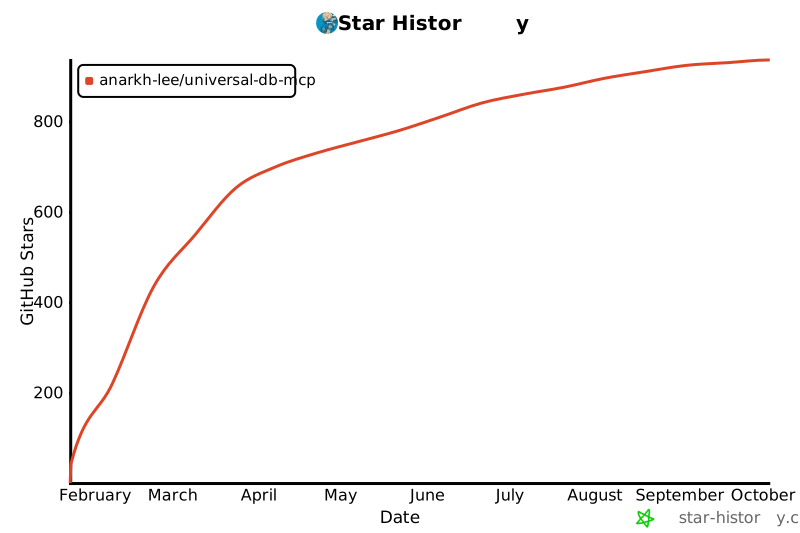](https://star-history.com/#Anarkh-Lee/universal-db-mcp&Date) ## 📝 Changelog See [CHANGELOG.md](./CHANGELOG.md) for a detailed version history. ## 🙏 Acknowledgements This project is based on [universal-db-mcp](https://github.com/Anarkh-Lee/universal-db-mcp) by [Anarkh-Lee](https://github.com/Anarkh-Lee). We deeply appreciate the original author's work in building this comprehensive universal database MCP connector. ---Original project by Anarkh-Lee · Enhanced by ppanphper