<div align="center">

<img src="docs/images/banner.png" alt="Tripo Studio for Codex — Your Conversational 3D Studio" width="100%" />

<p align="center">
  <a href="README.md"><b>简体中文</b></a> ·
  <a href="README.zh-TW.md"><b>繁體中文</b></a> ·
  <a href="README.en.md"><b>English</b></a> ·
  <a href="README.ja.md"><b>日本語</b></a> ·
  <a href="README.ko.md"><b>한국어</b></a>
</p>

# Tripo Studio for Codex

**Your own one-person 3D studio. Create, sculpt, rig, and export 3D assets inside Codex with natural language.**

_Your one-stop 3D AI studio inside Codex. Describe, sculpt, rig, and export 3D models with one sentence — powered by Tripo Studio & local Blender pipeline._

<p align="center">
  <a href="#2-installation--quick-start"><img src="https://img.shields.io/badge/INSTALL-CODEX%20PLUGIN-000000?style=for-the-badge&logo=openai&logoColor=white" alt="Install Plugin" /></a>
  <a href="https://www.npmjs.com/package/tripo-studio-plugin"><img src="https://img.shields.io/badge/NPM-v0.3.13-CB3837?style=for-the-badge&logo=npm&logoColor=white" alt="NPM Package" /></a>
  <a href="https://github.com/GrinZero/tripo-studio-plugin"><img src="https://img.shields.io/badge/GITHUB-REPO-181717?style=for-the-badge&logo=github&logoColor=white" alt="GitHub Repo" /></a>
  <a href="#3-tool-matrix--capabilities-68-mcp-tools"><img src="https://img.shields.io/badge/DOCS-68%20TOOLS-2563EB?style=for-the-badge" alt="68 Tools" /></a>
</p>

<p align="center">
  <img src="https://img.shields.io/badge/built%20on-Codex%20MCP%20Apps-6366f1?style=flat-square&logo=openai&logoColor=white" alt="Codex MCP Apps" />
  <img src="https://img.shields.io/badge/models-H3.1%20%C2%B7%20Smart%20Mesh%20%C2%B7%20Rig%20V3-1f2937?style=flat-square" alt="Models" />
  <img src="https://img.shields.io/badge/credits-BYO%20Account%20%C2%B7%20Zero%20Markup-ff5722?style=flat-square" alt="BYO Account" />
  <img src="https://img.shields.io/badge/local%20engine-Blender%20Integrated-e87d0d?style=flat-square&logo=blender&logoColor=white" alt="Blender Integrated" />
  <img src="https://img.shields.io/badge/tools-68%20MCP%20Tools-10b981?style=flat-square" alt="68 MCP Tools" />
  <a href="LICENSE"><img src="https://img.shields.io/badge/license-MIT-10b981?style=flat-square" alt="MIT License" /></a>
  <img src="https://img.shields.io/badge/i18n-%E7%AE%80%E4%BD%93%20%C2%B7%20%E7%B9%81%E9%AB%94%20%C2%B7%20EN%20%C2%B7%20%E6%97%A5%E6%9C%AC%E8%AA%9E%20%C2%B7%20%ED%95%9C%EA%B5%AD%EC%96%B4-8b5cf6?style=flat-square" alt="Multi-language" />
</p>

<p align="center">
  <a href="#1-what-it-is"><b>💡 What it is</b></a> ·
  <a href="#2-installation--quick-start"><b>🚀 Quick Start</b></a> ·
  <a href="#3-tool-matrix--capabilities-68-mcp-tools"><b>🛠️ 68 Tools</b></a> ·
  <a href="#4-prompts--showcase"><b>💬 Prompts</b></a> ·
  <a href="#5-showcase-gallery"><b>🖼️ Gallery</b></a> ·
  <a href="#6-engineering-boundaries"><b>📐 Boundaries</b></a> ·
  <a href="#7-documentation"><b>📖 Docs</b></a>
</p>

</div>

---

> [!NOTE]
> 🚀 **Zero API Key Markup · Bring Your Own Studio Account**: Connect your existing Tripo Studio web membership directly. No need to apply for or purchase expensive API tokens. Featuring 68 MCP tools, an interactive MCP Apps workbench, transparent credit quotation, and completely free offline Blender processing!

---

## 1. What it is

**Tripo API is provided officially by Tripo; Tripo Studio for Codex is an unofficial plugin developed independently by us.** Tripo does not currently offer a Codex integration that directly reuses your Tripo Studio web membership account, so we built this plugin to fill that gap and let you run 3D asset workflows in Codex with your own Studio account.

Traditionally, creating 3D assets has been a disjointed and tedious pipeline:
Prompt in a web browser ➔ Manually download raw GLB files ➔ Import into Blender to check polycount & manifold issues ➔ Switch back and forth to re-prompt ➔ Transfer to external rigging tools ➔ Suffer from texture baking and format conversion failures.

**Tripo Studio for Codex bridges this entire production loop directly inside Codex AI agents.**

Simply send a natural language prompt to Codex. Your agent drafts generation parameters, validates quotes against your account credits, triggers high-detail H3.1 or quad-based Smart Mesh generation, renders interactive 3D GLB cards directly in chat, rigs character skeletons via Rig V3, and drives animations. Furthermore, with an integrated local Blender engine, it performs wireframe rendering, manifold health checks, texture projection baking, and FBX/OBJ/USDZ exports completely free of charge.

### Three Core Design Principles

1. **Dual Collaboration: Agent-Driven & Interactive Workbench**
   Command the AI agent via natural language or toggle the 3-in-1 graphical workbench (**Assets, Tasks, Create**). Chat tools feature a 60-second editable confirmation card to prevent accidental quota deductions.
2. **BYO Account · Zero API Token Markup**
   Reuse your existing Tripo Studio browser session directly. Access the latest H3.1, Smart Mesh P2, and Rig V3 models with zero third-party proxy markup.
3. **Hybrid Edge-Cloud Pipeline (Cloud AI + Local Blender Engine)**
   The cloud handles heavy 3D geometry synthesis, 8K PBR material generation, and AI Motion sequencing. Local Blender handles mesh validation, wireframe rendering, texture projection, and export delivery at zero credit cost.

---

## 2. Installation & Quick Start

### 2.1 Prerequisites

- **Node.js ≥ 22** (including npm / npx accessible in Codex environment)
- Codex host supporting MCP Apps (with plugin extension support)
- A **Tripo Studio account** (browser login session)
- _(Optional)_ **Blender** (for offline mesh checks, wireframe renders, and projection baking)

### 2.2 Copy This Prompt to AI and Let It Install (Recommended)

**Copy the entire block below, paste it into a Codex chat, and send it.** AI will check your environment, run the installation, and verify the result for you.

```text
Please install the Tripo Studio for Codex plugin for me.
Repository: https://github.com/GrinZero/tripo-studio-plugin

First check for Node.js ≥ 22, npm / npx, and a Codex CLI with plugin support. Help install or configure anything missing.
Then run:
codex plugin marketplace add https://github.com/GrinZero/tripo-studio-plugin.git --ref main
codex plugin add tripo-studio-plugin@tripo-studio-plugins

If the marketplace is already added, reuse it; refresh it with codex plugin marketplace upgrade tripo-studio-plugins if needed.
Verify the plugin is installed successfully, and diagnose and fix any errors. When done, remind me to open a new Codex chat,
send "Check my Tripo Studio login status, and log in if needed," then send "Open Tripo workbench."
```

For manual installation, run these commands in your terminal:

```bash
codex plugin marketplace add https://github.com/GrinZero/tripo-studio-plugin.git --ref main
codex plugin add tripo-studio-plugin@tripo-studio-plugins
```

The first command adds the `tripo-studio-plugins` marketplace from the repository's `main` branch; the second installs the plugin from that marketplace. Codex also accepts the shorthand: `codex plugin marketplace add GrinZero/tripo-studio-plugin --ref main`.

Open a new conversation in Codex after installation. The marketplace bundle fetches the full plugin from npm (including skills, MCP configuration, and web UI); no manual git cloning or local building is required.

> **Release Status**: This automated installation requires published packages on npm. Refer to [Distribution Guide](docs/DISTRIBUTION.md) for publishing notes or [Contributing Guide](CONTRIBUTING.md#本地开发) for local development setup.

### 2.3 Login & Launch Workbench

1. **Check Authentication**: Say to Codex: _"Check my Tripo Studio login status, and log in if needed."_
   - Existing browser sessions are automatically inherited; otherwise, the login page will open.
2. **Open Workbench**: Say to Codex: _"Open Tripo workbench."_
   - Access **Assets, Tasks, and Create** tabs with zero fee.
3. **Start Creating**: Send your 3D prompt in chat or in the Create panel to begin generating models!

> Default local assets are saved to `~/Documents/TripoStudio`, customizable via [Configuration Guide](docs/CONFIGURATION.md).

### 2.4 Update & Uninstall

To update the plugin to the latest release:

```bash
codex plugin marketplace upgrade tripo-studio-plugins
codex plugin add tripo-studio-plugin@tripo-studio-plugins
```

To uninstall:

```bash
codex plugin remove tripo-studio-plugin@tripo-studio-plugins
```

---

## 3. Tool Matrix & Capabilities (68 MCP Tools)

The server registers **64 agent-visible tools** and **4 app-only streaming tools**. We have organized dedicated sub-documentation and tutorials for each category:

```text
┌─────────────────────────────────────────────────────────────┐
│                    Tripo Studio for Codex                   │
├─────────────────┬──────────────────────┬────────────────────┤
│ 🖥️ Workbench (1)│ 👤 Session & Auth (5)│ ⚡ 3D Generation(8)│
│ View routing    │ Login, status, credits│ H3.1/SmartMesh/Multi│
├─────────────────┼──────────────────────┼────────────────────┤
│ 🔧 Mesh Ops (6) │ 🎨 Texture/PBR (5)   │ 🦴 Rig & Motion (5)│
│ Segment/Remesh  │ 8K PBR/Inpainting    │ Rig V3/AI Motion   │
├─────────────────┼──────────────────────┼────────────────────┤
│ 🛠️ Local Engine(6)│ 📦 Asset Groups (5) │ 📋 Tasks & DL (12) │
│ Blender offline │ Local grouping & tags│ Queue/Lineage/Export│
└─────────────────┴──────────────────────┴────────────────────┘
```

👉 **[View Complete Tool Categorization Index (docs/tools/README.md)](docs/tools/README.md)**

---

### 3.1 🖥️ Interactive Workbench (Workbench)

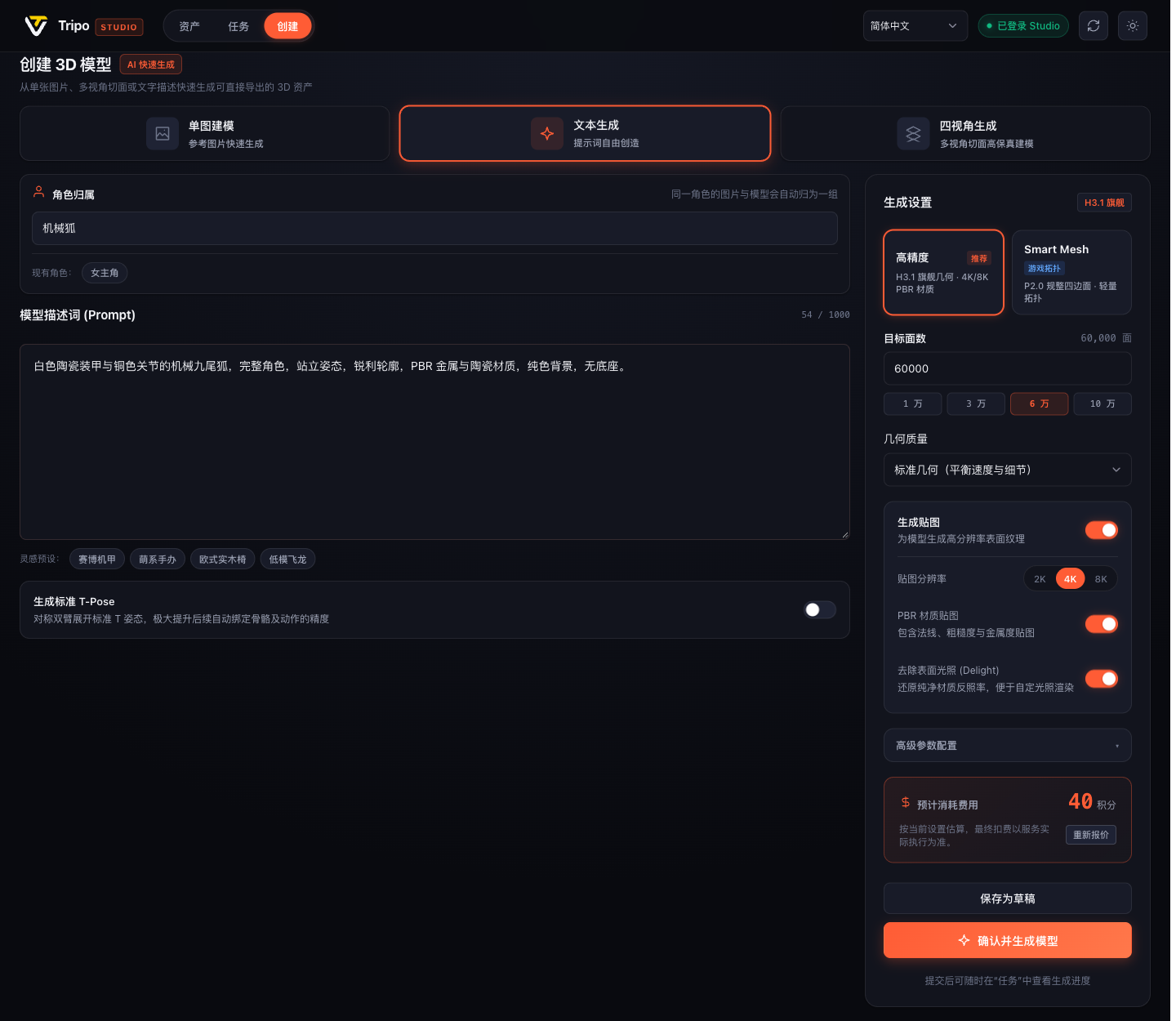
- **Primary Tool**: `tripo_open_workbench` (plus 4 app-only tools: `tripo_ui_preview`, `tripo_ui_import_image`, `tripo_ui_asset_library`, `tripo_ui_review`).
- **Features**: Seamless 3-in-1 UI covering Asset Library, Task Queue, and Creation panel. Adaptive dark/light themes with real-time multi-language switching (EN, ZH, JA).
- **Prompt Example**: _"Open the Tripo workbench asset view."_

<div align="center">
  <img src="docs/images/workbench-create-dark.png" alt="Interactive 3-in-1 Workbench" width="85%" />
</div>

---

### 3.2 ⚡ Cloud 3D Generation (Generation)

- **Dedicated Guide**: 👉 **[3D Generation Guide & Parameters (docs/tools/generation.md)](docs/tools/generation.md)**
- **Included Tools**: `tripo_generate_model`, `tripo_generate_image`, `tripo_generate_multiview`, `tripo_regenerate_image`, `tripo_upscale_image`, `tripo_split_image`, `tripo_import_model`, `tripo_list_image_templates`
- **Key Capabilities**:
  - **High Detail Pipeline**: H2.5 / H3.0 / H3.1 architecture, custom polygon counts, independent geometry quality, and 2K/4K/8K PBR textures.
  - **Smart Mesh P2**: Strict 500–25,000 quad polycount budget with simultaneous 1, 2, or 4 LOD variant outputs.
  - **Multiview Modeling**: Front/Back/Left/Right 4-view reference alignment.
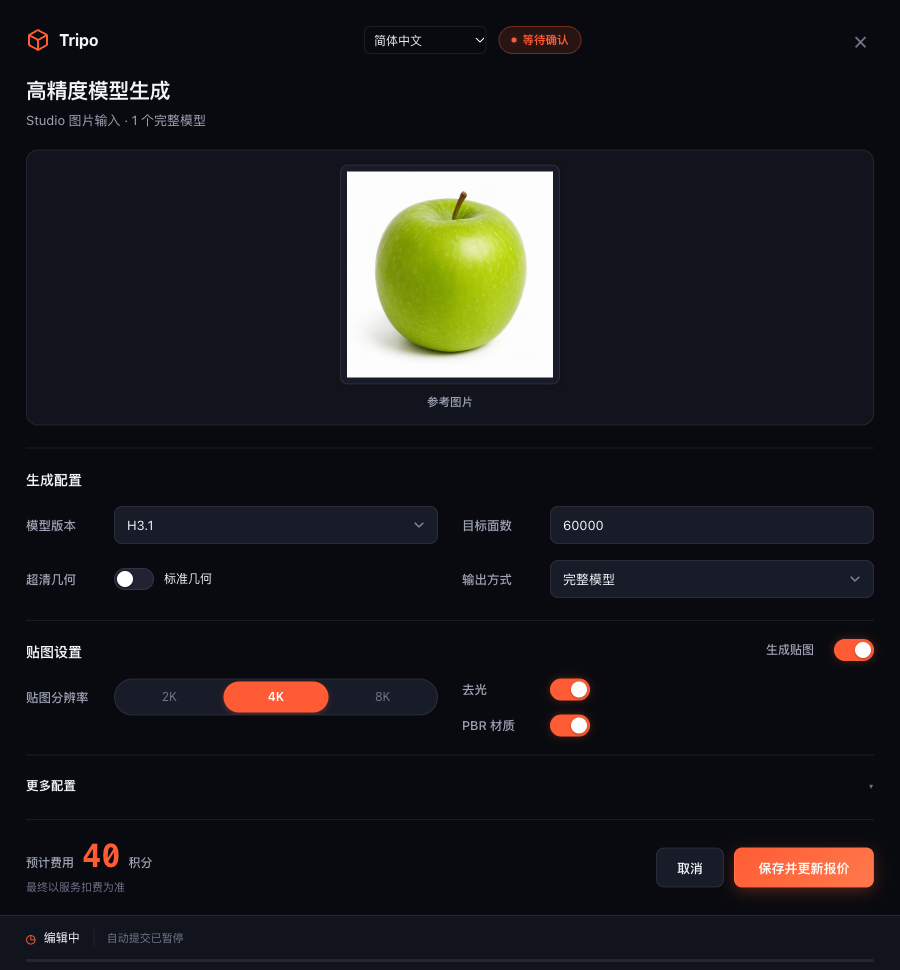
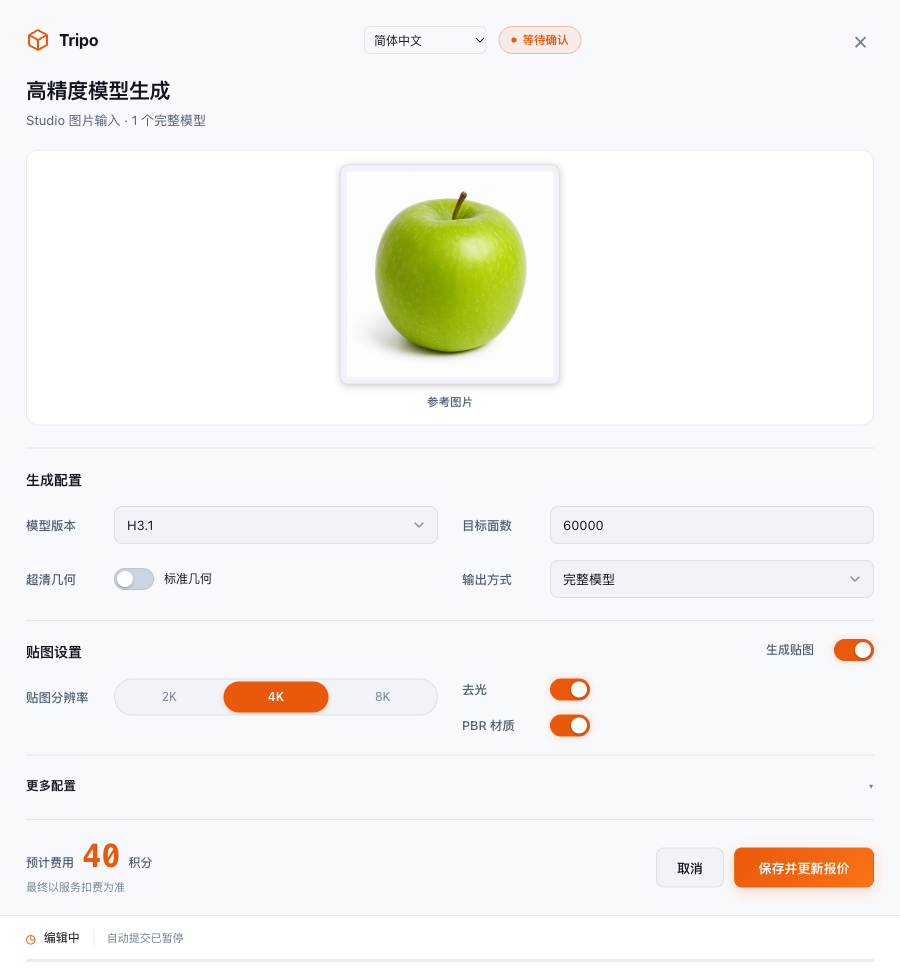
  - **60-Second Editable Safety Card**: Pre-estimates credits and pauses the deadline only when parameters actually change. Focus, clicks and preview inspection keep the countdown running.

<div align="center">
  <img src="docs/images/configuration-dark.png" alt="Dark Confirmation Card" width="70%" />
</div>

---

### 3.3 🔧 Mesh Studio & 🎨 Texture Pipeline (Mesh & Texture)

- **Dedicated Guide**: 👉 **[Mesh & Texture Tools Guide (docs/tools/mesh-texture.md)](docs/tools/mesh-texture.md)**
- **Included Tools**:
  - Mesh Operations: `tripo_segment_model` (Semantic segmentation), `tripo_complete_parts` (Part closing & completion), `tripo_remesh_model` (Quad remeshing), `tripo_generate_uv` (Smart UV candidates), `tripo_apply_uv`, `tripo_get_uv_context`
  - Texture Pipeline: `tripo_generate_texture` (Repaint), `tripo_preview_texture_edit`, `tripo_apply_texture_edits`, `tripo_upscale_texture` (8K super-resolution), `tripo_generate_pbr` (PBR map baking)
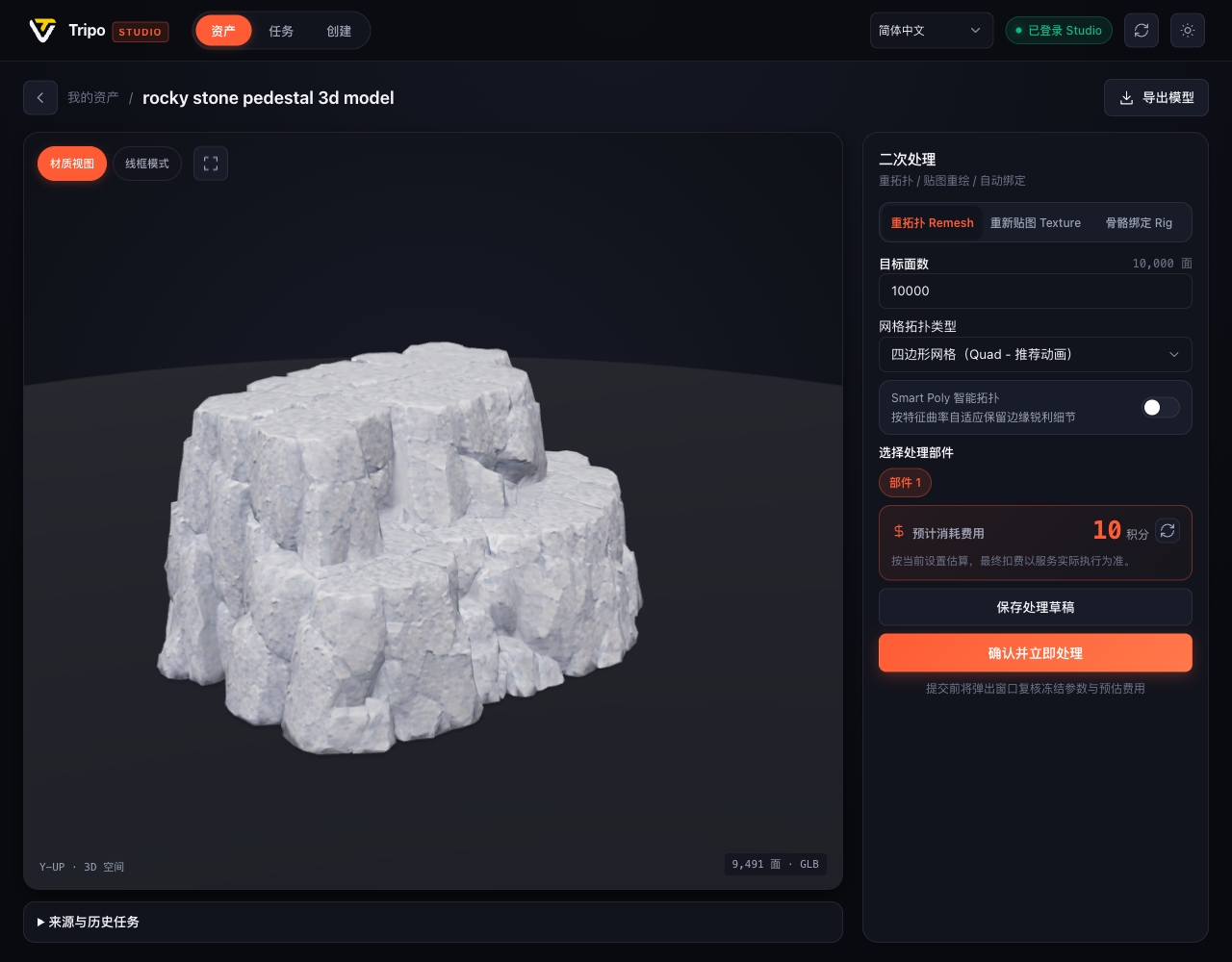
- **Prompt Example**: _"Remesh this armor model down to 8,000 faces and bake 4K PBR material maps."_

<div align="center">
  <img src="docs/images/model-detail.png" alt="Model Detail & Remesh Parameters" width="85%" />
</div>

---

### 3.4 🦴 Rigging & AI Motion System (Rigging & Animation)

- **Dedicated Guide**: 👉 **[Rigging & Animation Tools Guide (docs/tools/rigging-animation.md)](docs/tools/rigging-animation.md)**
- **Included Tools**: `tripo_rig_model`, `tripo_animate_model`, `tripo_list_animation_presets`, `tripo_generate_motion`, `tripo_apply_motion`, `tripo_list_motions`, `tripo_get_motion`
- **Key Capabilities**:
  - **Rig V3 Auto-Rigging**: Detects biped features and produces skeletons standard-compliant with ActorCore, Mixamo, Unreal Engine Mannequin, and Unity Humanoid.
  - **Preset Motion Catalog**: Instant walk, run, combat, jump, and idle presets.
  - **AI Motion**: Text-driven 1–5 stage multi-sequence action generation retargeted onto rigged characters.

---

### 3.5 🛠️ Local Blender Engine (Local Tools · Zero Credits)

- **Dedicated Guide**: 👉 **[Local Blender Tools Guide (docs/tools/local-blender.md)](docs/tools/local-blender.md)**
- **Included Tools**: `tripo_render_model`, `tripo_inspect_local_parts`, `tripo_edit_parts`, `tripo_bake_texture_projection`, `tripo_paint_texture`, `tripo_crop_image`
- **Key Advantages**:
  - 🛡️ **Zero Credits Consumed · 100% Offline Processing**: Never uploads models or images to external clouds.
  - **Manifold & Topology Inspection**: Validates self-contained GLBs, polycount, and UV space coverage.
  - **Wireframe & Viewport Rendering**: Generates unlit wireframes and 2× supersampled WebP views.
  - **Texture Projection Baking**: Reprojects 2D reference images directly onto UV textures.

---

### 3.6 📦 Asset Groups, Lineage & Industrial Export (Assets, Tasks & Export)

- **Dedicated Guide**: 👉 **[Assets, Tasks & Export Guide (docs/tools/assets-tasks-export.md)](docs/tools/assets-tasks-export.md)**
- **Included Tools**:
  - Asset Groups: `tripo_list_asset_groups`, `tripo_list_group_assets`, `tripo_create_asset_group`, `tripo_set_asset_group`, `tripo_rename_asset_group`
  - Task Engine: `tripo_task_sync`, `tripo_task_wait`, `tripo_task_cancel`, `tripo_task_reconcile`, `tripo_list_tasks`, `tripo_get_task`, `tripo_list_task_groups`, `tripo_set_task_character`
  - Delivery: `tripo_export_model`, `tripo_download`, `tripo_show_result`, `tripo_quote_operation`
- **Key Capabilities**:
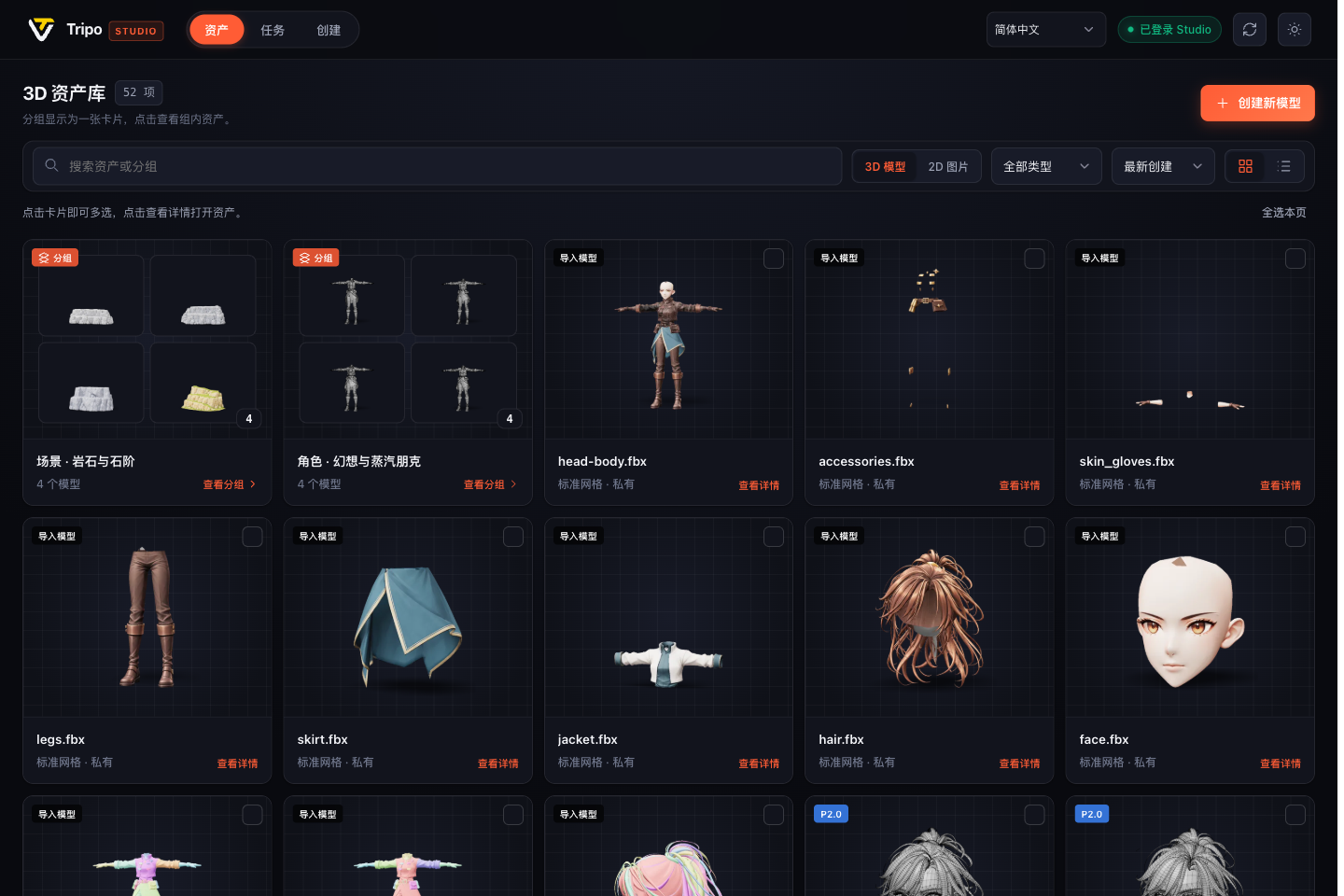
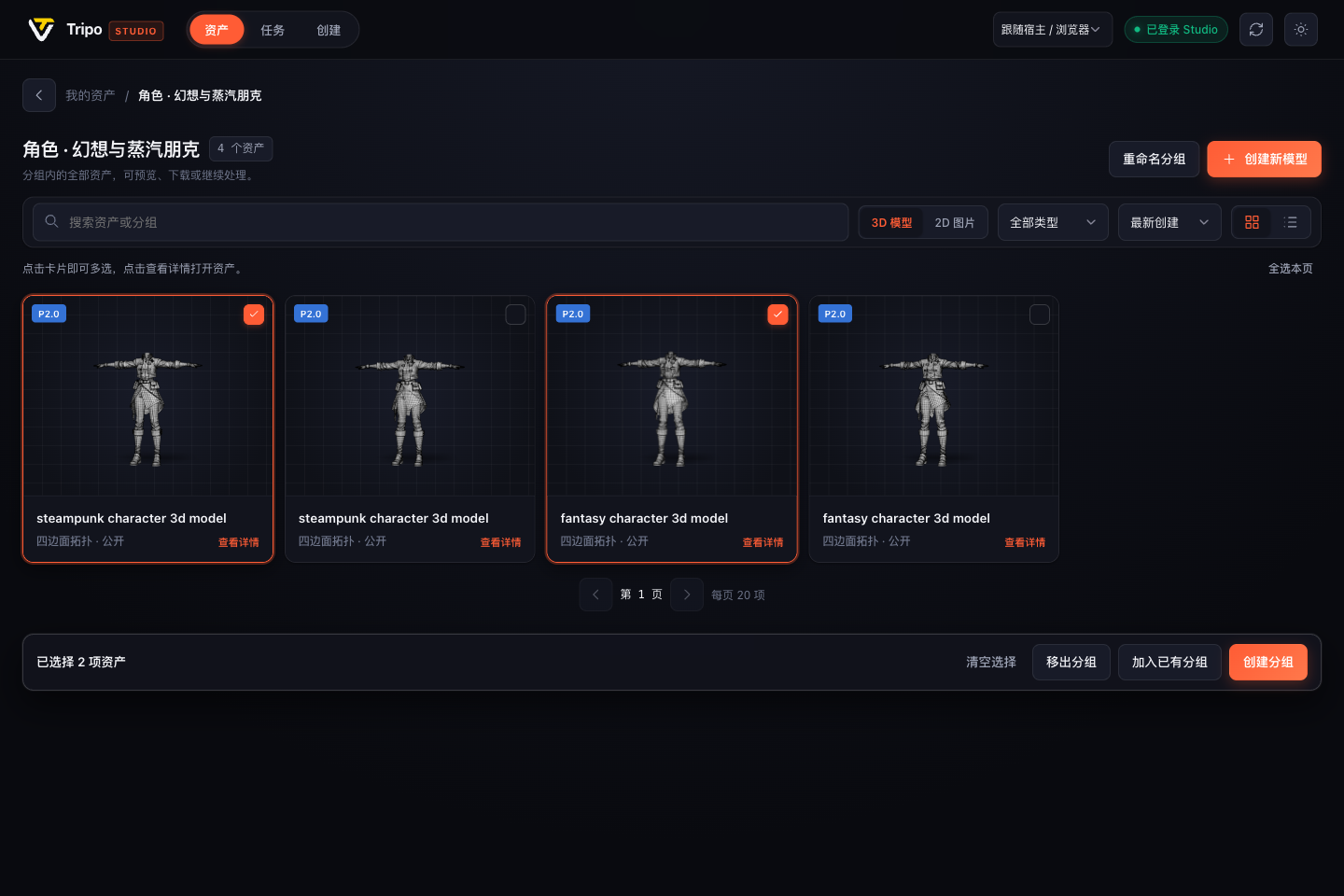
  - **Multi-Select & Asset Cards**: Group models and reference images locally with cross-page selection.
  - **Immutable Lineage Tracking**: Preserves frozen parameters, source input hashes, and parent task linkages.
  - **Multi-Format Export**: GLB, FBX (Blender presets), OBJ, USDZ, STL, 3MF with auto-generated meshopt GLB decoders.

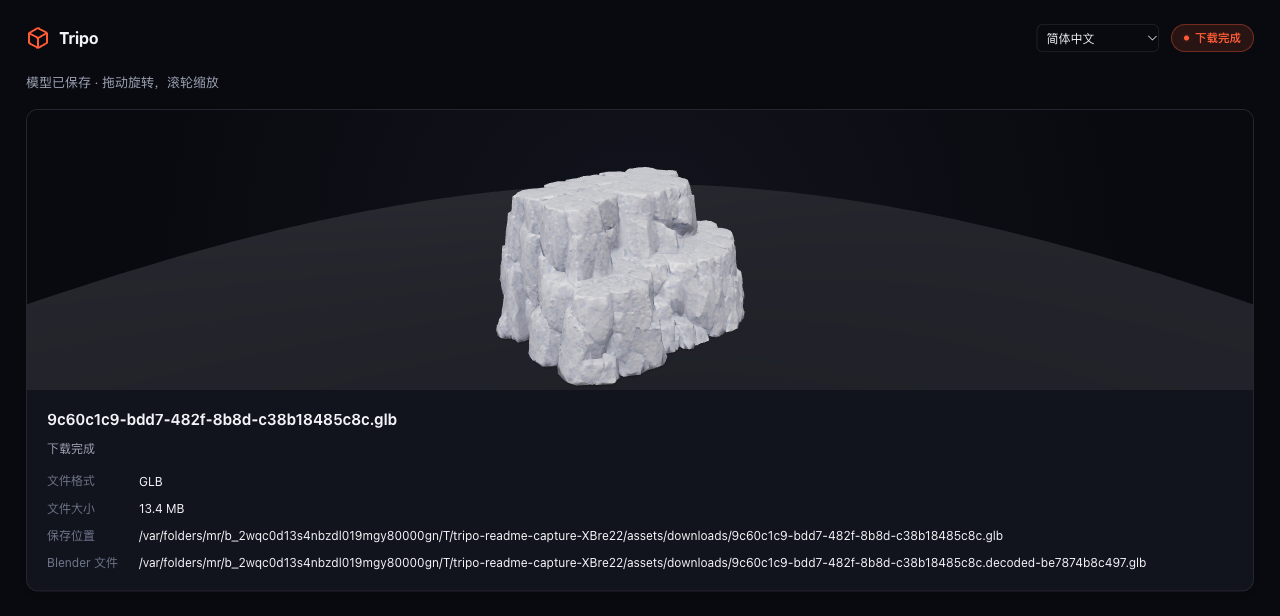
<table width="100%">
  <tr>
    <td width="50%" align="center">
      <b>Asset Group Cards (Thumbnails & Counts)</b><br/>
      <img src="docs/images/asset-groups.png" alt="Asset Group Cards" width="100%" />
    </td>
    <td width="50%" align="center">
      <b>Interactive 3D Viewer & Download Card</b><br/>
      <img src="docs/images/model-preview-download.png" alt="Model Preview Card" width="100%" />
    </td>
  </tr>
</table>

---

## 4. Prompts & Showcase

Interact with Codex directly using conversational prompts:

```text
Generate a "Mecha Fox" model using this reference image:
- Architecture: H3.1, standard geometry, 60,000 faces, 4K PBR textures.
- Show the configuration form; I can change its parameters, or it submits after 60 seconds if they remain unchanged.
```

### Prompt Patterns

| Scenario                       | What to say to Codex                                                                                                                         | Capabilities Involved                |
| ------------------------------ | -------------------------------------------------------------------------------------------------------------------------------------------- | ------------------------------------ |
| **🎮 Strict Polycount Budget** | "Create a Smart Mesh P2 model from this image with 5,000 and 10,000 face variants. Quote the cost first without creating a generation task." | Smart Mesh P2, multi-variant budgets |
| **📐 Multiview Alignment**     | "These 4 images are front, left, back, and right views. Generate one model matching all views."                                              | Multiview 3D synthesis               |
| **🏃 Rigging & Motion**        | "Check the biped rigging compatibility of this model, rig it with UE skeleton, and apply a walk animation."                                  | Rig V3, skeleton presets, AI Motion  |
| **📦 Asset Organization**      | "Bundle selected reference images and models into a new group named 'Mecha Fox Game Assets'."                                                | Local asset groups, batch operations |
| **🔍 Provenance & Lineage**    | "Show the source task, input images, and exact generation parameters for this model."                                                        | Task lineage tracking, source replay |
| **🚀 Blender Export**          | "Export this project to FBX using Blender preset and 2K textures. Show the downloaded file path."                                            | Model export, texture packing        |

---

## 5. Showcase Gallery

<table width="100%">
  <tr>
    <td width="50%" align="center">
      <b>Dark Configuration Card (Paused during edits)</b><br/>
      <img src="docs/images/configuration-dark.png" alt="Dark Config Card" width="100%" />
    </td>
    <td width="50%" align="center">
      <b>Light Configuration Card (Editable parameters & quotes)</b><br/>
      <img src="docs/images/configuration-light.png" alt="Light Config Card" width="100%" />
    </td>
  </tr>
  <tr>
    <td width="50%" align="center">
      <b>Direct Multi-Selection Action Bar</b><br/>
      <img src="docs/images/asset-multiselect.png" alt="Multi-select Action Bar" width="100%" />
    </td>
    <td width="50%" align="center">
      <b>Japanese Narrow Sidebar Responsive Layout</b><br/>
      <img src="docs/images/workbench-japanese-narrow.png" alt="Japanese Layout" width="60%" />
    </td>
  </tr>
</table>

---

## 6. Engineering Boundaries

- **Validation Scope**: Contract tests pass against Tripo Studio web client protocol. Paid tasks depend on account quotas; see [Verification Records (CONTRIBUTING.md)](CONTRIBUTING.md#验证记录).
- **Export Restrictions**: Exports are supported only for user-owned projects. Formats must be explicitly exported; changing file extensions locally does not convert 3D formats.
- **Local Engine Limits**: Local processing requires self-contained GLBs under 150 MiB. Rigged mesh topological modifications are prevented to preserve skinning.
- **Lineage Boundary**: Provenance relies on locally recorded task trees; tasks generated outside this plugin on the web cannot be retroactively backfilled.

---

## 7. Documentation

- 🛠️ **[Complete Tool Index (docs/tools/README.md)](docs/tools/README.md)**: 68 MCP tools quick index
- ⚡ **[3D Generation Guide (docs/tools/generation.md)](docs/tools/generation.md)**: H3.1, Smart Mesh P2, multiview & safety cards
- 🔧 **[Mesh & Texture Guide (docs/tools/mesh-texture.md)](docs/tools/mesh-texture.md)**: Segmentation, remesh, Smart UV & PBR
- 🦴 **[Rigging & Animation Guide (docs/tools/rigging-animation.md)](docs/tools/rigging-animation.md)**: Rig V3, skeletons & AI Motion
- 🛠️ **[Local Blender Tools Guide (docs/tools/local-blender.md)](docs/tools/local-blender.md)**: Free offline mesh inspection & baking
- 📦 **[Assets, Tasks & Export Guide (docs/tools/assets-tasks-export.md)](docs/tools/assets-tasks-export.md)**: Grouping, lineage & delivery
- 📖 **[Usage Guide (docs/USAGE.md)](docs/USAGE.md)**: Step-by-step instructions & submission options
- ⚙️ **[Configuration (docs/CONFIGURATION.md)](docs/CONFIGURATION.md)**: Paths, environment variables, and Blender settings
- 💻 **[Contributing & Verification (CONTRIBUTING.md)](CONTRIBUTING.md)**: Dev workflows, testing, and validation suites
- 📦 **[Distribution Guide (docs/DISTRIBUTION.md)](docs/DISTRIBUTION.md)**: Marketplace listings, npm packaging, and releases
- 🧠 **[Architecture (CORE.md)](CORE.md)**: Underlying design philosophy and runtime mechanics
- 🤖 **[Agent Skill Guide (skills/tripo-studio/SKILL.md)](skills/tripo-studio/SKILL.md)**: AI Agent operational rules and patterns

---

## 8. License

This project is open source under the [MIT License](LICENSE). Third-party dependencies retain their own licenses; their notices are included in the distribution at `dist/THIRD_PARTY_NOTICES.txt`.