<p align="center">
  <a href="https://github.com/vengatmacuser/react-native-inapp-inspector">
    <img src="https://raw.githubusercontent.com/vengatmacuser/react-native-inapp-inspector/main/assets/inapp_inspector_icon.gif" alt="React Native In-App Inspector Icon" width="120" height="120" style="border-radius: 28px; box-shadow: 0 10px 30px rgba(99, 102, 241, 0.45);" />
  </a>
</p>

<h1 align="center">React Native In-App Inspector</h1>

<p align="center">
  <b>The modern, zero-config on-device debugging suite for React Native & Expo</b>
</p>

<p align="center">
  <b><a href="./README.md">English</a></b> |
  <b><a href="./README.zh-CN.md">简体中文</a></b> |
  <b><a href="./README.hi.md">हिन्दी</a></b> |
  <b><a href="./README.ja.md">日本語</a></b> |
  <b><a href="./README.es.md">Español</a></b> |
  <b><a href="./README.de.md">Deutsch</a></b> |
  <b><a href="./README.fr.md">Français</a></b> |
  <b><a href="./README.pt-BR.md">Português</a></b> |
  <b><a href="./README.ko.md">한국어</a></b> |
  <b><a href="./README.ru.md">Русский</a></b> |
  <b><a href="./README.ar.md">العربية</a></b>
</p>

<p align="center">
  <a href="https://www.npmjs.com/package/react-native-inapp-inspector"><img src="https://img.shields.io/npm/v/react-native-inapp-inspector?color=6366f1&label=npm&logo=npm" alt="npm version" /></a>
  <a href="https://www.npmjs.com/package/react-native-inapp-inspector"><img src="https://img.shields.io/npm/dm/react-native-inapp-inspector?color=3b82f6&label=downloads" alt="npm downloads" /></a>
  <a href="https://github.com/vengatmacuser/react-native-inapp-inspector"><img src="https://img.shields.io/github/stars/vengatmacuser/react-native-inapp-inspector?color=f59e0b&label=stars&logo=github" alt="GitHub stars" /></a>
  <a href="https://github.com/vengatmacuser/react-native-inapp-inspector/blob/main/LICENSE"><img src="https://img.shields.io/badge/license-MIT-green" alt="license" /></a>
  <a href="https://github.com/sponsors/vengatmacuser"><img src="https://img.shields.io/badge/sponsor-GitHub%20Sponsors-ea4aaa?logo=githubsponsors&logoColor=white" alt="sponsor" /></a>
</p>

<p align="center">
  <img src="https://img.shields.io/badge/Platform-iOS%20%7C%20Android%20%7C%20Expo-0284c7?logo=apple&logoColor=white" alt="platform" />
  <img src="https://img.shields.io/badge/React%20Native-%E2%89%A50.60-61DAFB?logo=react&logoColor=white" alt="React Native" />
  <img src="https://img.shields.io/badge/Expo-SDK%2048%2B%20%7C%2050%2B%20%7C%2051%2B%20%7C%2052%2B-000020?logo=expo&logoColor=white" alt="Expo" />
  <img src="https://img.shields.io/badge/TypeScript-Strict%20Ready-3178c6?logo=typescript&logoColor=white" alt="TypeScript" />
  <img src="https://img.shields.io/badge/Engine-Hermes%20%7C%20JSC-9333ea" alt="Engine" />
</p>

<p align="center">
  <img src="https://img.shields.io/badge/WebSockets-ws%20%7C%20wss%20%7C%20Socket.IO-06b6d4?logo=socketdotio&logoColor=white" alt="WebSockets" />
  <img src="https://img.shields.io/badge/Storage-AsyncStorage%20%7C%20MMKV-f59e0b?logo=databricks&logoColor=white" alt="Storage" />
  <img src="https://img.shields.io/badge/Push%20Logger-APNs%20%7C%20FCM-10b981?logo=firebase&logoColor=white" alt="Push" />
  <img src="https://img.shields.io/badge/Localization-25%20Languages-ec4899" alt="Localization" />
  <img src="https://img.shields.io/badge/Screen%20Capture-Video%20%7C%20GIF%20%7C%20Screenshot-8b5cf6" alt="Screen Capture" />
  <a href="https://github.com/vengatmacuser/react-native-inapp-inspector/pulls"><img src="https://img.shields.io/badge/PRs-welcome-brightgreen.svg" alt="PRs Welcome" /></a>
</p>

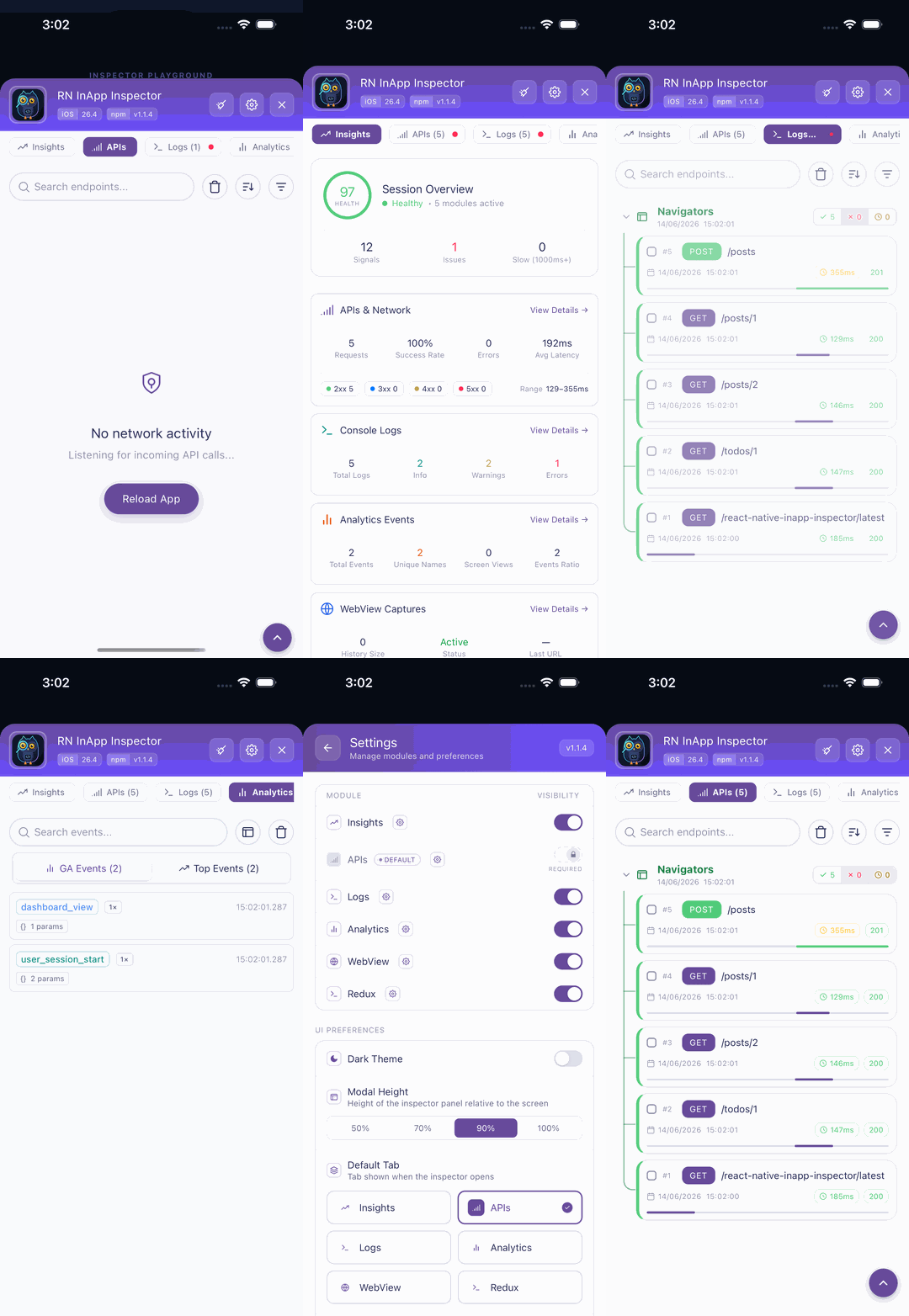
The **zero-config, all-in-one in-app debugging toolkit for React Native & Expo**. Inspect HTTP/HTTPS network traffic, WebSocket and Socket.IO real-time streams, console logs with Metro symbolicated stack traces, Redux state diffs, AsyncStorage & MMKV live storage, push notifications, native hardware metrics, and capture screenshots or screen recordings directly on your device with **zero native setup**.

> 🚀 **The modern, lightweight alternative to Flipper, Charles, Proxyman, and Chucker** — works standalone on device, in test builds, and across standalone APKs/IPAs without desktop companion apps, cables, or open debugger ports.

<p align="center">
  <img src="https://raw.githubusercontent.com/vengatmacuser/react-native-inapp-inspector/main/assets/walkthrough.gif" alt="React Native In-App Inspector Walkthrough" width="360" style="border-radius: 20px; box-shadow: 0 12px 36px rgba(0,0,0,0.5);" />
</p>

<p align="center">
  🎬 <b><a href="https://raw.githubusercontent.com/vengatmacuser/react-native-inapp-inspector/main/docs/video_walkthrough.mp4">Watch Full Video Walkthrough (MP4)</a></b> | <b><a href="https://raw.githubusercontent.com/vengatmacuser/react-native-inapp-inspector/main/docs/video_walkthrough.mov">Original MOV</a></b>
</p>

---

<table align="center" width="100%">
  <tr>
    <td align="center" style="padding: 24px; background: linear-gradient(135deg, rgba(236,72,153,0.1), rgba(99,102,241,0.1)); border-radius: 16px; border: 1px solid rgba(236,72,153,0.35);">
      <h3 align="center">💖 Made with Love for Every Developer Who Has Ever Chased a Phantom Bug at 2 AM</h3>
      <p align="center">
        <i>"We built <b>react-native-inapp-inspector</b> because we know the exact pain of tangled USB cables, broken proxy ports, and elusive production crashes. We poured hundreds of sleepless nights and pure passion into crafting this tool so that every mobile developer and QA engineer in the world could debug freely, effortlessly, and with joy."</i>
      </p>
      <p align="center">
        If this tool saved you an hour of debugging, helped you ship a release on time, or made your daily development a little lighter — <b>please consider sponsoring the project</b>. Even a small coffee or a monthly sponsorship fuels continuous updates, new features, and keeps independent open-source development alive. ☕✨
      </p>
      <p align="center">
        <a href="https://github.com/sponsors/vengatmacuser">
          <img src="https://img.shields.io/badge/Sponsor%20%40vengatmacuser-💖%20Back%20This%20Project-ea4aaa?style=for-the-badge&logo=githubsponsors&logoColor=white" alt="Sponsor on GitHub Sponsors" />
        </a>
      </p>
    </td>
  </tr>
</table>

---

## ⚡ Why Choose `react-native-inapp-inspector`?

| Capability | **react-native-inapp-inspector** | Flipper (Deprecated) | Chucker | Charles / Proxyman | Reactotron | RN Debugger |
| :--- | :---: | :---: | :---: | :---: | :---: | :---: |
| **Standalone on Device (No PC/Cable Required)** | ✅ | ❌ | ✅ (Android only) | ❌ | ❌ | ❌ |
| **Zero-Render Inactive Mode (0% Background CPU)** | ✅ | ❌ | ⚠️ | ❌ | ⚠️ | ❌ |
| **HTTP/HTTPS Network Logger (Fetch / Axios / XHR)** | ✅ | ✅ | ✅ | ✅ | ✅ | ✅ |
| **Timing Waterfall & P95 Telemetry** | ✅ | ⚠️ | ❌ | ⚠️ | ❌ | ❌ |
| **cURL & Fetch Snippet Instant Export** | ✅ | ⚠️ | ⚠️ | ⚠️ | ❌ | ❌ |
| **WebSocket & Socket.IO Packet Inspector** | ✅ | ❌ | ❌ | ⚠️ | ⚠️ | ⚠️ |
| **Storage Inspector & Editor (AsyncStorage & MMKV)** | ✅ (Live CRUD) | ⚠️ (Read-only) | ❌ | ❌ | ✅ | ⚠️ |
| **Push Notification Logger (APNs, FCM, Salesforce)** | ✅ | ❌ | ❌ | ❌ | ❌ | ❌ |
| **Console Logger + Metro Source-Map Symbolication** | ✅ (Accurate Line #) | ✅ | ❌ | ❌ | ⚠️ | ✅ |
| **Redux State Diffs & Action Timeline** | ✅ | ⚠️ | ❌ | ❌ | ✅ | ✅ |
| **Crash Protection & Multi-type Breadcrumbs** | ✅ | ❌ | ❌ | ❌ | ❌ | ❌ |
| **Native Hardware, RAM, Storage & Battery Telemetry** | ✅ | ⚠️ | ❌ | ❌ | ❌ | ❌ |
| **Screen Capture & Video Recording Suite** | ✅ | ❌ | ❌ | ❌ | ❌ | ❌ |
| **25 Global Languages with Bottom Sheet Picker** | ✅ | ❌ (English only) | ❌ | ❌ | ❌ | ❌ |
| **Expo (Bare & Managed) & React Native** | ✅ | ⚠️ | ⚠️ | ⚠️ | ⚠️ | ⚠️ |

---

## ✨ Features

### 🌐 1. Network Inspector & Timing Waterfall
- **Universal HTTP/HTTPS Interception**: Automatically hooks into `fetch`, default Axios, `axios.create()` instances, and `XMLHttpRequest`.
- **Latency Breakdown**: Proportional timing waterfall bars, latency grading (Fast `<200ms`, Moderate `200-800ms`, Slow `>800ms`).
- **Telemetry Strip**: Real-time **Success Rate %**, **Avg Latency (ms)**, and **P95 Latency (ms)**.
- **Payload Viewer**: Formatted JSON syntax tree, raw payload view, request & response headers, query parameters, and caller origin.
- **Export Formats**: One-tap copy as **cURL command**, **Fetch code snippet**, or formatted summary report.

### ⚡ 2. WebSocket & Socket.IO Real-Time Stream Inspector
- **Full Protocol Coverage**: Intercepts native WebSocket (`ws://`, `wss://`) and Socket.IO (`v2`, `v3`, `v4`).
- **Live Frame Timeline**: Bidirectional frame tracking (⬆️ Sent, ⬇️ Received) with high-resolution timestamps.
- **Frame Types**: Text, JSON payloads, Binary/ArrayBuffer lengths, and Ping/Pong heartbeats.
- **Handshake & Metadata**: Inspect connection state, handshake query params, transport type (websocket/polling), reconnection events, and errors.
- **Search & Filter**: Filter frames by direction, opcode, or inspect specific payload payloads.

### 💾 3. Storage Manager (AsyncStorage & MMKV)
- **Unified Storage Interface**: Live viewer for both `@react-native-async-storage/async-storage` and `react-native-mmkv`.
- **Live In-App CRUD**: Read, search, create, update, and delete storage keys directly from your phone screen.
- **Type-Aware Parsing**: Automatically distinguishes JSON objects, arrays, booleans, numbers, and strings.
- **Instant Search**: Search through thousands of stored keys and values with zero lag.

### 🔔 4. Push Notification Logger
- **Multi-Provider Detection**: Automatically logs notifications from FCM (`@react-native-firebase/messaging`), APNs, Salesforce Marketing Cloud, OneSignal, and Notifee.
- **App State Tracking**: Identifies if notifications were received in **Foreground**, **Background**, or caused app launch from **Killed** state.
- **Payload Inspector**: Full data payload inspection, deep-link URLs, notification titles, bodies, and channel IDs.
- **Interactive Action Tracking**: Captures user taps, dismissals, and custom notification button action clicks.

### 🪵 5. Console Logger & Metro Source-Map Symbolication
- **Line-Accurate Symbolication**: Intercepts `console.log`, `info`, `warn`, and `error`. Symbolicates stack traces via Metro Bundler so you see exact project source files and line numbers (`HomeScreen.tsx:42:15`, `AuthService.ts:88`).
- **Detailed Sub-Tabs**:
  - **Output**: JSON viewer (Pretty, Raw, Table) with clickable URL detection.
  - **Args (N)**: Inspect each passed argument individually with type breakdown.
  - **Call Stack**: Structured frame cards (File name, Function, Line, Column pills).
  - **Error Stack**: Thrown Error stack traces preserved and highlighted.
  - **Metadata**: Duplicate collapsing counter (`×N`), character size, and timestamp.

### 🔄 6. Redux State & Action Diffs
- **Redux & Redux Toolkit**: Seamless integration with Redux Store, RTK Query, and `redux-persist`.
- **Action Timeline**: Chronological record of dispatched actions with exact timestamps and durations.
- **Deep State Diffs**: Visual color-coded diffing of state changes (**Green** for additions, **Amber** for updates, **Red** for deletions).
- **Slice Tree Navigation**: Explore your global state tree slice by slice.

### 📊 7. Analytics Event Tracker
- **Firebase Analytics Auto-Patch**: Hooks into `@react-native-firebase/analytics` (`logEvent`, `logScreenView`, `setUserProperties`, `setUserId`).
- **Plugin Architecture**: Easily plug in custom analytics providers (Google Analytics 4, Mixpanel, Segment, Amplitude).
- **Parameter Inspection**: Inspect event parameters, user properties, and timestamps.

### 🛡️ 8. Crash Protection & Global Error Boundary
- **Zero-Crash Micro-UI**: The inspector UI is fully isolated; errors inside the inspector cannot crash your host application.
- **Global Error Boundary**: Catch unhandled JavaScript rendering crashes with a helpful recovery UI.
- **Breadcrumb Timeline**: Tracks preceding user navigation, network calls, and Redux actions leading up to the crash.
- **Native Crash Protection**: Captures native uncaught signals and exceptions on iOS and Android.

### 📱 9. Native Hardware, RAM & Performance Telemetry
- **Low-Level Metrics**: Total RAM, Available Free RAM, Native Allocated Heap, Internal Storage Free Space, Battery Percentage & Charging state, CPU Architecture (ABI).
- **Live FPS Counter**: Real-time FPS monitoring on native display refresh cycles.
- **Memory Warning Auto-Pruning**: Automatically prunes in-memory logs when the OS triggers low memory alerts.
- **Shake to Toggle**: Shake physical device or press `Ctrl+Cmd+Z` / `Cmd+M` to toggle the inspector.

### 📸 10. Native Media Capture & Studio In-App Editor
- **On-Device Capture**: Capture crisp high-res screenshots, smooth MP4 video recordings, or animated GIFs directly on device.
- **Full-Featured Media Gallery**: Browse, filter (Photos, Videos, GIFs), batch select, delete, and copy capture URIs.
- **Photo & Video Editing Studio**:
  - **Crop & Resize**: Crop to custom aspects (Square, 4:3, 16:9) and scale resolution down for lightweight uploads.
  - **Video Trimming & Audio Control**: Set start/end trim bounds, adjust playback speed (0.5× – 2.0×), or mute audio tracks.
  - **Frame Snapshot**: Extract high-res PNG frame snapshots from any video with a single tap.
- **QA Annotations & Markup**:
  - **Instagram 3×3 Gridlines**: Toggle alignment grid overlays for pixel-perfect UI inspection.
  - **Sequential Step Badges**: Tap or drag to place numbered step pills (`1`, `2`, `3`...) to document repro steps.
  - **Bug & Note Tags**: Drop color-coded bug (`🐛`), note (`📝`), and warning badges onto screenshots.
  - **Text Overlays & QA Watermark**: Add custom text annotations and toggle dynamic QA device watermarks.
- **Camera Roll Importer**: Import photos or videos directly from the device photo library with smart media-type filtering.

### 🎛️ 11. Draggable Floating FAB & Peek-Through Opacity
- **Floating Action Launcher**: Draggable, minimizable floating bubble with live unread indicators and badge count.
- **Drag-to-Dismiss Bottom Zone**: Drag the launcher to the glowing bottom dismiss target to hide it gracefully.
- **Peek-Through Mode**: Toggle transparent view mode with customizable opacity (0.05 – 1.0) so you can inspect network calls and Redux state while interacting with the underlying app screen.

### ☁️ 12. Firebase Remote Config Module Management
- **Remote Feature Flags**: Toggle inspector modules (APIs, Redux, Crash, Storage, WebSockets) on or off in production/test builds via Firebase Remote Config without releasing new app builds.

### 🌍 13. 25 Global Languages & Interactive Bottom Sheet
- **25 Supported Locales**: English, Spanish, French, German, Italian, Portuguese, Russian, Japanese, Korean, Simplified Chinese, Arabic, Hindi, Turkish, Dutch, Polish, Indonesian, Vietnamese, Bengali, Tamil, Telugu, Marathi, Gujarati, Kannada, Malayalam, and Punjabi.
- **Interactive Language Modal**: Tap `[ 🌐 EN ▾ ]` in the header to open the bottom sheet with country flag chips and instant search for real-time localization testing.

---

## 🔎 Smart DevTools Search Engine Syntax

The search bar supports advanced Chrome DevTools-style filtering across all tabs:

```text
# Filter by HTTP method and status code
method:POST status:200

# Exclude analytics or third-party domains
url:api.myapp.com -analytics -facebook

# Filter by request or response header
header:authorization

# Search inside request or response JSON body
body:"orderId"

# Filter logs by screen / route name
page:CheckoutScreen

# Filter console logs by specific TSX file
file:ProfileView.tsx

# Negate any term using minus prefix
-healthcheck -socket.io
```

*Note: Proxy headers like `via: 2.0 heroku-router`, `cf-ray:`, or `nel:` are automatically separated to avoid polluting search results.*

---

## 📦 Installation

### Bare React Native
```bash
npm install --save-dev react-native-inapp-inspector react-native-svg
# or
yarn add -D react-native-inapp-inspector react-native-svg
# or
pnpm add -D react-native-inapp-inspector react-native-svg
```

#### iOS CocoaPods Setup
```bash
cd ios && pod install && cd ..
```

### Expo Projects
```bash
npx expo install react-native-inapp-inspector react-native-svg
```
*(Compatible with Expo SDK 48, 49, 50, 51, 52+ in both Expo Go and Prebuild)*

---

## 🚀 Getting Started

### 1. Basic Setup in `App.tsx`

Mount `<NetworkInspector />` at the root of your app. Wrap with `__DEV__` to ensure it only runs in development or test builds:

```tsx
import React from 'react';
import { SafeAreaView } from 'react-native';
import NetworkInspector, {
  setupNetworkLogger,
  setupConsoleLogger,
  setupSocketLogger,
  connectReduxStore,
  connectAsyncStorage,
} from 'react-native-inapp-inspector';
import AsyncStorage from '@react-native-async-storage/async-storage';
import { store } from './src/store';

// ⚡ Initialize loggers before application renders
setupNetworkLogger();
setupConsoleLogger();
setupSocketLogger();

if (store) {
  connectReduxStore(store);
}
connectAsyncStorage(AsyncStorage);

export default function App() {
  return (
    <SafeAreaView style={{ flex: 1 }}>
      {/* Your host app components */}
      <YourAppRoot />

      {/* Floating overlay UI */}
      {__DEV__ && (
        <NetworkInspector
          enabled={true}
          environment="DEV"
        />
      )}
    </SafeAreaView>
  );
}
```

---

## 💡 Advanced Usage & Feature Guides

### 🌐 Early Startup Network Logging
If your app triggers API calls before root components mount, invoke `setupNetworkLogger()` at the top of your index entry file (`index.js` or `index.ts`):

```typescript
import { setupNetworkLogger } from 'react-native-inapp-inspector';

// Automatically captures fetch, Axios, and XMLHttpRequest
setupNetworkLogger({
  maxRequests: 200,
  ignoredUrls: ['https://clients3.google.com/generate_204'],
});
```

### ⚡ WebSocket & Socket.IO Interception
Intercept real-time packets effortlessly:

```typescript
import { setupSocketLogger, recordSocketConnection, recordSocketFrame } from 'react-native-inapp-inspector/socket';

// Initialize global WebSocket interceptor
setupSocketLogger();

// Or manually record custom socket frames:
recordSocketFrame(connectionId, {
  direction: 'in', // 'in' | 'out'
  type: 'json',
  data: { event: 'ORDER_UPDATED', orderId: '12345' },
});
```

### 💾 Storage Tab Integration (AsyncStorage & MMKV)
Inspect and mutate storage keys in real-time on your phone:

```typescript
// For AsyncStorage
import AsyncStorage from '@react-native-async-storage/async-storage';
import { connectAsyncStorage } from 'react-native-inapp-inspector/storage';

connectAsyncStorage(AsyncStorage);

// For react-native-mmkv
import { MMKV } from 'react-native-mmkv';
import { connectMMKV } from 'react-native-inapp-inspector/storage';

export const storage = new MMKV();
connectMMKV(storage, 'default');
```

### 🔔 Push Notifications Logger
Track APNs, FCM, and custom push events:

```typescript
import { autoSetupPushLogger, recordPushNotification } from 'react-native-inapp-inspector/push';

// Auto-detect and hook available push providers (FCM, OneSignal, etc.)
autoSetupPushLogger();

// Or manually record received notifications:
recordPushNotification({
  title: 'Order Delivered',
  body: 'Your package #58219 has arrived!',
  source: 'fcm',
  appState: 'foreground',
  data: { orderId: '58219', url: 'myapp://orders/58219' },
});
```

### 🔄 Redux State & Action Inspection
Inspect action payloads and deep state diffs:

```typescript
import { configureStore } from '@reduxjs/toolkit';
import { inspectorReduxMiddleware, connectReduxStore } from 'react-native-inapp-inspector/redux';
import rootReducer from './slices';

const store = configureStore({
  reducer: rootReducer,
  middleware: (getDefaultMiddleware) =>
    getDefaultMiddleware().concat(inspectorReduxMiddleware),
});

connectReduxStore(store);
```

### 🧭 React Navigation Screen Tracking
Pass your navigation container ref so all logs, network calls, and socket frames are tagged with the active screen:

```tsx
import { NavigationContainer, createNavigationContainerRef } from '@react-navigation/native';
import NetworkInspector from 'react-native-inapp-inspector';

const navigationRef = createNavigationContainerRef();

export default function App() {
  return (
    <>
      <NavigationContainer ref={navigationRef}>
        <RootNavigator />
      </NavigationContainer>
      <NetworkInspector navigationRef={navigationRef} />
    </>
  );
}
```

### 📸 Screen Capture & Video Recording Suite
Take screenshots or record screen videos on device:

```typescript
import { ScreenCapture } from 'react-native-inapp-inspector/capture';

// Take high-resolution screenshot
const shot = await ScreenCapture.takeScreenshot({ format: 'png' });
console.log('Saved screenshot to:', shot.uri);

// Start video recording with mic audio
await ScreenCapture.startRecording({
  audioSource: 'mic',
  format: 'mp4',
});

// Stop recording and retrieve file
const video = await ScreenCapture.stopRecording();
console.log('Recorded video:', video.uri, video.duration);
```

### 🌍 Multi-Language Programmatic API
Switch languages on the fly or customize translations:

```typescript
import { setLanguage, getLanguage, SUPPORTED_LANGUAGES } from 'react-native-inapp-inspector';

// Change language to Simplified Chinese, Hindi, Spanish, etc.
setLanguage('zh'); // 'en' | 'zh' | 'hi' | 'ja' | 'es' | 'fr' | 'de' | etc.

console.log('Current language:', getLanguage());
```

---

## 📚 Public API Reference

### Component Props: `<NetworkInspector />`

| Prop | Type | Default | Description |
| :--- | :--- | :--- | :--- |
| `enabled` | `boolean` | `true` | When `false`, completely unmounts with 0% overhead. |
| `environment` | `string` | `'DEV'` | Environment badge displayed on top bar (`'DEV'`, `'QA'`, `'STAGING'`). |
| `navigationRef` | `NavigationContainerRef` | `undefined` | React Navigation ref for tagging logs with active screen names. |
| `storage` | `AsyncStorage / MMKV` | `undefined` | Custom storage instance for persisting inspector settings. |
| `theme` | `'dark' \| 'light' \| 'system'` | `'dark'` | Visual theme preference. |
| `defaultTab` | `ActiveTab` | `ActiveTab.APIs` | Initial tab opened when expanding the inspector modal. |

### Module Exports: `react-native-inapp-inspector`

| Export | Type | Description |
| :--- | :--- | :--- |
| `setupNetworkLogger(options?)` | `Function` | Intercepts `fetch`, Axios, and XMLHttpRequest. |
| `setupConsoleLogger()` | `Function` | Intercepts `console.log/info/warn/error` with Metro symbolication. |
| `setupSocketLogger()` | `Function` | Intercepts WebSocket and Socket.IO real-time traffic. |
| `connectReduxStore(store)` | `Function` | Connects a Redux store for action timeline and state diffs. |
| `connectAsyncStorage(storage)` | `Function` | Connects AsyncStorage to the Storage tab. |
| `connectMMKV(instance, id?)` | `Function` | Connects an MMKV instance to the Storage tab. |
| `autoSetupPushLogger()` | `Function` | Automatically attaches push notification logger. |
| `recordPushNotification(record)` | `Function` | Manually records an incoming push notification. |
| `ScreenCapture` | `Object` | Screenshot, video recording, and GIF capture API. |
| `getNativeDeviceMetrics()` | `Function` | Returns hardware RAM, heap, disk, battery, and CPU info. |
| `setupGlobalCrashHandler()` | `Function` | Captures uncaught JS errors and records breadcrumbs. |
| `enableNativeCrashProtection()`| `Function` | Enables native crash signal and uncaught exception protection. |
| `setLanguage(code)` | `Function` | Switches inspector language across 25 supported locales. |
| `SUPPORTED_LANGUAGES` | `Array` | Array of all 25 supported languages with country metadata. |

---

## 📱 Sub-Path Modular Imports

For optimal bundle tree-shaking, you can import specific sub-modules directly:

```typescript
import { setupNetworkLogger } from 'react-native-inapp-inspector/network';
import { setupSocketLogger } from 'react-native-inapp-inspector/socket';
import { connectAsyncStorage, connectMMKV } from 'react-native-inapp-inspector/storage';
import { autoSetupPushLogger } from 'react-native-inapp-inspector/push';
import { connectReduxStore, inspectorReduxMiddleware } from 'react-native-inapp-inspector/redux';
import { setupConsoleLogger } from 'react-native-inapp-inspector/console';
import { ScreenCapture } from 'react-native-inapp-inspector/capture';
```

---

## 📱 Example App

Explore a complete working showcase in the `example/` directory:

```bash
cd example
npm install
cd ios && pod install && cd ..
npm run ios
# or
npm run android
```

---

## 🧪 E2E Simulation & Visual Regression Testing

`react-native-inapp-inspector` includes a comprehensive 15-suite gray-box E2E test suite powered by **Detox**, **Page Object Model (POM)**, **Pixel-Diff Visual Regression**, and **Interactive HTML Test Reports**:

```bash
# Run all 15 E2E test suites on iOS simulator
npm run e2e:test:ios

# Run on Android emulator
npm run e2e:test:android

# Generate & open interactive HTML visual test report
npm run e2e:report
```

For the complete testing architecture, POM locators taxonomy, and chaos scenarios, see the [Detox E2E Testing Guide](docs/DETOX_E2E_GUIDE.md).

---

## 🤝 Contributing

Contributions are warmly welcomed! Please check out [CONTRIBUTING.md](CONTRIBUTING.md) to get started with local development and testing.

---

## 💖 Support & Sponsoring

<table align="center" width="100%">
  <tr>
    <td align="center" style="padding: 20px; background: linear-gradient(135deg, rgba(236,72,153,0.08), rgba(99,102,241,0.08)); border-radius: 12px; border: 1px solid rgba(236,72,153,0.3);">
      <p align="center">
        <b>react-native-inapp-inspector</b> is 100% free and independent open-source software.<br />
        If it helped your workflow, please consider sponsoring to support ongoing maintenance & new features!
      </p>
      <p align="center">
        <a href="https://github.com/sponsors/vengatmacuser">
          <img src="https://img.shields.io/badge/Sponsor%20%40vengatmacuser-💖%20GitHub%20Sponsors-ea4aaa?style=for-the-badge&logo=githubsponsors&logoColor=white" alt="Sponsor on GitHub Sponsors" />
        </a>
      </p>
    </td>
  </tr>
</table>

## 🏷️ Popular Search Keywords & Developer Topics Index (SEO)

<details>
<summary><b>🔍 Click to view comprehensive Developer Search Keywords & Framework Integrations</b></summary>

### 🛠️ Core Debugging & DevTools Alternatives
`react-native-debugger` · `in-app-debugger` · `react-native-devtools` · `flipper-alternative` · `flipper-alternative-react-native` · `chucker-for-react-native` · `chucker-react-native` · `charles-proxy-alternative` · `proxyman-alternative` · `reactotron-alternative` · `zero-config-debugging` · `mobile-devtools` · `on-device-debugging` · `react-native-debug-menu`

### 🌐 Network, APIs & Real-time Protocols
`react-native-network-logger` · `react-native-network-inspector` · `http-logger` · `api-inspector` · `api-debugger` · `axios-interceptor` · `fetch-logger` · `graphql-inspector` · `websocket-logger` · `websocket-inspector` · `socketio-debugger` · `curl-export` · `copy-as-curl` · `latency-waterfall` · `p95-latency-monitor` · `ssl-pinning-safe-logger` · `rest-api-debugger`

### 💾 State Management & Device Storage
`redux-devtools-react-native` · `redux-inspector` · `redux-logger` · `redux-toolkit-debugger` · `rtk-query-inspector` · `redux-persist-debugger` · `asyncstorage-viewer` · `asyncstorage-inspector` · `asyncstorage-editor` · `mmkv-inspector` · `mmkv-viewer` · `mmkv-debugger` · `live-storage-crud`

### 🪵 Console, Logging & Crash Diagnostics
`console-logger` · `metro-symbolication` · `stacktrace-symbolication` · `hermes-stacktrace` · `crash-reporter` · `crash-logger` · `error-boundary` · `breadcrumb-tracker` · `uncaught-exception-handler` · `native-crash-protection` · `ram-monitor` · `hermes-memory-debugger` · `heap-size-inspector` · `live-fps-counter` · `hardware-telemetry`

### 🔔 Push Notifications & Telemetry
`push-notification-logger` · `fcm-debugger` · `apns-logger` · `notifee-debugger` · `onesignal-inspector` · `firebase-analytics-debugger` · `ga4-debugger` · `mixpanel-inspector` · `segment-analytics-logger` · `amplitude-debugger`

### 📸 QA Testing, Screen Capture & Annotation Studio
`react-native-screen-recorder` · `screen-capture` · `screenshot-capture` · `qa-annotation-tools` · `video-trimmer` · `gif-generator` · `bug-repro-recorder` · `testflight-qa-tool` · `on-device-qa` · `gridline-overlay` · `watermark-qa`

### 📱 Platforms, Frameworks & Modern Architecture
`expo-network-logger` · `expo-network-inspector` · `expo-in-app-debugger` · `expo-devtools` · `expo-go` · `expo-prebuild` · `expo-sdk-50` · `expo-sdk-51` · `expo-sdk-52` · `turbomodules` · `fabric` · `react-native-new-architecture` · `hermes-engine` · `jsc-engine` · `react-native-ios` · `react-native-android`

</details>

## 🔍 Global Search Keywords & Regional Topics

`react-native-inapp-inspector` is index-optimized for developers and teams searching across all world markets, languages, and regional dev ecosystems:

| Region / Market | Primary Countries | Search Keywords & Native Regional Developer Terms |
| :--- | :--- | :--- |
| 🇺🇸 🇬🇧 🇨🇦 🇦🇺 🇳🇿 🇮🇪 | **USA, UK, Canada, Australia, New Zealand, Ireland** | React Native network logger, Flipper alternative, Charles proxy alternative, Chucker for React Native, Proxyman alternative, Reactotron alternative, in-app inspector, WebSocket inspector, AsyncStorage editor, MMKV debugger, push notification logger, Metro source-map symbolication, Hermes bytecode visualizer, mobile devtools, zero-config network debugger. |
| 🇨🇳 🇹🇼 🇭🇰 🇸🇬 | **China, Taiwan, Hong Kong, Singapore** | React Native 抓包工具, 移动端抓包, 网络监控, 移动端控制台, 调试工具, Flipper 替代方案, Charles 替代, Chucker 替代, Proxyman 替代, WebSocket 实时抓包, MMKV 查看器, AsyncStorage 查看器, 免电脑抓包, 行動端偵錯, 網路封包側錄, 移动端网络调试, 真机调试工具. |
| 🇮🇳 | **India & South Asia** | react-native-india, नेटवर्क लॉगर, मोबाइल ऐप डिबगिंग, इन-ऐप इंस्पेक्टर, வலைப்பின்னல் பதிவர் (Tamil), நெட்வொர்க் இன்ஸ்பெக்டர், வலைப்பின்னல் ஆய்வாளர், నెట్‌వర్క్ లాగర్ (Telugu), నెట్‌వర్క్ ఇన్‌స్పెక్టర్, ನೆಟ್‌ವರ್ಕ್ ಲಾಗರ್ (Kannada), നെറ്റ്‌വർക്ക് ലോഗർ (Malayalam), নেটওয়ার্ক লগার (Bengali), नेटवर्क लॉगर मराठी (Marathi), react-native-bangalore, react-native-hyderabad. |
| 🇯🇵 | **Japan** | リアクトネイティブ デバッガー, ネットワークロガー, パケットキャプチャ, 開発ツール, フリッパー代替, 通信ログ監視, チャールズ代替, アプリ内デバッガー, モバイル開発ツール, 通信監視ツール, WebSocket デバッグ, 端末内インスペクター, 通信ログ. |
| 🇰🇷 | **South Korea** | 리액트 네이티브 디버거, 네트워크 로거, 모바일 패킷 캡처, 플리퍼 대체, 인앱 디버거, 웹소켓 로거, 찰스 프록시 대체, 차커 대체, 단말기 디버거, 모바일 개발 도구, 리액트네이티브 디버깅. |
| 🇪🇸 🇲🇽 🇦🇷 🇨🇴 🇨🇱 | **Spain, Mexico, Argentina, Colombia, Chile, Peru** | Depurador React Native, captura de red móvil, registro de red, alternativa a Flipper, alternativa a Charles, herramientas de desarrollo React Native, editor de AsyncStorage en vivo, depuración móvil, monitor de tráfico móvil, react-native-mexico, react-native-argentina. |
| 🇩🇪 🇦🇹 🇨🇭 | **Germany, Austria, Switzerland (DACH)** | Netzwerk-Logger, Entwicklertools React Native, In-App-Debugger Deutschland, Flipper-Alternative, Charles-Alternative, Paketmitschnitt Mobil, Netzwerk-Mitschnitt, Chucker-Alternative Deutsch, Fehlersuche Mobil, Speicher-Inspektor. |
| 🇫🇷 🇧🇪 🇨🇦 | **France, Belgium, Canada (Quebec), Francophonie** | Débogueur React Native, inspecteur réseau mobile, outils de développement, alternative à Flipper, journal réseau, analyseur réseau mobile, capture paquets mobile, dépannage mobile React Native, inspecteur réseau France. |
| 🇧🇷 🇵🇹 🇦🇴 | **Brazil, Portugal, Angola** | Depurador React Native, inspetor de rede móvel, ferramentas dev, alternativa ao Flipper, captura de pacotes, editor de storage mobile, react-native-brasil, depurador mobile, monitor de rede mobile. |
| 🇷🇺 🇰🇿 🇧🇾 🇺🇦 | **Russia, Kazakhstan, Belarus, Ukraine (CIS)** | Отладчик React Native, сниффер сети, логирование сети, альтернатива Flipper, перехватчик трафика, мобильная отладка, инспектор сети, налагоджувач React Native Україна, логер мережі. |
| 🇦🇪 🇸🇦 🇪🇬 🇶🇦 | **Middle East & North Africa (MENA)** | فاحص الشبكة رياكت نيتف, مصحح أخطاء الموبايل, مراقب الشبكة, بديل فليبر, أدوات مطور رياكت نيتف, فاحص الشبكة المحمول, تسجيل حزم البيانات. |
| 🇮🇹 | **Italy** | Debugger React Native Italia, ispettore di rete, strumenti sviluppo mobile, cattura traffico mobile, alternativa Flipper Italia, registro chiamate HTTP. |
| 🇳🇱 🇧🇪 | **Netherlands & Belgium (Flanders)** | Netwerk inspecteur Nederlands, netwerk logger Nederland, mobiele debugger, React Native ontwikkelaar, pakket sniffer mobiel, Flipper alternatief Nederland. |
| 🇵🇱 | **Poland & Central Europe** | Debuger React Native Polska, inspektor sieci mobilnej, narzędzia programistyczne, rejestrator pakietów, rejestrator sieci, alternatywa dla Flipper. |
| 🇹🇷 | **Turkey & Central Asia** | Ağ günlükçüsü Türkçe, hata ayıklayıcı, ağ denetleyicisi, Flipper alternatifi, React Native geliştirici araçları, mobil paket yakalama. |
| 🇮🇩 🇻🇳 🇹🇭 🇵🇭 🇲🇾 | **Southeast Asia (ASEAN)** | Alat debug React Native Indonesia, pelacak jaringan mobile, kiểm tra mạng React Native Vietnam, ghi log mạng mobile, ดีบักเกอร์ React Native Thai, เครื่องมือตรวจสอบเครือข่าย, tagasuri ng network React Native Philippines. |
| 🇸🇪 🇳🇴 🇩🇰 🇫🇮 | **Nordic Countries (Sweden, Norway, Denmark, Finland)** | Nätverkslogg Sverige, felsökare React Native, utvecklarverktyg React Native, mobildebuggning. |
| 🇮🇱 | **Israel** | מנפה שגיאות ריאקט נייטיב, ניטור רשת מובייל, כלי פיתוח מובייל, לוכד תעבורת רשת. |
| 🇿🇦 🇳🇬 🇰🇪 | **Sub-Saharan Africa (South Africa, Nigeria, Kenya)** | React Native Nigeria, React Native South Africa, mobile debugging Kenya, in-app inspector Africa. |

---

## 📄 License

| 🇸🇪 🇳🇴 🇩🇰 🇫🇮 | **Nordic Countries (Sweden, Norway, Denmark, Finland)** | Nätverkslogg Sverige, felsökare React Native, utvecklarverktyg React Native, mobildebuggning. |
| 🇮🇱 | **Israel** | מנפה שגיאות ריאקט נייטיב, ניטור רשת מובייל, כלי פיתוח מובייל, לוכד תעבורת רשת. |
| 🇿🇦 🇳🇬 🇰🇪 | **Sub-Saharan Africa (South Africa, Nigeria, Kenya)** | React Native Nigeria, React Native South Africa, mobile debugging Kenya, in-app inspector Africa. |

---

## 📄 License

MIT © [vengatmacuser](LICENSE)