
InkLayer Vue
简体中文 |
English
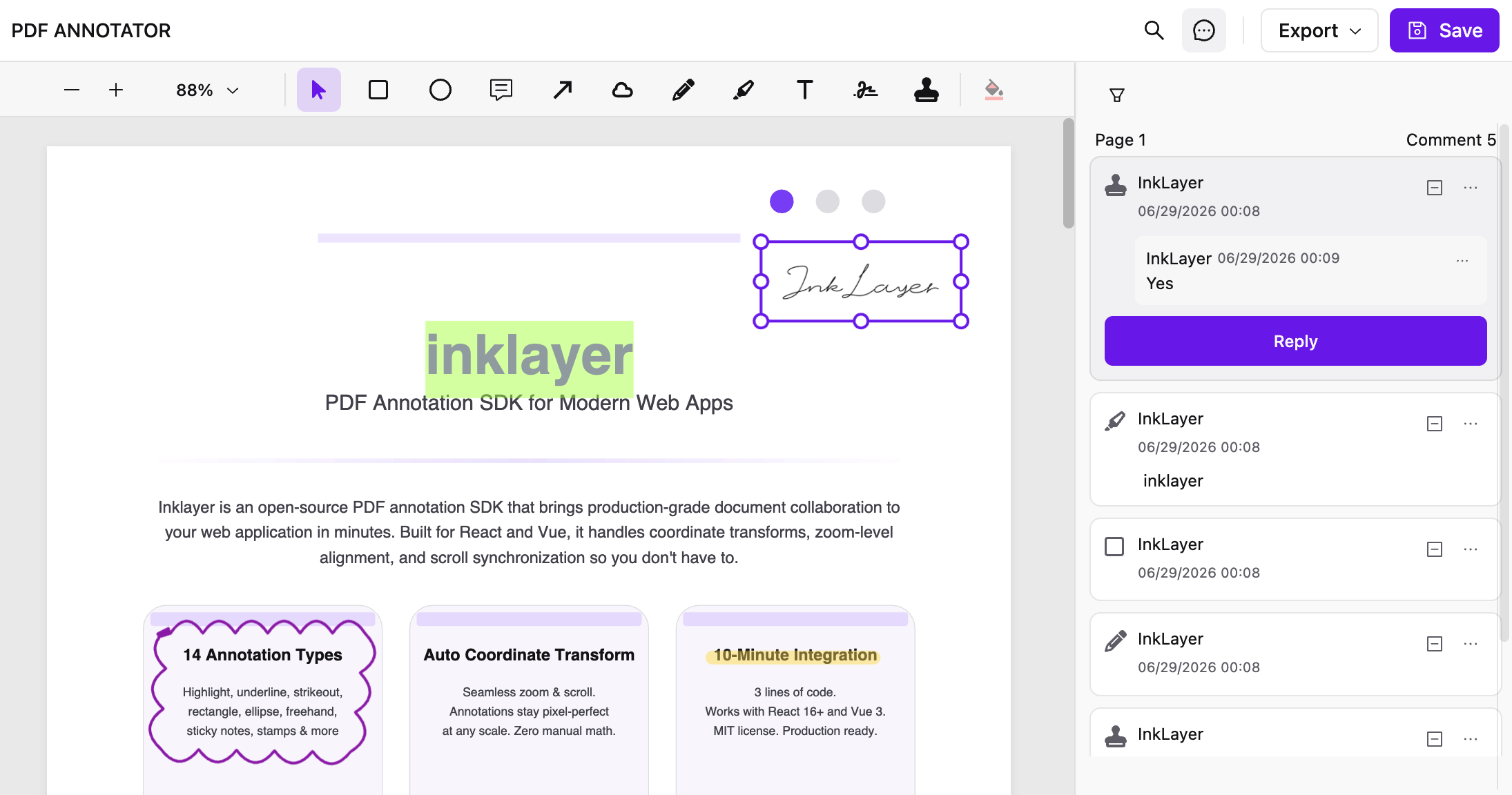
🖊️ A PDF viewer and annotation SDK for Vue 3 applications
For building document review, collaborative annotation, and commenting workflows
---
## ⭐ Quick Start (Recommended)
The fastest way to try InkLayer Vue: use the [official starter 🚀 ](https://github.com/Laomai-codefee/inklayer-vue-starter).
```bash
git clone https://github.com/Laomai-codefee/inklayer-vue-starter.git
cd inklayer-vue-starter
npm install
npm run dev
```
Open:
http://localhost:5173
> 💡 The starter comes with a complete PDF annotation example pre-configured — no extra setup needed to experience the full SDK.
---
## ✨ Features
- 🚀 PDF Viewer (thumbnails / outline / zoom / search / theming)
- 🖍️ PDF Annotation System (highlight / ink / shapes / stamps / signatures)
- 💬 Comment & review workflow
- 🔗 Annotation references and cross-page navigation (`#` references / hover previews / click-to-jump)
- 🔐 Collaborative annotation permissions (ownership / admin overrides / read-only)
- 💾 Annotation data model (persistable)
- 📤 Export support (PDF / Excel)
- 🎨 Customizable UI (toolbar / sidebar)
---
## 📣 Recent updates
### 🔥 1.2.2
- Refined annotation interactions: Sidebar and PDF synchronize on selection only, while Canvas hover keeps author labels without a distracting outline
- Fixed annotation navigation at automatic zoom, clipped Sidebar editors, and menu positioning after user or permission changes
- Improved PDF and Excel numbering: main PDF annotations use `Author · #N`, while Excel uses stable `#N / #N.1` references
- Localized annotation-type filters, preserved filter state, and polished collaborative permission and read-only behavior
### 🔥 1.2.1
- Restore a deleted annotation or reply before the notification disappears
- Fixed annotation selection state and the color picker's back, layout, and timer interactions
- Improved author-label collision handling, drag updates, and hover-preview layering
### 🔥 1.2.0
- Reference other annotations with `#` from comments and replies
- Preview referenced annotations, selected text, authors, pages, and replies on hover
- Jump between sidebar entries and PDF annotations, including across pages
- Improved annotation selection, editor focus, and hover interactions
---
## 📦 Installation
```bash
npm install inklayer-vue
```
---
## 🚀 Basic Usage
### 1. Plugin Registration (Required)
```typescript
import { createApp } from 'vue'
import { inklayerVuePlugin } from 'inklayer-vue'
import App from './App.vue'
const app = createApp(App)
app.use(inklayerVuePlugin)
app.mount('#app')
```
### 2. PdfAnnotator (annotation)
```vue
```
---
### 3. PdfViewer (viewer)
```vue
```
---
## 📖 API Docs
👉 https://inklayer.dev/docs/vue
---
## 🔐 Collaborative Annotation Permissions
`user` is the current application user supplied by the host application. InkLayer uses this identity only to determine annotation and reply ownership; authentication remains the host application's responsibility, and callers do not need to provide a separate `role`. In `owner-only` mode, a current user with a valid `user.id` may create annotations and replies, while only the annotation owner may move, resize, edit, change status, or delete that annotation. A reply can be edited or deleted only by its author.
```vue
```
The optional synchronous `can(request)` resolver overrides the mode: return `true` to allow, `false` to deny, or `undefined` to keep the mode's default decision. The request includes `action`, `currentUser`, `annotation`, `comment`, and `defaultAllowed`, so applications can add administrator, workflow-state, or document-level rules.
For a fully read-only annotator, pass `:annotation-permissions="{ can: () => false }"`. Users can still select and inspect annotations, while every mutation is denied.
> These are browser interaction permissions for InkLayer UI and local mutations. Your backend API must still authorize every read and write; client-side decisions are not a security boundary.
---
## 🔗 Related Projects
- InkLayer React: https://github.com/Laomai-codefee/inklayer-react
- Vue Starter: https://github.com/Laomai-codefee/inklayer-vue-starter
- React Starter: https://github.com/Laomai-codefee/inklayer-react-starter
---
## 💬 Community & Commercial Support
The core InkLayer SDK is MIT licensed and free to use in personal and commercial projects.
### Community Support
- Questions and feature ideas: [GitHub Discussions](https://github.com/Laomai-codefee/inklayer-vue/discussions)
- Bug reports: [GitHub Issues](https://github.com/Laomai-codefee/inklayer-vue/issues)
- Documentation: https://inklayer.dev/docs/vue
Community support is provided on a best-effort basis as maintainer time allows, without a guaranteed response time.
### Commercial Technical Support
Contact the maintainer if your project needs:
- React or Vue integration and troubleshooting
- Annotation persistence and backend integration
- User, role, and workflow permission integration
- Custom features or support for another framework
- Ongoing maintenance and priority response for a private project
Email: [codefee@foxmail.com](mailto:codefee@foxmail.com?subject=InkLayer%20Project%20Inquiry)
Please include your use case, technology stack, required capabilities, and target timeline.
---
## 🌐 Runtime Environment
InkLayer Vue is browser-only and does not support server-side rendering (SSR). Load it from a client entry point or a client-only component.
- Vue 3.5+
- Vite 5+ or Webpack 5
- ESM and CommonJS package entry points
- Standard package managers such as npm and pnpm; all runtime dependencies are declared by the package
When using an SSR framework such as Nuxt, disable server rendering for the component and import both the component and its styles on the client only.
---
## 📄 License
MIT © InkLayer

