<h1 align="center">dsh-pet-StatusLight</h1>

<p align="center"><b>给 DeepSeek Harness 配一个会说话的桌面宠物。</b></p>

<p align="center">
  <a href="./README.md">English</a> ·
  <a href="./README.zh.md">中文</a>
</p>

<p align="center">
  <a href="https://www.npmjs.com/package/dsh-pet-statuslight"><img src="https://img.shields.io/npm/v/dsh-pet-statuslight?style=flat-square" alt="npm version"></a>
  <a href="LICENSE"><img src="https://img.shields.io/npm/l/dsh-pet-statuslight?style=flat-square" alt="license"></a>
  <a href="https://github.com/kongchengavg/dsh-pet-StatusLight"><img src="https://img.shields.io/github/repo-size/kongchengavg/dsh-pet-StatusLight?style=flat-square" alt="repo size"></a>
  <a href="https://github.com/kongchengavg/dsh-pet-StatusLight/issues"><img src="https://img.shields.io/github/issues/kongchengavg/dsh-pet-StatusLight?style=flat-square" alt="issues"></a>
  <a href="INSTALL_DESKTOP.md"><img src="https://img.shields.io/badge/platform-Windows-blue?style=flat-square" alt="Platform"></a>
  <a href="https://github.com/kongchengavg/dsh-pet-StatusLight/tree/main/assets/characters"><img src="https://img.shields.io/badge/assets-9%20characters-green?style=flat-square" alt="assets"></a>
</p>

模型思考、出错、完成任务时，角色表情实时切换；完成、出错、向你提问时，角色头顶弹出专属聊天框。当模型完成任务时会主动弹出聊天框提醒用户，同时用户可以点击聊天框下方的「查看详细」跳转到相应会话；DSH Desktop 启用原生桌面通知时，只有用户位于 DSH Desktop 界面且通知来自其他会话才同时显示聊天框与「跳转会话」，其余状态二者同时隐藏；关闭原生桌面通知后则完整回退为聊天框与「查看详细」。就算浏览器或桌面端最小化了也不怕——系统级置顶小窗继续陪着你。

## 预览

<p align="center">
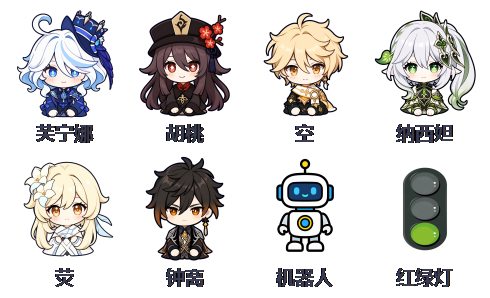
  <img src="assets/screenshots/characters.png" alt="角色阵容" width="520">
  <br><em>九位角色，右键随时切换</em>
</p>

<p align="center">
  <img src="assets/screenshots/states.png" alt="四种状态" width="620">
  <br><em>状态灯：思考 / 出错 / 完成 / 空闲 表情自动切换</em>
</p>

<p align="center">
  <img src="assets/screenshots/chatbox.png" alt="聊天框" width="520">
  <br><em>任务完成、出错、提问时弹出角色专属聊天框</em>
</p>

## 交流

欢迎提 [issue](https://github.com/kongchengavg/dsh-pet-StatusLight/issues/new/choose) 反馈 bug、建议或使用问题。

## 亮点及功能

- 🐾 **9 个角色桌面宠物**：芙宁娜、胡桃、空、纳西妲、枫原万叶、荧、钟离、红绿灯、机器人；右键随时切换，选择自动记住。
- 🎭 **表情实时跟随**：思考、出错、完成、空闲四种状态对应四套表情；出错优先显示，结束后自动恢复。
- 🖥️ **适配 [DSH Desktop](https://github.com/anywhere-labs/dsh-desktop)**：支持 Desktop 的 `web` 与 `desktop` Profile，并针对前台状态、原生桌面通知和跨会话跳转提供一致的聊天框体验。
- 💬 **角色专属聊天框**：任务完成、出错、向你提问时弹出气泡提示；普通 dsh web 可点「查看详细」跳转。DSH Desktop 启用原生通知时仅在前台不同会话显示「跳转会话」，关闭原生通知时显示「查看详细」并采用与 dsh web 相同的设置。
- 🪟 **系统级置顶小窗**（Windows）：独立于浏览器的透明小窗，浏览器最小化也照常显示；可拖动、可右键切换角色，异常退出自动重连。

## 安装、卸载及更新

### 安装

**方法一：交给 AI（将以下文字复制并发给 AI）**

**安装到 dsh web，或 [DSH Desktop](https://github.com/anywhere-labs/dsh-desktop) 当前选择的 `web` Profile：**

```text
按照 https://github.com/kongchengavg/dsh-pet-StatusLight/ 的 INSTALL_WEB.md 安装该插件
```

**安装到 [DSH Desktop](https://github.com/anywhere-labs/dsh-desktop) 当前选择的 `desktop` Profile：**

```text
按照 https://github.com/kongchengavg/dsh-pet-StatusLight/ 的 INSTALL_DESKTOP.md 安装该插件
```

安装后重启当前宿主（dsh web 或 DSH Desktop），插件即可自动加载。

**方法二：手动安装**

已发布到 npm。请根据实际使用的宿主和 Profile 选择命令：

**安装到 dsh web，或 [DSH Desktop](https://github.com/anywhere-labs/dsh-desktop) 当前选择的 `web` Profile：**

```sh
dsh plugin --profile web add dsh-pet-statuslight          # npm 一键安装
# 或 GitHub 源：
dsh plugin --profile web add git+https://github.com/kongchengavg/dsh-pet-StatusLight.git
```

**安装到 [DSH Desktop](https://github.com/anywhere-labs/dsh-desktop) 当前选择的 `desktop` Profile：**

```sh
dsh plugin --profile desktop add dsh-pet-statuslight      # npm 一键安装
# 或 GitHub 源：
dsh plugin --profile desktop add git+https://github.com/kongchengavg/dsh-pet-StatusLight.git
```

> DSH Desktop 的 `web` 与 `desktop` Profile 分别保存插件。命令中的 `--profile` 必须与 DSH Desktop 当前选择的 Profile 一致；如果两个 Profile 都会使用，请分别执行两种安装命令。

> **没有全局安装 dsh CLI？用 npx 临时使用**——无需全局安装，把命令里的 `dsh` 换成 `npx -y @deepseek-ai/dsh` 即可：
> ```sh
> npx -y @deepseek-ai/dsh plugin --profile web add dsh-pet-statuslight
> npx -y @deepseek-ai/dsh plugin --profile web add git+https://github.com/kongchengavg/dsh-pet-StatusLight.git
> npx -y @deepseek-ai/dsh plugin --profile desktop add dsh-pet-statuslight
> npx -y @deepseek-ai/dsh plugin --profile desktop add git+https://github.com/kongchengavg/dsh-pet-StatusLight.git
> ```

安装后重启当前宿主（dsh web 或 DSH Desktop），插件即可自动加载。

> 提示：pnpm 会扣住发布不足 24 小时的新版本，若装到的不是最新版，请**点名版本号**安装（如 `dsh-pet-statuslight@1.0.33`）。

### 卸载

**dsh web 或 [DSH Desktop](https://github.com/anywhere-labs/dsh-desktop) 当前选择的 `web` Profile：**

```sh
dsh plugin --profile web remove dsh-pet-statuslight
# 没有全局 dsh CLI？用 npx：
npx -y @deepseek-ai/dsh plugin --profile web remove dsh-pet-statuslight
```

**[DSH Desktop](https://github.com/anywhere-labs/dsh-desktop)  当前选择的 `desktop` Profile：**

```sh
dsh plugin --profile desktop remove dsh-pet-statuslight
# 没有全局 dsh CLI？用 npx：
npx -y @deepseek-ai/dsh plugin --profile desktop remove dsh-pet-statuslight
```

重启 dsh web 后插件移除。

### 更新

**使用安装时的方法重新安装即可**

重新 add 即完成更新，重启 dsh web 生效。

## 用法

- **右键**状态灯或小窗：切换角色 / 打开主界面 / 关闭置顶小窗。
- **左键拖动**小窗：移动位置（自动保存）。
- **Desktop Profile**：DSH Desktop 中选择 `web` 或 `desktop` Profile 均采用相同的 Desktop 聊天框、通知和跳转规则；Profile=`web` 且启用通知时也会正常显示「跳转会话」。
- **聊天框**：普通 dsh web 使用基于 1.0.37 的「查看详细」跳转与显示时长；从后台手动返回弹窗目标会话时，聊天框会主动关闭。DSH Desktop 也会在用户手动返回弹窗目标会话时主动关闭聊天框。启用原生桌面通知时，仅在 Desktop 前台且通知来自其他会话时显示「跳转会话」，失焦、最小化、隐藏或当前已是目标会话时二者同时隐藏。关闭原生桌面通知时，即使 Desktop 失焦、最小化或隐藏，也同时显示聊天框与「查看详细」，时长、已读和跳转规则与 dsh web 相同。点击链接、手动进入目标会话或点击「×」都会关闭聊天框。
- 角色与位置等配置保存在工作区 `.statuslight.json`，可手动编辑。

## 后续优化方向

1. 为角色添加专属提示音；
2. 添加更多有趣角色；
3. 如果有宝贵意见可以提交 issues 交流，我会尽快评估并升级插件。

## 免责声明

本项目按现状提供，作者不对任何特定用途（含商业使用）提供保证或背书。角色图片素材版权归原作者所有，仅供个人学习使用，请自行确认使用许可。本项目为社区开源项目，与 DeepSeek、米哈游等官方无关。

## License

代码部分采用 MIT（见 [LICENSE](LICENSE)）；角色图片素材版权归原作者所有。