参考源码
1.《117颗星 manuelnas/CesiumHeatmap》 基于heatmap.min.js,通过绘制Entity(矩形)实体实现,364行代码,有三维效果 2. 《32颗星 postor/cesiumjs-heat 》 基于heatmap.min.js,使用SingleTileImageryProvider图层实现,根据镜头移动具有重绘功能,239行代码,无三维效果 3. 《16颗星 wangzhongliang/CesiumHeatmap》 使用Primitive图元实现,提供了两种方式,优点在于计算范围的方法。 方式一基于heatmap.min.js,157行代码,无三维效果; 方式二基于webgl-heatmap.js,128行代码,无三维效果;
特点
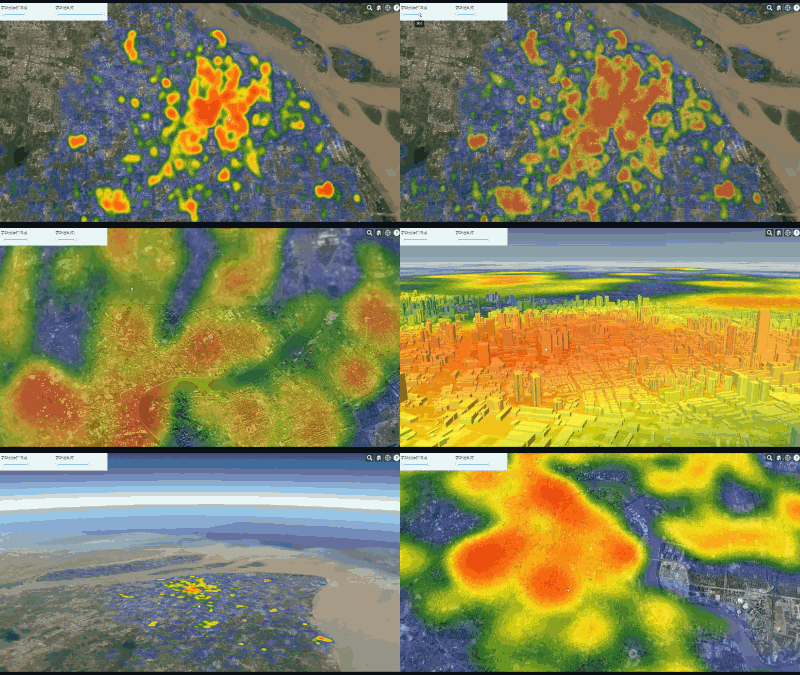
- 提供三种绘制方式,实体(可贴模型,有三维效果)、图元、图层
- 提供重绘,通过摄像头的高度进行重绘
- 提供heatmap.js的所有配置参数入口
- 源码ts编写,发布支持es6和umd两种模式
- 支持npm安装
效果图


插件使用方法
安装
npm install cesium-heatmap-es6
文档
自行打开docs文件夹
umd模式
<script type="text/javascript" src="./CesiumHeatmap/dist/cesium-heatmap-es6.umd.js"></script>
 const defaultDataValue = [10, 500]
        const defaultOpacityValue = [0, 1]
  const points = []
        fetch("/datas/geojson/busstop2016.geojson", {
            method: 'GET',
            headers: {
                'Content-Type': 'application/json'
            },
        }).then((response) => {
            response.json().then((data) => {
                if (data)
                    data.features.forEach(function (feature) {
                        const lon = feature.geometry.coordinates[0]
                        const lat = feature.geometry.coordinates[1]
                        points.push({
                            x: lon,
                            y: lat,
                            value: 100 * Math.random()
                        })
                    })
                const earthHeatMap = new CesiumHeatmap(viewer,
                    {
                        zoomToLayer: true,
                        points,
                        heatmapDataOptions: { max: defaultDataValue[1], min: defaultDataValue[0] },
                        heatmapOptions: {
                            maxOpacity: defaultOpacityValue[1],
                            minOpacity: defaultOpacityValue[0]
                        }
                    }
                )
            })
        })
es6模式
 const defaultDataValue = [10, 500]
        const defaultOpacityValue = [0, 1]
import { CesiumHeatmap, HeatmapPoint } from "cesium-heatmap-es6"

 const points: HeatmapPoint[] = []
        fetch("/datas/geojson/busstop2016.geojson", {
            method: 'GET',
            headers: {
                'Content-Type': 'application/json'
            },
        }).then((response) => {
            response.json().then((data) => {
                if (data)
                    data.features.forEach(function (feature) {
                        const lon = feature.geometry.coordinates[0]
                        const lat = feature.geometry.coordinates[1]
                        points.push({
                            x: lon - 0.05,
                            y: lat - 0.04,
                            value: 100 * Math.random()
                        })
                    })
                cesiumHeatmap = new CesiumHeatmap(viewer,
                    {
                        zoomToLayer: true,
                        points,
                        heatmapDataOptions: { max: defaultDataValue[1], min: defaultDataValue[0] },
                        heatmapOptions: {
                            maxOpacity: defaultOpacityValue[1],
                            minOpacity: defaultOpacityValue[0]
                        }
                    }
                )
            })
        })
源码使用方法
依赖安装
npm run a
项目运行
npm start
项目打包
npm run build
发布
npm run release