# dsh-mcp-manager
Manage every MCP server and skill in DeepSeek Harness from one settings page — install, configure, monitor.
server list add / edit / delete enable / disable restart tool-count health JSON export / import
Skills browse / search / disable 4 model tools HTTP API dsh plugin one-command
Settings → MCP 管理 manages @deepseek-ai/dsh-mcp-client rows in your project-level and
global cordis.patch.yml; Settings → Skills 管理 browses and disables skills from every
source — no hand-editing, every change applies live via HMR, survives restarts and upgrades.
[](https://www.npmjs.com/package/@xxxyz/dsh-mcp-manager)
[](LICENSE)
[](package.json)
[](https://github.com/xxxyz/DeepSeekHarness-MCP-Manager)
[](https://dsh.market)
[](https://awesome-dsh-plugin.com)
[](https://whyihaveyou.github.io/dsh-suite/)
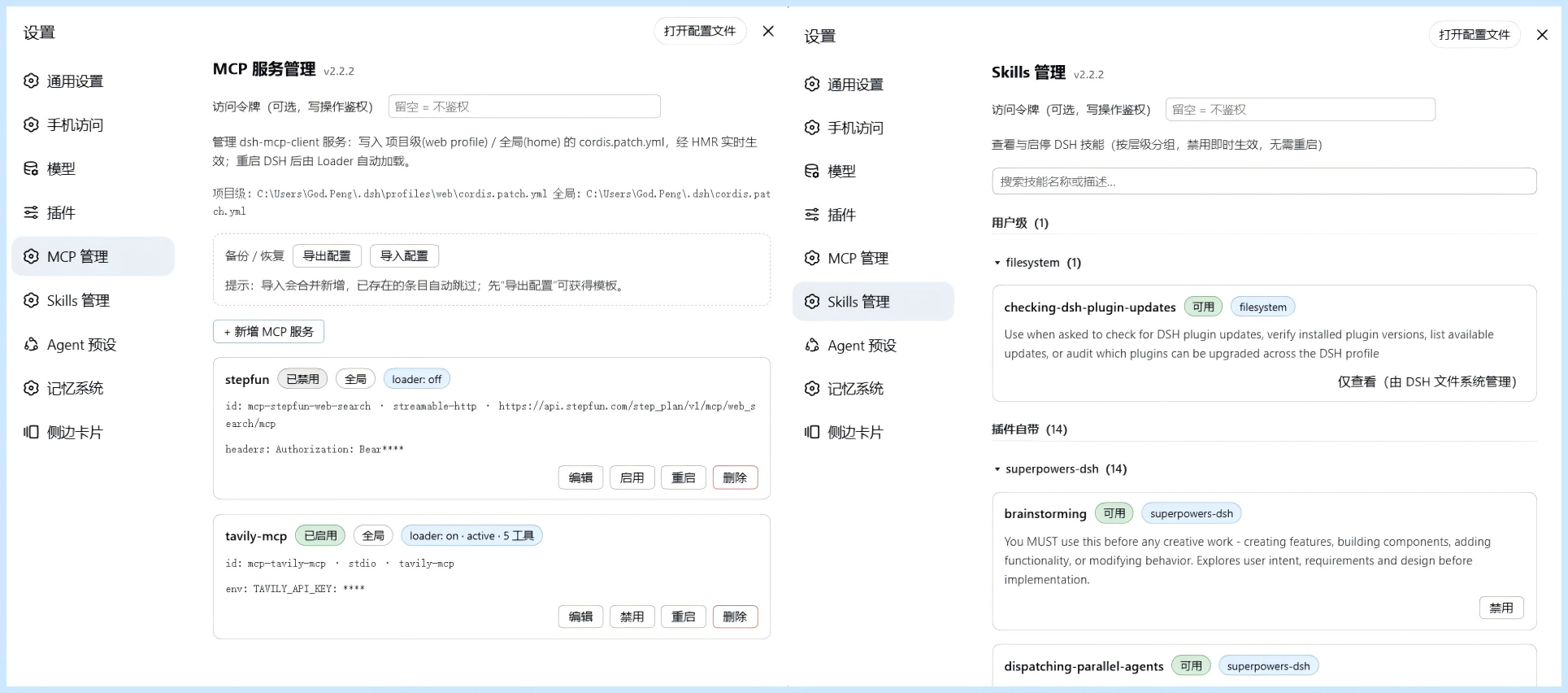
## ✨ Features
- **📋 Server list** — every configured MCP server (`@deepseek-ai/dsh-mcp-client` instance): `serverName`, transport (`stdio` / `streamable-http`), URL / command, enabled state, live loader phase, registered tool count
- **➕ Add / ➖ Delete** — form-based (env / headers / args supported) with format and duplicate-name validation; one-click delete
- **🔌 Enable / Disable** — flip at any time, tools hot-connect / hot-disconnect
- **🔄 Restart** — disable + re-enable, reconnect and re-sync tools automatically
- **💾 Persistence** — written to the **project-level** (`profiles//cordis.patch.yml`) or **global** (`~/.dsh/cordis.patch.yml`) patch file; survives restarts; the file path is shown at the bottom of the page
- **🩺 Health check** — live tool counts and loader phase per server, problems visible at a glance
- **📦 Backup / Restore** — JSON export / import; merges new entries, skips existing ones
- **🤖 Model tools** — four `mcp_manager_*` tools registered on the host, so the model can query and manage MCP servers directly
- **🧠 Skill management** — the **Settings → Skills 管理** page lists every DSH skill grouped by source (project / runtime / custom / user / built-in / plugin-bundled) with search and per-provider collapse; enable / disable any skill in one click (rank-0 override provider, so every source level including project-level is disable-able), persisted to `dsh-skill-manager.json`, applied live via HMR
- **🌐 HTTP API** — `POST /dsh-mcp-manager/api` (JSON `{op, args}` → `{ok, ...}`) for the client and scripts. Cross-site (CSRF) protected: POST-only, requires the `x-dsh-plugin: dsh-mcp-manager` request header, and checks the Origin is same-origin (local scripts without an Origin are fine)
- **📦 One-command install** — `dsh plugin --profile web add` installs and mounts automatically (Windows / macOS / Linux)
## 🚀 Install
**Prerequisite**: DSH installed and running (`dsh web` works), Node.js ≥ 18, pnpm ≥ 9.
### Method 1 · dsh command (recommended)
One command installs the package and **auto-mounts** it (the `dsh.bundle.patch` mechanism — no manual config file edits needed):
```sh
dsh plugin --profile web add @xxxyz/dsh-mcp-manager@latest
```
After installing, **hard-refresh the browser** (Cmd/Ctrl+Shift+R) and open **Settings → MCP 管理** (DSH hot-reloads client changes; a full restart is only needed for host-half changes).
### Method 2 · Let DSH install it
Paste this prompt into any DSH conversation:
```text
Install the dsh-mcp-manager plugin (DSH MCP server manager):
1. Run dsh plugin --profile web add @xxxyz/dsh-mcp-manager@latest
2. When done, remind me to hard-refresh the browser (Cmd/Ctrl+Shift+R)
If you hit an error, check https://github.com/xxxyz/DeepSeekHarness-MCP-Manager README's FAQ table.
```
**Update**
```sh
dsh plugin --profile web add @xxxyz/dsh-mcp-manager@latest
```
Or bump the version in `~/.dsh/profiles/web/package.json` and run `pnpm install`. Hard-refresh the browser afterwards (Cmd/Ctrl+Shift+R) — client changes are hot-reloaded; only host-half changes need a restart.
FAQ
| Symptom | Cause & fix |
|---|---|
| No "MCP 管理" in Settings after install | Hard-refresh (Cmd/Ctrl+Shift+R); if still missing, restart DSH once. |
| **Two MCP tabs / duplicated tools** | Double mount: both a legacy loader row and the new bundle entry exist. Delete the old loader row from `cordis.patch.yml`, or the `dsh.profile.bundles` entry, then restart DSH. |
| Upgrading from a legacy script install | The new bundle has a built-in double-mount guard — `dsh plugin --profile web add @xxxyz/dsh-mcp-manager@latest` won't crash. To actually switch to the new code: remove the old `- id: mcp-manager` row from `~/.dsh/profiles/web/cordis.patch.yml`, delete `local-packages/dsh-mcp-manager` and `profiles/node_modules/dsh-mcp-manager`, then restart DSH. |
| `dsh: command not found` | Install DSH first, or use `npx -y --package @deepseek-ai/dsh dsh plugin --profile web add @xxxyz/dsh-mcp-manager@latest`. |
| `npm view` reports 404 | Local mirror (npmmirror) sync lag: add `--registry=https://registry.npmjs.org` or wait a moment. |
| Config changes don't take effect | All changes apply via HMR within 1–2 s; the page auto-polls. |
Uninstall
```sh
dsh plugin --profile web remove @xxxyz/dsh-mcp-manager
```
Then restart DSH.
## 📖 Usage
Open **Settings → MCP 管理**:
- **Add a server**: enter `serverName` (unique, 1–32 chars of `[A-Za-z0-9_-]`), the transport and its fields (`streamable-http` → URL / headers; `stdio` → command / args / env), and the level (project / global). The form validates format and duplicate names.
- Each card shows live status, the connection target and the tool count; you can **enable / disable**, **restart**, **edit** and **delete**.
- **Backup / Restore**: export the configuration as JSON with one click, or paste JSON to import (merges new entries, skips existing ones).
- The file path being edited is shown at the bottom of the page.
Open **Settings → Skills 管理**:
- **Browse / Search**: lists every DSH skill grouped by source (project / runtime / custom / user / built-in / plugin-bundled), collapsed per provider; the search box filters live. User-level skills under `~/.dsh/skills/` (2.2.0+) are listed too — even though the official scoped layer never exposes them to scope-less queries.
- **Enable / Disable**: toggle any skill in one click — implemented with a rank-0 override provider (`dsh-mcp-manager-override`), so every source level (including project-level and user-level filesystem skills) can be disabled.
- **Persistence**: disabled state is written to `/dsh-skill-manager.json`, survives restarts, and applies live via HMR.
## ⚙️ Configuration
Configuration of the plugin itself on its loader row:
| Field | Description |
|---|---|
| `version` | The loader row's `config.version`, only used to trigger an HMR re-apply; auto-managed by the bundle channel — no manual edits needed. |
| `token` | **Optional** access token (write-op auth, defense in depth). When set, state-changing ops (add/edit/remove/enable/restart/import/export/skill-toggle) require the `x-dsh-token: ` header; the settings pages provide a token input (stored in browser localStorage). Can also be set via the `DSH_MCP_MANAGER_TOKEN` env var. Off by default. |
> **Why is the token needed?** The plugin's CSRF protection only blocks *cross-site browser* requests — it assumes DSH web listens on localhost (`127.0.0.1`) only. Once you expose port 3080 to a LAN or the public internet (port forwarding, a `dsh-web-lan-access`-style plugin, or a reverse proxy), **anyone who can reach the port gets full write access**: they can add/modify MCP servers, and a `stdio` server's `command` field accepts any executable — i.e. **remote arbitrary code execution**. The token is the last gate for exactly this exposure scenario: without the secret, no write op succeeds even when the port is exposed, so commands cannot be injected. Local single-machine use does not need it.
The loader row must be an **`insert` block** (in DSH's patch dialect a plain `- id:` row only overrides existing entries and can never add a new plugin):
```yaml
- insert:
- id: dsh-mcp-manager
name: '@xxxyz/dsh-mcp-manager'
config:
token: your-access-token # optional: enable write-op auth
```
> You don't need to write this row manually — `dsh plugin add` inserts it automatically via the bundle patch (see `cordis.patch.yml`).
## 🏗️ Architecture
- **Host half** (`src/index.ts` → `lib/index.js`, an object-form Cordis plugin `{name, inject, apply}`): `inject` declares `timer/fs/settings/sandboxPolicy/webServer/tools` — the framework guarantees they are ready and reloads the plugin if one disappears, which is how the plugin survives DSH upgrades. Registers four model tools (`ctx.tools.register(defineTool(...))`) and the exact route `POST /dsh-mcp-manager/api` (scoped cleanup via `ctx.effect`); line-level CRUD on `cordis.patch.yml` (mini YAML parser + per-file write lock).
- **Browser half** (`lib/client.js`, ModuleLoader CJS bundle): registers the Settings → MCP 管理 page (`settings.section` slot, order 16) and talks to the host through same-origin `fetch('/dsh-mcp-manager/api')` — it never touches the filesystem directly.
- **Loader row**: inserted automatically by `dsh plugin add`'s bundle patch; the client-modules service scans enabled entries and serves the client bundle.
## 🛠️ Development
```bash
npm install
npm run build # tsc -p tsconfig.json → lib/index.js (host half)
```
- Host source: `src/index.ts`; browser bundle: `lib/client.js` (hand-written, no build step)
- The package is pure JS, zero-dependency and cross-platform; building only needs the devDependencies (typescript, `@deepseek-ai/cordis`, `@deepseek-ai/dsh-tools`, `@types/node`)
- Publishing: `npm version patch && npm publish` (`prepublishOnly` builds automatically; the scoped package has `publishConfig.access: public`)
## License
MIT