SQL Chat

 ## Startup options
## TL;DR
- If you just want to use for yourself, then run without database. Check [.env.nodb](https://github.com/sqlchat/sqlchat/blob/main/.env.nodb).
- If you want to offer a similar service as [sqlchat.ai](https://sqlchat.ai), then run with database, check [.env.usedb](https://github.com/sqlchat/sqlchat/blob/main/.env.usedb). The database is used to store account, usage info.
### OpenAI related
- `OPENAI_API_KEY`: OpenAI API key. You can get one from [here](https://platform.openai.com/api-keys).
- `OPENAI_API_ENDPOINT`: OpenAI API endpoint. Defaults to `https://api.openai.com`. Use [Ollama](https://github.com/ollama/ollama) to set up self-host AI model and set the endpoint to it.
- `NEXT_PUBLIC_ALLOW_SELF_OPENAI_KEY`: Set to `true` to allow users to bring their own OpenAI API key.
### Database related
- `NEXT_PUBLIC_USE_DATABASE`: Set to `true` to start SQL Chat with database. This will
enable following features:
1. Account system.
1. Per-user quota enforcement.
1. Payment.
1. Usage data collection.
- `DATABASE_URL`: Applicable if `NEXT_PUBLIC_USE_DATABASE` is `true`. Postgres connection string to store data. e.g. `postgresql://postgres:YOUR_PASSWORD@localhost:5432/sqlchat?schema=sqlchat`.
## Local Development
1. Install dependencies
```bash
pnpm i
```
1. Generate prisma client
```bash
pnpm prisma generate
```
1. Make a copy of the example environment variables file:
```bash
cp .env.usedb .env
```
1. Add your [API key](https://platform.openai.com/account/api-keys) and OpenAI API Endpoint(optional) to the newly created `.env` file.
### Setup database
**You can skip this section with `NEXT_PUBLIC_USE_DATABASE=false` if you don't build features requiring database**
1. Start a Postgres instance. For mac, you can use [StackbBricks](https://stackbricks.app/), [DBngin](https://dbngin.com/) or [Postgres.app](https://postgresapp.com/).
1. Create a database:
```sql
CREATE DATABASE sqlchat;
```
In `.env` file, assign the connection string to environment variable `DATABASE_URL` and `DATABASE_DIRECT_URL`. [This article](https://www.prisma.io/docs/data-platform/data-proxy/prisma-cli-with-data-proxy#set-a-direct-database-connection-url-in-your-prisma-schema) explains why we need two URLs.
1. Set up database schema
```bash
pnpm prisma migrate dev
```
1. (Optional) Seed data
```bash
pnpm prisma db seed
```
## Star History
[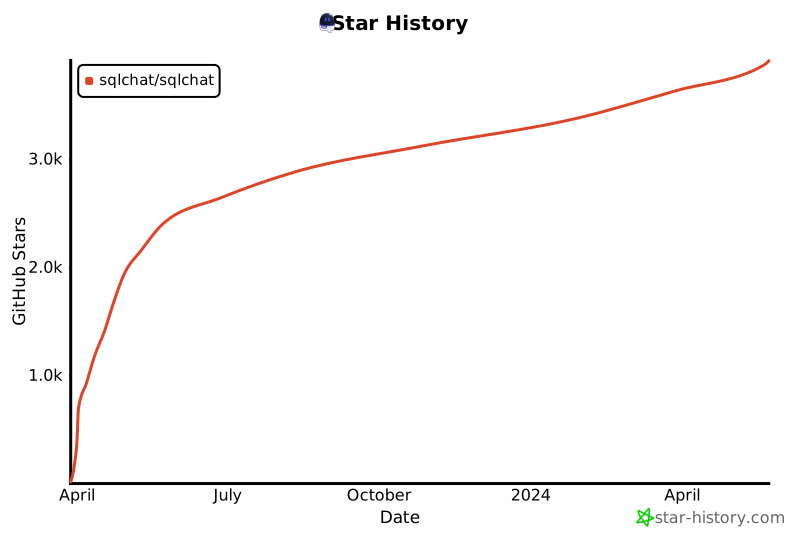](https://star-history.com/#sqlchat/sqlchat&Date)
## Community
[](https://twitter.com/Bytebase)
## Startup options
## TL;DR
- If you just want to use for yourself, then run without database. Check [.env.nodb](https://github.com/sqlchat/sqlchat/blob/main/.env.nodb).
- If you want to offer a similar service as [sqlchat.ai](https://sqlchat.ai), then run with database, check [.env.usedb](https://github.com/sqlchat/sqlchat/blob/main/.env.usedb). The database is used to store account, usage info.
### OpenAI related
- `OPENAI_API_KEY`: OpenAI API key. You can get one from [here](https://platform.openai.com/api-keys).
- `OPENAI_API_ENDPOINT`: OpenAI API endpoint. Defaults to `https://api.openai.com`. Use [Ollama](https://github.com/ollama/ollama) to set up self-host AI model and set the endpoint to it.
- `NEXT_PUBLIC_ALLOW_SELF_OPENAI_KEY`: Set to `true` to allow users to bring their own OpenAI API key.
### Database related
- `NEXT_PUBLIC_USE_DATABASE`: Set to `true` to start SQL Chat with database. This will
enable following features:
1. Account system.
1. Per-user quota enforcement.
1. Payment.
1. Usage data collection.
- `DATABASE_URL`: Applicable if `NEXT_PUBLIC_USE_DATABASE` is `true`. Postgres connection string to store data. e.g. `postgresql://postgres:YOUR_PASSWORD@localhost:5432/sqlchat?schema=sqlchat`.
## Local Development
1. Install dependencies
```bash
pnpm i
```
1. Generate prisma client
```bash
pnpm prisma generate
```
1. Make a copy of the example environment variables file:
```bash
cp .env.usedb .env
```
1. Add your [API key](https://platform.openai.com/account/api-keys) and OpenAI API Endpoint(optional) to the newly created `.env` file.
### Setup database
**You can skip this section with `NEXT_PUBLIC_USE_DATABASE=false` if you don't build features requiring database**
1. Start a Postgres instance. For mac, you can use [StackbBricks](https://stackbricks.app/), [DBngin](https://dbngin.com/) or [Postgres.app](https://postgresapp.com/).
1. Create a database:
```sql
CREATE DATABASE sqlchat;
```
In `.env` file, assign the connection string to environment variable `DATABASE_URL` and `DATABASE_DIRECT_URL`. [This article](https://www.prisma.io/docs/data-platform/data-proxy/prisma-cli-with-data-proxy#set-a-direct-database-connection-url-in-your-prisma-schema) explains why we need two URLs.
1. Set up database schema
```bash
pnpm prisma migrate dev
```
1. (Optional) Seed data
```bash
pnpm prisma db seed
```
## Star History
[](https://star-history.com/#sqlchat/sqlchat&Date)
## Community
[](https://twitter.com/Bytebase)
 ## Sponsors

See [this issue](https://github.com/sqlchat/sqlchat/issues/141).
 Your OpenAI Key has run out of quota. Please check your [OpenAI account](https://platform.openai.com/account/api-keys).
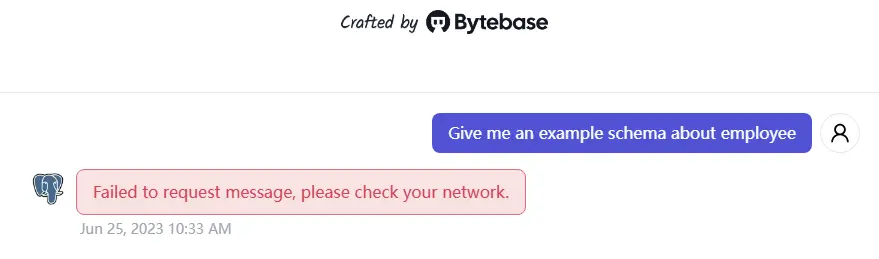 Please make sure you have a stable network connection which can access the OpenAI API endpoint. ```bash ping api.openai.com ``` If you cannot access the OpenAI API endpoint, you can try to set the `OPENAI_API_ENDPOINT` in UI or environment variable.