코딩 에이전트가 모든 것을 기억합니다. 더 이상 다시 설명할 필요가 없습니다.
Built on iii engine
Claude Code, Cursor, Gemini CLI, Codex CLI, Hermes, OpenClaw, pi, OpenCode 및 모든 MCP 클라이언트를 위한 영구 메모리입니다.
---
## Install
```bash
npm install -g @agentmemory/agentmemory # once — bare `agentmemory` on PATH
# If you hit EACCES on macOS/Linux system Node installs, retry with:
# sudo npm install -g @agentmemory/agentmemory
agentmemory # start the memory server on :3111
agentmemory demo # seed sample sessions + prove recall
agentmemory connect claude-code # wire your agent (also: codex, cursor, gemini-cli, ...)
```
또는 `npx`로 설치 없이 실행:
```bash
npx @agentmemory/agentmemory
```
참고 — npx는 버전별로 캐싱합니다. 단순한 `npx @agentmemory/agentmemory`가 이전 릴리스를 제공한다면, `npx -y @agentmemory/agentmemory@latest`로 최신 버전을 강제로 가져오거나 `rm -rf ~/.npm/_npx`로 캐시를 한 번 비우십시오(macOS/Linux. Windows에서는 `%LOCALAPPDATA%\npm-cache\_npx`를 삭제). v0.9.16부터의 첫 npx 실행은 전역 설치 여부를 인라인으로 묻기 때문에, 이후에는 어디서나 단순한 `agentmemory` 명령이 동작합니다.
전체 옵션은 아래 [빠른 시작](#quick-start)을 참고하십시오. 에이전트별 연결 방법은 [모든 에이전트와 호환](#works-with-every-agent) 섹션에서 확인할 수 있습니다.
---
agentmemory는 hooks, MCP, REST API를 지원하는 모든 에이전트와 호환됩니다. 모든 에이전트는 동일한 메모리 서버를 공유합니다.
Claude Code native plugin + 12 hooks + MCP
Codex CLI native plugin + 6 hooks + MCP
OpenClaw native plugin + MCP
Hermes native plugin + MCP
pi native plugin + MCP
OpenHuman native Memory trait backend
Cursor MCP server
Gemini CLI MCP server
OpenCode 22 hooks + MCP + plugin
Cline MCP server
Goose MCP server
Kilo Code MCP server
Aider REST API
Claude Desktop MCP server
Windsurf MCP server
Roo Code MCP server
MCP 또는 HTTP를 지원하는 모든 에이전트와 호환됩니다. 서버 하나, 모든 에이전트가 메모리를 공유합니다.
---
세션마다 같은 아키텍처를 설명하고, 같은 버그를 다시 찾고, 같은 선호 사항을 다시 가르치게 됩니다. 내장 메모리(CLAUDE.md, .cursorrules)는 200줄 한도에서 멈추고 금세 낡습니다. agentmemory가 이 문제를 해결합니다. 에이전트의 동작을 조용히 캡처하여 검색 가능한 메모리로 압축하고, 다음 세션이 시작될 때 적절한 컨텍스트를 주입합니다. 명령 하나면 됩니다. 모든 에이전트에서 동작합니다.
**무엇이 바뀌는가:** 세션 1에서 JWT 인증을 설정합니다. 세션 2에서 rate limiting을 요청합니다. 에이전트는 이미 인증이 `src/middleware/auth.ts`의 jose 미들웨어로 처리된다는 것, 테스트가 토큰 검증을 다룬다는 것, 그리고 Edge 호환성 때문에 jsonwebtoken 대신 jose를 선택했다는 것을 알고 있습니다. 다시 설명할 필요도, 복사·붙여넣기도 필요 없습니다. 에이전트가 그냥 *알고* 있습니다.
```bash
npx @agentmemory/agentmemory
```
> **v0.9.0의 새로운 기능** — [agent-memory.dev](https://agent-memory.dev)의 랜딩 사이트, 파일시스템 커넥터(`@agentmemory/fs-watcher`), 독립형 MCP가 이제 실행 중인 서버로 프록시되어 hooks와 뷰어가 일치합니다. 모든 삭제 경로에 감사 정책이 코드로 명문화되었고, 작은 Node 프로세스에서 health가 `memory_critical`로 잘못 표시되지 않습니다. 전체 노트는 [CHANGELOG.md](../CHANGELOG.md#090--2026-04-18)에서 확인할 수 있습니다.
---
### 토큰 절감
| 방식 | 연간 토큰 | 연간 비용 |
|---|---|---|
| 전체 컨텍스트를 매번 붙여넣기 | 19.5M+ | 불가능(컨텍스트 윈도우 초과) |
| LLM 요약 | ~650K | ~$500 |
| **agentmemory** | **~170K** | **~$10** |
| agentmemory + 로컬 임베딩 | ~170K | **$0** |
> 임베딩 모델: `all-MiniLM-L6-v2` (로컬, 무료, API 키 불필요). 전체 보고서: [`benchmark/LONGMEMEVAL.md`](../benchmark/LONGMEMEVAL.md), [`benchmark/QUALITY.md`](../benchmark/QUALITY.md), [`benchmark/SCALE.md`](../benchmark/SCALE.md). 경쟁 제품 비교: [`benchmark/COMPARISON.md`](../benchmark/COMPARISON.md) — agentmemory 대 mem0, Letta, Khoj, claude-mem, Hippo.
**로컬 재현 방법:** [`eval/README.md`](../eval/README.md) — LongMemEval `_s`(공개 500-Q)와 `coding-agent-life-v1`(자체 15-세션 코퍼스)을 위한 어댑터 플러그형 하니스. grep / vector / agentmemory 어댑터를 나란히 평가하고, NDJSON으로 출력하며, 게시된 스코어카드는 [`docs/benchmarks/`](../docs/benchmarks/)에 보관됩니다.
**다음과 함께 사용하기 좋습니다: [codegraph](https://github.com/colbymchenry/codegraph), [Understand Anything](https://github.com/Lum1104/Understand-Anything), [Graphify](https://github.com/safishamsi/graphify).** 코드 그래프 인덱싱, 멀티 에이전트 빌드 파이프라인, 그리고 docs/PDF/이미지/비디오에 걸친 더 넓은 지식 그래프. agentmemory는 작업을 기억하고, 이 세 프로젝트는 나머지 컨텍스트 레이어를 밝혀줍니다. 레시피와 질문 라우팅 표: [`docs/recipes/pairings.md`](../docs/recipes/pairings.md).
---
agentmemory
mem0 (53K ⭐)
Letta / MemGPT (22K ⭐)
내장 메모리 (CLAUDE.md)
유형
메모리 엔진 + MCP 서버
메모리 레이어 API
완전한 에이전트 런타임
정적 파일
검색 R@5
95.2%
68.5% (LoCoMo)
83.2% (LoCoMo)
해당 없음 (grep)
자동 캡처
12 hooks (수동 작업 없음)
수동 add() 호출
에이전트 자체 편집
수동 편집
검색
BM25 + Vector + Graph (RRF 융합)
Vector + Graph
Vector (archival)
모든 것을 컨텍스트에 로드
멀티 에이전트
MCP + REST + leases + signals
API (조정 없음)
Letta 런타임 내에서만
에이전트별 파일
프레임워크 종속성
없음 (모든 MCP 클라이언트)
없음
높음 (Letta 사용 필수)
에이전트별 포맷
외부 의존성
없음 (SQLite + iii-engine)
Qdrant / pgvector
Postgres + 벡터 DB
없음
메모리 라이프사이클
4-tier 통합 + 감쇠 + 자동 망각
수동적 추출
에이전트 관리
수동 정리
토큰 효율
세션당 ~1,900 토큰 ($10/년)
통합 방식에 따라 다름
핵심 메모리는 컨텍스트에 상주
관측 240개 기준 22K+ 토큰
실시간 뷰어
있음 (port 3113)
클라우드 대시보드
클라우드 대시보드
없음
셀프 호스팅
예 (기본)
선택 사항
선택 사항
예
---
호환성: 이 릴리스는 안정 버전 `iii-sdk` `^0.11.0`과 iii-engine v0.11.x를 대상으로 합니다.
### 30초 만에 사용해 보기
```bash
# Terminal 1: start the server
npx @agentmemory/agentmemory
# Terminal 2: seed sample data and see recall in action
npx @agentmemory/agentmemory demo
```
`demo`는 현실적인 세션 3개(JWT 인증, N+1 쿼리 수정, rate limiting)를 시드하고, 그 위에서 시맨틱 검색을 실행합니다. "database performance optimization"으로 검색하면 "N+1 query fix"를 찾는 것을 확인할 수 있는데, 키워드 매칭으로는 불가능한 결과입니다.
`http://localhost:3113`을 열어서 메모리가 실시간으로 쌓이는 것을 지켜보십시오.
### 권장: 전역 설치
`npx`는 버전별로 캐싱합니다. 지난주에 `npx @agentmemory/agentmemory@0.9.14`를 실행했다면, 단순한 `npx @agentmemory/agentmemory`는 최신 릴리스가 아니라 `~/.npm/_npx/`에 캐시된 0.9.14를 제공할 수 있습니다. 한 번 설치하면 단순한 `agentmemory` 명령이 어디서나 동작합니다:
```bash
npm install -g @agentmemory/agentmemory
# If you hit EACCES on macOS/Linux system Node installs, retry with:
# sudo npm install -g @agentmemory/agentmemory
agentmemory # start the server (same as the npx form)
agentmemory stop # tear it down
agentmemory remove # uninstall everything we created
agentmemory connect claude-code # wire one agent
agentmemory doctor # interactive diagnostics + fix prompts
```
v0.9.16 이후부터 첫 npx 실행은 인라인으로 전역 설치 여부를 묻습니다 — `Y`로 한 번만 답하면 설정이 끝납니다. 만약 건너뛰었다면, 새로 가져오기 위해 다음 중 하나를 사용하십시오:
```bash
npx -y @agentmemory/agentmemory@latest # forces latest from npm (cross-platform)
rm -rf ~/.npm/_npx && npx @agentmemory/agentmemory # macOS/Linux only (POSIX shell)
```
Windows / PowerShell에서 동일한 캐시 비우기는 `Remove-Item -Recurse -Force "$env:LOCALAPPDATA\npm-cache\_npx"`입니다 — 위의 `npx -y ...@latest`가 크로스 플랫폼 옵션입니다.
### 세션 리플레이
agentmemory가 기록한 모든 세션은 재생 가능합니다. 뷰어를 열어 **Replay** 탭을 선택하고 타임라인을 스크럽하면 프롬프트, 도구 호출, 도구 결과, 응답이 별개의 이벤트로 렌더링됩니다. 재생/일시정지, 속도 제어(0.5×–4×), 키보드 단축키(space로 토글, 화살표로 단계 이동)를 모두 지원합니다.
가져오고 싶은 기존 Claude Code JSONL 트랜스크립트가 있습니까?
```bash
# Import everything under the default ~/.claude/projects
npx @agentmemory/agentmemory import-jsonl
# Or import a single file
npx @agentmemory/agentmemory import-jsonl ~/.claude/projects/-my-project/abc123.jsonl
```
가져온 세션은 네이티브 세션과 함께 Replay 선택기에 표시됩니다. 내부적으로 각 항목은 `mem::replay::load`, `mem::replay::sessions`, `mem::replay::import-jsonl` iii 함수로 라우팅됩니다 — 별도의 사이드 채널 서버 없이.
### 업그레이드 / 유지보수
로컬 런타임을 의도적으로 업데이트할 때는 maintenance 명령을 사용하십시오:
```bash
npx @agentmemory/agentmemory upgrade
```
경고: 이 명령은 현재 workspace/런타임을 변경합니다. JavaScript 의존성을 업데이트할 수 있으며, 고정된 Docker 이미지 `iiidev/iii:0.11.2`를 pull할 수 있습니다. 고정되지 않았거나 더 새로운 iii 엔진을 설치하는 일은 절대 없습니다.
구현 세부 사항은 `src/cli.ts`에 있습니다 (`runUpgrade`는 `src/cli.ts:544-595` 부근 참고).
### Claude Code (블록 한 번, 붙여넣기)
```text
Install agentmemory: run `npx @agentmemory/agentmemory` in a separate terminal to start the memory server. Then run `/plugin marketplace add rohitg00/agentmemory` and `/plugin install agentmemory` — the plugin registers all 12 hooks, 4 skills, AND auto-wires the `@agentmemory/mcp` stdio server via its `.mcp.json`, so you get 53 MCP tools (memory_smart_search, memory_save, memory_sessions, memory_governance_delete, etc.) without any extra config step. Verify with `curl http://localhost:3111/agentmemory/health`. The real-time viewer is at http://localhost:3113.
```
#### 플러그인 설치 없이 Claude Code 사용 (MCP-독립형 경로)
`/plugin install` 대신 `~/.claude.json`을 통해 agentmemory의 MCP 서버를 직접 연결한 경우, Claude Code는 `${CLAUDE_PLUGIN_ROOT}`를 해석하지 못하므로 `~/.claude/settings.json`의 hook 스크립트를 절대 경로로 지정해야 합니다. 이 경로들은 일반적으로 agentmemory 버전을 포함하기 때문에 (예: `~/.codex/plugins/cache/agentmemory/agentmemory/0.9.21/scripts/…`), 다음 업그레이드에서 모든 hook이 조용히 깨질 수 있습니다.
해결책:
```bash
agentmemory connect claude-code --with-hooks
```
이 명령은 현재 설치된 `@agentmemory/agentmemory` 패키지의 번들된 `plugin/` 디렉터리로 해석된 절대 경로로 동일한 hook 명령을 `~/.claude/settings.json`에 병합합니다. agentmemory를 업그레이드한 후 동일한 명령을 다시 실행하여 경로를 갱신하십시오. 동일한 파일의 사용자 항목은 보존되며, 이전 agentmemory 항목만 교체됩니다. `/plugin install` 경로를 사용하는 것이 여전히 권장 방식입니다.
원격 또는 보호된 배포의 경우, `AGENTMEMORY_URL`과 `AGENTMEMORY_SECRET`을 설정한 채로 Claude Code를 실행하십시오. 플러그인은 두 값을 모두 번들된 MCP 서버로 전달합니다. `AGENTMEMORY_URL`이 비어 있을 때는 MCP shim이 `http://localhost:3111`을 사용합니다.
### Codex CLI (Codex 플러그인 플랫폼)
```bash
# 1. start the memory server in a separate terminal
npx @agentmemory/agentmemory
# 2. register the agentmemory marketplace and install the plugin
codex plugin marketplace add rohitg00/agentmemory
codex plugin add agentmemory@agentmemory
```
Codex 플러그인은 Claude Code 플러그인과 동일한 `plugin/` 디렉터리에서 제공됩니다. 다음을 등록합니다:
- `@agentmemory/mcp`를 MCP 서버로 등록 (`AGENTMEMORY_URL`이 실행 중인 agentmemory 서버를 가리킬 때 51개 도구 모두 프록시. 도달 가능한 서버가 없으면 로컬에서 7개 도구로 폴백)
- 6개 라이프사이클 hooks: `SessionStart`, `UserPromptSubmit`, `PreToolUse`, `PostToolUse`, `PreCompact`, `Stop`
- 4개 skills: `/recall`, `/remember`, `/session-history`, `/forget`
Codex의 hook 엔진은 hook 서브프로세스에 `CLAUDE_PLUGIN_ROOT`를 주입하므로 ([`codex-rs/hooks/src/engine/discovery.rs`](https://github.com/openai/codex/blob/main/codex-rs/hooks/src/engine/discovery.rs) 참고), 동일한 hook 스크립트가 중복 없이 두 호스트에서 모두 동작합니다. Subagent / SessionEnd / Notification / TaskCompleted / PostToolUseFailure 이벤트는 Claude Code 전용이며 Codex에는 등록되지 않습니다.
#### Codex Desktop: 플러그인 hooks가 현재 동작하지 않음 (해결책 있음)
`CodexHooks`와 `PluginHooks`는 [`codex-rs/features/src/lib.rs`](https://github.com/openai/codex/blob/main/codex-rs/features/src/lib.rs)에서 모두 안정 + 기본 활성화 상태이지만, 현재 Codex Desktop 빌드는 플러그인-로컬 `hooks.json`을 디스패치하지 않습니다 ([openai/codex#16430](https://github.com/openai/codex/issues/16430)). MCP 도구는 여전히 동작합니다. 라이프사이클 관측만 누락됩니다.
업스트림 수정이 적용될 때까지 동일한 hook 명령을 전역 `~/.codex/hooks.json`에 미러링하십시오:
```bash
agentmemory connect codex --with-hooks
```
이 명령은 번들된 스크립트의 절대 경로를 참조하는 idempotent 블록을 `~/.codex/hooks.json`에 추가합니다(사용자 스코프에서 `${CLAUDE_PLUGIN_ROOT}` 확장이 필요 없음). agentmemory를 업그레이드한 후 동일한 명령을 다시 실행하여 경로를 갱신하십시오. 동일한 파일의 사용자 항목은 보존되며, 이전 agentmemory 항목만 교체됩니다.
OpenClaw (이 프롬프트를 붙여넣으세요)
```text
Install agentmemory for OpenClaw. Run `npx @agentmemory/agentmemory` in a separate terminal to start the memory server on localhost:3111. Then add this to my OpenClaw MCP config so agentmemory is available with all 51 memory tools:
{
"mcpServers": {
"agentmemory": {
"command": "npx",
"args": ["-y", "@agentmemory/mcp"],
"env": {
"AGENTMEMORY_URL": "http://localhost:3111"
}
}
}
}
Restart OpenClaw. Verify with `curl http://localhost:3111/agentmemory/health`. Open http://localhost:3113 for the real-time viewer. For deeper memory-slot integration, copy `integrations/openclaw` to `~/.openclaw/extensions/agentmemory` and enable `plugins.slots.memory = "agentmemory"` in `~/.openclaw/openclaw.json`.
```
전체 가이드: [`integrations/openclaw/`](../integrations/openclaw/)
Hermes Agent (이 프롬프트를 붙여넣으세요)
```text
Install agentmemory for Hermes. Run `npx @agentmemory/agentmemory` in a separate terminal to start the memory server on localhost:3111. Then add this to ~/.hermes/config.yaml so Hermes can use agentmemory as an MCP server with all 51 memory tools:
mcp_servers:
agentmemory:
command: npx
args: ["-y", "@agentmemory/mcp"]
memory:
provider: agentmemory
Verify with `curl http://localhost:3111/agentmemory/health`. Open http://localhost:3113 for the real-time viewer. For deeper 6-hook memory provider integration (pre-LLM context injection, turn capture, MEMORY.md mirroring, system prompt block), copy integrations/hermes from the agentmemory repo to ~/.hermes/plugins/agentmemory.
```
전체 가이드: [`integrations/hermes/`](../integrations/hermes/)
### 다른 에이전트
메모리 서버 시작: `npx @agentmemory/agentmemory`
agentmemory 항목은 `mcpServers` 형태를 사용하는 모든 호스트(Cursor, Claude Desktop, Cline, Roo Code, Windsurf, Gemini CLI, OpenClaw)에서 **동일한 MCP 서버 블록**입니다:
```json
"agentmemory": {
"command": "npx",
"args": ["-y", "@agentmemory/mcp"],
"env": {
"AGENTMEMORY_URL": "${AGENTMEMORY_URL}",
"AGENTMEMORY_SECRET": "${AGENTMEMORY_SECRET}"
}
}
```
**호스트 설정 파일의 기존 `mcpServers` 객체에 이 항목을 병합하십시오** — 파일 전체를 교체하지 마십시오. 파일에 이미 다른 서버가 있다면, `agentmemory`를 `mcpServers` 안의 또 다른 키로 옆에 추가하십시오. `mcpServers` 자체가 없다면 `{ "mcpServers": { ... } }` 안에 블록을 붙여넣으십시오. `${VAR}` 자리표시자는 MCP 서버 실행 시 셸에서 `AGENTMEMORY_URL` / `AGENTMEMORY_SECRET`을 상속합니다 — 설정되지 않은 변수는 빈 문자열로 전달되며 shim은 `http://localhost:3111`로 폴백합니다. 한 번 연결한 항목으로 로컬과 원격(k8s / 리버스 프록시) 배포를 모두 커버합니다.
| 에이전트 | 설정 파일 | 비고 |
|---|---|---|
| **Cursor** | `~/.cursor/mcp.json` | `mcpServers`에 병합. 웹사이트에서 원클릭 deeplink도 사용 가능. |
| **Claude Desktop** | `claude_desktop_config.json` (Application Support) | `mcpServers`에 병합. 편집 후 Claude Desktop 재시작. |
| **Cline / Roo Code / Kilo Code** | Cline MCP settings (Settings UI → MCP Servers → Edit) | 동일한 `mcpServers` 블록. |
| **Windsurf** | `~/.codeium/windsurf/mcp_config.json` | 동일한 `mcpServers` 블록. |
| **Gemini CLI** | `~/.gemini/settings.json` | `gemini mcp add agentmemory npx -y @agentmemory/mcp --scope user` (자동 병합). |
| **OpenClaw** | OpenClaw MCP config | 동일한 `mcpServers` 블록을 사용하거나, 더 깊은 [memory plugin](../integrations/openclaw/)을 사용. |
| **Codex CLI (MCP only)** | `.codex/config.toml` | TOML 형식: `codex mcp add agentmemory -- npx -y @agentmemory/mcp`, 또는 `[mcp_servers.agentmemory]`를 수동으로 추가. |
| **Codex CLI (full plugin)** | Codex 플러그인 마켓플레이스 | `codex plugin marketplace add rohitg00/agentmemory` 후 `codex plugin add agentmemory@agentmemory`. MCP + 6 lifecycle hooks (SessionStart, UserPromptSubmit, PreToolUse, PostToolUse, PreCompact, Stop) + 4 skills 등록. Codex Desktop에서는 [openai/codex#16430](https://github.com/openai/codex/issues/16430)이 머지될 때까지 `agentmemory connect codex --with-hooks`도 실행해야 합니다 — 현재 그곳에서는 플러그인 hooks가 동작하지 않습니다. |
| **OpenCode (MCP only)** | `opencode.json` | 다른 형식 — 최상위 `mcp` 키, 명령은 배열로: `{"mcp": {"agentmemory": {"type": "local", "command": ["npx", "-y", "@agentmemory/mcp"], "enabled": true}}}`. |
| **OpenCode (full plugin)** | `plugin/opencode/` | 세션 라이프사이클, 메시지, 도구, 오류를 다루는 22개의 자동 캡처 hooks. 두 개의 슬래시 명령(`/recall`, `/remember`). `plugin/opencode/`를 OpenCode workspace에 복사한 후 `opencode.json`에 플러그인 항목을 추가하십시오. 전체 hook 표 + gap 분석은 [`plugin/opencode/README.md`](../plugin/opencode/README.md) 참고. |
| **pi** | `~/.pi/agent/extensions/agentmemory` | [`integrations/pi`](../integrations/pi/)를 복사하고 pi를 재시작. |
| **Hermes Agent** | `~/.hermes/config.yaml` | `memory.provider: agentmemory`로 더 깊은 [memory provider plugin](../integrations/hermes/) 사용. |
| **Qwen Code** | `~/.qwen/settings.json` | `agentmemory connect qwen`이 표준 `mcpServers` 블록을 기록. Hook 페이로드는 Claude Code와 필드 호환이므로, 기존 12-hook 스크립트가 수정 없이 동작합니다 — 동일한 `settings.json`의 `hooks` 섹션에서 연결. |
| **Antigravity** (Gemini CLI 대체) | `mcp_config.json` (Antigravity의 User 디렉터리 내) | `agentmemory connect antigravity`가 표준 `mcpServers` 블록을 기록. macOS: `~/Library/Application Support/Antigravity/User/`. Linux: `~/.config/Antigravity/User/`. 2026-06-18 Gemini CLI sunset 이후 사용. |
| **Kiro** | `~/.kiro/settings/mcp.json` | `agentmemory connect kiro`가 사용자 레벨 설정을 기록. 워크스페이스 오버라이드는 코드 옆 `.kiro/settings/mcp.json`에. |
| **Goose** | Goose MCP settings UI | 동일한 `mcpServers` 블록. |
| **Aider** | n/a | REST API와 직접 통신: `curl -X POST http://localhost:3111/agentmemory/smart-search -d '{"query": "auth"}'`. |
| **모든 에이전트 (32+)** | n/a | `npx skillkit install agentmemory`가 호스트를 자동 감지하고 병합. |
**샌드박스된 MCP 클라이언트**(Flatpak / Snap / 제한적인 컨테이너 등)가 호스트의 `localhost`에 도달할 수 없는 경우: `env` 블록에 `"AGENTMEMORY_FORCE_PROXY": "1"`도 설정하고, `AGENTMEMORY_URL`을 샌드박스가 실제로 도달 가능한 경로(예: LAN IP)로 지정하십시오.
### 프로그래매틱 액세스 (Python / Rust / Node)
agentmemory는 핵심 작업을 iii 함수(`mem::remember`, `mem::observe`, `mem::context`, `mem::smart-search`, `mem::forget`)로 등록합니다. iii SDK가 있는 모든 언어에서 `ws://localhost:49134`로 직접 호출할 수 있습니다 — 언어별 별도의 REST 클라이언트가 필요하지 않습니다.
```bash
pip install iii-sdk # Python
cargo add iii-sdk # Rust
npm install iii-sdk # Node
```
```python
from iii import register_worker
iii = register_worker("ws://localhost:49134")
iii.connect()
iii.trigger({
"function_id": "mem::smart-search",
"payload": {"project": "demo", "query": "how do tokens refresh"},
})
```
작동 예제: [`examples/python/`](../examples/python/) (퀵스타트 + 관측/리콜 흐름). iii 런타임이 없는 호스트를 위해 `:3111`의 REST는 그대로 사용 가능합니다.
### 소스에서 빌드
```bash
git clone https://github.com/rohitg00/agentmemory.git && cd agentmemory
npm install && npm run build && npm start
```
`iii`가 이미 설치되어 있으면 로컬 `iii-engine`으로 agentmemory를 시작하고, Docker가 사용 가능하면 Docker Compose로 폴백합니다. REST, 스트림, 뷰어는 기본적으로 `127.0.0.1`에 바인딩됩니다.
`iii-engine`을 수동으로 설치하십시오. **agentmemory는 현재 `iii-engine`을 `v0.11.2`로 고정합니다** — `v0.11.6`은 모든 것을 `iii worker add`를 통해 샌드박스화하는 새 모델을 도입했는데 agentmemory는 아직 이를 위해 리팩터링되지 않았기 때문입니다. 리팩터링이 완료되면 고정이 풀립니다. 수동으로 sandbox 모델로 마이그레이션했다면 `AGENTMEMORY_III_VERSION=`으로 덮어쓰십시오.
- **macOS arm64:** `mkdir -p ~/.local/bin && curl -fsSL https://github.com/iii-hq/iii/releases/download/iii/v0.11.2/iii-aarch64-apple-darwin.tar.gz | tar -xz -C ~/.local/bin && chmod +x ~/.local/bin/iii`
- **macOS x64:** `aarch64-apple-darwin`을 `x86_64-apple-darwin`으로 교체
- **Linux x64:** `x86_64-unknown-linux-gnu`로 교체
- **Linux arm64:** `aarch64-unknown-linux-gnu`로 교체
- **Windows:** [iii-hq/iii releases v0.11.2](https://github.com/iii-hq/iii/releases/tag/iii%2Fv0.11.2)에서 `iii-x86_64-pc-windows-msvc.zip`을 다운로드하고 `iii.exe`를 추출한 후 PATH에 추가
또는 Docker 사용 (번들된 `docker-compose.yml`이 `iiidev/iii:0.11.2`를 pull). 전체 문서: [iii.dev/docs](https://iii.dev/docs).
### Windows
agentmemory는 Windows 10/11에서 실행되지만, Node.js 패키지만으로는 충분하지 않습니다 — 별도의 네이티브 바이너리인 `iii-engine` 런타임이 백그라운드 프로세스로 필요합니다. 공식 업스트림 인스톨러는 `sh` 스크립트이고 PowerShell 인스톨러나 scoop/winget 패키지는 현재 없으므로, Windows 사용자에게는 두 가지 경로가 있습니다:
**옵션 A — 사전 빌드된 Windows 바이너리 (권장):**
```powershell
# 1. Open https://github.com/iii-hq/iii/releases/tag/iii%2Fv0.11.2 in your browser
# (we pin to v0.11.2 until agentmemory refactors for the new sandbox
# model that engine v0.11.6+ requires)
# 2. Download iii-x86_64-pc-windows-msvc.zip
# (or iii-aarch64-pc-windows-msvc.zip if you're on an ARM machine)
# 3. Extract iii.exe somewhere on PATH, or place it at:
# %USERPROFILE%\.local\bin\iii.exe
# (agentmemory checks that location automatically)
# 4. Verify:
iii --version
# Should print: 0.11.2
# 5. Then run agentmemory as usual:
npx -y @agentmemory/agentmemory
```
**옵션 B — Docker Desktop:**
```powershell
# 1. Install Docker Desktop for Windows
# 2. Start Docker Desktop and make sure the engine is running
# 3. Run agentmemory — it will auto-start the bundled compose file:
npx -y @agentmemory/agentmemory
```
**옵션 C — 독립형 MCP만 사용 (엔진 없음):** 에이전트용 MCP 도구만 필요하고 REST API, 뷰어, cron 작업이 필요하지 않다면 엔진을 완전히 건너뛸 수 있습니다:
```powershell
npx -y @agentmemory/agentmemory mcp
# or via the shim package:
npx -y @agentmemory/mcp
```
**Windows 진단:** `npx @agentmemory/agentmemory`가 실패하면 `--verbose`로 다시 실행하여 실제 엔진 stderr를 확인하십시오. 일반적인 실패 모드:
| 증상 | 해결 방법 |
|---|---|
| `iii-engine process started`가 표시된 후 `did not become ready within 15s` | 엔진이 시작 시 충돌함 — `--verbose`로 다시 실행하여 stderr 확인 |
| `Could not start iii-engine` | `iii.exe`도 Docker도 설치되어 있지 않음. 위의 옵션 A 또는 B 참고 |
| 포트 충돌 | `netstat -ano \| findstr :3111`로 무엇이 바인딩되어 있는지 확인하고 종료하거나 `--port ` 사용 |
| Docker가 설치되어 있어도 Docker 폴백을 건너뜀 | Docker Desktop이 실제로 실행 중인지 확인 (시스템 트레이 아이콘) |
> 참고: iii **엔진**은 사전 빌드된 바이너리이며 cargo 크레이트가 아닙니다 — `cargo install`로 설치하려 하지 마세요. (iii **SDK**는 crates.io, npm, PyPI에 게시되어 있지만 agentmemory에는 필요하지 않습니다.) 지원되는 엔진 설치 방법은 모두 v0.11.2에 고정되어 있습니다: 위의 사전 빌드된 v0.11.2 바이너리, 버전 핀**을 포함한** 업스트림 `sh` 설치 스크립트 `curl -fsSL https://install.iii.dev/iii/main/install.sh | VERSION=0.11.2 sh` (macOS/Linux), 그리고 Docker 이미지 `iiidev/iii:0.11.2`. 그냥 `install.sh | sh`를 실행하면 **최신** 엔진이 설치되는데, agentmemory는 이를 지원하지 않습니다 — 항상 `VERSION=0.11.2`를 전달하세요. 가장 쉬운 방법은 그냥 `npx @agentmemory/agentmemory`를 실행하는 것입니다. 이 명령이 고정된 엔진을 `~/.agentmemory/bin`에 가져다 줍니다.
---
배포
매니지드 호스트용 원클릭 템플릿입니다. 각각은 npm에서 `@agentmemory/agentmemory`를 가져오고 공식 `iiidev/iii` Docker Hub 이미지에서 iii 엔진 바이너리를 복사하는 자체 완결형 Dockerfile을 제공합니다 — 사전 빌드된 agentmemory 이미지가 필요 없습니다. 영구 스토리지는 `/data`에 마운트되며, 첫 부팅 진입점은 npm 번들 iii 설정(`127.0.0.1`에 바인딩)을 `0.0.0.0`에 바인딩하고 절대 `/data` 경로를 사용하는 배포 튜닝 설정으로 덮어쓰고, HMAC 시크릿을 생성한 후, `gosu`를 통해 `root`에서 `node`로 권한을 낮춘 다음 agentmemory CLI를 exec합니다.
Render의 원클릭 배포 버튼은 저장소 루트에 `render.yaml`이 필요한데, 우리는 의도적으로 이를 깨끗하게 유지합니다. [`deploy/render/`](../deploy/render/README.md)에 문서화된 Render Blueprint 플로우를 사용하여 in-repo blueprint를 수동으로 가리키도록 하십시오.
전체 설정 세부 사항(HMAC 캡처, 뷰어 SSH 터널, 로테이션, 백업, 비용 하한)은 [`deploy/`](../deploy/README.md)에 있습니다:
- [`deploy/fly`](../deploy/fly/README.md) — `auto_stop_machines = "stop"`으로 단일 머신; 유휴 비용이 가장 저렴.
- [`deploy/railway`](../deploy/railway/README.md) — Hobby 플랜 정액제, 볼륨은 대시보드에서.
- [`deploy/render`](../deploy/render/README.md) — Blueprint 플로우, 유료 플랜에서 자동 디스크 스냅샷.
- [`deploy/coolify`](../deploy/coolify/README.md) — [Coolify](https://coolify.io/self-hosted)를 통해 자체 VPS에 셀프 호스팅; 동일한 Docker Compose 스택, 호스트와 데이터를 직접 소유.
`3111` 포트만 게시됩니다. `3113`의 뷰어는 컨테이너 내부에서 loopback에 바인딩된 채로 유지됩니다 — 각 템플릿의 README는 그곳에 도달하기 위한 SSH 터널 패턴을 문서화합니다.
---
모든 코딩 에이전트는 세션이 끝나면 모든 것을 잊습니다. 매 세션의 첫 5분을 스택을 다시 설명하는 데 낭비합니다. agentmemory는 백그라운드에서 실행되어 이를 완전히 제거합니다.
```text
Session 1: "Add auth to the API"
Agent writes code, runs tests, fixes bugs
agentmemory silently captures every tool use
Session ends -> observations compressed into structured memory
Session 2: "Now add rate limiting"
Agent already knows:
- Auth uses JWT middleware in src/middleware/auth.ts
- Tests in test/auth.test.ts cover token validation
- You chose jose over jsonwebtoken for Edge compatibility
Zero re-explaining. Starts working immediately.
```
### 내장 에이전트 메모리와의 비교
모든 AI 코딩 에이전트는 내장 메모리와 함께 제공됩니다 — Claude Code에는 `MEMORY.md`가 있고, Cursor에는 notepad가, Cline에는 memory bank가 있습니다. 이들은 포스트잇처럼 동작합니다. agentmemory는 포스트잇 뒤에 있는 검색 가능한 데이터베이스입니다.
| | 내장 (CLAUDE.md) | agentmemory |
|---|---|---|
| 규모 | 200줄 한도 | 무제한 |
| 검색 | 모든 것을 컨텍스트에 로드 | BM25 + vector + graph (top-K만) |
| 토큰 비용 | 관측 240개 기준 22K+ | ~1,900 토큰 (92% 적음) |
| 크로스 에이전트 | 에이전트별 파일 | MCP + REST (모든 에이전트) |
| 조정 | 없음 | leases, signals, actions, routines |
| 가시성 | 파일 수동 읽기 | :3113의 실시간 뷰어 |
---
### 메모리 파이프라인
```text
PostToolUse hook fires
-> SHA-256 dedup (5min window)
-> Privacy filter (strip secrets, API keys)
-> Store raw observation
-> LLM compress -> structured facts + concepts + narrative
-> Vector embedding (6 providers + local)
-> Index in BM25 + vector
Stop / SessionEnd hook fires
-> Summarize session
-> Knowledge graph extraction (if GRAPH_EXTRACTION_ENABLED=true)
-> Slot reflection (if SLOT_REFLECT_ENABLED=true)
SessionStart hook fires
-> Load project profile (top concepts, files, patterns)
-> Hybrid search (BM25 + vector + graph)
-> Token budget (default: 2000 tokens)
-> Inject into conversation
```
### 4-Tier 메모리 통합
인간 뇌가 메모리를 처리하는 방식 — 수면 통합과 크게 다르지 않은 방식 — 에서 영감을 받았습니다.
| Tier | 무엇 | 비유 |
|------|------|---------|
| **Working** | 도구 사용에서 나온 원시 관측 | 단기 기억 |
| **Episodic** | 압축된 세션 요약 | "무슨 일이 있었는가" |
| **Semantic** | 추출된 사실과 패턴 | "내가 아는 것" |
| **Procedural** | 워크플로우와 의사 결정 패턴 | "그것을 하는 방법" |
메모리는 시간이 지나면서 감쇠합니다(Ebbinghaus 곡선). 자주 액세스하는 메모리는 강화됩니다. 오래된 메모리는 자동으로 축출됩니다. 모순은 감지되고 해결됩니다.
### 무엇이 캡처되는가
| Hook | 캡처 내용 |
|------|----------|
| `SessionStart` | 프로젝트 경로, 세션 ID |
| `UserPromptSubmit` | 사용자 프롬프트 (개인정보 필터링됨) |
| `PreToolUse` | 파일 접근 패턴 + 풍부한 컨텍스트 |
| `PostToolUse` | 도구 이름, 입력, 출력 |
| `PostToolUseFailure` | 오류 컨텍스트 |
| `PreCompact` | 컴팩션 전에 메모리 재주입 |
| `SubagentStart/Stop` | 서브 에이전트 라이프사이클 |
| `Stop` | 세션 종료 요약 |
| `SessionEnd` | 세션 완료 마커 |
### 핵심 기능
| 기능 | 설명 |
|---|---|
| **자동 캡처** | 모든 도구 사용을 hooks로 기록 — 수동 작업 없음 |
| **시맨틱 검색** | BM25 + vector + 지식 그래프, RRF 융합 |
| **메모리 진화** | 버저닝, supersession, 관계 그래프 |
| **자동 망각** | TTL 만료, 모순 감지, 중요도 기반 축출 |
| **개인정보 우선** | API 키, 시크릿, `` 태그를 저장 전에 제거 |
| **자가 치유** | 서킷 브레이커, 프로바이더 폴백 체인, 헬스 모니터링 |
| **Claude 브리지** | MEMORY.md와의 양방향 동기화 |
| **지식 그래프** | 엔티티 추출 + BFS 순회 |
| **팀 메모리** | 팀원 간 namespaced 공유 + 비공개 |
| **인용 출처 추적** | 모든 메모리를 원본 관측으로 추적 |
| **Git 스냅샷** | 메모리 상태의 버전 관리, 롤백, 차이 비교 |
---
세 가지 신호를 결합한 트리플 스트림 검색:
| 스트림 | 무엇을 하는가 | 언제 |
|---|---|---|
| **BM25** | 형태소 추출 키워드 매칭 + 동의어 확장 | 항상 활성 |
| **Vector** | 밀집 임베딩 위의 코사인 유사도 | 임베딩 프로바이더 구성 시 |
| **Graph** | 엔티티 매칭을 통한 지식 그래프 순회 | 쿼리에서 엔티티 감지 시 |
Reciprocal Rank Fusion(RRF, k=60)으로 융합하고, 세션 다양화(세션당 최대 3개 결과)합니다.
BM25는 기본적으로 그리스어, 키릴 문자, 히브리어, 아랍어, 강세 부호가 있는 라틴 문자를 토크나이즈합니다. 중국어 / 일본어 / 한국어 메모리의 경우 선택적 세그멘터(`npm install @node-rs/jieba tiny-segmenter`)를 설치하여 CJK 런을 단어 수준 토큰으로 분할하십시오. 설치하지 않으면 agentmemory는 전체 런 토크나이제이션으로 soft fallback하고 stderr에 일회성 힌트를 출력합니다.
### 임베딩 프로바이더
agentmemory는 프로바이더를 자동 감지합니다. 최상의 결과를 위해 로컬 임베딩을 설치하십시오 (무료):
```bash
npm install @xenova/transformers
```
| 프로바이더 | 모델 | 비용 | 비고 |
|---|---|---|---|
| **Local (권장)** | `all-MiniLM-L6-v2` | 무료 | 오프라인, BM25-only 대비 +8pp recall |
| Gemini | `gemini-embedding-001` | 무료 티어 | 100+ 언어, 768/1536/3072 dims (MRL), 2048-token 입력. `text-embedding-004`를 대체 ([deprecated, 2026년 1월 14일 종료](https://ai.google.dev/gemini-api/docs/deprecations)) |
| OpenAI | `text-embedding-3-small` | $0.02/1M | 최고 품질 |
| Voyage AI | `voyage-code-3` | 유료 | 코드 최적화 |
| Cohere | `embed-english-v3.0` | 무료 평가판 | 범용 |
| OpenRouter | 모든 모델 | 다양 | 멀티 모델 프록시 |
---
53개 도구, 6개 리소스, 3개 프롬프트, 4개 skills — 모든 에이전트를 위한 가장 포괄적인 MCP 메모리 툴킷.
> **MCP shim 대 전체 서버:** 게시된 `@agentmemory/mcp` 패키지는 얇은 shim입니다. `AGENTMEMORY_URL`을 통해 실행 중인 agentmemory 서버에 도달할 수 있을 때 **만** 전체 51-도구 표면을 노출합니다(프록시 모드). 도달 가능한 서버가 없으면 shim은 7-도구 로컬 세트(`memory_save`, `memory_recall`, `memory_smart_search`, `memory_sessions`, `memory_export`, `memory_audit`, `memory_governance_delete`)로 폴백합니다. `AGENTMEMORY_TOOLS=core|all` 환경 변수는 *서버 측* 플래그입니다 — shim의 `env` 블록에 설정해도 효과가 없습니다. Cursor / OpenCode / Gemini CLI에서 도구가 7개만 보인다면 `npx @agentmemory/agentmemory`(또는 Docker 스택)를 시작하고 `AGENTMEMORY_URL=http://localhost:3111`을 설정하십시오.
### 51개 도구
핵심 도구 (항상 사용 가능)
| 도구 | 설명 |
|------|-------------|
| `memory_recall` | 과거 관측 검색 |
| `memory_compress_file` | 구조를 유지하면서 markdown 파일 압축 |
| `memory_save` | 통찰, 결정, 패턴 저장 |
| `memory_patterns` | 반복 패턴 감지 |
| `memory_smart_search` | 하이브리드 시맨틱 + 키워드 검색 |
| `memory_file_history` | 특정 파일에 대한 과거 관측 |
| `memory_sessions` | 최근 세션 목록 |
| `memory_timeline` | 시간순 관측 |
| `memory_profile` | 프로젝트 프로필 (개념, 파일, 패턴) |
| `memory_export` | 모든 메모리 데이터 내보내기 |
| `memory_relations` | 관계 그래프 쿼리 |
확장 도구 (총 51개 — AGENTMEMORY_TOOLS=all 설정)
| 도구 | 설명 |
|------|-------------|
| `memory_patterns` | 반복 패턴 감지 |
| `memory_timeline` | 시간순 관측 |
| `memory_relations` | 관계 그래프 쿼리 |
| `memory_graph_query` | 지식 그래프 순회 |
| `memory_consolidate` | 4-tier 통합 실행 |
| `memory_claude_bridge_sync` | MEMORY.md와 동기화 |
| `memory_team_share` | 팀원과 공유 |
| `memory_team_feed` | 최근 공유 항목 |
| `memory_audit` | 작업 감사 로그 |
| `memory_governance_delete` | 감사 로그를 남기는 삭제 |
| `memory_snapshot_create` | Git 버전 관리 스냅샷 |
| `memory_action_create` | 의존성이 있는 작업 항목 생성 |
| `memory_action_update` | 작업 상태 업데이트 |
| `memory_frontier` | 우선순위로 정렬된 차단 해제된 작업 |
| `memory_next` | 가장 중요한 다음 작업 하나 |
| `memory_lease` | 독점 작업 leases (멀티 에이전트) |
| `memory_routine_run` | 워크플로우 루틴 인스턴스화 |
| `memory_signal_send` | 에이전트 간 메시징 |
| `memory_signal_read` | 수신 확인이 있는 메시지 읽기 |
| `memory_checkpoint` | 외부 조건 게이트 |
| `memory_mesh_sync` | 인스턴스 간 P2P 동기화 |
| `memory_sentinel_create` | 이벤트 기반 워처 |
| `memory_sentinel_trigger` | 외부에서 sentinel 발화 |
| `memory_sketch_create` | 일시적 작업 그래프 |
| `memory_sketch_promote` | 영구로 승격 |
| `memory_crystallize` | 작업 체인 압축 |
| `memory_diagnose` | 헬스 체크 |
| `memory_heal` | 정체된 상태 자동 수정 |
| `memory_facet_tag` | dimension:value 태그 |
| `memory_facet_query` | facet 태그로 쿼리 |
| `memory_verify` | 출처 추적 |
### 6 리소스 · 3 프롬프트 · 4 Skills
| 유형 | 이름 | 설명 |
|------|------|-------------|
| Resource | `agentmemory://status` | 헬스, 세션 수, 메모리 수 |
| Resource | `agentmemory://project/{name}/profile` | 프로젝트별 인텔리전스 |
| Resource | `agentmemory://memories/latest` | 최신 10개 활성 메모리 |
| Resource | `agentmemory://graph/stats` | 지식 그래프 통계 |
| Prompt | `recall_context` | 검색 + 컨텍스트 메시지 반환 |
| Prompt | `session_handoff` | 에이전트 간 핸드오프 데이터 |
| Prompt | `detect_patterns` | 반복 패턴 분석 |
| Skill | `/recall` | 메모리 검색 |
| Skill | `/remember` | 장기 메모리에 저장 |
| Skill | `/session-history` | 최근 세션 요약 |
| Skill | `/forget` | 관측/세션 삭제 |
### 독립형 MCP
전체 서버 없이 실행 — 모든 MCP 클라이언트용. 다음 둘 다 동작합니다:
```bash
npx -y @agentmemory/agentmemory mcp # canonical (always available)
npx -y @agentmemory/mcp # shim package alias
```
또는 에이전트의 MCP 설정에 추가:
대부분의 에이전트 (Cursor, Claude Desktop, Cline, Roo Code, Windsurf, Gemini CLI):
```json
{
"mcpServers": {
"agentmemory": {
"command": "npx",
"args": ["-y", "@agentmemory/mcp"],
"env": {
"AGENTMEMORY_URL": "http://localhost:3111"
}
}
}
}
```
파일을 교체하지 말고 호스트의 기존 `mcpServers` 객체에 `agentmemory` 항목을 병합하십시오. 호스트의 `localhost`에 도달할 수 없는 샌드박스 클라이언트의 경우 env 블록에 `"AGENTMEMORY_FORCE_PROXY": "1"`을 추가하고 `AGENTMEMORY_URL`을 샌드박스가 도달할 수 있는 경로로 설정하십시오.
OpenCode (`opencode.json`):
```json
{
"mcp": {
"agentmemory": {
"type": "local",
"command": ["npx", "-y", "@agentmemory/mcp"],
"enabled": true
}
},
"plugin": ["./plugins/agentmemory-capture.ts"]
}
```
저장소에서 플러그인 파일을 복사하십시오:
```bash
mkdir -p ~/.config/opencode/plugins
cp plugin/opencode/agentmemory-capture.ts ~/.config/opencode/plugins/
cp plugin/opencode/commands/*.md ~/.config/opencode/commands/
```
---
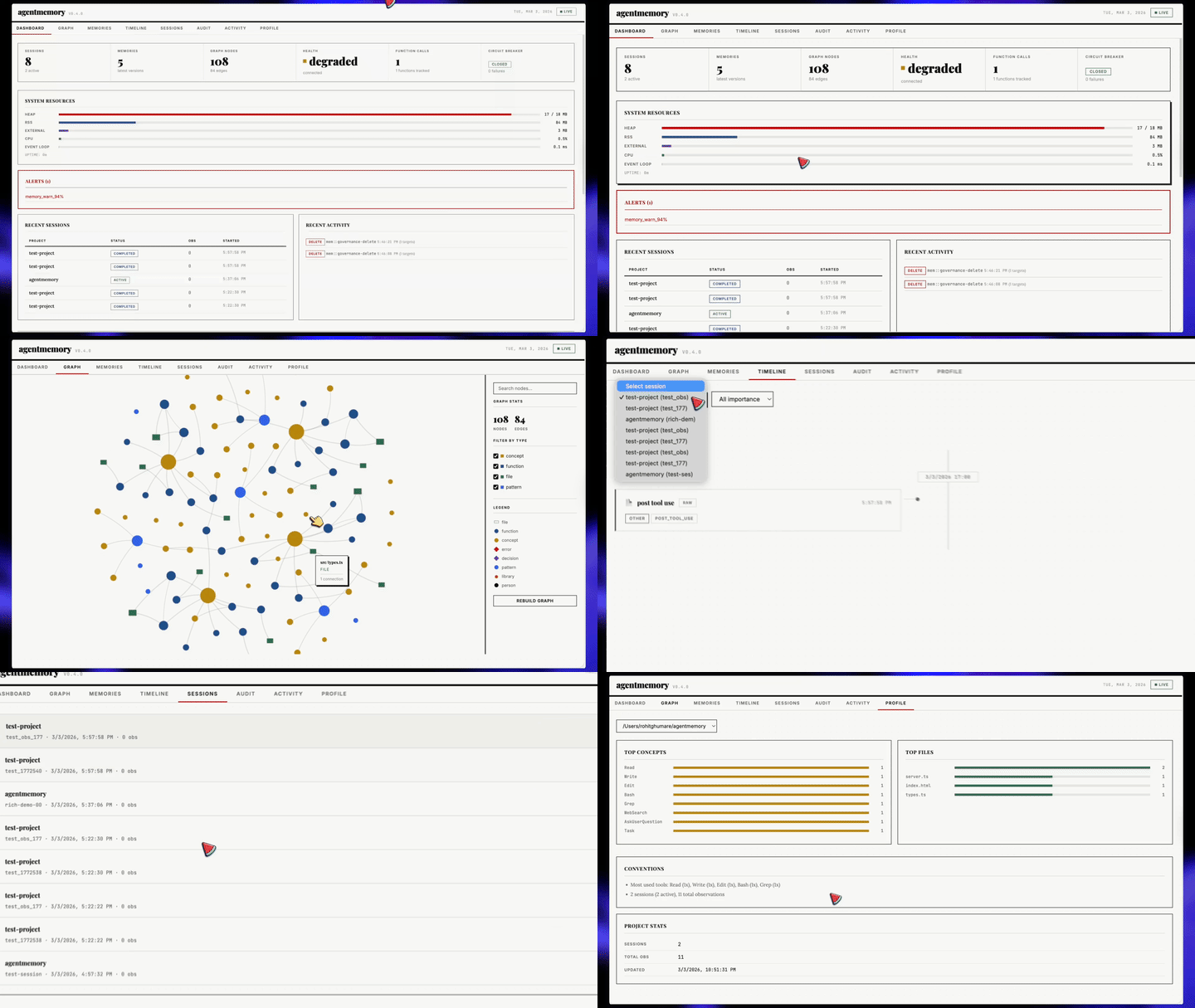
`3113` 포트에서 자동 시작됩니다. 라이브 관측 스트림, 세션 탐색기, 메모리 브라우저, 지식 그래프 시각화, 헬스 대시보드.
```bash
open http://localhost:3113
```
뷰어 서버는 기본적으로 `127.0.0.1`에 바인딩됩니다. REST가 서빙하는 `/agentmemory/viewer` 엔드포인트는 일반 `AGENTMEMORY_SECRET` bearer-token 규칙을 따릅니다. CSP 헤더는 응답별 script nonce를 사용하며 인라인 핸들러 속성을 비활성화합니다 (`script-src-attr 'none'`).
---
`:3113`의 뷰어는 에이전트가 **기억한 것**을 보여줍니다. [iii console](https://iii.dev/docs/console)은 에이전트가 **무엇을 했는지**를 보여줍니다 — 모든 메모리 작업을 OpenTelemetry 추적으로, 모든 KV 항목을 편집 가능하게, 모든 함수를 호출 가능하게, 모든 스트림을 탭 가능하게. 동일한 메모리에 대한 두 창: 하나는 제품 형태, 하나는 엔진 형태.
`memory_smart_search`가 발화되는 것을 보고 BM25 스캔 → 임베딩 조회 → RRF 융합 → 리랭커를 워터폴로 확인하십시오. KV 브라우저에서 정체된 통합 타이머를 편집하십시오. 조정된 페이로드로 `PostToolUse` hook을 재생하십시오. WebSocket 스트림을 고정하고 관측이 실시간으로 도착하는 것을 지켜보십시오.
agentmemory는 모든 함수, 트리거, 상태 스코프, 스트림이 iii 프리미티브이기 때문에 — 사용자 정의도, 계측할 것도 없기 때문에 — 이를 무료로 제공합니다.
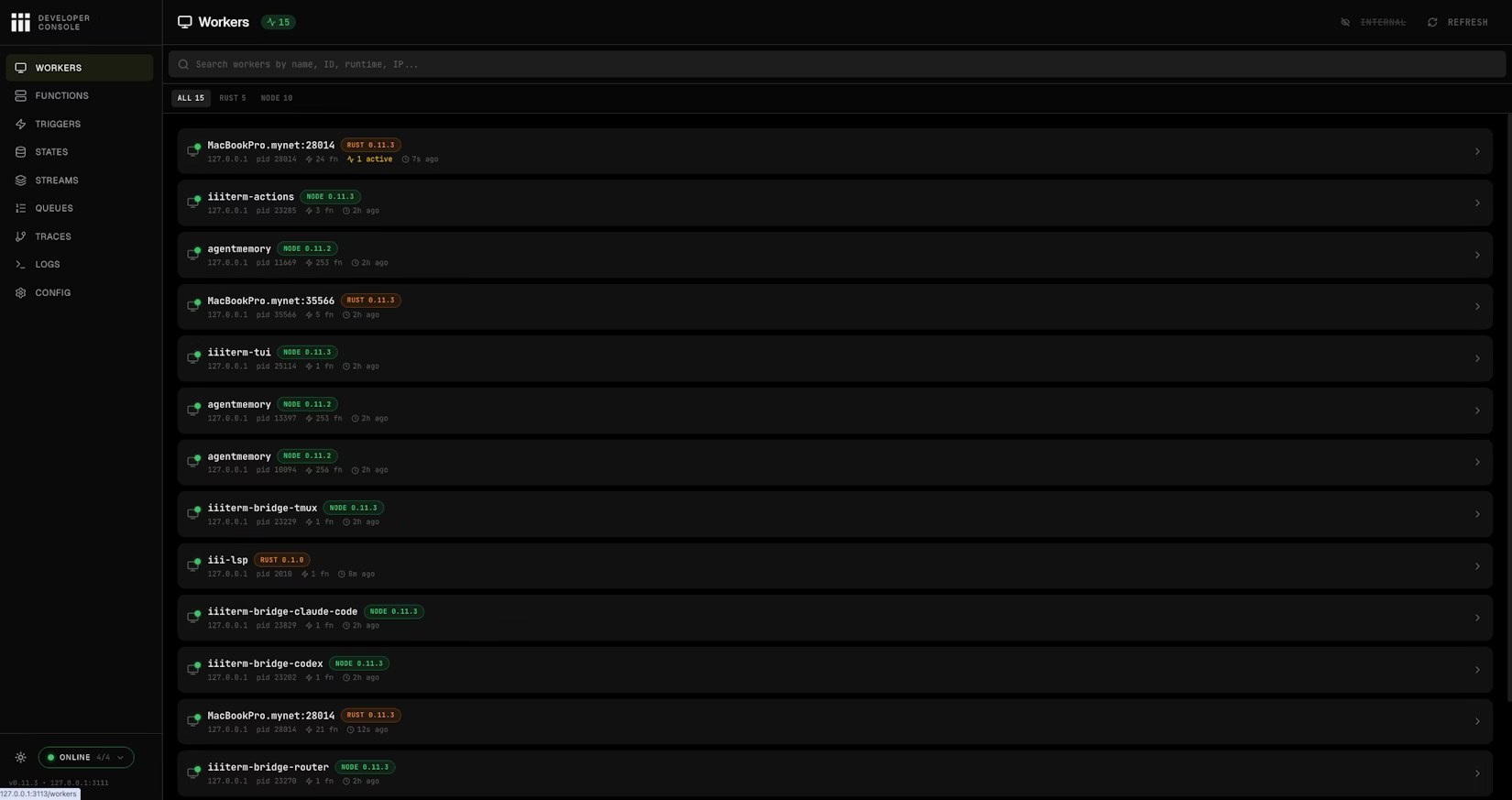
Workers 페이지: 연결된 모든 워커 — agentmemory 자체 포함 — PID, 함수 수, 런타임, last-seen 표시.
**이미 설치됨.** 콘솔은 `iii`와 함께 제공됩니다 — 별도의 인스톨러가 없습니다.
**agentmemory와 함께 실행:**
```bash
# agentmemory viewer holds port 3113, so run the console on 3114.
# Engine REST (3111), WebSocket (3112), and bridge (49134) defaults match agentmemory.
iii console --port 3114
```
그런 다음 `http://localhost:3114`을 여십시오. 실험적인 architecture-graph 페이지를 위해 `--enable-flow`를 추가하십시오.
엔진 엔드포인트를 옮긴 경우에만 덮어쓰십시오:
```bash
iii console --port 3114 \
--engine-port 3111 \
--ws-port 3112 \
--bridge-port 49134
```
**콘솔에서 할 수 있는 일:**
| 페이지 | 용도 |
|------|-----------|
| **Workers** | 연결된 모든 워커와 그 라이브 메트릭 확인 — agentmemory 워커 자체 포함. |
| **Functions** | JSON 페이로드로 agentmemory의 모든 함수를 직접 호출 — 클라이언트를 연결하지 않고 `memory.recall`, `memory.consolidate`, `graph.query`를 테스트하기에 편리. |
| **Triggers** | HTTP, cron, event, state 트리거를 재생 — 통합 cron을 수동으로 발화, HTTP 라우트를 재시도, state 변경을 발생. |
| **States** | 전체 CRUD가 가능한 KV 브라우저 — 세션, 메모리 슬롯, 라이프사이클 타이머, 임베딩 인덱스 — 값을 그 자리에서 편집. |
| **Streams** | iii 스트림을 통해 흐르는 메모리 쓰기, hook 이벤트, 관측 업데이트를 위한 라이브 WebSocket 모니터. |
| **Queues** | 내구성 있는 큐 토픽 + 데드 레터 관리. 실패한 임베딩 / 압축 작업을 재생하거나 폐기. |
| **Traces** | OpenTelemetry 워터폴 / 플레임 / 서비스별 분해 뷰. `trace_id`로 필터링하여 단일 `memory.search`가 생성한 함수, DB 호출, 임베딩 요청을 정확히 확인. |
| **Logs** | trace/span ID에 필터링·상관된 구조화된 OTEL 로그. |
| **Config** | 런타임 설정 — 엔진이 실행 중인 워커, 프로바이더, 포트를 정확히 확인. |
| **Flow** | (선택, `--enable-flow`) 모든 워커, 트리거, 스트림의 인터랙티브 architecture graph. |
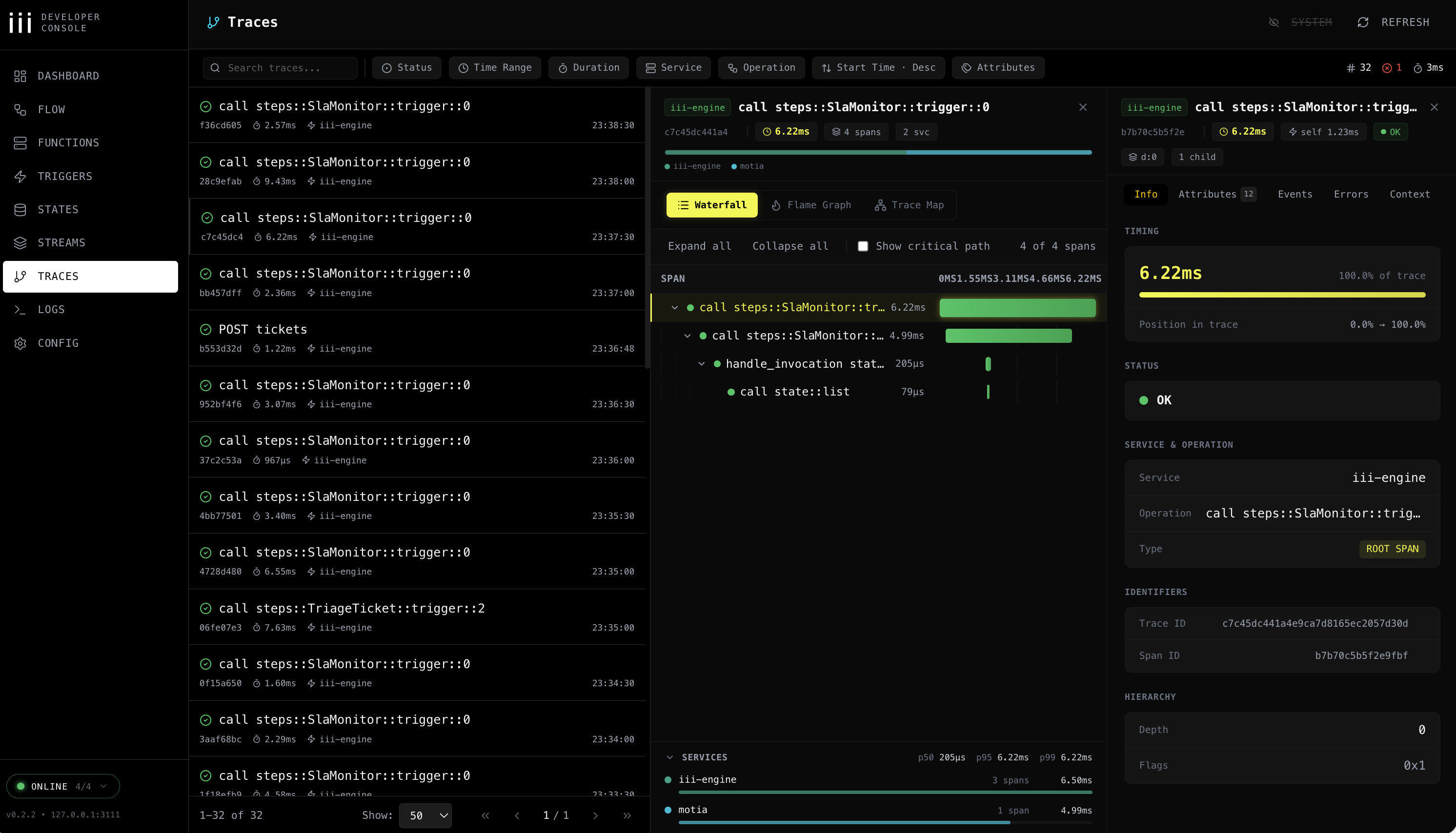
Traces: 모든 메모리 작업에 대한 워터폴 / 플레임 / 서비스 분해.
**Traces는 이미 켜져 있습니다:**
`iii-config.yaml`은 `iii-observability` 워커가 활성화된 상태로 제공됩니다(`exporter: memory`, `sampling_ratio: 1.0`, metrics + logs). 추가 설정이 필요 없습니다 — agentmemory가 시작되는 순간 모든 메모리 작업이 콘솔이 읽을 수 있는 trace span과 구조화된 로그를 방출합니다.
대신 Jaeger/Honeycomb/Grafana Tempo로 내보내고 싶다면 `exporter: memory`를 `exporter: otlp`로 변경하고 iii의 가시성 문서에 따라 collector 엔드포인트를 설정하십시오.
> **참고:** 콘솔 자체에는 인증이 적용되지 않습니다 — `127.0.0.1`에 바인딩된 채로 두고(기본값) 절대 공개적으로 노출하지 마십시오.
---
agentmemory는 **이미 실행 중인 [iii](https://iii.dev) 인스턴스**입니다. 함수, 트리거, KV 상태, 스트림, OTEL 추적 — 모두 iii 프리미티브입니다. Postgres, Redis, Express, pm2, Prometheus를 설치하지 않은 이유는 iii가 이들을 대체하기 때문입니다.
그 말은 명령어 하나로 agentmemory에 완전히 새로운 기능을 확장할 수 있다는 뜻입니다.
### 명령어 하나로 agentmemory 확장
```bash
iii worker add iii-pubsub # fan memory writes out to every connected instance
iii worker add iii-cron # scheduled consolidation, decay sweeps, snapshot rotation
iii worker add iii-queue # durable retries for embedding + compression jobs
iii worker add iii-observability # OTEL traces on every memory op (default on)
iii worker add iii-sandbox # run recalled code inside an isolated microVM
iii worker add iii-database # swap in a SQL-backed state adapter
iii worker add mcp # generic MCP host alongside the agentmemory MCP
```
각 `iii worker add`는 agentmemory가 이미 실행 중인 동일한 엔진에 새 함수와 트리거를 등록합니다. 뷰어와 콘솔은 즉시 이를 인식합니다 — 재로드도, 새 통합도, 새 컨테이너도 필요 없습니다.
| `iii worker add` | agentmemory 위에 무엇이 추가되는가 |
|---|---|
| [`iii-pubsub`](https://workers.iii.dev/workers/iii-pubsub) | 멀티 인스턴스 메모리: 모든 `remember`가 팬아웃, 모든 `search`가 합집합을 읽음 |
| [`iii-cron`](https://workers.iii.dev/workers/iii-cron) | 스케줄링된 라이프사이클 — 야간 통합, 주간 스냅샷, 고정된 시계에 따른 감쇠 |
| [`iii-queue`](https://workers.iii.dev/workers/iii-queue) | 내구성 있는 재시도: 실패한 임베딩 + 압축 작업은 재시작에도 살아남아 관측 손실 없음 |
| [`iii-observability`](https://workers.iii.dev/workers/iii-observability) | 모든 함수에 OTEL traces, metrics, logs — 첫날부터 `iii-config.yaml`에 연결됨 |
| [`iii-sandbox`](https://workers.iii.dev/workers/iii-sandbox) | `memory_recall`에서 나온 코드를 셸이 아니라 일회용 VM 안에서 실행 |
| [`iii-database`](https://workers.iii.dev/workers/iii-database) | 인메모리 KV 기본값을 넘어설 때 SQL 기반 state adapter |
| [`mcp`](https://workers.iii.dev/workers/mcp) | agentmemory의 MCP 옆에 추가 MCP 서버를 세우고 동일한 엔진을 공유 |
전체 레지스트리: [workers.iii.dev](https://workers.iii.dev). 그곳의 모든 워커는 agentmemory가 사용하는 동일한 프리미티브로 구성됩니다 — 그리고 이미 갖고 있는 agentmemory도 그중 하나입니다.
### iii가 무엇을 대체하는가
| 전통적인 스택 | agentmemory에서의 사용 |
|---|---|
| Express.js / Fastify | iii HTTP Triggers |
| SQLite / Postgres + pgvector | iii KV State + 인메모리 벡터 인덱스 |
| SSE / Socket.io | iii Streams (WebSocket) |
| pm2 / systemd | iii engine worker supervision |
| Prometheus / Grafana | iii OTEL + 헬스 모니터 |
| 사용자 정의 플러그인 시스템 | `iii worker add ` |
**118개 소스 파일 · ~21,800 LOC · 950+ tests · 123개 함수 · 34개 KV 스코프** — 모두 세 가지 프리미티브 위에. `agentmemory plugin install`이 없습니다. 플러그인 시스템은 iii 자체입니다.
---
### LLM 프로바이더
agentmemory는 환경에서 자동 감지합니다. 기본적으로 프로바이더를 구성하거나 Claude subscription 폴백에 명시적으로 옵트인하지 않는 한 LLM 호출이 발생하지 않습니다.
| 프로바이더 | 설정 | 비고 |
|----------|--------|-------|
| **No-op (기본)** | 설정 불필요 | LLM 기반 압축/요약이 비활성화됨. 합성 BM25 압축 + 리콜은 여전히 동작. 이전에 Claude-subscription 폴백에 의존했다면 아래의 `AGENTMEMORY_ALLOW_AGENT_SDK` 참고. |
| Anthropic API | `ANTHROPIC_API_KEY` | 토큰당 청구 |
| MiniMax | `MINIMAX_API_KEY` | Anthropic 호환 |
| Gemini | `GEMINI_API_KEY` | 임베딩도 활성화 |
| OpenRouter | `OPENROUTER_API_KEY` | 모든 모델 |
| Claude subscription 폴백 | `AGENTMEMORY_ALLOW_AGENT_SDK=true` | 옵트인 전용. `@anthropic-ai/claude-agent-sdk` 세션을 스폰 — 무한 Stop-hook 재귀를 일으킨 전력이 있어서 더 이상 기본값이 아닙니다. |
### 비용 인식 모델 선택
백그라운드 압축은 모든 관측마다 실행되므로 모델 선택이 월별 지출에 의미 있게 영향을 미칩니다. 캡처된 워크로드 데이터: 635 요청 / 888K 토큰 / 35시간의 활성 사용, 2026-05-23 가격으로 세 가지 OpenRouter 모델에 대해 실행.
| 티어 | 모델 | Input / 1M | Output / 1M | 캡처된 35h 비용 | 비고 |
|------|-------|------------|-------------|---------------------------|-------|
| 권장 | `deepseek/deepseek-v4-pro` | $0.435 | $0.87 | ~$0.46 | 견고한 압축 + 요약 품질, Sonnet 대비 ~10배 저렴. |
| 권장 | `deepseek/deepseek-chat` | $0.27 | $1.10 | ~$0.40 | 더 오래되었지만 압축 전용 워크로드에 여전히 적합. |
| 권장 | `qwen/qwen3-coder` | $0.45 | $1.80 | ~$0.55 | 세션이 코드 중심이라면 강한 코드 추론. |
| 프리미엄 | `anthropic/claude-sonnet-4.6` | $3.00 | $15.00 | ~$5.02 | 고품질이지만 항시 백그라운드 작업에는 비쌈. |
| 프리미엄 | `openai/gpt-4o` | $2.50 | $10.00 | ~$4.20 | Sonnet과 유사한 티어. |
| 회피 | `anthropic/claude-opus-4.6` | $15.00 | $75.00 | ~$25+ | 추론 클래스 모델; 압축에는 막대한 과지출. |
`OPENROUTER_MODEL`이 프리미엄 티어 패턴과 일치하면 agentmemory가 런타임 경고를 출력합니다. 정보에 기반한 결정을 내렸다면 `AGENTMEMORY_SUPPRESS_COST_WARNING=1`로 한 번에 침묵시키십시오.
메모리 작업에서의 품질 대 비용 트레이드오프: 압축은 비교적 느슨한 품질 기준을 가진 요약 작업입니다(사용자가 아니라 에이전트가 요약을 다시 읽습니다). DeepSeek-V4-Pro / Qwen3-Coder는 이 작업에서 Sonnet과 반올림 오차 내에 들어가면서 ~10배 적은 비용이 듭니다. 프리미엄 티어 모델은 직접 읽는 쿼리에 남겨두십시오.
출처: [OpenRouter pricing for Sonnet 4.6](https://openrouter.ai/anthropic/claude-sonnet-4.6/pricing), [DeepSeek V4 Pro](https://openrouter.ai/deepseek/deepseek-v4-pro), [DeepSeek pricing notes](https://api-docs.deepseek.com/quick_start/pricing/).
### 멀티 에이전트 메모리 (`AGENT_ID` + `AGENTMEMORY_AGENT_SCOPE`)
여러 역할(architect / developer / reviewer / researcher / support-agent)이 하나의 agentmemory 서버를 공유하는 멀티 에이전트 설정에서, `AGENT_ID`는 모든 쓰기에 그것을 작성한 역할을 태깅합니다. `AGENTMEMORY_AGENT_SCOPE`는 리콜이 그 태그로 필터링되는지 여부를 제어합니다.
```env
TEAM_ID=company
USER_ID=engineering-team
AGENT_ID=architect
AGENTMEMORY_AGENT_SCOPE=isolated # optional; default "shared"
```
두 가지 모드:
| 모드 | 쓰기 태그 | 리콜 필터링 | 사용 시점 |
|------|------------|---------------|-------------|
| `shared` (기본) | 예 | 아니오 | 감사 로그가 있는 크로스 에이전트 컨텍스트. architect는 developer가 기록한 내용을 볼 수 있지만, 모든 행은 누가 말했는지 기록합니다. |
| `isolated` | 예 | 예 | 엄격한 분리. architect는 developer의 관측 / 메모리 / 세션을 절대 보지 않습니다. |
`AGENT_ID`가 설정되었을 때 태깅되는 것: `Session.agentId`, `RawObservation.agentId`, `CompressedObservation.agentId`, `Memory.agentId`. 역할은 `api::session::start` → `mem::observe` → `mem::compress` → KV로 흐릅니다.
isolated 모드에서 필터링되는 것: `mem::smart-search`, `/agentmemory/memories`, `/agentmemory/observations`, `/agentmemory/sessions`. 각 엔드포인트는 요청별로 덮어쓰기 위해 `?agentId=`을 받고, env 스코프를 완전히 옵트아웃하기 위해 `?agentId=*`을 받습니다. `/memories`는 또한 `agentId`가 undefined인 pre-AGENT_ID 메모리를 노출하기 위해 `?includeOrphans=true`를 받습니다.
SDK / REST 레이어에서의 호출별 덮어쓰기: 모든 변형 엔드포인트(`/session/start`, `/remember`)는 env를 이기는 `agentId` 필드를 request body에서 받습니다. 많은 역할을 하나의 서버 프로세스로 라우팅하는 런타임에 유용합니다.
`AGENT_ID`가 설정되지 않았을 때, 메모리는 스코프되지 않은 상태로 유지됩니다(레거시 동작, 태그 없음, 필터 없음).
### 포트
agentmemory + iii-engine은 기본적으로 네 개의 포트에 바인딩합니다. 재시작이 `port in use`로 실패한다면, 이 표가 어떤 프로세스를 찾을지 알려줍니다.
| 포트 | 프로세스 | 용도 | Env 덮어쓰기 |
|------|---------|---------|--------------|
| `3111` | agentmemory | REST API + MCP HTTP + `/agentmemory/health` + `/agentmemory/livez` | `III_REST_PORT` |
| `3112` | iii-engine | 내부 streams 워커 (agentmemory + 뷰어가 소비) | `III_STREAMS_PORT` |
| `3113` | agentmemory | 실시간 뷰어 (`http://localhost:3113`) | `AGENTMEMORY_VIEWER_PORT` |
| `49134` | iii-engine | WebSocket — 워커가 여기에 등록, OTel 텔레메트리가 이 위로 흐름 | `III_ENGINE_URL` (전체 URL, 기본 `ws://localhost:49134`) |
크래시된 실행 후 포트가 바인딩된 채로 남아 있을 때의 정리:
```bash
# macOS / Linux — find whatever is on each port and kill it
lsof -i :3111,3112,3113,49134
pkill -f agentmemory || true
pkill -f 'iii ' || true
# Windows
netstat -ano | findstr ":3111 :3112 :3113 :49134"
taskkill /F /PID
```
`agentmemory stop`은 정상 종료 시 워커와 엔진 pidfile을 모두 깔끔하게 회수합니다. 위의 수동 정리는 어떤 pidfile도 남지 않은 크래시 후 케이스에만 해당됩니다.
### 설정 파일
매 셸에서 변수를 export하는 대신 agentmemory 런타임 설정을 `~/.agentmemory/.env`에 두십시오. 뷰어가 `export ANTHROPIC_API_KEY=...` 같은 setup 힌트를 보여주면, `export` 접두사 없이 `ANTHROPIC_API_KEY=...`로 이 파일에 복사한 후 agentmemory를 재시작하십시오.
프로세스 환경 변수는 여전히 동작하며 파일의 값보다 우선순위가 높습니다.
Windows에서 동일한 파일은 `%USERPROFILE%\.agentmemory\.env`에 있습니다:
```powershell
New-Item -ItemType Directory -Force $HOME\.agentmemory
notepad $HOME\.agentmemory\.env
```
API 키 대신 Claude Code Pro/Max subscription으로 테스트하려면 명시적으로 옵트인하십시오:
```env
AGENTMEMORY_ALLOW_AGENT_SDK=true
AGENTMEMORY_AUTO_COMPRESS=true
```
원한다면 동일한 파일에서 graph 또는 consolidation 기능을 활성화하십시오:
```env
GRAPH_EXTRACTION_ENABLED=true
CONSOLIDATION_ENABLED=true
```
### 환경 변수
`~/.agentmemory/.env` 생성:
```env
# LLM provider (pick one — default is the no-op provider: no LLM calls)
# ANTHROPIC_API_KEY=sk-ant-...
# ANTHROPIC_BASE_URL=... # Optional: Anthropic-compatible proxy / Azure
# GEMINI_API_KEY=...
# OPENROUTER_API_KEY=...
# MINIMAX_API_KEY=...
# OPENAI_API_KEY=*** # NOTE: this same key auto-activates BOTH the
# # OpenAI LLM provider (here) AND the OpenAI
# # embedding provider (further below). Set
# # OPENAI_API_KEY_FOR_LLM=false to scope it
# # to embeddings only.
# OPENAI_BASE_URL=https://api.openai.com # Optional: override for Azure / vLLM / LM Studio / proxies
# # Azure: https://.openai.azure.com/openai/deployments/
# # Auto-detected from `.openai.azure.com` hostname; uses
# # api-key header + api-version query param.
# OPENAI_API_VERSION=2024-08-01-preview # Optional: Azure api-version query param
# OPENAI_MODEL=gpt-4o-mini # Optional: default model
# OPENAI_TIMEOUT_MS=60000 # Optional: OpenAI-scoped alias for the outbound fetch
# # timeout. Takes precedence over AGENTMEMORY_LLM_TIMEOUT_MS
# # for back-compat with v0.9.17. New configs should
# # prefer the global AGENTMEMORY_LLM_TIMEOUT_MS below.
# OPENAI_REASONING_EFFORT=none # Optional: "low" | "medium" | "high" | "none"
# # Honored only by OpenAI's reasoning models (o1, o3,
# # gpt-*-reasoning) and providers that mirror that
# # schema (Ollama Cloud thinking models). Standard
# # chat models reject this field with 400. Set to
# # "none" for thinking models that return reasoning
# # but no content.
# OPENAI_API_KEY_FOR_LLM=false # Optional: set to false to skip OpenAI auto-detection
# # for LLM (useful if you only want OpenAI for embeddings)
# Opt-in Claude-subscription fallback (spawns @anthropic-ai/claude-agent-sdk);
# leave OFF unless you understand the Stop-hook recursion risk:
# AGENTMEMORY_ALLOW_AGENT_SDK=true
# Embedding provider (auto-detected, or override)
# EMBEDDING_PROVIDER=local
# VOYAGE_API_KEY=...
# OPENAI_API_KEY=sk-...
# OPENAI_BASE_URL=https://api.openai.com # Override for Azure / vLLM / LM Studio / proxies
# OPENAI_EMBEDDING_MODEL=text-embedding-3-small
# OPENAI_EMBEDDING_DIMENSIONS=1536 # Required when the model is not in the known-models table
# Outbound LLM / embedding timeout
# AGENTMEMORY_LLM_TIMEOUT_MS=60000 # Default: 60 000 ms (60 s). Applies to every
# raw-fetch provider (Gemini, OpenRouter, MiniMax,
# OpenAI LLM, OpenAI/Cohere/Voyage/OpenRouter
# embedding). For the OpenAI LLM path, the
# OpenAI-scoped OPENAI_TIMEOUT_MS alias (above)
# takes precedence when set, for back-compat
# with v0.9.17.
# Increase for slow networks or large batch calls;
# decrease to fail-fast on rate-limit holds.
# Search tuning
# BM25_WEIGHT=0.4
# VECTOR_WEIGHT=0.6
# TOKEN_BUDGET=2000
# Auth
# AGENTMEMORY_SECRET=your-secret
# Ports (defaults: 3111 API, 3113 viewer)
# III_REST_PORT=3111
# Features
# AGENTMEMORY_AUTO_COMPRESS=false # OFF by default. When on,
# every PostToolUse hook calls your
# LLM provider to compress the
# observation — expect significant
# token spend on active sessions.
# AGENTMEMORY_SLOTS=false # OFF by default. Editable pinned
# memory slots — persona,
# user_preferences, tool_guidelines,
# project_context, guidance,
# pending_items, session_patterns,
# self_notes. Size-limited; agent
# edits via memory_slot_* tools.
# Pinned slots addressable for
# SessionStart injection.
# AGENTMEMORY_REFLECT=false # OFF by default. Requires SLOTS=on.
# Stop hook fires mem::slot-reflect:
# scans recent observations, auto-
# appends TODOs to pending_items,
# counts patterns in
# session_patterns, records touched
# files in project_context. Fire-
# and-forget; does not block.
# AGENTMEMORY_INJECT_CONTEXT=false # OFF by default. When on:
# - SessionStart may inject ~1-2K
# chars of project context into
# the first turn of each session
# (this is what actually reaches
# the model — Claude Code treats
# SessionStart stdout as context)
# - PreToolUse fires /agentmemory/enrich
# on every file-touching tool call
# (resource cleanup, not a token
# fix — PreToolUse stdout is debug
# log only per Claude Code docs)
# Observations are still captured via
# PostToolUse regardless of this flag.
# GRAPH_EXTRACTION_ENABLED=false
# CONSOLIDATION_ENABLED=true
# LESSON_DECAY_ENABLED=true
# OBSIDIAN_AUTO_EXPORT=false
# AGENTMEMORY_EXPORT_ROOT=~/.agentmemory
# CLAUDE_MEMORY_BRIDGE=false
# SNAPSHOT_ENABLED=false
# Team
# TEAM_ID=
# USER_ID=
# TEAM_MODE=private
# Tool visibility: "core" (8 tools) or "all" (51 tools)
# AGENTMEMORY_TOOLS=core
```
---
`3111` 포트의 124개 엔드포인트. REST API는 기본적으로 `127.0.0.1`에 바인딩됩니다. 보호된 엔드포인트는 `AGENTMEMORY_SECRET`이 설정되었을 때 `Authorization: Bearer `를 요구하며, mesh sync 엔드포인트는 양쪽 피어 모두에서 `AGENTMEMORY_SECRET`을 요구합니다.
주요 엔드포인트
| Method | Path | 설명 |
|--------|------|-------------|
| `GET` | `/agentmemory/health` | 헬스 체크 (항상 공개) |
| `POST` | `/agentmemory/session/start` | 세션 시작 + 컨텍스트 가져오기 |
| `POST` | `/agentmemory/session/end` | 세션 종료 |
| `POST` | `/agentmemory/observe` | 관측 캡처 |
| `POST` | `/agentmemory/smart-search` | 하이브리드 검색 |
| `POST` | `/agentmemory/context` | 컨텍스트 생성 |
| `POST` | `/agentmemory/remember` | 장기 메모리에 저장 |
| `POST` | `/agentmemory/forget` | 관측 삭제 |
| `POST` | `/agentmemory/enrich` | 파일 컨텍스트 + 메모리 + 버그 |
| `GET` | `/agentmemory/profile` | 프로젝트 프로필 |
| `GET` | `/agentmemory/export` | 모든 데이터 내보내기 |
| `POST` | `/agentmemory/import` | JSON에서 가져오기 |
| `POST` | `/agentmemory/graph/query` | 지식 그래프 쿼리 |
| `POST` | `/agentmemory/team/share` | 팀과 공유 |
| `GET` | `/agentmemory/audit` | 감사 로그 |
전체 엔드포인트 목록: [`src/triggers/api.ts`](../src/triggers/api.ts)
---
```bash
npm run dev # Hot reload
npm run build # Production build
npm test # 950+ tests
npm run test:integration # API tests (requires running services)
```
**전제 조건:** Node.js >= 20, [iii-engine](https://iii.dev/docs) 또는 Docker