आपका कोडिंग एजेंट सब कुछ याद रखता है। बार-बार समझाने की ज़रूरत नहीं।
Built on iii engine
Claude Code, Cursor, Gemini CLI, Codex CLI, Hermes, OpenClaw, pi, OpenCode, और किसी भी MCP क्लाइंट के लिए स्थायी मेमोरी।
यह gist Karpathy के LLM Wiki पैटर्न को confidence scoring, lifecycle, knowledge graphs और hybrid search के साथ बढ़ाता है: agentmemory इसका implementation है।
---
## इंस्टॉल
```bash
npm install -g @agentmemory/agentmemory # एक बार — PATH पर `agentmemory` कमांड उपलब्ध
# अगर macOS/Linux सिस्टम Node इंस्टॉल पर EACCES त्रुटि आती है, तो इसके साथ फिर से चलाएँ:
# sudo npm install -g @agentmemory/agentmemory
agentmemory # :3111 पर मेमोरी सर्वर शुरू करें
agentmemory demo # नमूना सेशंस सीड करें + recall साबित करें
agentmemory connect claude-code # अपना एजेंट जोड़ें (अन्य: codex, cursor, gemini-cli, ...)
```
या `npx` के माध्यम से (इंस्टॉल की ज़रूरत नहीं):
```bash
npx @agentmemory/agentmemory
```
ध्यान दें — npx प्रति-वर्ज़न कैश करता है। अगर बेयर `npx @agentmemory/agentmemory` कोई पुराना रिलीज़ चला रहा है, तो नवीनतम को `npx -y @agentmemory/agentmemory@latest` से ज़बरदस्ती चलाएँ, या एक बार `rm -rf ~/.npm/_npx` से कैश साफ़ करें (macOS/Linux; Windows पर `%LOCALAPPDATA%\npm-cache\_npx` हटाएँ)। v0.9.16+ के बाद पहली npx रन आपको इनलाइन ग्लोबल इंस्टॉल करने का प्रॉम्प्ट देती है ताकि बेयर `agentmemory` कमांड हर जगह काम करे।
पूर्ण विकल्प नीचे [क्विक स्टार्ट](#quick-start) में हैं। एजेंट-विशिष्ट कॉन्फ़िगरेशन [हर एजेंट के साथ काम करता है](#works-with-every-agent) में।
---
agentmemory किसी भी ऐसे एजेंट के साथ काम करता है जो hooks, MCP, या REST API सपोर्ट करता है। सभी एजेंट एक ही मेमोरी सर्वर साझा करते हैं।
Claude Code native plugin + 12 hooks + MCP
Codex CLI native plugin + 6 hooks + MCP
OpenClaw native plugin + MCP
Hermes native plugin + MCP
pi native plugin + MCP
OpenHuman native Memory trait बैकएंड
Cursor MCP सर्वर
Gemini CLI MCP सर्वर
OpenCode 22 hooks + MCP + plugin
Cline MCP सर्वर
Goose MCP सर्वर
Kilo Code MCP सर्वर
Aider REST API
Claude Desktop MCP सर्वर
Windsurf MCP सर्वर
Roo Code MCP सर्वर
MCP या HTTP बोलने वाले किसी भी एजेंट के साथ काम करता है। एक सर्वर, सभी के बीच साझा मेमोरी।
---
आप हर सेशन में वही आर्किटेक्चर समझाते हैं। आप वही bugs बार-बार खोजते हैं। आप वही प्राथमिकताएँ फिर से सिखाते हैं। बिल्ट-इन मेमोरी (CLAUDE.md, .cursorrules) 200 लाइनों पर सीमित है और पुरानी हो जाती है। agentmemory इसे ठीक करता है। यह चुपचाप आपके एजेंट की गतिविधियाँ कैप्चर करता है, उन्हें खोज योग्य मेमोरी में संकुचित करता है, और अगला सेशन शुरू होने पर सही संदर्भ इंजेक्ट करता है। एक कमांड। सभी एजेंट्स के साथ काम करता है।
**क्या बदलता है:** सेशन 1 में आप JWT auth सेटअप करते हैं। सेशन 2 में आप rate limiting माँगते हैं। एजेंट को पहले से पता है कि आपकी auth `src/middleware/auth.ts` में jose middleware का उपयोग करती है, आपके tests token validation को कवर करते हैं, और आपने Edge compatibility के लिए jsonwebtoken के बजाय jose चुना है। फिर से समझाना नहीं। कॉपी-पेस्ट नहीं। एजेंट बस *जानता है*।
```bash
npx @agentmemory/agentmemory
```
> **v0.9.0 में नया** — लैंडिंग साइट [agent-memory.dev](https://agent-memory.dev), फाइलसिस्टम कनेक्टर (`@agentmemory/fs-watcher`), स्टैंडअलोन MCP अब चल रहे सर्वर को प्रॉक्सी करता है ताकि hooks और व्यूअर सहमत हों, हर delete path में audit policy कोडिफाई की गई, small Node प्रक्रियाओं पर health अब `memory_critical` फ़्लैग नहीं करता। पूरे नोट्स [CHANGELOG.md](../CHANGELOG.md#090--2026-04-18) में।
---
> Embedding मॉडल: `all-MiniLM-L6-v2` (local, free, कोई API key नहीं)। पूरी रिपोर्ट्स: [`benchmark/LONGMEMEVAL.md`](../benchmark/LONGMEMEVAL.md), [`benchmark/QUALITY.md`](../benchmark/QUALITY.md), [`benchmark/SCALE.md`](../benchmark/SCALE.md)। प्रतिस्पर्धी तुलना: [`benchmark/COMPARISON.md`](../benchmark/COMPARISON.md) — agentmemory बनाम mem0, Letta, Khoj, claude-mem, Hippo।
**स्थानीय रूप से reproduce करें:** [`eval/README.md`](../eval/README.md) — LongMemEval `_s` (public 500-Q) + `coding-agent-life-v1` (in-house 15-session corpus) के लिए adapter-pluggable harness। Grep / vector / agentmemory adapters साथ-साथ scored होते हैं, NDJSON output, प्रकाशित scorecards [`docs/benchmarks/`](../docs/benchmarks/) में जाते हैं।
**[codegraph](https://github.com/colbymchenry/codegraph), [Understand Anything](https://github.com/Lum1104/Understand-Anything), और [Graphify](https://github.com/safishamsi/graphify) के साथ जोड़ता है।** Code-graph indexing, multi-agent build pipelines, और docs / PDFs / images / videos में व्यापक knowledge graphs। agentmemory काम याद रखता है; ये तीन प्रोजेक्ट्स context layer के बाकी हिस्से को रोशन करते हैं। Recipes + question-routing table: [`docs/recipes/pairings.md`](../docs/recipes/pairings.md)।
---
agentmemory
mem0 (53K ⭐)
Letta / MemGPT (22K ⭐)
बिल्ट-इन (CLAUDE.md)
प्रकार
Memory engine + MCP सर्वर
Memory layer API
पूर्ण agent runtime
Static फाइल
Retrieval R@5
95.2%
68.5% (LoCoMo)
83.2% (LoCoMo)
N/A (grep)
स्वचालित कैप्चर
12 hooks (शून्य मैनुअल प्रयास)
मैनुअल add() कॉल
एजेंट self-edits
मैनुअल editing
खोज
BM25 + Vector + Graph (RRF fusion)
Vector + Graph
Vector (archival)
सब कुछ context में लोड करता है
Multi-agent
MCP + REST + leases + signals
API (कोई coordination नहीं)
केवल Letta runtime में
प्रति-एजेंट फाइलें
Framework lock-in
कोई नहीं (कोई भी MCP क्लाइंट)
कोई नहीं
उच्च (Letta का उपयोग आवश्यक)
प्रति-एजेंट format
बाहरी निर्भरताएँ
कोई नहीं (SQLite + iii-engine)
Qdrant / pgvector
Postgres + vector DB
कोई नहीं
Memory lifecycle
4-tier consolidation + decay + auto-forget
Passive extraction
Agent-managed
मैनुअल pruning
Token दक्षता
~1,900 tokens/session ($10/yr)
integration पर निर्भर
Core memory context में
240 observations पर 22K+ tokens
Real-time व्यूअर
हाँ (port 3113)
Cloud dashboard
Cloud dashboard
नहीं
Self-hosted
हाँ (default)
Optional
Optional
हाँ
---
संगतता: यह रिलीज़ stable `iii-sdk` `^0.11.0` और iii-engine v0.11.x को टार्गेट करता है।
### 30 सेकंड में आज़माएँ
```bash
# Terminal 1: सर्वर शुरू करें
npx @agentmemory/agentmemory
# Terminal 2: नमूना डेटा सीड करें और recall को कार्य में देखें
npx @agentmemory/agentmemory demo
```
`demo` 3 यथार्थवादी सेशंस सीड करता है (JWT auth, N+1 query fix, rate limiting) और उन पर semantic searches चलाता है। जब आप "database performance optimization" खोजते हैं तो आप देखेंगे कि यह "N+1 query fix" ढूँढ़ लेता है — keyword matching ऐसा नहीं कर सकती।
मेमोरी को लाइव बनते हुए देखने के लिए `http://localhost:3113` खोलें।
### अनुशंसित: globally इंस्टॉल करें
`npx` per-version कैश करता है। अगर आपने पिछले हफ्ते `npx @agentmemory/agentmemory@0.9.14` चलाया था, तो एक बेयर `npx @agentmemory/agentmemory` `~/.npm/_npx/` से stale 0.9.14 दे सकता है, न कि नवीनतम रिलीज़। एक बार इंस्टॉल करें और बेयर `agentmemory` कमांड हर जगह काम करता है:
```bash
npm install -g @agentmemory/agentmemory
# अगर macOS/Linux सिस्टम Node इंस्टॉल पर EACCES त्रुटि आती है, इसके साथ फिर से चलाएँ:
# sudo npm install -g @agentmemory/agentmemory
agentmemory # सर्वर शुरू करें (npx form के समान)
agentmemory stop # बंद करें
agentmemory remove # हमने जो भी बनाया उसे अनइंस्टॉल करें
agentmemory connect claude-code # एक एजेंट जोड़ें
agentmemory doctor # interactive diagnostics + fix prompts
```
v0.9.16 के बाद से, पहली npx रन आपको inline globally इंस्टॉल करने का प्रॉम्प्ट देती है — एक बार `Y` जवाब दें और तैयार। अगर आप skip करते हैं, तो ताज़ा fetch के लिए इनमें से किसी पर भी fallback करें:
```bash
npx -y @agentmemory/agentmemory@latest # npm से नवीनतम को force करता है (cross-platform)
rm -rf ~/.npm/_npx && npx @agentmemory/agentmemory # केवल macOS/Linux (POSIX shell)
```
Windows / PowerShell पर, समतुल्य cache clear है `Remove-Item -Recurse -Force "$env:LOCALAPPDATA\npm-cache\_npx"` — ऊपर का `npx -y ...@latest` form cross-platform विकल्प है।
### Session Replay
agentmemory द्वारा रिकॉर्ड किया गया हर सेशन replayable है। व्यूअर खोलें, **Replay** टैब चुनें, और timeline scrub करें: prompts, tool calls, tool results, और responses अलग events के रूप में render होते हैं, play/pause, speed control (0.5×–4×), और keyboard shortcuts (space toggle के लिए, arrows step के लिए) के साथ।
क्या आपके पास पहले से पुरानी Claude Code JSONL transcripts हैं जिन्हें आप लाना चाहते हैं?
```bash
# डिफ़ॉल्ट ~/.claude/projects के तहत सब कुछ import करें
npx @agentmemory/agentmemory import-jsonl
# या एक अकेली फाइल import करें
npx @agentmemory/agentmemory import-jsonl ~/.claude/projects/-my-project/abc123.jsonl
```
Imported सेशंस native ones के साथ Replay picker में दिखते हैं। हुड के नीचे प्रत्येक entry `mem::replay::load`, `mem::replay::sessions`, और `mem::replay::import-jsonl` iii functions के माध्यम से रूट होती है — कोई side-channel servers नहीं।
### Upgrade / Maintenance
जब आप जानबूझकर अपने local runtime को update करना चाहते हैं तो maintenance command का उपयोग करें:
```bash
npx @agentmemory/agentmemory upgrade
```
चेतावनी: यह कमांड वर्तमान workspace/runtime को mutate करता है। यह JavaScript निर्भरताएँ update कर सकता है और pinned Docker image `iiidev/iii:0.11.2` खींच सकता है। यह कभी भी unpinned या नया iii engine install नहीं करता।
Implementation विवरण `src/cli.ts` में हैं (`src/cli.ts:544-595` क्षेत्र के आसपास `runUpgrade` देखें)।
### Claude Code (एक block, paste करें)
```text
Install agentmemory: run `npx @agentmemory/agentmemory` in a separate terminal to start the memory server. Then run `/plugin marketplace add rohitg00/agentmemory` and `/plugin install agentmemory` — the plugin registers all 12 hooks, 4 skills, AND auto-wires the `@agentmemory/mcp` stdio server via its `.mcp.json`, so you get 53 MCP tools (memory_smart_search, memory_save, memory_sessions, memory_governance_delete, etc.) without any extra config step. Verify with `curl http://localhost:3111/agentmemory/health`. The real-time viewer is at http://localhost:3113.
```
#### Plugin install के बिना Claude Code (MCP-standalone path)
अगर आप `/plugin install` का उपयोग करने के बजाय `~/.claude.json` के माध्यम से सीधे agentmemory का MCP सर्वर कनेक्ट करते हैं, तो Claude Code कभी भी `${CLAUDE_PLUGIN_ROOT}` resolve नहीं करता और आपको hook scripts को `~/.claude/settings.json` में absolute paths पर point करना पड़ता है। ये paths आमतौर पर agentmemory version को embed करते हैं (जैसे `~/.codex/plugins/cache/agentmemory/agentmemory/0.9.21/scripts/…`), इसलिए अगला upgrade चुपचाप हर hook को तोड़ देता है।
Workaround:
```bash
agentmemory connect claude-code --with-hooks
```
यह वही hook commands को `~/.claude/settings.json` में merge करता है, current installed `@agentmemory/agentmemory` package की bundled `plugin/` directory पर resolve किए गए absolute paths के साथ। agentmemory upgrade करने के बाद paths refresh करने के लिए कमांड फिर से चलाएँ। उसी फाइल में user entries संरक्षित होती हैं; केवल पिछली agentmemory entries replace होती हैं। `/plugin install` path अनुशंसित approach बनी रहती है।
Remote या protected deployments के लिए, Claude Code को `AGENTMEMORY_URL` और `AGENTMEMORY_SECRET` set के साथ launch करें। Plugin दोनों values को इसके bundled MCP सर्वर के माध्यम से pass करता है; जब `AGENTMEMORY_URL` खाली होता है, तो MCP shim `http://localhost:3111` का उपयोग करता है।
### Codex CLI (Codex plugin platform)
```bash
# 1. एक अलग terminal में memory सर्वर शुरू करें
npx @agentmemory/agentmemory
# 2. agentmemory marketplace register करें और plugin install करें
codex plugin marketplace add rohitg00/agentmemory
codex plugin add agentmemory@agentmemory
```
Codex plugin उसी `plugin/` directory से ship होता है जिससे Claude Code plugin। यह register करता है:
- `@agentmemory/mcp` MCP सर्वर के रूप में (जब `AGENTMEMORY_URL` चल रहे agentmemory सर्वर पर point करता है, तो सभी 51 tools proxy करता है; कोई पहुँच योग्य सर्वर न होने पर locally 7 tools पर fallback करता है)
- 6 lifecycle hooks: `SessionStart`, `UserPromptSubmit`, `PreToolUse`, `PostToolUse`, `PreCompact`, `Stop`
- 4 skills: `/recall`, `/remember`, `/session-history`, `/forget`
Codex का hook engine hook subprocesses में `CLAUDE_PLUGIN_ROOT` inject करता है ([`codex-rs/hooks/src/engine/discovery.rs`](https://github.com/openai/codex/blob/main/codex-rs/hooks/src/engine/discovery.rs) के अनुसार), इसलिए वही hook scripts duplication के बिना दोनों hosts में काम करते हैं। Subagent / SessionEnd / Notification / TaskCompleted / PostToolUseFailure events केवल Claude-Code-only हैं और Codex के लिए register नहीं होते।
#### Codex Desktop: plugin hooks वर्तमान में silent हैं (workaround उपलब्ध)
`CodexHooks` और `PluginHooks` दोनों [`codex-rs/features/src/lib.rs`](https://github.com/openai/codex/blob/main/codex-rs/features/src/lib.rs) में stable + default-enabled हैं, लेकिन Codex Desktop builds वर्तमान में plugin-local `hooks.json` dispatch नहीं करते ([openai/codex#16430](https://github.com/openai/codex/issues/16430))। MCP tools अभी भी काम करते हैं; केवल lifecycle observations छूट जाते हैं।
जब तक upstream fix land नहीं करता, वही hook commands को global `~/.codex/hooks.json` में mirror करें:
```bash
agentmemory connect codex --with-hooks
```
यह `~/.codex/hooks.json` में एक idempotent block जोड़ता है जो bundled scripts के absolute paths को reference करता है (user-scope पर `${CLAUDE_PLUGIN_ROOT}` expansion की ज़रूरत नहीं)। agentmemory upgrade के बाद paths refresh करने के लिए वही कमांड फिर से चलाएँ। उसी फाइल में user entries संरक्षित रहती हैं; केवल पिछली agentmemory entries replace होती हैं।
OpenClaw (यह prompt paste करें)
```text
Install agentmemory for OpenClaw. Run `npx @agentmemory/agentmemory` in a separate terminal to start the memory server on localhost:3111. Then add this to my OpenClaw MCP config so agentmemory is available with all 51 memory tools:
{
"mcpServers": {
"agentmemory": {
"command": "npx",
"args": ["-y", "@agentmemory/mcp"],
"env": {
"AGENTMEMORY_URL": "http://localhost:3111"
}
}
}
}
Restart OpenClaw. Verify with `curl http://localhost:3111/agentmemory/health`. Open http://localhost:3113 for the real-time viewer. For deeper memory-slot integration, copy `integrations/openclaw` to `~/.openclaw/extensions/agentmemory` and enable `plugins.slots.memory = "agentmemory"` in `~/.openclaw/openclaw.json`.
```
पूर्ण गाइड: [`integrations/openclaw/`](../integrations/openclaw/)
Hermes Agent (यह prompt paste करें)
```text
Install agentmemory for Hermes. Run `npx @agentmemory/agentmemory` in a separate terminal to start the memory server on localhost:3111. Then add this to ~/.hermes/config.yaml so Hermes can use agentmemory as an MCP server with all 51 memory tools:
mcp_servers:
agentmemory:
command: npx
args: ["-y", "@agentmemory/mcp"]
memory:
provider: agentmemory
Verify with `curl http://localhost:3111/agentmemory/health`. Open http://localhost:3113 for the real-time viewer. For deeper 6-hook memory provider integration (pre-LLM context injection, turn capture, MEMORY.md mirroring, system prompt block), copy integrations/hermes from the agentmemory repo to ~/.hermes/plugins/agentmemory.
```
पूर्ण गाइड: [`integrations/hermes/`](../integrations/hermes/)
### अन्य एजेंट्स
मेमोरी सर्वर शुरू करें: `npx @agentmemory/agentmemory`
agentmemory entry `mcpServers` shape का उपयोग करने वाले हर host में **वही MCP server block** है (Cursor, Claude Desktop, Cline, Roo Code, Windsurf, Gemini CLI, OpenClaw):
```json
"agentmemory": {
"command": "npx",
"args": ["-y", "@agentmemory/mcp"],
"env": {
"AGENTMEMORY_URL": "${AGENTMEMORY_URL}",
"AGENTMEMORY_SECRET": "${AGENTMEMORY_SECRET}"
}
}
```
**इस entry को host की config file में मौजूदा `mcpServers` object में merge करें** — file को replace न करें। अगर फाइल में पहले से अन्य servers हैं, तो `mcpServers` के अंदर एक और key के रूप में `agentmemory` को उनके बगल में जोड़ें। अगर `mcpServers` पूरी तरह से missing है, तो block को `{ "mcpServers": { ... } }` के अंदर paste करें। `${VAR}` placeholders MCP-server launch पर shell से `AGENTMEMORY_URL` / `AGENTMEMORY_SECRET` inherit करते हैं — unset variables empty strings pass करते हैं और shim `http://localhost:3111` पर fallback होता है। एक wired entry local और remote (k8s / reverse-proxied) दोनों deployments को कवर करती है।
| एजेंट | Config फाइल | नोट्स |
|---|---|---|
| **Cursor** | `~/.cursor/mcp.json` | `mcpServers` में merge करें। Website पर one-click deeplink भी उपलब्ध। |
| **Claude Desktop** | `claude_desktop_config.json` (Application Support) | `mcpServers` में merge करें। Edit के बाद Claude Desktop restart करें। |
| **Cline / Roo Code / Kilo Code** | Cline MCP settings (Settings UI → MCP Servers → Edit) | वही `mcpServers` block। |
| **Windsurf** | `~/.codeium/windsurf/mcp_config.json` | वही `mcpServers` block। |
| **Gemini CLI** | `~/.gemini/settings.json` | `gemini mcp add agentmemory npx -y @agentmemory/mcp --scope user` (auto-merges)। |
| **OpenClaw** | OpenClaw MCP config | वही `mcpServers` block, या गहरे [memory plugin](../integrations/openclaw/) का उपयोग करें। |
| **Codex CLI (केवल MCP)** | `.codex/config.toml` | TOML shape: `codex mcp add agentmemory -- npx -y @agentmemory/mcp`, या manually `[mcp_servers.agentmemory]` जोड़ें। |
| **Codex CLI (पूर्ण plugin)** | Codex plugin marketplace | `codex plugin marketplace add rohitg00/agentmemory` फिर `codex plugin add agentmemory@agentmemory`। MCP + 6 lifecycle hooks (SessionStart, UserPromptSubmit, PreToolUse, PostToolUse, PreCompact, Stop) + 4 skills register करता है। Codex Desktop पर, [openai/codex#16430](https://github.com/openai/codex/issues/16430) land होने तक `agentmemory connect codex --with-hooks` भी चलाएँ — plugin hooks वर्तमान में वहाँ silent हैं। |
| **OpenCode (केवल MCP)** | `opencode.json` | अलग shape — top-level `mcp` key, command array के रूप में: `{"mcp": {"agentmemory": {"type": "local", "command": ["npx", "-y", "@agentmemory/mcp"], "enabled": true}}}`। |
| **OpenCode (पूर्ण plugin)** | `plugin/opencode/` | Session lifecycle, messages, tools, errors को कवर करने वाले 22 auto-capture hooks। दो slash commands (`/recall`, `/remember`)। `plugin/opencode/` को अपने OpenCode workspace में copy करें और plugin entry को `opencode.json` में जोड़ें। पूरी hook table + gap analysis के लिए [`plugin/opencode/README.md`](../plugin/opencode/README.md) देखें। |
| **pi** | `~/.pi/agent/extensions/agentmemory` | [`integrations/pi`](../integrations/pi/) copy करें और pi restart करें। |
| **Hermes Agent** | `~/.hermes/config.yaml` | गहरे [memory provider plugin](../integrations/hermes/) का उपयोग `memory.provider: agentmemory` के साथ करें। |
| **Qwen Code** | `~/.qwen/settings.json` | `agentmemory connect qwen` standard `mcpServers` block लिखता है। Hook payload Claude Code के साथ field-compatible है, इसलिए मौजूदा 12-hook scripts modification के बिना काम करते हैं — उन्हें उसी `settings.json` के `hooks` section के माध्यम से जोड़ें। |
| **Antigravity** (Gemini CLI को replace करता है) | `mcp_config.json` (Antigravity की User dir में) | `agentmemory connect antigravity` standard `mcpServers` block लिखता है। macOS: `~/Library/Application Support/Antigravity/User/`। Linux: `~/.config/Antigravity/User/`। 2026-06-18 Gemini CLI sunset के बाद उपयोग करें। |
| **Kiro** | `~/.kiro/settings/mcp.json` | `agentmemory connect kiro` user-level config लिखता है। Workspace overrides आपके code के बगल में `.kiro/settings/mcp.json` में जाते हैं। |
| **Goose** | Goose MCP settings UI | वही `mcpServers` block। |
| **Aider** | n/a | REST API से सीधे बात करें: `curl -X POST http://localhost:3111/agentmemory/smart-search -d '{"query": "auth"}'`। |
| **कोई भी एजेंट (32+)** | n/a | `npx skillkit install agentmemory` host को auto-detect करता है और merge करता है। |
**Sandboxed MCP क्लाइंट्स** (Flatpak / Snap / प्रतिबंधात्मक containers) जो host के `localhost` तक नहीं पहुँच सकते: `env` block में `"AGENTMEMORY_FORCE_PROXY": "1"` भी set करें, और `AGENTMEMORY_URL` को एक ऐसे route पर point करें जिस तक sandbox वास्तव में पहुँच सकता है (जैसे आपका LAN IP)।
### Programmatic access (Python / Rust / Node)
agentmemory अपने core operations को iii functions के रूप में register करता है (`mem::remember`, `mem::observe`, `mem::context`, `mem::smart-search`, `mem::forget`)। iii SDK वाली कोई भी भाषा उन्हें `ws://localhost:49134` पर सीधे call कर सकती है — प्रति भाषा अलग REST क्लाइंट नहीं।
```bash
pip install iii-sdk # Python
cargo add iii-sdk # Rust
npm install iii-sdk # Node
```
```python
from iii import register_worker
iii = register_worker("ws://localhost:49134")
iii.connect()
iii.trigger({
"function_id": "mem::smart-search",
"payload": {"project": "demo", "query": "how do tokens refresh"},
})
```
कार्यशील उदाहरण: [`examples/python/`](../examples/python/) (quickstart + observation/recall flow)। iii runtime के बिना hosts के लिए REST `:3111` पर उपलब्ध रहता है।
### Source से
```bash
git clone https://github.com/rohitg00/agentmemory.git && cd agentmemory
npm install && npm run build && npm start
```
यह agentmemory को local `iii-engine` के साथ शुरू करता है अगर `iii` पहले से installed है, या Docker उपलब्ध होने पर Docker Compose पर fallback करता है। REST, streams, और व्यूअर default रूप से `127.0.0.1` से bind करते हैं।
`iii-engine` मैनुअली इंस्टॉल करें। **agentmemory वर्तमान में `iii-engine` को `v0.11.2` पर pin करता है** — `v0.11.6` एक नया sandbox-everything-via-`iii worker add` model introduce करता है जिसके लिए agentmemory को अभी refactor नहीं किया गया है। Refactor land होने के बाद pin हटा दी जाती है। अगर आपने sandbox model पर मैनुअली migrate किया है तो `AGENTMEMORY_III_VERSION=` से override करें।
- **macOS arm64:** `mkdir -p ~/.local/bin && curl -fsSL https://github.com/iii-hq/iii/releases/download/iii/v0.11.2/iii-aarch64-apple-darwin.tar.gz | tar -xz -C ~/.local/bin && chmod +x ~/.local/bin/iii`
- **macOS x64:** `aarch64-apple-darwin` को `x86_64-apple-darwin` के साथ बदलें
- **Linux x64:** `x86_64-unknown-linux-gnu` के साथ बदलें
- **Linux arm64:** `aarch64-unknown-linux-gnu` के साथ बदलें
- **Windows:** [iii-hq/iii releases v0.11.2](https://github.com/iii-hq/iii/releases/tag/iii%2Fv0.11.2) से `iii-x86_64-pc-windows-msvc.zip` download करें, `iii.exe` extract करें, PATH में जोड़ें
या Docker का उपयोग करें (bundled `docker-compose.yml` `iiidev/iii:0.11.2` खींचता है)। पूर्ण docs: [iii.dev/docs](https://iii.dev/docs)।
### Windows
agentmemory Windows 10/11 पर चलता है, लेकिन केवल Node.js package पर्याप्त नहीं है — आपको एक background process के रूप में `iii-engine` runtime (एक अलग native binary) भी चाहिए। आधिकारिक upstream installer एक `sh` script है और आज कोई PowerShell installer या scoop/winget package नहीं है, इसलिए Windows users के पास दो रास्ते हैं:
**विकल्प A — Prebuilt Windows binary (अनुशंसित):**
```powershell
# 1. अपने browser में https://github.com/iii-hq/iii/releases/tag/iii%2Fv0.11.2 खोलें
# (हम v0.11.2 पर pin करते हैं जब तक agentmemory नए sandbox
# model के लिए refactor नहीं हो जाता जो engine v0.11.6+ की आवश्यकता है)
# 2. iii-x86_64-pc-windows-msvc.zip download करें
# (या ARM machine पर हैं तो iii-aarch64-pc-windows-msvc.zip)
# 3. PATH पर कहीं iii.exe extract करें, या यहाँ रखें:
# %USERPROFILE%\.local\bin\iii.exe
# (agentmemory उस location को automatically check करता है)
# 4. Verify करें:
iii --version
# Print होना चाहिए: 0.11.2
# 5. फिर agentmemory को सामान्य की तरह चलाएँ:
npx -y @agentmemory/agentmemory
```
**विकल्प B — Docker Desktop:**
```powershell
# 1. Windows के लिए Docker Desktop install करें
# 2. Docker Desktop शुरू करें और सुनिश्चित करें कि engine चल रहा है
# 3. agentmemory चलाएँ — यह bundled compose file को auto-start करेगा:
npx -y @agentmemory/agentmemory
```
**विकल्प C — केवल standalone MCP (कोई engine नहीं):** अगर आपको केवल अपने agent के लिए MCP tools चाहिए और REST API, व्यूअर, या cron jobs की ज़रूरत नहीं है, तो engine को पूरी तरह से skip करें:
```powershell
npx -y @agentmemory/agentmemory mcp
# या shim package के माध्यम से:
npx -y @agentmemory/mcp
```
**Windows के लिए diagnostics:** अगर `npx @agentmemory/agentmemory` fail करता है, तो वास्तविक engine stderr देखने के लिए `--verbose` के साथ फिर से चलाएँ। सामान्य failure modes:
| लक्षण | समाधान |
|---|---|
| `iii-engine process started` फिर `did not become ready within 15s` | Engine startup पर crashed — `--verbose` के साथ फिर से चलाएँ, stderr check करें |
| `Could not start iii-engine` | न तो `iii.exe` न ही Docker installed है। ऊपर विकल्प A या B देखें |
| Port conflict | `netstat -ano \| findstr :3111` से देखें कि क्या bind है, फिर उसे kill करें या `--port ` का उपयोग करें |
| Docker installed होने पर भी Docker fallback skip हो रहा है | सुनिश्चित करें कि Docker Desktop वास्तव में चल रहा है (system tray icon) |
> नोट: iii **engine** एक prebuilt binary है, cargo crate नहीं — इसे `cargo install` से install करने की कोशिश न करें। (iii **SDKs** crates.io, npm, और PyPI पर publish हैं, लेकिन agentmemory को उनकी ज़रूरत नहीं है।) समर्थित engine install methods, सभी v0.11.2 पर pinned: ऊपर वाला prebuilt v0.11.2 binary, version pin **के साथ** upstream `sh` install script `curl -fsSL https://install.iii.dev/iii/main/install.sh | VERSION=0.11.2 sh` (macOS/Linux), और Docker image `iiidev/iii:0.11.2`। केवल `install.sh | sh` **latest** engine install करता है, जिसे agentmemory support नहीं करता — हमेशा `VERSION=0.11.2` पास करें। सबसे आसान: बस `npx @agentmemory/agentmemory` चलाएँ, जो pinned engine को आपके लिए `~/.agentmemory/bin` में ले आता है।
---
Deploy
Managed hosts के लिए one-click templates। प्रत्येक एक self-contained
Dockerfile ship करता है जो npm से `@agentmemory/agentmemory` खींचता है
और आधिकारिक `iiidev/iii` Docker Hub image से iii engine binary को
copy करता है — pre-built agentmemory image की आवश्यकता नहीं। Persistent
storage `/data` पर mount होती है; first-boot entrypoint npm-bundled
iii config (जो `127.0.0.1` से bind करती है) को एक deploy-tuned config
से overwrite करता है जो `0.0.0.0` से bind करती है और absolute `/data`
paths का उपयोग करती है, HMAC secret generate करती है, फिर agentmemory
CLI को exec करने से पहले `gosu` के माध्यम से privileges को `root` से
`node` पर drop करती है।
Render का one-click deploy button repository root पर `render.yaml` की आवश्यकता रखता है,
जिसे हम जानबूझकर साफ़ रखते हैं। In-repo blueprint पर manually point करने के लिए
[`deploy/render/`](../deploy/render/README.md) में documented Render Blueprint flow का उपयोग करें।
पूर्ण setup विवरण (HMAC capture, viewer SSH tunnel,
rotation, backup, cost floors) [`deploy/`](../deploy/README.md) में रहते हैं:
- [`deploy/fly`](../deploy/fly/README.md) — `auto_stop_machines = "stop"` के साथ
single machine; सबसे सस्ता idle।
- [`deploy/railway`](../deploy/railway/README.md) — Hobby plan flat fee,
dashboard में volume।
- [`deploy/render`](../deploy/render/README.md) — Blueprint flow,
paid plans पर automatic disk snapshots।
- [`deploy/coolify`](../deploy/coolify/README.md) — अपने स्वयं के VPS पर
[Coolify](https://coolify.io/self-hosted) के माध्यम से self-hosted; वही Docker
Compose stack, आप host और data के मालिक हैं।
केवल port `3111` publish किया जाता है। `3113` पर viewer container के अंदर
loopback से bound रहता है — हर template का README उस तक पहुँचने के लिए
SSH-tunnel pattern को document करता है।
---
हर coding agent सेशन समाप्त होने पर सब कुछ भूल जाता है। आप हर सेशन के पहले 5 मिनट अपने stack को फिर से समझाने में बर्बाद करते हैं। agentmemory पृष्ठभूमि में चलता है और इसे पूरी तरह से समाप्त कर देता है।
```text
Session 1: "Add auth to the API"
Agent writes code, runs tests, fixes bugs
agentmemory silently captures every tool use
Session ends -> observations compressed into structured memory
Session 2: "Now add rate limiting"
Agent already knows:
- Auth uses JWT middleware in src/middleware/auth.ts
- Tests in test/auth.test.ts cover token validation
- You chose jose over jsonwebtoken for Edge compatibility
Zero re-explaining. Starts working immediately.
```
### बिल्ट-इन agent memory से तुलना
हर AI coding agent बिल्ट-इन memory के साथ ship होता है — Claude Code में `MEMORY.md` है, Cursor में notepads हैं, Cline में memory bank है। ये sticky notes की तरह काम करते हैं। agentmemory उन sticky notes के पीछे का searchable database है।
| | बिल्ट-इन (CLAUDE.md) | agentmemory |
|---|---|---|
| Scale | 200-line cap | असीमित |
| खोज | सब कुछ context में load करता है | BM25 + vector + graph (केवल top-K) |
| Token cost | 240 observations पर 22K+ | ~1,900 tokens (92% कम) |
| Cross-agent | प्रति-agent फाइलें | MCP + REST (कोई भी agent) |
| Coordination | कोई नहीं | Leases, signals, actions, routines |
| Observability | फाइलें मैनुअल पढ़ें | :3113 पर real-time viewer |
---
### Memory Pipeline
```text
PostToolUse hook fires
-> SHA-256 dedup (5min window)
-> Privacy filter (strip secrets, API keys)
-> Store raw observation
-> LLM compress -> structured facts + concepts + narrative
-> Vector embedding (6 providers + local)
-> Index in BM25 + vector
Stop / SessionEnd hook fires
-> Summarize session
-> Knowledge graph extraction (if GRAPH_EXTRACTION_ENABLED=true)
-> Slot reflection (if SLOT_REFLECT_ENABLED=true)
SessionStart hook fires
-> Load project profile (top concepts, files, patterns)
-> Hybrid search (BM25 + vector + graph)
-> Token budget (default: 2000 tokens)
-> Inject into conversation
```
### 4-Tier Memory Consolidation
मानव मस्तिष्क memory को कैसे process करता है उससे प्रेरित — sleep consolidation से बहुत अलग नहीं।
| Tier | क्या | Analogy |
|------|------|---------|
| **Working** | Tool use से raw observations | Short-term memory |
| **Episodic** | संकुचित session summaries | "क्या हुआ" |
| **Semantic** | निकाले गए facts और patterns | "मैं क्या जानता हूँ" |
| **Procedural** | Workflows और decision patterns | "कैसे करें" |
Memories समय के साथ decay होती हैं (Ebbinghaus curve)। बार-बार access की जाने वाली memories मज़बूत होती हैं। पुरानी memories auto-evict होती हैं। Contradictions detect और resolve होती हैं।
### क्या Capture होता है
| Hook | Captures |
|------|----------|
| `SessionStart` | Project path, session ID |
| `UserPromptSubmit` | User prompts (privacy-filtered) |
| `PreToolUse` | File access patterns + enriched context |
| `PostToolUse` | Tool name, input, output |
| `PostToolUseFailure` | Error context |
| `PreCompact` | Compaction से पहले memory को re-inject करता है |
| `SubagentStart/Stop` | Sub-agent lifecycle |
| `Stop` | End-of-session summary |
| `SessionEnd` | Session complete marker |
### मुख्य क्षमताएँ
| क्षमता | विवरण |
|---|---|
| **Automatic capture** | हर tool use hooks के माध्यम से record होता है — शून्य manual effort |
| **Semantic search** | RRF fusion के साथ BM25 + vector + knowledge graph |
| **Memory evolution** | Versioning, supersession, relationship graphs |
| **Auto-forgetting** | TTL expiry, contradiction detection, importance eviction |
| **Privacy first** | API keys, secrets, `` tags storage से पहले strip होते हैं |
| **Self-healing** | Circuit breaker, provider fallback chain, health monitoring |
| **Claude bridge** | MEMORY.md के साथ bi-directional sync |
| **Knowledge graph** | Entity extraction + BFS traversal |
| **Team memory** | Team members के बीच namespaced shared + private |
| **Citation provenance** | किसी भी memory को source observations तक trace करें |
| **Git snapshots** | Memory state को version, rollback, और diff करें |
---
तीन signals को combine करने वाला triple-stream retrieval:
| Stream | यह क्या करता है | कब |
|---|---|---|
| **BM25** | Synonym expansion के साथ stemmed keyword matching | हमेशा on |
| **Vector** | Dense embeddings पर cosine similarity | Embedding provider configured |
| **Graph** | Entity matching के माध्यम से knowledge graph traversal | Query में entities detected |
Reciprocal Rank Fusion (RRF, k=60) के साथ fuse होता है और session-diversified होता है (प्रति session max 3 results)।
BM25 box से बाहर ही Greek, Cyrillic, Hebrew, Arabic, और accented Latin को tokenize करता है। Chinese / Japanese / Korean memories के लिए, CJK runs को word-level tokens में split करने के लिए optional segmenters install करें (`npm install @node-rs/jieba tiny-segmenter`); उनके बिना, agentmemory soft-fall back होकर whole-run tokenization पर जाता है और stderr पर एक-बार hint print करता है।
### Embedding providers
agentmemory आपके provider को auto-detect करता है। सर्वोत्तम परिणामों के लिए, local embeddings install करें (free):
```bash
npm install @xenova/transformers
```
| Provider | Model | Cost | नोट्स |
|---|---|---|---|
| **Local (अनुशंसित)** | `all-MiniLM-L6-v2` | Free | Offline, BM25-only पर +8pp recall |
| Gemini | `gemini-embedding-001` | Free tier | 100+ भाषाएँ, 768/1536/3072 dims (MRL), 2048-token input। `text-embedding-004` को replace करता है ([deprecated, 14 जनवरी 2026 को shutdown](https://ai.google.dev/gemini-api/docs/deprecations)) |
| OpenAI | `text-embedding-3-small` | $0.02/1M | उच्चतम quality |
| Voyage AI | `voyage-code-3` | Paid | Code के लिए optimized |
| Cohere | `embed-english-v3.0` | Free trial | General purpose |
| OpenRouter | कोई भी model | भिन्न | Multi-model proxy |
---
53 tools, 6 resources, 3 prompts, और 4 skills — किसी भी agent के लिए सबसे व्यापक MCP memory toolkit।
> **MCP shim बनाम full server:** published `@agentmemory/mcp` package एक thin shim है। यह full 51-tool surface को **केवल तभी expose करता है जब यह `AGENTMEMORY_URL` के माध्यम से चल रहे agentmemory server तक पहुँच सके** (proxy mode)। कोई पहुँच योग्य server न होने पर, shim 7-tool local set (`memory_save`, `memory_recall`, `memory_smart_search`, `memory_sessions`, `memory_export`, `memory_audit`, `memory_governance_delete`) पर fallback करता है। `AGENTMEMORY_TOOLS=core|all` env var एक *server-side* flag है — shim के `env` block में set करने का कोई असर नहीं। अगर आप Cursor / OpenCode / Gemini CLI में केवल 7 tools देखते हैं, तो `npx @agentmemory/agentmemory` (या Docker stack) शुरू करें और `AGENTMEMORY_URL=http://localhost:3111` set करें।
### 51 Tools
Core tools (हमेशा उपलब्ध)
| Tool | विवरण |
|------|-------------|
| `memory_recall` | पिछले observations खोजें |
| `memory_compress_file` | Structure preserve करते हुए markdown files compress करें |
| `memory_save` | एक insight, decision, या pattern save करें |
| `memory_patterns` | Recurring patterns detect करें |
| `memory_smart_search` | Hybrid semantic + keyword search |
| `memory_file_history` | विशिष्ट files के बारे में पिछले observations |
| `memory_sessions` | Recent sessions list करें |
| `memory_timeline` | Chronological observations |
| `memory_profile` | Project profile (concepts, files, patterns) |
| `memory_export` | सभी memory data export करें |
| `memory_relations` | Relationship graph query करें |
Extended tools (कुल 51 — AGENTMEMORY_TOOLS=all set करें)
| Tool | विवरण |
|------|-------------|
| `memory_patterns` | Recurring patterns detect करें |
| `memory_timeline` | Chronological observations |
| `memory_relations` | Relationship graph query करें |
| `memory_graph_query` | Knowledge graph traversal |
| `memory_consolidate` | 4-tier consolidation चलाएँ |
| `memory_claude_bridge_sync` | MEMORY.md के साथ sync करें |
| `memory_team_share` | Team members के साथ share करें |
| `memory_team_feed` | हाल ही में shared items |
| `memory_audit` | Operations का audit trail |
| `memory_governance_delete` | Audit trail के साथ delete करें |
| `memory_snapshot_create` | Git-versioned snapshot |
| `memory_action_create` | Dependencies के साथ work items create करें |
| `memory_action_update` | Action status update करें |
| `memory_frontier` | Priority द्वारा ranked unblocked actions |
| `memory_next` | Single most important next action |
| `memory_lease` | Exclusive action leases (multi-agent) |
| `memory_routine_run` | Workflow routines instantiate करें |
| `memory_signal_send` | Inter-agent messaging |
| `memory_signal_read` | Receipts के साथ messages पढ़ें |
| `memory_checkpoint` | External condition gates |
| `memory_mesh_sync` | Instances के बीच P2P sync |
| `memory_sentinel_create` | Event-driven watchers |
| `memory_sentinel_trigger` | Sentinels externally fire करें |
| `memory_sketch_create` | Ephemeral action graphs |
| `memory_sketch_promote` | Permanent पर promote करें |
| `memory_crystallize` | Action chains compact करें |
| `memory_diagnose` | Health checks |
| `memory_heal` | Stuck state को auto-fix करें |
| `memory_facet_tag` | Dimension:value tags |
| `memory_facet_query` | Facet tags द्वारा query करें |
| `memory_verify` | Provenance trace करें |
### 6 Resources · 3 Prompts · 4 Skills
| प्रकार | नाम | विवरण |
|------|------|-------------|
| Resource | `agentmemory://status` | Health, session count, memory count |
| Resource | `agentmemory://project/{name}/profile` | Per-project intelligence |
| Resource | `agentmemory://memories/latest` | नवीनतम 10 active memories |
| Resource | `agentmemory://graph/stats` | Knowledge graph statistics |
| Prompt | `recall_context` | Search + context messages return करें |
| Prompt | `session_handoff` | Agents के बीच handoff data |
| Prompt | `detect_patterns` | Recurring patterns analyze करें |
| Skill | `/recall` | Memory खोजें |
| Skill | `/remember` | Long-term memory में save करें |
| Skill | `/session-history` | हाल के session summaries |
| Skill | `/forget` | Observations/sessions delete करें |
### Standalone MCP
Full server के बिना चलाएँ — किसी भी MCP client के लिए। इनमें से कोई भी काम करता है:
```bash
npx -y @agentmemory/agentmemory mcp # canonical (हमेशा उपलब्ध)
npx -y @agentmemory/mcp # shim package alias
```
या अपने agent की MCP config में जोड़ें:
अधिकांश agents (Cursor, Claude Desktop, Cline, Roo Code, Windsurf, Gemini CLI):
```json
{
"mcpServers": {
"agentmemory": {
"command": "npx",
"args": ["-y", "@agentmemory/mcp"],
"env": {
"AGENTMEMORY_URL": "http://localhost:3111"
}
}
}
}
```
`agentmemory` entry को file को replace करने के बजाय अपने host के मौजूदा `mcpServers` object में merge करें। होस्ट के `localhost` तक नहीं पहुँच सकने वाले sandboxed clients के लिए, env block में `"AGENTMEMORY_FORCE_PROXY": "1"` जोड़ें और `AGENTMEMORY_URL` को एक ऐसे route पर set करें जिस तक sandbox पहुँच सकता है।
OpenCode (`opencode.json`):
```json
{
"mcp": {
"agentmemory": {
"type": "local",
"command": ["npx", "-y", "@agentmemory/mcp"],
"enabled": true
}
},
"plugin": ["./plugins/agentmemory-capture.ts"]
}
```
Plugin file को repo से copy करें:
```bash
mkdir -p ~/.config/opencode/plugins
cp plugin/opencode/agentmemory-capture.ts ~/.config/opencode/plugins/
cp plugin/opencode/commands/*.md ~/.config/opencode/commands/
```
---
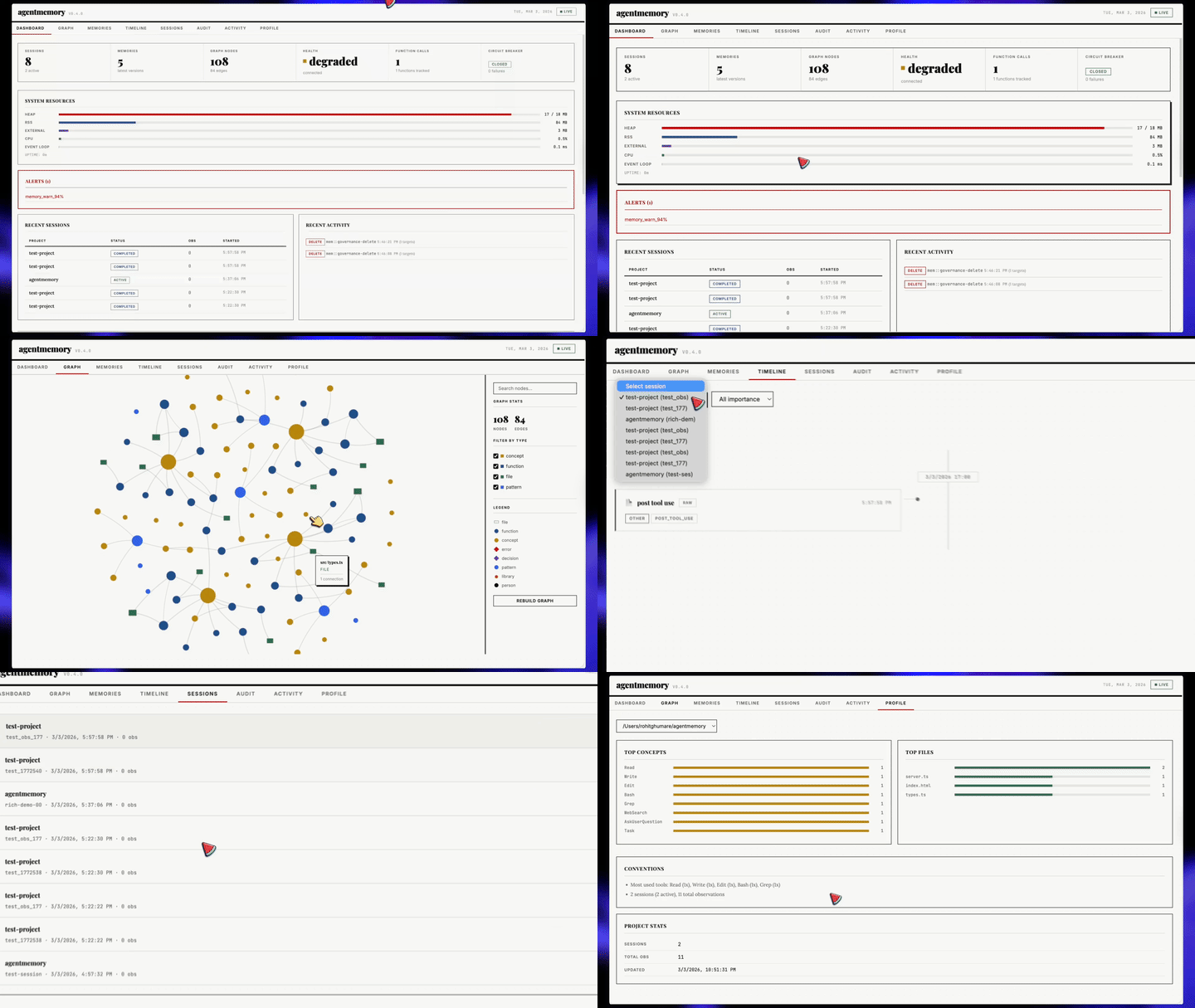
Port `3113` पर auto-start होता है। Live observation stream, session explorer, memory browser, knowledge graph visualization, और health dashboard।
```bash
open http://localhost:3113
```
व्यूअर server default रूप से `127.0.0.1` से bind होता है। REST-served `/agentmemory/viewer` endpoint सामान्य `AGENTMEMORY_SECRET` bearer-token नियमों का पालन करता है। CSP headers per-response script nonce का उपयोग करते हैं और inline handler attributes को disable करते हैं (`script-src-attr 'none'`)।
---
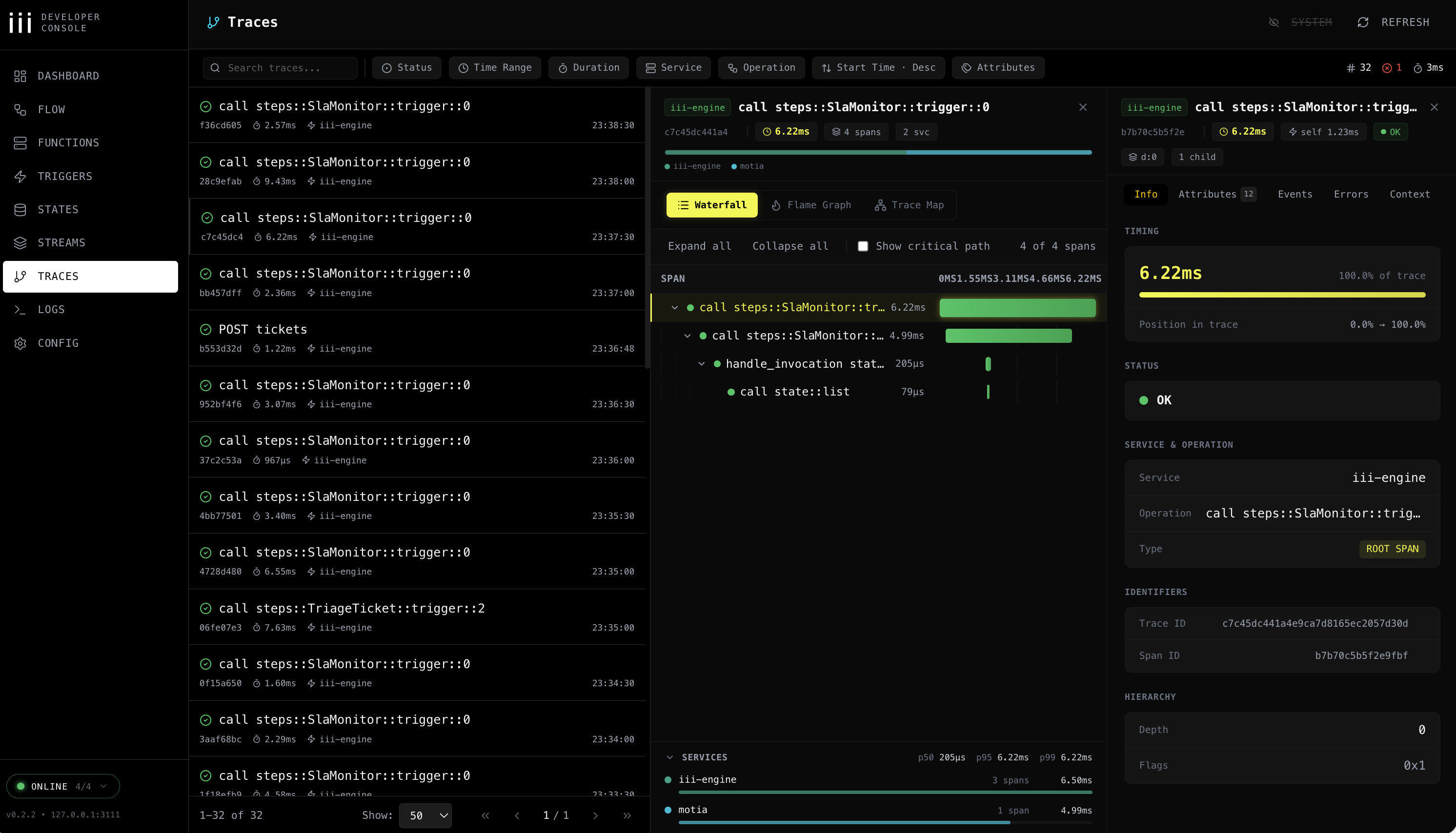
`:3113` पर viewer दिखाता है कि आपके agent ने क्या **याद रखा**। [iii console](https://iii.dev/docs/console) दिखाता है कि आपके agent ने क्या **किया** — हर memory op एक OpenTelemetry trace के रूप में, हर KV entry editable, हर function invocable, हर stream tappable। एक ही memory पर दो windows: एक product-shaped, एक engine-shaped।
`memory_smart_search` को fire होते देखें और BM25 scan → embedding lookup → RRF fusion → reranker को waterfall के रूप में देखें। KV browser में stuck consolidation timer को edit करें। `PostToolUse` hook को tweaked payload के साथ replay करें। WebSocket stream को pin करें और observations को live land होते देखें।
agentmemory इसे free में ship करता है क्योंकि हर function, trigger, state scope, और stream एक iii primitive है — कुछ भी custom नहीं, instrument करने के लिए कुछ नहीं।
Workers page: हर connected worker — agentmemory स्वयं सहित — PID, function count, runtime, और last-seen के साथ।
**पहले से installed।** Console `iii` के साथ ship होता है — कोई अलग installer नहीं।
**agentmemory के साथ launch करें:**
```bash
# agentmemory viewer port 3113 रखता है, तो console को 3114 पर चलाएँ।
# Engine REST (3111), WebSocket (3112), और bridge (49134) defaults agentmemory से match करते हैं।
iii console --port 3114
```
फिर `http://localhost:3114` खोलें। Experimental architecture-graph page के लिए `--enable-flow` जोड़ें।
केवल तभी engine endpoints override करें जब आपने उन्हें move किया हो:
```bash
iii console --port 3114 \
--engine-port 3111 \
--ws-port 3112 \
--bridge-port 49134
```
**Console से आप क्या कर सकते हैं:**
| Page | इसके लिए उपयोग करें |
|------|-----------|
| **Workers** | हर connected worker और उसके live metrics देखें — agentmemory worker सहित। |
| **Functions** | agentmemory के किसी भी function को सीधे JSON payload के साथ invoke करें — client जोड़े बिना `memory.recall`, `memory.consolidate`, `graph.query` test करने के लिए उपयोगी। |
| **Triggers** | HTTP, cron, event, और state triggers replay करें — consolidation cron को manually fire करें, HTTP route retry करें, एक state change emit करें। |
| **States** | Full CRUD के साथ KV browser — sessions, memory slots, lifecycle timers, embeddings index — values को in place edit करें। |
| **Streams** | Memory writes, hook events, और observation updates के लिए live WebSocket monitor क्योंकि वे iii streams से बहते हैं। |
| **Queues** | Durable queue topics + dead-letter management। Failed embedding / compression jobs को replay या drop करें। |
| **Traces** | OpenTelemetry waterfall / flame / service-breakdown views। `trace_id` से filter करें ताकि देख सकें कि एक `memory.search` ने वास्तव में कौन से functions, DB calls, और embedding requests produce किए। |
| **Logs** | Trace/span IDs से correlated और filtered structured OTEL logs। |
| **Config** | Runtime configuration — देखें कि आपका engine किन workers, providers, और ports के साथ चल रहा है। |
| **Flow** | (Optional, `--enable-flow`) हर worker, trigger, और stream का interactive architecture graph। |
Traces: हर memory operation के लिए waterfall / flame / service breakdown।
**Traces पहले से on हैं:**
`iii-config.yaml` `iii-observability` worker enabled (`exporter: memory`, `sampling_ratio: 1.0`, metrics + logs) के साथ ship होता है। कोई extra config की ज़रूरत नहीं — जैसे ही agentmemory शुरू होता है, हर memory operation एक trace span और एक structured log emit करता है जिसे console पढ़ सकता है।
अगर आप इसके बजाय Jaeger/Honeycomb/Grafana Tempo पर export करना चाहते हैं, तो `exporter: memory` को `exporter: otlp` में बदलें और iii के observability docs के अनुसार collector endpoint set करें।
> **ध्यान दें:** console पर कोई auth enforce नहीं है — इसे `127.0.0.1` (default) से bound रखें और इसे कभी publicly expose न करें।
---
agentmemory **पहले से एक चल रहा [iii](https://iii.dev) instance है**। Functions, triggers, KV state, streams, OTEL traces — यह सब iii primitives हैं। आपने Postgres, Redis, Express, pm2, या Prometheus install नहीं किया, क्योंकि iii उन्हें replace करता है।
इसका मतलब है कि एक और कमांड agentmemory को एक पूरी नई capability के साथ extend करती है।
### एक command के साथ agentmemory को extend करें
```bash
iii worker add iii-pubsub # memory writes को हर connected instance पर fan out करें
iii worker add iii-cron # scheduled consolidation, decay sweeps, snapshot rotation
iii worker add iii-queue # embedding + compression jobs के लिए durable retries
iii worker add iii-observability # हर memory op पर OTEL traces (default on)
iii worker add iii-sandbox # recalled code को isolated microVM के अंदर चलाएँ
iii worker add iii-database # एक SQL-backed state adapter में swap करें
iii worker add mcp # agentmemory MCP के साथ-साथ generic MCP host
```
प्रत्येक `iii worker add` उसी engine में नए functions और triggers register करता है जिस पर agentmemory पहले से चल रहा है। Viewer और console उन्हें तुरंत pick करते हैं — कोई reload नहीं, कोई नया integration नहीं, कोई नया container नहीं।
| `iii worker add` | agentmemory के ऊपर आपको क्या मिलता है |
|---|---|
| [`iii-pubsub`](https://workers.iii.dev/workers/iii-pubsub) | Multi-instance memory: हर `remember` fan out होती है, हर `search` union पढ़ता है |
| [`iii-cron`](https://workers.iii.dev/workers/iii-cron) | Scheduled lifecycle — रात की consolidation, साप्ताहिक snapshots, fixed clock पर decay |
| [`iii-queue`](https://workers.iii.dev/workers/iii-queue) | Durable retries: failed embedding + compression jobs restart से बचते हैं, कोई lost observations नहीं |
| [`iii-observability`](https://workers.iii.dev/workers/iii-observability) | हर function पर OTEL traces, metrics, logs — दिन एक से `iii-config.yaml` में wired |
| [`iii-sandbox`](https://workers.iii.dev/workers/iii-sandbox) | `memory_recall` से निकला code throwaway VM के अंदर चलता है, आपके shell में नहीं |
| [`iii-database`](https://workers.iii.dev/workers/iii-database) | जब आप in-memory KV defaults से बाहर निकलते हैं तो SQL-backed state adapter |
| [`mcp`](https://workers.iii.dev/workers/mcp) | agentmemory के साथ-साथ extra MCP servers खड़े करें, वही engine share करें |
Full registry: [workers.iii.dev](https://workers.iii.dev)। वहाँ हर worker उन्हीं primitives के माध्यम से compose करता है जिनका agentmemory उपयोग करता है — और आपके पास पहले से जो agentmemory है, वह उनमें से एक है।
### iii क्या replace करता है
| Traditional stack | agentmemory उपयोग करता है |
|---|---|
| Express.js / Fastify | iii HTTP Triggers |
| SQLite / Postgres + pgvector | iii KV State + in-memory vector index |
| SSE / Socket.io | iii Streams (WebSocket) |
| pm2 / systemd | iii engine worker supervision |
| Prometheus / Grafana | iii OTEL + health monitor |
| Custom plugin systems | `iii worker add ` |
**118 source files · ~21,800 LOC · 950+ tests · 123 functions · 34 KV scopes** — सब कुछ तीन primitives पर। कोई `agentmemory plugin install` नहीं। Plugin system iii स्वयं है।
---
### LLM Providers
agentmemory आपके environment से auto-detect करता है। Default रूप से, जब तक आप एक provider configure नहीं करते या Claude subscription fallback में explicitly opt in नहीं करते, कोई LLM calls नहीं की जातीं।
| Provider | Config | नोट्स |
|----------|--------|-------|
| **No-op (default)** | कोई config की ज़रूरत नहीं | LLM-backed compress/summarize DISABLED है। Synthetic BM25 compression + recall अभी भी काम करते हैं। अगर आप पहले Claude-subscription fallback पर निर्भर थे तो नीचे `AGENTMEMORY_ALLOW_AGENT_SDK` देखें। |
| Anthropic API | `ANTHROPIC_API_KEY` | Per-token billing |
| MiniMax | `MINIMAX_API_KEY` | Anthropic-compatible |
| Gemini | `GEMINI_API_KEY` | Embeddings भी enable करता है |
| OpenRouter | `OPENROUTER_API_KEY` | कोई भी model |
| Claude subscription fallback | `AGENTMEMORY_ALLOW_AGENT_SDK=true` | केवल opt-in। `@anthropic-ai/claude-agent-sdk` sessions spawn करता है — पहले unbounded Stop-hook recursion का कारण था तो यह अब default नहीं है। |
### Cost-aware model selection
Background compression हर observation पर चलता है, इसलिए model choice monthly spend को meaningfully बदलता है। Captured workload data: 635 requests / 888K tokens / 35 hours of active use, 2026-05-23 pricing पर तीन OpenRouter models पर चलाया गया।
| Tier | Model | Input / 1M | Output / 1M | Captured 35h के लिए cost | नोट्स |
|------|-------|------------|-------------|---------------------------|-------|
| अनुशंसित | `deepseek/deepseek-v4-pro` | $0.435 | $0.87 | ~$0.46 | Sonnet से ~10× कम cost पर solid compression + summarization quality। |
| अनुशंसित | `deepseek/deepseek-chat` | $0.27 | $1.10 | ~$0.40 | पुराना लेकिन केवल-compression workloads के लिए अभी भी ठीक। |
| अनुशंसित | `qwen/qwen3-coder` | $0.45 | $1.80 | ~$0.55 | अगर आपके sessions भारी रूप से code-shaped हैं तो strong code reasoning। |
| Premium | `anthropic/claude-sonnet-4.6` | $3.00 | $15.00 | ~$5.02 | High quality लेकिन always-on background work के लिए महंगा। |
| Premium | `openai/gpt-4o` | $2.50 | $10.00 | ~$4.20 | Sonnet के समान tier। |
| बचें | `anthropic/claude-opus-4.6` | $15.00 | $75.00 | ~$25+ | Reasoning-class model; compression के लिए massive overspend। |
जब `OPENROUTER_MODEL` premium-tier pattern से match करता है तो agentmemory एक runtime warning print करता है। जब आप informed choice कर लें तो silence करने के लिए `AGENTMEMORY_SUPPRESS_COST_WARNING=1` set करें।
Memory work के लिए quality बनाम cost tradeoff: compression एक summarization task है जिसमें अपेक्षाकृत loose quality bars हैं (agent summary को re-read करता है, user नहीं)। DeepSeek-V4-Pro / Qwen3-Coder इस task पर Sonnet से rounding error के भीतर land होते हैं जबकि ~10× कम cost में। Premium-tier models को उन queries के लिए save करें जिन्हें आप सीधे पढ़ते हैं।
Sources: [Sonnet 4.6 के लिए OpenRouter pricing](https://openrouter.ai/anthropic/claude-sonnet-4.6/pricing), [DeepSeek V4 Pro](https://openrouter.ai/deepseek/deepseek-v4-pro), [DeepSeek pricing नोट्स](https://api-docs.deepseek.com/quick_start/pricing/)।
### Multi-agent memory (`AGENT_ID` + `AGENTMEMORY_AGENT_SCOPE`)
Multi-agent setups में जहाँ कई roles एक agentmemory server share करते हैं (architect / developer / reviewer / researcher / support-agent), `AGENT_ID` हर write को उस role से tag करता है जिसने इसे किया। `AGENTMEMORY_AGENT_SCOPE` यह control करता है कि recall उस tag के द्वारा filter करता है या नहीं।
```env
TEAM_ID=company
USER_ID=engineering-team
AGENT_ID=architect
AGENTMEMORY_AGENT_SCOPE=isolated # optional; default "shared"
```
दो modes:
| Mode | Writes को tag करें | Recall filter करें | कब उपयोग करें |
|------|------------|---------------|-------------|
| `shared` (default) | हाँ | नहीं | Audit trail के साथ cross-agent context। Architect देख सकता है कि developer ने क्या note किया, लेकिन हर row record करती है कि किसने कहा। |
| `isolated` | हाँ | हाँ | सख्त separation। Architect कभी developer के observations / memories / sessions नहीं देखता। |
जब `AGENT_ID` set होता है तो क्या tagged होता है: `Session.agentId`, `RawObservation.agentId`, `CompressedObservation.agentId`, `Memory.agentId`। Role `api::session::start` → `mem::observe` → `mem::compress` → KV से flow करता है।
Isolated mode में क्या filter होता है: `mem::smart-search`, `/agentmemory/memories`, `/agentmemory/observations`, `/agentmemory/sessions`। प्रत्येक endpoint per-request override के लिए `?agentId=` और env scope से पूरी तरह से opt out करने के लिए `?agentId=*` accept करता है। `/memories` AGENT_ID से पहले के memories को surface करने के लिए `?includeOrphans=true` भी accept करता है जिनकी `agentId` undefined है।
SDK / REST layer पर per-call override: हर mutating endpoint (`/session/start`, `/remember`) request body में एक `agentId` field accept करता है जो env से जीतता है। एक server process के माध्यम से कई roles को route करने वाले runtimes के लिए उपयोगी।
जब `AGENT_ID` unset होता है, तो memory unscoped रहती है (legacy behavior, कोई tags नहीं, कोई filters नहीं)।
### Ports
agentmemory + iii-engine default रूप से चार ports पर bind होते हैं। अगर एक restart `port in use` के साथ fail होता है, तो यह table बताती है कि किस process को देखना है।
| Port | Process | उद्देश्य | Env override |
|------|---------|---------|--------------|
| `3111` | agentmemory | REST API + MCP HTTP + `/agentmemory/health` + `/agentmemory/livez` | `III_REST_PORT` |
| `3112` | iii-engine | Internal streams worker (agentmemory + viewer द्वारा consumed) | `III_STREAMS_PORT` |
| `3113` | agentmemory | Real-time viewer (`http://localhost:3113`) | `AGENTMEMORY_VIEWER_PORT` |
| `49134` | iii-engine | WebSocket — workers यहाँ register होते हैं, OTel telemetry यहाँ से flow होती है | `III_ENGINE_URL` (full URL, default `ws://localhost:49134`) |
Crashed run के बाद ports bound रहने पर stale-process cleanup:
```bash
# macOS / Linux — हर port पर जो भी है उसे ढूँढ़ें और kill करें
lsof -i :3111,3112,3113,49134
pkill -f agentmemory || true
pkill -f 'iii ' || true
# Windows
netstat -ano | findstr ":3111 :3112 :3113 :49134"
taskkill /F /PID
```
`agentmemory stop` graceful shutdown पर worker और engine pidfile दोनों को साफ़ रूप से reap करता है। ऊपर का manual cleanup केवल post-crash case के लिए है जहाँ कोई भी pidfile पीछे नहीं छोड़ी गई।
### Config File
हर shell में variables export करने के बजाय agentmemory runtime configuration को `~/.agentmemory/.env` में रखें। अगर viewer `export ANTHROPIC_API_KEY=...` जैसा setup hint दिखाता है, तो इसे `export` prefix के बिना इस file में `ANTHROPIC_API_KEY=...` के रूप में copy करें, फिर agentmemory restart करें।
Process environment variables अभी भी काम करते हैं और file में values पर precedence लेते हैं।
Windows पर, वही file `%USERPROFILE%\.agentmemory\.env` पर रहती है:
```powershell
New-Item -ItemType Directory -Force $HOME\.agentmemory
notepad $HOME\.agentmemory\.env
```
API key के बजाय Claude Code Pro/Max subscription के साथ test करने के लिए, explicitly opt in करें:
```env
AGENTMEMORY_ALLOW_AGENT_SDK=true
AGENTMEMORY_AUTO_COMPRESS=true
```
अगर आप graph या consolidation features चाहते हैं तो उसी file में उन्हें on करें:
```env
GRAPH_EXTRACTION_ENABLED=true
CONSOLIDATION_ENABLED=true
```
### Environment Variables
`~/.agentmemory/.env` बनाएँ:
```env
# LLM provider (pick one — default is the no-op provider: no LLM calls)
# ANTHROPIC_API_KEY=sk-ant-...
# ANTHROPIC_BASE_URL=... # Optional: Anthropic-compatible proxy / Azure
# GEMINI_API_KEY=...
# OPENROUTER_API_KEY=...
# MINIMAX_API_KEY=...
# OPENAI_API_KEY=*** # NOTE: this same key auto-activates BOTH the
# # OpenAI LLM provider (here) AND the OpenAI
# # embedding provider (further below). Set
# # OPENAI_API_KEY_FOR_LLM=false to scope it
# # to embeddings only.
# OPENAI_BASE_URL=https://api.openai.com # Optional: override for Azure / vLLM / LM Studio / proxies
# # Azure: https://.openai.azure.com/openai/deployments/
# # Auto-detected from `.openai.azure.com` hostname; uses
# # api-key header + api-version query param.
# OPENAI_API_VERSION=2024-08-01-preview # Optional: Azure api-version query param
# OPENAI_MODEL=gpt-4o-mini # Optional: default model
# OPENAI_TIMEOUT_MS=60000 # Optional: OpenAI-scoped alias for the outbound fetch
# # timeout. Takes precedence over AGENTMEMORY_LLM_TIMEOUT_MS
# # for back-compat with v0.9.17. New configs should
# # prefer the global AGENTMEMORY_LLM_TIMEOUT_MS below.
# OPENAI_REASONING_EFFORT=none # Optional: "low" | "medium" | "high" | "none"
# # Honored only by OpenAI's reasoning models (o1, o3,
# # gpt-*-reasoning) and providers that mirror that
# # schema (Ollama Cloud thinking models). Standard
# # chat models reject this field with 400. Set to
# # "none" for thinking models that return reasoning
# # but no content.
# OPENAI_API_KEY_FOR_LLM=false # Optional: set to false to skip OpenAI auto-detection
# # for LLM (useful if you only want OpenAI for embeddings)
# Opt-in Claude-subscription fallback (spawns @anthropic-ai/claude-agent-sdk);
# leave OFF unless you understand the Stop-hook recursion risk:
# AGENTMEMORY_ALLOW_AGENT_SDK=true
# Embedding provider (auto-detected, or override)
# EMBEDDING_PROVIDER=local
# VOYAGE_API_KEY=...
# OPENAI_API_KEY=sk-...
# OPENAI_BASE_URL=https://api.openai.com # Override for Azure / vLLM / LM Studio / proxies
# OPENAI_EMBEDDING_MODEL=text-embedding-3-small
# OPENAI_EMBEDDING_DIMENSIONS=1536 # Required when the model is not in the known-models table
# Outbound LLM / embedding timeout
# AGENTMEMORY_LLM_TIMEOUT_MS=60000 # Default: 60 000 ms (60 s). Applies to every
# raw-fetch provider (Gemini, OpenRouter, MiniMax,
# OpenAI LLM, OpenAI/Cohere/Voyage/OpenRouter
# embedding). For the OpenAI LLM path, the
# OpenAI-scoped OPENAI_TIMEOUT_MS alias (above)
# takes precedence when set, for back-compat
# with v0.9.17.
# Increase for slow networks or large batch calls;
# decrease to fail-fast on rate-limit holds.
# Search tuning
# BM25_WEIGHT=0.4
# VECTOR_WEIGHT=0.6
# TOKEN_BUDGET=2000
# Auth
# AGENTMEMORY_SECRET=your-secret
# Ports (defaults: 3111 API, 3113 viewer)
# III_REST_PORT=3111
# Features
# AGENTMEMORY_AUTO_COMPRESS=false # OFF by default. When on,
# every PostToolUse hook calls your
# LLM provider to compress the
# observation — expect significant
# token spend on active sessions.
# AGENTMEMORY_SLOTS=false # OFF by default. Editable pinned
# memory slots — persona,
# user_preferences, tool_guidelines,
# project_context, guidance,
# pending_items, session_patterns,
# self_notes. Size-limited; agent
# edits via memory_slot_* tools.
# Pinned slots addressable for
# SessionStart injection.
# AGENTMEMORY_REFLECT=false # OFF by default. Requires SLOTS=on.
# Stop hook fires mem::slot-reflect:
# scans recent observations, auto-
# appends TODOs to pending_items,
# counts patterns in
# session_patterns, records touched
# files in project_context. Fire-
# and-forget; does not block.
# AGENTMEMORY_INJECT_CONTEXT=false # OFF by default. When on:
# - SessionStart may inject ~1-2K
# chars of project context into
# the first turn of each session
# (this is what actually reaches
# the model — Claude Code treats
# SessionStart stdout as context)
# - PreToolUse fires /agentmemory/enrich
# on every file-touching tool call
# (resource cleanup, not a token
# fix — PreToolUse stdout is debug
# log only per Claude Code docs)
# Observations are still captured via
# PostToolUse regardless of this flag.
# GRAPH_EXTRACTION_ENABLED=false
# CONSOLIDATION_ENABLED=true
# LESSON_DECAY_ENABLED=true
# OBSIDIAN_AUTO_EXPORT=false
# AGENTMEMORY_EXPORT_ROOT=~/.agentmemory
# CLAUDE_MEMORY_BRIDGE=false
# SNAPSHOT_ENABLED=false
# Team
# TEAM_ID=
# USER_ID=
# TEAM_MODE=private
# Tool visibility: "core" (8 tools) or "all" (51 tools)
# AGENTMEMORY_TOOLS=core
```
---
Port `3111` पर 124 endpoints। REST API default रूप से `127.0.0.1` से bind होता है। `AGENTMEMORY_SECRET` set होने पर protected endpoints `Authorization: Bearer ` की आवश्यकता रखते हैं, और mesh sync endpoints दोनों peers पर `AGENTMEMORY_SECRET` की आवश्यकता रखते हैं।
मुख्य endpoints
| Method | Path | विवरण |
|--------|------|-------------|
| `GET` | `/agentmemory/health` | Health check (हमेशा public) |
| `POST` | `/agentmemory/session/start` | Session शुरू करें + context प्राप्त करें |
| `POST` | `/agentmemory/session/end` | Session समाप्त करें |
| `POST` | `/agentmemory/observe` | Observation capture करें |
| `POST` | `/agentmemory/smart-search` | Hybrid search |
| `POST` | `/agentmemory/context` | Context generate करें |
| `POST` | `/agentmemory/remember` | Long-term memory में save करें |
| `POST` | `/agentmemory/forget` | Observations delete करें |
| `POST` | `/agentmemory/enrich` | File context + memories + bugs |
| `GET` | `/agentmemory/profile` | Project profile |
| `GET` | `/agentmemory/export` | सभी data export करें |
| `POST` | `/agentmemory/import` | JSON से import करें |
| `POST` | `/agentmemory/graph/query` | Knowledge graph query |
| `POST` | `/agentmemory/team/share` | Team के साथ share करें |
| `GET` | `/agentmemory/audit` | Audit trail |
Full endpoint list: [`src/triggers/api.ts`](../src/triggers/api.ts)
---
```bash
npm run dev # Hot reload
npm run build # Production build
npm test # 950+ tests
npm run test:integration # API tests (running services की आवश्यकता है)
```
**आवश्यकताएँ:** Node.js >= 20, [iii-engine](https://iii.dev/docs) या Docker