



<a id="top"></a>

<div align="center">

<div style="margin: 20px 0;">
  <img src="imgs/logo.png" alt="NanoResearch Logo" width="500" style="border-radius: 20px;">
</div>

# NanoResearch

<p>
  <a href="README.md"><img src="https://img.shields.io/badge/🇨🇳_中文-1a1a2e?style=for-the-badge" alt="中文"></a>
  <a href="README_en.md"><img src="https://img.shields.io/badge/🇺🇸_English-1a1a2e?style=for-the-badge" alt="English"></a>
</p>

**End-to-End Autonomous AI Research Engine — From Idea to Full Paper, Fully Automated**

<p>
  <a href="https://github.com/OpenRaiser/NanoResearch"><img src="https://img.shields.io/badge/🔥_Project-Page-00d9ff?style=for-the-badge&logo=github&logoColor=white&labelColor=1a1a2e" alt="Project"></a>
  <a href="https://github.com/OpenRaiser/NanoResearch/stargazers"><img src="https://img.shields.io/github/stars/OpenRaiser/NanoResearch?color=00d9ff&style=for-the-badge&logo=star&logoColor=white&labelColor=1a1a2e" alt="Stars"></a>
  <a href="https://github.com/OpenRaiser/NanoResearch/issues"><img src="https://img.shields.io/badge/🐛_Issues-ff6b6b?style=for-the-badge&logo=github&logoColor=white&labelColor=1a1a2e" alt="Issues"></a>
</p>

<p>
  <img src="https://img.shields.io/badge/Python-3.10%2B-4ecdc4?style=for-the-badge&logo=python&logoColor=white&labelColor=1a1a2e" alt="Python">
  <img src="https://img.shields.io/badge/License-MIT-16A34A?style=for-the-badge&labelColor=1a1a2e" alt="License">
  <img src="https://img.shields.io/badge/Pipeline-9_Stage_Deep-7C3AED?style=for-the-badge&labelColor=1a1a2e" alt="Pipeline">
  <img src="https://img.shields.io/badge/Execution-Local_|_SLURM-0EA5E9?style=for-the-badge&labelColor=1a1a2e" alt="Execution">
</p>

<p>
  <a href="#quick-start"><b>Quick Start</b></a> ·
  <a href="#showcase"><b>Showcase</b></a> ·
  <a href="#pipeline"><b>Pipeline</b></a> ·
  <a href="#claude-code-mode"><b>Claude Code</b></a> ·
  <a href="#feishu-bot"><b>Feishu Bot</b></a>
</p>

</div>

---

> 🔬 NanoResearch **actually runs computational experiments** — it doesn't just generate code, it submits jobs to GPU clusters, collects real results, generates figures, and outputs a complete LaTeX paper backed by real experimental data. Every number, table, and chart in the paper comes from actual experiment outputs, **not LLM fabrication**.

---

## 📖 Table of Contents

- [📊 Real-World Output Showcase](#-real-world-output-showcase)
- [⚡ CLI Demo](#cli-demo)
- [📢 News](#-news)
- [✨ Key Features](#-key-features)
- [🆚 Why NanoResearch](#-why-nanoresearch)
- [🎯 Use Cases](#-use-cases)
- [🖼️ Showcase](#️-showcase)
- [CLI: Plain vs TUI](#cli-plain-vs-tui)
- [🔬 Pipeline](#-pipeline)
- [📦 Quick Start](#-quick-start)
- [🧬 Evo Self-Evolving Pipeline](#-evo-self-evolving-pipeline)
- [🧩 Claude Code Mode](#-claude-code-mode)
- [⚙️ Configuration](#️-configuration)
- [💻 CLI Reference](#-cli-reference)
- [🍪 Examples & Demos](#-examples--demos)
- [📂 Output Structure](#-output-structure)
- [💬 Feishu Bot](#-feishu-bot)
- [🏗️ Project Structure](#️-project-structure)
- [❓ FAQ](#-faq)
- [🎯 Roadmap](#-roadmap)
- [📋 Requirements](#-requirements)
- [🙏 Acknowledgements](#-acknowledgements)
- [🤝 Contributing](#-contributing)
- [📝 Citation](#-citation)
- [📄 License](#-license)

<p align="right"><a href="#top">🔝 Back to top</a></p>

---

## 📊 Real-World Output Showcase

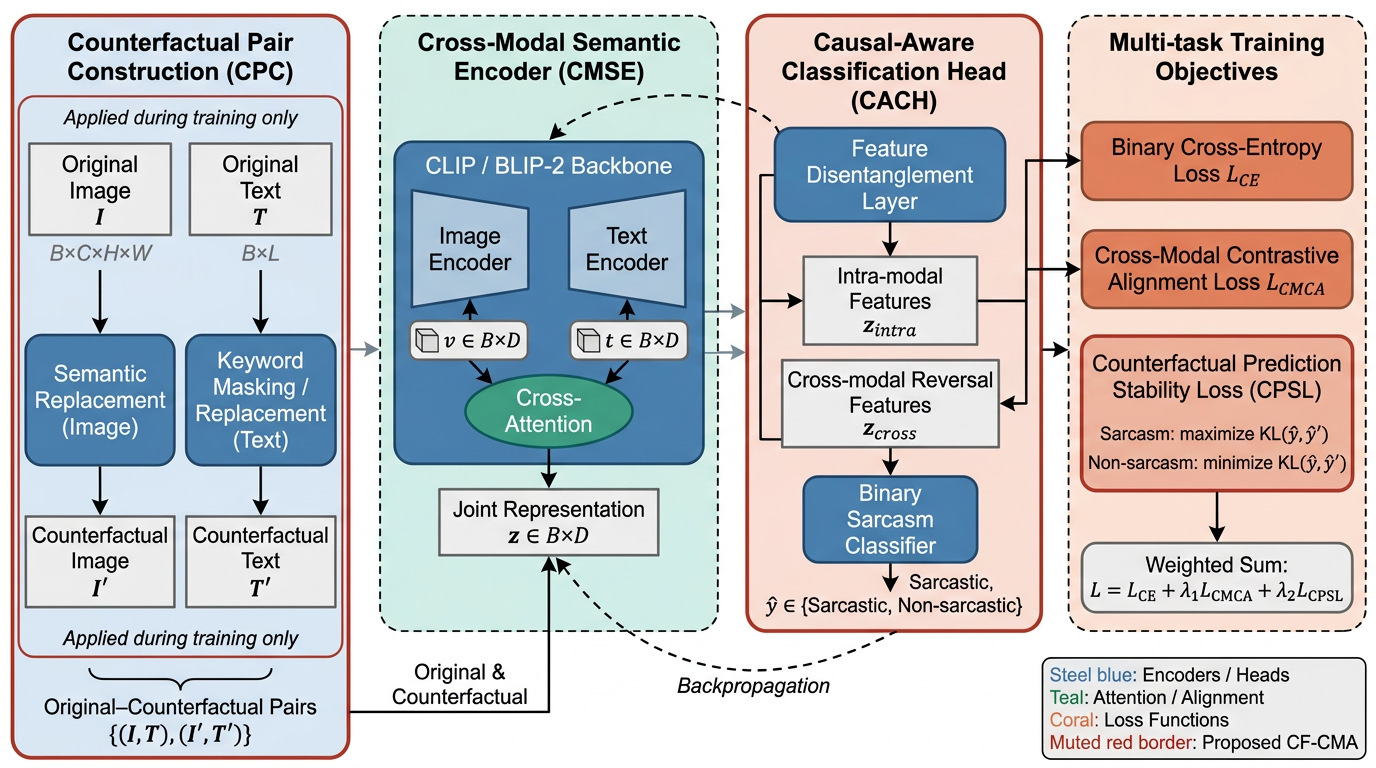
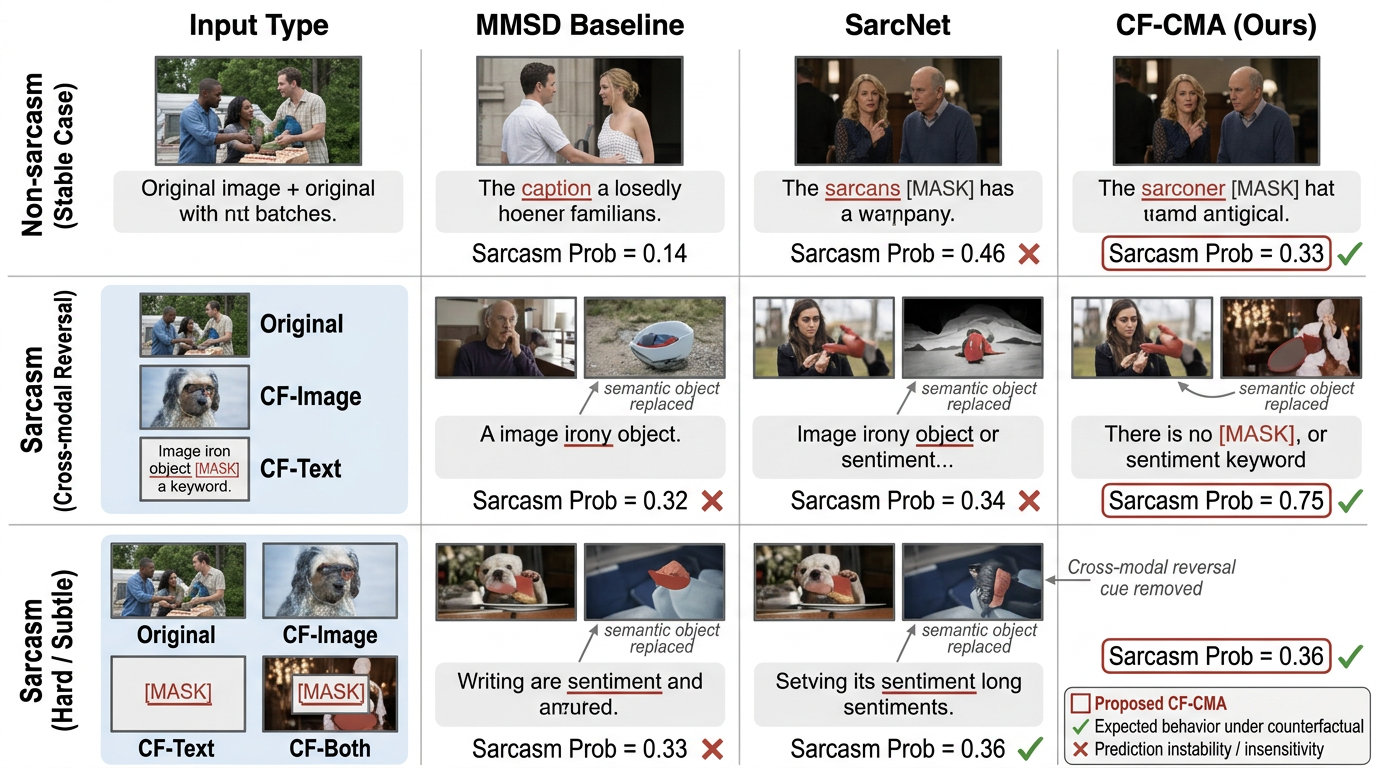
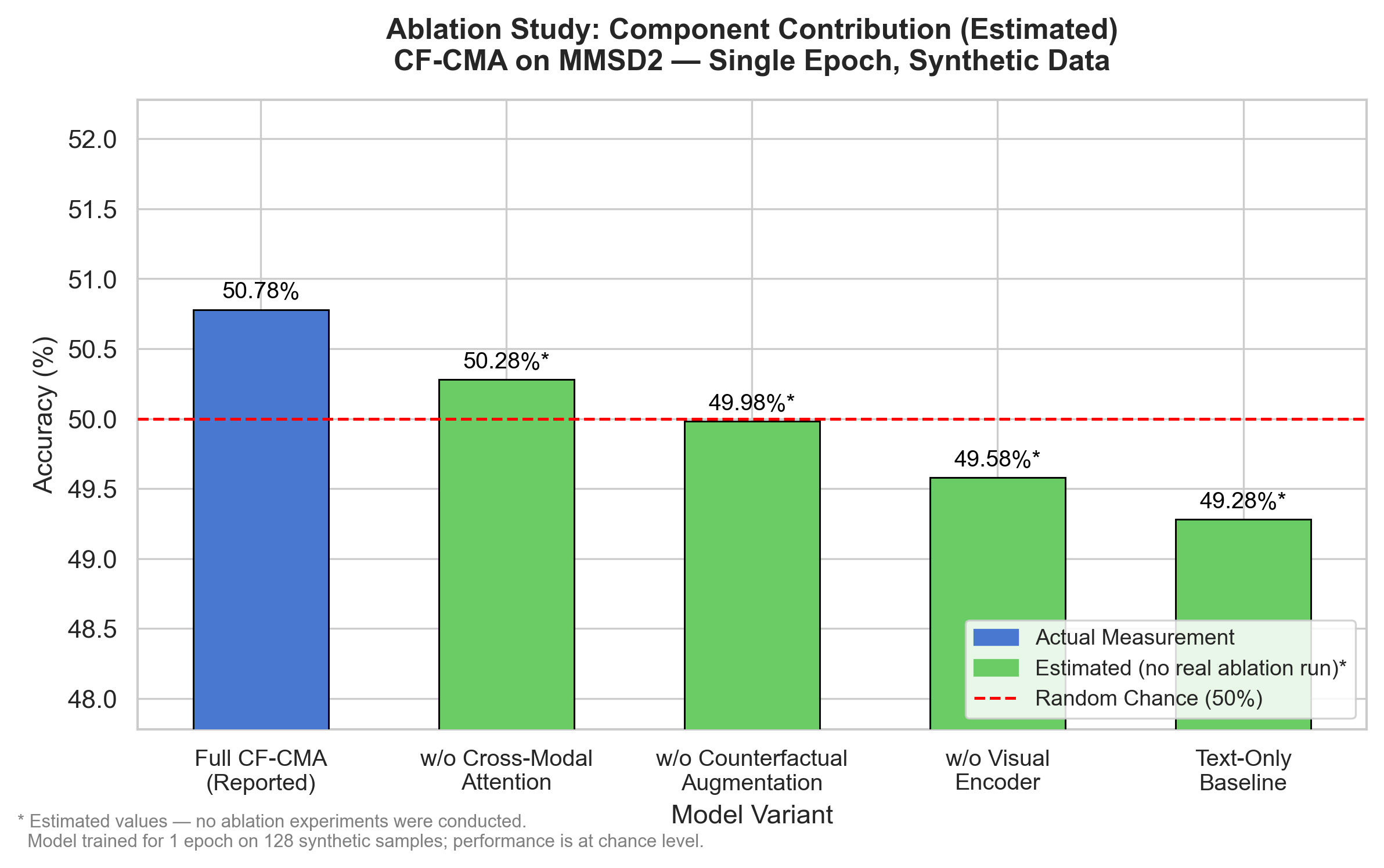
Figures below are **generated by NanoResearch** from real experiment runs. All curves, tables, and visualizations are derived from actual training logs and execution outputs — **not LLM fabrication**.

<table>
  <tr>
    <td align="center" valign="top" width="33%">
      <img src="imgs/recognition_1.jpg" height="200" alt="Experimental Results"/>
      <br />
      <sub><b>Experimental Results</b></sub>
    </td>
    <td align="center" valign="top" width="33%">
      <img src="imgs/recognition_2.jpg" height="200" alt="Main Results & Comparison"/>
      <br />
      <sub><b>Main Results & Comparison</b></sub>
    </td>
    <td align="center" valign="top" width="33%">
      <img src="imgs/recognition_3.jpg" height="200" alt="Ablation & Visualization"/>
      <br />
      <sub><b>Ablation & Visualization</b></sub>
    </td>
  </tr>
</table>

> Every figure is produced by the pipeline from genuine experiment artifacts; all data traces back to executed runs.

---

<a id="cli-demo"></a>

## ⚡ CLI Demo

The **command-line interface (CLI)** offers both a **full-screen TUI** and **classic streaming logs**. Below is a **TUI theme and interface** demo (color themes and layout). For other entry points (e.g. Claude Code, Feishu bot), see the corresponding sections in this README.

<table>
  <tr>
    <th><p align="center">🖥️ CLI / TUI</p></th>
  </tr>
  <tr>
    <td align="center">
      <video src="https://github.com/user-attachments/assets/008911c6-b015-47ff-a286-1d8c22f5817e" autoplay loop muted playsinline width="100%" style="max-width: 100%; border-radius: 8px;">
        <a href="https://github.com/user-attachments/assets/008911c6-b015-47ff-a286-1d8c22f5817e">Download / play CLI demo video</a>
      </video>
    </td>
  </tr>
</table>
<sub><i>TUI layout, color theme switching, and improved on-screen structure</i></sub>

<p align="right"><a href="#top">🔝 Back to top</a></p>

---

## 📢 News

- **[2026-03]** 📄 [**NanoResearch**](https://github.com/OpenRaiser/NanoResearch) documentation and showcase overhaul — local image references and real-world output display.
- **[2026-03]** 🚀 [**NanoResearch v1.0**](https://github.com/OpenRaiser/NanoResearch) officially released — the first end-to-end autonomous AI research engine, covering literature search through LaTeX paper output.
- **[2026-03]** 🔬 Core capabilities: real GPU/SLURM execution, evidence-driven writing, 9-stage resumable pipeline, per-stage multi-model routing.

<details>
<summary><b>📜 Release History</b></summary>

| Date | Milestone |
|------|-----------|
| 2026-03 | Feishu bot, Claude Code integration, NeurIPS/ICML/arXiv templates |
| 2026-03 | SLURM cluster auto-submission, checkpoint & resume, multi-model routing |
| 2026-02 | Core pipeline and Agent architecture |

</details>

---

## ✨ Key Features

<table align="center">
  <tr align="center">
    <th>🔬 Real Experiments</th>
    <th>🧠 Multi-Model Routing</th>
    <th>🔄 Checkpoint & Resume</th>
    <th>📝 Evidence-Grounded Writing</th>
  </tr>
  <tr>
    <td align="center">Auto-submit GPU/SLURM<br/>jobs and collect real metrics</td>
    <td align="center">Configure different models<br/>for each pipeline stage</td>
    <td align="center">Resume from any failed<br/>stage without restart</td>
    <td align="center">Paper data is bound to<br/>real experiment results</td>
  </tr>
  <tr align="center">
    <th>📊 Auto Figure Gen</th>
    <th>🏗️ Multi-Format Templates</th>
    <th>🤖 Multi-Interface Control</th>
    <th>💰 Cost Efficient</th>
  </tr>
  <tr>
    <td align="center">Code-based charts + AI<br/>architecture diagrams</td>
    <td align="center">NeurIPS / ICML / arXiv<br/>one-click switch</td>
    <td align="center">CLI / Claude Code<br/>/ Feishu Bot</td>
    <td align="center">As low as $0.5/paper<br/>with DeepSeek</td>
  </tr>
</table>

---

## 🆚 Why NanoResearch

| Feature | Traditional AI Writing Tools | **NanoResearch** |
|---------|:---:|:---:|
| Literature Search | Partial | ✅ OpenAlex + Semantic Scholar |
| Experiment Design | ❌ | ✅ Auto-generated blueprints |
| Code Generation | Partial | ✅ Complete runnable code |
| **GPU Experiment Execution** | ❌ | ✅ **Local / SLURM auto-training** |
| Results Analysis | ❌ | ✅ Parse real training logs |
| Paper Figures | ❌ | ✅ From real data |
| Paper Writing | Outline/draft | ✅ Full LaTeX paper |
| Checkpoint & Resume | ❌ | ✅ Any stage recoverable |
| Multi-Model Collaboration | Single model | ✅ Per-stage routing |

---

## 🎯 Use Cases

- **Research Prototyping** — Quickly turn a research idea into a full experiment + paper workspace
- **Autonomous Experiments** — Let the system generate code, submit GPU training, and analyze results
- **Benchmark Generation** — Batch-run multiple topics with reproducible experiment results
- **Paper Draft Assistance** — Produce LaTeX drafts grounded in real experimental data
- **Research Audit Trail** — Complete workspaces, intermediate artifacts, and logs for full traceability

---

## 🖼️ Showcase

<div align="center">
  <img src="imgs/before_after.png" alt="Before and After NanoResearch" width="90%" />
  <p><b>Break free from the manual research grind</b></p>
  <p>No more debugging failed experiments, wrangling data by hand, or writing papers from scratch —<br/>NanoResearch automates the full research workflow so you can focus on real innovation.</p>
</div>

<a id="cli-plain-vs-tui"></a>

## Overview
 
NanoResearch is a unified research pipeline that automates the full paper-production workflow:

- starts from a research topic
- searches and synthesizes relevant literature
- proposes an experiment blueprint
- generates runnable code and scripts
- executes locally or on SLURM
- analyzes real outputs
- generates figures
- writes a LaTeX paper draft
- reviews and revises the result

It is designed around **resumable workspaces**, **multi-model routing**, and **grounded writing** so that downstream paper content is tied to actual experiment evidence instead of free-form draft generation.

## Why NanoResearch

Most "AI paper writers" stop at outlines or prose. NanoResearch is built for a deeper loop:

- **End-to-end pipeline**: topic to exportable paper workspace
- **Grounded writing**: writing consumes structured experiment evidence, figures, and citations
- **Checkpoint + resume**: failed stages can be resumed from the last saved state
- **Execution-aware**: supports local execution and SLURM-backed workflows
- **Multi-model by stage**: route ideation, coding, writing, and review to different models
- **Exportable outputs**: clean paper/code/figure bundles for sharing or submission prep

## Use cases

- **Research prototyping** — quickly turn a fresh idea into a full experiment-and-paper workspace
- **Benchmark generation** — create repeatable topic-to-paper runs across multiple tasks
- **Autonomous experimentation** — let the system generate code, execute runs, and analyze outputs
- **Paper drafting from evidence** — produce LaTeX drafts grounded in actual experiment artifacts
- **Internal research tooling** — use workspaces, manifests, and stage artifacts as an auditable research log

## Showcase

### Generated research workspace

A typical NanoResearch run produces a clean, inspectable workspace containing:

- literature and planning artifacts
- runnable experiment code
- generated figures
- LaTeX paper sources and bibliography
- a final exported bundle for sharing or submission prep

### Example outputs

<table>
  <tr>
    <td align="center" width="50%">
      <img src="imgs/framework_overview.png" alt="Framework Overview" width="95%" />
      <br />
      <sub><b>Framework Overview</b></sub>
    </td>
    <td align="center" width="50%">
      <img src="imgs/examples.png" alt="Examples" width="95%" />
      <br />
      <sub><b>Generated Paper Examples</b></sub>
    </td>
  </tr>
  <tr>
    <td align="center" width="50%">
      <img src="imgs/main_results.png" alt="Main Results" width="95%" />
      <br />
      <sub><b>Main Results (Real Experiment Data)</b></sub>
    </td>
    <td align="center" width="50%">
      <img src="imgs/ablation.png" alt="Ablation Study" width="95%" />
      <br />
      <sub><b>Ablation Study</b></sub>
    </td>
  </tr>
</table>

---

## 🔬 Pipeline

```text
Research Topic
     ↓
 IDEATION → PLANNING → SETUP → CODING → EXECUTION → ANALYSIS → FIGURE_GEN → WRITING → REVIEW
     ↓
 Exported: paper.pdf / paper.tex / references.bib / figures / code / data
```

<details>
<summary><b>📋 Stage Details</b></summary>

| Stage | What It Does |
|-------|-------------|
| `IDEATION` | Search literature, identify gaps, propose hypotheses, collect must-cite candidates |
| `PLANNING` | Turn the idea into a concrete experiment blueprint (datasets, baselines, metrics, ablations) |
| `SETUP` | Prepare repositories, dependencies, models, and datasets |
| `CODING` | Generate a complete runnable experiment project (training scripts, data loading, model definition) |
| `EXECUTION` | **Run experiments locally or on SLURM, with automatic retry and debugging** |
| `ANALYSIS` | Parse training logs and metrics into structured evidence |
| `FIGURE_GEN` | Create architecture diagrams, result comparison charts, and ablation figures |
| `WRITING` | Write and compile the LaTeX paper from experiment evidence and citations |
| `REVIEW` | Multi-perspective review, issue detection, and revision |

</details>

<details>
<summary><b>🚀 EXECUTION Stage Core Capabilities</b></summary>

The `EXECUTION` stage is NanoResearch's core differentiator:

- **Auto SLURM Submission** — Generate sbatch scripts, submit to cluster, monitor job status
- **Local GPU Execution** — Auto-detect available GPUs and manage training processes
- **Auto Debug & Retry** — Analyze error logs on failure, fix code, and re-execute automatically
- **Real-Time Log Monitoring** — Track training progress and metric changes
- **Hybrid Execution** — Automatically switch between local and cluster based on task complexity

</details>

---

## 📦 Quick Start

Follow these steps to go from install to first run in about 5 minutes.

### Step 1: Install

```bash
git clone https://github.com/OpenRaiser/NanoResearch.git
cd NanoResearch
pip install -e ".[dev]"
```

### Step 2: Configure

> [!TIP]
> Create `~/.nanoresearch/config.json`. Replace `base_url` and `api_key` with your own OpenAI-compatible API endpoint.

<details>
<summary><b>View full configuration example</b></summary>

```json
{
  "research": {
    "base_url": "https://your-openai-compatible-endpoint/v1/",
    "api_key": "your-api-key",
    "template_format": "neurips2025",
    "execution_profile": "local_quick",
    "writing_mode": "hybrid",
    "max_retries": 2,
    "auto_create_env": true,
    "auto_download_resources": true,
    "ideation": { "model": "your-model", "temperature": 0.5, "max_tokens": 16384, "timeout": 600.0 },
    "planning": { "model": "your-model", "temperature": 0.2, "max_tokens": 16384, "timeout": 600.0 },
    "code_gen": { "model": "your-model", "temperature": 0.1, "max_tokens": 16384, "timeout": 600.0 },
    "writing": { "model": "your-model", "temperature": 0.4, "max_tokens": 16384, "timeout": 600.0 },
    "figure_prompt": { "model": "pro/gpt-5.5", "temperature": 0.5, "max_tokens": 4096, "timeout": 300.0 },
    "figure_code": { "model": "pro/gpt-5.5", "temperature": 0.1, "max_tokens": 16384, "timeout": 600.0 },
    "figure_gen": {
      "model": "gpt-image-2",
      "image_backend": "openai",
      "base_url": "https://your-image-endpoint/v1/",
      "api_key": "your-image-api-key",
      "temperature": null,
      "timeout": 300.0
    },
    "review": { "model": "your-model", "temperature": 0.3, "max_tokens": 16384, "timeout": 300.0 }
  }
}
```

</details>

Environment variable overrides: `NANORESEARCH_BASE_URL` / `NANORESEARCH_API_KEY` / `NANORESEARCH_TIMEOUT`

### Step 3: Validate & Run

```bash
# Validate config
nanoresearch run --topic "Adaptive Sparse Attention Mechanisms" --dry-run

# Run the full pipeline
nanoresearch run --topic "Adaptive Sparse Attention Mechanisms" --format neurips2025 --verbose

# Resume from checkpoint (if a stage fails)
nanoresearch resume --workspace ~/.nanoresearch/workspace/research/{session_id} --verbose

# Export paper
nanoresearch export --workspace ~/.nanoresearch/workspace/research/{session_id} --output ./my_paper
```

### Step 4: Expected Output

After the pipeline completes, you will have paper figures and LaTeX sources backed by real experiment data.

---

## 🧬 Evo Self-Evolving Pipeline

`evo` is NanoResearch's self-evolving pipeline for personalized research automation. It combines skill evolution, memory evolution, and feedback-aware planner/router adaptation so the system can reuse experience and better align with user preferences across research cycles.

### When to use `evo`

- You want the system to accumulate reusable skills and project memory across research cycles.
- You want plans to adapt to user preferences, resource constraints, target venues, and feedback.
- You want planning to explicitly request proposed-method, baseline, ablation, optimization/history, and complexity experiments, with paper writing grounded only in real artifacts.

### From user initialization to paper export

```bash
# 1. Initialize or refresh the user profile, preferences, and runtime settings
nanoresearch init

# 2. Start the self-evolving full workflow
nanoresearch run --pipeline evo --topic "your research topic" --format neurips2025 --verbose

# 3. Resume if a stage fails or the process is interrupted
nanoresearch resume --workspace ~/.nanoresearch/workspace/research/{session_id} --verbose

# 4. Inspect stage status and artifacts
nanoresearch status --workspace ~/.nanoresearch/workspace/research/{session_id}
nanoresearch inspect --workspace ~/.nanoresearch/workspace/research/{session_id}

# 5. Export the final paper package
nanoresearch export --workspace ~/.nanoresearch/workspace/research/{session_id} --output ./paper_export
```

### What `evo` produces

`evo` still runs the nine-stage backbone: `IDEATION -> PLANNING -> SETUP -> CODING -> EXECUTION -> ANALYSIS -> FIGURE_GEN -> WRITING -> REVIEW`. The difference is that it continuously updates and reuses the user profile, skill bank, project memory, and feedback routing across stages.

Machine-checkable experiment artifacts are typically written to:

```text
~/.nanoresearch/workspace/research/{session_id}/experiment/configs/experiment_matrix.json
~/.nanoresearch/workspace/research/{session_id}/experiment/results/metrics.json
~/.nanoresearch/workspace/research/{session_id}/experiment/results/run_manifest.json
~/.nanoresearch/workspace/research/{session_id}/experiment/results/final_metrics.json
~/.nanoresearch/workspace/research/{session_id}/experiment/results/optimization_history.csv
~/.nanoresearch/workspace/research/{session_id}/experiment/results/pareto_front.json
```

The writing stage reads only measured execution results, analysis reports, and figure artifacts. If an experiment category or metric has no real artifact, NanoResearch narrows the evidence scope or writes it as a limitation / future-work item rather than filling in synthetic numbers. OpenAlex can be used anonymously; configure `OPENALEX_API_KEY` only when you need higher literature-search rate limits.

---

## 🤖 Recommended Models

| Stage | Task | Recommended | Budget-Friendly |
|-------|------|-------------|-----------------|
| `ideation` | Literature search + hypothesis | DeepSeek-V3.2 | DeepSeek-V3.2 |
| `planning` | Experiment design | Claude Sonnet 4.6 | DeepSeek-V3.2 |
| `code_gen` | Code generation | pro/gpt-5.5 | DeepSeek-V3.2 |
| `writing` | Paper writing | pro/gpt-5.5 / Claude Sonnet 4.6 | DeepSeek-V3.2 |
| `figure_prompt` | Figure description | pro/gpt-5.5 | DeepSeek-V3.2 |
| `figure_code` | Chart plotting code | pro/gpt-5.5 | DeepSeek-V3.2 |
| `figure_gen` | AI architecture diagrams | gpt-image-2 (OpenAI-compatible image API) | gpt-image-2 |
| `review` | Review + revision | DeepSeek-V3.2 / pro/gpt-5.5 | DeepSeek-V3.2 |


---

## 🧩 Claude Code Mode

In addition to the Python CLI, NanoResearch can be driven directly through **[Claude Code](https://docs.anthropic.com/en/docs/claude-code)** — **no API keys required**.

<details>
<summary><b>How It Works</b></summary>

In Claude Code integration mode, Claude Code itself is the research engine:

- **WebSearch** replaces external APIs for literature retrieval (arXiv, Semantic Scholar, Google Scholar)
- **Bash** runs experiment code, submits SLURM jobs, and compiles LaTeX
- **File read/write** generates experiment code, papers, and structured artifacts

</details>

### Quick Start

```bash
git clone https://github.com/OpenRaiser/NanoResearch.git
cd NanoResearch
claude
/project:research "Your Research Topic Here"
```

### Available Commands

| Command | Description |
|---------|-------------|
| `/project:research <topic>` | Run the full 9-stage pipeline |
| `/project:ideation <topic>` | Stage 1: Literature search + hypothesis generation |
| `/project:planning` | Stage 2: Experiment blueprint design |
| `/project:experiment` | Stages 3-5: Setup + code generation + execution |
| `/project:analysis` | Stage 6: Results analysis |
| `/project:writing` | Stages 7-8: Figure generation + paper writing |
| `/project:review` | Stage 9: Multi-perspective review + revision |
| `/project:status` | Show current pipeline status |
| `/project:resume` | Resume pipeline from last checkpoint |

<details>
<summary><b>💡 Tips</b></summary>

- **Architecture diagrams**: Use the Nano Banana series of image models for high-quality architecture diagrams. In Claude Code mode, call image generation APIs via Bash in the `figure_gen` stage.
- **LaTeX compilation**: Use `tectonic` instead of `pdflatex`. Install with: `conda install -c conda-forge tectonic`.
- **Checkpoint & resume**: All stage artifacts are tracked in `manifest.json`, enabling resume from any stage.
- **Compatible with Python CLI**: Workspaces created in Claude Code mode are fully compatible with the Python CLI, and vice versa.

</details>

---

## Codex Integration

In addition to Claude Code, NanoResearch now exposes a project-level entrypoint for **Codex**. Codex does not need a second pipeline or a dedicated `--mode codex` flag. It should reuse the existing CLI, workspace, manifest, and `PaperMode` behavior already implemented in the repo.

### How to use it

```bash
# 1. Clone the project
git clone https://github.com/OpenRaiser/NanoResearch.git
cd NanoResearch

# 2. Open the repo in Codex
# 3. Ask Codex to read AGENTS.md first
```

Codex entrypoint: `AGENTS.md`

### How Codex should interpret the repo

- Treat the repository as an end-to-end autonomous research pipeline, not a generic coding project
- Prefer the existing `nanoresearch` CLI / workspace / orchestrator behavior
- Map user intent onto the existing `research`, `ideation`, `planning`, `experiment`, `analysis`, `writing`, `review`, `status`, and `resume` flows
- Keep outputs compatible with the existing workspaces and `manifest.json`

### Survey and original modes

Codex should follow the same topic-prefix convention used by the CLI:

- `original: Topic`
- `survey:short: Topic`
- `survey:standard: Topic`
- `survey:long: Topic`

These prefixes already feed the repo's `PaperMode` parsing logic. Codex should reuse that behavior rather than introducing a new interface.

## Execution profiles

### Execution Profiles

| Profile | Behavior |
|---------|----------|
| `fast_draft` | Lightweight drafting, fast iteration |
| `local_quick` | Prefer local execution; upgrade to SLURM when needed |
| `cluster_full` | Cluster-first execution for heavy workloads |

### Model Routing

NanoResearch routes different stages to different model configs through a unified configuration layer, letting you mix models by task instead of forcing one model to do everything.

<details>
<summary><b>Routable Stages</b></summary>

- `ideation` — Literature search & ideas
- `planning` — Experiment design
- `experiment` — Experiment-related
- `code_gen` — Code generation
- `writing` — Paper writing
- `figure_prompt` — Figure description
- `figure_code` — Chart code
- `figure_gen` — Image generation
- `review` — Paper review
- `revision` — Revision

Built around **OpenAI-compatible endpoints** with per-stage override support.

</details>

### Literature Search API Keys (optional)

The IDEATION stage uses OpenAlex and Semantic Scholar. Works without API keys (anonymous), but with lower rate limits.

| Service | How to Get | Config Key | Env Variable |
|---------|-----------|------------|--------------|
| [OpenAlex](https://developers.openalex.org/) | Free | `openalex_api_key` | `OPENALEX_API_KEY` |
| [Semantic Scholar](https://www.semanticscholar.org/product/api#api-key) | Free | `s2_api_key` | `S2_API_KEY` |

### Paper Formats

Templates are auto-discovered from `nanoresearch/templates/`. Built-in formats:

| Format | Purpose |
|--------|---------|
| `arxiv` | arXiv preprint |
| `icml` | ICML conference |
| `neurips` | NeurIPS conference |
| `neurips2025` | NeurIPS 2025 |

```bash
nanoresearch run --topic "Graph Foundation Models for Biology" --format neurips2025
```

---

## 💻 CLI Reference

| Command | Purpose |
|---------|---------|
| `nanoresearch run --topic "..."` | Start a new pipeline run |
| `nanoresearch resume --workspace ...` | Resume from last checkpoint |
| `nanoresearch status --workspace ...` | Show per-stage status and artifacts |
| `nanoresearch list` | List saved research sessions |
| `nanoresearch export --workspace ...` | Export a clean output bundle |
| `nanoresearch config` | Print effective config with masked secrets |
| `nanoresearch inspect --workspace ...` | Inspect saved artifacts |
| `nanoresearch health` | Run environment/config health checks |
| `nanoresearch delete <session_id>` | Remove a saved session |

```bash
nanoresearch --help
```

---

## 🍪 Examples & Demos

Official examples and advanced usage to get you started with NanoResearch:

👉 **[Browse Examples & Demos](https://github.com/OpenRaiser/NanoResearch)** <!-- TODO: Replace with docs/ or examples/ path if available -->

<details>
<summary><b>Quick example commands</b></summary>

```bash
# Full pipeline + verbose logs
nanoresearch run --topic "Adaptive Sparse Attention" --format neurips2025 --verbose

# Export and inspect
nanoresearch export --workspace ~/.nanoresearch/workspace/research/{session_id} --output ./paper_out
```

> Paper-only (skip experiments): Set `"skip_stages": ["SETUP", "CODING", "EXECUTION", "ANALYSIS"]` in config.

</details>

<p align="right"><a href="#top">🔝 Back to top</a></p>

---

## 📂 Output Structure

<details>
<summary><b>Exported paper directory</b></summary>

```text
my_paper/
├── paper.pdf
├── paper.tex
├── references.bib
├── figures/
├── code/
├── data/
└── manifest.json
```

</details>

<details>
<summary><b>Full workspace (with intermediate artifacts)</b></summary>

```text
~/.nanoresearch/workspace/research/{session_id}/
├── manifest.json          # Pipeline state tracker
├── papers/                # Literature search artifacts
├── plans/                 # Experiment blueprints and analysis
├── experiment/            # Generated experiment code + results
├── figures/               # Generated paper figures
├── drafts/                # Paper drafts and review feedback
├── output/                # Final export (main.tex / main.pdf)
└── logs/                  # Run logs
```

</details>

---

## 💬 Feishu Bot

NanoResearch includes a built-in Feishu (Lark) bot for triggering pipelines, checking status, and receiving papers directly in chat — no terminal needed.

<details>
<summary><b>Setup & Launch</b></summary>

**1. Install dependency**

```bash
pip install lark-oapi
```

**2. Configure**

Create a custom app at [open.feishu.cn](https://open.feishu.cn) and obtain App ID and App Secret:

```bash
export FEISHU_APP_ID="cli_xxx"
export FEISHU_APP_SECRET="xxx"
```

Or add to `~/.nanoresearch/config.json`:

```json
{
  "feishu": {
    "app_id": "cli_xxx",
    "app_secret": "xxx"
  }
}
```

**3. Launch**

```bash
nanoresearch feishu          # Start the bot
nanoresearch feishu -v       # Verbose logging
```

Connects via WebSocket (no public server or webhook URL required). Press `Ctrl+C` to stop.

</details>

### Supported Commands

| Command | Description |
|---------|-------------|
| `/run <topic>` | Start a research pipeline for the given topic |
| `/status` | Check current task progress |
| `/list` | List all historical research sessions |
| `/stop` | Stop the currently running pipeline |
| `/export` | Re-export the most recent completed research |
| `/new` | Clear conversation memory, start fresh |
| `/help` | Show help message |

You can also chat naturally — the bot acts as an AI research assistant with conversation memory. When the pipeline finishes, it automatically sends the compiled `paper.pdf` to the chat.

---

## 🏗️ Project Structure

```text
nanoresearch/
├── nanoresearch/
│   ├── cli.py              # 🖥️ CLI entry point
│   ├── config.py           # ⚙️ Configuration management
│   ├── agents/             # 🧠 Stage-specific agents
│   │   ├── ideation.py     #    Literature search & hypothesis
│   │   ├── planning.py     #    Experiment blueprint
│   │   ├── coding.py       #    Code generation
│   │   ├── execution/      #    Local/cluster execution
│   │   ├── analysis/       #    Results analysis
│   │   ├── figure_gen/     #    Figure generation
│   │   ├── writing/        #    Paper writing
│   │   └── review/         #    Review & revision
│   ├── pipeline/           # 🔄 Orchestrators & state machine
│   ├── schemas/            # 📋 Pydantic data models
│   ├── prompts/            # 💬 YAML prompt templates
│   ├── templates/          # 📄 LaTeX Jinja2 templates
│   └── latex/              # 🔧 LaTeX auto-fixer
├── mcp_server/             # 🔌 MCP tool server
├── skills/                 # 🎯 Claude Code skills
└── pyproject.toml
```

---

## ❓ FAQ

<details>
<summary><b>Does NanoResearch run real experiments?</b></summary>

Yes. The pipeline generates runnable code, executes it locally or on SLURM, and feeds resulting artifacts into analysis, figure generation, and writing stages. **Paper data comes from real experiments, not model fabrication.**

</details>

<details>
<summary><b>Can I resume a failed run?</b></summary>

Yes. Workspaces are checkpointed by stage. `nanoresearch resume --workspace ...` continues from the last incomplete or failed stage.

</details>

<details>
<summary><b>Do I need one model for every stage?</b></summary>

No. NanoResearch supports per-stage model routing, but you can also use a single model for all stages.

</details>

<details>
<summary><b>Is the generated paper submission-ready?</b></summary>

Treat it as a high-quality draft, not a final submission. The system generates a complete paper workspace and compiled PDF, but human review and revision are still necessary.

</details>

<details>
<summary><b>What LaTeX compiler is recommended?</b></summary>

Use `tectonic`. Conda's texlive may be missing `pdflatex.fmt`, causing hard-to-fix compilation failures. `tectonic` auto-downloads all required TeX packages.

```bash
conda install -c conda-forge tectonic
```

</details>

---

## 🎯 Roadmap

- [x] 9-stage unified pipeline
- [x] Local GPU + SLURM cluster execution
- [x] Claude Code integration mode
- [x] Feishu bot
- [x] Multi-conference templates (NeurIPS / ICML / arXiv)
- [x] Checkpoint & resume with multi-model routing
- [ ] More demos and tutorials
- [ ] Benchmark evaluation suite
- [ ] Web workspace UI
- [ ] More paper format support

<p align="right"><a href="#top">🔝 Back to top</a></p>

---

## 🤝 Contributing

We welcome contributions from developers and researchers.

### 👥 Community

Join our WeChat group for discussion, Q&A, and collaboration. Scan to join:

<p align="center">
  <img src="imgs/wechat_group.png" alt="WeChat Group QR Code" width="220"/>
</p>

<a href="https://github.com/OpenRaiser/NanoResearch/graphs/contributors">
  <img src="https://contrib.rocks/image?repo=OpenRaiser/NanoResearch" alt="Contributors" />
</a>

<p align="right"><a href="#top">🔝 Back to top</a></p>

---

## 📋 Requirements

- Python **3.10+**
- **OpenAI-compatible API endpoint** (for text model stages)
- Optional: image model access (for some figure generation)
- `tectonic` or `pdflatex` (for PDF compilation)

---

## 🙏 Acknowledgements

- [claude-scholar](https://github.com/Galaxy-Dawn/claude-scholar) — Scientific research skills for Claude Code

---

## ⭐ Star History

<div align="center">
  <a href="https://star-history.com/#OpenRaiser/NanoResearch&Date">
    <picture>
      <source media="(prefers-color-scheme: dark)" srcset="https://api.star-history.com/svg?repos=OpenRaiser/NanoResearch&type=Date&theme=dark" />
      <source media="(prefers-color-scheme: light)" srcset="https://api.star-history.com/svg?repos=OpenRaiser/NanoResearch&type=Date" />
      <img alt="Star History Chart" src="https://api.star-history.com/svg?repos=OpenRaiser/NanoResearch&type=Date" width="100%" />
    </picture>
  </a>
</div>

---

## 📝 Citation

```bibtex
@software{nanoresearch2026,
  title = {NanoResearch},
  author = {OpenRaiser},
  year = {2026},
  url = {https://github.com/OpenRaiser/NanoResearch}
}
```

---

## 📄 License

MIT

---

<div align="center">
  <p>
    <a href="https://github.com/OpenRaiser/NanoResearch"><img src="https://img.shields.io/badge/⭐_Star_us_on_GitHub-1a1a2e?style=for-the-badge&logo=github&logoColor=white" alt="Star"></a>
    <a href="https://github.com/OpenRaiser/NanoResearch/issues"><img src="https://img.shields.io/badge/🐛_Report_Issues-ff6b6b?style=for-the-badge&logo=github&logoColor=white" alt="Issues"></a>
    <a href="https://github.com/OpenRaiser/NanoResearch/discussions"><img src="https://img.shields.io/badge/💬_Discussions-4ecdc4?style=for-the-badge&logo=github&logoColor=white" alt="Discussions"></a>
  </p>
  <sub>NanoResearch is for educational, research, and technical exchange purposes only.</sub>
</div>