English · 日本語
Adaptive memory for AI agents and teams — self-hosted, beyond RAG.
Works with Claude, ChatGPT, Gemini, and any MCP-compatible client.Python SDK (KaguraClient, REST clients & FileIngestor)
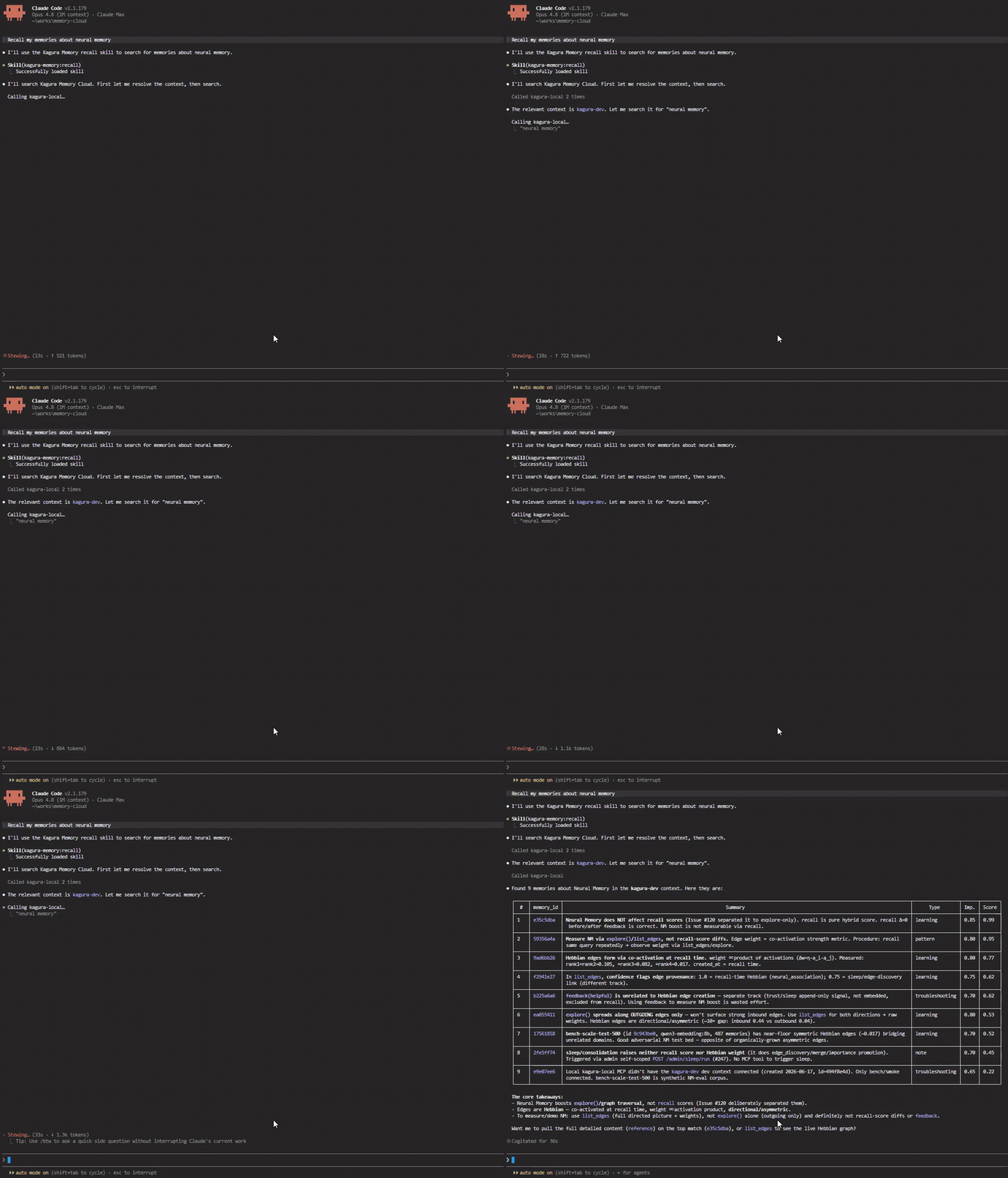
Claude Code CLI recalling memories from Kagura over MCP — ▶ watch the demo
## Why Kagura Memory Cloud?
> **Your AI forgets everything after each conversation. Kagura fixes that — and gets smarter every time you search.**
Most AI memory tools are just vector databases with a chat wrapper. Kagura is different — it implements the full **LLM Knowledge Base** pattern (Karpathy's [LLM Wiki](https://gist.github.com/karpathy/442a6bf555914893e9891c11519de94f)) at team scale:
| Approach | Storage | Compounding | Scale |
|---|---|---|---|
| Vector DB / RAG | Embedded chunks | None — retrieve-only | Any |
| Karpathy's LLM Wiki | Markdown files | LLM rewrites pages | Personal (~100 pages) |
| **Kagura Memory Cloud** | **PostgreSQL + Qdrant + Neural graph** | **Hebbian + Sleep Maintenance** | **Team / org** |
| Feature | Description |
|---------|-------------|
| **Adaptive Memory** | Every search automatically strengthens connections between related memories. The more you use it, the better `explore()` discovers hidden relationships. |
| **Hybrid Search** | Semantic (OpenAI / self-hosted) + BM25 keyword — 96% top-1 accuracy |
| **AI Reranking** | Self-hosted (Ollama/vLLM — local, free), Voyage AI, or Cohere — cross-encoder reranking for precision |
| **Neural Memory Graph** | Hebbian learning builds a knowledge graph in the background. `explore()` traverses it for serendipitous discovery. |
| **Agent Memory Substrate** | Beyond a knowledge store: delivery modes (pinned / time-triggered), a server-stamped trust boundary, an agent state lane, and a retrieval-feedback signal — the primitives an autonomous agent loop needs. |
| **Agent Control Plane (preview)** | Workspace-scoped Agent Registry, subtractive context bindings, agent-bound member keys, lifecycle kill switches, and one-call session bootstrap. Introduced in v0.49.0. |
| **63 MCP Tools** | Memory, Agent Substrate, Agent Control Plane, Neural edges, Contexts, Tags, Files (R2), Analyses (Memory Analysis), Resources, Secrets, Sleep Maintenance, Usage, API-Key Bindings |
| **Multi-Provider** | OpenAI or self-hosted (Ollama, vLLM — local, private, zero cost) for embeddings |
| **Team Ready** | Workspaces, RBAC, context isolation, shared memory |
| **Web UI** | Next.js dashboard — contexts, search settings, member management |
| **5-Minute Setup** | `./setup.sh` and you're done |
## Architecture
```
Workspace (team/org)
├── Context A ("my-project") ← like a folder
│ ├── Memory 1 ← 3-layer: summary / context / content
│ ├── Memory 2
│ └── Neural edges (Hebbian) ← automatic connections
├── Context B ("learning-notes")
│ └── ...
└── Members (Owner/Admin/Member/Viewer)
```
### LLM Knowledge Base — 5-Layer Implementation
Karpathy's [LLM Wiki pattern](https://gist.github.com/karpathy/442a6bf555914893e9891c11519de94f) describes a 5-layer "living knowledge base" — beyond traditional RAG. Kagura implements all 5 layers at team scale:
| Layer | Kagura Implementation | Difference from Karpathy's pattern |
|---|---|---|
| **Ingest** | REST `/api/v1/memory`, MCP `remember`, R2 file storage, resource tokens | + binary blobs, + multi-tenant |
| **Compile** | **MCP-as-compile-API** — chat agent compiles via structured tool calls (`remember(summary, content, type, tags)`) + Sleep Maintenance for batch consolidation | Continuous micro-compile (not batch wiki rewrite) — schema-enforced output |
| **Index** | Triple index: **BM25** (keyword) + **Qdrant** (semantic) + **Hebbian graph** (relational) — all auto-maintained | No manual `index.md` upkeep |
| **Query** | Hybrid Search + AI Reranker + `explore` graph traversal | Beyond markdown grep — supports semantic + relational queries |
| **Enhance** | **Hebbian learning** — every `recall()` strengthens edges between co-retrieved memories. Sleep Maintenance consolidates periodically. | Background graph evolution (zero LLM cost) vs LLM-driven page rewrites |
**Compounding loop**: Currently explicit (user/agent calls `remember()` after synthesizing answers). Auto-write-back of synthesized answers is intentionally opt-in to keep noise low.
### Adaptive Memory: Two Search Paths
Kagura separates **precision search** and **discovery** into two independent paths, each optimized for its purpose:
```
recall() ──→ Hybrid Search (semantic + BM25) ──→ [Reranker] ──→ Precise results
│
└──→ Hebbian Learning (background) ──→ Graph edges grow
│
explore() ──→ Graph Traversal (Neural Memory) ←─────────────────┘ Related discoveries
```
- **`recall()`** — Precision search. Hybrid (semantic 60% + BM25 40%) with optional AI reranking. Returns the most relevant memories.
- **`explore()`** — Discovery. Traverses the Neural Memory graph to find related memories that keyword search would miss.
- **Hebbian learning** — Every `recall()` silently strengthens edges between co-retrieved memories. No explicit training needed — the graph grows organically as you use the system.
This separation is intentional: mixing graph signals into recall degrades precision ([validated via benchmarks](docs/neural-memory-evaluation.md)). Instead, each path does what it's best at.
**Data isolation:** All data is filtered by `workspace_id → context_id → user_id`. Memories never leak across boundaries. Single Qdrant collection with payload filtering.
**Tech stack:** FastAPI (async) · PostgreSQL · Qdrant · Redis · Next.js 16 · OAuth2 · MCP over Streamable HTTP
**Vector backend:** Qdrant by default. A single-process self-hosted / CLI / edge deployment can instead run the embedded **LanceDB backend — "Kagura Lite" (preview)** with no separate Qdrant server (`KAGURA_VECTOR_BACKEND=lance`, `pip install '.[lite]'`). Not for multi-worker / SaaS (LanceDB is single-writer). See [Deployment → Embedded Vector Backend](docs/deployment.md#embedded-vector-backend-kagura-lite-preview).
## Quick Start
### System Requirements
| | Minimum | Recommended |
|--|---------|-------------|
| CPU | 2 cores | 4+ cores |
| RAM | 4 GB | 8+ GB |
| Disk | 10 GB free | 20+ GB free |
### Prerequisites
- Docker & Docker Compose
- Python 3.11+
- Node.js 20+
- OpenAI API key (for embeddings) — or a self-hosted inference server (e.g. Ollama) for local embeddings
- OAuth2 credentials (optional — password + MFA login available without OAuth)
### Setup
**One-line setup:**
```bash
git clone https://github.com/kagura-ai/memory-cloud.git
cd memory-cloud
./setup.sh
```
**With Claude Code:**
```bash
git clone https://github.com/kagura-ai/memory-cloud.git
cd memory-cloud
claude # then run /setup
```
**Step-by-step setup:**
```bash
# 1. Clone
git clone https://github.com/kagura-ai/memory-cloud.git
cd memory-cloud
# 2. Configure environment (generates secrets, prompts for API keys)
(cd backend && python3 -m src.cli.setup_env)
# 3. Start all services
docker compose up -d
# 4. Run migrations
(cd backend && alembic upgrade head)
# 5. Create admin account (interactive — sets password, MFA, API key, embedding provider)
(cd backend && python3 -m src.cli.create_admin)
# Backend API: http://localhost:8080
# Frontend UI: http://localhost:3000
# API docs: http://localhost:8080/redoc
```
**`.env.local` settings** (auto-configured by `setup_env`):
| Setting | Required | Description |
|---------|----------|-------------|
| `API_KEY_SECRET` | **Yes** | Secret for API key encryption (auto-generated) |
| `JWT_SECRET` | **Yes** | Secret for JWT tokens (auto-generated) |
| `OPENAI_API_KEY` | **Yes**\* | OpenAI API key for embeddings |
| `SELF_HOSTED_BASE_URL` | No | Self-hosted backend URL (default: `http://localhost:11434`) |
| `EMBEDDING_PROVIDER` | No | `openai` (default) or `self_hosted` |
| `GOOGLE_CLIENT_ID/SECRET` | No | Google OAuth2 login (optional — password login available) |
| `GITHUB_CLIENT_ID/SECRET` | No | GitHub OAuth2 login (optional) |
\* Either `OPENAI_API_KEY` or a running self-hosted inference server (e.g. Ollama) is required for memory features.
### Admin CLI
| Command | Purpose |
|---------|---------|
| `python3 -m src.cli.setup_env` | Generate secrets + configure `.env.local` (run before Docker) |
| `python3 -m src.cli.create_admin` | Create admin + workspace + API key + `.mcp.json` + embedding setup |
| `python3 -m src.cli.reset_password` | Reset password and/or MFA |
| `python3 -m src.cli.delete_admin` | Delete admin (for re-creation) |
> Run from `backend/` directory. Docker API container must be running.
Platform-specific notes
- **WSL (Windows)**: Install Docker Desktop for Windows and enable WSL integration
- **macOS**: Install Docker Desktop for Mac. `brew install python@3.11 node`
- **Linux (Ubuntu/Debian)**: `sudo apt install docker.io docker-compose-v2 python3.11 nodejs npm`
- **GCP (Production)**: Set production values in `.env.local` (`DATABASE_URL`, `QDRANT_URL`, `ENVIRONMENT=production`, `CORS_ORIGINS`)
- **Frontend env vars**: Copy `frontend/.env.example` to `frontend/.env.local` and set:
- `NEXT_PUBLIC_API_URL` — backend URL (default: `http://localhost:8080`)
- `NEXT_PUBLIC_APP_URL` — frontend URL for metadata
- `NEXT_PUBLIC_PLAN_FREE_DISPLAY_NAME` / `BASIC` / `PRO` — plan display name customization (default: S/M/L)
## Connect an MCP Client
Works with Claude Code, Claude Desktop, Claude Chat, ChatGPT, Gemini CLI, and any Streamable-HTTP MCP client.
**Claude Code (3 steps):**
1. Start services and open `http://localhost:3000/workspace/integrations/api-keys` to create an API key
2. Copy `.mcp.json.example` to `.mcp.json` and fill in your workspace ID and API key:
```bash
cp .mcp.json.example .mcp.json
# Edit .mcp.json — set workspace_id (from URL bar) and API key
```
3. Restart Claude Code and verify:
```
You: "Remember: our API uses JWT with 1h expiry and refresh token rotation"
→ AI calls remember() — stored permanently
You: "What do we know about auth?"
→ AI calls recall() — finds it instantly, even months later
```
> `.mcp.json` is in `.gitignore` — never commit it (contains API keys).
Full setup guide — every client, the memory-sync hook, the ready-to-use `.claude/` templates, the **kagura-memory** Claude Code plugin, and the WSL2 networking note: **[MCP Client Setup](docs/mcp-clients.md)**
## MCP Tools
**63 tools across 13 categories**: Memory (`remember` / `recall` / `explore` …), Agent Substrate (pinned + time-triggered delivery, state, measurements, feedback), Agent Control Plane (preview), Neural Edges, Contexts, Tags, Files (R2), Analyses (Memory Analysis), Resources, Secrets (zero-knowledge), Sleep Maintenance, Usage, and API-Key Bindings — each with per-role access control.
Tool-by-tool reference with required roles: **[MCP Tools Reference](docs/mcp-tools.md)**
## REST API
In addition to MCP tools, a full REST API is available:
- **Memory**: remember, recall, reference, forget, explore (`/api/v1/memory/*`)
- **Contexts**: CRUD, search settings (`/api/v1/contexts/*`)
- **Agents (preview)**: Registry, context bindings, and composed bootstrap (`/api/v1/agents/*`)
- **Files**: Presigned upload/download backed by R2 (`/api/v1/files/*`, up to 100 MiB); legacy `/api/v1/attachments/*` routes return `410 Gone`
- **Analyses**: Memory Analysis preview/start/read/cancel (`/api/v1/analyses/*`)
- **Resources**: External event ingestion and resource inspection (`/api/v1/resources/*`)
- **Workspaces**: Management, members, invitations (`/api/v1/workspaces/*`)
- **Admin**: Users, plan management, neural config (`/api/v1/admin/*`)
- **Secrets**: Zero-knowledge secret store — ciphertext-only, server never decrypts (`/api/v1/config/secrets/*`)
Full API documentation: `http://localhost:8080/redoc`
## Authentication
Two OAuth2 providers are supported:
- **Google OAuth2** — Optional. Set `GOOGLE_CLIENT_ID` and `GOOGLE_CLIENT_SECRET`
- **GitHub OAuth2** — Optional. Set `GITHUB_CLIENT_ID` and `GITHUB_CLIENT_SECRET`
Users with the same email address across providers share a single account. Password + MFA login is available without any OAuth provider (see [Quick Start](#quick-start)).
## Plan Tier Customization
Plans control per-workspace resource limits (contexts / memories / MCP calls per day). For self-hosted single-user setups, assign the L (Pro) plan to your workspace. Defaults, environment-variable overrides, and optional Stripe self-service billing: **[Deployment → Plan Tiers](docs/deployment.md#plan-tiers)**
## Development with Claude Code
This project is designed to be developed **with** Claude Code and Kagura Memory Cloud itself — pre-configured slash commands, safety hooks, sub-agents, and rules load automatically from `.claude/`. Setup and the full tooling reference: **[Contributing → Development with Claude Code](CONTRIBUTING.md#development-with-claude-code)**
## Documentation
**API reference** — two complementary entry points:
- **Concepts (markdown)**: [API Reference](docs/api-reference.md) — auth, base URLs, MCP endpoint, request/response examples
- **Endpoint reference (live)**: `http://localhost:8080/redoc` — auto-generated from FastAPI, always in sync with the running backend
**Concepts & guides:**
- [Core Concepts](docs/concepts.md) — Workspace, Context, Memory, Neural Memory, MCP Tools
- [MCP Client Setup](docs/mcp-clients.md) — Claude Code / Desktop / Chat, ChatGPT, Gemini CLI, plugin & templates
- [MCP Tools Reference](docs/mcp-tools.md) — All 63 tools with required roles
- [Architecture](docs/architecture.md) — System design and data flow
- [Getting Started](docs/getting-started.md) — Detailed setup guide
- [Chunking Guide](docs/chunking-guide.md) — Best practices for memory storage
- [Resource Tokens Guide](docs/resource-tokens-guide.md) — External data ingestion via resource tokens
- [Neural Memory Evaluation](docs/neural-memory-evaluation.md) — Benchmark results, architecture decisions
- [Search Quality Benchmark](docs/search-quality-benchmark.md) — Accuracy tests, reranking, best practices
- [Retrieval Feedback & Eval Gate](docs/eval/retrieval-feedback-and-eval-gate.md) — Feedback signal + the no-self-update-loop policy (Agent Memory Substrate)
- [Deployment](docs/deployment.md) — Production deployment with Caddy reverse proxy
- [Contributing](CONTRIBUTING.md) — Development setup, code style, PR workflow
- [Security](SECURITY.md) — Vulnerability reporting, security design
- [Python SDK](https://github.com/kagura-ai/kagura-memory-python-sdk) — `KaguraClient` (MCP) plus REST clients for resources, files, secrets, workspaces, and agent bootstrap, and a document `FileIngestor`
- **Project site**: [www.kagura-ai.com](https://www.kagura-ai.com) — overview, use cases, getting started paths
## Contributing
See [CONTRIBUTING.md](CONTRIBUTING.md) for development setup, code style, and PR workflow.
## License
[Apache License 2.0](LICENSE)