Install once. Let AI handle the rest.
PRD writing, milestone management, knowledge accumulation, self-learning, session retrospectives.
You just code. fireauto does everything else.
---
## What is this?
fireauto is an **AI development harness** for Claude Code.
Think of a harness like reins on a horse -- a system that **keeps AI on track**. Once installed, AI automatically:
- Manages your project end-to-end (PRD -> milestones -> tasks)
- Accumulates work history as a knowledge base
- Learns from mistakes (auto-updates rules)
- Runs session retrospectives (loud on failure, silent on success)
- Tells you "what to do today" at the start of each session
- Detects repeated patterns and auto-generates skills
Built on Andrej Karpathy's **LLM Knowledge Base** pattern and Claude Code team's **harness management principles**.
---
## How does it work?
### What happens automatically after installation
| Timing | Automatic Behavior | Mechanism |
|--------|-------------------|-----------|
| Session start | Shows project status + warnings | SessionStart Hook |
| Code edit | Auto-accumulates work history + AI summary | PostToolUse Hook + Haiku |
| Mistake made | Haiku auto-detects mistake + adds CLAUDE.md rule | PostToolUse Hook + Agent SDK |
| After code edit | Auto-lint (silent on success, loud on error) | PostToolUse Hook |
| Pattern repeats | Auto-generates skill after 3+ repetitions | PostToolUse Hook |
| CLAUDE.md bloat | Auto-moves to Wiki when exceeding 80 lines | PostToolUse Hook |
| Session end | Auto-retrospective (loud on failure, silent on success) + saves session summary | Stop Hook |
**What you need to do: Nothing.** Just code.
---
## Getting Started
### Step 1: Install fireauto
```bash
# Run inside Claude Code
/plugin marketplace add imgompanda/fireauto
/plugin install fireauto@fireauto
/reload-plugins
```
Done. **Run `/reload-plugins` to activate MCP tools and hooks.**
> If GitHub doesn't work: `git clone https://github.com/imgompanda/fireauto.git` -> `/plugin marketplace add ./fireauto` -> `/plugin install fireauto@fireauto`
### Step 2: One-click setup
```bash
/freainer
```
Run this one command and everything gets configured:
| Item | Description |
|------|-------------|
| **Context7 MCP** | AI references latest library docs in real-time |
| **Playwright MCP** | Browser automation + E2E testing |
| **Draw.io MCP** | Auto-generate architecture diagrams, flowcharts, ERDs |
| **LSP setup** | Maximize code navigation speed and accuracy |
| **Notification hooks** | macOS notifications on task completion |
| **Agent team** | Multiple AIs working simultaneously |
| **Skill auto-trigger** | Skills activate automatically based on context |
| **Memory system** | Auto-accumulates dev knowledge + AI analysis |
| **Project setup** (optional) | Auto-generates PRD, CLAUDE.md, Wiki, milestones |
All free. No API keys required.
### Step 3: Boilerplate (optional)
For new projects, we recommend **[FireShip Starter Kit](https://github.com/imgompanda/FireShipZip3)**.
```bash
/fireship-install
```
Auth, payments (Paddle/Toss), AI, email, and i18n -- all included.
[Live Demo](https://fire-ship-zip3.vercel.app) · [Boilerplate Details](https://github.com/imgompanda/FireShipZip3)
---
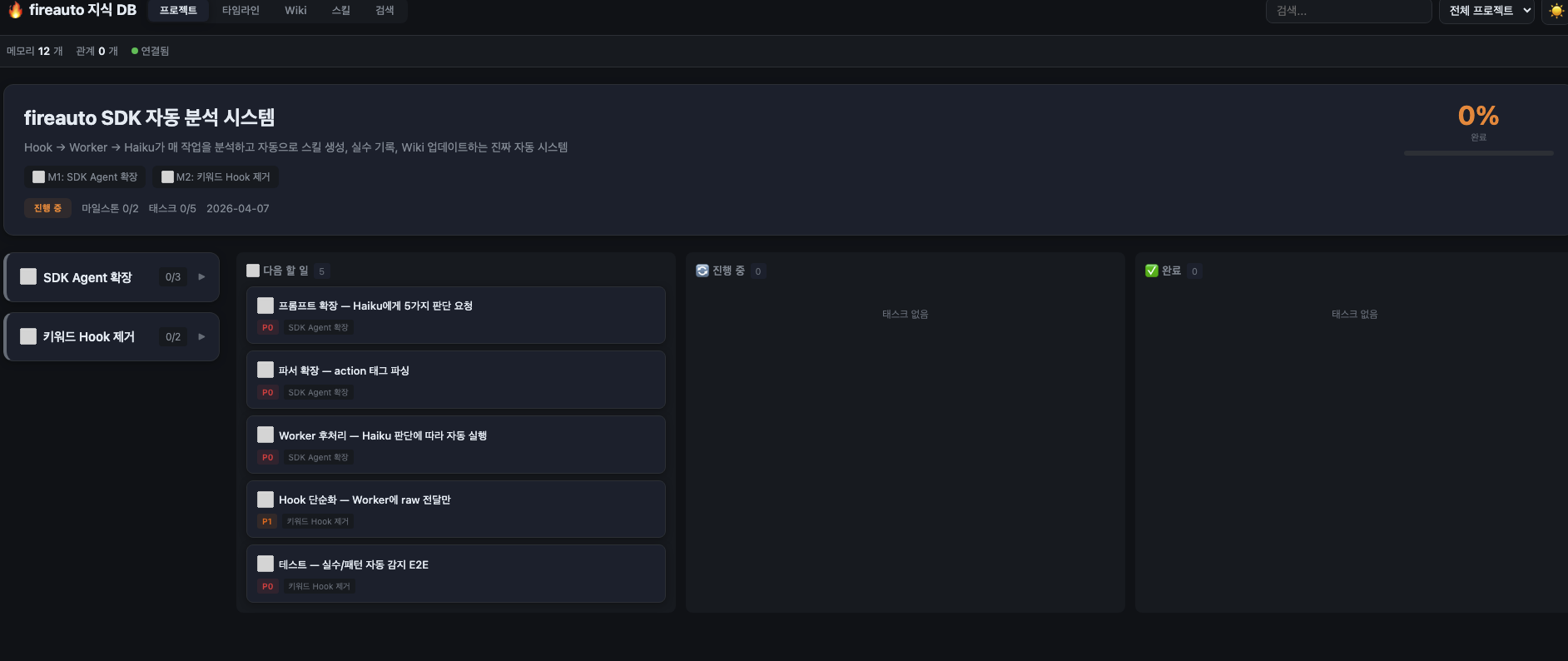
## Dashboard
See everything at `http://localhost:37888`.
The Worker server starts automatically when the memory system is installed, and the dashboard opens right away.
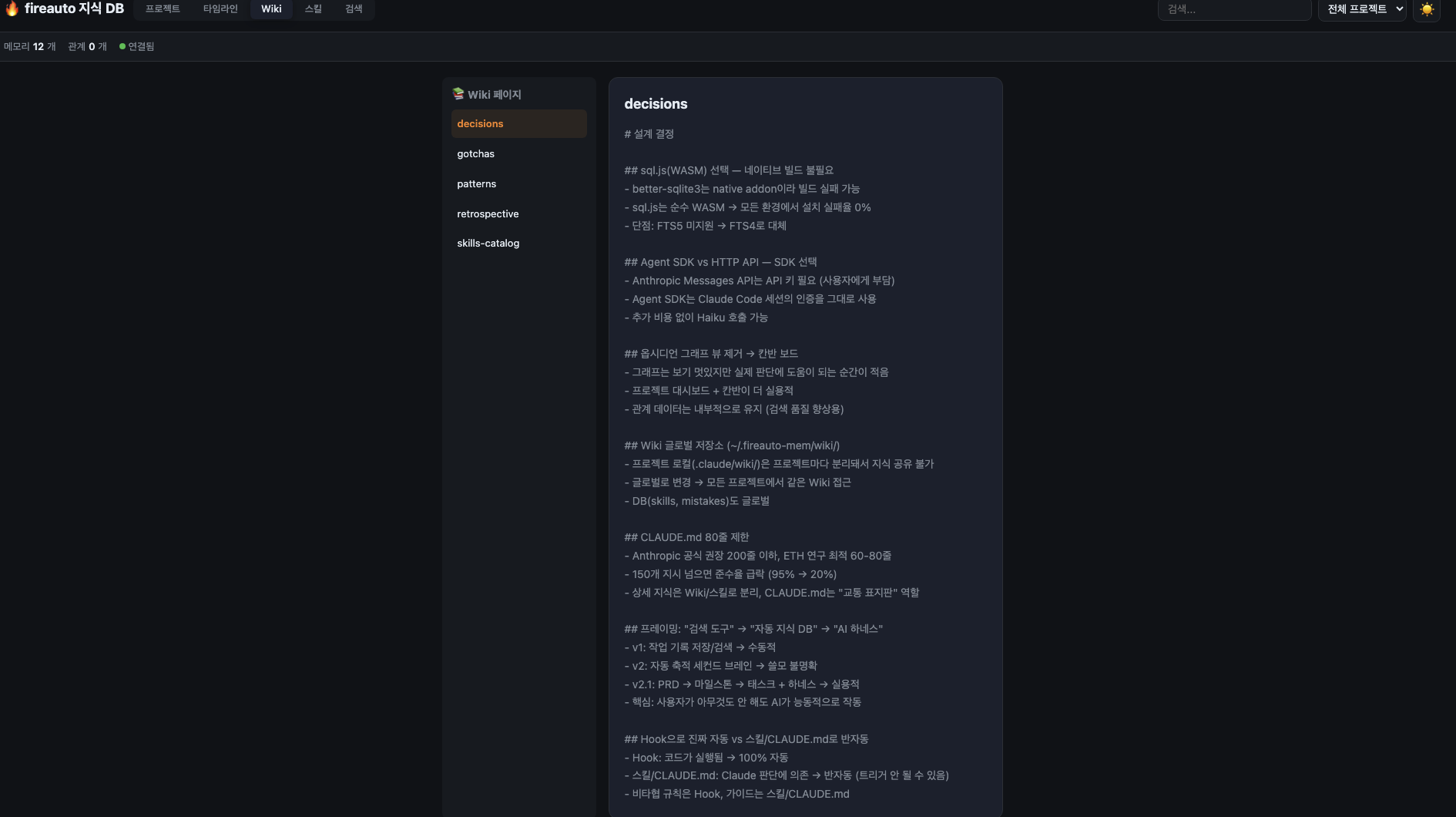
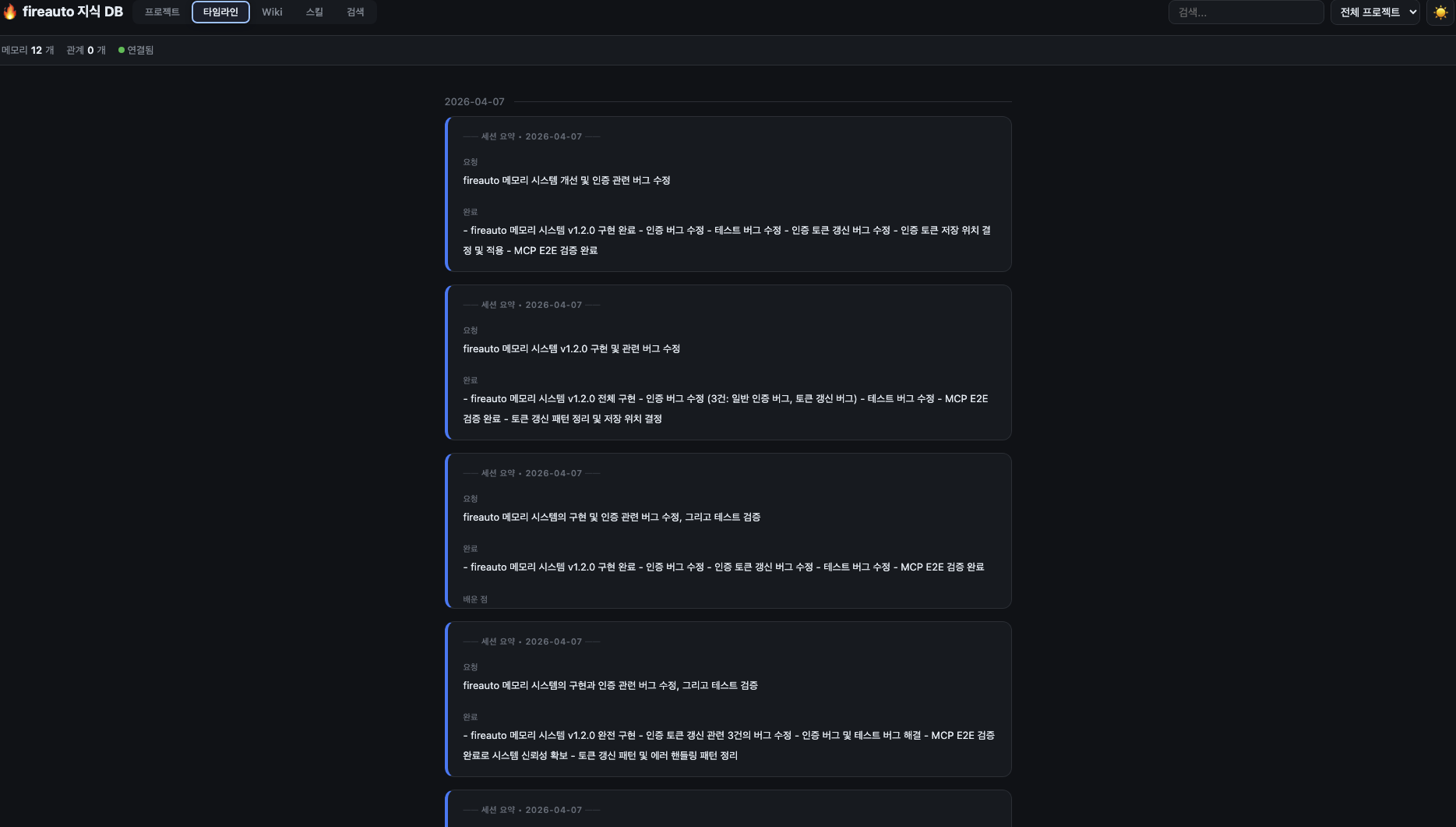
| Tab | Content |
|-----|---------|
| **Project** | Milestone progress + Kanban board (Up next / In progress / Done) |
| **Timeline** | AI-summarized knowledge cards (grouped by session) |
| **Wiki** | Patterns, gotchas, and decision records |
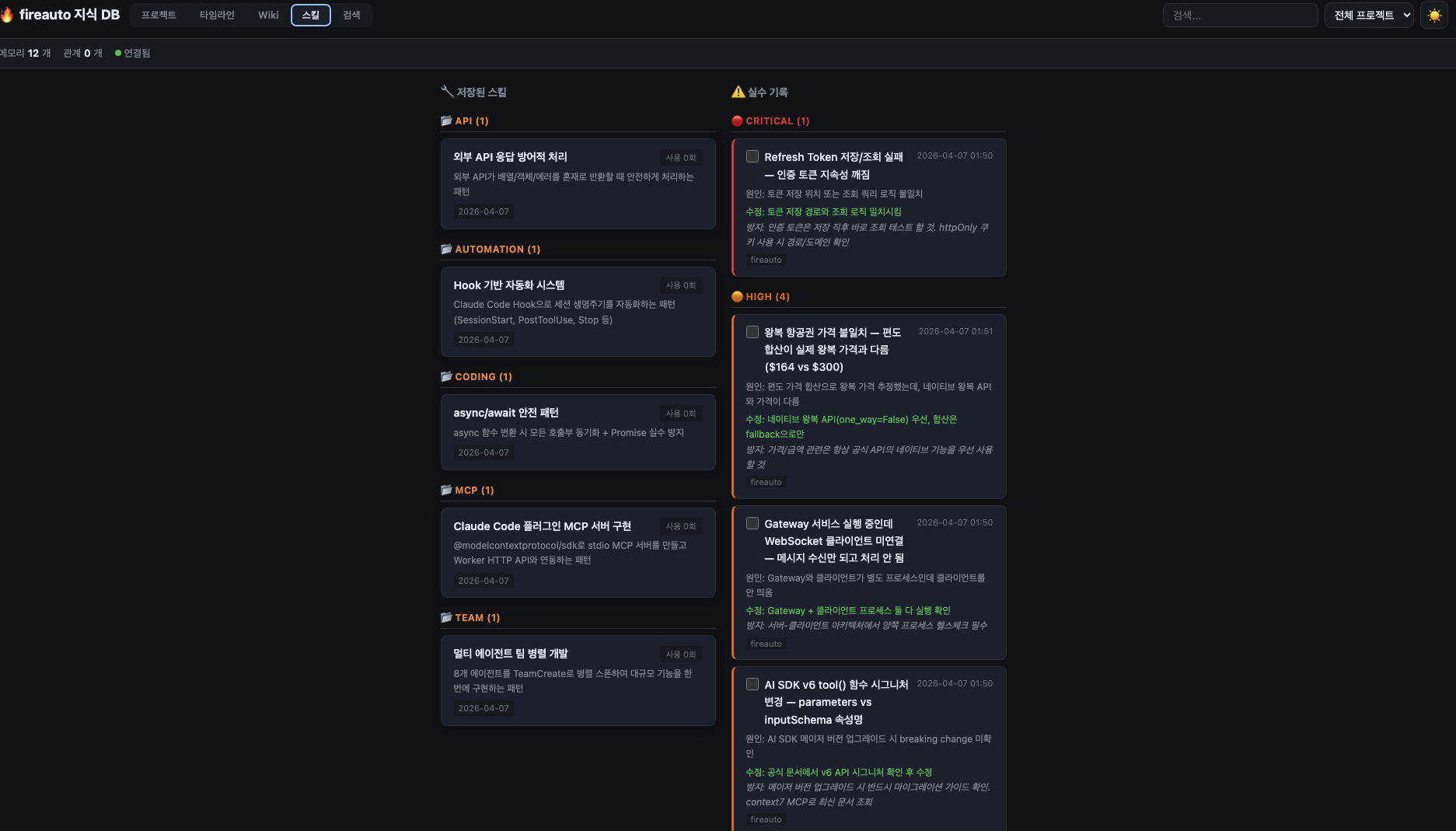
| **Skills** | Auto-generated skills + mistake log |
| **Search** | Full-text search across accumulated knowledge (FTS4) |
| **Settings** | Haiku/Sonnet/Opus model selection |
Click a milestone on the dashboard to expand its tasks.
---
## Core Features
### Project Management -- Plan before you code
```bash
/freainer # Auto-generates PRD on project start
/project # Project dashboard
/next # Start next task (AI shows related knowledge too)
```
When you write a PRD, AI automatically:
- Breaks it into milestones
- Decomposes into tasks (1-4 hour chunks)
- Arranges them on a Kanban board
Tasks flow through `pending -> in_progress -> completed`. Run `/next` and AI finds the next task, showing related knowledge alongside it. Say "let's go" and coding begins immediately.
Dashboard: `http://localhost:37888` (Project tab)
### Knowledge Accumulation -- Builds up automatically as you code
Every time you edit code, AI (Haiku) automatically:
- Analyzes: "This is a bug fix, caused by X"
- Accumulates: "This is a reusable pattern"
- Tags: "This is a gotcha"
- Auto-links related knowledge (same file, same tag, temporal proximity)
Project knowledge is auto-organized in `~/.fireauto-mem/wiki/`:
| File | Content |
|------|---------|
| `patterns.md` | Coding patterns, best practices |
| `gotchas.md` | Pitfall records, warnings |
| `decisions.md` | Design decisions + rationale |
| `skills-catalog.md` | Auto-generated skill catalog |
| `retrospective.md` | Per-session retrospectives |
| `index.md` | Auto-generated index |
**What you need to do: Nothing.** Just code and knowledge accumulates on its own.
Dashboard: `http://localhost:37888` (Timeline tab)
### Self-Learning -- AI learns from its mistakes
When AI makes a mistake:
1. Haiku auto-detects the mistake and logs it to the DB (PostToolUse Hook + Agent SDK)
2. Adds a warning to `gotchas.md`
3. Adds a prevention rule to CLAUDE.md
4. Doesn't repeat the same mistake
When the same pattern repeats 3+ times:
1. Auto-detects the repeated pattern (PostToolUse Hook checks every 3 occurrences)
2. Auto-generates a skill
3. Registers it in `skills-catalog.md`
Prompts are requests. Harness is enforcement.
CLAUDE.md is auto-managed to stay **under 80 lines**. (Anthropic recommendation: under 200 lines, optimal: 60-80 lines) Excess content is auto-moved to Wiki. "Would Claude make a mistake if this line were removed?" -- if not, delete it.
### Session Retrospective -- Auto-summarized when the session ends
When a session ends, the Stop Hook automatically runs a retrospective:
```
===============================
Session Retrospective
Mistakes (2):
1. Paddle API timeout not handled -> fixed
2. DB query parameter mismatch -> fixed
Lessons learned:
- Paddle webhooks require idempotency keys
- DB timestamps should be unified to UTC
Completed: Payment integration, webhook handling
Next: Write tests
===============================
```
Silent on success, loud on failure. Retrospective results are auto-saved to `retrospective.md`, mistakes go to `gotchas.md`, and lessons to `patterns.md`.
### Session Start -- Automatically tells you where you left off
When a session starts, the SessionStart Hook automatically:
- Shows project status and progress
- Surfaces recent mistakes/warnings
- Suggests "what to do today"
```
[fireauto] Project: SaaS Dashboard (45% complete)
[fireauto] Current milestone: Phase 2 - Payment Integration
[fireauto] Warnings:
- Set Paddle API timeout to 3 seconds
- Backup required before DB migration
```
**What you need to do: Nothing.** It's automatic when you start a session.
### Cross-Project -- Knowledge carries over from previous projects
When you start a new project, AI:
- Searches and recommends skills from previous projects (`skill-search`)
- Automatically surfaces past mistakes/warnings (`mistake-search`)
- Asks "You had these skills/warnings from a previous project. Apply them?"
---
## When should I use what?
### New to Claude Code? (Start here)
```
/freainer # One-click install: MCP + LSP + notifications + memory + skill auto-trigger
```
### Want structured project management?
```
/project new # Auto-decomposes PRD into milestones and tasks
/next # AI suggests next task + shows related knowledge
/project # Check project dashboard
```
AI tells you "here's where you left off, here's what to do next" at every session start.
Dashboard: `http://localhost:37888`
### Building a service?
```
/planner # Turn an idea into a full PRD
/researcher # Validate real demand on Reddit
/designer # Build UI with DaisyUI
/uiux-upgrade # Auto-audit and fix your UI/UX
```
### Service almost done?
```
/seo-manager # Run a full SEO audit
/security-guard # Check for security vulnerabilities
```
### Large-scale work?
```
/team # Multiple AIs work simultaneously and communicate with each other
```
### Need video content?
```
/video-maker # Create videos with React code
```
### Struggling with prompts?
```
/loop # Drop one prompt and AI iterates until it's done
```
---
## All Commands
| Command | Description |
|---------|-------------|
| `/freainer` | One-click setup (MCP + LSP + memory + skill trigger + project) |
| `/project` | Project dashboard / PRD -> milestones -> tasks auto-decomposition |
| `/next` | Start next task + related knowledge |
| `/planner` | One-line idea -> detailed PRD document |
| `/researcher` | Reddit demand research + lead scoring |
| `/team` | AI team parallel work + inter-agent communication |
| `/team-status` | Check team progress |
| `/seo-manager` | 7-area SEO audit |
| `/security-guard` | 8-category security audit |
| `/designer` | DaisyUI UI builder / migration / theming |
| `/uiux-upgrade` | UI/UX audit + auto-fix |
| `/video-maker` | Video production with React (Remotion) |
| `/lsp-install` | LSP setup (included in /freainer) |
| `/memory-install` | Memory system install (included in /freainer) |
| `/loop` | AI loop execution |
| `/cancel-loop` | Stop the loop |
| `/fireship-install` | FireShip boilerplate |
---
## MCP Tools (AI uses these automatically)
After installation, AI uses these as needed. You don't have to call them directly.
### Memory
| Tool | Description |
|------|-------------|
| `memory-search` | Search accumulated knowledge for relevant entries |
| `memory-save` | Proactively save valuable knowledge |
| `memory-timeline` | Chronological knowledge accumulation history |
| `memory-detail` | View knowledge entry details |
| `memory-related` | Explore related knowledge graph |
| `memory-compile` | Compile project knowledge into structured documents |
### Project
| Tool | Description |
|------|-------------|
| `project-status` | Check project progress |
| `project-task-update` | Update task status |
| `project-next` | Suggest next task |
### Wiki
| Tool | Description |
|------|-------------|
| `wiki-read` | Read Wiki page |
| `wiki-write` | Write/update Wiki page |
| `wiki-search` | Search Wiki |
| `wiki-index` | List Wiki pages |
### Self-Learning
| Tool | Description |
|------|-------------|
| `skill-save` | Save a skill |
| `skill-search` | Search skills |
| `mistake-log` | Log a mistake |
| `mistake-search` | Search mistakes |
| `retrospect` | Run session retrospective |
---
## Commands vs Skills (Guides)
fireauto has two types of components: **commands** and **skills (guides)**.
- **Commands** = you tell AI what to do (`/seo-manager` -> run an SEO audit!)
- **Skills (guides)** = AI references these automatically (here's how to do SEO well)
| | Commands | Skills (Guides) |
|------|----------|-----------------|
| **Example names** | `/team`, `/seo-manager` | `fireauto-team-guide`, `fireauto-seo-guide` |
| **How to run** | Type `/` and execute directly | AI **auto-triggers** based on context |
| **Role** | Perform a specific task | Provide background knowledge so AI works better |
> Skills have `-guide` in the name. They appear in the `/` menu but you don't need to run them manually.
### Auto-trigger skills added in v2.1
| Skill | Auto-trigger condition |
|-------|----------------------|
| `fireauto-harness-guide` | Auto-checks project status at session start |
| `fireauto-init-guide` | Auto-generates PRD/Wiki/milestones for new projects |
| `fireauto-project-guide` | Milestone/task management |
| `fireauto-wiki-guide` | Auto-records patterns, gotchas, decisions to Wiki |
| `fireauto-retro-guide` | Auto-retrospective at session end |
| `fireauto-self-learn-guide` | Mistake detection + auto-skill generation |
| `fireauto-mem-search-guide` | Auto-searches past knowledge |
| `fireauto-mem-save-guide` | Auto-saves valuable knowledge |
| `fireauto-mem-compile-guide` | Compiles project knowledge |
| `fireauto-self-heal-guide` | Auto-retries up to 3 times on error |
| `fireauto-knowledge-hierarchy-guide` | CLAUDE.md -> Wiki -> Skills lookup order |
---
## Feature Details
### `/freainer` -- One-click setup
Even first-time Claude Code users can get a pro-level environment with a single command.
```
/freainer
```
Runs through 8 steps automatically:
| Step | Description |
|------|-------------|
| Step 1 | Auto-installs 3 recommended MCPs (Context7, Playwright, Draw.io) |
| Step 2 | Installs LSP (choose category: web/backend/iOS/Android/systems/game) |
| Step 3 | Sets up notification hooks (macOS notifications on task completion) |
| Step 4 | Enables agent team |
| Step 5 | Configures skill auto-triggers (adds rules to CLAUDE.md) |
| Step 6 | Installs memory system (dev knowledge DB) |
| Step 7 | Project setup (optional -- auto-generates PRD, CLAUDE.md, Wiki, milestones) |
| Step 8 | Final confirmation + restart instructions |
All free. No API keys required.
### `/project` -- Project dashboard
Shows your project's full status at a glance and makes it easy to create new projects.
```
/project # Show dashboard
/project new # Create new project
```
When you create a new project, AI analyzes the PRD to:
- Convert "Implementation Roadmap" or "Phase" sections into milestones
- Break each milestone's work items into 1-4 hour tasks
- Auto-assign ordering based on dependencies
No PRD yet? Create one first with `/planner`.
Dashboard: `http://localhost:37888` (Project tab)
### `/next` -- Start next task
Automatically finds the next task and shows it with related knowledge.
```
/next
```
How it works:
1. Queries next task via `project-next` MCP tool
2. Auto-searches related knowledge via `memory-search` MCP tool
3. Shows task + related knowledge together
4. Say "let's go" and the task status changes to `in_progress`, coding starts immediately
5. On completion, status changes to `completed` + discovered knowledge auto-saved
### `/planner` -- Product planner
Just write "I want to build something like..." and get a detailed PRD.
```
/planner
```
Auto-generates 9 sections:
Project overview, core features (P0/P1/P2), feasibility study, external API pricing comparison, competitor analysis, tech stack recommendation, revenue model, implementation roadmap, success metrics
Saved as markdown in `docs/prd/`.
### `/researcher` -- Market researcher
Finds related Reddit posts and scores each user as a potential customer from 1 to 10.
```
/researcher
```
Deliverables:
- **Lead scorecard** (CSV) -- hot/warm/cold/not_a_lead classification
- **Pain point taxonomy** -- categorized by cost, time, complexity, regulation, scale
- **Summary report** -- markdown document
### `/team` -- Team leader (Company model)
Multiple AIs work simultaneously and communicate with each other.
```
/team
```
- AIs discuss in real-time via SendMessage
- Each works in an isolated space (git worktree) -> no code conflicts
- After completion, manual sequential merge (not auto-merge -- to prevent conflicts)
Check team status: `/team-status`
### `/seo-manager` -- SEO manager
Code-based SEO audit across 7 areas. No build required.
```
/seo-manager
```
Checks: robots.txt, sitemap, JSON-LD structured data, meta tags, pSEO routes, redirect chains, performance SEO
Results are prioritized P0 (critical) through P3 (nice-to-have).
### `/security-guard` -- Security auditor
Checks your code for security vulnerabilities across 8 categories.
```
/security-guard
```
Checks: Secret exposure, auth/authorization gaps, rate limiting, file uploads, storage security, prompt injection, information disclosure, dependency vulnerabilities
Ordered CRITICAL -> HIGH -> MEDIUM -> LOW, with fix instructions included.
### `/designer` -- UI designer
Builds or transforms UI using DaisyUI v5.
```
/designer
```
3 modes:
- **build** -- Create UI from scratch with DaisyUI
- **migrate** -- Auto-convert shadcn/ui -> DaisyUI
- **theme** -- Configure themes with oklch() colors
### `/uiux-upgrade` -- UX improver
Audits your project's UI/UX across 8 categories and fixes issues directly in code.
```
/uiux-upgrade
```
Audit areas: Dark/light mode compatibility, responsive design, accessibility, loading states, form UX, navigation consistency, typography, animations
Classified P0 (critical) through P3 (nice-to-have). Select a scope and it auto-fixes.
### `/video-maker` -- Video producer
Create videos with code using React-based Remotion. AI writes the video code directly.
```
/video-maker
```
4 modes: init (project setup) / create (produce video) / edit (modify) / render (export)
Intros, text animations, charts, subtitles, 3D, scene transitions -- all supported.
### LSP (Enhanced code navigation)
> Auto-installed when you run `/freainer`.
With LSP enabled, AI understands your code structure. It finds function definitions, references, and call hierarchies in one shot -- saving tokens and improving accuracy.
### `/loop` -- Loop runner
Drop one prompt and AI iterates until the work is done.
```
/loop TODO API 만들어줘 --completion-promise 'all tests pass' --max-iterations 20
```
How it works:
1. AI works -> 2. When it tries to stop, Stop Hook re-injects the same prompt -> 3. AI reviews previous results and improves -> 4. Exits when completion condition is met
Especially useful for beginners. Even if your prompts aren't great, AI refines through iteration.
Cancel: `/cancel-loop`
---
## Design Principles
### Karpathy LLM Knowledge Base Pattern
Follows the LLM knowledge base architecture proposed by Andrej Karpathy:
- **Raw data -> AI compilation -> structured Wiki**: Haiku analyzes code change observations and classifies them into patterns/gotchas/decisions for the Wiki
- **Index-based navigation**: Full-text search (FTS4) + file-based indexing instead of embedding vector DBs
- **Knowledge compounds over time**: As sessions accumulate, the relationship graph grows richer and cross-project learning becomes possible
### Claude Code Harness Management Principles
Follows Anthropic's official harness management recommendations:
- **CLAUDE.md stays under 80 lines** (Anthropic official recommendation: 200 lines, optimal: 60-80 lines)
- **"Would Claude make a mistake if this line were removed?"** -- if not, delete it
- **Detailed knowledge goes to `~/.fireauto-mem/wiki/` + `.claude/rules/`**
- **Non-negotiable rules are enforced via Hooks** (CLAUDE.md is advice; Hooks are enforcement)
### Hook Architecture
| Hook | File | Role |
|------|------|------|
| SessionStart | `session-start.sh` | Start Worker server + session initialization |
| SessionStart | `inject-context.sh` | Auto-display project status + warnings |
| PostToolUse | `auto-lint.sh` | Auto-lint after file edits (silent on success, loud on error) |
| PostToolUse | `save-observation.sh` | Record meaningful tool usage (Edit/Write/Bash) observations |
| PostToolUse | `post-tool-check.sh` | CLAUDE.md 80-line trimming + repeated pattern detection |
| Stop | `stop-hook.sh` | Loop iteration handling |
| Stop | `save-summary.sh` | Save session summary + auto-retrospective |
---
## Plugin Management
```bash
/plugin update fireauto # Update
/plugin disable fireauto # Temporarily disable
/plugin enable fireauto # Re-enable
/plugin uninstall fireauto # Remove
```
For team-wide usage:
```bash
/plugin install fireauto@fireauto --scope project
```
---
## FAQ
### Does it cost money?
fireauto itself is **free**. MIT licensed -- use it however you want.
However, you need one of the following to use Claude Code:
- **Claude Max subscription** ($100/mo or $200/mo) -- most recommended
- **Claude Pro subscription** ($20/mo) -- usage limits apply
- **Anthropic API credits** -- pay as you go
The memory system's AI summaries use Haiku by default. You can switch to Sonnet/Opus in the dashboard settings tab.
### localhost:37888 won't open
The Worker server requires the memory system to be installed. Run `/memory-install` or `/freainer` first. The SessionStart Hook auto-starts the Worker when you begin a session.
### What if I get an error?
1. Check Claude Code is up to date: `npm update -g @anthropic-ai/claude-code`
2. Reinstall the plugin: `/plugin uninstall fireauto` -> `/plugin install fireauto@fireauto`
3. Still broken? [Open an issue](https://github.com/imgompanda/fireauto/issues)
### Where is data stored?
- Memory DB: `~/.fireauto-mem/fireauto-mem.db` (SQLite)
- Wiki: `~/.fireauto-mem/wiki/` (global, shared across all projects)
- Skills: `~/.claude/skills/` (global) + DB
- Projects/tasks: Stored in DB (viewable on dashboard)
- All data stays local. Nothing is sent to external servers.
---
## Star History
## About
Made by [FreAiner](https://fireship.me?utm_source=github&utm_medium=readme&utm_campaign=fireauto)
Solo developer who built 40 AI services with Claude Code over the past year and monetized 3 of them. Delivered 15+ corporate AI training sessions (including Samsung Electronics). This open-source toolkit is a collection of the automation tools I built from daily repetitive workflows.
- Web: [fireship.me](https://fireship.me?utm_source=github&utm_medium=readme&utm_campaign=fireauto)
- Threads: [@freainer](https://www.threads.net/@freainer)
## License
MIT