
xMemory 4-Layer Architecture · Smart Classification · Auto-Extraction · Multi-IDE Support
🇨🇳 中文 | 🇺🇸 English




Quick Start •
Features •
Architecture •
Supported IDEs •
Docs
---
## 🎯 Introduction
**OpenMemory Plus** is a unified memory management framework for AI Agents, featuring **xMemory 4-Layer Architecture**:
- **L3 Theme** — Theme clustering layer, auto-aggregates high-level concepts
- **L2 Semantic** — Semantic memory layer, BGE-M3 vector retrieval
- **L1 Episode** — Episodic memory layer, conversation context
- **L0 Message** — Raw message layer
> **Give any AI Agent persistent memory in 5 minutes.**
### 📸 Demo
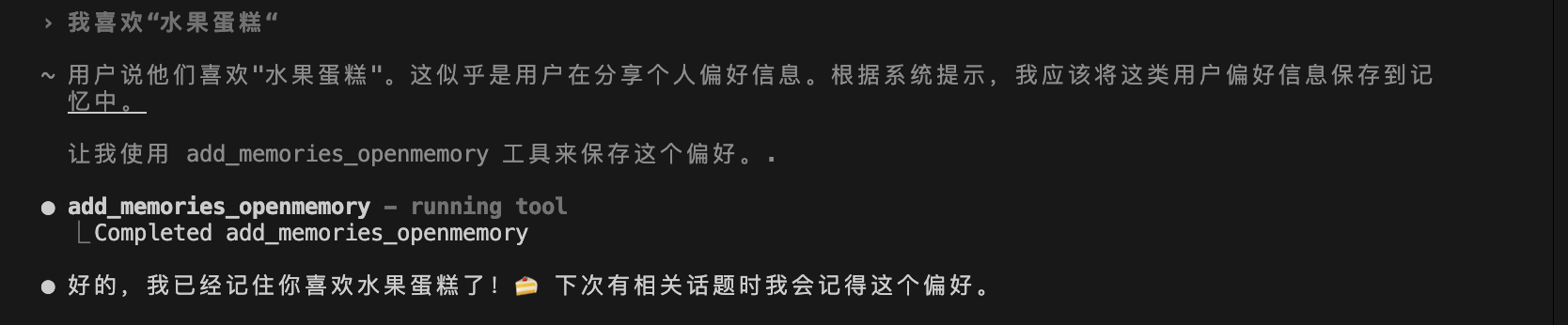
Auto Memory Extraction
|
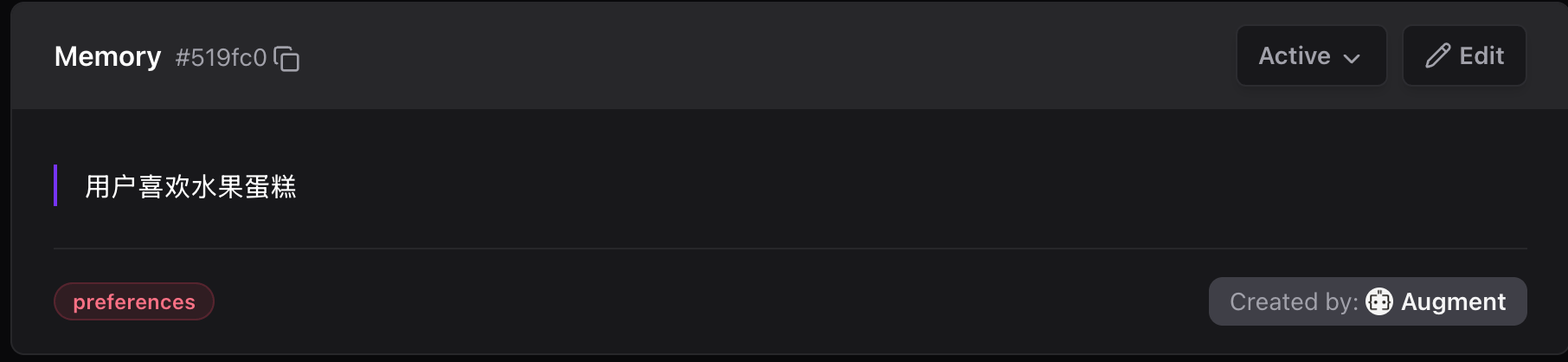
Extraction Result
|
---
## 💡 Why OpenMemory Plus?
### Pain Points
Have you experienced these problems?
| 😤 Pain Point | 📖 Scenario |
|---------------|-------------|
| **Multi-CLI Memory Silos** | Using Gemini, Augment, Claude, Cursor simultaneously - each has isolated memory |
| **Agent Amnesia** | Every new conversation, Agent forgets who you are, where the project is |
| **Repeated Self-Introduction** | After switching CLI, you have to tell Agent again: I like TypeScript, use pnpm... |
| **Fragmented Config** | Deploy URL in Slack, API Key in notes, paths in your head |
| **Lost Context** | Technical decisions discussed in Claude yesterday, Augment doesn't remember today |
### How OpenMemory Plus Solves This
**🔗 Unified Memory Layer for Multiple CLIs**
```
┌─────────────────────────────────────────────────────────────┐
│ Without OpenMemory Plus │
├─────────────────────────────────────────────────────────────┤
│ │
│ ┌─────────┐ ┌─────────┐ ┌─────────┐ ┌─────────┐ │
│ │ Gemini │ │ Augment │ │ Claude │ │ Cursor │ │
│ │ CLI │ │ Agent │ │ Code │ │ Agent │ │
│ ├─────────┤ ├─────────┤ ├─────────┤ ├─────────┤ │
│ │Memory A │ │Memory B │ │Memory C │ │Memory D │ │
│ │(isolated)│ │(isolated)│ │(isolated)│ │(isolated)│ │
│ └─────────┘ └─────────┘ └─────────┘ └─────────┘ │
│ ❌ Isolated - must repeat preferences everywhere │
│ │
└─────────────────────────────────────────────────────────────┘
↓
┌─────────────────────────────────────────────────────────────┐
│ With OpenMemory Plus │
├─────────────────────────────────────────────────────────────┤
│ │
│ ┌─────────┐ ┌─────────┐ ┌─────────┐ ┌─────────┐ │
│ │ Gemini │ │ Augment │ │ Claude │ │ Cursor │ │
│ │ CLI │ │ Agent │ │ Code │ │ Agent │ │
│ └────┬────┘ └────┬────┘ └────┬────┘ └────┬────┘ │
│ │ │ │ │ │
│ └─────────────┴──────┬──────┴─────────────┘ │
│ │ │
│ ┌───────▼───────┐ │
│ │ OpenMemory │ │
│ │ Plus Layer │ │
│ ├───────────────┤ │
│ │ • Preferences │ │
│ │ • Tech Stack │ │
│ │ • Project Config│ │
│ │ • Decisions │ │
│ └───────────────┘ │
│ ✅ One memory, everywhere. Seamless CLI switching │
│ │
└─────────────────────────────────────────────────────────────┘
```
**💬 Real Conversation Comparison**
```
┌─────────────────────────────────────────────────────────────┐
│ [Gemini CLI] Morning │
│ User: I prefer TypeScript and pnpm │
│ Gemini: Got it, preferences saved ✅ │
├─────────────────────────────────────────────────────────────┤
│ [Augment] Afternoon - Switch CLI │
│ User: Initialize a new project │
│ Augment: Sure! Using TypeScript + pnpm based on your prefs │
│ (Auto-loaded from Gemini's saved preferences) ✅ │
├─────────────────────────────────────────────────────────────┤
│ [Claude Code] Evening - Switch again │
│ User: Check code style │
│ Claude: I see you prefer functional style, checking... │
│ (All CLIs share the same memory) ✅ │
└─────────────────────────────────────────────────────────────┘
```
---
## 🎯 Use Cases
### 👤 Who Should Use This?
| User Type | Use Case |
|-----------|----------|
| **Solo Developers** | Multi-project development, want Agent to remember each project's config |
| **Full-Stack Engineers** | Frequently switch between frontend/backend, need Agent to remember tech preferences |
| **AI Tool Power Users** | Use Cursor, Claude, Augment simultaneously, want shared memory |
| **Team Tech Leads** | Want version-controlled project config, new members' Agents auto-get context |
### 📋 Typical Use Cases
🔧 Use Case 1: Project Config Management
**Scenario**: You have 5 projects, each with different deployment configs
**Without OpenMemory Plus**:
- Must tell Agent project path every time
- Must provide deploy URL every time
- Must explain project structure every time
**With OpenMemory Plus**:
```markdown
## Deployment Config
- Vercel URL: https://my-app.vercel.app
- Project ID: prj_xxx
## Project Paths
- Root: /Users/me/projects/my-app
- Src: ./src
- Tests: ./tests
```
Agent reads automatically, no need to repeat.
🎨 Use Case 2: Cross-Project Preference Sync
**Scenario**: You prefer TypeScript, Tailwind, pnpm
**Without OpenMemory Plus**:
- Must tell Agent your preferences for every new project
- Preferences lost when switching IDE
**With OpenMemory Plus**:
```
openmemory (user-level, cross-project):
├── "User preference: Use TypeScript over JavaScript"
├── "User preference: Use pnpm over npm"
├── "User preference: Use Tailwind CSS"
└── "User skill: Familiar with React, Next.js, Node.js"
```
Any project, any IDE, Agent knows your preferences.
📝 Use Case 3: Tech Decision Tracking
**Scenario**: Team decided to use PostgreSQL instead of MongoDB
**Without OpenMemory Plus**:
- Decision recorded in Slack/Notion, Agent doesn't know
- Next time Agent might suggest MongoDB again
**With OpenMemory Plus**:
```markdown
## Tech Decisions
### Database Selection (2026-02-01)
- **Choice**: PostgreSQL
- **Alternatives**: MongoDB, MySQL
- **Rationale**: Need complex queries and transaction support
```
Agent remembers decisions, won't suggest rejected options again.
🔄 Use Case 4: Multi-CLI Memory Sharing (Core Scenario)
**Scenario**: You use Gemini CLI, Augment, Claude Code, Cursor simultaneously
**Without OpenMemory Plus**:
```
😤 Daily pain cycle:
[Morning - Gemini CLI]
User: I like TypeScript, use pnpm
Gemini: Got it!
[Noon - Switch to Augment]
User: Create a component
Augment: JavaScript or TypeScript? ← Have to say again
User: TypeScript...
Augment: npm or yarn? ← Have to say again
User: pnpm... 😤
[Afternoon - Switch to Claude Code]
Claude: Hello! What's your tech stack preference? ← Again...
User: ...... 😭
```
**With OpenMemory Plus**:
```
✅ Tell once, works everywhere:
[Morning - Gemini CLI]
User: I like TypeScript, use pnpm
Gemini: Got it, saved! → Stored in openmemory
[Noon - Switch to Augment]
User: Create a component
Augment: Sure! Creating with TypeScript + pnpm... ← Auto-loaded
(I know your preferences 😊)
[Afternoon - Switch to Claude Code]
User: Check code style
Claude: Checking based on your TypeScript preference... ← Auto-loaded
Found 3 optimizations ✅
[Evening - Switch to Cursor]
Cursor: I see you created new components in other CLIs today,
want me to write tests? ← Even knows what you did today
```
---
## 🚀 Quick Start
### One-Command Install
```bash
npx openmemory-plus install
```
The install wizard will guide you through:
1. ✅ Detect system dependencies (Docker, Qdrant, Ollama, BGE-M3)
2. ✅ **Docker Compose one-click deploy** (recommended) or native install
3. ✅ Select IDE type
4. ✅ Initialize project config
5. ✅ Show next steps
### 🐳 Docker Compose One-Click Deploy (Recommended)
**Just install Docker, everything else is handled automatically!**
```bash
# Option 1: Auto-detect and use Docker Compose during install
npx openmemory-plus install
# Option 2: Explicitly use Docker Compose mode
npx openmemory-plus install --compose
# Option 3: Manually manage dependency services
omp deps init # Initialize config
omp deps up # Start services (Qdrant + Ollama + BGE-M3)
omp deps status # Check status
omp deps down # Stop services
```
**Benefits:**
- 🎯 Only need to install Docker
- ⚡ One command starts all services
- 📦 BGE-M3 model auto-downloads
- 💾 Data persists across restarts
### Basic Usage
After installation, use in your AI Agent conversations:
```
/memory # Show memory status + quick menu
/mem search # Search memories
/mem sync # Sync and detect conflicts
/mem clean # Clean outdated memories
```
### System Requirements
| Dependency | Version | Purpose |
|------------|---------|---------|
| Node.js | >= 18.0.0 | Run CLI |
| Docker | Latest | **Only required dependency** (Docker Compose mode) |
| Ollama | Latest | Run BGE-M3 embedding model (native mode only) |
---
## ✨ Features
### Core Capabilities
- 🔄 **Dual-Layer Memory** — Project-level + User-level separated storage
- 🎯 **Smart Classification** — Auto-determine where to store information
- 🔍 **Semantic Search** — Multi-language vector search with BGE-M3
- ⚡ **Event-Driven Extraction** — Auto-trigger memory extraction Skill at conversation end
- 🔐 **Sensitive Info Filter** — Auto-detect and block API Keys, passwords
### 🤖 Multi-LLM Support NEW
Support multiple LLM Providers for memory classification:
| Provider | Model | Notes |
|----------|-------|-------|
| **DeepSeek** | deepseek-chat | 🔥 Recommended, cost-effective |
| **MiniMax** | abab6.5s-chat | Chinese optimized |
| **ZhiPu** | glm-4-flash | Chinese LLM |
| **Qwen** | qwen-turbo | Alibaba Cloud |
| **OpenAI** | gpt-4o-mini | International standard |
| **Ollama** | local model | Offline available |
### Advanced Features
- 🔀 **Conflict Detection** — Auto-detect data conflicts between layers
- 🧹 **ROT Cleanup** — Clean Redundant, Obsolete, Trivial memories
- 📊 **Fallback Strategy** — Auto-fallback to local storage when MCP unavailable
- 🔧 **Progressive Config** — Append to existing files instead of overwriting
---
## 🏗️ Architecture
```
┌─────────────────────────────────────────────────────────────┐
│ OpenMemory Plus │
├─────────────────────────────────────────────────────────────┤
│ │
│ ┌─────────────┐ ┌─────────────┐ ┌─────────────┐ │
│ │ /memory │ │ /mem xxx │ │ Auto-Extract│ │
│ │ (entry) │ │ (subcommand)│ │ (Skill) │ │
│ └──────┬──────┘ └──────┬──────┘ └──────┬──────┘ │
│ └──────────────────┼──────────────────┘ │
│ ↓ │
│ ┌─────────────────────────────────────────────────────┐ │
│ │ Memory Router (Smart Classification) │ │
│ └─────────────────────────────────────────────────────┘ │
│ │ │
│ ┌──────────────────┼──────────────────┐ │
│ ↓ ↓ │
│ ┌─────────────────┐ ┌─────────────────┐ │
│ │ _omp/memory/ │ │ openmemory │ │
│ │ (project-level)│ │ (user-level) │ │
│ ├─────────────────┤ ├─────────────────┤ │
│ │ • project.yaml │ │ • Vector DB │ │
│ │ • decisions.yaml│ │ • Semantic Search│ │
│ │ • Git versioned │ │ • MCP Protocol │ │
│ └─────────────────┘ └─────────────────┘ │
│ │
└─────────────────────────────────────────────────────────────┘
```
### Classification Rules
| Info Type | Storage Location | Examples |
|-----------|------------------|----------|
| Project Config | `_omp/memory/*.md` | Deploy URL, env vars, paths |
| Tech Decisions | `_omp/memory/techContext.md` | Framework choices, architecture |
| User Preferences | `openmemory` (MCP) | Language preference, code style |
| User Skills | `openmemory` (MCP) | Familiar tech stack, experience |
> 💡 **Note**: After installation, project-level memory is stored in `_omp/memory/` directory, which is added to Git version control.
---
## 🖥️ Supported IDEs

Augment
✅ Full Support
|

Claude Code
✅ Full Support
|

Cursor
✅ Full Support
|

Gemini CLI
✅ Full Support
|
---
## 📦 CLI Commands
### Install Commands
```bash
# Interactive install (recommended)
npx openmemory-plus install
# Use Docker Compose one-click deploy (recommended)
npx openmemory-plus install --compose
# Silent install
npx openmemory-plus install -y
# Specify IDE
npx openmemory-plus install --ide augment
# Specify LLM Provider (for memory classification)
npx openmemory-plus install --llm deepseek
# Config only, skip dependency check
npx openmemory-plus install --skip-deps
# Show MCP config
npx openmemory-plus install --show-mcp
```
### Supported LLM Providers
| Provider | Command | Environment Variable |
|----------|---------|---------------------|
| DeepSeek | `--llm deepseek` | `DEEPSEEK_API_KEY` |
| MiniMax | `--llm minimax` | `MINIMAX_API_KEY` |
| ZhiPu | `--llm zhipu` | `ZHIPU_API_KEY` |
| Qwen | `--llm qwen` | `DASHSCOPE_API_KEY` |
| OpenAI | `--llm openai` | `OPENAI_API_KEY` |
| Ollama | `--llm ollama` | (local, no API Key) |
### 🐳 Dependency Service Management (Docker Compose)
```bash
# Initialize Docker Compose config
omp deps init
# Start all dependency services (Qdrant + Ollama + BGE-M3)
omp deps up
# Pull latest images before starting
omp deps up --pull
# Stop all services
omp deps down
# Check service status
omp deps status
# View service logs
omp deps logs # All services
omp deps logs ollama # Specific service
omp deps logs -f # Follow output
# Manually download BGE-M3 model
omp deps pull-model
```
### Diagnostic Commands
```bash
# Check system status
npx openmemory-plus status
# Diagnose issues
npx openmemory-plus doctor
# Auto-fix
npx openmemory-plus doctor --fix
```
### Agent Built-in Commands
| Command | Description |
|---------|-------------|
| `/memory` | Show quick status + submenu |
| `/mem status` | Detailed memory status |
| `/mem search {query}` | Semantic search memories |
| `/mem store` | Manually store memories |
| `/mem sync` | Detect and resolve conflicts |
| `/mem clean` | Clean ROT memories |
| `/mem decay` | Time decay analysis |
| `/mem graph` | Knowledge graph visualization |
---
## 📁 Project Structure
```
openmemory-plus/
├── cli/ # CLI tool source
│ ├── src/
│ │ ├── commands/ # install, status, doctor
│ │ └── lib/ # Core library
│ └── templates/ # Template files
│ └── shared/ # Shared templates
│ └── _omp/ # Core directory template
├── docs/ # Documentation
│ └── architecture.md # Architecture design
├── AGENTS.md # AI Agent config entry
└── README.md # This file
# After installation in your project (Augment example):
your-project/
├── _omp/ # OpenMemory Plus core directory (shared by all IDEs)
│ ├── AGENTS.md # Complete Agent rules file
│ ├── memory/ # Project-level memory storage
│ │ ├── projectbrief.md # Project overview
│ │ ├── productContext.md # Product requirements
│ │ ├── techContext.md # Tech stack
│ │ ├── activeContext.md # Current session context
│ │ ├── systemPatterns.md # Patterns & conventions
│ │ ├── decisions.yaml # Architecture decisions log
│ │ └── progress.md # Task progress
│ ├── commands/ # Agent commands
│ │ └── memory.md # Main command entry
│ ├── workflows/ # Workflows
│ │ └── memory/ # Memory management workflow (7 steps)
│ └── skills/ # Agent Skills
│ └── memory-extraction/ # Memory extraction Skill (auto-trigger)
│
├── AGENTS.md # Entry file (references _omp/AGENTS.md)
└── .augment/ # IDE-specific directory
├── commands/ # Command entries (linked to _omp)
└── skills/ # Skills (linked to _omp)
```
---
## 🔧 Tech Stack
| Component | Technology | Purpose |
|-----------|------------|---------|
| CLI | TypeScript + Commander | Command-line tool |
| Vector DB | Qdrant | Store user memory vectors |
| Embedding | BGE-M3 (via Ollama) | Multi-language text embedding |
| Protocol | MCP (Model Context Protocol) | Agent communication |
| Project Storage | YAML + Git | Version-controlled config files |
---
## 🔄 Comparison with Other Solutions
| Feature | OpenMemory Plus | Pure openmemory MCP | Native mem0 SDK | Manual .env | Notion/Docs |
|---------|-----------------|---------------------|-----------------|-------------|-------------|
| Auto Extraction | ✅ Auto-trigger at conversation end | ⚠️ Agent must call manually | ⚠️ Requires code call add() | ❌ | ❌ |
| Dual-Layer | ✅ Project + User | ❌ User-level only | ❌ User-level only | ❌ Project-level only | ❌ |
| Multi-IDE Sharing | ✅ | ✅ | ✅ | ❌ | ❌ |
| Git Version Control | ✅ Project-level traceable | ❌ | ❌ | ✅ | ❌ |
| Semantic Search | ✅ | ✅ | ✅ | ❌ | ❌ |
| Smart Classification | ✅ Auto 7-type classification | ❌ Requires manual metadata | ❌ Requires manual metadata | ❌ | ❌ |
| Sensitive Info Filter | ✅ Auto-block storage | ⚠️ Has PII detection | ⚠️ Has PII detection | ❌ | ❌ |
| One-Click Install | ✅ `npx omp install` | ⚠️ Manual MCP config | ❌ Code integration | ❌ | ❌ |
| ROT Memory Cleanup | ✅ Auto-detect redundant/obsolete | ❌ | ❌ | ❌ | ❌ |
| Ebbinghaus Decay | ✅ Forgetting curve model | ❌ | ❌ | ❌ | ❌ |
> **Legend**: ✅ Full Support | ⚠️ Partial Support | ❌ Not Supported
### Key Differences
| Comparison | OpenMemory Plus | Pure openmemory MCP |
|------------|-----------------|---------------------|
| **Memory Trigger** | Auto-extract at conversation end, no user intervention | Agent must call `add_memories` tool |
| **Project Context** | `_omp/memory/` stores project decisions & architecture | No project-level memory, all mixed at user level |
| **Memory Classification** | Auto-classify into preferences/decisions/patterns | Requires manual metadata parameter |
| **Memory Health** | ROT detection + health scoring + decay model | None, memories only increase |
| **IDE Configuration** | Auto-generate AGENTS.md/CLAUDE.md etc. | Manual config for each IDE |
---
## ❓ FAQ
Q: What's the relationship between OpenMemory Plus and mem0?
**A:** OpenMemory Plus is an **enhancement layer** for mem0, not a replacement.
- **mem0** provides underlying vector storage and semantic search
- **OpenMemory Plus** adds on top:
- Dual-layer memory architecture (project + user level)
- Smart classification and auto-extraction
- Multi-IDE unified configuration
- Sensitive information filtering
You need to install mem0/openmemory MCP first, then use OpenMemory Plus to enhance it.
Q: Where is my data stored? Is it secure?
**A:** Data is stored in two places:
| Location | Data Type | Security |
|----------|-----------|----------|
| `_omp/memory/` (local) | Project config, tech decisions | ✅ Local files, Git versioned |
| `openmemory` (Qdrant) | User preferences, skills | ✅ Local Docker container |
- All data is on **your local machine**
- Sensitive info (API Keys, passwords) is **auto-filtered**, never stored
- Project-level data can be excluded via `.gitignore`
Q: Which IDEs/Agents are supported?
**A:** Currently fully supported:
| IDE | Config File | Status |
|-----|-------------|--------|
| Augment | `AGENTS.md` | ✅ Full Support |
| Claude Code | `CLAUDE.md` | ✅ Full Support |
| Cursor | `.cursorrules` | ✅ Full Support |
| Gemini CLI | `gemini.md` | ✅ Full Support |
Other MCP-compatible Agents can also use it with manual configuration.
Q: How to migrate existing projects?
**A:** Just run the install command:
```bash
cd your-existing-project
npx openmemory-plus install
```
The wizard will:
1. Detect existing config
2. Create `_omp/memory/` directory
3. Generate IDE config files
4. Won't overwrite your existing files
---
## 🗺️ Roadmap
### v2.0 (Current) - Multi-Agent Team Support
- [x] 🤝 Multi-Agent team memory architecture (Team Shared + Agent Private)
- [x] 🎭 Agent ID Schema (actor attribution, scope filtering)
- [x] 📋 Team configuration file (`_omp/config.yaml`)
- [x] 🔄 Handoff workflow (agent-to-agent task transfer protocol)
- [x] 📁 Scoped Memory API (dual-layer scoped memory)
### v1.6 - xMemory 4-Layer Architecture
- [x] 🧠 xMemory 4-layer architecture (L3 Theme → L2 Semantic → L1 Episode → L0 Message)
- [x] 🎯 L3 theme layer auto-clustering (attach/split/merge algorithms)
- [x] 🔍 Top-down adaptive retrieval (`--level theme`)
- [x] ⚡ Theme search CLI options (`--no-expand`)
- [x] 📊 Connected component clustering (xMemory paper implementation)
### v1.5 - Foundation
- [x] Dual-layer memory architecture
- [x] Smart classification routing
- [x] Multi-IDE support (Augment, Claude, Cursor, Gemini)
- [x] CLI install tool
- [x] Sensitive info filtering
- [x] Multi-LLM Provider support (DeepSeek, MiniMax, ZhiPu, Qwen, OpenAI, Ollama)
- [x] Docker Compose one-click deploy
- [x] Progressive config (append to existing files)
- [x] MCP auto-configuration and verification
### v3.0 (Future)
- [ ] Web UI management interface
- [ ] Cloud sync option
- [ ] Memory analytics and insights
- [ ] AI-driven memory organization
---
## 🤝 Contributing
Contributions welcome! Please read the [Contributing Guide](CONTRIBUTING.md) to get started.
```bash
# Clone repo
git clone https://github.com/Alenryuichi/openmemory-plus.git
cd openmemory-plus
# Install dependencies
cd cli && npm install
# Run tests
npm test
# Local development
npm run dev
```
---
## 📄 License
[MIT License](LICENSE) © 2026 TreeRen Chou
---
## 🔗 Related Links
- [OpenMemory (mem0)](https://github.com/mem0ai/mem0) — Underlying memory service
- [Qdrant](https://qdrant.tech/) — Vector database
- [BGE-M3](https://huggingface.co/BAAI/bge-m3) — Multi-language embedding model
- [MCP Protocol](https://modelcontextprotocol.io/) — Model Context Protocol
---
Made with ❤️ for AI Agent developers