WPTRUECACHE High Availability [WPTRUECACHE-HA]
A Custom drop in for Wordpress
Version 2.0.4
April 6, 2012
Patrick O. Ingle
Changes
2012-01-05 Added semaphore locking to page entry keys, user control constants for comment cookie and timeouts.
2012-01-11 Added user-defined filter to prevent caching (e.g. rss feeds, images, etc.), additional debug information shown in the headers (user-selectable), control path execution setting, shows the cache version during both cache and non-cache/DB transactions, change flush all cache to domain specific cache flushing during a page, post or comment update.
Corrected the hashing of the cache key and removal of the page info and page lock during an admin update.
2012-01-12 Remove trailing slash from URL before hashing for memcache
2012-01-16 Added two additional WP-CONFIG settings for defining the memcache server port, memcache replication algorithm
2012-01-19 Remove code for SQL_CALC_FOUND_ROWS as appropriate fix is placed in the home.php of the theme and remove test for comment in the url, thud relying on the detection of the comment author cookie as an indicator not to cache.
2012-01-23 Added helpful header parameters that indicates which user type is pulling from the DB (Visitor, Comment Author, Administrator, Editor, Author, Contributor, or Subscriber)
2012-01-24 Documentation update to add notes concerning database and object (wordpress default) caching.
2012-01-25 Fixed PHP Warning: Invalid argument supplied for foreach() in /advanced-cache.php on line 360 caused when $_COOKIE parameter is not present. Change Cached User header value to Visitor.
Fixed apache log error from memcached connection pool during page buffering.
2012-02-03 Removed protocol from memcache key, made memcache locks domain specific
2012-02-08 Added check for memcache extension is available, if not writes error to apache log.
2012-02-09 Added additional error logging to the apache log file when memcache extension is not loaded, and additional header information regarding memcache connectivity.
2012-02-17 Restored protocol in url memcache key construction, add trace points for on demand debugging, cleaned up redundant code.
2012-02-23 Changed from a drop in to a plug in with dependency checking code. PHP Version 5.3 is the minimum requirement.
2012-03-14 Added WP_TRUECACHE_CHECK_PERMISSIONS constant to enable file permission checking during plugin activation, added cache path creation code, change absolute path to relative path.
2012-04-06 Added admin page for Memcache and File cache, admin notification of memcache errors, email and apache log file logging for plugin errors.
Overview
The WPTRUECACHE-HA purpose is to provide high availability performance in a wordpress cluster environment. This performance includes the proper implementation of Memcache distributed caching and to maintain compatibility with existing and future plug in adaptations.
Reporting Issues
Wordpress Clustering
Clustering a wordpress configuration is not a standard approach and presented many challenges including file replication across multiple copies of the wordpress on different server instances, to choosing the proper caching mechanism. Wordpress, by default, is not designed for a clustered environment and required further customizations.
The existing caching plugins use file-based caching which is not suitable for a cluster environment as the cache resides locally on each server in the cluster. These caches are not available to other servers. Therefore distributed caching is the only option.
Additionally, the existing caching plugins are not true caching implementations. The purpose of caching is to eliminate the database access when serving up unchanged/unmodified pages, hence cached pages. Excessive database queries places an unnecessary load on the server and slows the response time in serving the pages to the visitor. This prompted a custom caching solution.
A plug-in is available that makes use of Memcache but is improperly written, whereas connections to the Memcache server are left open and dangling after each use. Proper coding techniques dictate that resources are freed immediately after use whenever possible.
Architecture Overview
The approach to achieve the required affects is to use page caching. The purpose of page caching is the page will be served from the cache as opposed from being generated from the database. Upon entering the site, a check is made with the requested URI against the Memcache server to see if this page entry is locked. This indicates that the page is currently being updated or regenerated and the visitor who is on a lock page waits for a preset time, the visitor will attempt to reload the page via a redirect. This reduces the load on the server further by preventing unnecessary database or memcache queries. If the page entry is not locked, then a check is made to see if the page is already cached? On the first page access, no memcache entry exists so a page must be generated from the database, at this time this visitor session will lock this page entry informing all subsequent visitors accessing this page not to try to update the page or pull from the cache as he is currently updating the cache. Then this generated page is cached through the use of output buffering. Additional page information is needed to be saved in the cache. This page information is used in the headers of the cache page and to maintain the design approach of no database access during cache retrieval, the page information is also retrieved from the cache. The page lock is release and the database generated page is then displayed to the visitor.
On the next page request, the cache is check for a page entry and this time an entry is found and the item retrieve along with the associated page information entry. The headers are created for the CDN delivery system and page presented to the visitor.
Memcache requires a unique key for each entry. The best practice for generating these keys is to hash the URI (via MD5). This solves the problem of using the same cache server to service multiple domains without key content overlap. Additionally, a key must be generated for each page/post information. A tag _POSTINFO is added to the end of the page URI before hashing for this key.
During servicing of the page from the cache, there are times that the server will send an If-Modified-Since parameter. This cannot be ignored, as a 304 Not Modified response is expected and will be sent back to the visitor if nor specifically handled. When this happens, not content is sent back only headers and not the intended headers previously set. There is one additional header parameter, known as ETag is this included in the headers.
The cache check should occur early in the boot process. There is a little known function, wp_cache_postload which would reside in the drop in file advanced-cache and activated when WP_CACHE constant is set to true. This function is invoked very early in the boot process before any database connection has been established. The function is a UDF for allowing initialization and operations by a custom cache plug-in. This function is where the cache check will be performed against the page URI.
Keep in mind, that caching only occurs for visitors. No caching will occur for administrators/bloggers, comment authors or anyone logged into the wordpress dashboard. So the first check in the wp_cache_postload, is to verify the user is just a visitor.
Once the user has been identified as a visitor, then a connection must be established with the Memcache server pool, followed by getting the URL from the Server and checking for non-cacheable requests. The non-cacheable requests include images, login, admin and comment pages. All other pages are considered cacheable. An additional check is made on the cookies for the existence of a recent comment post, which is not cacheable. This is when a visitor has made a comment to a post and is now consider and identified as a comment author in a cookie. Until the cookie expires, this visitor will not get cached pages.
Now that we have the request URI, we hash (or salt) the URI into a Memcache key and check for the existence in Memcache server pool (this is includes the lock first and then the content, if no lock exists). If the key does not exist, this key is locked and the loading will continue as normal. If the key exists, then the POSTINFO is also retrieved. From the POSTINFO, the Last-Modified header parameter is set based on the last modified dated of the post. Additional headers are set for Limelight CDN.
A request check is made for If-Modified-Since and if present, will return the 304 Not Modified header, otherwise a shutdown hook is registered to ensure resources are cleaned when the script exits and then the cache content is output to the browser via an echo statement and the script exits.
If no cache item exists, then loading process continues by instantiating an output buffer object known as wptruecache_cache. The output buffering method is assigned. Hooks are established for clearing the cache item on the requested URI when a post is published, edited or deleted, as well as when a comment is added, deleted, edit or moved from between approved and unapproved state.
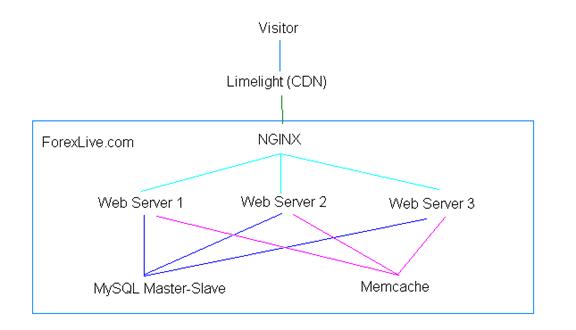
There may be times when the memcache server becomes unavailable, at this point in time, a determination is needed whether to pull from the database directly or failover to server file-based caching until memcache becomes available. Then a decision is needed whether the file caching should be updated every time memcache is updated, that is a mirror copy is kept at the file level. The questions comes up with file cache being out of sync with memcache. Keeping mind that the file cache is only a backup of the last memcache and memcache takes precedent. So for each memcache pull, file cache item is updated, for each database pull, memcache is updated.
The scenario,
- Visitor checks for memcache connectivity, if not connected, checks for file cached item, if not exist, then pull from database
- Visitor checks for memcache connectivity and available, then checks for cached item in memcache, if not available, pulls from database and populates memcache and file cache.
- Visitor checks for memcache connectivity and is available, then checks the cached item in memcache is available, pulls from memcache and updates file cache
- Visitor checks for memcache connectivity, not available, checks for a file cache item that is available, then pulls from the file cached.
- Visitor checks for memcache connectivity, not available, checks for file cache item that is not available, then pulls from the database and saves in temporary file cache (logs in apache error log of this action to check memcache). At this point memcache and file cache are out of sync and will not be back into sync until next successful memcache connection.
Additional Notes
During an output buffering operation for a visitor in preparation for a cache, the Cookies were also getting cached. This presented a security issue that exposed independent visitor sessions to the world. The correction was to remove the cookies for all visitors that did not post a comment and are considered cacheable. Administrators and bloggers retain their cookies and are not considered cacheable.
No output buffering occurs for Administrators, bloggers and comment authors as well as these users always pull from the database and never from the cache.
Because database connectivity is not available during cache object checking (wp_cache_postload), the post information is also saved to the cache using a related key. This post information is needed to retrieve the last modified date of the post itself and set the last modified header parameter.
To ensure proper cleanup of any wordpress allocated resources upon exit of the script during a cache rendering, a shutdown function is registered. This shutdown function will invoke the wordpress shutdown action. This is the same approach during normal operation after a rendered template page is displayed.
For all comment operations (add, edit, delete) invokes the same hook, which will clear the cache item for that comment. A new cache item is generated, reflecting whether or not the comment has been approved. Once a visitor becomes a comment author, that visitor will retrieve the pages directly from the database and not from the cache until their comment is approved. This ensures that the visitor will see their pending comment status.
A separate hook is invoked when the comment is approved. This just deletes the post item for this comment from the cache so the next time a visitor loads a page the new comment is properly cached.
Caveats
Comment Cookie Time
[from http://shibashake.com/wordpress-theme/w3-total-cache-cookie-is-rejected]
This is a common issue that arises whenever a user makes a comment on your blog. Making a comment causes a cookie to be set, and this disables caching for that user until the cookie is cleared or expired.
Here is an explanation by Frederick Townes.
In WordPress 3.0, the default comment cookie expiration time is 30,000,000 seconds which is about 8333 hours or 347 days. That is a long expiration time.
Unless the user manually clears his browser cookies, he will not get to enjoy the super caching capabilities on your site for about a whole year.
A simple way to fix this is to use the comment_cookie_lifetime filter which will only get applied for non-logged in users.
The comment cookie lifetime should be the maximum time a moderator takes to approved or disapproved a comment. If the moderator approves comments every 24 hours, then the comment cookie lifetime is set for 24 hours.
Single Memcache for Multiple Domains
Memcache supports a single key value caching mechanism. This is sufficient when using a single memcache instance per server domain, but when you have multiple domains and you need to delete the cache content for a specified domain, this becomes impossible as Memcache cannot distinguish between which cached items belong to each server. So the option is flush the cache which clears all cached items for all server domains. This became apparent when a comment is approved/updated, and the recent comment widget is not updating on pages because at the time, only the page which contained the actual comment was cleared from the cached. Any other pages which contain the recent comment widget were cached with content before. A quick work around is to flush the cache when a comment is approved/updated/deleted. Remember during a cache checking operation, there is no DB connectivity (only Memcache connections exists).
Another solution, during admin comment updating, the pages and posts permalinks are retrieved with memcache check for the existence of cache items, if found, will delete the cached item. A global admin comment update lock is set to prevent visitors from pulling from the cache during the update.
Memcache Failover Issue
There are three ways to establish a connection to the memcache server(s). Through addServer, connect and pconnect functions. The addServer function does not establish a connection until it is actually needed, e.g. call the add or get function. The connect and pconnect function establishes a connection immediately. The pconnect establishes a persistent connection that cannot be closed. An important note, though the addServer function provides a clean way of providing failover for a pool of servers, memcache does not replicate across the pool. The memcache replication algorithm must be coded into the script. The addServer connection pool, is useful only for reading or pulling from the cache, while multiple connect/pconnect are required for saving/writing to the cache.
During a read only cache transaction, the addServer function is preferred, as failover does occur if one of the servers in the pool is not responding. This is still a fast transaction which is desired, as you want to pull the cache page as quick as you can, display it and leave.
During an update cache transaction, required connections to each available memcache server, as each memcache server must be individually updated with the cache content. Therefore when a server fails later, the other servers have the replicated content and there is no need to regenerate the page for the surviving cache. When one cache server is updated, they all are updated.
To verify, set your WP_MEMCACHE_SERVERS to your full list, load several pages and ensure that you are reading from the cache. Then modify your WP_MEMCACHE_SERVERS showing only the last server or shutdown all but the last server. Reload the page and verify that the page is being pulled from memcache.
Memcache port may not be required
While the default port for the memcache serves is 11211, a port value apparently does not need to be provided if the only argument is the ip address. A memcache connection will be established on the appropriate port.
Browsers sending URL’s differently requires double caching
Discovery has been made that IE will send a trailing slash while Firefox will leave off the trailing slash. This slash determines whether the item is cached or not as different keys are generated for each scenario. There are three options available, 1) remove the trailing slash from the URL before hashing, 2) add a trailing slash, if none exist, before hashing, or 3) cache both the trailing slash and non-slash versions of the page, even if identical. Then delete both versions when a page, post or comment is updated.
The best solution is to remove the trailing slash before hashing so all URL’s are hashed without a trailing slash, and before they are checked against the cache.
File Caching failover
During the development of this plug in, the issue arose when the memcache server is offline, should there be a failover and what type? A simple, file-based caching failover has been implemented. The file cache resides on each web server in the cluster individually and mirrors the content of memcache. When no connection to memcache is possible, file cache retrieval will be substituted until memcache is restored.
Wordpress Functions of Interest
- wp_is_large_network
Hacking Wordpress
There is a user definable file called my-hacks.php.
SQL_CALC_FOUND_ROWS
During the process of developing the new caching drop in, a fix was identified for this SQL query. The problem was this query produce a lot of results from the database that it was affecting the performance of the site.
The fix was to apply a hook on the pre_get_posts api, and when invoke will alter the query passing a ‘no_found_rows’ setting. This prevented the above statement to be added to the query. Testing did not find any loss of functionality to the site.
Adding Plug-ins
Not all plug-ins are created equal and not all plug-ins are compatible with each other. The example being with the HyperDB and DBCache, where each plug-in had their own custom db.php file which is an override of the wordpress database object, wpdb. Each drop in had it own unique functionality where as one plug-in became active the other plug-in lost it functionality even though it was still reported as active.
Future additions of plug-ins must be careful and diligent to ensure compatibility with the existing plug-ins. Recommendations is to assigned a single point of entry that is responsible for verifying the coexistence of future plug-ins. This should be separate from the person assigned to perform the actual installation of the plug-in.
Configuration
The deployment of WPTRUECACHE-HA component was designed towards simplicity with minimal configuration changes if needed. The component consists of a packaged plug in that is placed in the wp-content/plugins directory of the wordpress installation, resulting in a new directory wptruecache. Before installing this file, there must be NO existing advanced-cache.php otherwise you will break other functionality when installing the WPTRUECACHE-HA.
You must then activate the plugin just like any other plugin. If activation fails, descriptive messages explain the reason for the failure and how to correct the problem.
There are entries for WP_CONFIG file,
Required:
define(‘WP_CACHE’,true); define(‘WP_MEMCACHE_SERVERS’,’192.168.101.1,…’);
define(‘WP_MEMCACHE_PORT’,11211);
include(ABSPATH.’wp-content/plugins/wptruecache/config.php’);
Optional:
define(‘WP_MEMCACHE_FULL_SERVER_LIST’,’192.168.56.105,11211|172.19.47.180,23091’);
define(‘WP_TRUECACHE_COMPRESSION’,true); // turns on extra gzip compression*
define(‘WP_TRUECACHE_LOCK_TIMEOUT’,5); // sets a semaphore timeout*
define(‘WP_TRUECACHE_MEMCACHE_TIMEOUT’,30000);
define(‘WP_TRUECACHE_COMMENT_COOKIE_TIMEOUT’,(60*60*24));
define(‘WP_TRUECACHE_WAIT', 5 );
define(‘WP_TRUECACHE_NOCACHE_ITEMS’,’png|jpg|gif|js|feed|wp-login|wp-admin’);
define(‘WP_TRUECACHE_HEADERSTATS’,true);
define(‘WP_TRUECACHE_CACHEFLUSHALL’,true);
define(‘WP_TRUECACHE_TRACEON’, true);
Test Server IP Address:
Original test server: 74.217.227.161
Test cluster server: 74.217.226.37
The WP_CACHE=true setting tells wordpress to look for the advanced-cache.php file and invoke the wp_cache_postload function.
The WP_MEMCACHE_SERVERS specify the memcache server pool for the memcache distributed caching. This setting consists of a comma-delimited string of the memcache server ip addresses.
The WP_MEMCACHE_PORT=<port number> defines a global port variable for all memcache servers within the server pool. Used when the each memcache server in the cluster has the same port.
The WP_MEMCACHE_FULL_SERVER_LIST is an alternative method for defining the memcache server pool with the port. The server pool list is defined as a string delimited by the pipe (‘|’) to separate each host ip address/port number configuration, e.g. ‘host1,ip1|host2,ip2|host3,ip3’
IMPORTANT: If this setting is defined, will override the WP_MEMCACHE_SERVERS and WP_MEMCACHE_PORT settings.
When WP_TRUECACHE_COMPRESSION is set to true enables page compression before being displayed to the browser.
WP_TRUECACHE_LOCK TIMEOUT sets the expiration time for the memcached item semaphore.
WP_TRUECACHE_MEMCACHE_TIMEOUT sets the expiration time for a cached page.
WP_TRUECACHE_COMMENT_COOKIE_TIMEOUT sets the expiration for the infamous 357 day old cookie.
WP_TRUECACHE_WAIT sets the waiting time before a page reload attempt is made when the page is locked.
WP_TRUECACHE_NOCACHE_ITEMS overrides the items that should not be cached. Specify the list delimited by the pipe character (‘|’)
WP_TRUECACHE_HEADERSTATS will display the following stats in the header during a cache retrieval transaction:
WP-TrueCache-Lock-Timeout (from WP_TRUECACHE_LOCK_TIMEOUT)
WP-TrueCache-Memcache-Timeout (from WP_TRUECACHE_MEMCACHE_TIMEOUT)
WP-TrueCache-Wait (from WP_TRUECACHE_WAIT)
WP-TrueCache-Memcache-Server-Pool (from WP_MEMCACHE_SERVERS)
WP_TRUECACHE_CACHEFLUSHALL will change the execution path when a page, post or a comment is being updated, then the entire memcache contents is flushed. This should not be set if memcache is being used for multiple domains, as the cache content for all domains will be discarded during a flushing operation.
WP_TRUECACHE_TRACEON will show memcache program path execution tracing in the response headers. This is usefully for quick live debugging to verify memcache operations are valid.
No further configuration operations are needed. The next time the page is loaded, the changes will be in effect.
IMPORTANT:
TO TURN OFF THE WPTRUECACHE-HA, REMOVE THE WP-CACHE SETTING FROM WP-CONFIG FILE OR SET THE WP-CACHE SETTING TO FALSE. THIS TELLS WORDPRESS NOT TO LOAD THE ADVANCED-CACHE.PHP AND HENCE NOT INVOKE THE WP_CACHE_POSTLOAD FUNCTION.
Known Issues
This list is not exhaustive, for known problems that were discovered during the development of WPTRUECACHE-HA.
The wordpress core function wp_list_pages breaks on PHP version 5.3.8 when the core is below level 3.2.1. The current version of PHP being used (2011-11-25) is 5.2.17. If PHP is upgraded to the current version, wordpress must also be updated as well.
Some browsers may not support the extra page compression and you will receive a content encoding error page. If this happens, disable the extra page compression.
Database Caching
While page caching is sufficient for visitor traffic, database caching may be needed when there are too many bloggers and comment authors accessing the database simultaneously. When implementing database caching, care must be taken due to compatibility issues between plugins using the the db.php file. To implement database caching involves modifying the existing hyperdb db object (in db.php) to cache and retrieve the database objects. Before any development can commence, a determination is needed as to what part of the database object/structure needs to be cached and what is not to be cached.
Wordpress Caching
Wordpress has built in memory caching via it’s object cache functions and uses local memory by default. This is an implicit caching model as only those items or object particularly in need of caching will be cached by invoking the object caching functions. The wordpress caching model can be overridden by adding an object-cache.php file in the wp-content directory. There is an available object-cache drop in for Memcache but that component must be fixed to enable memcache server pool replication. This replication is enabled by changing the memcache function invocation from addServer to implicit memcache add and then looping through the available memcache connections to add to each server within the pool. See the advanced-cache drop in for a good implementation of handling the memcache server pool connections. This ensures that only those memcache servers connections are available.
The Future
During the course of the discovery and development of WPTRUECACHE-HA, there were many questions and issues that arose for the proper approach for handling high availability web site infrastructure in a LAMP environment. For mission critical web sites, a truly open source solution may not be a suitable option. This being that Apache was not designed with high availability in mind nor was PHP. MySQL has a high availability version available. A true high availability LAMP infrastructure would involve building a custom version of Apache with PHP at a minimum. A group at www.linux-ha.org has an approach but it is incomplete.
Just building a cluster of failover services is neither sufficient nor using virtualization for the cluster. The underlying services and applications need adaptation for high availability environments.
Extreme care must be use when using Memcache for shred domain caching, as one domain can inadvertently clear (flush) the cached entries for all domains. This happens when the flush method is invoked as there is no distinguishing between domain cached content. To correct this problem, a custom Memcache PECL component must be built along with a custom memcache server to accept a server key for the flush command. There are presently two PECL memcache components (Memcache and Memcached), the difference is that Memcached provides support for a server key in additional to the hash key for all functions except the flush command.
Further research and discovery is needed.
Setting up a Shared Hosting Cluster Environment
The goal is to setup a pseudo production environment emulating the components of a high availability production system. The key services include a shared host with pecl memcache extension installed (may have to make a separate request from the hosting provider), a memcached server on a different server, and a CDN such as Cloudflare which offers a free entitlement.
To begin your shared cluster setup, follow these steps:
1. Sign up for a shared hosting account that offers pecl memcache php extension. One such provider is www.webhostinghub.com. After sign up you will need to submit a support request to have memcache pecl installed.
2. Then sign up for a Windows 2003 Server VPS from Commercial Network Services at https://cp.commercialnetworkservices.net/aff.php?aff=898
3. Sign up for a free web hosting account with another provider for use with MySQL replication.
- Install the memcached NT service on the VPS and start the service.
- Install Wordpress on your shared hosting service and a memcache plugin/dropin, setting the memcache server to the ip of the VPS.
- Configure the MySQL Master-Slave replication
- Create some pages from your wordpress blog, log out of admin so caching can take affect, then load some pages and verify the headers are showing cached transactions/sessions.
Correct sequence:

Incorrect sequence:
