# File Uploader by Uploadcare
 This is a plugin for [WordPress][wordpress], that powers beautiful websites for businesses, professionals, and bloggers, providing it for working with [Uploadcare Widget][uc-feature-widget].
The plugin allows WordPress users to upload media
from their devices, social media, cloud storage, and more, check out this [article][wparena-article] for details.
[![GitHub release][badge-release-img]][badge-release-url]
[![Uploadcare stack on StackShare][badge-stack-img]][badge-stack-url]
* [Requirements](#requirements)
* [Install](#install)
* [Usage](#usage)
* [Configuration](#configuration)
* [Plugin configuration](#plugin-configuration)
* [Widget configuration](#widget-configuration)
* [Contributors](#contributors)
* [Security issues](#security-issues)
* [Feedback](#feedback)
## Requirements
- Wordpress 3.5+
- PHP 5.3+
- php-curl
## Install
### In Wordpress
This is a plugin for [WordPress][wordpress], that powers beautiful websites for businesses, professionals, and bloggers, providing it for working with [Uploadcare Widget][uc-feature-widget].
The plugin allows WordPress users to upload media
from their devices, social media, cloud storage, and more, check out this [article][wparena-article] for details.
[![GitHub release][badge-release-img]][badge-release-url]
[![Uploadcare stack on StackShare][badge-stack-img]][badge-stack-url]
* [Requirements](#requirements)
* [Install](#install)
* [Usage](#usage)
* [Configuration](#configuration)
* [Plugin configuration](#plugin-configuration)
* [Widget configuration](#widget-configuration)
* [Contributors](#contributors)
* [Security issues](#security-issues)
* [Feedback](#feedback)
## Requirements
- Wordpress 3.5+
- PHP 5.3+
- php-curl
## Install
### In Wordpress
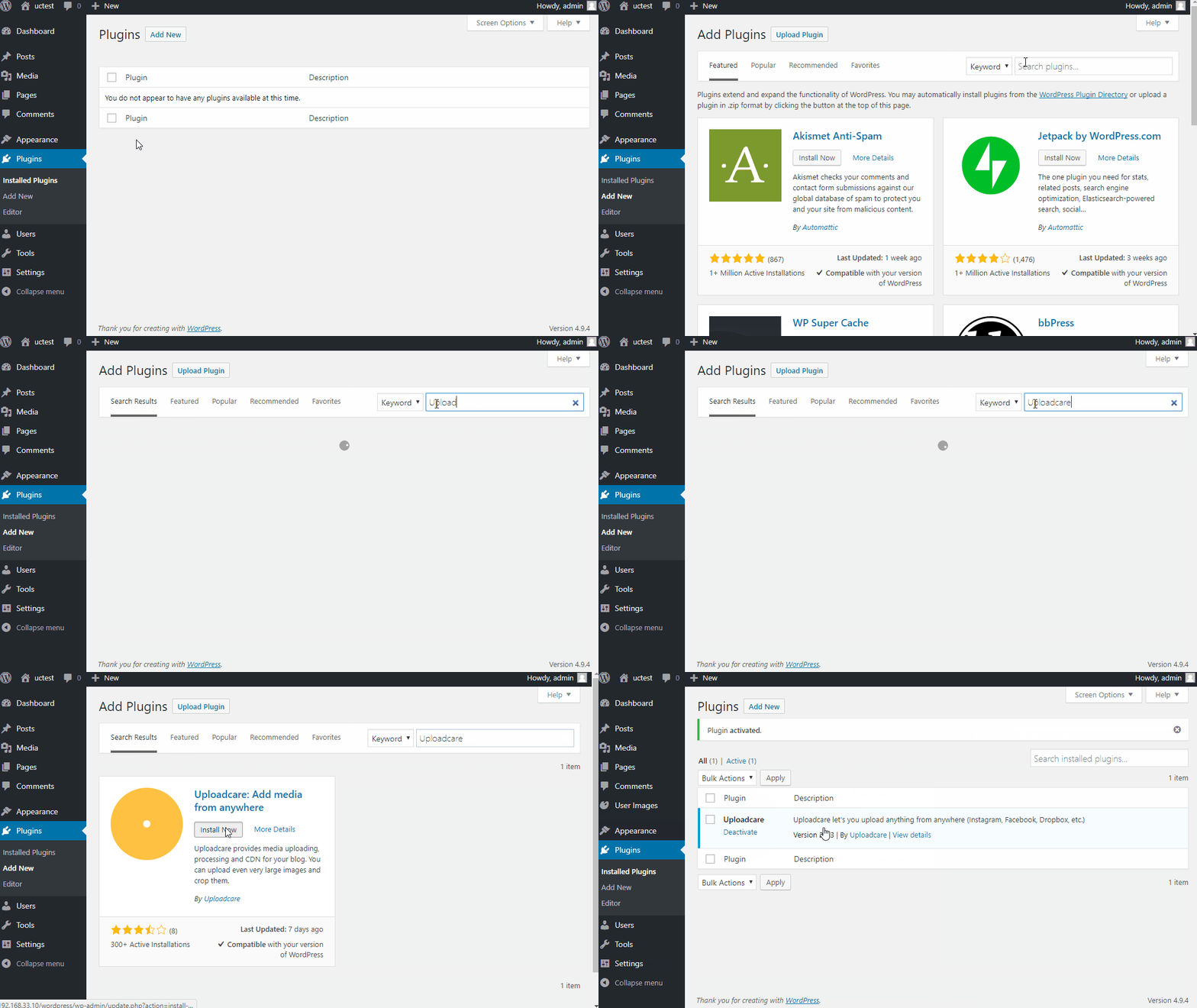 ### Manual installation
1. Download the [latest release][github-releases]. The download is a ZIP archive holding the plugin.
2. Download the [Uploadcare PHP library][github-php]. WordPress library is build around it.
3. Unzip the first archive to your `wp-content/plugins` directory.
4. Unzip the second archive to your `wp-content/plugins/uploadcare/uploadcare-php` directory.
5. Activate the plugin on your "Plugins" page in a WordPress admin area.
6. Go to "Settings" -> "Uploadcare" and set your public and secret API.
The keys are used to identify an Uploadcare project your uploaded media will
go to. Please note, you can use `demopublickey` and `demoprivatekey` for
testing purposes. The keys point to the demo Uploadcare account where all the
files are wiped out every 24 hours.
To acquire your own keys, you will need to create
an [Uploadcare account][uc-account]. The
provided link will navigate you to creating a FREE one.
7. That is it!
## Usage
1. Start adding a new post.
2. Press "Add Media" to insert any media with
[Uploadcare Widget][uc-widget-features].
3. Upload a file using the widget.
4. When uploading images, you can edit them right in your mobile or desktop
browser. This adds the modified image to your post. You can learn more about
in-browser image editing [here][uc-widget-image-processing].
5. Press "Store and Insert." You are there: an image gets added to your post.
## Configuration
### Widget configuration
Uploadcare Widget can be deeply customized to suit your UX/UI. You can define
allowed upload sources, implement file validation, and more.
Use our live [widget sandbox][uc-widget-configure] as a starting point and consider
checking out the docs on [widget configuration][uc-docs-widget-config] and its
[JavaScript API][uc-docs-widget-js-api].
## Contributors
This list of contributors is based on the git history of this repo.
Gray Hound
Dmitry Mukhin
Nikolay Zherdev
Dmitry Petrov
Zarema Khalilova
Elijah
Igor Debatur
Roman Sedykh
Siarhei Bautrukevich
[All contributors][github-contributors]
## Security issues
If you think you ran into something in Uploadcare libraries which might have
security implications, please hit us up at [bugbounty@uploadcare.com][uc-email-bounty]
or Hackerone.
We'll contact you personally in a short time to fix an issue through co-op and
prior to any public disclosure.
## Feedback
Issues and PRs are welcome. You can provide your feedback or drop us a support
request at [hello@uploadcare.com][uc-email-hello].
[wordpress]: http://www.wordpress.org/
[wparena-article]: https://wparena.com/3-must-have-wordpress-plugins-to-start-a-photoblog/
[uc-account]: https://uploadcare.com/accounts/create/free/
[uc-widget-features]: https://uploadcare.com/features/widget/
[uc-widget-image-processing]: https://uploadcare.com/features/image_processing/
[uc-docs-widget-config]: https://uploadcare.com/docs/uploads/widget/config/?utm_source=github&utm_campaign=uploadcare-wordpress
[uc-docs-widget-js-api]: https://uploadcare.com/docs/api_reference/javascript/?utm_source=github&utm_campaign=uploadcare-wordpress
[uc-widget-configure]: https://uploadcare.com/widget/configure/?utm_source=github&utm_campaign=uploadcare-wordpress
[uc-feature-widget]: https://uploadcare.com/features/widget/?utm_source=github&utm_campaign=uploadcare-wordpress
[uc-email-bounty]: mailto:bugbounty@uploadcare.com
[uc-email-hello]: mailto:hello@uploadcare.com
[github-releases]: https://github.com/uploadcare/uploadcare-wordpress/releases
[github-php]: https://github.com/uploadcare/uploadcare-php/releases
[github-contributors]: https://github.com/uploadcare/uploadcare-wordpress/graphs/contributors
[badge-stack-img]: https://img.shields.io/badge/tech-stack-0690fa.svg?style=flat
[badge-stack-url]: https://stackshare.io/uploadcare/stacks/
[badge-release-img]: https://img.shields.io/github/release/uploadcare/uploadcare-wordpress.svg
[badge-release-url]: https://github.com/uploadcare/uploadcare-wordpress/releases
### Manual installation
1. Download the [latest release][github-releases]. The download is a ZIP archive holding the plugin.
2. Download the [Uploadcare PHP library][github-php]. WordPress library is build around it.
3. Unzip the first archive to your `wp-content/plugins` directory.
4. Unzip the second archive to your `wp-content/plugins/uploadcare/uploadcare-php` directory.
5. Activate the plugin on your "Plugins" page in a WordPress admin area.
6. Go to "Settings" -> "Uploadcare" and set your public and secret API.
The keys are used to identify an Uploadcare project your uploaded media will
go to. Please note, you can use `demopublickey` and `demoprivatekey` for
testing purposes. The keys point to the demo Uploadcare account where all the
files are wiped out every 24 hours.
To acquire your own keys, you will need to create
an [Uploadcare account][uc-account]. The
provided link will navigate you to creating a FREE one.
7. That is it!
## Usage
1. Start adding a new post.
2. Press "Add Media" to insert any media with
[Uploadcare Widget][uc-widget-features].
3. Upload a file using the widget.
4. When uploading images, you can edit them right in your mobile or desktop
browser. This adds the modified image to your post. You can learn more about
in-browser image editing [here][uc-widget-image-processing].
5. Press "Store and Insert." You are there: an image gets added to your post.
## Configuration
### Widget configuration
Uploadcare Widget can be deeply customized to suit your UX/UI. You can define
allowed upload sources, implement file validation, and more.
Use our live [widget sandbox][uc-widget-configure] as a starting point and consider
checking out the docs on [widget configuration][uc-docs-widget-config] and its
[JavaScript API][uc-docs-widget-js-api].
## Contributors
This list of contributors is based on the git history of this repo.
Gray Hound
Dmitry Mukhin
Nikolay Zherdev
Dmitry Petrov
Zarema Khalilova
Elijah
Igor Debatur
Roman Sedykh
Siarhei Bautrukevich
[All contributors][github-contributors]
## Security issues
If you think you ran into something in Uploadcare libraries which might have
security implications, please hit us up at [bugbounty@uploadcare.com][uc-email-bounty]
or Hackerone.
We'll contact you personally in a short time to fix an issue through co-op and
prior to any public disclosure.
## Feedback
Issues and PRs are welcome. You can provide your feedback or drop us a support
request at [hello@uploadcare.com][uc-email-hello].
[wordpress]: http://www.wordpress.org/
[wparena-article]: https://wparena.com/3-must-have-wordpress-plugins-to-start-a-photoblog/
[uc-account]: https://uploadcare.com/accounts/create/free/
[uc-widget-features]: https://uploadcare.com/features/widget/
[uc-widget-image-processing]: https://uploadcare.com/features/image_processing/
[uc-docs-widget-config]: https://uploadcare.com/docs/uploads/widget/config/?utm_source=github&utm_campaign=uploadcare-wordpress
[uc-docs-widget-js-api]: https://uploadcare.com/docs/api_reference/javascript/?utm_source=github&utm_campaign=uploadcare-wordpress
[uc-widget-configure]: https://uploadcare.com/widget/configure/?utm_source=github&utm_campaign=uploadcare-wordpress
[uc-feature-widget]: https://uploadcare.com/features/widget/?utm_source=github&utm_campaign=uploadcare-wordpress
[uc-email-bounty]: mailto:bugbounty@uploadcare.com
[uc-email-hello]: mailto:hello@uploadcare.com
[github-releases]: https://github.com/uploadcare/uploadcare-wordpress/releases
[github-php]: https://github.com/uploadcare/uploadcare-php/releases
[github-contributors]: https://github.com/uploadcare/uploadcare-wordpress/graphs/contributors
[badge-stack-img]: https://img.shields.io/badge/tech-stack-0690fa.svg?style=flat
[badge-stack-url]: https://stackshare.io/uploadcare/stacks/
[badge-release-img]: https://img.shields.io/github/release/uploadcare/uploadcare-wordpress.svg
[badge-release-url]: https://github.com/uploadcare/uploadcare-wordpress/releases