Provides a simple way to use the Syntax Highlighter tool from [http://alexgorbatchev.com/wiki/SyntaxHighlighter](http://alexgorbatchev.com/wiki/SyntaxHighlighter)
## Latest Info
* Objective C brush now added.
## Description
This plugin works like many of the others that enable the use of the Syntax Highlighter tool. Dynamic plugin loading
is now available as part of the Syntax Highlighter tool, making brush configuration obsolete.
Available brushes are:
* applescript
* actionscript3 as3
* bash shell
* coldfusion cf
* cpp c
* c# c-sharp csharp
* css
* delphi pascal
* diff patch pas
* erl erlang
* groovy
* java
* jfx javafx
* js jscript javascript
* objc obj-c
* perl pl
* php
* text plain
* py python
* ruby rails ror rb
* sass scss
* scala
* sql
* vb vbnet
* xml xhtml xslt html
## Installation
### Recommended Method
1. Install the plugin from with Wordpress from "Plugins->Add New"
### Alternate Method
1. Unzip the `syntax-highlighter-mt` directory and upload it to `/wp-content/plugins/` directory
1. Activate the plugin through the 'Plugins' menu in WordPress
## Frequently Asked Questions
### How do I highlight code?
Take a look at [http://alexgorbatchev.com/wiki/SyntaxHighlighter](http://alexgorbatchev.com/wiki/SyntaxHighlighter) for the documentation on using the Syntax Highlighter tool.
Basic usage is similar to: `...PHP code...
`
### Why does my content containing “<” and “>” get messed up?
This is an issue with using the `` tags. Replace the `<` characters with their entity escape of `<` to get the desired result.
See [http://alexgorbatchev.com/SyntaxHighlighter/manual/installation.html](http://alexgorbatchev.com/SyntaxHighlighter/manual/installation.html) for more discussion.
(Note that this issue only happens if you are using the `` tags to surround the highlighted code.)
### I get an error saying "Can't find brush for: xxx"
The most likely issue is that the specified brush is not available as part of the plugin install.
### Why "Syntax Highlighter MT"?
There are several plugins already that are named Syntax Highlighter, or some variant. I added "MT" (for Megatome Technologies - my company) to the name to make it unique.
## Screenshots
1. Styled Groovy code.
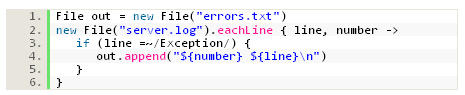
2. Styled Groovy code using the Django theme.

3. Styled Groovy code using the FadeToGrey theme.
