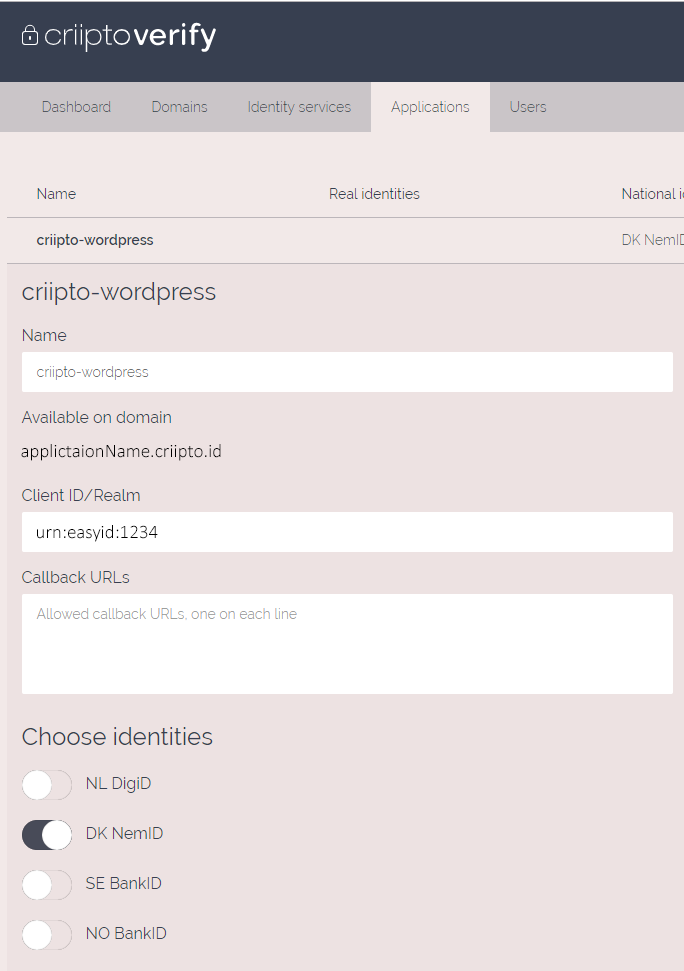
 7. Add the applications information from manage.criipto.id to criipto settings in wordpress
== Screenshots ==
1. `/assets/screenshot.png`
== Usage ==
Add this shortcode to wordpress page. Guide to add shortcode to wordpress page [Wordpress support](https://en.support.wordpress.com/wordpress-editor/blocks/shortcode-block/)
```wordpress
[criipto]
```
Supported parameters:
7. Add the applications information from manage.criipto.id to criipto settings in wordpress
== Screenshots ==
1. `/assets/screenshot.png`
== Usage ==
Add this shortcode to wordpress page. Guide to add shortcode to wordpress page [Wordpress support](https://en.support.wordpress.com/wordpress-editor/blocks/shortcode-block/)
```wordpress
[criipto]
```
Supported parameters:
| Type | info | Support |
|---|---|---|
acr_values= |
"Your login method" | "urn:grn:authn:no:bankid:mobile", "urn:grn:authn:no:bankid:central", "urn:grn:authn:se:bankid:same-device", "urn:grn:authn:se:bankid:another-device", "urn:grn:authn:dk:nemid:poces", "urn:grn:authn:dk:nemid:moces", "urn:grn:authn:dk:nemid:moces:codefile", "urn:grn:authn:nl:digid:basic", "urn:grn:authn:nl:digid:middle", "urn:grn:authn:nl:digid:substantial", "urn:grn:authn:nl:digid:high" |
client_id= |
"Your Client ID/Realm" | |
implicit= |
"Return an id token directly" | |
domain= |
"Your application domain" | |
authority= |
"https / http" | |
port= |
"port" | |
afterLogOutRedirect= |
"Redirect url after log out" | |