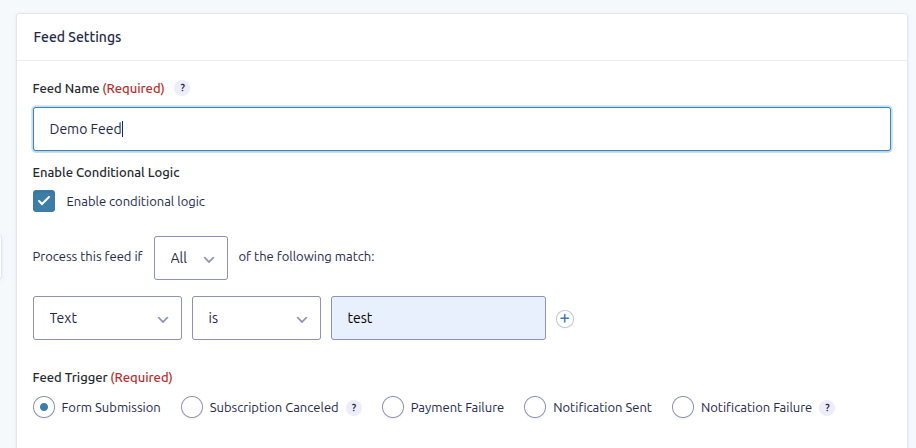
# Feed Settings — Name, Conditional Logic & Trigger
This reference covers the core feed settings—Feed Name, Trigger, and
Conditional Logic—so you can configure how and when your integrations
fire.
------------------------------------------------------------------------
### **Feed Name**
- This is a label you assign to your feed so you can easily identify it
in your list of feeds.
- Choose something descriptive—e.g., *“New Client Inquiry Task”* or
*“Application → Onboarding Feed”*.
- Only visible within your form settings; helps with organization,
especially if you have multiple feeds.
------------------------------------------------------------------------
### **Conditional Logic**
- Toggle on “Enable Conditional Logic” if you want this feed to run only
under certain conditions.
- You can configure logic based on form fields (e.g., *only create a
task if “Priority” = “High”*).
- Great for segmenting alerts/tasks, or for routing submissions
differently.
- If disabled, the feed will run for every form submission.
------------------------------------------------------------------------
### **Feed Trigger**
- Determines when the feed executes. Default (and only option on the
free plan) is Form Submission.
- Choose the option that best matches how (and when) you want tasks to
be created or updated.
- See here and here for more details.
------------------------------------------------------------------------
------------------------------------------------------------------------
### Summary
Setting
Purpose
Feed Name
For identifying and organizing your feeds within a form.
Conditional Logic
Controls when the feed executes based on form field values.
Trigger
Defines the event or action that causes the feed to run (e.g., form
submission).