Slack Block Kit for PHP
:point_right: For formatting messages and modals for Slack using their Block Kit syntax via an OOP interface :point_left:
By Jeremy Lindblom (@jeremeamia)



---
## Introduction
From Slack's [Block Kit documentation](https://api.slack.com/block-kit):
> **Block Kit** is a UI framework for Slack apps that offers a balance of control and flexibility when building
> experiences in messages and other _surfaces_.
>
> Customize the order and appearance of information and guide users through your app's capabilities by composing,
> updating, sequencing, and stacking _blocks_ — reusable components that work almost everywhere in Slack.
This library provides an OOP interface in PHP for composing messages/modals using Slack Block Kit. It also does the
reverse, meaning you can "hydrate" message/modal JSON into an object hierarchy.
## Block Kit Concepts
This library helps you build Slack messages programmatically and dynamically in your code, but you need to know how they
work generally first. The library does try to prevent you from doing things you are not permitted to do in Block Kit,
but it does not validate or guard against every single rule.
You may want to review the following concepts in the Slack documentation:
- [Surfaces](https://api.slack.com/surfaces) – There are 3 main types: Message, Modal, and App Home
- [Blocks](https://api.slack.com/reference/block-kit/blocks) – Includes _section_, _context_, _actions_, and more
- [Interactive Components](https://api.slack.com/reference/block-kit/interactive-components) – We call these "Inputs" in this library
- [Composition Objects](https://api.slack.com/reference/block-kit/composition-objects) – We call these "Partials" ion the library
In general, we refer to all of the different things in Block Kit collectively as "elements".
## Installation
Install easily via Composer:
```bash
composer require slack-php/slack-block-kit
```
Then include the Composer-generated autoloader in your project's initialization code.
_Note: This library is built for PHP 7.3+._
## Basic Usage
This library supports an intuitive and fluid syntax for composing Slack surfaces (e.g., messages, modals). The `Kit`
class acts as a façade to the library, and let's you start new messages/modals.
```php
text('Don\'t you just love XKCD?');
$msg->divider();
$msg->newImage()
->title('Team Chat')
->url('https://imgs.xkcd.com/comics/team_chat.png')
->altText('Comic about the stubbornness of some people switching chat clients');
// To convert to JSON (to send to Slack API, webhook, or response_url), use PHP's `json_encode` function.
echo json_encode($msg);
// OR you can use the surfaces's `toJson` method, which also includes a convenience parameter for pretty printing.
echo $msg->toJson(true);
```
### Fluent Interface
When using the fluent interface, every method that sets a property or adds a sub-element returns the original element's
object, so you can chain additional method calls.
```php
$msg = Message::new()
->text('Don\'t you just love XKCD?');
->divider();
```
Methods with a `new` prefix will return the new element's object, so be careful with how you are using the fluent
interface in those cases.
```php
// Correctly renders the whole message.
$msg = Message::new()
->text('Don\'t you just love XKCD?')
->divider();
$msg->newImage()
->title('Team Chat')
->url('https://imgs.xkcd.com/comics/team_chat.png')
->altText('Comic about the stubbornness of some people switching chat clients');
echo json_encode($msg);
// YAY!
// INCORRECT: Renders just the image, because only that element gets stored in the variable.
$msg = Message::new()
->text('Don\'t you just love XKCD?')
->divider()
->newImage()
->title('Team Chat')
->url('https://imgs.xkcd.com/comics/team_chat.png')
->altText('Comic about the stubbornness of some people switching chat clients');
echo json_encode($msg);
// WHOOPS!
```
#### Tapping
Tapping is a way to keep the fluent interface going, but makes sure the whole message is preserved.
```php
// Correctly renders the whole message, by using tap()
$msg = Message::new()
->text('Don\'t you just love XKCD?')
->divider()
->tap(function (Message $msg) {
$msg->newImage()
->title('Team Chat')
->url('https://imgs.xkcd.com/comics/team_chat.png')
->altText('Comic about the stubbornness of some people switching chat clients');
});
echo json_encode($msg);
// YAY!
```
### Preview in Block Kit Builder
Slack provides an [interactive Block Kit Builder](https://app.slack.com/block-kit-builder) for composing/testing
messages and other surfaces. This is a great way to play around with and learn the Block Kit format.
The `Kit::preview` method allows you to render your message/surface as a Block Kit Builder URL, so you can link to a
preview or your message/surface in the browser via their interactive tool. This will help you see how it would be
rendered in a Slack client.
```php
$msg = Kit::newMessage()
->text('Don\'t you just love XKCD?')
->divider()
->tap(function (Message $msg) {
$msg->newImage()
->title('Team Chat')
->url('https://imgs.xkcd.com/comics/team_chat.png')
->altText('Comic about the stubbornness of some people switching chat clients');
});
echo Kit::preview($msg);
```
#### Output
```
https://app.slack.com/block-kit-builder#%7B"blocks":%5B%7B"type":"section"%2C"text":%7B"type":"mrkdwn"%2C"text":"Don%27t%20you%20just%20love%20XKCD%3F"%7D%7D%2C%7B"type":"divider"%7D%2C%7B"type":"image"%2C"title":%7B"type":"plain_text"%2C"text":"Team%20Chat"%7D%2C"image_url":"https:%5C%2F%5C%2Fimgs.xkcd.com%5C%2Fcomics%5C%2Fteam_chat.png"%2C"alt_text":"Comic%20about%20the%20stubbornness%20of%20some%20people%20switching%20chat%20clients"%7D%5D%7D
```
And here's the [actual Block Kit Builder link](https://app.slack.com/block-kit-builder#%7B"blocks":%5B%7B"type":"section"%2C"text":%7B"type":"mrkdwn"%2C"text":"Don%27t%20you%20just%20love%20XKCD%3F"%7D%7D%2C%7B"type":"divider"%7D%2C%7B"type":"image"%2C"title":%7B"type":"plain_text"%2C"text":"Team%20Chat"%7D%2C"image_url":"https:%5C%2F%5C%2Fimgs.xkcd.com%5C%2Fcomics%5C%2Fteam_chat.png"%2C"alt_text":"Comic%20about%20the%20stubbornness%20of%20some%20people%20switching%20chat%20clients"%7D%5D%7D).
It will show up in the Block Kit Builder looking something like this:

### Surface Hydration
Some Slack application integrations (such as with Modals) require receiving the JSON of an existing surface and then
modifying or replacing that surface with another. You can "hydrate" the JSON of a surface (or element) into its object
representation using its `fromArray` method (or `fromJson`).
```php
$messageJson = <<`, and `&`
characters automatically, if it's needed.
Example:
```php
// Note: $event is meant to represent some kind of DTO from your own application.
$fmt = Kit::formatter();
$msg = Kit::newMessage()->text($fmt->sub(
'Hello, {audience}! On {date}, {host} will be hosting an AMA in the {channel} channel at {time}.',
[
'audience' => $fmt->atHere(),
'date' => $fmt->date($event->timestamp),
'host' => $fmt->user($event->hostId),
'channel' => $fmt->channel($event->channelId),
'time' => $fmt->time($event->timestamp),
]
));
```
Example Result:
```json
{
"blocks": [
{
"type": "section",
"text": {
"type": "mrkdwn",
"text": "Hello, ! On , <@U12345678> will be hosting an AMA in the <#C12345678> channel at ."
}
}
]
}
```
## Virtual Elements
In addition to the standard Block Kit elements, the following are virtual/custom elements composed of one or
more blocks:
* `TwoColumnTable` - Uses Sections with Fields to create a two-column table with an optional header.
## Class Structure
The `Kit` façade provides ways to create _surfaces_. Surfaces contain one or more _blocks_. _Blocks_ are the primary
element of the Block Kit. Blocks contain other elements, including other blocks, _inputs_ (interactive elements), and
_partials_ (element parts that are not uniquely identifiable).
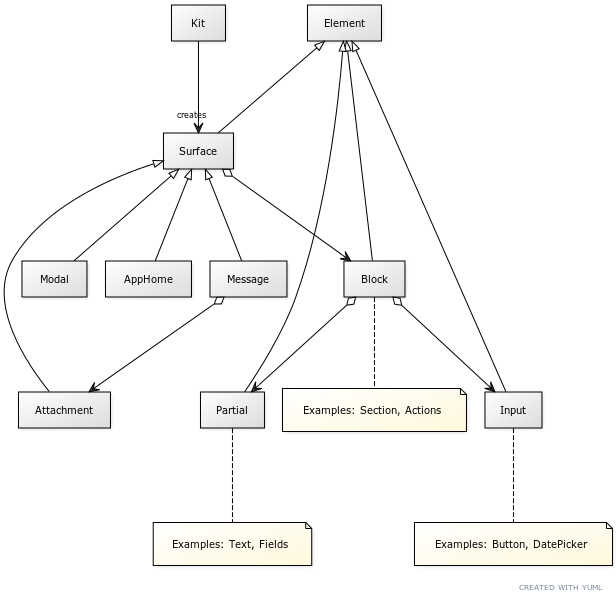
See the YUML
[Kit]-creates>[Surface]
[Surface]^[Message]
[Surface]^[Modal]
[Surface]^[AppHome]
[Surface]^[Attachment]
[Element]^[Surface]
[Element]^[Block]
[Element]^[Input]
[Element]^[Partial]
[Surface]<>->[Block]
[Message]<>->[Attachment]
[Block]<>->[Input]
[Block]<>->[Partial]
[Input]-[note:Examples: Button
DatePicker {bg:cornsilk}]
[Partial]-[note: Examples: Text
Fields {bg:cornsilk}]
[Block]-[note: Examples: Section
Actions {bg:cornsilk}]
### Contributions
Contributions welcome to support new elements, add tests, improve, etc.
When implementing elements, to fit within the existing DSL, consider these points:
- To set instantiated sub-element objects, provide a `set`-prefixed setter (e.g., `setText(Text $text): self`).
- Should return `self` to support chaining.
- Should set the parent (e.g., `setParent()`) of the sub-element to `$this`.
- To set simple sub-element objects, provide a simple setter method (e.g., `title(string $title): self`).
- Should be in addition to the `set`-prefixed setter.
- Should be named after the property being set.
- Should return `self` to support chaining.
- Should have a maximum of 2 parameters.
- Should call the regular setter (e.g., `return $this->setText(new PlainText($title));`).
- To set other non-element properties, provide a simple setter method (e.g., `url(string $url): self`).
- Should be named after the property being set.
- Should return `self` to support chaining.
- To create new sub-elements attached to the current one, provide a `new`-prefixed factory method (e.g., `newImage(): Image`).
- Should return an instance of the sub-element.
- Should set the parent (e.g., `setParent()`) of the sub-element to `$this` before returning.
- Should support a `$blockId` parameter if it's a Block or an `$actionId` parameter if it's an Input element.
- All element types should be defined in the `Type` class and registered in relevant constant lists to be appropriately validated.
- If you implement a custom constructor for an element, make sure all the parameters are optional.