# woobase
Woocommerce module for Easymanage app
Recommended version Woocommerce 3.6
Everybody knows Google Drive power and how to work with documents there, eh?
If you dont know about its not a problem, check this link WIKI
One of the most great thing – its that it let you keep your documents,
in one place, access from anywhere and share with anybody.
Manual Installation
Download code from repo. FTP to your webstore root and copy it content to wp-content/plugins/easymanage.
Activate plugin in wordpress adminpanel(Plugins -> Installed Plugins)
Our support forum
Setup Google Sheet add-onn
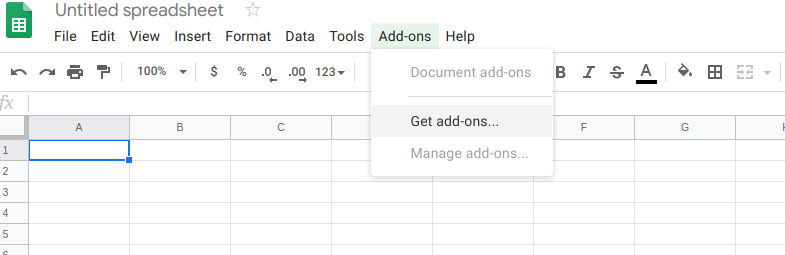
Open Google Spreadsheet -> Menu -> Add-ons -> Get add-ons
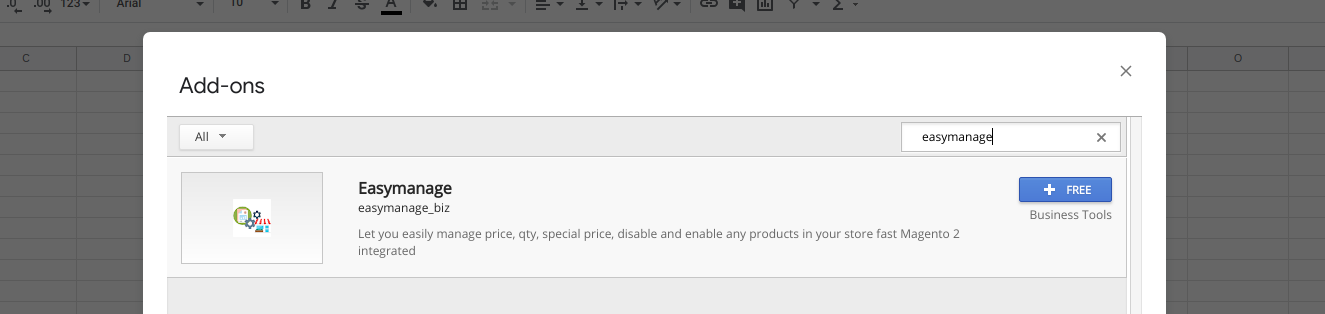
In search field type "Easymanage", find add-on and press "+ Free" button
Go through OAuth process, and you are done.
More info about here
Youtube videos - https://www.youtube.com/channel/UCFYmDRJqQU8J6dFUxlRV1zg
Documentation - https://docs.google.com/document/d/1XYKxhMBHxng4VYdRcTmyT86cE5nG61XPq7OLr_vZ434/edit?usp=sharing