# easwoocommerce
 Plugin for Woocommerce (Wordpress)
EAS EU compliance plugin.
Plugin for Woocommerce (Wordpress)
EAS EU compliance plugin.
EAS EU compliance plugin gives easy and unimpeded access to the whole EU market, your sales are always VAT compliant irrespective of where you sell from and your registry/legal environment.
All complicated tax schemes and situations are covered automatically – you involve yourself in making sales , not manual accounting reports
Your end-customers in EU receive full transparency regarding the price and charges due from them.
Electronic interfaces are fully covered and clearly define facilitated sales
To install this plugin follow steps:
1. Download solution in zip archive
2. Open administrators Dashboard of your WooCommerce instance.
3. Navigate to Plugins → Add new.

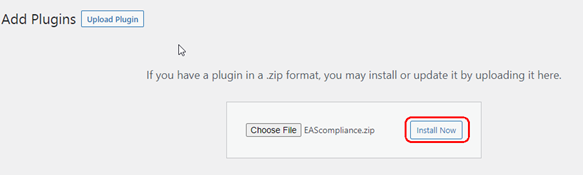
4. In the window press button “Upload plugin”

5. Press button “Choose File”.
6. Select previously downloaded file (easwoocommerce.zip).
7. Press button “Install now”
8. Once installation finished, press button “Activate plugin”

9. Installation finished. Plugin to be configured, please follow to configuration section of plugin.
10. Follow instructions in the User guide file to setup plugin.