']);
$response = $this->registryApiRequest('refresh',$apiParams);
Revise an existing registration...
$response = $this->registryApiRequest('revise',$apiParams);
**API Response**
The API response is a standard object. status->code is an http status, 200 indicating success.
status ->
(
code -> 200, // HTTP status code
message -> '(action) ok' // (action) = 'create', 'activate', 'deactivate', 'verify', 'revise'
),
registration ->
(
registry_key -> string // UUID,
registry_status -> string, // 'pending', 'trial', 'active', 'inactive', 'expired', 'terminated', 'invalid'
registry_effective -> string, // DD-MMM-YYYY effective date
registry_expires -> string, // DD-MMM-YYYY expiration date
registry_name -> string,
registry_email -> string,
registry_company -> string,
registry_address -> string,
registry_phone -> string,
registry_product -> string,
registry_title -> string,
registry_description -> string,
registry_version -> string,
registry_license -> string,
registry_count -> int,
registry_variations -> array,
registry_options -> array,
registry_domains -> array,
registry_sites -> array,
registry_transid -> string,
registry_timezone -> string,
registry_locale -> string,
registry_valid -> bool,
),
registrar ->
(
contact -> object(
name -> string // Registrar Name
email -> string // Registrar Support Email
phone -> string // Registrar Telephone
web -> string // Registrar Web Address
),
timezone -> string, // standard timezone string
locale -> string, // WordPress locale
cacheTime -> int, // in seconds, time to cache the registration response (Default Cache Time)
refreshInterval -> int, // in seconds, time before refreshing the registration (Default Refresh Time)
refreshSchedule -> string, // 'hourly', 'twicedaily', 'daily', 'twiceweekly', 'weekly', 'twicemonthly', 'monthly' - corresponding to refreshInterval
options -> array( // from settings page, registrar_options (Allow API to...)
'allow_set_key',
'allow_set_status',
'allow_set_effective',
'allow_set_expiration',
'allow_activation_update'
),
licenseCodes -> object( // may be changed by filter on registration server
L1 -> 'Lite'
L2 -> 'Basic'
L3 -> 'Standard'
L4 -> 'Professional'
L5 -> 'Enterprise'
LD -> 'Developer'
LU -> 'Unlimited'
),
notices -> object(
info -> string, // information message text
warning -> string, // warning message text
error -> string, // error message text
success -> string, // success message text
),
message -> string, // html message
),
registryHtml -> string, // html (table) of human-readable registration values
supplemental -> mixed, // supplemental data/html assigned via filters (developer's discretion).
On a successful response (status->code = 200), the SDK will automatically cache the registration data and schedule the next refresh event (you do not have to do this).
_notices_ may be set (according to severity) to indicate an expiration or pending expiration and should be displayed to the user. Typically, only one notice will be set but they can be set via the `eacSoftwareRegistry_api_registration_notices` filter.
_message_ is set via the `eacSoftwareRegistry_api_registration_message` filter.
_supplemental_ is set via the `eacSoftwareRegistry_api_registration_supplemental` filter.
On an error response, an additional element is included:
error ->
(
code -> 'error_code',
message -> 'error message'
),
error->message may be more informative than status->message.
Errors may be handled with something like:
if ($this->is_api_error($response))
{
echo "Error ".$response->error->code." : ".$response->error->message."
";
}
#### Methods, Hooks, and Callbacks
Useful methods built into the SDK...
$this->isValidRegistration();
// Returns boolean
if ( $this->isValidRegistration() ) {...}
$this->getRegistrationKey();
// Returns the current registration key
$registrationKey = $this->getRegistrationKey();
$this->getCurrentRegistration();
// Returns the current registration object (above response object)
$currentRegistration = $this->getCurrentRegistration();
$this->isRegistryValue($keyName);
// Returns the value of a specific registry key
$regStatus = $this->isRegistryValue( 'status ');
$this->isRegistryValue($keyName, $value, $test);
// Returns boolean comparison of the value of a registry key ($test is '=|eq' (default), '<|lt', '>|gt', '<=|le', '>=|ge')
if ( $this->isRegistryValue('license', 'L3', '>=') ) {...}
Several hooks are available to customize or react to registration events.
In WordPresss, there are several actions and filters, for file based projects there are corresponding callback methods...
filter/callback: (your_productid)_api_remote_request( $request, $endpoint )
@param array $request ['method'=>, 'timeout'=>, 'redirection'=>, 'sslverify'=>, 'headers'=>, 'body'=>]
@param string $endpoint create, activate, deactivate, verify, refresh, revise
@return array request body
action/callback: (your_productid)_api_remote_response( $body, $request, $endpoint )
@param array $body response body
@param array $request ['method'=>, 'timeout'=>, 'redirection'=>, 'sslverify'=>, 'headers'=>, 'body'=>]
@param string $endpoint create, activate, deactivate, verify, refresh, revise
action/callback: (your_productid)_api_remote_$endpoint( $body, $request, $endpoint )
@param array $body response body
@param array $request ['method'=>, 'timeout'=>, 'redirection'=>, 'sslverify'=>, 'headers'=>, 'body'=>]
@param string $endpoint create, activate, deactivate, verify, refresh, revise
action/callback: (your_productid)_api_remote_error( $error, $request, $endpoint )
@param object $error {status:{}, error: {}}
@param array $request ['method'=>, 'timeout'=>, 'redirection'=>, 'sslverify'=>, 'headers'=>, 'body'=>]
@param string $endpoint create, activate, deactivate, verify, refresh, revise
action/callback: (your_productid)_update_registration($registration)
@param array $registration registration object
action/callback: (your_productid)_purge_registration()
#### What You Need To Do
**For WordPress Projects**
In your class constructor/initialization, add an action to fulfill the registration refresh scheduled by the `scheduleRegistryRefresh()` method in `(your_productid).wordpress.trait.php`
\add_action( '(your_productid)_registry_refresh', array($this, 'refreshRegistration') );
You can add this and other hooks with:
$this->addSoftwareRegistryHooks();
The `addSoftwareRegistryHooks()` method adds:
\add_action( '(your_productid)_registry_refresh', array($this, 'refreshRegistration') );
\add_filter( '(your_productid)_is_registered', array($this, 'isValidRegistration') );
\add_filter( '(your_productid)_registration_key', array($this, 'getRegistrationKey') );
\add_filter( '(your_productid)_registration', array($this, 'getCurrentRegistration') );
\add_filter( '(your_productid)_registry_value', array($this, 'isRegistryValue'), 10, 4 );
Example:
include "(your_productid)_registration/(your_productid)_registration.includes.php";
class implements \(your_namespace)\Interfaces\(your_productid)_registration
{
use \(your_namespace)\Traits\(your_productid)_registration_wordpress;
...
public function __construct()
{
$this->addSoftwareRegistryHooks();
}
}
Note:
If your primary plugin file name is not the same as the product id, edit your `(your_productid).interface.tpl` file and change the `SOFTWARE_REGISTRY_FILENAME` constant.
const SOFTWARE_REGISTRY_FILENAME = 'myPluginName';
**For Other File Based Projects**
The `scheduleRegistryRefresh()` method in `(your_productid)_registration.filebased.trait.php` is called to schedule the next registration refresh. This method can be modified to schedule a cron event to execute the refresh at a future time. The scheduled event may run `(your_productid)_registration.refresh.php ` from the command line to refresh the registration.
When left as is, the `checkRegistryRefreshEvent()` method uses the key file to check for a needed registration refresh.
In your class constructor or destructor add:
$this->checkRegistryRefreshEvent();
to trigger the refresh check.
Example:
include "(your_productid)_registration/(your_productid)_registration.includes.php";
class implements \(your_namespace)\Interfaces\(your_productid)_registration
{
use \(your_namespace)\Traits\(your_productid)_registration_filebased;
...
public function __destruct()
{
/* if necessary, set HOME/USERPROFILE and/or TMP/TMPDIR/TEMP directories */
// putenv('HOME={your home directory}'); // where the registration key is stored, otherwise use $_SERVER['DOCUMENT_ROOT']
// putenv('TMP={your temp directory}'); // where the registration data is stored, otherwise use sys_get_temp_dir()
$this->checkRegistryRefreshEvent();
}
}
#### User Interface
Of course, the user interface is up to you, the developer, but you may look at (and maybe use) the registration UI trait included with _{eac}Doojigger_ and used by _{eac}SoftwareRegistry_ as an example.
see:
+ .../Traits/swRegistrationUI.trait.php in the eacDoojigger folder.
+ .../Extensions/class.eacSoftwareRegistry_registration.extension.php in the eacSoftwareRegistry folder.
### Installation
**{eac}SoftwareRegistry Distribution SDK** is an extension plugin to and requires installation and registration of [{eac}SoftwareRegistry](https://swregistry.earthasylum.com/).*
#### Automatic Plugin Installation
This plugin is available from the [WordPress Plugin Repository](https://wordpress.org/plugins/search/earthasylum/) and can be installed from the WordPress Dashboard » *Plugins* » *Add New* page. Search for 'EarthAsylum', click the plugin's [Install] button and, once installed, click [Activate].
See [Managing Plugins -> Automatic Plugin Installation](https://wordpress.org/support/article/managing-plugins/#automatic-plugin-installation-1)
#### Upload via WordPress Dashboard
Installation of this plugin can be managed from the WordPress Dashboard » *Plugins* » *Add New* page. Click the [Upload Plugin] button, then select the eacsoftwareregistry-distribution-sdk.zip file from your computer.
See [Managing Plugins -> Upload via WordPress Admin](https://wordpress.org/support/article/managing-plugins/#upload-via-wordpress-admin)
#### Manual Plugin Installation
You can install the plugin manually by extracting the eacsoftwareregistry-distribution-sdk.zip file and uploading the 'eacsoftwareregistry-distribution-sdk' folder to the 'wp-content/plugins' folder on your WordPress server.
See [Managing Plugins -> Manual Plugin Installation](https://wordpress.org/support/article/managing-plugins/#manual-plugin-installation-1)
#### Settings
Options for this extension will be added to the *Software Registry » Settings » Distribution* tab.
### Screenshots
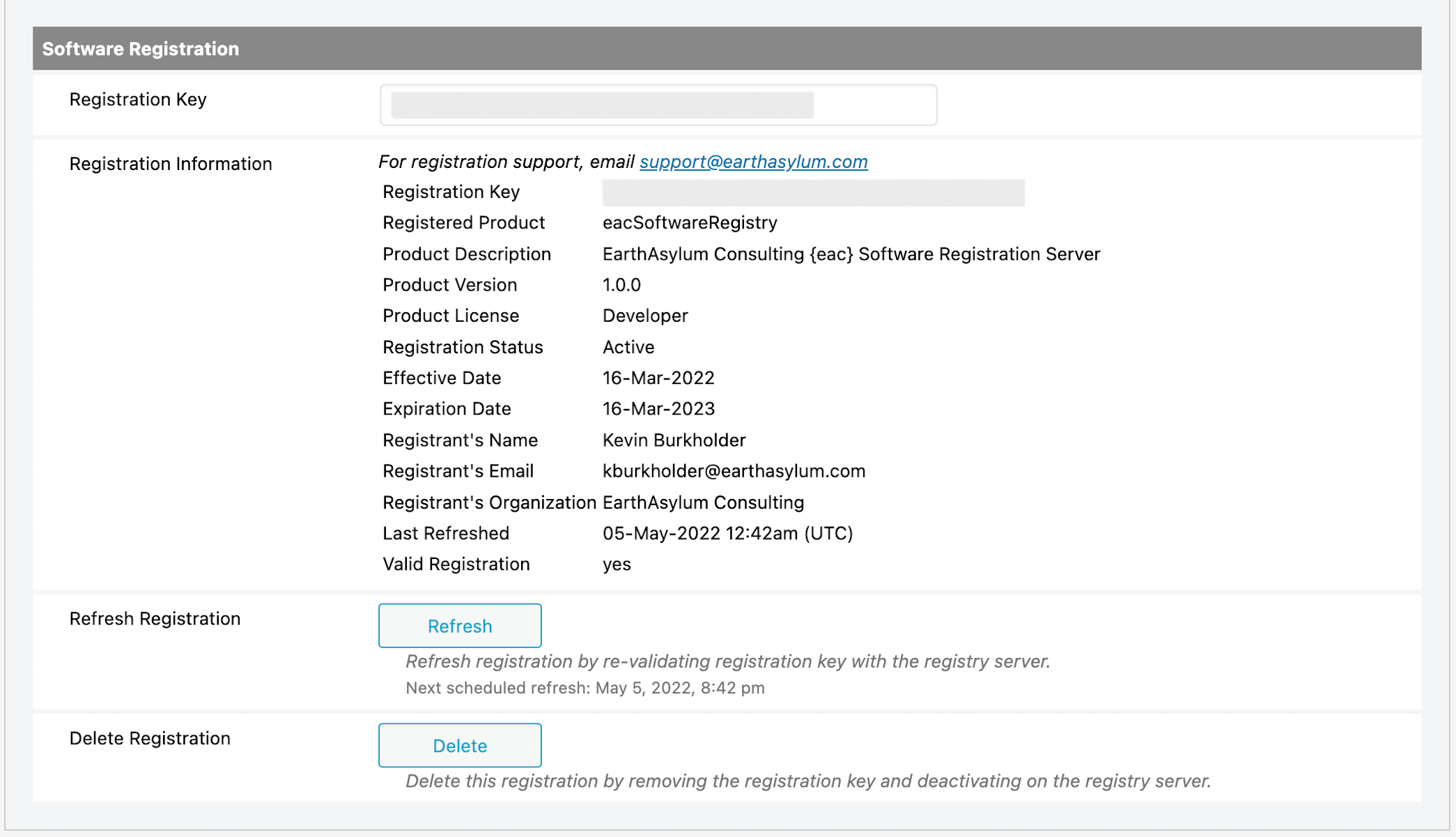
1. {eac}SoftwareRegistry Distribution

2. UI Example 1 (Activate/Register):

3. UI Example 2 (Refresh/Delete):
### Other Notes
#### See Also
+ [{eac}SoftwareRegistry – Software Registration Server](https://swregistry.earthasylum.com/software-registration-server/)
+ [{eac}SoftwareRegistry Custom Hooks](https://swregistry.earthasylum.com/software-registry-hooks/)
### Copyright
#### Copyright © 2019-2025, EarthAsylum Consulting, distributed under the terms of the GNU GPL.
This program is free software: you can redistribute it and/or modify it under the terms of the GNU General Public License as published by the Free Software Foundation, either version 3 of the License, or (at your option) any later version.
This program is distributed in the hope that it will be useful, but WITHOUT ANY WARRANTY; without even the implied warranty of MERCHANTABILITY or FITNESS FOR A PARTICULAR PURPOSE. See the GNU General Public License for more details.
You should receive a copy of the GNU General Public License along with this program. If not, see [https://www.gnu.org/licenses/](https://www.gnu.org/licenses/).