## {eac}Doojigger Readme Extension for WordPress  
[![EarthAsylum Consulting](https://img.shields.io/badge/EarthAsylum-Consulting-0?&labelColor=6e9882&color=707070)](https://earthasylum.com/)

[![WordPress](https://img.shields.io/badge/WordPress-Plugins-grey?logo=wordpress&labelColor=blue)](https://wordpress.org/plugins/search/EarthAsylum/)
[![eacDoojigger](https://img.shields.io/badge/Requires-%7Beac%7DDoojigger-da821d)](https://eacDoojigger.earthasylum.com/)

<details><summary>Plugin Header</summary>

Plugin URI:         https://eacdoojigger.earthasylum.com/eacreadme/  
Author:             [EarthAsylum Consulting](https://www.earthasylum.com)  
Stable tag:         1.4.2  
Last Updated:       04-Apr-2024  
Requires at least:  5.5.0  
Tested up to:       6.5  
Requires PHP:       7.4  
Requires EAC:       2.0  
Contributors:       [kevinburkholder](https://profiles.wordpress.org/kevinburkholder)  
License:            GPLv3 or later  
License URI:        https://www.gnu.org/licenses/gpl.html  
Tags:               readme, markdown, parsedown, {eac}Doojigger, code-highlighting, github, svn  
WordPress URI:      https://wordpress.org/plugins/eacreadme  
GitHub URI:         https://github.com/EarthAsylum/eacReadme  

</details>

> {eac}Readme loads and translates a WordPress markdown 'readme.txt' file providing shortcodes to access header lines and section blocks.

### Description

_{eac}Readme_ is an [{eac}Doojigger](https://eacDoojigger.earthasylum.com/) extension which loads and translates a WordPress markdown 'readme.txt' file providing shortcodes to access header lines and section blocks.

#### Shortcode Usage

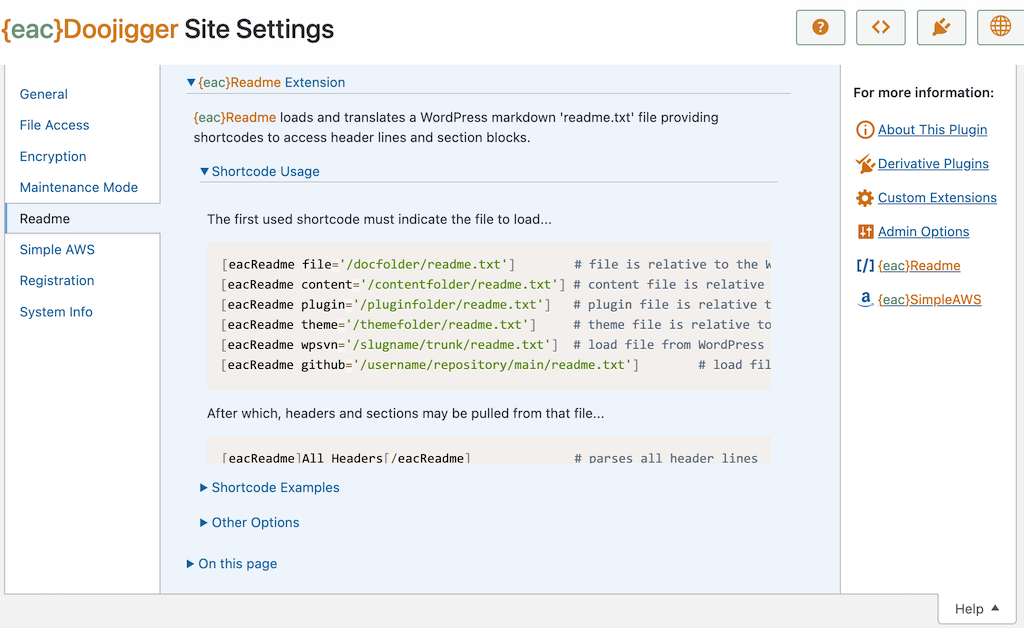
The first used shortcode must indicate the file to load...

    [eacReadme file='/docfolder/readme.txt']        # file is relative to the WordPress document root folder
    [eacReadme content='/contentfolder/readme.txt'] # content file is relative to the WordPress content folder (wp-content/)
    [eacReadme plugin='/pluginfolder/readme.txt']   # plugin file is relative to the WordPress plugins folder (wp-content/plugins/)
    [eacReadme theme='/themefolder/readme.txt']     # theme file is relative to the WordPress themes folder (wp-content/themes/)
    [eacReadme wpsvn='/slugname/trunk/readme.txt']  # load file from WordPress SVN repository
    [eacReadme github='/owner/repository/main/readme.txt']        # load file from github repository

After which, headers and sections may be pulled from that file...

    [eacReadme]All Headers[/eacReadme]              # parses all header lines
    [eacReadme]headerName[/eacReadme]               # gets the value of the named header line

    [eacReadme]All Sections[/eacReadme]             # parses all section blocks
    [eacReadme]sectionName[/eacReadme]              # parses the content of the named section block
    [eacReadme]sectionName/sub-section[/eacReadme]  # parses the content of the named sub-section within section block

One shortcode can do it all...

    [eacReadme plugin='/pluginfolder/readme.txt']Document[/eacReadme]    # loads the file and parses the entire document

Or load the entire file as a single code block...

    [eacReadme theme='/themefolder/functions.php']Code File[/eacReadme]

#### Shortcode Examples

Get header values...

    [eacReadme]Contributors[/eacReadme]
    [eacReadme]Donate link[/eacReadme]
    [eacReadme]Requires at least[/eacReadme]
    [eacReadme]Stable tag[/eacReadme]

Get unnamed segments...

    [eacReadme]Title[/eacReadme]                    # gets the '=== plugin name ===' line (before headers)
    [eacReadme]Short Description[/eacReadme]        # gets the short description (between headers and first section block)

Get section blocks...

    [eacReadme]Description[/eacReadme]
    [eacReadme]Installation[/eacReadme]
    [eacReadme]Screenshots[/eacReadme]
    [eacReadme]Changelog[/eacReadme]

Get multiple blocks and/or sub-sections...

    [eacReadme plugin='/eacReadme/readme.txt']Short Description,Description[/eacReadme]
    [eacReadme plugin='/eacReadme/readme.txt']Short Description,Description/Shortcode Examples[/eacReadme]

Get a file as a code block...

    [eacReadme theme='/my-child-theme/functions.js' lang='js']Code File[/eacReadme]
    [eacReadme theme='/my-child-theme/style.css' lang='css']Code File[/eacReadme]

#### Other Options

Change the default cache time-to-live by adding to wp-config.php:

    define('EAC_README_CACHE_LIFETIME',$seconds);   # default: 1-day (DAY_IN_SECONDS).

Override the default cache time-to-live

    [eacReadme ttl=$seconds ...]                    # minimum: 1-minute (MINUTE_IN_SECONDS).

Set the default GitHub access token (for private repositories):

    define('GITHUB_ACCESS_TOKEN',$token);

Set/override the GitHub access token

    [eacReadme token=$token ...]

Override option to parse markdown when retrieving a segment

    [eacReadme parse='true|false' ...]

Set class='language-*' on code blocks

    [eacReadme lang='php|js|css|html' ...]

#### Translating Header/Section Names

Translate header/section names when retrieving _All Headers_, _All Sections_, or _Document_

    [eacReadme translate='name=newname,...']
    [eacReadme translate='Requires at least=Requires WordPress Version,Screenshots=Screen Shots']

Erase default translation table

    [eacReadme translate='no|none|false']

Default translation table

    [
        'Headers'               => 'Document Header',
        'Plugin URI'            => 'Homepage',
        'Stable tag'            => 'Current Version',
        'Requires at least'     => 'Requires WordPress Version',
        'Tested up to'          => 'Compatible up to',
        'Requires PHP'          => 'Requires PHP Version',
        'WC requires at least'  => 'Requires WooCommerce',
        'Requires EAC'          => 'Requires {eac}Doojigger',
        'Changelog'             => 'Change Log',
        'Screenshots'           => 'Screen Shots',
    ];

#### Readme Format

{eac}Readme expects a well-formed readme.txt file that follows the [WordPress readme file standard](https://developer.wordpress.org/plugins/wordpress-org/how-your-readme-txt-works)...

    === title ===
    header: value  
    header: value  
    short Description
    == section ==
    = sub-section =
    
...but supports some extensions to that standard:

+   Author & Author URI
    +   `Author` header may be a simple name or a markdown link:
        +   `[Author](Author URI)`.
    +   The `Author` & `Author URI` headers, if present, are combined as a markdown `[Author](Author URI)`.

+   Homepage
    +   Looks for `Homepage` or `Plugin URI`.

+   Version
    +   Looks for `Version` or `Stable tag`.

+   Contributors
    +   `profileId` - wordpress profile (standard)
    +   `profileId@youremaildomain.com` - gravatar profile
    +   `profileId@wordpress` - wordpress profile
    +   `profileId@gravatar` - gravatar profile
    +   `profileId@github` - github profile
    +   `[display name](mailto:email@address.com)` or `[display name](http://www.gravatar.com/profileId/)`
    +   `[display name](http://profiles.wordpress.org/profileId/)`
    +   `[your name]((http://your/profile/url)`

+   A "banner" section may be included between the top title line and the first header line.

```
    === title ===
   [![banner](//image_url)](//link_url)
    header: value  
    header: value  
    short Description
    == section ==
    = sub-section =
```

+   The header block may be enclosed in an html `<header>` or `<details>` tag, opening and closing each on a single line. These tags are ignored by the eacParseReadme parser but may be beneficial if posting your readme file elseware. See [{eac}Readme on Github](https://github.com/EarthAsylum/eacReadme).

>   Note: these extensions are not supported by the WordPress Plugin Repository.

{eac}Readme supports standard markdown (readme.md) formatting for section identification.
+   `=== title ===` and `## title` are equivalent
+   `== section ==` and `### section` are equivalent
+   `= sub-section =` and `#### sub-section` are equivalent


#### Output HTML

When retrieving the header block with ...

`[eacReadme]All Headers[/eacReadme]` or `\eacParseReadme::getAllHeaders()`

Or when retrieving all sections with ...

`[eacReadme]All Sections[/eacReadme]` or `\eacParseReadme::getAllSections()`
    
Or when retrieving the entire document with ...

`[eacReadme]Document[/eacReadme]` or `\eacParseReadme::getDocument()`

Additional html tags and classes are added, including wrapping blocks within a `<details>` tags, adding `readme-*` class names, and adding `<a>` anchor links.


#### WordPress Actions

3rd-party actors may load and use the parser class included in {eac}Readme...

        do_action('eacReadme_load_parser');     // loads \eacParseReadme static class
        if (class_exists('\eacParseReadme'))
        {
            \eacParseReadme::loadFile($readme,$context);
            $html_document  = \eacParseReadme::getDocument();
            $title          = \eacParseReadme::getTitle();
            $version        = \eacParseReadme::getVersion();
            $donations      = \eacParseReadme::getHeader('donate_link');
            $description    = \eacParseReadme::getSection('description');
        }


### Installation

**{eac}Doojigger Readme Extension** is an extension plugin to and requires installation and registration of [{eac}Doojigger](https://eacDoojigger.earthasylum.com/).

#### Automatic Plugin Installation

This plugin is available from the [WordPress Plugin Repository](https://wordpress.org/plugins/search/earthasylum/) and can be installed from the WordPress Dashboard » *Plugins* » *Add New* page. Search for 'EarthAsylum', click the plugin's [Install] button and, once installed, click [Activate].

See [Managing Plugins -> Automatic Plugin Installation](https://wordpress.org/support/article/managing-plugins/#automatic-plugin-installation-1)

#### Upload via WordPress Dashboard

Installation of this plugin can be managed from the WordPress Dashboard » *Plugins* » *Add New* page. Click the [Upload Plugin] button, then select the eacreadme.zip file from your computer.

See [Managing Plugins -> Upload via WordPress Admin](https://wordpress.org/support/article/managing-plugins/#upload-via-wordpress-admin)

#### Manual Plugin Installation

You can install the plugin manually by extracting the eacreadme.zip file and uploading the 'eacreadme' folder to the 'wp-content/plugins' folder on your WordPress server.

See [Managing Plugins -> Manual Plugin Installation](https://wordpress.org/support/article/managing-plugins/#manual-plugin-installation-1)

#### Settings

Once installed and activated options for this extension will show in the 'General' tab of {eac}Doojigger settings.


### Screenshots

1. Readme Extension
![{eac}Readme Extension](https://ps.w.org/eacreadme/assets/screenshot-1.png)

1. Readme Help
![{eac}Readme Help](https://ps.w.org/eacreadme/assets/screenshot-2.png)


### Other Notes

#### Additional Information

+   {eac}Readme is an extension plugin to and requires installation and registration of [{eac}Doojigger](https://eacDoojigger.earthasylum.com/).
+   {eac}Readme uses [Parsedown 1.7.4](http://parsedown.org/), Copyright (c) 2013-2018 [Emanuil Rusev](erusev.com)
+   {eac}Readme uses [Prism syntax highlighter](https://prismjs.com/), Copyright (c) 2012 Lea Verou

+   The [{eac}SoftwareRegistry Software Product Taxonomy](https://swregistry.earthasylum.com/software-taxonomy/) plugin uses {eac}Readme to parse readme markdown files hosted on Github to provide plugin information and automated updates to WordPress for self-hosted plugins.