# Google Doc-Style Gutenberg Block Commenting
> **⚠️ Note:** This is a beta version. Use it for contributions only.
## Critical Importance of Google doc-style Commenting Plugin
Did you know that 35% of the web uses WordPress from stand-alone blog posts to content-intensive news sites and more? But, publishing content on WordPress is not a simple exercise. One needs to create content, and then get suggestions from all stakeholders, and implement these. But it is not over yet. In most cases, stakeholders will take one final look at the content, again place comments where necessary, and ask content creators to make the necessary changes. Typically, this review/validation process becomes even more time consuming because it does not happen in a consistent manner.
Imagine that you are creating a post, which you have published as a draft. During the review process, the stakeholder will take a look and more often than not suggest changes via a Word/Google doc. The content creator takes a look at the comments, makes the necessary changes and the stakeholder again takes a look at the revised draft. If needed, more revisions are sought, using the same process.
But not anymore! WordPress Google Doc-Style Gutenberg Block Commenting Plugin is built to streamline the comments process in a Google-doc style, wherein feedback/suggestion comments can be placed from within the WordPress platform, by choosing the specific content areas, where changes need to be made.

Multidots recognizes the need for a plugin that smoothens the comments process and we created a plugin solution that leverages the features of the native Gutenberg editor in WordPress to place comments. This plugin allows client comments or key stakeholders’ comments to be placed on the specific text in Gutenberg blocks. This is a beta version and we have made it publicly available to the WordPress community. While we have done all the research and identified specific needs that this plugin will address, we believe the community’s participation will further enhance the comments plugin features.

 ## Key Features
### Comment in Gutenberg Block

Place comments on default Gutenberg paragraph and header blocks that are a part of page/post. It will be as easy as clicking and typing in your comment. No time wastage.
### Comment Activity

We keep track of all comment activity with this WordPress plugin. You get a history of comments including who placed the comment, when it was placed and where.
### Comment Notification

If someone resolves a comment thread on a particular page/post, all the participants of that specific thread will immediately get a notification through email. Suggestions don’t fall through the gap.
### Comment Resolution

This Google-doc style comments plugin gives users the option of not only adding comments but also editing, replying to, and resolving comments in a page/post. It offers you complete flexibility.
### Comments Hide/Show

This Google-doc style comments plugin gives users the option of not only adding comments but also editing, replying to, and resolving comments in a page/post. It offers you complete flexibility.
## How to Use
Step by step guide to comment on post/page in WordPress Platform.
### Step 1
Install the latest WordPress (should be 5.X or newer)
### Step 2
Download, install & activate the plugin.
### Step 3
Create a new or edit an existing page/post.
### Step 4
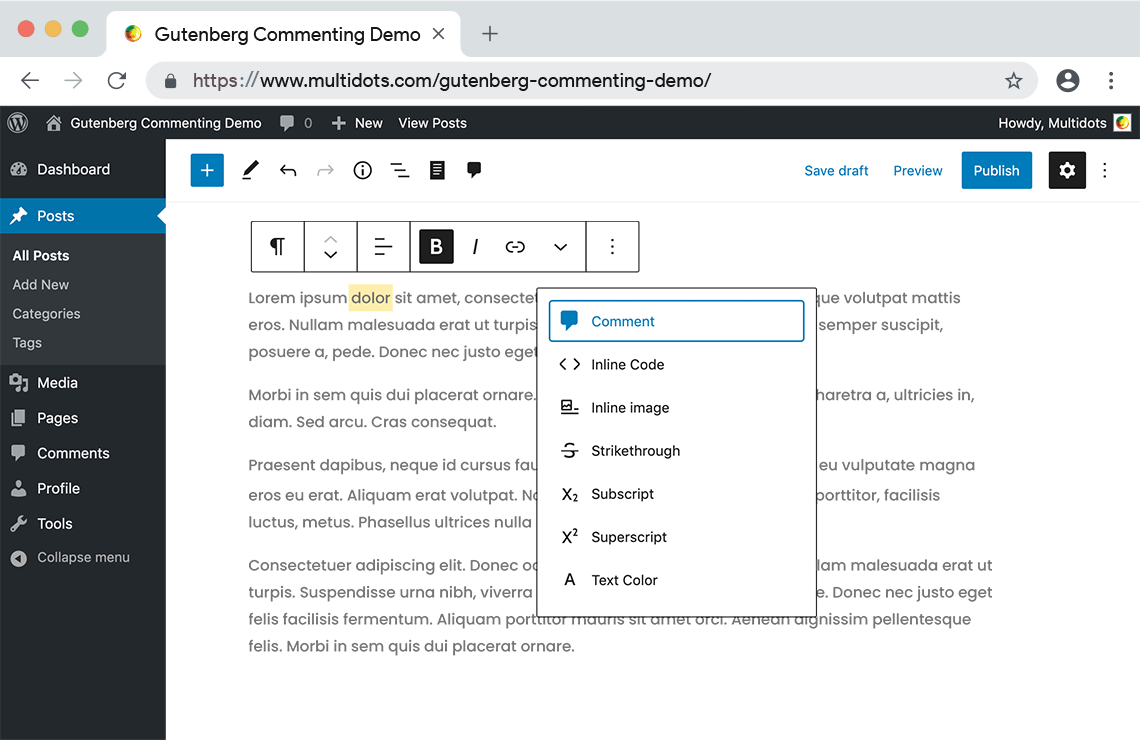
Select text to comment on.
### Step 5
Open a dropdown menu and selext 'Comment' option to start commenting.
## Gutenberg Blocks Compatibility
This plugin is compatible with a range of Gutenberg blocks allowing comments placement across a large-section of your content.
* Paragraph Block
* List Block
* Table Block
* Headings Block
* Quote Block
* Image Block (caption)
* Gallery Block (Captions)
* Cover Block
* Audio Block (Caption)
* File Block (File name)
* Pullquote Block
* Verse Block
* Button Block
* Media & Text
## Require Environment

## How to Contribute
All type of contributions from are most welcome.
- Fork the repository to your account (you will get this option at top right of this page);
- Create a branch into your fork repository like `development` if it exists else from master.
- Take a clone of the fork repository to your local system.
- Write your clean code and test with PHPCS with `WordpressVIPMinimum` coding standard.
- Commit Your code from your local system.
- Finally, click `Pull Request` from your fork repository.
- This [github article](https://help.github.com/en/articles/creating-a-pull-request-from-a-fork) will helpful for how to submit pull request from the fork.
## Future Roadmap
The next release of this Google doc-style Gutenberg block commenting plugin will be a more optimized version with far more enhanced comments features. These will be as follows:
### 1 Markup features along with the comments.
This feature will allow users to add suggestions for adding/removing certain text on a specific location. These suggestions can be placed in a popup allowing other users to see these suggestions.
### 2. Asynchronous comments
WordPress is offering a collaborative editing experience through Google Docs, so that different users are able to edit the same content of a page/post at the same time. To keep in step with this WordPress development, we are also planning an update wherein different users can add comments on a particular Gutenberg content block at the same time through the Content Editor.
We hope the “Comment” feature will help manage editorial flow within Gutenberg blocks. We will appreciate bug reports and any other contributions that can enhance the value of this Gutenberg Google-doc style comments plugin. Please refer to this guide for more information about how to get involved.
We hope the “Comment” feature will help manage editorial flow within Gutenberg blocks. We will appreciate bug reports and any other contributions that can enhance the value of this Gutenberg Google-doc style comments plugin. Please refer to this guide for more information about how to get involved.
## Support
This repository is not for support. Please use it for contributions only. To get help/support, please email us at [help@multidots.com](mailto:help@multidots.com)
## License
[GPL-3.0](LICENSE) © 2020 Multidots
## Key Features
### Comment in Gutenberg Block

Place comments on default Gutenberg paragraph and header blocks that are a part of page/post. It will be as easy as clicking and typing in your comment. No time wastage.
### Comment Activity

We keep track of all comment activity with this WordPress plugin. You get a history of comments including who placed the comment, when it was placed and where.
### Comment Notification

If someone resolves a comment thread on a particular page/post, all the participants of that specific thread will immediately get a notification through email. Suggestions don’t fall through the gap.
### Comment Resolution

This Google-doc style comments plugin gives users the option of not only adding comments but also editing, replying to, and resolving comments in a page/post. It offers you complete flexibility.
### Comments Hide/Show

This Google-doc style comments plugin gives users the option of not only adding comments but also editing, replying to, and resolving comments in a page/post. It offers you complete flexibility.
## How to Use
Step by step guide to comment on post/page in WordPress Platform.
### Step 1
Install the latest WordPress (should be 5.X or newer)
### Step 2
Download, install & activate the plugin.
### Step 3
Create a new or edit an existing page/post.
### Step 4
Select text to comment on.
### Step 5
Open a dropdown menu and selext 'Comment' option to start commenting.
## Gutenberg Blocks Compatibility
This plugin is compatible with a range of Gutenberg blocks allowing comments placement across a large-section of your content.
* Paragraph Block
* List Block
* Table Block
* Headings Block
* Quote Block
* Image Block (caption)
* Gallery Block (Captions)
* Cover Block
* Audio Block (Caption)
* File Block (File name)
* Pullquote Block
* Verse Block
* Button Block
* Media & Text
## Require Environment

## How to Contribute
All type of contributions from are most welcome.
- Fork the repository to your account (you will get this option at top right of this page);
- Create a branch into your fork repository like `development` if it exists else from master.
- Take a clone of the fork repository to your local system.
- Write your clean code and test with PHPCS with `WordpressVIPMinimum` coding standard.
- Commit Your code from your local system.
- Finally, click `Pull Request` from your fork repository.
- This [github article](https://help.github.com/en/articles/creating-a-pull-request-from-a-fork) will helpful for how to submit pull request from the fork.
## Future Roadmap
The next release of this Google doc-style Gutenberg block commenting plugin will be a more optimized version with far more enhanced comments features. These will be as follows:
### 1 Markup features along with the comments.
This feature will allow users to add suggestions for adding/removing certain text on a specific location. These suggestions can be placed in a popup allowing other users to see these suggestions.
### 2. Asynchronous comments
WordPress is offering a collaborative editing experience through Google Docs, so that different users are able to edit the same content of a page/post at the same time. To keep in step with this WordPress development, we are also planning an update wherein different users can add comments on a particular Gutenberg content block at the same time through the Content Editor.
We hope the “Comment” feature will help manage editorial flow within Gutenberg blocks. We will appreciate bug reports and any other contributions that can enhance the value of this Gutenberg Google-doc style comments plugin. Please refer to this guide for more information about how to get involved.
We hope the “Comment” feature will help manage editorial flow within Gutenberg blocks. We will appreciate bug reports and any other contributions that can enhance the value of this Gutenberg Google-doc style comments plugin. Please refer to this guide for more information about how to get involved.
## Support
This repository is not for support. Please use it for contributions only. To get help/support, please email us at [help@multidots.com](mailto:help@multidots.com)
## License
[GPL-3.0](LICENSE) © 2020 Multidots