# CarNoPikcer 快运车牌号选择器
### 贡献人
黄伟高(01211115)
### 介绍
用于车牌号的选择
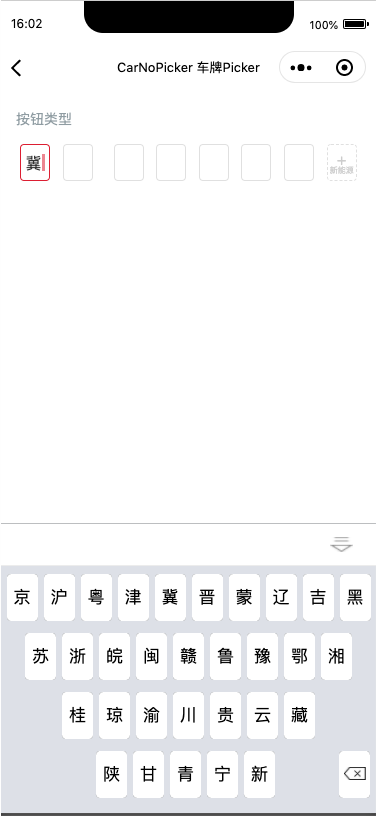 ### 引入
```jsx
import CarNoPicker from '../../components/carNoPicker';
```
## 代码演示
### 基础用法
```html
console.log(v);}>
```
```scss
.ky-keyboard {
.input-fields-wrap {
display: flex;
flex-direction: row;
align-items: center;
justify-content: space-around;
.input-field {
&:nth-child(2){
margin-right:24rpx;
}
position: relative;
display: flex;
align-items: center;
justify-content: center;
width: 56rpx;
height: 70rpx;
margin-right: 8rpx;
background: #ffffff;
border: 2rpx solid #e0e0e0;
border-radius: 8rpx;
font-size: 32rpx;
color: #333333;
&.new-power{
position: relative;
>view {
position: absolute;
width:100%;
height:100%;
display: flex;
flex-direction: column;
align-items: center;
justify-content: center;
> text {
font-size: 32rpx;
line-height: 1;
color: #cccccc;
&:last-child {
font-size: 17rpx;
color: #cccccc;
}
}
}
}
&:last-child {
margin-right: 0;
background: #ffffff;
border: 2rpx dashed #e0e0e0;
border-radius: 8rpx;
}
&.active,
&:focus {
border: 2rpx solid #dc1e32;
border-radius: 8rpx;
&::after{
position: relative;
z-index: 999;
content:'';
display: block;
width:1rpx;
height:34rpx;
border-right:3px solid #dc1e32;
animation:
cursor 1s infinite;
}
}
}
}
}
@keyframes cursor {
50% {
border-color: white;
}
}
```
## API
### 注:属性应用在组件上需要统一使用驼峰式命名,如custom-class应变为
```html
大号按钮
```
### 注:事件应用在组件上需要统一使用驼峰式命名,如bind:click/bind:search/bind:before-enter应变为
```html
this.onClick()}>大号按钮
this.onSearch()}>大号按钮
this.onBeforeEnter()}>大号按钮
```
### Options
| 属性 | 类型 | 默认值 | 必要 | 说明 |
| --------- | -------- | ------ | ---- | ---------------------------- |
| initialValue | String | '' | 否 | 车牌的值 |
| onChange | Function | -- | 否 | 车牌值发生变化后的回调函数,v:string |
### 引入
```jsx
import CarNoPicker from '../../components/carNoPicker';
```
## 代码演示
### 基础用法
```html
console.log(v);}>
```
```scss
.ky-keyboard {
.input-fields-wrap {
display: flex;
flex-direction: row;
align-items: center;
justify-content: space-around;
.input-field {
&:nth-child(2){
margin-right:24rpx;
}
position: relative;
display: flex;
align-items: center;
justify-content: center;
width: 56rpx;
height: 70rpx;
margin-right: 8rpx;
background: #ffffff;
border: 2rpx solid #e0e0e0;
border-radius: 8rpx;
font-size: 32rpx;
color: #333333;
&.new-power{
position: relative;
>view {
position: absolute;
width:100%;
height:100%;
display: flex;
flex-direction: column;
align-items: center;
justify-content: center;
> text {
font-size: 32rpx;
line-height: 1;
color: #cccccc;
&:last-child {
font-size: 17rpx;
color: #cccccc;
}
}
}
}
&:last-child {
margin-right: 0;
background: #ffffff;
border: 2rpx dashed #e0e0e0;
border-radius: 8rpx;
}
&.active,
&:focus {
border: 2rpx solid #dc1e32;
border-radius: 8rpx;
&::after{
position: relative;
z-index: 999;
content:'';
display: block;
width:1rpx;
height:34rpx;
border-right:3px solid #dc1e32;
animation:
cursor 1s infinite;
}
}
}
}
}
@keyframes cursor {
50% {
border-color: white;
}
}
```
## API
### 注:属性应用在组件上需要统一使用驼峰式命名,如custom-class应变为
```html
大号按钮
```
### 注:事件应用在组件上需要统一使用驼峰式命名,如bind:click/bind:search/bind:before-enter应变为
```html
this.onClick()}>大号按钮
this.onSearch()}>大号按钮
this.onBeforeEnter()}>大号按钮
```
### Options
| 属性 | 类型 | 默认值 | 必要 | 说明 |
| --------- | -------- | ------ | ---- | ---------------------------- |
| initialValue | String | '' | 否 | 车牌的值 |
| onChange | Function | -- | 否 | 车牌值发生变化后的回调函数,v:string |