# zego-express-engine-reactnative
[English](https://github.com/zegoim/zego-express-reactnative-sdk/blob/master/README.md) | [中文](https://github.com/zegoim/zego-express-reactnative-sdk/blob/master/README_zh.md)
ZegoExpressEngine Audio/Video ReactNative SDK is a react-native wrapper based on [ZegoExpressEngine](https://doc-en.zego.im/en/693.html) native Android / iOS SDK, providing live video and real-time audio/video services. It only needs 4 lines of code and can be easily accessed in 30 minutes.
Learn more about the solution: [https://www.zego.im](https://www.zego.im)
## 1️⃣ Apply for ZEGO AppID
Log in to [ZEGO Official Website](https://www.zego.im) to register an account, select a scenario according to your actual business needs, and obtain AppID and App Sign for initializing the SDK.
## 2️⃣ Import `zego-express-engine-reactnative` (only support react-native >= 0.60)
In your project, you can type in:
`npm install zego-express-engine-reactnative --save`
or
`yarn add zego-express-engine-reactnative`
Next, In **iOS**, you should `cd` to `ios` folder, and execute this command:
`pod install`
Now, you can use `zego-express-engine-reactnative` module in your project by using javascript or typescript(recommended)
## 3️⃣ Add device permissions
### Android
Open the file `app/src/main/AndroidManifest.xml`, and add the following contents:
```xml
```
> Note: Because Android 6.0 requires dynamic permissions for some of the more important permissions, you cannot apply for static permissions only through the `AndroidMainfest.xml` file. Therefore, you need to refer to the following code
```javascript
import {PermissionsAndroid} from 'react-native';
const granted = PermissionsAndroid.check(PermissionsAndroid.PERMISSIONS.CAMERA,
PermissionsAndroid.RECORD_AUDIO);
granted.then((data)=>{
if(!data) {
const permissions = [PermissionsAndroid.PERMISSIONS.RECORD_AUDIO, PermissionsAndroid.PERMISSIONS.CAMERA];
PermissionsAndroid.requestMultiple(permissions);
}
}).catch((err)=>{
console.log(err.toString());
})
}
```
### iOS
Choose the option TARGETS -> Info -> Custom iOS Target Properties
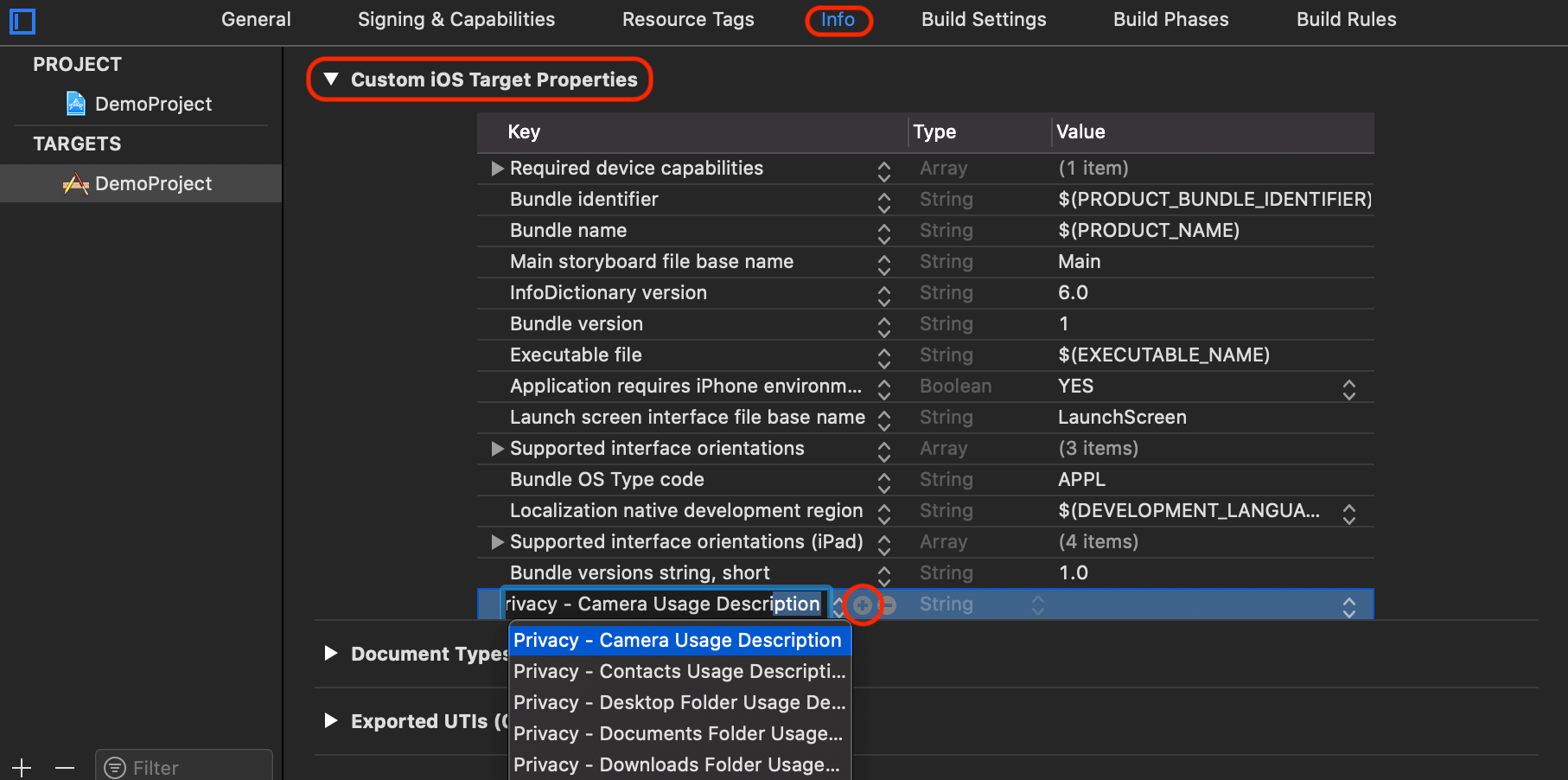
Click the + Add button to add camera and microphone permissions.
1. `Privacy - Camera Usage Description`
2. `Privacy - Microphone Usage Description`
After adding permissions, it will be as shown:

## 4️⃣ Init SDK
```javascript
import React, { Component } from 'react';
import ZegoExpressEngine from 'zego-express-engine-reactnative';
export default class App extends Component<{}> {
componentDidMount() {
ZegoExpressEngine.createEngineWithProfile({appID: 1234567890, scenario: ZegoScenario.General}).then((engine) => {
if(engine != undefined)
console.log("init sdk success");
else
console.log("init sdk failed");
});
}
}
```
## 5️⃣ FAQ
### 1. Can I integrate SDK with versions below 0.60?
No. `zego-express-engine-reactnative` only supports ReactNative versions of 0.60 or above, otherwise, please upgrade your project version.
### Do I need a manual link this native module?
No. Automatic Link is supported in versions 0.60 or above, so you **don't need** to execute this command:
`react-native link zego-express-engine-reactnative`