# yzhanHTMLParser
[![npm](https://img.shields.io/npm/v/yzhanhtmlparser)](https://www.npmjs.com/package/yzhanhtmlparser)
[![npm](https://img.shields.io/npm/dt/yzhanhtmlparser)](https://www.npmjs.com/package/yzhanhtmlparser)

[![GitHub license](https://img.shields.io/github/license/mantoufan/yzhanhtmlparser)](https://github.com/mantoufan/yzhanhtmlparser/blob/main/LICENSE)

![coverage](https://img.shields.io/badge/coverage-100%25-green)  
A streaming HTML parser based on [HTML Standard](https://html.spec.whatwg.org/multipage/parsing.html)  
一款基于 HTML 标准的流式 HTML 解析器
## Demo
You could change HTML Code and view the result in realtime.  
[Online Demo](https://mantoufan.github.io/yzhanHTMLParser)  
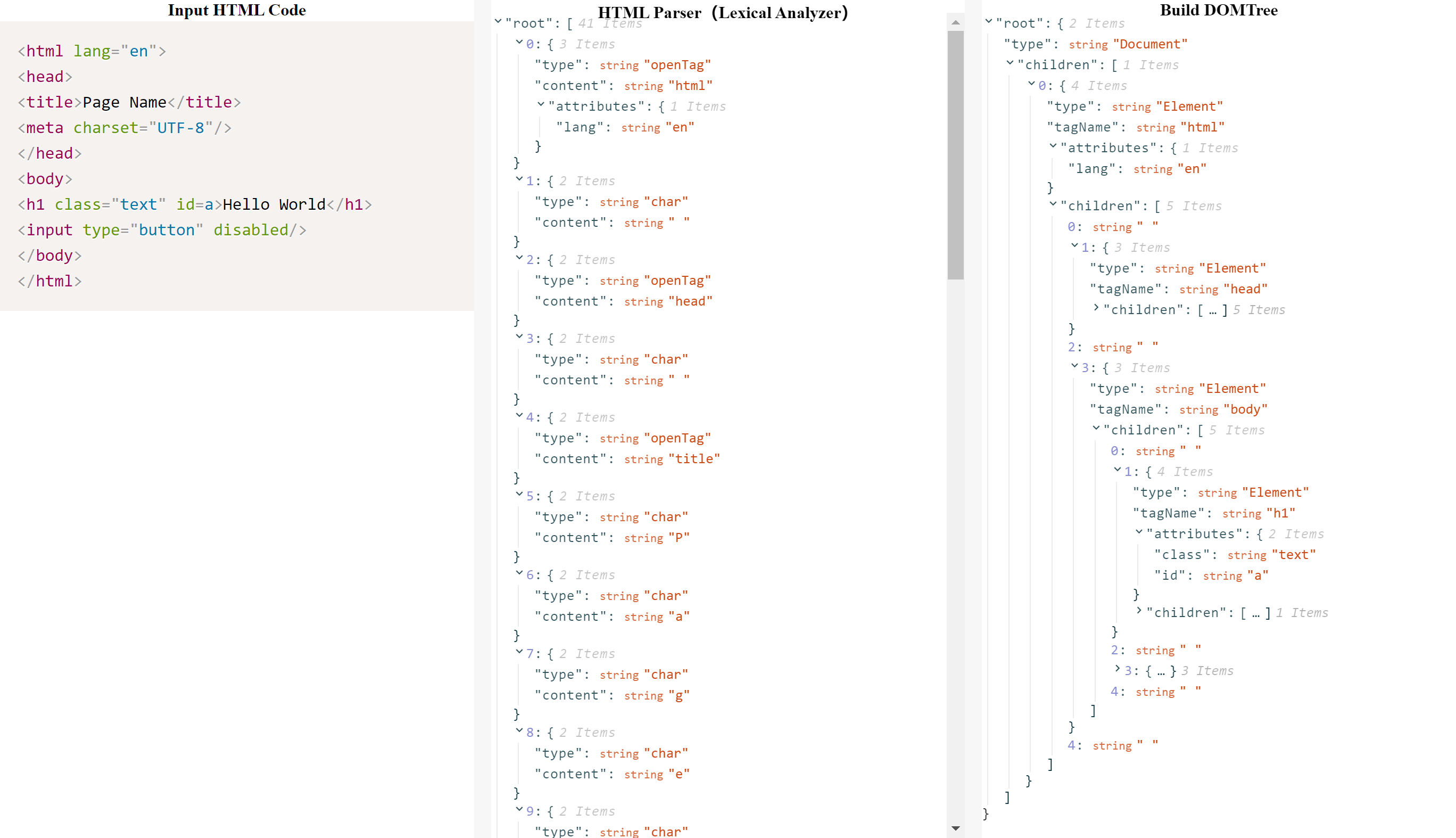
![DEMO PNG](https://s2.loli.net/2023/09/12/GXF8DAJuVMBksn4.png)
## Setup
### Node.js
```javascript
npm i yzhanhtmlparser
import yzhanHTMLParser from 'yzhanhtmlparser'
```
### Browser
```html
<script src="https://cdn.jsdelivr.net/npm/yzhanhtmlparser@latest/docs/yzhanhtmlparser.min.js"></script>
```
## Usage
### Parser · Prase
```javascript 
const code = `<html lang="en">
<head>
<title>Page Name</title>
<meta charset="UTF-8"/>
</head>
<body>
<h1 class="text" id=a>Hello World</h1>
<input type="button" disabled/>
</body>
</html>`
const parseResult = yzhanHTMLParser.parse(code)
```
### Streaming Usage
data.html
```html
<html lang="en">
<head>
<title>Page Name</title>
<meta charset="UTF-8"/>
</head>
<body>
<h1 class="text" id=a>Hello World</h1>
<input type="button" disabled/>
</body>
</html>
```
index.js
```javascript
const fs = require('node:fs')
const yzhanHTMLParser = require('yzhanhtmlparser')
const htmlParser = new yzhanHTMLParser.HtmlParser()
fs.createReadStream('./data.html', {
  encoding: 'utf8', 
  highWaterMark: 1 // * read only 1 byte once *
}).pipe(htmlParser)
htmlParser.on('data.html', char => {
  console.log(char)
})
```
Put index.js and data.html in the same folder, run:
```shell
node index.js
```
You will get line by line:
```shell
{"type":"openTag","content":"html","attributes":{"lang":"en"}}
{"type":"char","content":"\n"}
{"type":"openTag","content":"head"}
...
{"type":"selfClosingTag","content":"input","attributes":{"type":"button","disabled":"disabled"}}
{"type":"char","content":"\n"}
{"type":"closeTag","content":"body"}
{"type":"char","content":"\n"}
{"type":"closeTag","content":"html"}
```

## Utility Methods
### isMatched
Check if html tag is closed.
```javascript 
yzhanHTMLParser.isMatched('<html></html>') // True
yzhanHTMLParser.isMatched('<html>') // False
```
### buildDOMTree
```javascript
yzhanHTMLParser.buildTree('<div><a>123</a></div>')
// {"type":"Document","children":[{"type":"Element","tagName":"div","children":[{"type":"Element","tagName":"a","children":["123"]}]}]}
```
## Development
### Unit Testing
```shell
npm test
```
### Unit Testing Coverage
```shell
npm run test:coverage
```
### Build
```shell
npm run build
```
### Preview
```shell
npm run dev
```