
ysk-server
The Linux control plane for a host you own.
CLI ysk-server · HTTP API · embedded web panel.
GitHub
·
中文
·
ysk.hk
·
email@ysk.hk


Free, open, **single-host**. Install on your VPS or bare metal. The same core drives the panel, the CLI, and the API — including AI agents.
Host writes need **root** + `YSK_EXECUTE=1`. Dry-run never reports success.
## What's new in 1.1.26
- Validators: NEAR form fills `create_staking_pool` and writes `account_id` only (`validators near-account`). Cosmos form fills gaiad v28 `validator.json`. ETH Lighthouse VC example or beacon URL. Honest ADA / AVAX / Solana copy.
- `ysk-server`, `ysk-server-shared`, and `ysk-server-core` ship **1.1.26**.
## What's new in 1.1.25
- Cron: in-place host crontab edit (`source=host`); `cron update` for managed jobs. Validators: staking next steps + CLI `checklist` / `rewrite-compose` / `compose-write` / `software` / `pull` / `leftover-remove` / `stats`. Host P2P in `public_addr`.
- `ysk-server`, `ysk-server-shared`, and `ysk-server-core` ship **1.1.25**.
## What's new in 1.1.24
- Host WAN DDNS: Cloudflare / RFC 2136 / local PowerDNS upsert when the host public address changes. Probe is detect-only. Publish needs execute.
- `ysk-server`, `ysk-server-shared`, and `ysk-server-core` ship **1.1.24**.
## What's new in 1.1.23
- NEAR compose: escape `$PUB` for Compose; keep `pids_limit` in lockstep with deploy pids. Cosmos `$TRUST_*` and RAM+CPU `cpus` overlay match the same rules.
- `ysk-server`, `ysk-server-shared`, and `ysk-server-core` ship **1.1.23**.
## What's new in 1.1.22
- Validator wizard: RAM below the chain cap still lets you Install after typing the node id.
- `ysk-server`, `ysk-server-shared`, and `ysk-server-core` ship **1.1.22**.
## What's new in 1.1.21
- Public `/legal` Terms, Privacy, Disclaimer (EN + Hong Kong written Chinese; English controls). After panel self-update, confirm to reload the UI. Cardano producer drag-drop. FTP overview actions stay aligned.
- `ysk-server`, `ysk-server-shared`, and `ysk-server-core` ship **1.1.21**.
[Full changelog](https://github.com/yanshekki/ysk-server/blob/main/CHANGELOG.md)
## Panel
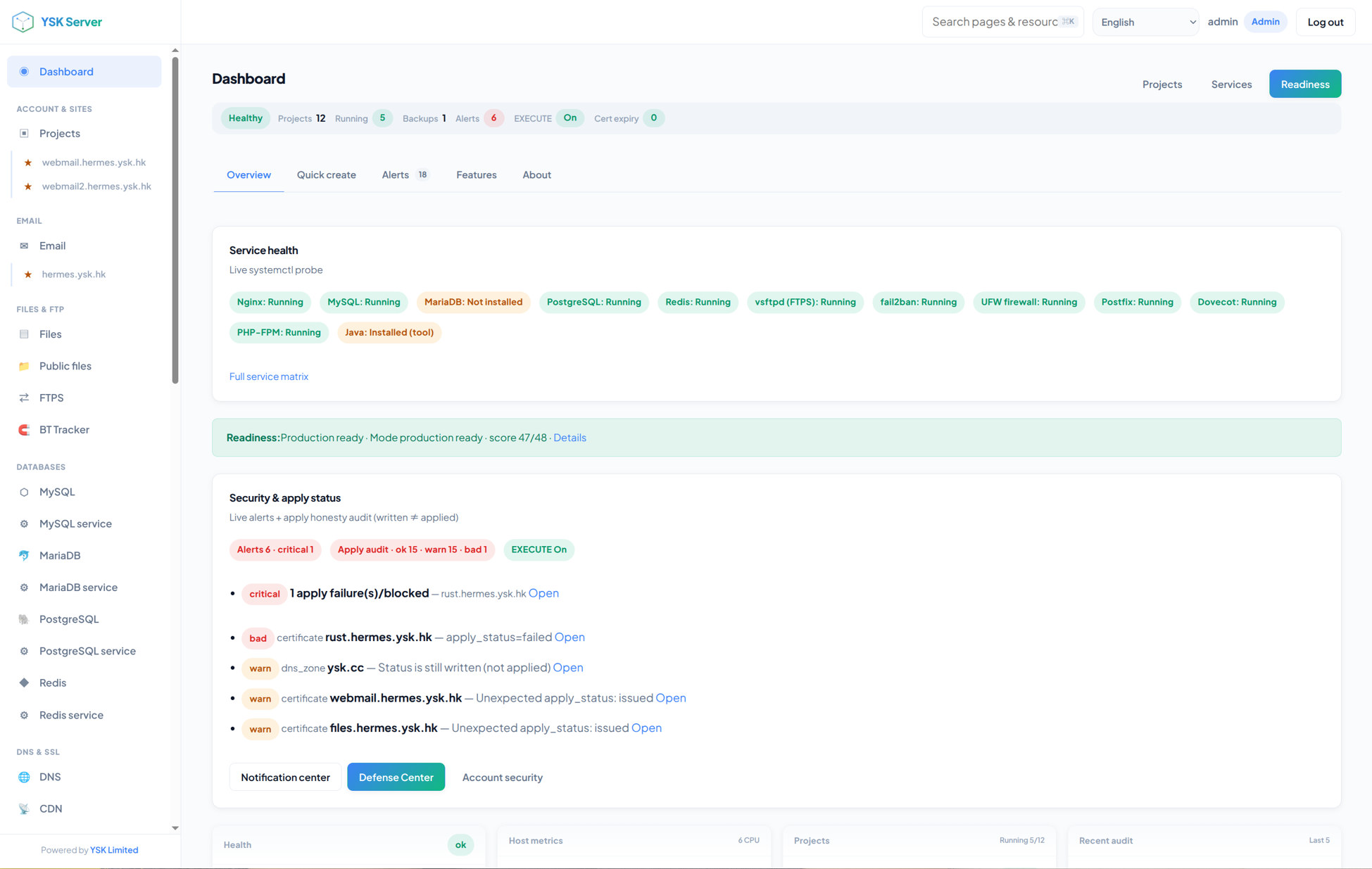
Dashboard — live service health, readiness, and apply honesty
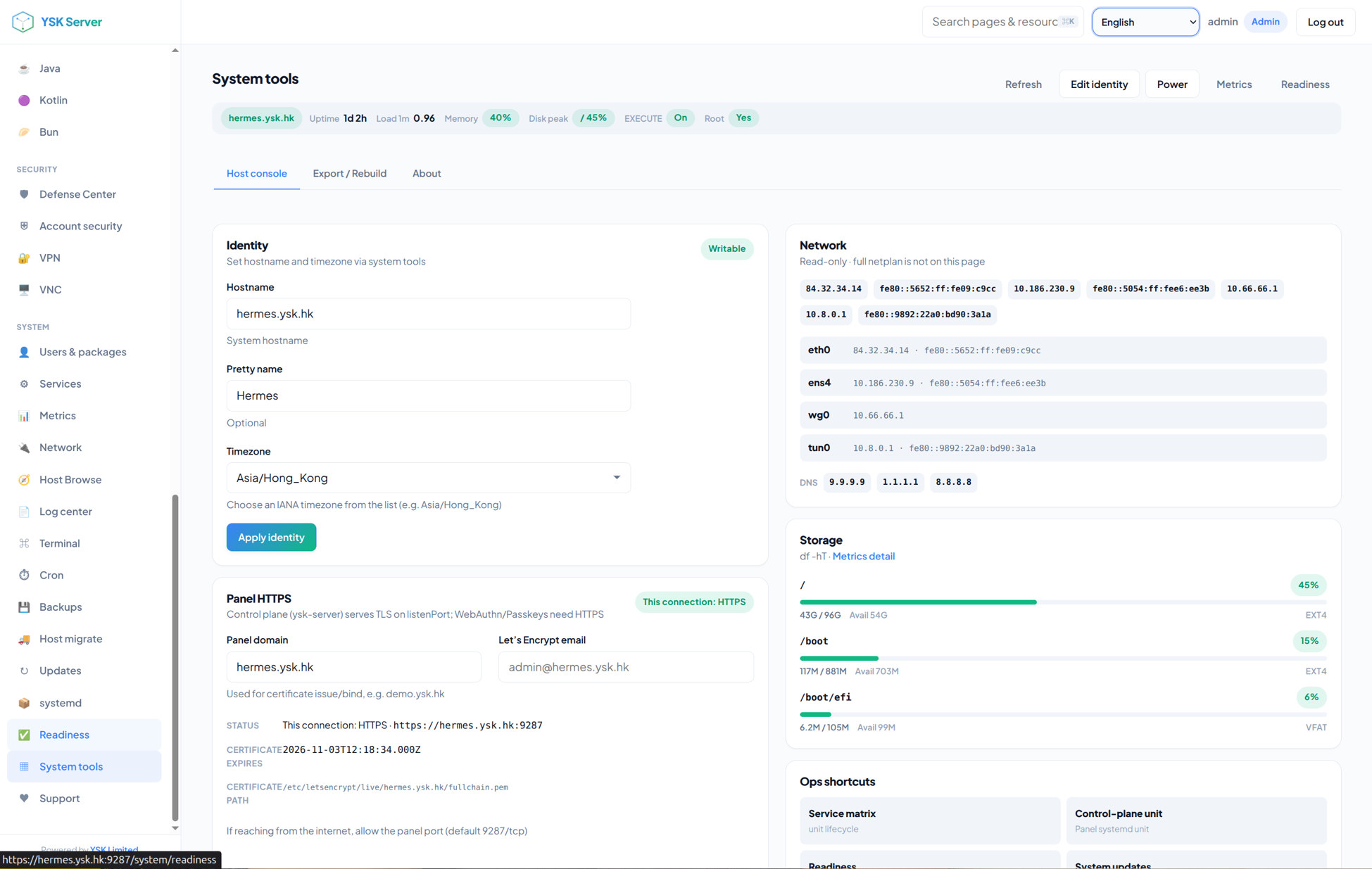
System tools — identity, panel HTTPS, network, and storage
## Install
**Ubuntu 22.04 / 24.04** as **root**. Node.js **≥ 22**. Native deps need `python3`, `make`, and `g++`.
### Fresh host (recommended)
```bash
curl -fsSL https://raw.githubusercontent.com/yanshekki/ysk-server/main/install.sh | bash -s -- --non-interactive
```
Then open **`https://:9287`**, accept the self-signed warning, and sign in with the one-time password printed by the installer.
### This package
```bash
npm install -g ysk-server
sudo ysk-server setup --admin-user admin --admin-password 'YourStrongPass1!' --data-dir /var/lib/ysk-server
export YSK_EXECUTE=1
sudo ysk-server serve
```
Weak default `admin` is rejected. On a new machine prefer `install.sh` (systemd + TLS + random password).
```bash
ysk-server help
ysk-server readiness --json
```
## Capabilities
| Area | What ships |
|:-----|:-----------|
| **Sites** | Projects, Git deploy, per-site isolation |
| **Files** | File manager, shares, WebDAV, FTPS, BT Tracker / WebTorrent |
| **Mail** | Domains, mailboxes, deliverability checks (inbox reputation is not guaranteed) |
| **Data** | MySQL, MariaDB, PostgreSQL, Redis |
| **Edge** | DNS, SSL, Nginx, Apache, CDN agents |
| **Security** | Protection, SSH / 2FA, VPN, VNC |
| **Containers** | Docker engine |
| **Ops** | Metrics, logs, terminal, cron, backups, updates |
| **Validators** | L1 nodes (Beta) |
## Honesty
- Installing the panel **does not** make global mail inbox delivery a given.
- Dangerous host operations stay **dry-run** until `YSK_EXECUTE=1`.
- First panel certificate is self-signed. Replace it when the host has a domain.
## Package family
| Package | Role |
|:--------|:-----|
| **[ysk-server](https://www.npmjs.com/package/ysk-server)** | **This package** — CLI + API + embedded panel |
| [ysk-server-shared](https://www.npmjs.com/package/ysk-server-shared) | Types and locales (1.1.26) |
| [ysk-server-core](https://www.npmjs.com/package/ysk-server-core) | Hosting and security core (1.1.26) |
`ysk-server` **bundles** shared and core so `npm install -g` is reliable.
Source, docs, and install scripts live on GitHub (not on the npm “Code” tab):
**https://github.com/yanshekki/ysk-server**
[Product README](https://github.com/yanshekki/ysk-server#readme) · [Install guide](https://github.com/yanshekki/ysk-server/blob/main/docs/getting-started/install.md) · [CLI reference](https://github.com/yanshekki/ysk-server/blob/main/docs/cli/reference.md)
## Uninstall
```bash
npm uninstall -g ysk-server
```
If you used `install.sh`:
```bash
sudo ./uninstall.sh --all --keep-data --yes
```
---
YSK Server · control without a landlord ·
ysk.hk ·
email@ysk.hk