# YoastSEO.js
YoastSEO.js is a text analysis and assessment library in JavaScript.
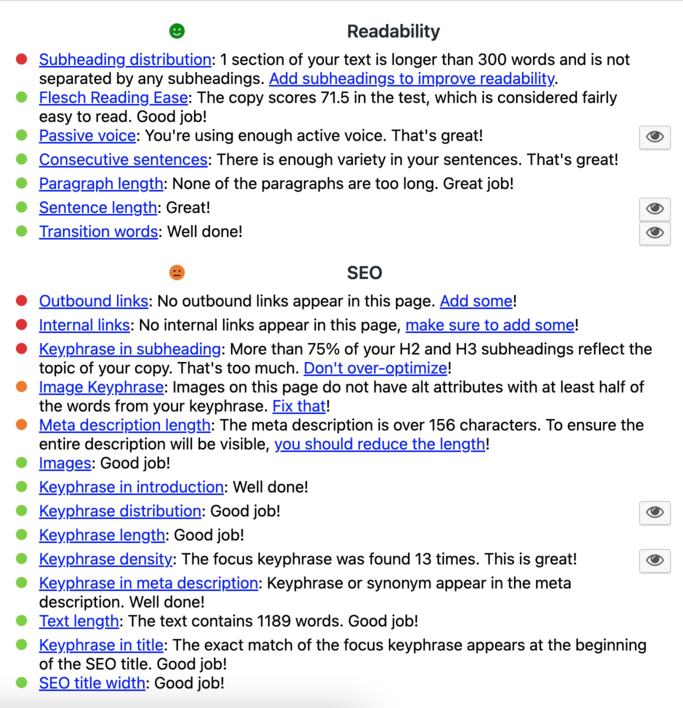
This library is used in the Yoast SEO plugin for WordPress to analyze and assess the content of a post or page.
This library can generate metrics about a text and assess these metrics to give you an assessment which can be used to improve the text.
## Documentation
* A list of all the [assessors](https://github.com/Yoast/wordpress-seo/blob/trunk/packages/yoastseo/src/scoring/assessors/ASSESSORS%20OVERVIEW.md)
* Information on the [scoring system of the assessments](https://github.com/Yoast/wordpress-seo/blob/trunk/packages/yoastseo/src/scoring/assessments/README.md)
* [SEO analysis scoring](https://github.com/Yoast/wordpress-seo/blob/trunk/packages/yoastseo/src/scoring/assessments/SCORING%20SEO.md)
* [Readability analysis scoring](https://github.com/Yoast/wordpress-seo/blob/trunk/packages/yoastseo/src/scoring/assessments/SCORING%20READABILITY.md)
* [Inclusive language analysis scoring](https://github.com/Yoast/wordpress-seo/blob/trunk/packages/yoastseo/src/scoring/assessments/SCORING%20INCLUSIVE%20LANGUAGE.md)
* [How keyphrase matching works](https://github.com/Yoast/wordpress-seo/blob/trunk/packages/yoastseo/src/scoring/assessments/KEYPHRASE%20MATCHING.md)
* [Scoring on taxonomy pages](https://github.com/Yoast/wordpress-seo/blob/trunk/packages/yoastseo/src/scoring/assessments/SCORING%20TAXONOMY.md)
* The data that will be analyzed by YoastSEO.js can be modified by plugins. Plugins can also add new research and assessments. To find out how to do this, checkout out the [customization documentation](https://github.com/Yoast/wordpress-seo/blob/trunk/packages/yoastseo/docs/Customization.md).
* Information on the design decisions within the package can be found [here](https://github.com/Yoast/wordpress-seo/blob/trunk/packages/yoastseo/DESIGN%20DECISIONS.md).
* Information on how morphology works in `yoastseo` package can be found [here](https://github.com/Yoast/wordpress-seo/blob/trunk/packages/yoastseo/MORPHOLOGY.md).
## Installation
You can install YoastSEO.js using npm:
```bash
npm install yoastseo
```
Or using yarn:
```bash
yarn add yoastseo
```
## Usage
You can either use YoastSEO.js using the web worker API or use the internal components directly.
### Web Worker API
Because a web worker must be a separate script in the browser, you first need to create a script to use inside the web worker:
```js
import { AnalysisWebWorker } from "yoastseo";
import EnglishResearcher from "yoastseo/build/languageProcessing/languages/en/Researcher";
const worker = new AnalysisWebWorker( self, new EnglishResearcher() );
// Any custom registration should be done here (or send messages via postMessage to the wrapper).
worker.register();
```
Then, in a different script, you have the following code:
```js
import { AnalysisWorkerWrapper, Paper } from "yoastseo";
// `url` needs to be the full URL to the script for the browser to know where to load the worker script from.
// This should be the script created by the previous code-snippet.
const url = "https://my-site-url.com/path-to-webworker-script.js"
const worker = new AnalysisWorkerWrapper( new Worker( url ) );
worker.initialize( {
logLevel: "TRACE", // Optional, see https://github.com/pimterry/loglevel#documentation
} ).then( () => {
// The worker has been configured, we can now analyze a Paper.
const paper = new Paper( "Text to analyze", {
keyword: "analyze",
} );
return worker.analyze( paper );
} ).then( ( results ) => {
console.log( 'Analysis results:' );
console.log( results );
} ).catch( ( error ) => {
console.error( 'An error occured while analyzing the text:' );
console.error( error );
} );
```
There is a basic example [over here](https://github.com/Yoast/wordpress-seo/tree/trunk/apps/content-analysis-webworker), which also contains a basic setup with Webpack.
There is also a more involved example [over here](https://github.com/Yoast/wordpress-seo/tree/trunk/apps/content-analysis), which has a basic React implementation.
### Usage of internal components
If you want to have a more bare-bones API, or are in an environment without access to Web Worker you can use the internal objects:
```js
import { AbstractResearcher, Paper } from "yoastseo";
const paper = new Paper( "Text to analyze", {
keyword: "analyze",
} );
const researcher = new AbstractResearcher( paper );
console.log( researcher.getResearch( "wordCountInText" ) );
```
There is a basic example of this setup [over here](https://github.com/Yoast/wordpress-seo/tree/trunk/apps/content-analysis-api).
## Supported languages
### SEO analysis
**Function word support**, which is used for internal linking, insights, and keyphrase-related analysis, is available in the following languages:
English, German, Dutch, French, Spanish, Italian, Portuguese, Russian, Polish, Swedish, Hungarian, Indonesian, Arabic,
Hebrew, Farsi, Turkish, Norwegian, Czech, Slovak, Greek, Japanese
### Readability analysis
| Language | Transition words | Flesch reading ease | Passive voice | Sentence beginnings | Sentence length1 |
|------------ |------------------ |--------------------- |--------------- |--------------------- |----------------------------- |
| English | ✅ | ✅ | ✅ | ✅ | ✅ |
| German | ✅ | ✅ | ✅ | ✅ | ✅ |
| Dutch | ✅ | ✅ | ✅ | ✅ | ✅ |
| French | ✅ | ✅ | ✅ | ✅ | ✅ |
| Spanish | ✅ | ✅ | ✅ | ✅ | ✅ |
| Italian | ✅ | ✅ | ✅ | ✅ | ✅ |
| Portuguese | ✅ | ✅ | ✅ | ✅ | ✅ |
| Russian | ✅ | ✅ | ✅ | ✅ | ✅ |
| Catalan | ✅ | ❌3 | ❌3 | ❌3 | ✅ |
| Polish | ✅ | ❌2 | ✅ | ✅ | ✅ |
| Swedish | ✅ | ❌2 | ✅ | ✅ | ✅ |
| Hungarian | ✅ | ❌2 | ✅ | ✅ | ✅ |
| Indonesian | ✅ | ❌2 | ✅ | ✅ | ✅ |
| Arabic | ✅ | ❌2 | ✅ | ✅ | ✅ |
| Hebrew | ✅ | ❌2 | ✅ | ✅ | ✅ |
| Farsi | ✅ | ❌2 | ✅ | ✅ | ✅ |
| Turkish | ✅ | ❌2 | ✅ | ✅ | ✅ |
| Norwegian | ✅ | ❌2 | ✅ | ✅ | ✅ |
| Czech | ✅ | ❌2 | ✅ | ✅ | ✅ |
| Slovak | ✅ | ❌2 | ✅ | ✅ | ✅ |
| Greek | ✅ | ❌2 | ✅ | ✅ | ✅ |
| Japanese | ✅ | ❌2 | ❌4 | ✅ | ✅ |
1 This means the default upper limit of 20 words has been verified for this language, or the upper limit has been changed.
2 There is no existing Flesch reading ease formula for these languages.
3 This means that the functionality for this assessment is currently not available for these languages.
4 The Passive voice check for Japanese is not implemented since the structure is the same as the potential form and can additionally be used for an honorific purpose. Identifying whether a verb is in its passive, honorific or potential form is problematic without contextual information.
The following readability assessments are available for all languages:
- sentence length (with a default upper limit of 20 words, see1 above )
- paragraph length
- subheading distribution
- text presence
### Inclusive language analysis
The inclusive language analysis is currently available in English.
## Change log
Please see [CHANGELOG](CHANGELOG.md) for more information what has changed recently.
## Testing
```bash
npm test
```
Or using yarn:
```bash
yarn test
```
Generate coverage using the `--coverage` flag.
## Code style
To test your code style:
```bash
yarn lint
```
## Testing with Yoast SEO
In the YoastSEO.js directory, run:
```bash
npm link
```
Or using yarn:
```bash
yarn link
```
Then, in the project directory where you want to test the package, assuming you have a complete development version, run:
```bash
npm link yoastseo
```
Or using yarn:
```bash
yarn link yoastseo
```
If you want to unlink, simply do:
```bash
npm unlink yoastseo
```
Or using yarn:
```bash
yarn unlink yoastseo
```
## Contributing
Please see [CONTRIBUTING](.github/CONTRIBUTING.md) for details.
## Security
If you discover any security related issues, please email security [at] yoast.com instead of using the issue tracker.
## Credits
- [Team Yoast](https://github.com/orgs/Yoast/people)
- [All Contributors](https://github.com/Yoast/wordpress-seo/graphs/contributors)
## License
We follow the GPL. Please see [License](LICENSE) file for more information.