yaspeller
=========
[](https://www.npmjs.com/package/yaspeller)
[](https://www.npmjs.org/package/yaspeller)
[](https://coveralls.io/r/hcodes/yaspeller)
[](https://david-dm.org/hcodes/yaspeller)
 Средство поиска опечаток в тексте, в файлах и на сайтах.
Используется API [Yandex.Speller](https://tech.yandex.ru/speller/doc/dg/concepts/About-docpage/).
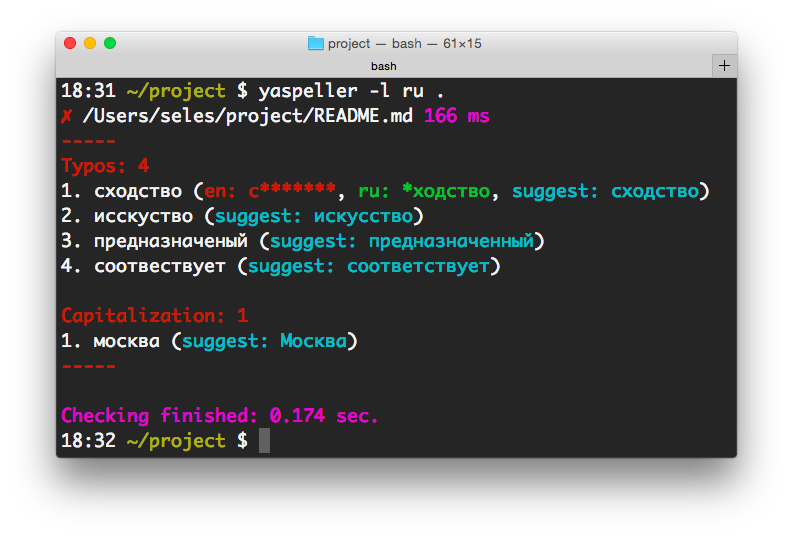
## Установка
`npm install yaspeller -g`
## Командная строка
`yaspeller [options] `
## Используйте с [pre-commit](https://pre-commit.com/)
Добавте в ваш `.pre-commit-config.yaml`:
```yaml
- repo: https://github.com/hcodes/yaspeller.git
rev: '' # Use the sha / tag you want to point at
hooks:
- id: yaspeller
```
### Примеры
+ `yaspeller README.md` — поиск опечаток в файле.
+ `yaspeller -e ".md,.html" ./texts/` — поиск опечаток в файлах в папке.
+ `yaspeller https://ru.wikipedia.org/wiki/%D0%9E%D0%BF%D0%B5%D1%87%D0%B0%D1%82%D0%BA%D0%B0` — поиск опечаток на странице сайта.
+ `yaspeller http://bem.info/sitemap.xml` — поиск опечаток в адресах, перечисленных в sitemap.xml.
+ `echo "Hello, world!" | yaspeller`
### Опции
#### `-f, --format `
Форматы: `plain`, `html`, `markdown` или `auto`.
Средство поиска опечаток в тексте, в файлах и на сайтах.
Используется API [Yandex.Speller](https://tech.yandex.ru/speller/doc/dg/concepts/About-docpage/).

## Установка
`npm install yaspeller -g`
## Командная строка
`yaspeller [options] `
## Используйте с [pre-commit](https://pre-commit.com/)
Добавте в ваш `.pre-commit-config.yaml`:
```yaml
- repo: https://github.com/hcodes/yaspeller.git
rev: '' # Use the sha / tag you want to point at
hooks:
- id: yaspeller
```
### Примеры
+ `yaspeller README.md` — поиск опечаток в файле.
+ `yaspeller -e ".md,.html" ./texts/` — поиск опечаток в файлах в папке.
+ `yaspeller https://ru.wikipedia.org/wiki/%D0%9E%D0%BF%D0%B5%D1%87%D0%B0%D1%82%D0%BA%D0%B0` — поиск опечаток на странице сайта.
+ `yaspeller http://bem.info/sitemap.xml` — поиск опечаток в адресах, перечисленных в sitemap.xml.
+ `echo "Hello, world!" | yaspeller`
### Опции
#### `-f, --format `
Форматы: `plain`, `html`, `markdown` или `auto`.
По умолчанию: `plain`.
#### `-l, --lang `
Языки: `en`, `ru` or `uk`.
По умолчанию: `en,ru`.
#### `-c, --config `
Конфигурационный файл.
#### `-e, --file-extensions `
Поиск файлов в папке по расширениям.
Пример: `.md,.htm,.txt`.
#### `--dictionary `
JSON-файл собственного словаря.
```js
[
"someword1", // someword1 = someword1 and Someword1
"Someword2", // Someword2 = Someword2
"someword3"
]
```
Поддерживаются регулярные выражения:
```js
[
"unknownword",
"unknown(W|w)ord[12]?", // unknown(W|w)ord[12]? = unknown(W|w)ord[12]? and Unknown(W|w)ord[12]?
"Unknown(W|w)ord[34]?" // Unknown(W|w)ord[34]? = Unknown(W|w)ord[34]?
]
```
Примеры использования:
`yaspeller --dictionary my_dict.json .`
`yaspeller --dictionary my_dict.json:my_dict2.json .`
Если у вас много md-файлов, и вы заносите линтер, то, возможно, вам пригодится
[yaspeller-dictionary-builder](https://github.com/razum2um/yaspeller-dictionary-builder).
Так вы сможете сгенерировать начальный словарь, где каждая строка будет объединять все словоформы.
#### `--report `
Задать вид отчёта: `console`, `html`, `markdown`, `junit` или `json`.
По умолчанию: `console`
Пример: `console,html,custom_report.js`
#### `--check-yo`
Проверять корректность использования буквы «ё» в русских текстах.
#### `--find-repeat-words`
Находить повторы слов, идущие подряд. Например, `я полетел на на Кипр`.
#### `--ignore-tags `
Игнорировать HTML-теги.
По умолчанию: `code,kbd,object,samp,script,style,var`
Опция для форматов `html` и `markdown`.
#### `--ignore-text `
Удалить текст из проверки с помощью регулярных выражений.
#### `--ignore-capitalization`
Игнорировать неверное употребление ПРОПИСНЫХ/строчных букв, например, в слове `москва`.
#### `--ignore-digits`
Пропускать слова с цифрами, например, `авп17х4534`.
#### `--ignore-urls`
Пропускать интернет-адреса, почтовые адреса и имена файлов.
#### `--max-requests `
Одновременное количество запросов к API Yandex.Speller.
По умолчанию: `2`.
#### `--no-color`
Консольный вывод без цвета.
#### `--only-errors`
Выводить только ошибки.
#### `--stdin`
Обработка файлов через ``. По умолчанию: false
#### `--stdin-filename `
Имя файла, отправленного на ``, используется в отчётах.
#### `--debug`
Режим отладки.
## Установка в проект
`npm install yaspeller --save-dev`
Необходимо добавить в `package.json` / `scripts`:
` "yaspeller": "yaspeller .",`
Для запуска в качестве линтера:
`npm run yaspeller`
`yaspeller` настраивается, используя JSON-файл, расположенный в корне проекта:
- `.yaspellerrc`
- `.yaspellerrc.js`
- `.yaspellerrc.json`
- `.yaspeller.json`
- `package.json`, поле `yaspeller`
```JSON
{
"excludeFiles": [
".git",
"yaspeller",
"node_modules",
"libs"
],
"lang": "ru",
"fileExtensions": [
".md",
".txt"
],
"dictionary": [
"someword1"
]
}
```
**Расширенный пример:**
```js
{
"excludeFiles": [
".git",
"yaspeller",
"node_modules",
"libs"
],
"format": "html",
"lang": "en",
"fileExtensions": [
".md",
".txt"
],
"report": ["console", "html"],
"dictionary": [
// JSON comments
"someword1", // someword1 = someword1 and Someword1
"Someword2", // Someword2 = Someword2
"some(w|W)ord[23]", // some(w|W)ord[23] = some(w|W)ord[23] and Some(w|W)ord[23]
"Some(w|W)ord" // Some(w|W)ord = Some(w|W)ord
],
"ignoreTags": ["code", "script"],
"ignoreText": [
"", // Короткая запись
["", "g"] // Длинная запись
],
"ignoreUrls": true,
"findRepeatWords": true,
"maxRequests": 5
}
```
| Свойство | Тип | Подробности |
|----------|------|---------|
| `format` | `String` | [`--format`](#-f---format-value) |
| `lang` | `String` | [`--lang`](#-l---lang-value) |
| `excludeFiles` | `Array` | |
| `fileExtensions` | `Array` | [`--file-extension`](#--file-extensions-value) |
| `dictionary` | `Array` | [`--dictionary`](#--dictionary-file) |
| `report` | `Array` | [`--report`](#--report-type) |
| `checkYo` | `Boolean` | [`--check-yo`](#--check-yo) |
| `findRepeatWords` | `Boolean` | [`--find-repeat-words`](#--find-repeat-words) |
| `ignoreTags` | `Array` | [`--ignore-tags`](#--ignore-tags-tags) |
| `ignoreText` | `Array` | [`--ignore-text`](#--ignore-text-regexp) |
| `ignoreCapitalization` | `Boolean` | [`--ignore-capitalization`](#--ignore-capitalization) |
| `ignoreDigits` | `Boolean` | [`--ignore-digits`](#--ignore-digits) |
| `ignoreUrls` | `Boolean` | [`--ignore-urls`](#--ignore-urls) |
| `maxRequests` | `Number` | [`--max-requests`](#--max-requests-value) |
## Исключение части текста из проверки
### Исключить строку
```js
var re = /А-ЯЁ/; // yaspeller ignore
```
```js
var re = /А-ЯЁ/; /* yaspeller ignore */
```
```html
А-ЯЁ
```
### Исключить блок
```js
/* yaspeller ignore:start */
const reUpper = /А-ЯЁ/;
const reLower = /а-яё/;
/* yaspeller ignore:end */
```
```html
А-ЯЁ
а-яё
```
## Плагин для [Gulp](http://gulpjs.com)
```js
const gulp = require('gulp');
const run = require('gulp-run'); // npm install gulp-run --save-dev
gulp.task('yaspeller', function (cb) {
run('./node_modules/.bin/yaspeller ./').exec()
.on('error', function (err) {
console.error(err.message);
cb();
})
.on('finish', cb);
});
```
## Плагин для [Grunt](http://gruntjs.com)
```js
module.exports = function(grunt) {
grunt.loadNpmTasks('grunt-shell'); // npm install grunt-shell --save-dev
grunt.initConfig({
shell: {
yaspeller: {
options: {stderr: false},
command: './node_modules/.bin/yaspeller .'
}
}
});
grunt.registerTask('lint', ['shell:yaspeller']);
};
```
## [Ограничения API Яндекс.Спеллера](http://legal.yandex.ru/speller_api/)
## Ссылки
- [Yaspeller для CI](https://github.com/ai/yaspeller-ci)
- [Github Action for Yaspeller](https://github.com/heytitle/github-action-yaspeller)
## [Лицензия](./LICENSE.md)
MIT License