# xtylink
xtylink any video. paste. xtylink. done.
Download videos from YouTube, X/Twitter, Instagram, Threads, TikTok and
1,800+ other sites — right from your terminal. Paste a url, pick a
resolution (or audio-only mp3), done. No popups, no fake download buttons,
no sketchy redirects.
## Install
```sh
npm install -g xtylink
```
Or try it without installing anything:
```sh
npx xtylink
```
Requires Node 18+. Everything else (yt-dlp, ffmpeg) is fetched or bundled
automatically.
## Usage
```sh
$ xtylink https://youtu.be/dQw4w9WgXcQ # straight to the format picker
$ xtylink # prompts for a url
$ xtylink --theme light # force the light palette
```
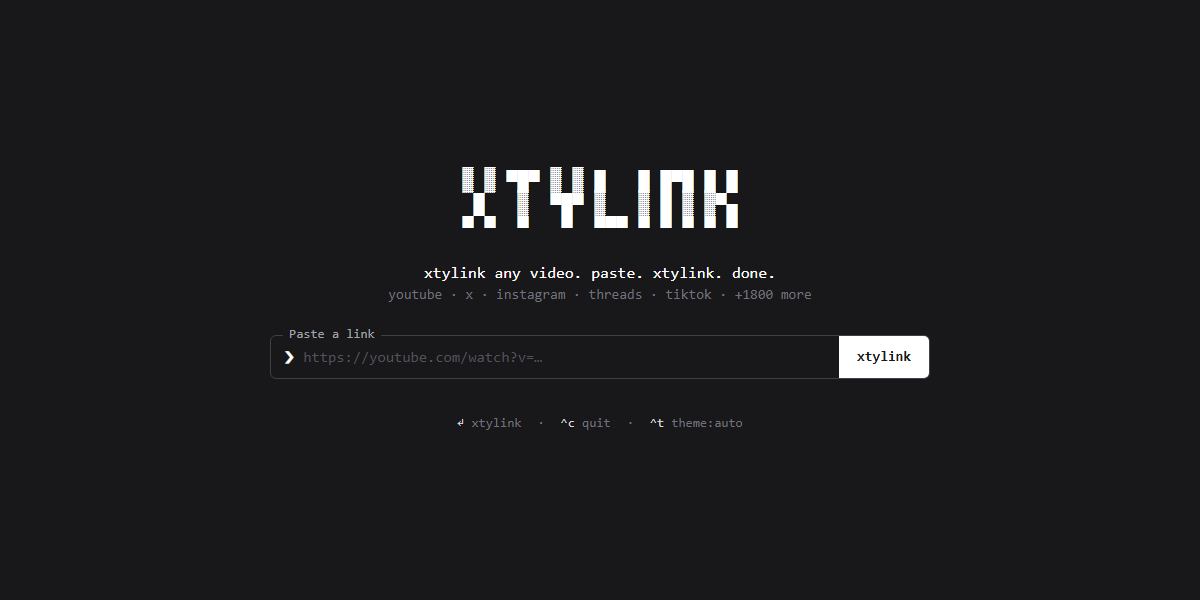
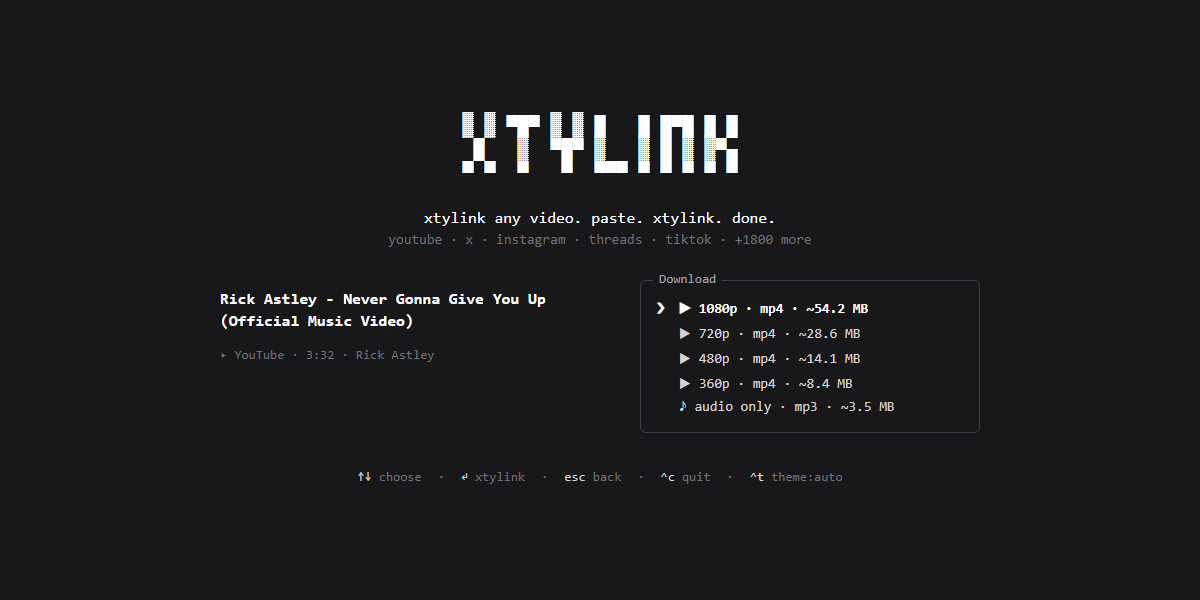
xtylink takes over the terminal (full-screen, centered — and restores your
scrollback on exit). Pick a format with ↑/↓ (or j/k, or number keys) and
hit enter. `esc` goes back, `^c` quits. Or just use the mouse — the xtylink
button, the format list and the footer hints are all clickable, and
clicking the logo takes you back home. Files are saved to `~/Downloads`,
and the file path is printed to your terminal when you're done.
The default `auto` theme uses your terminal's own foreground and background,
so it follows light and dark terminal themes without guessing. Press `^t` or
click the theme control in the footer to cycle through `auto`, `light`, and
`dark` for the current session. Use `--theme auto`, `--theme light`, or
`--theme dark` to choose the starting theme for one launch.
## How it works
- Powered by [yt-dlp](https://github.com/yt-dlp/yt-dlp). On first run,
xtylink downloads the standalone yt-dlp binary to `~/.xtylink/bin` —
no Python required. If you already have yt-dlp installed, it uses yours.
- ffmpeg (needed for merging high-res streams and mp3 extraction) is found
on your PATH, with `ffmpeg-static` as a bundled fallback.
- The UI is [Ink](https://github.com/vadimdemedes/ink) — React for the
terminal.
## Development
```sh
npm install
npm run build # bundle to dist/ with tsup
npm run dev # rebuild on change
node dist/cli.js
npm run typecheck
```
To try it as a global command without publishing: `npm link`, then run
`xtylink` anywhere.
## Roadmap
- [ ] `--best` / `--mp3` flags to skip the picker (scriptable mode)
- [ ] `-o ` to choose the output folder
- [ ] Playlist / thread-with-multiple-videos support
- [ ] Clipboard detection: launch bare and auto-suggest the url you copied
- [ ] Self-update for the bundled yt-dlp binary (`yt-dlp -U`)
- [x] Publish to npm (`npm i -g xtylink` / `npx xtylink`)
- [ ] `curl xtylink.sh | sh` installer
## A note on fair use
xtylink is a personal-archiving tool. Downloading content may violate a
platform's terms of service — only download what you have the right to
keep, and be excellent to creators.
## Author & Maintainers
An open-source project by **Frext Technologies**
Developed & Maintained by **Prince Kumar** ([@princesingh0101](https://github.com/princesingh0101))
## License
[MIT](LICENSE)

 ## Install
```sh
npm install -g xtylink
```
Or try it without installing anything:
```sh
npx xtylink
```
Requires Node 18+. Everything else (yt-dlp, ffmpeg) is fetched or bundled
automatically.
## Usage
```sh
$ xtylink https://youtu.be/dQw4w9WgXcQ # straight to the format picker
$ xtylink # prompts for a url
$ xtylink --theme light # force the light palette
```
xtylink takes over the terminal (full-screen, centered — and restores your
scrollback on exit). Pick a format with ↑/↓ (or j/k, or number keys) and
hit enter. `esc` goes back, `^c` quits. Or just use the mouse — the xtylink
button, the format list and the footer hints are all clickable, and
clicking the logo takes you back home. Files are saved to `~/Downloads`,
and the file path is printed to your terminal when you're done.
The default `auto` theme uses your terminal's own foreground and background,
so it follows light and dark terminal themes without guessing. Press `^t` or
click the theme control in the footer to cycle through `auto`, `light`, and
`dark` for the current session. Use `--theme auto`, `--theme light`, or
`--theme dark` to choose the starting theme for one launch.
## Install
```sh
npm install -g xtylink
```
Or try it without installing anything:
```sh
npx xtylink
```
Requires Node 18+. Everything else (yt-dlp, ffmpeg) is fetched or bundled
automatically.
## Usage
```sh
$ xtylink https://youtu.be/dQw4w9WgXcQ # straight to the format picker
$ xtylink # prompts for a url
$ xtylink --theme light # force the light palette
```
xtylink takes over the terminal (full-screen, centered — and restores your
scrollback on exit). Pick a format with ↑/↓ (or j/k, or number keys) and
hit enter. `esc` goes back, `^c` quits. Or just use the mouse — the xtylink
button, the format list and the footer hints are all clickable, and
clicking the logo takes you back home. Files are saved to `~/Downloads`,
and the file path is printed to your terminal when you're done.
The default `auto` theme uses your terminal's own foreground and background,
so it follows light and dark terminal themes without guessing. Press `^t` or
click the theme control in the footer to cycle through `auto`, `light`, and
`dark` for the current session. Use `--theme auto`, `--theme light`, or
`--theme dark` to choose the starting theme for one launch.
 ## How it works
- Powered by [yt-dlp](https://github.com/yt-dlp/yt-dlp). On first run,
xtylink downloads the standalone yt-dlp binary to `~/.xtylink/bin` —
no Python required. If you already have yt-dlp installed, it uses yours.
- ffmpeg (needed for merging high-res streams and mp3 extraction) is found
on your PATH, with `ffmpeg-static` as a bundled fallback.
- The UI is [Ink](https://github.com/vadimdemedes/ink) — React for the
terminal.
## Development
```sh
npm install
npm run build # bundle to dist/ with tsup
npm run dev # rebuild on change
node dist/cli.js
## How it works
- Powered by [yt-dlp](https://github.com/yt-dlp/yt-dlp). On first run,
xtylink downloads the standalone yt-dlp binary to `~/.xtylink/bin` —
no Python required. If you already have yt-dlp installed, it uses yours.
- ffmpeg (needed for merging high-res streams and mp3 extraction) is found
on your PATH, with `ffmpeg-static` as a bundled fallback.
- The UI is [Ink](https://github.com/vadimdemedes/ink) — React for the
terminal.
## Development
```sh
npm install
npm run build # bundle to dist/ with tsup
npm run dev # rebuild on change
node dist/cli.js