/**
* {@link Viewer} plugin that loads models from xeokit's optimized *````.XKT````* format.
*
* 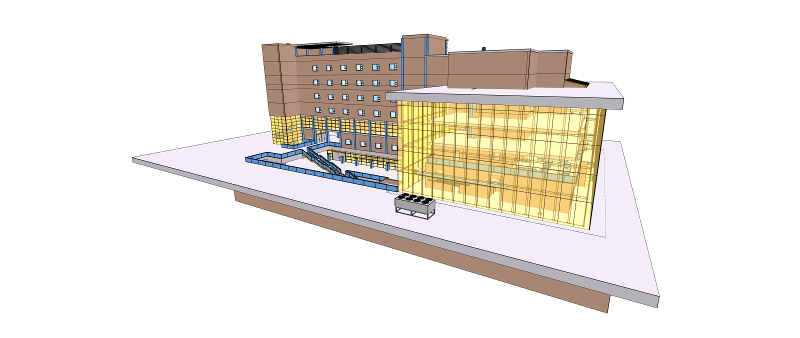 *
* [[Run this example](https://xeokit.github.io/xeokit-sdk/examples/#loading_XKT_OTCConferenceCenter)]
*
* ## Overview
*
* * XKTLoaderPlugin is the most efficient way to load high-detail models into xeokit.
* * An *````.XKT````* file is a single BLOB containing a model, compressed using geometry quantization
* and [pako](https://nodeca.github.io/pako/).
* * Supports double-precision coordinates, via ````.XKT```` format version 6.
* * Set the position, scale and rotation of each model as you load it.
* * Filter which IFC types get loaded.
* * Configure initial default appearances for IFC types.
* * Set a custom data source for *````.XKT````* and IFC metadata files.
* * Option to load multiple copies of the same model, without object ID clashes.
*
* ## Creating *````.XKT````* Files and Metadata
*
* See [Creating Files for Offline BIM](https://github.com/xeokit/xeokit-sdk/wiki/Creating-Files-for-Offline-BIM).
*
* ## Scene representation
*
* When loading a model, XKTLoaderPlugin creates an {@link Entity} that represents the model, which
* will have {@link Entity#isModel} set ````true```` and will be registered by {@link Entity#id}
* in {@link Scene#models}. The XKTLoaderPlugin also creates an {@link Entity} for each object within the
* model. Those Entities will have {@link Entity#isObject} set ````true```` and will be registered
* by {@link Entity#id} in {@link Scene#objects}.
*
* ## Metadata
*
* Since XKT V8, model metadata is included in the XKT file. If the XKT file has metadata, then loading it creates
* model metadata components within the Viewer, namely a {@link MetaModel} corresponding to the model {@link Entity},
* and a {@link MetaObject} for each object {@link Entity}.
*
* Each {@link MetaObject} has a {@link MetaObject#type}, which indicates the classification of its corresponding
* {@link Entity}. When loading metadata, we can also configure XKTLoaderPlugin with a custom lookup table of initial
* values to set on the properties of each type of {@link Entity}. By default, XKTLoaderPlugin uses its own map of
* default colors and visibilities for IFC element types.
*
* For XKT versions prior to V8, we provided the metadata to XKTLoaderPlugin as an accompanying JSON file to load. We can
* still do that for all XKT versions, and for XKT V8+ it will override any metadata provided within the XKT file.
*
* ## Usage
*
* In the example below we'll load the Schependomlaan model from a [.XKT file](https://github.com/xeokit/xeokit-sdk/tree/master/examples/models/xkt/schependomlaan).
*
* This will create a bunch of {@link Entity}s that represents the model and its objects, along with a {@link MetaModel} and {@link MetaObject}s
* that hold their metadata.
*
* Since this model contains IFC types, the XKTLoaderPlugin will set the initial appearance of each object
* {@link Entity} according to its IFC type in {@link XKTLoaderPlugin#objectDefaults}.
*
* Read more about this example in the user guide on [Viewing BIM Models Offline](https://www.notion.so/xeokit/Viewing-an-IFC-Model-with-xeokit-c373e48bc4094ff5b6e5c5700ff580ee).
*
* * [[Run example](https://xeokit.github.io/xeokit-sdk/examples/#BIMOffline_XKT_metadata_Schependomlaan)]
*
* ````javascript
* import {Viewer, XKTLoaderPlugin} from "xeokit-sdk.es.js";
*
* //------------------------------------------------------------------------------------------------------------------
* // 1. Create a Viewer,
* // 2. Arrange the camera
* //------------------------------------------------------------------------------------------------------------------
*
* // 1
* const viewer = new Viewer({
* canvasId: "myCanvas",
* transparent: true
* });
*
* // 2
* viewer.camera.eye = [-2.56, 8.38, 8.27];
* viewer.camera.look = [13.44, 3.31, -14.83];
* viewer.camera.up = [0.10, 0.98, -0.14];
*
* //------------------------------------------------------------------------------------------------------------------
* // 1. Create a XKTLoaderPlugin,
* // 2. Load a building model and JSON IFC metadata
* //------------------------------------------------------------------------------------------------------------------
*
* // 1
* const xktLoader = new XKTLoaderPlugin(viewer);
*
* // 2
* const model = xktLoader.load({ // Returns an Entity that represents the model
* id: "myModel",
* src: "./models/xkt/Schependomlaan.xkt",
* edges: true
* });
*
* model.on("loaded", () => {
*
* //--------------------------------------------------------------------------------------------------------------
* // 1. Find metadata on the third storey
* // 2. Select all the objects in the building's third storey
* // 3. Fit the camera to all the objects on the third storey
* //--------------------------------------------------------------------------------------------------------------
*
* // 1
* const metaModel = viewer.metaScene.metaModels["myModel"]; // MetaModel with ID "myModel"
* const metaObject
* = viewer.metaScene.metaObjects["0u4wgLe6n0ABVaiXyikbkA"]; // MetaObject with ID "0u4wgLe6n0ABVaiXyikbkA"
*
* const name = metaObject.name; // "01 eerste verdieping"
* const type = metaObject.type; // "IfcBuildingStorey"
* const parent = metaObject.parent; // MetaObject with type "IfcBuilding"
* const children = metaObject.children; // Array of child MetaObjects
* const objectId = metaObject.id; // "0u4wgLe6n0ABVaiXyikbkA"
* const objectIds = viewer.metaScene.getObjectIDsInSubtree(objectId); // IDs of leaf sub-objects
* const aabb = viewer.scene.getAABB(objectIds); // Axis-aligned boundary of the leaf sub-objects
*
* // 2
* viewer.scene.setObjectsSelected(objectIds, true);
*
* // 3
* viewer.cameraFlight.flyTo(aabb);
* });
*
* // Find the model Entity by ID
* model = viewer.scene.models["myModel"];
*
* // Destroy the model
* model.destroy();
* ````
*
* ## Transforming
*
* We have the option to rotate, scale and translate each *````.XKT````* model as we load it.
*
* This lets us load multiple models, or even multiple copies of the same model, and position them apart from each other.
*
* In the example below, we'll scale our model to half its size, rotate it 90 degrees about its local X-axis, then
* translate it 100 units along its X axis.
*
* * [[Run example](https://xeokit.github.io/xeokit-sdk/examples/#loading_XKT_Duplex_transform)]
*
* ````javascript
* xktLoader.load({
* src: "./models/xkt/Duplex.ifc.xkt",
* rotation: [90,0,0],
* scale: [0.5, 0.5, 0.5],
* position: [100, 0, 0]
* });
* ````
*
* ## Including and excluding IFC types
*
* We can also load only those objects that have the specified IFC types.
*
* In the example below, we'll load only the objects that represent walls.
*
* * [[Run example](https://xeokit.github.io/xeokit-sdk/examples/#BIMOffline_XKT_includeTypes)]
*
* ````javascript
* const model2 = xktLoader.load({
* id: "myModel2",
* src: "./models/xkt/OTCConferenceCenter.xkt",
* includeTypes: ["IfcWallStandardCase"]
* });
* ````
*
* We can also load only those objects that **don't** have the specified IFC types.
*
* In the example below, we'll load only the objects that do not represent empty space.
*
* * [[Run example](https://xeokit.github.io/xeokit-sdk/examples/#BIMOffline_XKT_excludeTypes)]
*
* ````javascript
* const model3 = xktLoader.load({
* id: "myModel3",
* src: "./models/xkt/OTCConferenceCenter.xkt",
* excludeTypes: ["IfcSpace"]
* });
* ````
*
* ## Configuring initial IFC object appearances
*
* We can specify the custom initial appearance of loaded objects according to their IFC types.
*
* This is useful for things like:
*
* * setting the colors to our objects according to their IFC types,
* * automatically hiding ````IfcSpace```` objects, and
* * ensuring that ````IfcWindow```` objects are always transparent.
*
*
* [[Run this example](https://xeokit.github.io/xeokit-sdk/examples/#loading_XKT_OTCConferenceCenter)]
*
* ## Overview
*
* * XKTLoaderPlugin is the most efficient way to load high-detail models into xeokit.
* * An *````.XKT````* file is a single BLOB containing a model, compressed using geometry quantization
* and [pako](https://nodeca.github.io/pako/).
* * Supports double-precision coordinates, via ````.XKT```` format version 6.
* * Set the position, scale and rotation of each model as you load it.
* * Filter which IFC types get loaded.
* * Configure initial default appearances for IFC types.
* * Set a custom data source for *````.XKT````* and IFC metadata files.
* * Option to load multiple copies of the same model, without object ID clashes.
*
* ## Creating *````.XKT````* Files and Metadata
*
* See [Creating Files for Offline BIM](https://github.com/xeokit/xeokit-sdk/wiki/Creating-Files-for-Offline-BIM).
*
* ## Scene representation
*
* When loading a model, XKTLoaderPlugin creates an {@link Entity} that represents the model, which
* will have {@link Entity#isModel} set ````true```` and will be registered by {@link Entity#id}
* in {@link Scene#models}. The XKTLoaderPlugin also creates an {@link Entity} for each object within the
* model. Those Entities will have {@link Entity#isObject} set ````true```` and will be registered
* by {@link Entity#id} in {@link Scene#objects}.
*
* ## Metadata
*
* Since XKT V8, model metadata is included in the XKT file. If the XKT file has metadata, then loading it creates
* model metadata components within the Viewer, namely a {@link MetaModel} corresponding to the model {@link Entity},
* and a {@link MetaObject} for each object {@link Entity}.
*
* Each {@link MetaObject} has a {@link MetaObject#type}, which indicates the classification of its corresponding
* {@link Entity}. When loading metadata, we can also configure XKTLoaderPlugin with a custom lookup table of initial
* values to set on the properties of each type of {@link Entity}. By default, XKTLoaderPlugin uses its own map of
* default colors and visibilities for IFC element types.
*
* For XKT versions prior to V8, we provided the metadata to XKTLoaderPlugin as an accompanying JSON file to load. We can
* still do that for all XKT versions, and for XKT V8+ it will override any metadata provided within the XKT file.
*
* ## Usage
*
* In the example below we'll load the Schependomlaan model from a [.XKT file](https://github.com/xeokit/xeokit-sdk/tree/master/examples/models/xkt/schependomlaan).
*
* This will create a bunch of {@link Entity}s that represents the model and its objects, along with a {@link MetaModel} and {@link MetaObject}s
* that hold their metadata.
*
* Since this model contains IFC types, the XKTLoaderPlugin will set the initial appearance of each object
* {@link Entity} according to its IFC type in {@link XKTLoaderPlugin#objectDefaults}.
*
* Read more about this example in the user guide on [Viewing BIM Models Offline](https://www.notion.so/xeokit/Viewing-an-IFC-Model-with-xeokit-c373e48bc4094ff5b6e5c5700ff580ee).
*
* * [[Run example](https://xeokit.github.io/xeokit-sdk/examples/#BIMOffline_XKT_metadata_Schependomlaan)]
*
* ````javascript
* import {Viewer, XKTLoaderPlugin} from "xeokit-sdk.es.js";
*
* //------------------------------------------------------------------------------------------------------------------
* // 1. Create a Viewer,
* // 2. Arrange the camera
* //------------------------------------------------------------------------------------------------------------------
*
* // 1
* const viewer = new Viewer({
* canvasId: "myCanvas",
* transparent: true
* });
*
* // 2
* viewer.camera.eye = [-2.56, 8.38, 8.27];
* viewer.camera.look = [13.44, 3.31, -14.83];
* viewer.camera.up = [0.10, 0.98, -0.14];
*
* //------------------------------------------------------------------------------------------------------------------
* // 1. Create a XKTLoaderPlugin,
* // 2. Load a building model and JSON IFC metadata
* //------------------------------------------------------------------------------------------------------------------
*
* // 1
* const xktLoader = new XKTLoaderPlugin(viewer);
*
* // 2
* const model = xktLoader.load({ // Returns an Entity that represents the model
* id: "myModel",
* src: "./models/xkt/Schependomlaan.xkt",
* edges: true
* });
*
* model.on("loaded", () => {
*
* //--------------------------------------------------------------------------------------------------------------
* // 1. Find metadata on the third storey
* // 2. Select all the objects in the building's third storey
* // 3. Fit the camera to all the objects on the third storey
* //--------------------------------------------------------------------------------------------------------------
*
* // 1
* const metaModel = viewer.metaScene.metaModels["myModel"]; // MetaModel with ID "myModel"
* const metaObject
* = viewer.metaScene.metaObjects["0u4wgLe6n0ABVaiXyikbkA"]; // MetaObject with ID "0u4wgLe6n0ABVaiXyikbkA"
*
* const name = metaObject.name; // "01 eerste verdieping"
* const type = metaObject.type; // "IfcBuildingStorey"
* const parent = metaObject.parent; // MetaObject with type "IfcBuilding"
* const children = metaObject.children; // Array of child MetaObjects
* const objectId = metaObject.id; // "0u4wgLe6n0ABVaiXyikbkA"
* const objectIds = viewer.metaScene.getObjectIDsInSubtree(objectId); // IDs of leaf sub-objects
* const aabb = viewer.scene.getAABB(objectIds); // Axis-aligned boundary of the leaf sub-objects
*
* // 2
* viewer.scene.setObjectsSelected(objectIds, true);
*
* // 3
* viewer.cameraFlight.flyTo(aabb);
* });
*
* // Find the model Entity by ID
* model = viewer.scene.models["myModel"];
*
* // Destroy the model
* model.destroy();
* ````
*
* ## Transforming
*
* We have the option to rotate, scale and translate each *````.XKT````* model as we load it.
*
* This lets us load multiple models, or even multiple copies of the same model, and position them apart from each other.
*
* In the example below, we'll scale our model to half its size, rotate it 90 degrees about its local X-axis, then
* translate it 100 units along its X axis.
*
* * [[Run example](https://xeokit.github.io/xeokit-sdk/examples/#loading_XKT_Duplex_transform)]
*
* ````javascript
* xktLoader.load({
* src: "./models/xkt/Duplex.ifc.xkt",
* rotation: [90,0,0],
* scale: [0.5, 0.5, 0.5],
* position: [100, 0, 0]
* });
* ````
*
* ## Including and excluding IFC types
*
* We can also load only those objects that have the specified IFC types.
*
* In the example below, we'll load only the objects that represent walls.
*
* * [[Run example](https://xeokit.github.io/xeokit-sdk/examples/#BIMOffline_XKT_includeTypes)]
*
* ````javascript
* const model2 = xktLoader.load({
* id: "myModel2",
* src: "./models/xkt/OTCConferenceCenter.xkt",
* includeTypes: ["IfcWallStandardCase"]
* });
* ````
*
* We can also load only those objects that **don't** have the specified IFC types.
*
* In the example below, we'll load only the objects that do not represent empty space.
*
* * [[Run example](https://xeokit.github.io/xeokit-sdk/examples/#BIMOffline_XKT_excludeTypes)]
*
* ````javascript
* const model3 = xktLoader.load({
* id: "myModel3",
* src: "./models/xkt/OTCConferenceCenter.xkt",
* excludeTypes: ["IfcSpace"]
* });
* ````
*
* ## Configuring initial IFC object appearances
*
* We can specify the custom initial appearance of loaded objects according to their IFC types.
*
* This is useful for things like:
*
* * setting the colors to our objects according to their IFC types,
* * automatically hiding ````IfcSpace```` objects, and
* * ensuring that ````IfcWindow```` objects are always transparent.
*
* In the example below, we'll load a model, while configuring ````IfcSpace```` elements to be always initially invisible,
* and ````IfcWindow```` types to be always translucent blue.
*
* * [[Run example](https://xeokit.github.io/xeokit-sdk/examples/#BIMOffline_XKT_objectDefaults)]
*
* ````javascript
* const myObjectDefaults = {
*
* IfcSpace: {
* visible: false
* },
* IfcWindow: {
* colorize: [0.337255, 0.303922, 0.870588], // Blue
* opacity: 0.3
* },
*
* //...
*
* DEFAULT: {
* colorize: [0.5, 0.5, 0.5]
* }
* };
*
* const model4 = xktLoader.load({
* id: "myModel4",
* src: "./models/xkt/Duplex.ifc.xkt",
* objectDefaults: myObjectDefaults // Use our custom initial default states for object Entities
* });
* ````
*
* When we don't customize the appearance of IFC types, as just above, then IfcSpace elements tend to obscure other
* elements, which can be confusing.
*
* It's often helpful to make IfcSpaces transparent and unpickable, like this:
*
* ````javascript
* const xktLoader = new XKTLoaderPlugin(viewer, {
* objectDefaults: {
* IfcSpace: {
* pickable: false,
* opacity: 0.2
* }
* }
* });
* ````
*
* Alternatively, we could just make IfcSpaces invisible, which also makes them unpickable:
*
* ````javascript
* const xktLoader = new XKTLoaderPlugin(viewer, {
* objectDefaults: {
* IfcSpace: {
* visible: false
* }
* }
* });
* ````
*
* ## Configuring a custom data source
*
* By default, XKTLoaderPlugin will load *````.XKT````* files and metadata JSON over HTTP.
*
* In the example below, we'll customize the way XKTLoaderPlugin loads the files by configuring it with our own data source
* object. For simplicity, our custom data source example also uses HTTP, using a couple of xeokit utility functions.
*
* * [[Run example](https://xeokit.github.io/xeokit-sdk/examples/#loading_XKT_dataSource)]
*
* ````javascript
* import {utils} from "xeokit-sdk.es.js";
*
* class MyDataSource {
*
* constructor() {
* }
*
* // Gets metamodel JSON
* getMetaModel(metaModelSrc, ok, error) {
* console.log("MyDataSource#getMetaModel(" + metaModelSrc + ", ... )");
* utils.loadJSON(metaModelSrc,
* (json) => {
* ok(json);
* },
* function (errMsg) {
* error(errMsg);
* });
* }
*
* // Gets the contents of the given .XKT file in an arraybuffer
* getXKT(src, ok, error) {
* console.log("MyDataSource#getXKT(" + xKTSrc + ", ... )");
* utils.loadArraybuffer(src,
* (arraybuffer) => {
* ok(arraybuffer);
* },
* function (errMsg) {
* error(errMsg);
* });
* }
* }
*
* const xktLoader2 = new XKTLoaderPlugin(viewer, {
* dataSource: new MyDataSource()
* });
*
* const model5 = xktLoader2.load({
* id: "myModel5",
* src: "./models/xkt/Duplex.ifc.xkt"
* });
* ````
*
* ## Loading multiple copies of a model, without object ID clashes
*
* Sometimes we need to load two or more instances of the same model, without having clashes
* between the IDs of the equivalent objects in the model instances.
*
* As shown in the example below, we do this by setting {@link XKTLoaderPlugin#globalizeObjectIds} ````true```` before we load our models.
*
* * [[Run example](https://xeokit.github.io/xeokit-sdk/examples/#TreeViewPlugin_Containment_MultipleModels)]
*
* ````javascript
* xktLoader.globalizeObjectIds = true;
*
* const model = xktLoader.load({
* id: "model1",
* src: "./models/xkt/Schependomlaan.xkt"
* });
*
* const model2 = xktLoader.load({
* id: "model2",
* src: "./models/xkt/Schependomlaan.xkt"
* });
* ````
*
* For each {@link Entity} loaded by these two calls, {@link Entity#id} and {@link MetaObject#id} will get prefixed by
* the ID of their model, in order to avoid ID clashes between the two models.
*
* An Entity belonging to the first model will get an ID like this:
*
* ````
* myModel1#0BTBFw6f90Nfh9rP1dlXrb
* ````
*
* The equivalent Entity in the second model will get an ID like this:
*
* ````
* myModel2#0BTBFw6f90Nfh9rP1dlXrb
* ````
*
* Now, to update the visibility of both of those Entities collectively, using {@link Scene#setObjectsVisible}, we can
* supply just the IFC product ID part to that method:
*
* ````javascript
* myViewer.scene.setObjectVisibilities("0BTBFw6f90Nfh9rP1dlXrb", true);
* ````
*
* The method, along with {@link Scene#setObjectsXRayed}, {@link Scene#setObjectsHighlighted} etc, will internally expand
* the given ID to refer to the instances of that Entity in both models.
*
* We can also, of course, reference each Entity directly, using its globalized ID:
*
* ````javascript
* myViewer.scene.setObjectVisibilities("myModel1#0BTBFw6f90Nfh9rP1dlXrb", true);
*````
*
* @class XKTLoaderPlugin
*/
export class XKTLoaderPlugin extends Plugin {
/**
* @constructor
*
* @param {Viewer} viewer The Viewer.
* @param {Object} cfg Plugin configuration.
* @param {String} [cfg.id="XKTLoader"] Optional ID for this plugin, so that we can find it within {@link Viewer#plugins}.
* @param {Object} [cfg.objectDefaults] Map of initial default states for each loaded {@link Entity} that represents an object. Default value is {@link IFCObjectDefaults}.
* @param {Object} [cfg.dataSource] A custom data source through which the XKTLoaderPlugin can load model and metadata files. Defaults to an instance of {@link XKTDefaultDataSource}, which loads uover HTTP.
* @param {String[]} [cfg.includeTypes] When loading metadata, only loads objects that have {@link MetaObject}s with {@link MetaObject#type} values in this list.
* @param {String[]} [cfg.excludeTypes] When loading metadata, never loads objects that have {@link MetaObject}s with {@link MetaObject#type} values in this list.
* @param {Boolean} [cfg.excludeUnclassifiedObjects=false] When loading metadata and this is ````true````, will only load {@link Entity}s that have {@link MetaObject}s (that are not excluded). This is useful when we don't want Entitys in the Scene that are not represented within IFC navigation components, such as {@link TreeViewPlugin}.
* @param {Number} [cfg.maxGeometryBatchSize=50000000] Maximum geometry batch size, as number of vertices. This is optionally supplied
* to limit the size of the batched geometry arrays that {@link PerformanceModel} internally creates for batched geometries.
* A low value means less heap allocation/de-allocation while loading batched geometries, but more draw calls and
* slower rendering speed. A high value means larger heap allocation/de-allocation while loading, but less draw calls
* and faster rendering speed. It's recommended to keep this somewhere roughly between ````50000```` and ````50000000```.
*/
constructor(viewer: any, cfg?: {
id?: string;
objectDefaults?: any;
dataSource?: any;
includeTypes?: string[];
excludeTypes?: string[];
excludeUnclassifiedObjects?: boolean;
maxGeometryBatchSize?: number;
});
_maxGeometryBatchSize: number;
/**
* Sets a custom data source through which the XKTLoaderPlugin can load models and metadata.
*
* Default value is {@link XKTDefaultDataSource}, which loads via HTTP.
*
* @type {Object}
*/
set dataSource(arg: any);
/**
* Gets the custom data source through which the XKTLoaderPlugin can load models and metadata.
*
* Default value is {@link XKTDefaultDataSource}, which loads via HTTP.
*
* @type {Object}
*/
get dataSource(): any;
/**
* Sets map of initial default states for each loaded {@link Entity} that represents an object.
*
* Default value is {@link IFCObjectDefaults}.
*
* @type {{String: Object}}
*/
set objectDefaults(arg: {
String: any;
});
/**
* Gets map of initial default states for each loaded {@link Entity} that represents an object.
*
* Default value is {@link IFCObjectDefaults}.
*
* @type {{String: Object}}
*/
get objectDefaults(): {
String: any;
};
/**
* Sets the whitelist of the IFC types loaded by this XKTLoaderPlugin.
*
* When loading models with metadata, causes this XKTLoaderPlugin to only load objects whose types are in this
* list. An object's type is indicated by its {@link MetaObject}'s {@link MetaObject#type}.
*
* Default value is ````undefined````.
*
* @type {String[]}
*/
set includeTypes(arg: string[]);
/**
* Gets the whitelist of the IFC types loaded by this XKTLoaderPlugin.
*
* When loading models with metadata, causes this XKTLoaderPlugin to only load objects whose types are in this
* list. An object's type is indicated by its {@link MetaObject}'s {@link MetaObject#type}.
*
* Default value is ````undefined````.
*
* @type {String[]}
*/
get includeTypes(): string[];
/**
* Sets the blacklist of IFC types that are never loaded by this XKTLoaderPlugin.
*
* When loading models with metadata, causes this XKTLoaderPlugin to **not** load objects whose types are in this
* list. An object's type is indicated by its {@link MetaObject}'s {@link MetaObject#type}.
*
* Default value is ````undefined````.
*
* @type {String[]}
*/
set excludeTypes(arg: string[]);
/**
* Gets the blacklist of IFC types that are never loaded by this XKTLoaderPlugin.
*
* When loading models with metadata, causes this XKTLoaderPlugin to **not** load objects whose types are in this
* list. An object's type is indicated by its {@link MetaObject}'s {@link MetaObject#type}.
*
* Default value is ````undefined````.
*
* @type {String[]}
*/
get excludeTypes(): string[];
/**
* Sets whether we load objects that don't have IFC types.
*
* When loading models with metadata and this is ````true````, XKTLoaderPlugin will not load objects
* that don't have IFC types.
*
* Default value is ````false````.
*
* @type {Boolean}
*/
set excludeUnclassifiedObjects(arg: boolean);
/**
* Gets whether we load objects that don't have IFC types.
*
* When loading models with metadata and this is ````true````, XKTLoaderPlugin will not load objects
* that don't have IFC types.
*
* Default value is ````false````.
*
* @type {Boolean}
*/
get excludeUnclassifiedObjects(): boolean;
/**
* Gets the ````.xkt```` format versions supported by this XKTLoaderPlugin/
* @returns {string[]}
*/
get supportedVersions(): string[];
_dataSource: any;
_objectDefaults: {
String: any;
};
_includeTypes: string[];
_excludeTypes: string[];
_excludeUnclassifiedObjects: boolean;
/**
* Sets whether XKTLoaderPlugin globalizes each {@link Entity#id} and {@link MetaObject#id} as it loads a model.
*
* Set this ````true```` when you need to load multiple instances of the same model, to avoid ID clashes
* between the objects in the different instances.
*
* When we load a model with this set ````true````, then each {@link Entity#id} and {@link MetaObject#id} will be
* prefixed by the ID of the model, ie. ````#````.
*
* {@link Entity#originalSystemId} and {@link MetaObject#originalSystemId} will always hold the original, un-prefixed, ID values.
*
* Default value is ````false````.
*
* See the main {@link XKTLoaderPlugin} class documentation for usage info.
*
* @type {Boolean}
*/
set globalizeObjectIds(arg: boolean);
/**
* Gets whether XKTLoaderPlugin globalizes each {@link Entity#id} and {@link MetaObject#id} as it loads a model.
*
* Default value is ````false````.
*
* @type {Boolean}
*/
get globalizeObjectIds(): boolean;
_globalizeObjectIds: boolean;
/**
* Loads an ````.xkt```` model into this XKTLoaderPlugin's {@link Viewer}.
*
* Since xeokit/xeokit-sdk 1.9.0, XKTLoaderPlugin has supported XKT 8, which bundles the metamodel
* data (eg. an IFC element hierarchy) in the XKT file itself. For XKT 8, we therefore no longer need to
* load the metamodel data from a separate accompanying JSON file, as we did with previous XKT versions.
* However, if we do choose to specify a separate metamodel JSON file to load (eg. for backward compatibility
* in data pipelines), then that metamodel will be loaded and the metamodel in the XKT 8 file will be ignored.
*
* @param {*} params Loading parameters.
* @param {String} [params.id] ID to assign to the root {@link Entity#id}, unique among all components in the Viewer's {@link Scene}, generated automatically by default.
* @param {String} [params.src] Path to a *````.xkt````* file, as an alternative to the ````xkt```` parameter.
* @param {ArrayBuffer} [params.xkt] The *````.xkt````* file data, as an alternative to the ````src```` parameter.
* @param {String} [params.metaModelSrc] Path to an optional metadata file, as an alternative to the ````metaModelData```` parameter.
* @param {*} [params.metaModelData] JSON model metadata, as an alternative to the ````metaModelSrc```` parameter.
* @param {{String:Object}} [params.objectDefaults] Map of initial default states for each loaded {@link Entity} that represents an object. Default value is {@link IFCObjectDefaults}.
* @param {String[]} [params.includeTypes] When loading metadata, only loads objects that have {@link MetaObject}s with {@link MetaObject#type} values in this list.
* @param {String[]} [params.excludeTypes] When loading metadata, never loads objects that have {@link MetaObject}s with {@link MetaObject#type} values in this list.
* @param {Boolean} [params.edges=false] Whether or not xeokit renders the model with edges emphasized.
* @param {Number[]} [params.position=[0,0,0]] The model World-space 3D position.
* @param {Number[]} [params.scale=[1,1,1]] The model's World-space scale.
* @param {Number[]} [params.rotation=[0,0,0]] The model's World-space rotation, as Euler angles given in degrees, for each of the X, Y and Z axis.
* @param {Number[]} [params.matrix=[1,0,0,0,0,1,0,0,0,0,1,0,0,0,0,1]] The model's world transform matrix. Overrides the position, scale and rotation parameters.
* @param {Boolean} [params.edges=false] Indicates if the model's edges are initially emphasized.
* @param {Boolean} [params.saoEnabled=true] Indicates if Scalable Ambient Obscurance (SAO) will apply to the model. SAO is configured by the Scene's {@link SAO} component. Only works when {@link SAO#enabled} is also ````true````
* @param {Boolean} [params.pbrEnabled=false] Indicates if physically-based rendering (PBR) will apply to the model. Only works when {@link Scene#pbrEnabled} is also ````true````.
* @param {Number} [params.backfaces=false] When we set this ````true````, then we force rendering of backfaces for the model. When
* we leave this ````false````, then we allow the Viewer to decide when to render backfaces. In that case, the
* Viewer will hide backfaces on watertight meshes, show backfaces on open meshes, and always show backfaces on meshes when we slice them open with {@link SectionPlane}s.
* @param {Boolean} [params.excludeUnclassifiedObjects=false] When loading metadata and this is ````true````, will only load {@link Entity}s that have {@link MetaObject}s (that are not excluded). This is useful when we don't want Entitys in the Scene that are not represented within IFC navigation components, such as {@link TreeViewPlugin}.
* @param {Boolean} [params.globalizeObjectIds=false] Indicates whether to globalize each {@link Entity#id} and {@link MetaObject#id}, in case you need to prevent ID clashes with other models. See {@link XKTLoaderPlugin#globalizeObjectIds} for more info.
* @returns {Entity} Entity representing the model, which will have {@link Entity#isModel} set ````true```` and will be registered by {@link Entity#id} in {@link Scene#models}.
*/
load(params?: any): any;
_loadModel(src: any, params: any, options: any, performanceModel: any): void;
_parseModel(arrayBuffer: any, params: any, options: any, performanceModel: any): void;
_createDefaultMetaModelIfNeeded(performanceModel: any, params: any, options: any): void;
}
import { Plugin } from "../../viewer/Plugin.js";