/**
* @desc A {@link Viewer} plugin that provides methods for visualizing IfcBuildingStoreys.
*
* 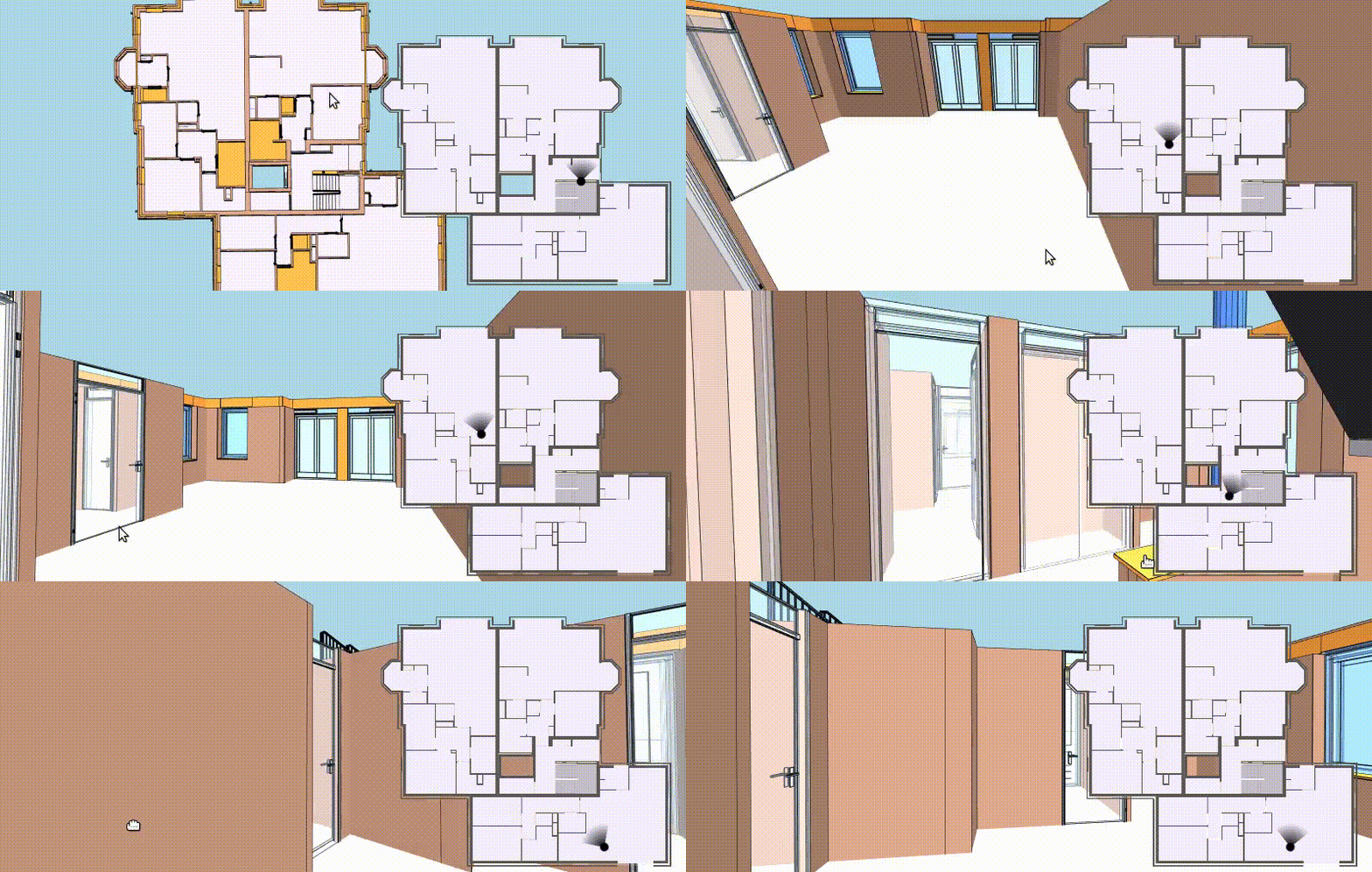 *
* [[Run this example](https://xeokit.github.io/xeokit-sdk/examples/#storeyViews_StoreyViewsPlugin_recipe2)]
*
* ## Overview
*
* StoreyViewsPlugin provides a flexible set of methods for visualizing building storeys in 3D and 2D.
*
* Use the first two methods to set up 3D views of storeys:
*
* * [showStoreyObjects](#instance-method-showStoreyObjects) - shows the {@link Entity}s within a storey, and
* * [gotoStoreyCamera](#instance-method-gotoStoreyCamera) - positions the {@link Camera} for a plan view of the Entitys within a storey.
*
*
* [[Run this example](https://xeokit.github.io/xeokit-sdk/examples/#storeyViews_StoreyViewsPlugin_recipe2)]
*
* ## Overview
*
* StoreyViewsPlugin provides a flexible set of methods for visualizing building storeys in 3D and 2D.
*
* Use the first two methods to set up 3D views of storeys:
*
* * [showStoreyObjects](#instance-method-showStoreyObjects) - shows the {@link Entity}s within a storey, and
* * [gotoStoreyCamera](#instance-method-gotoStoreyCamera) - positions the {@link Camera} for a plan view of the Entitys within a storey.
*
*
* Use the second two methods to create 2D plan view mini-map images:
*
* * [createStoreyMap](#instance-method-createStoreyMap) - creates a 2D plan view image of a storey, and
* * [pickStoreyMap](#instance-method-pickStoreyMap) - picks the {@link Entity} at the given 2D pixel coordinates within a plan view image.
*
* ## Usage
*
* Let's start by creating a {@link Viewer} with a StoreyViewsPlugin and an {@link XKTLoaderPlugin}.
*
* Then we'll load a BIM building model from an ```.xkt``` file.
*
* ````javascript
* import {Viewer, XKTLoaderPlugin, StoreyViewsPlugin} from "xeokit-sdk.es.js";
*
* // Create a Viewer, arrange the camera
*
* const viewer = new Viewer({
* canvasId: "myCanvas",
* transparent: true
* });
*
* viewer.camera.eye = [-2.56, 8.38, 8.27];
* viewer.camera.look = [13.44, 3.31, -14.83];
* viewer.camera.up = [0.10, 0.98, -0.14];
*
* // Add an XKTLoaderPlugin
*
* const xktLoader = new XKTLoaderPlugin(viewer);
*
* // Add a StoreyViewsPlugin
*
* const storeyViewsPlugin = new StoreyViewsPlugin(viewer);
*
* // Load a BIM model from .xkt format
*
* const model = xktLoader.load({
* id: "myModel",
* src: "./models/xkt/Schependomlaan.xkt",
* edges: true
* });
* ````
*
* ## Finding Storeys
*
* Getting information on a storey in our model:
*
* ````javascript
* const storey = storeyViewsPlugin.storeys["2SWZMQPyD9pfT9q87pgXa1"]; // ID of the IfcBuildingStorey
*
* const modelId = storey.modelId; // "myModel"
* const storeyId = storey.storeyId; // "2SWZMQPyD9pfT9q87pgXa1"
* const aabb = storey.aabb; // Axis-aligned 3D World-space boundary of the IfcBuildingStorey
* ````
*
* We can also get a "storeys" event every time the set of storeys changes, ie. every time a storey is created or destroyed:
*
* ````javascript
* storeyViewsPlugin.on("storeys", ()=> {
* const storey = storeyViewsPlugin.storeys["2SWZMQPyD9pfT9q87pgXa1"];
* //...
* });
* ````
*
* ## Showing Entitys within Storeys
*
* Showing the {@link Entity}s within a storey:
*
* ````javascript
* storeyViewsPlugin.showStoreyObjects("2SWZMQPyD9pfT9q87pgXa1");
* ````
*
* Showing **only** the Entitys in a storey, hiding all others:
*
* ````javascript
* storeyViewsPlugin.showStoreyObjects("2SWZMQPyD9pfT9q87pgXa1", {
* hideOthers: true
* });
* ````
* Showing only the storey Entitys, applying custom appearances configured on {@link StoreyViewsPlugin#objectStates}:
*
* ````javascript
* storeyViewsPlugin.showStoreyObjects("2SWZMQPyD9pfT9q87pgXa1", {
* hideOthers: true,
* useObjectStates: true
* });
* ````
*
* 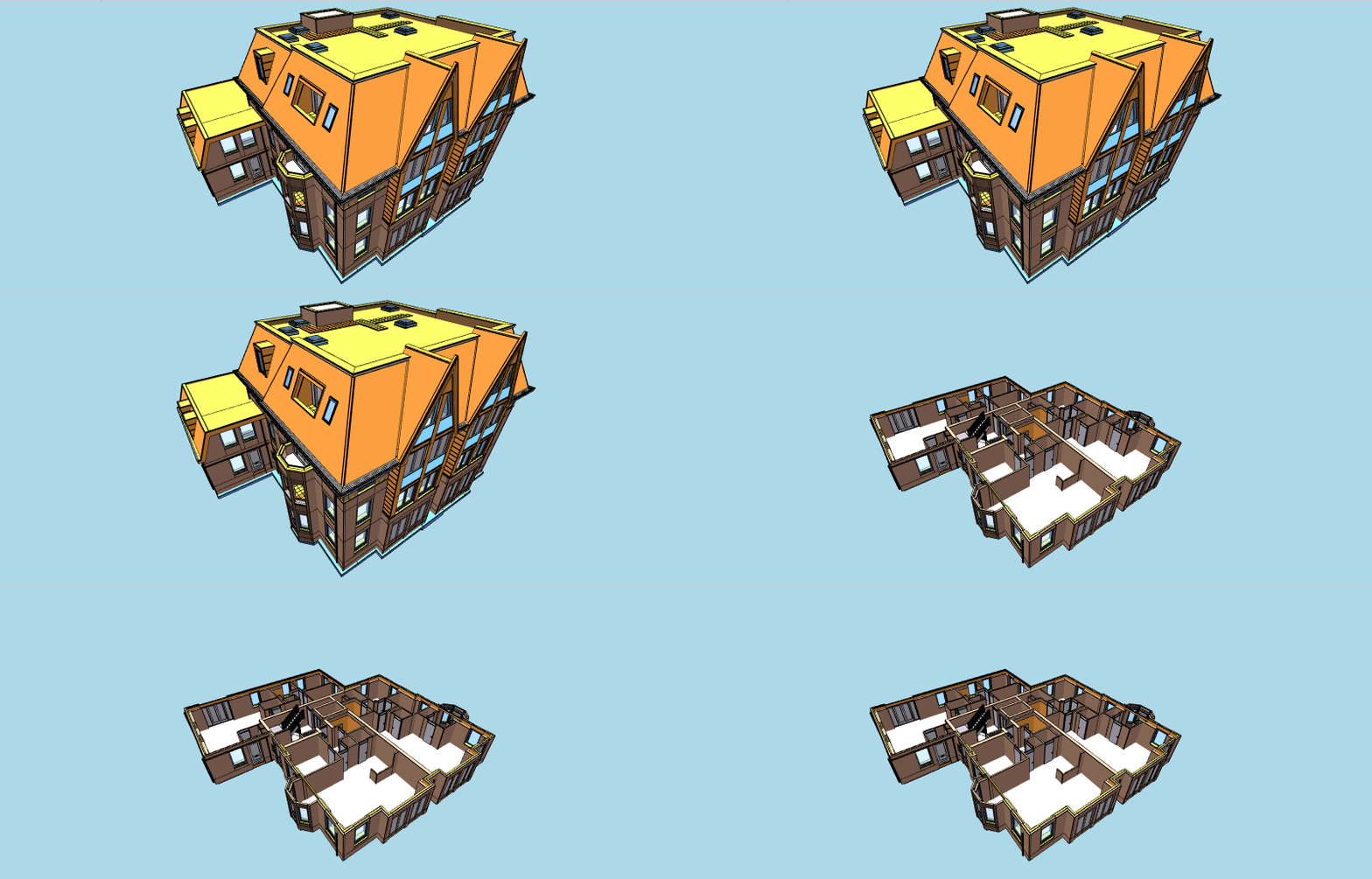 *
* [[Run this example](https://xeokit.github.io/xeokit-sdk/examples/#storeyViews_StoreyViewsPlugin_showStoreyObjects)]
*
* When using this option, at some point later you'll probably want to restore all Entitys to their original visibilities and
* appearances.
*
* To do that, save their visibility and appearance states in an {@link ObjectsMemento} beforehand, from
* which you can restore them later:
*
* ````javascript
* const objectsMemento = new ObjectsMemento();
*
* // Save all Entity visibility and appearance states
*
* objectsMemento.saveObjects(viewer.scene);
*
* // Show storey view Entitys, with custom appearances as configured for IFC types
*
* storeyViewsPlugin.showStoreyObjects("2SWZMQPyD9pfT9q87pgXa1", {
* useObjectStates: true // <<--------- Apply custom appearances
* });
*
* //...
*
* // Later, restore all Entitys to their saved visibility and appearance states
* objectsMemento.restoreObjects(viewer.scene);
* ````
*
* ## Arranging the Camera for Storey Plan Views
*
* The {@link StoreyViewsPlugin#gotoStoreyCamera} method positions the {@link Camera} for a plan view of
* the {@link Entity}s within the given storey.
*
*
*
* [[Run this example](https://xeokit.github.io/xeokit-sdk/examples/#storeyViews_StoreyViewsPlugin_showStoreyObjects)]
*
* When using this option, at some point later you'll probably want to restore all Entitys to their original visibilities and
* appearances.
*
* To do that, save their visibility and appearance states in an {@link ObjectsMemento} beforehand, from
* which you can restore them later:
*
* ````javascript
* const objectsMemento = new ObjectsMemento();
*
* // Save all Entity visibility and appearance states
*
* objectsMemento.saveObjects(viewer.scene);
*
* // Show storey view Entitys, with custom appearances as configured for IFC types
*
* storeyViewsPlugin.showStoreyObjects("2SWZMQPyD9pfT9q87pgXa1", {
* useObjectStates: true // <<--------- Apply custom appearances
* });
*
* //...
*
* // Later, restore all Entitys to their saved visibility and appearance states
* objectsMemento.restoreObjects(viewer.scene);
* ````
*
* ## Arranging the Camera for Storey Plan Views
*
* The {@link StoreyViewsPlugin#gotoStoreyCamera} method positions the {@link Camera} for a plan view of
* the {@link Entity}s within the given storey.
*
*  *
* [[Run this example](https://xeokit.github.io/xeokit-sdk/examples/#storeyViews_StoreyViewsPlugin_gotoStoreyCamera)]
*
* Let's fly the {@link Camera} to a downward-looking orthographic view of the Entitys within our storey.
*
* ````javascript
* storeyViewsPlugin.gotoStoreyCamera("2SWZMQPyD9pfT9q87pgXa1", {
* projection: "ortho", // Orthographic projection
* duration: 2.5, // 2.5 second transition
* done: () => {
* viewer.cameraControl.planView = true; // Disable rotation
* }
* });
* ````
*
* Note that we also set {@link CameraControl#planView} ````true````, which prevents the CameraControl from rotating
* or orbiting. In orthographic mode, this effectively makes the {@link Viewer} behave as if it were a 2D viewer, with
* picking, panning and zooming still enabled.
*
* If you need to be able to restore the Camera to its previous state, you can save it to a {@link CameraMemento}
* beforehand, from which you can restore it later:
*
* ````javascript
* const cameraMemento = new CameraMemento();
*
* // Save camera state
*
* cameraMemento.saveCamera(viewer.scene);
*
* // Position camera for a downward-looking orthographic view of our storey
*
* storeyViewsPlugin.gotoStoreyCamera("2SWZMQPyD9pfT9q87pgXa1", {
* projection: "ortho",
* duration: 2.5,
* done: () => {
* viewer.cameraControl.planView = true; // Disable rotation
* }
* });
*
* //...
*
* // Later, restore the Camera to its saved state
* cameraMemento.restoreCamera(viewer.scene);
* ````
*
* ## Creating StoreyMaps
*
* The {@link StoreyViewsPlugin#createStoreyMap} method creates a 2D orthographic plan image of the given storey.
*
*
*
* [[Run this example](https://xeokit.github.io/xeokit-sdk/examples/#storeyViews_StoreyViewsPlugin_gotoStoreyCamera)]
*
* Let's fly the {@link Camera} to a downward-looking orthographic view of the Entitys within our storey.
*
* ````javascript
* storeyViewsPlugin.gotoStoreyCamera("2SWZMQPyD9pfT9q87pgXa1", {
* projection: "ortho", // Orthographic projection
* duration: 2.5, // 2.5 second transition
* done: () => {
* viewer.cameraControl.planView = true; // Disable rotation
* }
* });
* ````
*
* Note that we also set {@link CameraControl#planView} ````true````, which prevents the CameraControl from rotating
* or orbiting. In orthographic mode, this effectively makes the {@link Viewer} behave as if it were a 2D viewer, with
* picking, panning and zooming still enabled.
*
* If you need to be able to restore the Camera to its previous state, you can save it to a {@link CameraMemento}
* beforehand, from which you can restore it later:
*
* ````javascript
* const cameraMemento = new CameraMemento();
*
* // Save camera state
*
* cameraMemento.saveCamera(viewer.scene);
*
* // Position camera for a downward-looking orthographic view of our storey
*
* storeyViewsPlugin.gotoStoreyCamera("2SWZMQPyD9pfT9q87pgXa1", {
* projection: "ortho",
* duration: 2.5,
* done: () => {
* viewer.cameraControl.planView = true; // Disable rotation
* }
* });
*
* //...
*
* // Later, restore the Camera to its saved state
* cameraMemento.restoreCamera(viewer.scene);
* ````
*
* ## Creating StoreyMaps
*
* The {@link StoreyViewsPlugin#createStoreyMap} method creates a 2D orthographic plan image of the given storey.
*
* 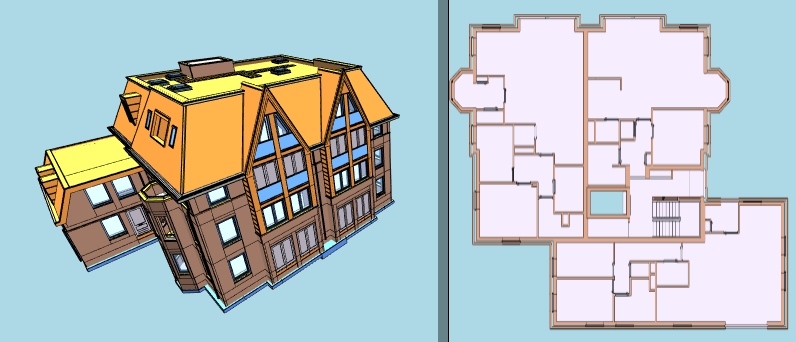 *
* [[Run this example](https://xeokit.github.io/xeokit-sdk/examples/#storeyViews_StoreyViewsPlugin_createStoreyMap)]
*
* This method creates a {@link StoreyMap}, which provides the plan image as a Base64-encoded string.
*
* Let's create a 2D plan image of our building storey:
*
* ````javascript
* const storeyMap = storeyViewsPlugin.createStoreyMap("2SWZMQPyD9pfT9q87pgXa1", {
* width: 300,
* format: "png"
* });
*
* const imageData = storeyMap.imageData; // Base64-encoded image data string
* const width = storeyMap.width; // 300
* const height = storeyMap.height; // Automatically derived from width
* const format = storeyMap.format; // "png"
* ````
*
* As with ````showStoreyEntitys````, We also have the option to customize the appearance of the Entitys in our plan
* images according to their IFC types, using the lookup table configured on {@link StoreyViewsPlugin#objectStates}.
*
* For example, we usually want to show only element types like ````IfcWall````, ````IfcDoor```` and
* ````IfcFloor```` in our plan images.
*
* Let's create another StoreyMap, this time applying the custom appearances:
*
* ````javascript
* const storeyMap = storeyViewsPlugin.createStoreyMap("2SWZMQPyD9pfT9q87pgXa1", {
* width: 300,
* format: "png",
* useObjectStates: true // <<--------- Apply custom appearances
* });
*````
*
* We can also specify a ````height```` for the plan image, as an alternative to ````width````:
*
* ````javascript
* const storeyMap = storeyViewsPlugin.createStoreyMap("2SWZMQPyD9pfT9q87pgXa1", {
* height: 200,
* format: "png",
* useObjectStates: true
* });
* ````
*
* ## Picking Entities in StoreyMaps
*
* We can use {@link StoreyViewsPlugin#pickStoreyMap} to pick Entities in our building storey, using 2D coordinates from mouse or touch events on our {@link StoreyMap}'s 2D plan image.
*
*
*
* [[Run this example](https://xeokit.github.io/xeokit-sdk/examples/#storeyViews_StoreyViewsPlugin_createStoreyMap)]
*
* This method creates a {@link StoreyMap}, which provides the plan image as a Base64-encoded string.
*
* Let's create a 2D plan image of our building storey:
*
* ````javascript
* const storeyMap = storeyViewsPlugin.createStoreyMap("2SWZMQPyD9pfT9q87pgXa1", {
* width: 300,
* format: "png"
* });
*
* const imageData = storeyMap.imageData; // Base64-encoded image data string
* const width = storeyMap.width; // 300
* const height = storeyMap.height; // Automatically derived from width
* const format = storeyMap.format; // "png"
* ````
*
* As with ````showStoreyEntitys````, We also have the option to customize the appearance of the Entitys in our plan
* images according to their IFC types, using the lookup table configured on {@link StoreyViewsPlugin#objectStates}.
*
* For example, we usually want to show only element types like ````IfcWall````, ````IfcDoor```` and
* ````IfcFloor```` in our plan images.
*
* Let's create another StoreyMap, this time applying the custom appearances:
*
* ````javascript
* const storeyMap = storeyViewsPlugin.createStoreyMap("2SWZMQPyD9pfT9q87pgXa1", {
* width: 300,
* format: "png",
* useObjectStates: true // <<--------- Apply custom appearances
* });
*````
*
* We can also specify a ````height```` for the plan image, as an alternative to ````width````:
*
* ````javascript
* const storeyMap = storeyViewsPlugin.createStoreyMap("2SWZMQPyD9pfT9q87pgXa1", {
* height: 200,
* format: "png",
* useObjectStates: true
* });
* ````
*
* ## Picking Entities in StoreyMaps
*
* We can use {@link StoreyViewsPlugin#pickStoreyMap} to pick Entities in our building storey, using 2D coordinates from mouse or touch events on our {@link StoreyMap}'s 2D plan image.
*
* 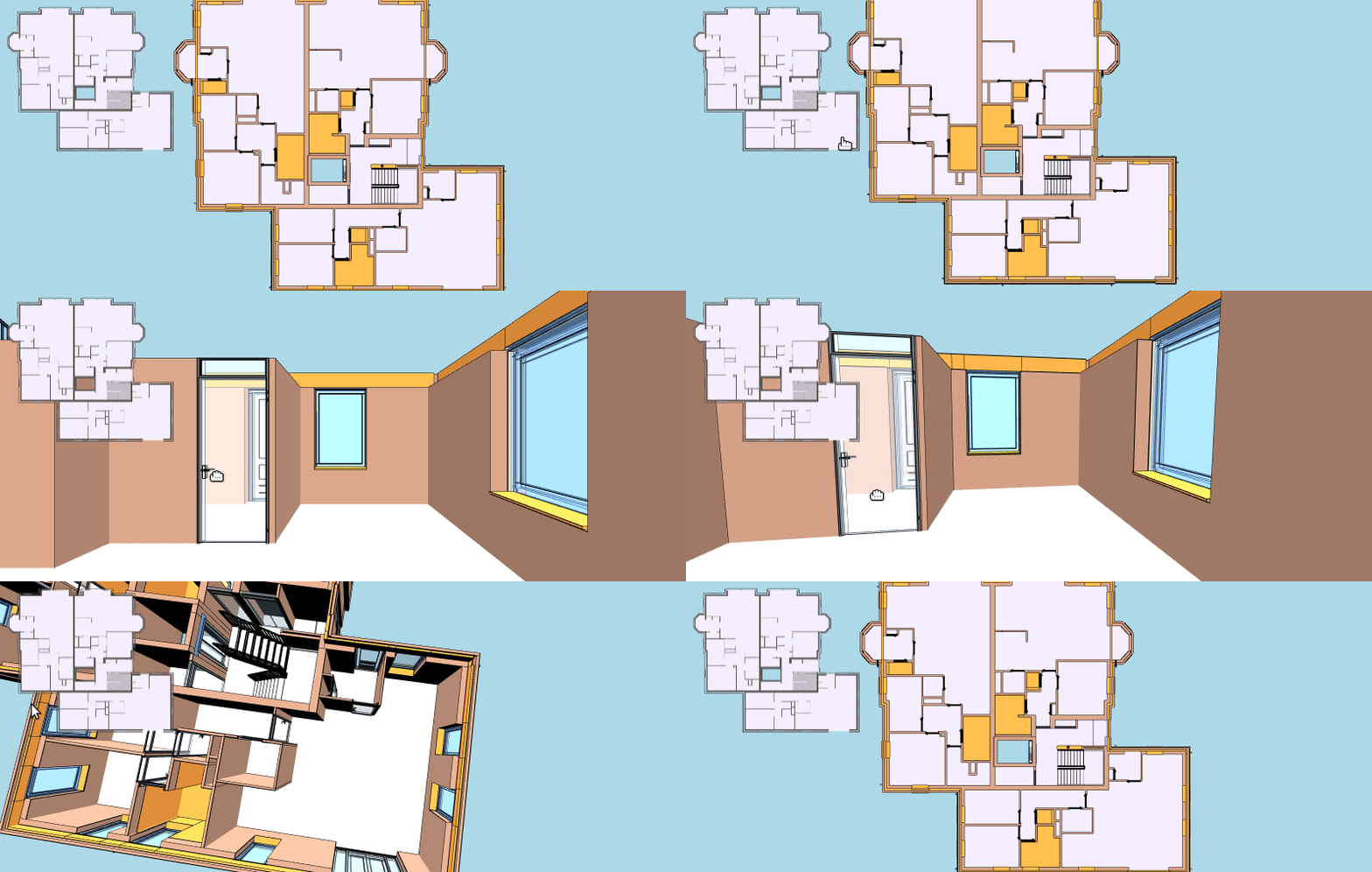 *
* [[Run this example](https://xeokit.github.io/xeokit-sdk/examples/#storeyViews_StoreyViewsPlugin_recipe2)]
*
* Let's programmatically pick the Entity at the given 2D pixel coordinates within our image:
*
* ````javascript
* const mouseCoords = [65, 120]; // Mouse coords within the image extents
*
* const pickResult = storeyViewsPlugin.pickStoreyMap(storeyMap, mouseCoords);
*
* if (pickResult && pickResult.entity) {
* pickResult.entity.highlighted = true;
* }
* ````
*/
export class StoreyViewsPlugin extends Plugin {
/**
* @constructor
*
* @param {Viewer} viewer The Viewer.
* @param {Object} cfg Plugin configuration.
* @param {String} [cfg.id="StoreyViews"] Optional ID for this plugin, so that we can find it within {@link Viewer#plugins}.
* @param {Object} [cfg.objectStates] Map of visual states for the {@link Entity}s as rendered within each {@link Storey}. Default value is {@link IFCStoreyPlanObjectStates}.
*/
constructor(viewer: any, cfg?: {
id?: string;
objectStates?: any;
});
_objectsMemento: ObjectsMemento;
_cameraMemento: CameraMemento;
/**
* A {@link Storey} for each ````IfcBuildingStorey```.
*
* There will be a {@link Storey} for every existing {@link MetaObject} whose {@link MetaObject#type} equals "IfcBuildingStorey".
*
* These are created and destroyed automatically as models are loaded and destroyed.
*
* @type {{String:Storey}}
*/
storeys: {
String: Storey;
};
/**
* A set of {@link Storey}s for each {@link MetaModel}.
*
* These are created and destroyed automatically as models are loaded and destroyed.
*
* @type {{String: {String:Storey}}}
*/
modelStoreys: {
String: {
String: Storey;
};
};
/**
* Sets map of visual states for the {@link Entity}s as rendered within each {@link Storey}.
*
* Default value is {@link IFCStoreyPlanObjectStates}.
*
* @type {{String: Object}}
*/
set objectStates(arg: {
String: any;
});
/**
* Gets map of visual states for the {@link Entity}s as rendered within each {@link Storey}.
*
* Default value is {@link IFCStoreyPlanObjectStates}.
*
* @type {{String: Object}}
*/
get objectStates(): {
String: any;
};
_onModelLoaded: any;
_registerModelStoreys(modelId: any): void;
_deregisterModelStoreys(modelId: any): void;
_objectStates: {
String: any;
};
/**
* Arranges the {@link Camera} for a 3D orthographic view of the {@link Entity}s within the given storey.
*
* See also: {@link CameraMemento}, which saves and restores the state of the {@link Scene}'s {@link Camera}
*
* @param {String} storeyId ID of the ````IfcBuildingStorey```` object.
* @param {*} [options] Options for arranging the Camera.
* @param {String} [options.projection] Projection type to transition the Camera to. Accepted values are "perspective" and "ortho".
* @param {Function} [options.done] Callback to fire when the Camera has arrived. When provided, causes an animated flight to the saved state. Otherwise jumps to the saved state.
*/
gotoStoreyCamera(storeyId: string, options?: any): void;
/**
* Shows the {@link Entity}s within the given storey.
*
* Optionally hides all other Entitys.
*
* Optionally sets the visual appearance of each of the Entitys according to its IFC type. The appearance of
* IFC types in plan views is configured by {@link StoreyViewsPlugin#objectStates}.
*
* See also: {@link ObjectsMemento}, which saves and restores a memento of the visual state
* of the {@link Entity}'s that represent objects within a {@link Scene}.
*
* @param {String} storeyId ID of the ````IfcBuildingStorey```` object.
* @param {*} [options] Options for showing the Entitys within the storey.
* @param {Boolean} [options.hideOthers=false] When ````true````, hide all other {@link Entity}s.
* @param {Boolean} [options.useObjectStates=false] When ````true````, apply the custom visibilities and appearances configured for IFC types in {@link StoreyViewsPlugin#objectStates}.
*/
showStoreyObjects(storeyId: string, options?: any): void;
/**
* Executes a callback on each of the objects within the given storey.
*
* ## Usage
*
* In the example below, we'll show all the {@link Entity}s, within the given ````IfcBuildingStorey````,
* that have {@link MetaObject}s with type ````IfcSpace````. Note that the callback will only be given
* an {@link Entity} when one exists for the given {@link MetaObject}.
*
* ````JavaScript
* myStoreyViewsPlugin.withStoreyObjects(storeyId, (entity, metaObject) => {
* if (entity && metaObject && metaObject.type === "IfcSpace") {
* entity.visible = true;
* }
* });
* ````
*
* @param {String} storeyId ID of the ````IfcBuildingStorey```` object.
* @param {Function} callback The callback.
*/
withStoreyObjects(storeyId: string, callback: Function): void;
/**
* Creates a 2D map of the given storey.
*
* @param {String} storeyId ID of the ````IfcBuildingStorey```` object.
* @param {*} [options] Options for creating the image.
* @param {Number} [options.width=300] Image width in pixels. Height will be automatically determined from this, if not given.
* @param {Number} [options.height=300] Image height in pixels, as an alternative to width. Width will be automatically determined from this, if not given.
* @param {String} [options.format="png"] Image format. Accepted values are "png" and "jpeg".
* @returns {StoreyMap} The StoreyMap.
*/
createStoreyMap(storeyId: string, options?: any): StoreyMap;
_arrangeStoreyMapCamera(storey: any): void;
/**
* Attempts to pick an {@link Entity} at the given pixel coordinates within a StoreyMap image.
*
* @param {StoreyMap} storeyMap The StoreyMap.
* @param {Number[]} imagePos 2D pixel coordinates within the bounds of {@link StoreyMap#imageData}.
* @param {*} [options] Picking options.
* @param {Boolean} [options.pickSurface=false] Whether to return the picked position on the surface of the Entity.
* @returns {PickResult} The pick result, if an Entity was successfully picked, else null.
*/
pickStoreyMap(storeyMap: StoreyMap, imagePos: number[], options?: any): any;
/**
* Gets the ID of the storey that contains the given 3D World-space position.
*.
* @param {Number[]} worldPos 3D World-space position.
* @returns {String} ID of the storey containing the position, or null if the position falls outside all the storeys.
*/
getStoreyContainingWorldPos(worldPos: number[]): string;
/**
* Converts a 3D World-space position to a 2D position within a StoreyMap image.
*
* Use {@link StoreyViewsPlugin#pickStoreyMap} to convert 2D image positions to 3D world-space.
*
* @param {StoreyMap} storeyMap The StoreyMap.
* @param {Number[]} worldPos 3D World-space position within the storey.
* @param {Number[]} imagePos 2D pixel position within the {@link StoreyMap#imageData}.
* @returns {Boolean} True if ````imagePos```` is within the bounds of the {@link StoreyMap#imageData}, else ````false```` if it falls outside.
*/
worldPosToStoreyMap(storeyMap: StoreyMap, worldPos: number[], imagePos: number[]): boolean;
/**
* Converts a 3D World-space direction vector to a 2D vector within a StoreyMap image.
*
* @param {StoreyMap} storeyMap The StoreyMap.
* @param {Number[]} worldDir 3D World-space direction vector.
* @param {Number[]} imageDir Normalized 2D direction vector.
*/
worldDirToStoreyMap(storeyMap: StoreyMap, worldDir: number[], imageDir: number[]): void;
}
import { Plugin } from "../../viewer/Plugin.js";
import { ObjectsMemento } from "../../viewer/scene/mementos/ObjectsMemento.js";
import { CameraMemento } from "../../viewer/scene/mementos/CameraMemento.js";
import { Storey } from "./Storey.js";
import { StoreyMap } from "./StoreyMap.js";
*
* [[Run this example](https://xeokit.github.io/xeokit-sdk/examples/#storeyViews_StoreyViewsPlugin_recipe2)]
*
* Let's programmatically pick the Entity at the given 2D pixel coordinates within our image:
*
* ````javascript
* const mouseCoords = [65, 120]; // Mouse coords within the image extents
*
* const pickResult = storeyViewsPlugin.pickStoreyMap(storeyMap, mouseCoords);
*
* if (pickResult && pickResult.entity) {
* pickResult.entity.highlighted = true;
* }
* ````
*/
export class StoreyViewsPlugin extends Plugin {
/**
* @constructor
*
* @param {Viewer} viewer The Viewer.
* @param {Object} cfg Plugin configuration.
* @param {String} [cfg.id="StoreyViews"] Optional ID for this plugin, so that we can find it within {@link Viewer#plugins}.
* @param {Object} [cfg.objectStates] Map of visual states for the {@link Entity}s as rendered within each {@link Storey}. Default value is {@link IFCStoreyPlanObjectStates}.
*/
constructor(viewer: any, cfg?: {
id?: string;
objectStates?: any;
});
_objectsMemento: ObjectsMemento;
_cameraMemento: CameraMemento;
/**
* A {@link Storey} for each ````IfcBuildingStorey```.
*
* There will be a {@link Storey} for every existing {@link MetaObject} whose {@link MetaObject#type} equals "IfcBuildingStorey".
*
* These are created and destroyed automatically as models are loaded and destroyed.
*
* @type {{String:Storey}}
*/
storeys: {
String: Storey;
};
/**
* A set of {@link Storey}s for each {@link MetaModel}.
*
* These are created and destroyed automatically as models are loaded and destroyed.
*
* @type {{String: {String:Storey}}}
*/
modelStoreys: {
String: {
String: Storey;
};
};
/**
* Sets map of visual states for the {@link Entity}s as rendered within each {@link Storey}.
*
* Default value is {@link IFCStoreyPlanObjectStates}.
*
* @type {{String: Object}}
*/
set objectStates(arg: {
String: any;
});
/**
* Gets map of visual states for the {@link Entity}s as rendered within each {@link Storey}.
*
* Default value is {@link IFCStoreyPlanObjectStates}.
*
* @type {{String: Object}}
*/
get objectStates(): {
String: any;
};
_onModelLoaded: any;
_registerModelStoreys(modelId: any): void;
_deregisterModelStoreys(modelId: any): void;
_objectStates: {
String: any;
};
/**
* Arranges the {@link Camera} for a 3D orthographic view of the {@link Entity}s within the given storey.
*
* See also: {@link CameraMemento}, which saves and restores the state of the {@link Scene}'s {@link Camera}
*
* @param {String} storeyId ID of the ````IfcBuildingStorey```` object.
* @param {*} [options] Options for arranging the Camera.
* @param {String} [options.projection] Projection type to transition the Camera to. Accepted values are "perspective" and "ortho".
* @param {Function} [options.done] Callback to fire when the Camera has arrived. When provided, causes an animated flight to the saved state. Otherwise jumps to the saved state.
*/
gotoStoreyCamera(storeyId: string, options?: any): void;
/**
* Shows the {@link Entity}s within the given storey.
*
* Optionally hides all other Entitys.
*
* Optionally sets the visual appearance of each of the Entitys according to its IFC type. The appearance of
* IFC types in plan views is configured by {@link StoreyViewsPlugin#objectStates}.
*
* See also: {@link ObjectsMemento}, which saves and restores a memento of the visual state
* of the {@link Entity}'s that represent objects within a {@link Scene}.
*
* @param {String} storeyId ID of the ````IfcBuildingStorey```` object.
* @param {*} [options] Options for showing the Entitys within the storey.
* @param {Boolean} [options.hideOthers=false] When ````true````, hide all other {@link Entity}s.
* @param {Boolean} [options.useObjectStates=false] When ````true````, apply the custom visibilities and appearances configured for IFC types in {@link StoreyViewsPlugin#objectStates}.
*/
showStoreyObjects(storeyId: string, options?: any): void;
/**
* Executes a callback on each of the objects within the given storey.
*
* ## Usage
*
* In the example below, we'll show all the {@link Entity}s, within the given ````IfcBuildingStorey````,
* that have {@link MetaObject}s with type ````IfcSpace````. Note that the callback will only be given
* an {@link Entity} when one exists for the given {@link MetaObject}.
*
* ````JavaScript
* myStoreyViewsPlugin.withStoreyObjects(storeyId, (entity, metaObject) => {
* if (entity && metaObject && metaObject.type === "IfcSpace") {
* entity.visible = true;
* }
* });
* ````
*
* @param {String} storeyId ID of the ````IfcBuildingStorey```` object.
* @param {Function} callback The callback.
*/
withStoreyObjects(storeyId: string, callback: Function): void;
/**
* Creates a 2D map of the given storey.
*
* @param {String} storeyId ID of the ````IfcBuildingStorey```` object.
* @param {*} [options] Options for creating the image.
* @param {Number} [options.width=300] Image width in pixels. Height will be automatically determined from this, if not given.
* @param {Number} [options.height=300] Image height in pixels, as an alternative to width. Width will be automatically determined from this, if not given.
* @param {String} [options.format="png"] Image format. Accepted values are "png" and "jpeg".
* @returns {StoreyMap} The StoreyMap.
*/
createStoreyMap(storeyId: string, options?: any): StoreyMap;
_arrangeStoreyMapCamera(storey: any): void;
/**
* Attempts to pick an {@link Entity} at the given pixel coordinates within a StoreyMap image.
*
* @param {StoreyMap} storeyMap The StoreyMap.
* @param {Number[]} imagePos 2D pixel coordinates within the bounds of {@link StoreyMap#imageData}.
* @param {*} [options] Picking options.
* @param {Boolean} [options.pickSurface=false] Whether to return the picked position on the surface of the Entity.
* @returns {PickResult} The pick result, if an Entity was successfully picked, else null.
*/
pickStoreyMap(storeyMap: StoreyMap, imagePos: number[], options?: any): any;
/**
* Gets the ID of the storey that contains the given 3D World-space position.
*.
* @param {Number[]} worldPos 3D World-space position.
* @returns {String} ID of the storey containing the position, or null if the position falls outside all the storeys.
*/
getStoreyContainingWorldPos(worldPos: number[]): string;
/**
* Converts a 3D World-space position to a 2D position within a StoreyMap image.
*
* Use {@link StoreyViewsPlugin#pickStoreyMap} to convert 2D image positions to 3D world-space.
*
* @param {StoreyMap} storeyMap The StoreyMap.
* @param {Number[]} worldPos 3D World-space position within the storey.
* @param {Number[]} imagePos 2D pixel position within the {@link StoreyMap#imageData}.
* @returns {Boolean} True if ````imagePos```` is within the bounds of the {@link StoreyMap#imageData}, else ````false```` if it falls outside.
*/
worldPosToStoreyMap(storeyMap: StoreyMap, worldPos: number[], imagePos: number[]): boolean;
/**
* Converts a 3D World-space direction vector to a 2D vector within a StoreyMap image.
*
* @param {StoreyMap} storeyMap The StoreyMap.
* @param {Number[]} worldDir 3D World-space direction vector.
* @param {Number[]} imageDir Normalized 2D direction vector.
*/
worldDirToStoreyMap(storeyMap: StoreyMap, worldDir: number[], imageDir: number[]): void;
}
import { Plugin } from "../../viewer/Plugin.js";
import { ObjectsMemento } from "../../viewer/scene/mementos/ObjectsMemento.js";
import { CameraMemento } from "../../viewer/scene/mementos/CameraMemento.js";
import { Storey } from "./Storey.js";
import { StoreyMap } from "./StoreyMap.js";