/**
* @desc A customizable HTML context menu.
*
* [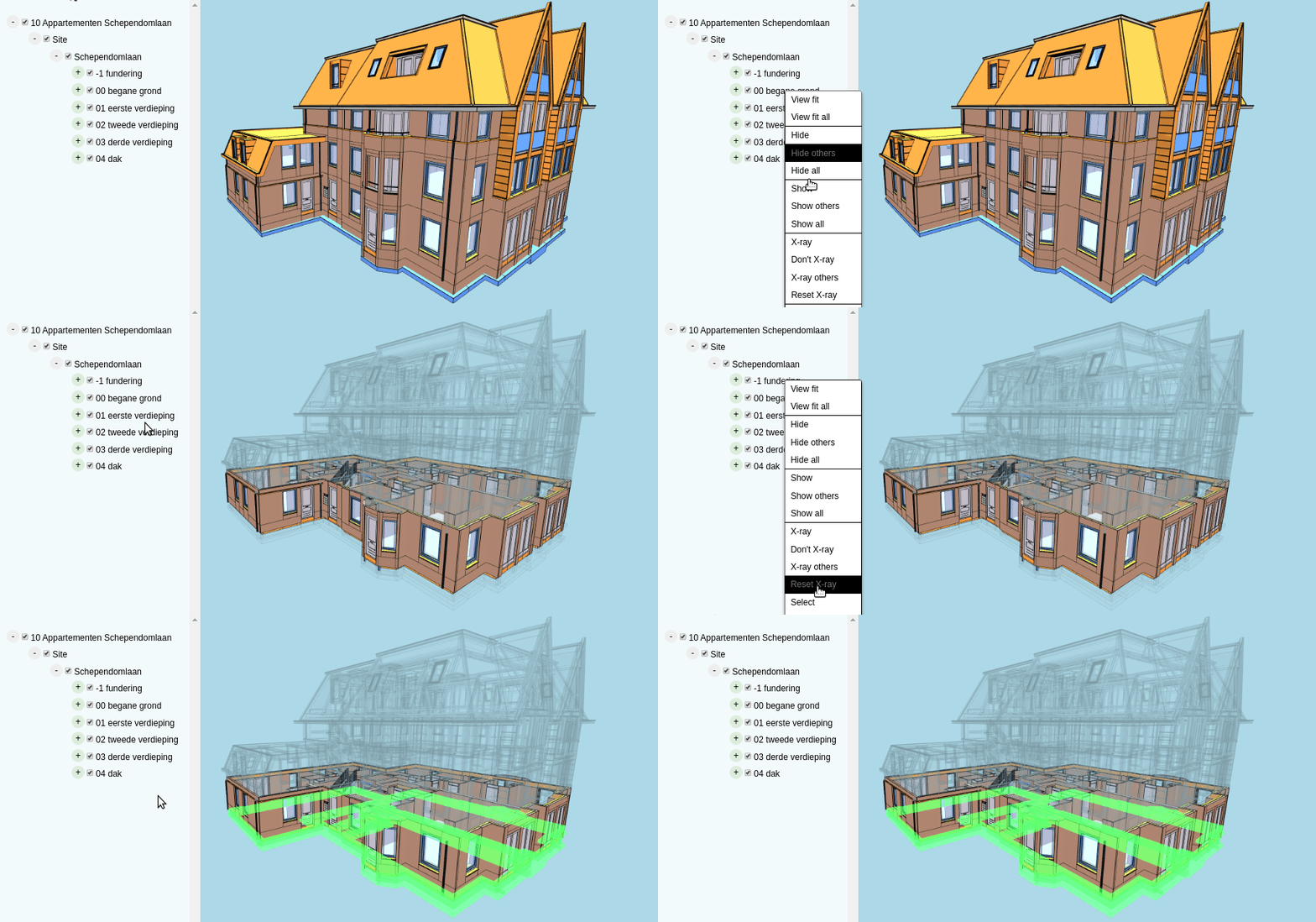 ](https://xeokit.github.io/xeokit-sdk/examples/#ContextMenu_Canvas_TreeViewPlugin_Custom)
*
* * [[Run this example](https://xeokit.github.io/xeokit-sdk/examples/#ContextMenu_Canvas_TreeViewPlugin_Custom)]
*
* ## Overview
*
* * A pure JavaScript, lightweight context menu
* * Dynamically configure menu items
* * Dynamically enable or disable items
* * Supports cascading sub-menus
* * Configure custom style with custom CSS (see examples above)
*
* ## Usage
*
* In the example below we'll create a ````ContextMenu```` that pops up whenever we right-click on an {@link Entity} within
* our {@link Scene}.
*
* First, we'll create the ````ContextMenu````, configuring it with a list of menu items.
*
* Each item has:
*
* * a ````title```` for the item,
* * a ````doAction()```` callback to fire when the item's title is clicked, and
* * an optional ````getEnabled()```` callback that indicates if the item should enabled in the menu or not.
*
*
](https://xeokit.github.io/xeokit-sdk/examples/#ContextMenu_Canvas_TreeViewPlugin_Custom)
*
* * [[Run this example](https://xeokit.github.io/xeokit-sdk/examples/#ContextMenu_Canvas_TreeViewPlugin_Custom)]
*
* ## Overview
*
* * A pure JavaScript, lightweight context menu
* * Dynamically configure menu items
* * Dynamically enable or disable items
* * Supports cascading sub-menus
* * Configure custom style with custom CSS (see examples above)
*
* ## Usage
*
* In the example below we'll create a ````ContextMenu```` that pops up whenever we right-click on an {@link Entity} within
* our {@link Scene}.
*
* First, we'll create the ````ContextMenu````, configuring it with a list of menu items.
*
* Each item has:
*
* * a ````title```` for the item,
* * a ````doAction()```` callback to fire when the item's title is clicked, and
* * an optional ````getEnabled()```` callback that indicates if the item should enabled in the menu or not.
*
*
*
* The ````getEnabled()```` callbacks are invoked whenever the menu is shown. When an item's ````getEnabled()```` callback
* returns ````true````, then the item is enabled and clickable. When it returns ````false````, then the item is disabled
* and cannot be clicked. An item without a ````getEnabled()```` callback is always enabled and clickable.
*
* Note how the ````doAction()```` and ````getEnabled()```` callbacks accept a ````context````
* object. That must be set on the ````ContextMenu```` before we're able to we show it. The context object can be anything. In this example,
* we'll use the context object to provide the callbacks with the Entity that we right-clicked.
*
* We'll also initially enable the ````ContextMenu````.
*
* [[Run this example](https://xeokit.github.io/xeokit-sdk/examples/#ContextMenu_Canvas_Custom)]
*
* ````javascript
* const canvasContextMenu = new ContextMenu({
*
* enabled: true,
*
* items: [
* [
* {
* title: "Hide Object",
* getEnabled: (context) => {
* return context.entity.visible; // Can't hide entity if already hidden
* },
* doAction: function (context) {
* context.entity.visible = false;
* }
* }
* ],
* [
* {
* title: "Select Object",
* getEnabled: (context) => {
* return (!context.entity.selected); // Can't select an entity that's already selected
* },
* doAction: function (context) {
* context.entity.selected = true;
* }
* }
* ],
* [
* {
* title: "X-Ray Object",
* getEnabled: (context) => {
* return (!context.entity.xrayed); // Can't X-ray an entity that's already X-rayed
* },
* doAction: (context) => {
* context.entity.xrayed = true;
* }
* }
* ]
* ]
* });
* ````
*
* Next, we'll make the ````ContextMenu```` appear whenever we right-click on an Entity. Whenever we right-click
* on the canvas, we'll attempt to pick the Entity at those mouse coordinates. If we succeed, we'll feed the
* Entity into ````ContextMenu```` via the context object, then show the ````ContextMenu````.
*
* From there, each ````ContextMenu```` item's ````getEnabled()```` callback will be invoked (if provided), to determine if the item should
* be enabled. If we click an item, its ````doAction()```` callback will be invoked with our context object.
*
* Remember that we must set the context on our ````ContextMenu```` before we show it, otherwise it will log an error to the console,
* and ignore our attempt to show it.
*
* ````javascript*
* viewer.scene.canvas.canvas.oncontextmenu = (e) => { // Right-clicked on the canvas
*
* if (!objectContextMenu.enabled) {
* return;
* }
*
* var hit = viewer.scene.pick({ // Try to pick an Entity at the coordinates
* canvasPos: [e.pageX, e.pageY]
* });
*
* if (hit) { // Picked an Entity
*
* objectContextMenu.context = { // Feed entity to ContextMenu
* entity: hit.entity
* };
*
* objectContextMenu.show(e.pageX, e.pageY); // Show the ContextMenu
* }
*
* e.preventDefault();
* });
* ````
*
* Note how we only show the ````ContextMenu```` if it's enabled. We can use that mechanism to switch between multiple
* ````ContextMenu```` instances depending on what we clicked.
*
* ## Dynamic Item Titles
*
* To make an item dynamically regenerate its title text whenever we show the ````ContextMenu````, provide its title with a
* ````getTitle()```` callback. The callback will fire each time you show ````ContextMenu````, which will dynamically
* set the item title text.
*
* In the example below, we'll create a simple ````ContextMenu```` that allows us to toggle the selection of an object
* via its first item, which changes text depending on whether we are selecting or deselecting the object.
*
* [[Run an example](https://xeokit.github.io/xeokit-sdk/examples/#ContextMenu_dynamicItemTitles)]
*
* ````javascript
* const canvasContextMenu = new ContextMenu({
*
* enabled: true,
*
* items: [
* [
* {
* getTitle: (context) => {
* return (!context.entity.selected) ? "Select" : "Undo Select";
* },
* doAction: function (context) {
* context.entity.selected = !context.entity.selected;
* }
* },
* {
* title: "Clear Selection",
* getEnabled: function (context) {
* return (context.viewer.scene.numSelectedObjects > 0);
* },
* doAction: function (context) {
* context.viewer.scene.setObjectsSelected(context.viewer.scene.selectedObjectIds, false);
* }
* }
* ]
* ]
* });
* ````
*
* ## Sub-menus
*
* Each menu item can optionally have a sub-menu, which will appear when we hover over the item.
*
* In the example below, we'll create a much simpler ````ContextMenu```` that has only one item, called "Effects", which
* will open a cascading sub-menu whenever we hover over that item.
*
* Note that our "Effects" item has no ````doAction```` callback, because an item with a sub-menu performs no
* action of its own.
*
* [[Run this example](https://xeokit.github.io/xeokit-sdk/examples/#ContextMenu_subMenus)]
*
* ````javascript
* const canvasContextMenu = new ContextMenu({
* items: [ // Top level items
* [
* {
* getTitle: (context) => {
* return "Effects";
* },
*
* items: [ // Sub-menu
* [
* {
* getTitle: (context) => {
* return (!context.entity.visible) ? "Show" : "Hide";
* },
* doAction: function (context) {
* context.entity.visible = !context.entity.visible;
* }
* },
* {
* getTitle: (context) => {
* return (!context.entity.selected) ? "Select" : "Undo Select";
* },
* doAction: function (context) {
* context.entity.selected = !context.entity.selected;
* }
* },
* {
* getTitle: (context) => {
* return (!context.entity.highlighted) ? "Highlight" : "Undo Highlight";
* },
* doAction: function (context) {
* context.entity.highlighted = !context.entity.highlighted;
* }
* }
* ]
* ]
* }
* ]
* ]
* });
* ````
*/
export class ContextMenu {
/**
* Creates a ````ContextMenu````.
*
* The ````ContextMenu```` will be initially hidden.
*
* @param {Object} [cfg] ````ContextMenu```` configuration.
* @param {Object} [cfg.items] The context menu items. These can also be dynamically set on {@link ContextMenu#items}. See the class documentation for an example.
* @param {Object} [cfg.context] The context, which is passed into the item callbacks. This can also be dynamically set on {@link ContextMenu#context}. This must be set before calling {@link ContextMenu#show}.
* @param {Boolean} [cfg.enabled=true] Whether this ````ContextMenu```` is initially enabled. {@link ContextMenu#show} does nothing while this is ````false````.
* @param {Boolean} [cfg.hideOnMouseDown=true] Whether this ````ContextMenu```` automatically hides whenever we mouse-down or tap anywhere in the page.
*/
constructor(cfg?: {
items?: any;
context?: any;
enabled?: boolean;
hideOnMouseDown?: boolean;
});
_id: any;
_context: any;
_enabled: boolean;
_itemsCfg: any[];
_rootMenu: Menu;
_menuList: any[];
_menuMap: {};
_itemList: any[];
_itemMap: {};
_shown: boolean;
_nextId: number;
/**
* Subscriptions to events fired at this ContextMenu.
* @private
*/
private _eventSubs;
/**
* Sets the ````ContextMenu```` items.
*
* These can be updated dynamically at any time.
*
* See class documentation for an example.
*
* @type {Object[]}
*/
set items(arg: any[]);
/**
* Gets the ````ContextMenu```` items.
*
* @type {Object[]}
*/
get items(): any[];
/**
* Sets the ````ContextMenu```` context.
*
* The context can be any object that you need to be provides to the callbacks configured on {@link ContextMenu#items}.
*
* This must be set before calling {@link ContextMenu#show}.
*
* @type {Object}
*/
set context(arg: any);
/**
* Gets the ````ContextMenu```` context.
*
* @type {Object}
*/
get context(): any;
/**
* Sets whether this ````ContextMenu```` is enabled.
*
* Hides the menu when disabling.
*
* @type {Boolean}
*/
set enabled(arg: boolean);
/**
* Gets whether this ````ContextMenu```` is enabled.
*
* {@link ContextMenu#show} does nothing while this is ````false````.
*
* @type {Boolean}
*/
get enabled(): boolean;
/**
Subscribes to an event fired at this ````ContextMenu````.
@param {String} event The event
@param {Function} callback Callback fired on the event
*/
on(event: string, callback: Function): void;
/**
Fires an event at this ````ContextMenu````.
@param {String} event The event type name
@param {Object} value The event parameters
*/
fire(event: string, value: any): void;
/**
* Shows this ````ContextMenu```` at the given page coordinates.
*
* Does nothing when {@link ContextMenu#enabled} is ````false````.
*
* Logs error to console and does nothing if {@link ContextMenu#context} has not been set.
*
* Fires a "shown" event when shown.
*
* @param {Number} pageX Page X-coordinate.
* @param {Number} pageY Page Y-coordinate.
*/
show(pageX: number, pageY: number): void;
/**
* Gets whether this ````ContextMenu```` is currently shown or not.
*
* @returns {Boolean} Whether this ````ContextMenu```` is shown.
*/
get shown(): boolean;
/**
* Hides this ````ContextMenu````.
*
* Fires a "hidden" event when hidden.
*/
hide(): void;
/**
* Destroys this ````ContextMenu````.
*/
destroy(): void;
_clear(): void;
_parseItems(itemsCfg: any): void;
_getNextId(): string;
_createUI(): void;
_createMenuUI(menu: any): void;
_updateItemsTitles(): void;
_updateItemsEnabledStatus(): void;
_showMenu(menuId: any, pageX: any, pageY: any): void;
_hideMenu(menuId: any): void;
_hideAllMenus(): void;
_showMenuElement(menuElement: any, pageX: any, pageY: any): void;
_hideMenuElement(menuElement: any): void;
}
/**
* Internal data class that represents the state of a menu or a submenu.
* @private
*/
declare class Menu {
constructor(id: any);
id: any;
parentItem: any;
groups: any[];
menuElement: any;
shown: boolean;
mouseOver: number;
}
export {};