# Workspai CLI
[](https://www.npmjs.com/package/workspai)
[](https://www.npmjs.com/package/workspai)
[](LICENSE)
[](https://marketplace.visualstudio.com/items?itemName=rapidkit.rapidkit-vscode)
## Give your AI agent the system, not just the repository
**Less rediscovery. More time building.**
Give your coding agent a system map, source references, and saved project context.
Use the same evidence yourself to understand the code and decide what to do next.
> One workspace. One truth. Humans and AI aligned.
## Workspace Intelligence for software systems
Workspai is an open-source CLI that helps you understand software and prepare
focused context for Codex, Claude Code, Cursor, and GitHub Copilot.
The system map and checks do not require an AI API key.
[Quickstart](#start-in-two-minutes) ·
[Agent setup](docs/agent-entry.md) ·
[Documentation](docs/README.md)
## Start in two minutes
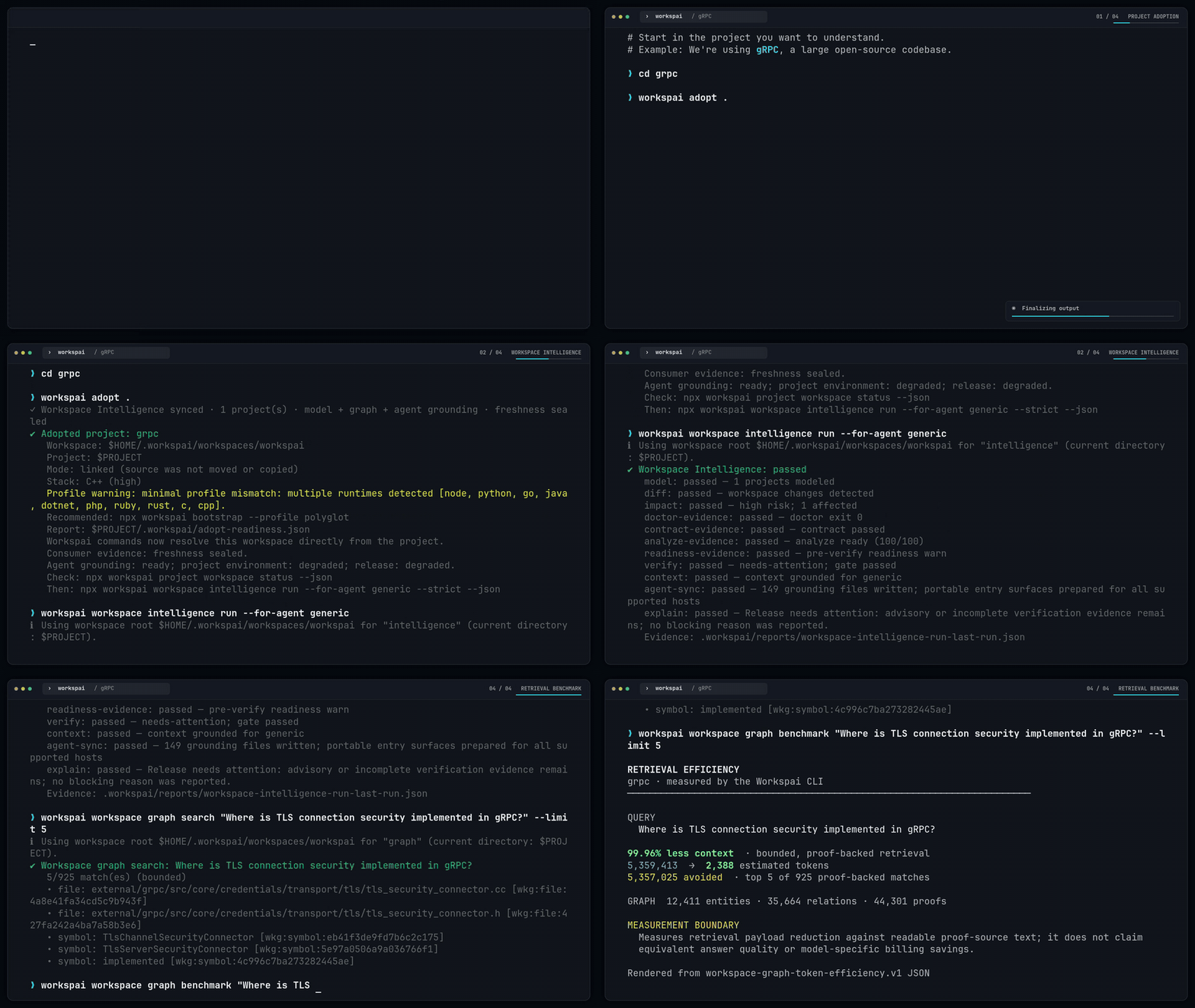
From the directory of your existing project:
```bash
npx workspai adopt .
npx workspai workspace intelligence run --for-agent generic
```
Requires **Node.js 20.19+ and npm**. Your source stays in place. Workspai adds
project metadata and agent entry files, creates or reuses a linked workspace,
and saves shared reports there. `generic` prepares context for supported agent
hosts without requiring you to choose one yet. Run time depends on your project.
**Read the terminal summary:** which projects were detected, where context was
saved, and which checks need attention. Rerun the intelligence command after
changes to refresh the saved view.
### Create a workspace or a new project
Build from a starter instead of setting up every project by hand:
```bash
npx workspai create
```
- **Create a workspace:** organize your projects with shared context and checks.
- **Create a project:** pick a category, kit, and name; scaffold and register it.
- **Add existing software:** connect a local project, Git repository, or workspace.
| Build… | Choose from starters such as… |
| --- | --- |
| A backend | FastAPI, NestJS, Go, ASP.NET Core, Rust Axum, Spring Boot |
| A frontend | Next.js, React + Vite, Vue, Angular, Astro, SvelteKit |
| An AI agent | Google ADK, OpenAI Agents SDK, Microsoft Agent Framework |
| A model gateway | OpenRouter with Python or TypeScript |
| A desktop app or extension | Browse the matching category in the picker |
The picker shows each kit's support status.
Install once with `npm install -g workspai` to use `workspai create`.
The optional `wspai` package provides the shorter `wspai create` command.
[All workspace and project setup options](docs/creating-workspaces-and-projects.md)
## Give your agent a goal, not an open-ended prompt
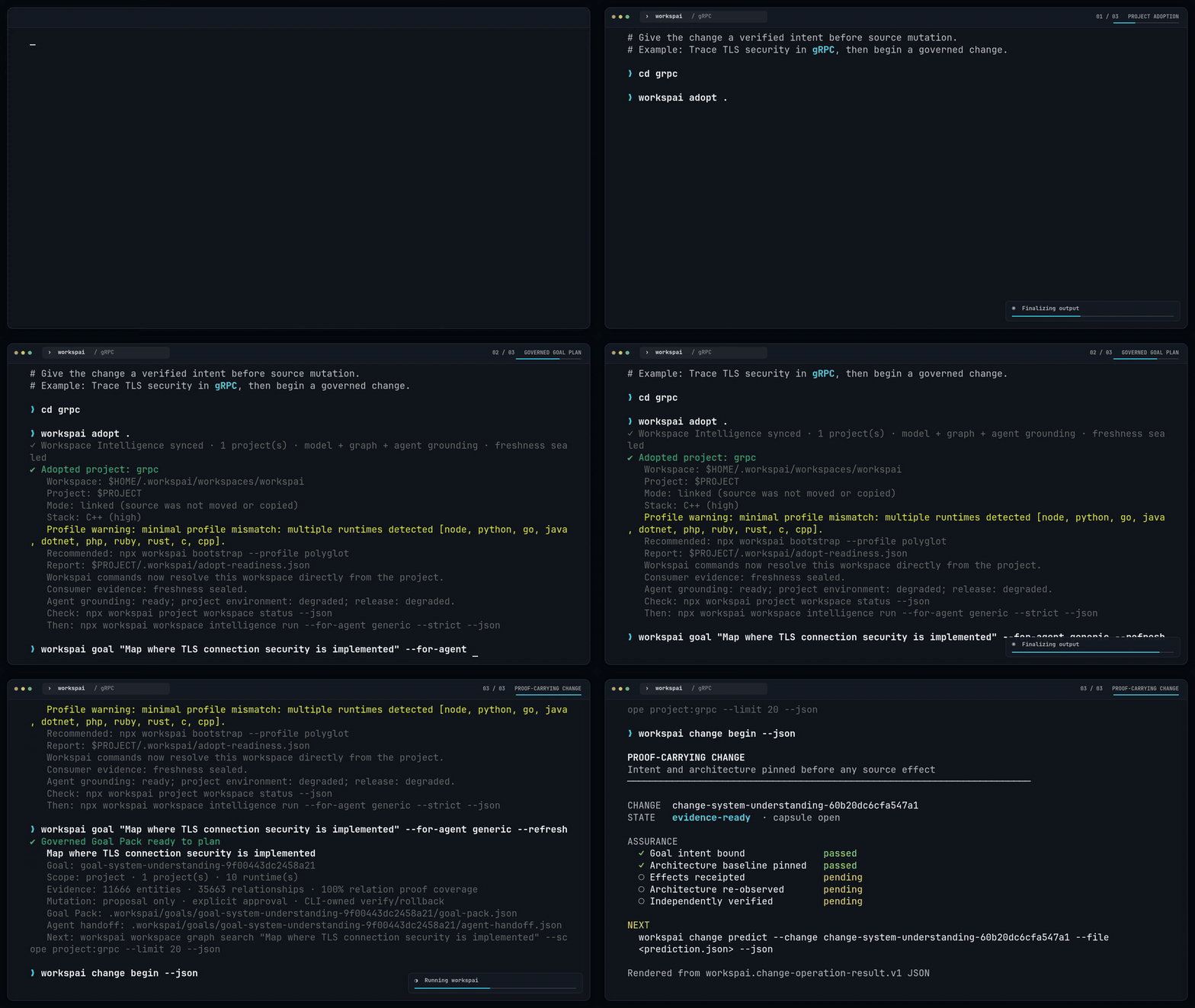
From your linked project:
```bash
npx workspai goal "Raise test coverage to 85%" --for-agent generic
```
Workspai prepares scope, acceptance criteria, and an agent handoff.
The agent gets a focused objective, not permission to scan or change everything.
The command does not edit source or claim that the outcome is complete.
Your agent performs the implementation; verification checks the result.
[Goal guide, including multi-project and runtime choices](docs/goal-packs.md)
## Make every agent change carry proof
Need an audit trail? **Proof-Carrying Change** connects the goal to authorized
changes, observed effects, and independent verification.
Prediction can guide work but can never prove its own result.
Example change lifecycle — after creating a Goal
Begin before the first source change; replace placeholders with your change ID
and actual effect receipt. See the guide for receipt creation and the full loop.
```bash
npx workspai change begin --json
npx workspai change authorize --change --effects filesystem,command --json
npx workspai change effect record --change --file effect-receipt.json --json
npx workspai change verify --change --strict --json
npx workspai change capsule validate --change --json
```
[Record and verify a change](docs/proof-carrying-change.md)
## What happens after the first run
Your project keeps its agent entry and scoped context. The linked workspace
keeps shared reports under `.workspai/reports/`. You can stay in the project terminal.
To check the entry before handing work to an agent:
```bash
npx workspai agent bootstrap --for-agent generic --strict --json
```
A blocked result is useful evidence, not a crashed command.
Inspect the named check and its report before claiming readiness.
[Agent setup and entry checks](docs/agent-entry.md)
## How Workspace Intelligence works
Workspai reads the workspace, builds a map, checks evidence, and prepares context.
The **Workspace Model is the canonical source of truth**. The graph is a
**derived, revision-bound representation**; providers enrich it without rewriting
the model during the same run.
A missing relationship means **not proven**, not "these projects are independent."
The full intelligence chain and CI command
```text
Model → Diff → Impact → Doctor + Contract Verify + Analyze → Readiness
→ Verify → Context → Agent Sync → Explain
```
```bash
npx workspai workspace intelligence run --for-agent generic --strict --json
```
`pipeline --json --strict` is the broader release/governance workflow and
complements this runner.
[Runner behavior and exit codes](docs/workspace-intelligence-runner.md)
See a workspace graph
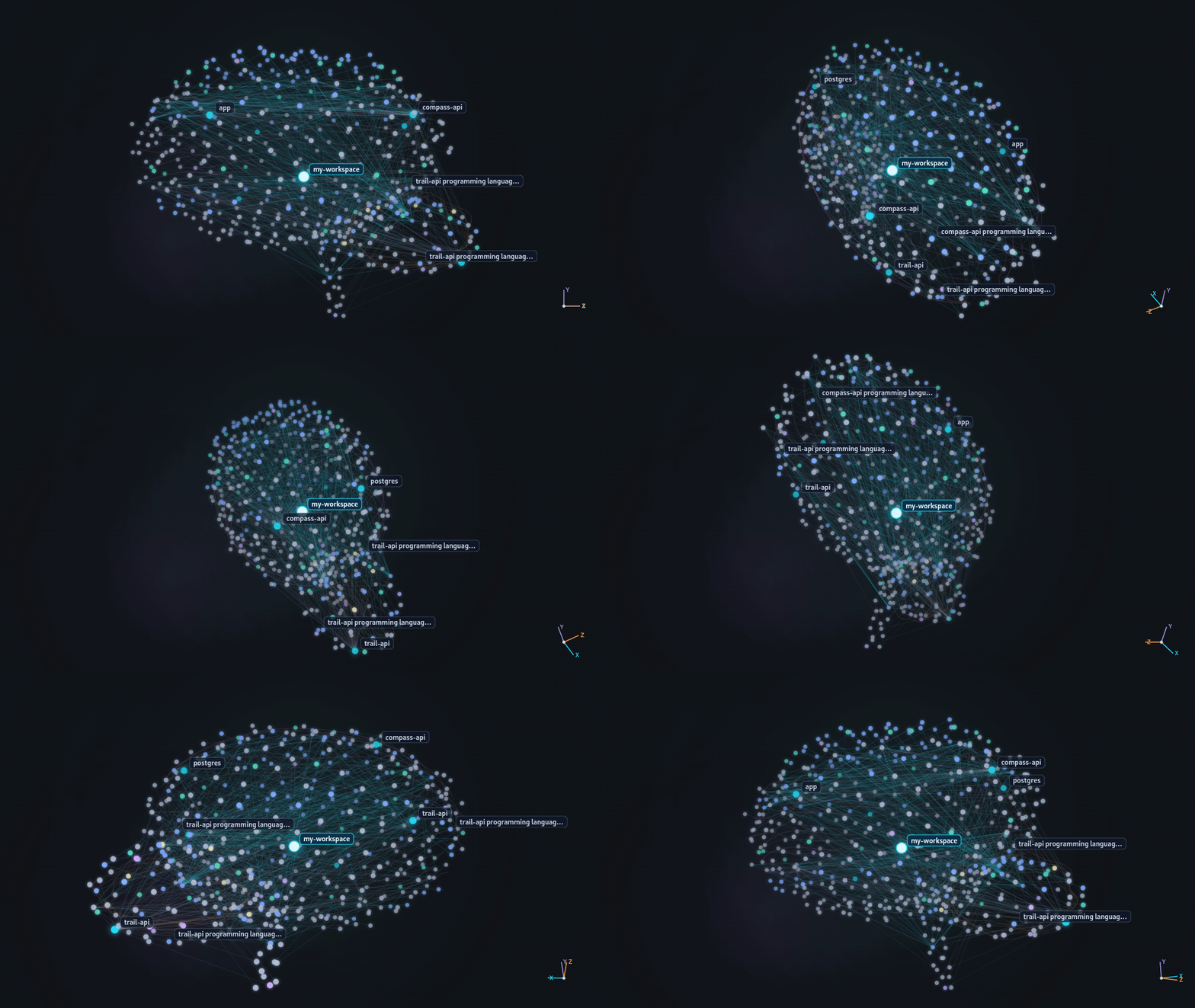
[Explore the graph](docs/workspace-knowledge-graph.md)
## Everyday workflows
| You want to… | Run |
| --- | --- |
| Refresh context and checks | `npx workspai workspace intelligence run --for-agent generic` |
| Explore a topic from your code | `npx workspai workspace graph search "authentication" --limit 5 --json` |
| Diagnose your project or workspace | `npx workspai doctor project` / `npx workspai doctor workspace` |
| Start a new project | `npx workspai create` |
| Serve workspace queries to an MCP client | `npx workspai workspace mcp serve` |
Search results include evidence references. Follow them before changing code.
[All commands and flags](docs/commands-reference.md)
## Outputs and integrations
Use terminal summaries for a first look, JSON for automation, and saved context
for coding agents. Graph exports include JSON, Mermaid, DOT, GraphML, and GEXF.
Live activity projections and reports for IDEs and dashboards show current activity;
activity alone does not prove a change is correct.
The [VS Code extension](https://marketplace.visualstudio.com/items?itemName=rapidkit.rapidkit-vscode)
uses the same CLI and workspace artifacts.
## Requirements
Node.js **20.19+** and npm. Other runtimes are needed only for projects and
workflows that use them. Python is not required for Python-free workflows;
RapidKit Core supports the Python/Core-dependent kits and modules.
## Documentation
| Next step | Guide |
| --- | --- |
| Create, adopt, or import a project | [Getting started](docs/creating-workspaces-and-projects.md) |
| Connect your coding agent | [Agent entry](docs/agent-entry.md) |
| Understand relationships | [Knowledge Graph](docs/workspace-knowledge-graph.md) |
| Add checks to CI | [CI workflows](docs/ci-workflows.md) |
| Find a command or understand a term | [Command reference](docs/commands-reference.md) · [Glossary](docs/GLOSSARY.md) |
[Browse all guides](docs/README.md)
## Troubleshooting
- **Workspace not detected?** Run from your linked project, or inspect
`npx workspai project workspace status --json`.
- **Context is stale?** Rerun the intelligence command.
- **A check is blocked?** Read the named report; adoption does not certify project health.
- **Agent files need refreshing?** Run
`npx workspai workspace agent-sync --write --refresh-context --json`.
## Contributing
[Contribution guide](CONTRIBUTING.md) · [Development](docs/DEVELOPMENT.md) ·
[Security](docs/SECURITY.md)
Built by [Chistiq](https://chistiq.com/), the team behind RapidKit and Workspai.
## License
MIT. See [LICENSE](LICENSE).