### Please note that open-source maintenance is not my main focus at the moment.
I will not be investing significant effort in the very near future to review and address issues on this repository. However I do want my software to be useable!
If you have an issue that must be resolved for your work, please open a pull request to fix it, and send me a direct email to make sure that I see it. I ignore most messages from GitHub these days.
I'm also happy to help out if you have a question about how to use the library.
My email can be found [at the top of this commit](https://github.com/benwiley4000/cassette/commit/d1a828ac146f357adec963ccfaad56a48155b8b6.patch).
Keep in mind that I have a full-time job and a personal life as well as other hobbies that have taken priority over open source, so I might not respond immediately. But don't hesitate to follow up after a few days if you think I've missed your email.
# Win95 Media Player
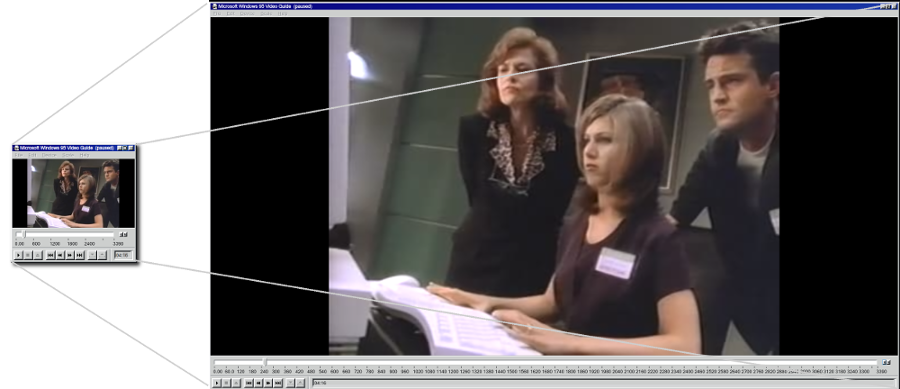
 A React media player component inspired by the Media Player app that shipped with Windows 95 (one of the early versions of Windows Media Player).
Works on the web, in an Electron app, or anywhere ReactDOM will run!
### [See it live!](https://benwiley4000.github.io/win95-media-player/)
A React media player component inspired by the Media Player app that shipped with Windows 95 (one of the early versions of Windows Media Player).
Works on the web, in an Electron app, or anywhere ReactDOM will run!
### [See it live!](https://benwiley4000.github.io/win95-media-player/)
 Under the hood we rely on two React component libraries:
- [Cassette](https://github.com/benwiley4000/cassette), which powers the media playback itself
- [@arturbien](https://github.com/arturbien)'s [React95](https://github.com/arturbien/React95), UI components built to resemble Windows 95
## install
```console
npm install win95-media-player
```
## quick start
The first thing you need is a working React application. If you don't have one, you can try [create-react-app](https://github.com/facebook/create-react-app) to skip all the annoying parts of setting one up.
After that, adding Win95 Media Player to your app is simple!
Assuming you have this in your html...
```html
```
Just run this JavaScript:
```jsx
// JavaScript
import React from 'react';
import ReactDOM from 'react-dom';
import { MediaPlayer } from 'win95-media-player';
const playlist = [
{
url: 'https://archive.org/download/CC1301_windows_95/CC1301_windows_95_512kb.mp4',
title: 'Computer Chronicles - Windows 95'
}
];
ReactDOM.render(
,
document.getElementById('app')
);
```
And you should have a working MediaPlayer on your page! It should look something [like this](https://benwiley4000.github.io/win95-media-player/quickstart.html).
## api
### MediaPlayer
A fully-functional media player component. Accepts all the props accepted by `MediaPlayerUI` and Cassette's [`PlayerContextProvider`](https://benwiley4000.github.io/cassette/styleguide/#playercontextprovider)
### MediaPlayerUI
The UI component used by `MediaPlayer`. If you're building a more complex media player app with Cassette, you can render this directly inside of a React tree wrapped by a `PlayerContextProvider` to hook into the surrounding `playerContext`.
#### props
| Prop name | Prop type | Default value | Description |
| ---------------- | --------- | --------------------------------------------- | ------------------------------------------------------------------------------------------------------------------------------------------------------------ |
| `getDisplayText` | Function | `track => track.title` | Receives a [track](https://benwiley4000.github.io/cassette/styleguide/#track) object (or `undefined` if none is active) and returns a string of display text |
| `showVideo` | Boolean | `false` | A boolean which must be set `true` to display video |
| `fullscreenEnabled` | Boolean | `false` | If set `true`, adds a maximize button to the title bar which will trigger fullscreen mode |
| `className` | String | | An optional CSS class name to pass to the outer window div |
| `dragHandlerClassName` | String | | An optional CSS class name which will added on Window Header |
| `style` | Object | | An optional React style object to pass to the outer window div |
| `minimizeClickHandler` | Function | | Click handler that will be executed when minimze button is clicked |
| `closeClickHandler` | Function | | Click handler that will be executed when close button is clicked |
## special thanks
[@felixrieseberg](https://github.com/felixrieseberg)'s [windows95](https://github.com/felixrieseberg/windows95) app allowed me to play around with the *real* Windows 95 Media Player so I could extract the concept for this project.
Under the hood we rely on two React component libraries:
- [Cassette](https://github.com/benwiley4000/cassette), which powers the media playback itself
- [@arturbien](https://github.com/arturbien)'s [React95](https://github.com/arturbien/React95), UI components built to resemble Windows 95
## install
```console
npm install win95-media-player
```
## quick start
The first thing you need is a working React application. If you don't have one, you can try [create-react-app](https://github.com/facebook/create-react-app) to skip all the annoying parts of setting one up.
After that, adding Win95 Media Player to your app is simple!
Assuming you have this in your html...
```html
```
Just run this JavaScript:
```jsx
// JavaScript
import React from 'react';
import ReactDOM from 'react-dom';
import { MediaPlayer } from 'win95-media-player';
const playlist = [
{
url: 'https://archive.org/download/CC1301_windows_95/CC1301_windows_95_512kb.mp4',
title: 'Computer Chronicles - Windows 95'
}
];
ReactDOM.render(
,
document.getElementById('app')
);
```
And you should have a working MediaPlayer on your page! It should look something [like this](https://benwiley4000.github.io/win95-media-player/quickstart.html).
## api
### MediaPlayer
A fully-functional media player component. Accepts all the props accepted by `MediaPlayerUI` and Cassette's [`PlayerContextProvider`](https://benwiley4000.github.io/cassette/styleguide/#playercontextprovider)
### MediaPlayerUI
The UI component used by `MediaPlayer`. If you're building a more complex media player app with Cassette, you can render this directly inside of a React tree wrapped by a `PlayerContextProvider` to hook into the surrounding `playerContext`.
#### props
| Prop name | Prop type | Default value | Description |
| ---------------- | --------- | --------------------------------------------- | ------------------------------------------------------------------------------------------------------------------------------------------------------------ |
| `getDisplayText` | Function | `track => track.title` | Receives a [track](https://benwiley4000.github.io/cassette/styleguide/#track) object (or `undefined` if none is active) and returns a string of display text |
| `showVideo` | Boolean | `false` | A boolean which must be set `true` to display video |
| `fullscreenEnabled` | Boolean | `false` | If set `true`, adds a maximize button to the title bar which will trigger fullscreen mode |
| `className` | String | | An optional CSS class name to pass to the outer window div |
| `dragHandlerClassName` | String | | An optional CSS class name which will added on Window Header |
| `style` | Object | | An optional React style object to pass to the outer window div |
| `minimizeClickHandler` | Function | | Click handler that will be executed when minimze button is clicked |
| `closeClickHandler` | Function | | Click handler that will be executed when close button is clicked |
## special thanks
[@felixrieseberg](https://github.com/felixrieseberg)'s [windows95](https://github.com/felixrieseberg/windows95) app allowed me to play around with the *real* Windows 95 Media Player so I could extract the concept for this project.