<div>
    <h1 align="center"><code>Web Highlighter</code>&nbsp;&nbsp;🖍️</h1>
    <p align="center">
        <strong>✨ A no-dependency lib for text highlighting & persistence on any website ✨🖍️</strong>
    </p>
    <img src="https://raw.githubusercontent.com/alienzhou/web-highlighter/master/docs/img/logo.png">
    <p align="center">
        <a href="https://github.com/alienzhou/web-highlighter/actions/workflows/ci.yml" target="_blank">
            <img src="https://github.com/alienzhou/web-highlighter/actions/workflows/ci.yml/badge.svg?branch=master" alt="CI status" />
        </a>
        <a href="https://www.npmjs.com/package/web-highlighter" target="_blank">
            <img src="https://img.shields.io/npm/v/web-highlighter.svg" alt="NPM version" />
        </a>
        <a href="https://unpkg.com/web-highlighter" target="_blank">
            <img src="https://img.badgesize.io/https://unpkg.com/web-highlighter/dist/web-highlighter.min.js?compression=gzip" alt="Gzip size" />
        </a>
        <a href="https://codebeat.co/projects/github-com-alienzhou-web-highlighter-master" target="_blank">
            <img src="https://codebeat.co/badges/f5a18a9b-9765-420e-a17f-fa0b54b3a125" alt="Codebeat" />
        </a>
        <a href="https://opensource.org/licenses/mit-license.php" target="_blank">
            <img src="https://img.shields.io/github/license/alienzhou/web-highlighter" alt="MIT Licence" />
        </a>
    </p>
</div>

---

English | [简体中文](https://github.com/alienzhou/web-highlighter/blob/master/README.zh_CN.md)

## Background

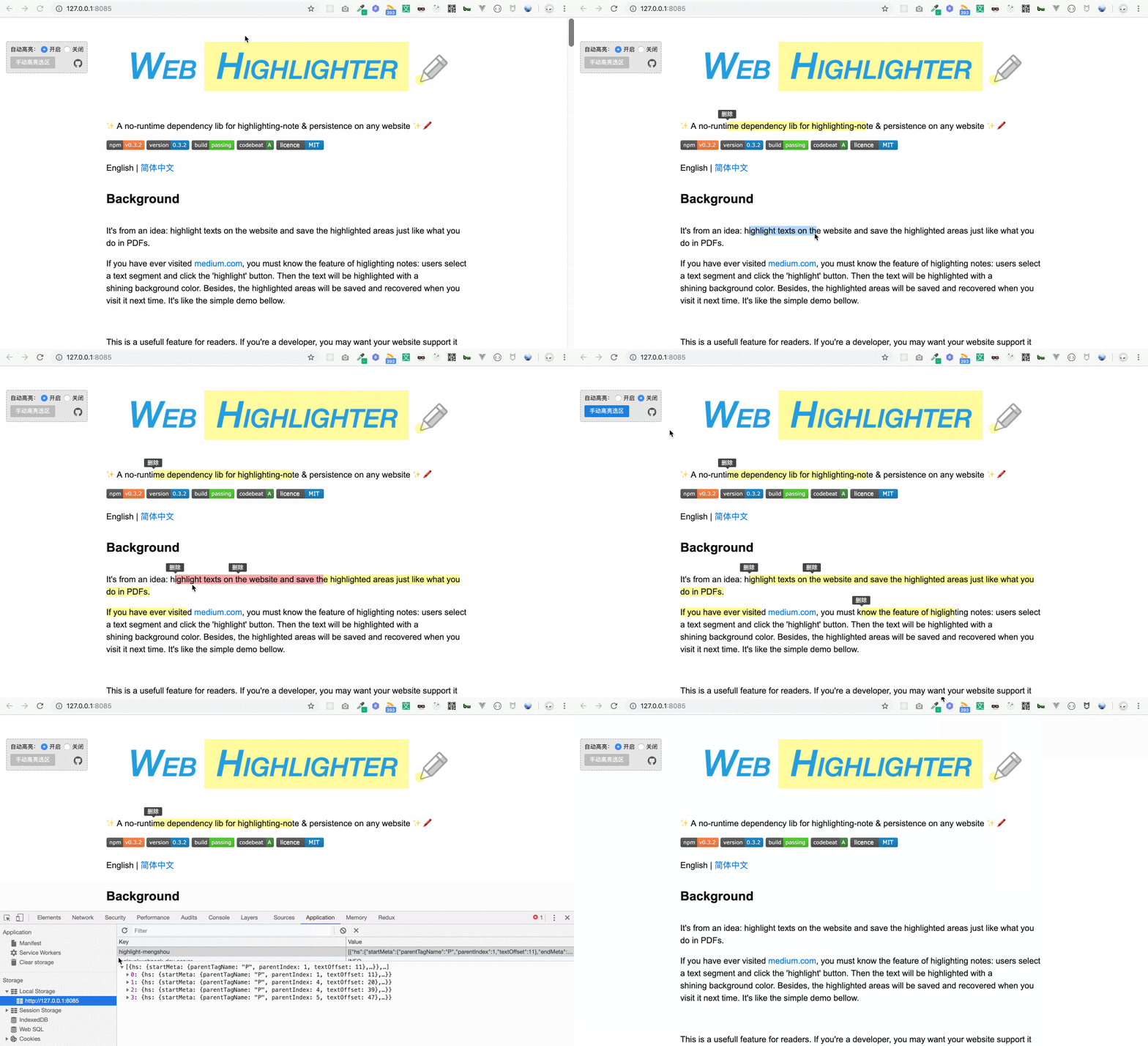
It's from an idea: highlight texts on the website and save the highlighted areas just like what you do in PDF.

If you have ever visited [medium.com](http://medium.com), you must know the feature of highlighting notes: users select a text segment and click the 'highlight' button. Then the text will be highlighted with a shining background color. Besides, the highlighted areas will be saved and recovered when you visit it next time. It's like the simple demo bellow.
![](https://raw.githubusercontent.com/alienzhou/web-highlighter/master/docs/img/sample.gif)

This is a useful feature for readers. If you're a developer, you may want your website support it and attract more visits. If you're a user (like me), you may want a browser-plugin to do this.

For this reason, the repo (web-highlighter) aims to help you implement highlighting-note on any website quickly (e.g. blogs, document viewers, online books and so on). It contains the core abilities for note highlighting and persistence. And you can implement your own product by some easy-to-use APIs. It has been used for our sites in production.

## Development

This project uses Node.js `22.15.1` and publishes ES5 output with IE11 support. With [nvm](https://github.com/nvm-sh/nvm) installed, run:

```bash
nvm use
npm ci
npm test
```

## Install

```bash
npm i web-highlighter
```

## Usage

Only two lines, highlighted when texts are selected.

```JavaScript
import Highlighter from 'web-highlighter';
(new Highlighter()).run();
```

If you need persistence, four lines make it.

```JavaScript
import Highlighter from 'web-highlighter';

// 1. initialize
const highlighter = new Highlighter();

// 2. retrieve data from backend, then highlight it on the page
getRemoteData().then(s => highlighter.fromStore(s.startMeta, s.endMeta, s.text, s.id));

// 3. listen for highlight creating, then save to backend
highlighter.on(Highlighter.event.CREATE, ({sources}) => save(sources));

// 4. auto highlight
highlighter.run();
```

## Example

A more complex example

```JavaScript
import Highlighter from 'web-highlighter';

// won't highlight pre&code elements
const highlighter = new Highlighter({
    exceptSelectors: ['pre', 'code']
});

// add some listeners to handle interaction, such as hover
highlighter
    .on('selection:hover', ({id}) => {
        // display different bg color when hover
        highlighter.addClass('highlight-wrap-hover', id);
    })
    .on('selection:hover-out', ({id}) => {
        // remove the hover effect when leaving
        highlighter.removeClass('highlight-wrap-hover', id);
    })
    .on('selection:create', ({sources}) => {
        sources = sources.map(hs => ({hs}));
        // save to backend
        store.save(sources);
    });

// retrieve data from store, and display highlights on the website
store.getAll().forEach(
    // hs is the same data saved by 'store.save(sources)'
    ({hs}) => highlighter.fromStore(hs.startMeta, hs.endMeta, hs.text, hs.id)
);

// auto-highlight selections
highlighter.run()
```

Besides, there is an example in this repo (in `example` folder). To play with it, you just need ——

Firstly enter the repository and run

```bash
npm i
```

Then start the example

```
npm start
```

Finally visit http://127.0.0.1:8085/

---

Another real product built with web-highlighter (for the highlighting area on the left):

![product sample](https://user-images.githubusercontent.com/9822789/64678049-632e8500-d4ab-11e9-99d6-f960bc90d17b.gif)

## How it works

It will read the selected range by [`Selection API`](https://caniuse.com/#search=selection%20api). Then the information of the range will be converted to a serializable data structure so that it can be store in backend. When users visit your page next time, these data will be returned and deserialized in your page. The data structure is tech stack independent. So you can use on any 'static' pages made with React / Vue / Angular / jQuery and others.

### Persistence constraints

Persisted highlights record DOM paths and text offsets relative to `$root`; they are not screen coordinates. Restore highlights only after the content is fully rendered, and keep the same `$root`, document structure, text segmentation, and `wrapTag` configuration used when the highlight was created. If a framework re-renders the content or the document changes, persisted positions can no longer be guaranteed. Use the [`Serialize.Restore` hook](./docs/ADVANCE.md#serializerestore) to implement a restoration strategy for changing content.

### Cross-paragraph persistence and DOM restoration

A cross-paragraph selection creates one continuous `HighlightSource`. If your application needs one record per paragraph, split the selection into one `Range` per paragraph before creating highlights, call `fromRange()` for each range, and persist the returned `HighlightSource` objects individually. Use the [`Serialize.RecordInfo` hook](./docs/ADVANCE.md#serializerecordinfo) to store paragraph-specific identifiers in `source.extra`.

```JavaScript
highlighter.hooks.Serialize.RecordInfo.tap((start, end) => ({
    startParagraphId: start.$node.parentElement.closest('p').dataset.id,
    endParagraphId: end.$node.parentElement.closest('p').dataset.id,
}));

const sources = paragraphRanges.map(range => highlighter.fromRange(range));
```

`remove(id)` and `removeAll()` remove the highlight wrappers and restore the original element hierarchy and attributes, including for cross-paragraph highlights. Browser text splitting and merging means the original TextNode object identities and event listeners attached directly to TextNodes are not preserved; delegate events from a stable parent element instead.

### Dynamic content and tables

Dynamic DOM is supported after it becomes stable. For asynchronously loaded or frequently re-rendered content, initialize and restore highlights after rendering completes. The library does not support one continuous highlight across table cells, because a wrapper cannot safely span multiple `td` or `th` elements. Use the [`Render.SelectedNodes` hook](./docs/ADVANCE.md#renderselectednodes) to split those selections into supported fragments.

For more details, please read [this article (in Chinese)](https://www.alienzhou.com/2019/04/21/web-note-highlight-in-js/).

## APIs

### 1. Options

```JavaScript
const highlighter = new Highlighter([opts])
```

Create a new `highlighter` instance.

`opts` will be merged into the default options (shown bellow).

```JavaScript
{
    $root: document.documentElement,
    exceptSelectors: null,
    wrapTag: 'span',
    style: {
        className: 'highlight-mengshou-wrap'
    }
}
```

All options:

| name | type | description | required | default |
|---|---|---|---|---|
| $root | `Document | HTMLElement` | the container to enable highlighting | No | `document` |
| exceptSelectors | `Array<string>` | if an element matches the selector, it won't be highlighted | No | `null` |

| wrapTag | `string` | the html tag used to wrap highlighted texts | No | `span` |
| verbose | `boolean` | dose it need to output (print) some warning and error message | No | `false` |
| style | `Object` | control highlighted areas style | No | details below |

`style` field options:

| name | type | description | required | default |
|---|---|---|---|---|
| className | `string` | the className for wrap element | No | `highlight-mengshou-wrap` |

`exceptSelectors` needs `null` or `Array<string>`. It supports id selectors, class selectors and tag selectors. For example, to skip h1 and `.title` elements:

```JavaScript
var highlighter = new Highlighter({
    exceptSelectors: ['h1', '.title']
});
```

### 2. Static Methods

#### `Highlighter.isHighlightSource(source)`

If the `source` is a highlight source object, it will return `true`, vice verse.

#### `Highlighter.isHighlightWrapNode($node)`

If the `$node` is a highlight wrapper dom node, it will return `true`, vice verse.

### 3. Instance Methods

#### `highlighter.run()`

Start auto-highlighting. When the user select a text segment, a highlighting will be added to the text automatically.

#### `highlighter.stop()`

It will stop the auto-highlighting.

#### `highlighter.dispose()`

When you don't want the highlighter anymore, remember to call it first. It will remove some listeners and do some cleanup.

#### `highlighter.fromRange(range, [options])`

You can pass a [`Range`](https://developer.mozilla.org/en-US/docs/Web/API/Range) object to it and then it will be highlighted. You can use `window.getSelection().getRangeAt(0)` to get a range object or use `document.createRange()` to create a new range.

Use it as bellow:

```JavaScript
const selection = window.getSelection();
if (!selection.isCollapsed) {
    highlighter.fromRange(selection.getRangeAt(0));
}
```

Highlighting splits and replaces text nodes. A native selection is live, so the browser recomputes its boundaries while that happens and may truncate it when the selection spans several text nodes. `options.selection` decides what happens to the native selection:

| value | behaviour |
|---|---|
| `keep` | the default, the native selection is left to the caller |
| `clear` | the native selection is dropped before the DOM is modified |
| `restore` | the created wrappers are selected after highlighting |

```JavaScript
// pass the current selection and keep the same text selected afterwards
highlighter.fromRange(selection.getRangeAt(0), { selection: 'restore' });
```

`highlighter.run()` always clears the native selection before modifying the DOM.

#### `highlighter.fromStore(start, end, text, id)`

Mostly, you use this api to highlight text by the persisted information stored from backend.

These four values are from the `HighlightSource` object. `HighlightSource` object is a special object created by web-highlighter when highlighted area created. For persistence in backend (database), it's necessary to find a data structure to represent a dom node. This structure is called `HighlightSource` in web-highlighter.

Four attributes' meanings:

- start `Object`:    meta info about the beginning element
- end   `Object`:    meta info about then end element
- text  `string`:    text content
- id    `string`:    unique id

#### `highlighter.remove(id)`

Remove (clean) a highlighted area by it's unique id. The id will be generated by web-highlighter by default. You can also add a hook for your own rule. [Hooks doc here](https://github.com/alienzhou/web-highlighter/blob/master/docs/ADVANCE.md).

#### `highlighter.removeAll()`

Remove all highlighted areas belonging to the root.

#### `highlighter.addClass(className, id)`

Add a className for highlighted areas (wrap elements) by unique id. You can change a highlighted area's style by using this api.


#### `highlighter.removeClass(className, id)`

Remove the className by unique id. It's `highlighter.addClass`'s inverse operation.

#### `highlighter.getDoms([id])`

Get all the wrap nodes in a highlighted area. A highlighted area may contain many segments. It will return all the dom nodes wrapping these segments.

If the `id` is not passed, it will return all the areas' wrap nodes.


#### `highlighter.getSourceByDom(node)`

Get the `HighlightSource` for one wrap node. It accepts the wrapper itself or a descendant node, and returns `null` outside a highlight. Unlike the original source emitted by the `CREATE` event, this source describes only that individual wrapped segment, so its `startMeta` and `endMeta` can be persisted separately after a cross-node or cross-paragraph selection.

#### `highlighter.getIdByDom(node)`

If you have a DOM node, it can return the unique highlight id for you. When passing a non-wrapper element, it will find the nearest ancestor wrapper node.

#### `highlighter.getExtraIdByDom(node)`

If you have a DOM node, it can return the extra unique highlight id for you. When passing a non-wrapper element, it will find the nearest ancestor wrapper node.

#### `highlighter.setOption(opt)`

You can use this API to change the highlighter's options. The parameters' structure is the same as the constructor's. You can pass partial options.

### 4. Event Listener

web-highlighter use listeners to handle the events.

e.g.

```JavaScript
var highlighter = new Highlighter();
highlighter.on(Highlighter.event.CREATE, function (data, inst, e) {
    // ...
});
```

The callback function will receive three parameters:

- data `any`: event data
- inst `Highlighter`: current Highlighter instance
- e `Event`: some event is triggered by the browser (such as click), web-highlighter will expose it

`Highlighter.event` is `EventType` type. It contains：

- `EventType.CLICK`: click the highlighted area
- `EventType.HOVER`: mouse enter the highlighted area
- `EventType.HOVER_OUT`: mouse leave the highlighted area
- `EventType.CREATE`: a highlighted area is created
- `EventType.REMOVE`: a highlighted area is removed


Different event has different `data`. Attributes below:

#### `EventType.CLICK`

|name|description|type|
|---|---|---|
|`id`|the highlight id|string|

#### `EventType.HOVER`

|name|description|type|
|---|---|---|
|`id`|the highlight id|string|

#### `EventType.HOVER_OUT`

|name|description|type|
|---|---|---|
|`id`|the highlight id|string|

#### `EventType.CREATE`

> no parameter `e`

|name|description|type|
|---|---|---|
|`sources`|a list of `HighlightSource` objects|Array<HighlightSource>|
|`type`|the reason for creating|string|

> The callback receives a single object, so destructure it as `({sources, type}) => ...`. Each item of `sources` is a `HighlightSource`; pass an item (not the wrapper object) to `Highlighter.isHighlightSource()`.

`sources` is a list of `HighlightSource` objects. Such an object is created by web-highlighter when highlighted area created. For persistence in backend (database), it's necessary to use a data structure which can be serialized (`JSON.stringify()`) to represent a dom node in browsers. `HighlightSource` is the data structure designed for this.

`type` explains why a highlighted area is be created. Now `type` has two possible values: `from-input` and `from-store`. `from-input` shows that a highlighted area is created because of user's selection. `from-store` means it from a storage.

#### `EventType.REMOVE`

> no parameter `e`

|name|description|type|
|---|---|---|
|`ids`|a list of the highlight id|Array<string>|

### 5. Hooks

Hooks let you control the highlighting flow powerfully. You can almost customize any logic by hooks. See more in ['Advance' part](#Advance).

### Diagnostics for bug reports

`getDiagnostics()` supports three evidence levels. Start with the default safe snapshot:

```JavaScript
copy(JSON.stringify(highlighter.getDiagnostics(), null, 2));
```

It includes browser/runtime capabilities, library lifecycle state, current selection shape, configuration, recent library errors, and persisted-position metadata. It intentionally **does not include page HTML or selected text**.

For a structure mismatch or cross-device restore issue, export a text-free DOM structure where every text node is replaced by its length:

```JavaScript
copy(JSON.stringify(highlighter.getDiagnostics({dom: 'redacted'}), null, 2));
```

For a trusted/private reproduction only, you can explicitly opt in to the root HTML and original persisted sources. Review and redact this output before sharing; the DOM output is capped at 20,000 characters by default and can be adjusted with `maxDomLength`.

```JavaScript
copy(JSON.stringify(highlighter.getDiagnostics({
    dom: 'full',
    sources: 'full',
    maxDomLength: 50000,
}), null, 2));
```

Include the suitable snapshot with a minimal HTML/JavaScript reproduction and exact interaction steps. For `fromStore()` failures, include the original source and the relevant DOM before and after content changes.


## Compatibility

> It depends on [Selection API](https://caniuse.com/#search=selection%20api).

- IE 11
- Edge
- Firefox 52+
- Chrome 15+
- Safari 5.1+
- Opera 15+

_**Mobile supports:**_ automatically detect whether mobile devices and use touch events when on mobile devices.

### Runtime environment

web-highlighter requires browser DOM APIs, including `document`, `Range`, and `Selection`. It supports browsers and WebViews that provide these APIs. Native mini-program renderers and non-DOM native application views are not supported.

## Advance

It provides some hooks for you so that the highlighting behaviour can be controlled better by your own.

To learn more about the hooks, read [this doc](https://github.com/alienzhou/web-highlighter/blob/master/docs/ADVANCE.md).

## License

[MIT](./LICENCE)
