# wc-waterfall
The `wc-waterfall` is a high performance waterfall component written using `web-component`
It can support running in various frameworks, such as `React` `Vue` `SolidJs`
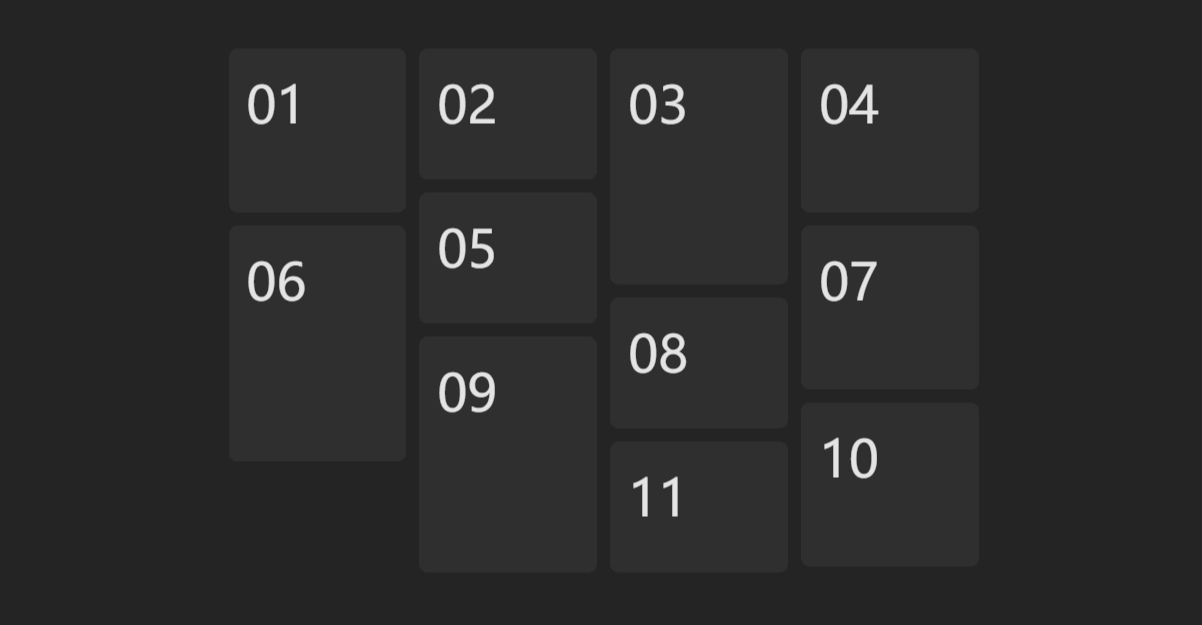
## 🌈 Demo
[vue-sfc]: https://play.vuejs.org/#eNqFVE1zmzAQ/Ss75JCkDQb81ZQSz7SdHNpD22l75IJBBiUgaSRhk3r837sCm0CUj/HB2rdvdx+r1e6dz0JMtjVxQidSqaRCgyK6FquY0UpwqWEPkmzgABvJKzhH6nnvOt+l7i7RRG6SskQ4ZilnSkPKSwU3Ju5idnkC80QcscBHMPK6clgIDU0qUWImtKANDyGiTNQatm7FM1LexI6BYwf0gyBoyYTlBM0qadBa4MlbwX7f1T4cTJ5oLRE0J6z9TEJEX8oX+H6f0QgfJjylbZFhByBEap83NEp62a0M5Gd0u/KDyDP/Q2hqQzMbmtvQwoaWNvTBhq5t6KMFBb4N2eoDW31gqw9s9cFAfeQNe4lQ5A2mAk2lH0pzHLV8Be9gb8I1XqCimnIWgnFMZupTzPDaYnaWCNGRqkTm1BBqzdFrgMbd0UwXISyCqWhGIaisCxNJllGWh3CkAGw4066i/0gIU1K10JrLjEhXJhmtcXyXR+Y6Se9zyWuWuTgJXIZwdu2b39R/WixkunDTgpbZxZzBewgu8fEVhOaFxjK+jxkBA16iT4f0YPoWfTaiL96iz0dilic6PuP2Wpwrp1sKbpWIyZ3iDDdK27z46MBHEHbtNNjwEo0jdgqthQo9L80YxuMLpVs5YUR7TFSj0cCJUdqjLCPNhNINQXbsmLwo54A6tMKFs6H5ExUprwQtifwpzJCM1WBWvvveYlrW5OqEpwVJ75/B71TTif4liSJyi4uj92mcMaI79+2fH6TBc+/E1VOXyH7F+ZsoXtZGY0f7gqODsge8Vu23tqk4lX/VbaMJzv7xo4zQthstP3ZwY3995dMf5c4ms76Lh/+zWfXS
- https://huodoushigemi.github.io/wc-flow-layout/
- [codepen — Basic usage](https://codepen.io/huodoushigemi/pen/dyQbmgW?editors=1100)
- [codepen — Photo wall](https://codepen.io/huodoushigemi/pen/BaGBxKM?editors=1100)
- [Vue SFC Playground][vue-sfc]
- [SolidJs Playground](https://playground.solidjs.com/anonymous/78577fad-c8e2-41fc-8a27-f47849e24615)
- [Animation][vue-sfc]
## ⚙️ Installation
- ### npm
```shell
npm i wc-waterfall
```
- ### scripts
```html
```
## 🦄 Example
### 🚀 Use in VanillaJS
```js
import 'wc-waterfall'
```
```html
01
02
03
04
05
06
```
### 🚀 Use in React
```tsx
// App.tsx
import 'wc-waterfall'
export default function MyApp() {
return (
01
02
03
04
05
06
)
}
```
TypeScript support (JSX/TSX)
```ts
// shims.d.ts
declare namespace JSX {
interface IntrinsicElements {
'wc-waterfall': React.DetailedHTMLProps & import('wc-waterfall').WaterfallProps, HTMLElement>;
}
}
```
### 🚀 Use in Vue
```js
// main.ts
import 'wc-waterfall'
```
```html
01
02
03
04
05
06
```
```ts
// vite.config.ts
import { defineConfig } from 'vite'
import vue from '@vitejs/plugin-vue'
export default defineConfig({
plugins: [
vue({
template: {
compilerOptions: { isCustomElement: (tag) => tag.startsWith('wc-') }
},
})
],
})
```
## 🚀 Use in SSR
```diff
- import 'wc-waterfall'
+ if (typeof document != 'undefined') import('wc-waterfall')
```
## 📄 Props
| Name | Type | Default | Description |
| ---- | ---------------------------- | ------- | ---------------------- |
| cols | `number` | 2 | Number of columns |
| gap | `number \| [number, number]` | 4 | Interval between cells |
## ⭐️ Show Your Support
Please give a ⭐️ if this project helped you!
## 👏 Contributing
If you have any questions or requests or want to contribute, please write the issue or give me a Pull Request freely.