[](https://github.com/wavedrom/wavedrom/actions/workflows/ci.yml)
[](https://www.npmjs.org/package/wavedrom)
 [](https://coveralls.io/github/wavedrom/wavedrom?branch=trunk)
[EDITOR](http://wavedrom.com/editor.html) | [TUTORIAL](http://wavedrom.com/tutorial.html)
## Introduction
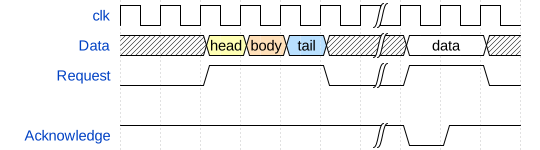
**WaveDrom** is a Free and Open Source online digital timing diagram (waveform) rendering engine that uses javascript, HTML5 and SVG to convert a [WaveJSON](https://github.com/wavedrom/schema/blob/master/WaveJSON.md) input text description into SVG vector graphics.
WaveJSON is an application of the [JSON](http://json.org/) format. The purpose of WaveJSON is to provide a compact exchange format for digital timing diagrams utilized by digital HW / IC engineers.
The engine is using [WaveDromSkin](unpacked/README.md) skin mechanism to render a complete picture.
## Server
svg.wavedrom.com
```

```
```md
```

```md

```

```
[](https://coveralls.io/github/wavedrom/wavedrom?branch=trunk)
[EDITOR](http://wavedrom.com/editor.html) | [TUTORIAL](http://wavedrom.com/tutorial.html)
## Introduction
**WaveDrom** is a Free and Open Source online digital timing diagram (waveform) rendering engine that uses javascript, HTML5 and SVG to convert a [WaveJSON](https://github.com/wavedrom/schema/blob/master/WaveJSON.md) input text description into SVG vector graphics.
WaveJSON is an application of the [JSON](http://json.org/) format. The purpose of WaveJSON is to provide a compact exchange format for digital timing diagrams utilized by digital HW / IC engineers.
The engine is using [WaveDromSkin](unpacked/README.md) skin mechanism to render a complete picture.
## Server
svg.wavedrom.com
```

```
```md

```

```md

```

```
 ```
```
 ## CLI
**WaveDrom** can be used from the command line to generate SVG files from JSON5 source.
### Run with npx
```bash
npx wavedrom --input source.json5 > output.svg
```
### Global Installation
```bash
npm install -g wavedrom
wavedrom --input source.json5 --indent 2 > output.svg
```
### Options
* `-i`, `--input `: (Required) Path to the WaveJSON source file.
* `-t`, `--indent `: Text indent in the output SVG.
* `-h`, `--help`: Show help message.
### Export to PNG
To export a waveform to PNG, you can use the `@resvg/resvg-js-cli` tool:
```bash
npx wavedrom -i source.json5 | npx @resvg/resvg-js-cli - output.png
```
## Web usage
**WaveDrom** timing diagrams can be embedded into the web pages, blogs, and wikis to be rendered by the most of modern browsers.
### HTML pages
There are three steps to insert **WaveDrom** diagrams directly into your page:
1) Put the following line into your HTML page `````` or ``````:
From a CDN (jsDelivr):
```html
```
or (unpkg):
```html
```
2) Set the ``onload`` event for the HTML body.
```html
```
3) Insert [WaveJSON](https://github.com/wavedrom/schema/blob/master/WaveJSON.md) source inside HTML ```` wrapped with the ``
```
The script will find all ``
## CLI
**WaveDrom** can be used from the command line to generate SVG files from JSON5 source.
### Run with npx
```bash
npx wavedrom --input source.json5 > output.svg
```
### Global Installation
```bash
npm install -g wavedrom
wavedrom --input source.json5 --indent 2 > output.svg
```
### Options
* `-i`, `--input `: (Required) Path to the WaveJSON source file.
* `-t`, `--indent `: Text indent in the output SVG.
* `-h`, `--help`: Show help message.
### Export to PNG
To export a waveform to PNG, you can use the `@resvg/resvg-js-cli` tool:
```bash
npx wavedrom -i source.json5 | npx @resvg/resvg-js-cli - output.png
```
## Web usage
**WaveDrom** timing diagrams can be embedded into the web pages, blogs, and wikis to be rendered by the most of modern browsers.
### HTML pages
There are three steps to insert **WaveDrom** diagrams directly into your page:
1) Put the following line into your HTML page `````` or ``````:
From a CDN (jsDelivr):
```html
```
or (unpkg):
```html
```
2) Set the ``onload`` event for the HTML body.
```html
```
3) Insert [WaveJSON](https://github.com/wavedrom/schema/blob/master/WaveJSON.md) source inside HTML ```` wrapped with the ``
```
The script will find all ``