`watch-state` is a **lightweight, high-performance reactive state engine** designed to power UI frameworks — **or replace them.**
- **Fast** — One of the fastest reactive libraries ([see benchmarks](#performance))
- **Light** — Less than 1 KB minzip
- **Zero-dependency** — No external packages required
- **Code splitting by design** — Decentralized state architecture, each page loads only the states it uses
- **Auto-subscription** — Dependencies tracked automatically, no manual subscriptions
- **Dynamic subscriptions** — Conditional watchers auto-subscribe/unsubscribe based on reactive conditions
- **Type-safe** — Full TypeScript support with type inference
- **Memory-safe** — Automatic cleanup on destroy
- **Lazy computation** — Compute executes only when accessed
- **No Proxy** — Supports old browsers (Firefox 45+, Safari 9+)
- **Framework-agnostic** — Business logic lives outside components, reusable across any framework or vanilla JS
Use it as the core state layer in your own framework, embed it in React components, or build a full UI — **no JSX, no virtual DOM, no framework required**.
Born while working on [@innet/dom](https://www.npmjs.com/package/@innet/dom).
[](https://github.com/d8corp/watch-state/stargazers)
[](https://github.com/d8corp/watch-state/watchers)
## Browser Support
### Desktop
| Firefox | Chrome | Safari | Opera | Edge |
|:-------:|:------:|:------:|:-----:|:----:|
| 45+ | 49+ | 9+ | 36+ | 13+ |
### Mobile
| Firefox | Chrome | Safari | Opera |
|:-------:|:------:|:------:|:-----:|
| 87+ | 90+ | 9+ | 62+ |
*You can transpile the code to support browsers older than listed above, but performance will decrease.*
## Index
**[ [Install](#install) ]****[ [Usage](#usage) ]** [Simple example](#simple-example) • [Example Vanilla JS](#example-vanilla-js) • [Example React](#example-react) • [Example Innet](#example-innet)**[ [Watch](#watch) ]** [Force update of Watch](#force-update-of-watch) • [Destroy Watch](#destroy-watch) • [Deep/Nested Watchers](#deepnested-watchers)**[ [State](#state) ]** [Get or Set value](#get-or-set-value) • [State.set](#stateset) • [Force update of State](#force-update-of-state) • [Raw value](#raw-value) • [Initial value](#initial-value) • [Reset value](#reset-value)**[ [Compute](#compute) ]** [Lazy computation](#lazy-computation) • [Force update of Compute](#force-update-of-compute) • [Destroy Compute](#destroy-compute)**[ [Utils](#utils) ]** [onDestroy](#ondestroy) • [callEvent](#callevent) • [createEvent](#createevent) • [unwatch](#unwatch)**[ [Typescript](#typescript) ]** [State type inference](#state-type-inference) • [Compute type inference](#compute-type-inference)**[ [Performance](#performance) ]**
## Install
###### [🏠︎](#index) / Install [↓](#usage)
npm
```shell
npm i watch-state
```
yarn
```shell
yarn add watch-state
```
html
```html
```
[minified on GitHub](https://github.com/d8corp/watch-state/blob/master/release/index.min.js)
## Usage
###### [🏠︎](#index) / Usage [↑](#install) [↓](#watch)
[Simple example](#simple-example) • [Example Vanilla JS](#example-vanilla-js) • [Example React](#example-react) • [Example Innet](#example-innet)
The library is based on the core concepts of `Observable` (something that can be observed) and `Observer` (something that can observe). On top of these concepts, the core classes `State`, `Compute`, and `Watch` are built according to the following scheme:
```
┌────────────┐ ┌─────────────┐
│ Observable │ │ Observer │
│ (abstract) │ │ (interface) │
└──────┬─────┘ └──────┬──────┘
┌────┴─────┐ ┌──────┴───┐
┌────┴────┐ ┌───┴─┴───┐ ┌────┴────┐
│ State │ │ Compute │ │ Watch │
└─────────┘ └─────────┘ └─────────┘
```
### Simple example
###### [🏠︎](#index) / [Usage](#usage) / Simple example [↓](#example-vanilla-js)
You can create an instance of `State` and **watch** its **value**.
```javascript
import { Watch, State } from 'watch-state'
const count = new State(0)
new Watch(() => console.log(count.value))
// logs: 0
count.value++
// logs: 1
count.value++
// logs: 2
```
### Example Vanilla JS
###### [🏠︎](#index) / [Usage](#usage) / Example Vanilla JS [↑](#simple-example) [↓](#example-react)
Simple reactive state without build tools or framework dependencies.
```html
Counter
```
### Example React
###### [🏠︎](#index) / [Usage](#usage) / Example React [↑](#example-vanilla-js) [↓](#example-innet)
[@watch-state/react](https://www.npmjs.com/package/@watch-state/react) provides hooks that automatically subscribe React components to state changes and re-renders only when needed.
```tsx
import { State } from 'watch-state'
import { useObservable } from '@watch-state/react'
const $count = new State(0)
const increase = () => {
$count.value++
}
export function CountButton () {
const count = useObservable($count)
return
}
```
### Example Innet
###### [🏠︎](#index) / [Usage](#usage) / Example Innet [↑](#example-react)
[@innet/dom](https://www.npmjs.com/package/@innet/dom) automatically watches accessed states and **updates only changed DOM content** — **no full re-renders**.
```tsx
import { State } from 'watch-state'
const count = new State(0)
const increase = () => {
count.value++
}
export function CountButton () {
return
}
```
## Watch
###### [🏠︎](#index) / Watch [↑](#usage) [↓](#state)
[Force update of Watch](#force-update-of-watch) • [Destroy Watch](#destroy-watch) • [Deep/Nested watchers](#deepnested-watchers)
`Watch` accepts a **reaction** as its first argument and executes it when any accessed state changes.
State accessed inside a reaction is **auto-subscribed** — no manual registration needed.
```ts
const state = new State(0)
const reaction = () => {
console.log(state.value)
// auto-subscribes to state
}
new Watch(reaction)
// logs: 0
state.value = 1 // triggers reaction
// logs: 1
```
### Force update of Watch
###### [🏠︎](#index) / [Watch](#watch) / Force update of Watch [↓](#destroy-watch)
You can run a reaction even when its states are not updated.
```typescript
const count = new State(0)
const watcher = new Watch(() => {
console.log(count.value)
})
// logs: 0
watcher.update()
// logs: 0
```
### Destroy Watch
###### [🏠︎](#index) / [Watch](#watch) / Destroy Watch [↑](#force-update-of-watch) [↓](#deepnested-watchers)
You can stop watching by `destroy` method of `Watch`.
```javascript
const count = new State(0)
const watcher = new Watch(() => {
console.log(count.value)
})
// logs: 0
count.value++
// logs: 1
watcher.destroy()
count.value++
// nothing happens
```
### Deep/Nested Watchers
###### [🏠︎](#index) / [Watch](#watch) / Deep/Nested Watchers [↑](#destroy-watch)
Each `Watch` **independently tracks only states accessed within its reaction**.
Nested watchers created inside parent watchers form a **dependency tree** with separate reactivity.
```javascript
const watching = new State(true)
const state = new State(0)
new Watch(() => {
console.log('Root Render')
if (watching.value) {
new Watch(() => {
console.log(`Deep Render: ${state.value}`)
})
}
})
// logs: Root Render, Deep Render: 0
state.value++
// logs: Deep Render: 1 (only deep watcher reacts)
watching.value = false
// logs: Root Render (deep watcher destroyed)
state.value++
// nothing happens (no active deep watcher)
```
## State
###### [🏠︎](#index) / State [↑](#watch) [↓](#compute)
[Get or Set value](#get-or-set-value) • [State.set](#stateset) • [Force update of State](#force-update-of-state) • [Raw value](#raw-value) • [Initial value](#initial-value) • [Reset value](#reset-value)
**Reactive primitive** that holds a value and automatically notifies all subscribers when it changes.
### Get or Set value
###### [🏠︎](#index) / [State](#state) / Get or Set value [↓](#stateset)
Reading `.value` inside reaction **auto-subscribes** to changes. Writing `.value` **triggers all reactions**.
```ts
const count = new State(0)
new Watch(() => console.log(count.value))
// auto-subscribes and logs 0
count.value++ // triggers: logs 1
```
### State.set
###### [🏠︎](#index) / [State](#state) / State.set [↑](#get-or-set-value) [↓](#force-update-of-state)
`State.set` mirrors the behavior of the value setter but returns `void`.
It is useful as a shorthand in arrow functions: `() => state.set(nextValue)` instead of `() => { state.value = nextValue }`.
Note: `state.set` cannot be used as a standalone function; `const set = state.set` is not supported.
```ts
const count = new State(0)
// Subscribing
new Watch(() => console.log(count.value))
// logs: 0
count.set(1)
// logs: 1
```
### Force update of State
###### [🏠︎](#index) / [State](#state) / Force update of State [↑](#stateset) [↓](#raw-value)
You can run reactions of a state with `update` method.
```ts
// Create state
const log = new State([])
// Subscribe to changes
new Watch(() => console.log(log.value)) // logs: []
// Modify the array
log.value.push(1) // no logs
log.value.push(2) // no logs
// Update value
log.update() // logs: [1, 2]
```
### Raw value
###### [🏠︎](#index) / [State](#state) / Raw value [↑](#force-update-of-state) [↓](#initial-value)
`raw` returns the current value but does not subscribe to changes — unlike `value`.
```ts
const foo = new State(0)
const bar = new State(0)
new Watch(() => console.log(foo.value, bar.raw))
// logs: 0, 0
foo.value++ // logs: 1, 0
bar.value++ // no logs
foo.value++ // logs: 2, 1
```
### Initial value
###### [🏠︎](#index) / [State](#state) / Initial value [↑](#raw-value) [↓](#reset-value)
`initial` stores the initial value passed to the constructor.
Useful for checking if the state has been modified by comparing `state.initial === state.raw`.
```ts
const count = new State(0)
console.log(count.initial)
// logs: 0
count.value = 5
console.log(count.initial === count.raw)
// logs: false
count.reset()
console.log(count.initial === count.raw)
// logs: true
```
### Reset value
###### [🏠︎](#index) / [State](#state) / Reset value [↑](#initial-value)
`reset()` restores the state to its initial value.
Triggers watchers only if the current value differs from the initial value.
```ts
const count = new State(0)
new Watch(() => console.log(count.value))
// logs: 0
count.value = 5
// logs: 5
count.reset()
// logs: 0
count.reset()
// no logs (value already 0)
```
## Compute
###### [🏠︎](#index) / Compute [↑](#state) [↓](#utils)
[Lazy computation](#lazy-computation) • [Force update of Compute](#force-update-of-compute) • [Destroy Compute](#destroy-compute)
`Compute` accepts a **reaction** as its first argument and represents a reactive value returned by the reaction.
It creates a **derived state** that automatically tracks dependencies and caches the result.
### Lazy computation
###### [🏠︎](#index) / [Compute](#compute) / Lazy computation [↓](#force-update-of-compute)
`Compute` doesn't execute immediately — waits for `.value` access.
Dependencies (`State.value` reads inside reaction) auto-subscribe like `Watch`.
```javascript
const name = new State('Foo')
const surname = new State('Bar')
const fullName = new Compute(() => (
`${name.value} ${surname.value[0]}` // auto-subscribes to name+surname
))
// NO COMPUTATION YET — lazy!
new Watch(() => {
console.log(fullName.value) // FIRST ACCESS → computes!
})
// logs: 'Foo B'
surname.value = 'Baz' // surname[0] still "B"
// nothing happens
surname.value = 'Quux' // surname[0] = "Q"
// logs: 'Foo Q'
```
### Force update of Compute
###### [🏠︎](#index) / [Compute](#compute) / Force update of Compute [↑](#lazy-computation) [↓](#destroy-compute)
You can run a reaction of a compute with `update` method.
```ts
const items = new State([])
const itemCount = new Compute(() => {
console.log('Recomputing length...')
return items.value.length
})
new Watch(() => console.log('Watcher sees:', itemCount.value))
// logs: Recomputing length...
// logs: Watcher sees: 0
items.value.push('apple')
// Array reference SAME → NO recompute!
itemCount.update()
// logs: Recomputing length...
// logs: Watcher sees: 1
```
### Destroy Compute
###### [🏠︎](#index) / [Compute](#compute) / Destroy Compute [↑](#force-update-of-compute)
You can stop watching by `destroy` method of `Compute`.
```ts
const user = new State({ name: 'Alice', age: 30 })
const userName = new Compute(() => {
console.log('Computing')
return user.value.name.toUpperCase()
})
new Watch(() => console.log(userName.value))
// logs: Computing
// logs: ALICE
user.value = { name: 'Mike', age: 32 }
// logs: Computing
// logs: MIKE
userName.destroy()
user.value = { name: 'Bob', age: 31 }
// nothing happens — fully disconnected!
```
## Utils
###### [🏠︎](#index) / Utils [↑](#compute) [↓](#typescript)
[onDestroy](#ondestroy) • [callEvent](#callevent) • [createEvent](#createevent) • [unwatch](#unwatch)
### onDestroy
###### [🏠︎](#index) / [Utils](#utils) / onDestroy [↓](#callevent)
You can subscribe on destroy or update of watcher
```javascript
const count = new State(0)
const watcher = new Watch(() => {
console.log('count', count.value)
// the order does not matter
onDestroy(() => console.log('destructor'))
})
// logs: 'count', 0
count.value++
// logs: 'destructor'
// logs: 'count', 1
watcher.destroy()
// logs: 'destructor'
count.value++
// nothing happens
```
### callEvent
###### [🏠︎](#index) / [Utils](#utils) / callEvent [↑](#ondestroy) [↓](#createevent)
You can immediately execute a reactive effect with `callEvent`.
`callEvent` batches all state updates inside the callback and triggers watchers only once at the end.
```ts
const a = new State(0)
const b = new State(0)
new Watch(() => {
console.log(a.value, b.value)
})
// logs: 0, 0
a.value = 1
// logs: 1, 0
b.value = 1
// logs: 1, 1
callEvent(() => {
a.value = 2
b.value = 2
})
// logs: 2, 2
```
`callEvent` returns exactly what your callback returns — TypeScript infers the correct type automatically.
```ts
const count = new State(0)
new Watch(() => console.log(count.value))
// logs: 0
const prev = callEvent(() => count.value++)
// logs: 1
console.log(prev)
// logs: 0
```
### createEvent
###### [🏠︎](#index) / [Utils](#utils) / createEvent [↑](#callevent) [↓](#unwatch)
You can create a reusable event function with `createEvent`.
Like `callEvent`, it batches state updates and triggers watchers only once after execution.
```typescript
import { State, createEvent } from 'watch-state'
const count = new State(0)
const increase = createEvent(() => count.value++)
new Watch(() => console.log(count.value))
// logs: 0
increase()
// logs: 1
increase()
// logs: 2
```
### unwatch
###### [🏠︎](#index) / [Utils](#utils) / unwatch [↑](#createevent)
You can disable automatic state subscriptions with `unwatch`.
```ts
import { State, Watch, unwatch } from 'watch-state'
const count = new State(0)
new Watch(() => {
console.log(unwatch(() => count.value++))
})
// logs: 0
count.value++
// logs: 1
console.log(count.value)
// logs: 2
```
## Typescript
###### [🏠︎](#index) / Typescript [↑](#utils) [↓](#performance)
### State type inference
###### [🏠︎](#index) / [Typescript](#typescript) / State type inference [↓](#compute-type-inference)
**Type inference from initial value:**
Type is automatically inferred from the initial value passed to the constructor — no generic needed.
```typescript
const count = new State(0) // State
count.value = 'str' // error: number expected
```
**Without initial value:**
When using a generic without an initial value, `initial` is `undefined`, which may conflict with strict types.
```typescript
const value = new State()
// value.initial is undefined (not string)
// To allow undefined in type:
const maybe = new State()
```
**State as a type annotation:**
Without a generic, `State` defaults to `State`, which accepts any value type.
```typescript
const foo: State = new State(0)
foo.value = 'str' // ok (unknown allows any)
foo.value = true // ok
// Specify generic for type safety:
const bar: State = new State(0)
bar.value = 'str' // error
```
### Compute type inference
###### [🏠︎](#index) / [Typescript](#typescript) / Compute type inference [↑](#state-type-inference)
**Type inferred from function return:**
Type is automatically inferred from the function's return value — no generic needed.
```typescript
const fullName = new Compute(() => `${firstName.value} ${lastName.value}`)
// Compute — no generic needed
const length = new Compute(() => items.value.length)
// Compute
```
**Explicit generic (usually not needed):**
Explicit generics are rarely needed since types are inferred. Use only when you want to enforce a specific type.
```typescript
new Compute(() => false) // error: boolean not assignable to string
```
**Destroyed Compute and undefined:**
`Compute.value` is typed as the function return type, but if you access `.value` after `destroy()` (before any computation ran), it returns `undefined`.
```typescript
const computed = new Compute(() => expensiveCalculation())
computed.destroy()
console.log(computed.value) // undefined (but typed as return type)
```
This is intentional — accessing destroyed observers is rare and shouldn't require `undefined` checks in normal code.
## Performance
###### [🏠︎](#index) / Performance [↑](#typescript)
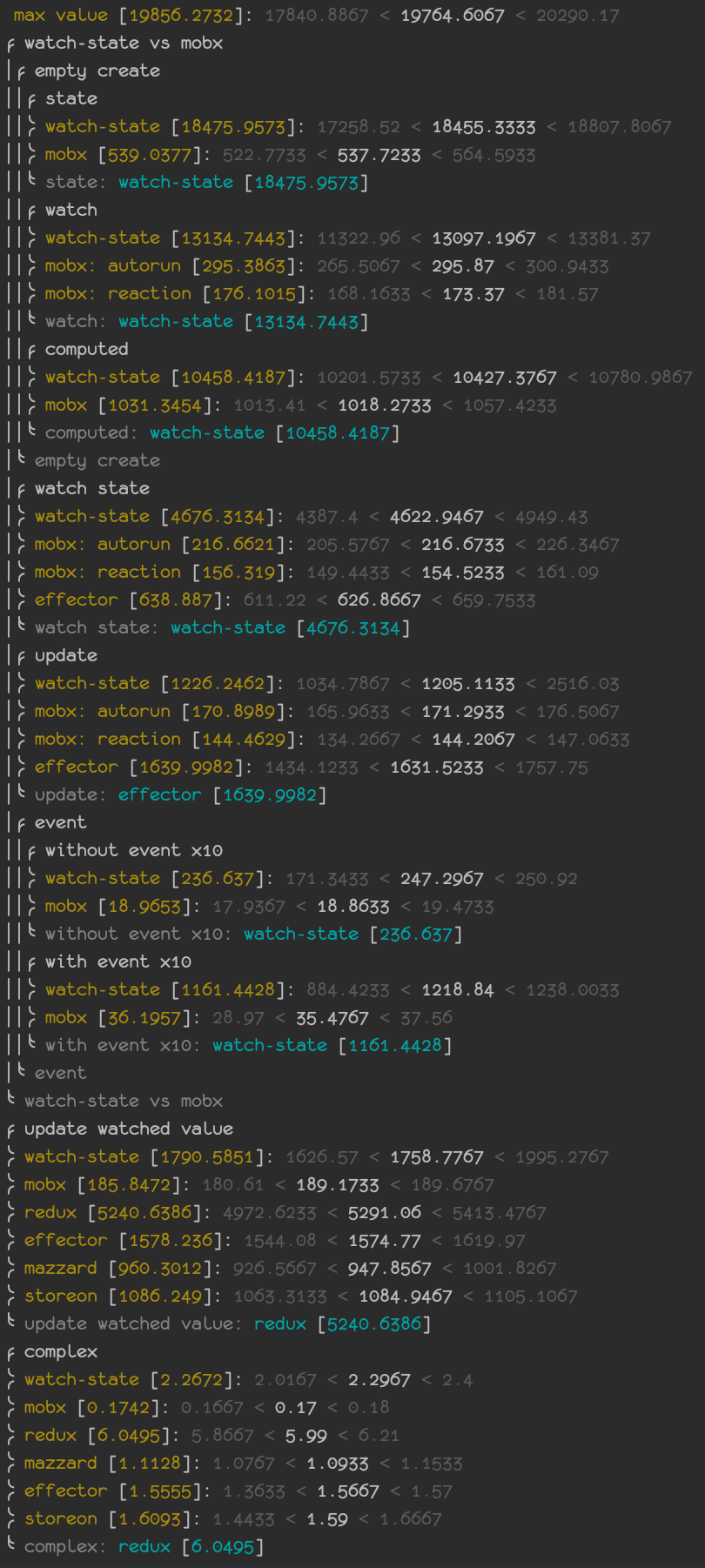
You can check a performance test with **[MobX](https://www.npmjs.com/package/mobx)**, **[Effector](https://www.npmjs.com/package/effector)**, **[Storeon](https://www.npmjs.com/package/storeon)**, **[Nano Stores](https://www.npmjs.com/package/nanostores)**, **[Mazzard](https://www.npmjs.com/package/mazzard)** and **[Redux](https://www.npmjs.com/package/redux)**.
Clone the repo, install packages and run this command
```shell
npm run speed
```
## Links
You can find more tools [here](https://www.npmjs.com/search?q=%40watch-state)
## Issues
If you find a bug or have a suggestion, please file an issue on [GitHub](https://github.com/d8corp/watch-state/issues)
[](https://github.com/d8corp/watch-state/issues)











 Firefox |
  Chrome |
  Safari |
  Opera |
  Edge |
|:-------:|:------:|:------:|:-----:|:----:|
| 45+ | 49+ | 9+ | 36+ | 13+ |
### Mobile
|
Edge |
|:-------:|:------:|:------:|:-----:|:----:|
| 45+ | 49+ | 9+ | 36+ | 13+ |
### Mobile
|