` breaks the outer flow's outline. |
| `Section lacks heading.` | **warning** | Rule is sensible for traditional print publishing but absurd for modern UI components not burning in nested `
` hell. |
If there is an additional W3C validation message you think is ridiculous, open an issue with a note explaining why the message should be ignored.
## D) Application Code and Testing Frameworks
In addition to the CLI interface, the **w3c-html-validator** package can also be imported and called directly in ESM and TypeScript projects.
Note that if your application calls `w3cHtmlValidator.validate()` multiple times, you must throttle (debounce) the calls or risk getting rejected by the W3C server.
### 1. Import
Example call to the `validate()` function:
```typescript
import { w3cHtmlValidator } from 'w3c-html-validator';
const options = { filename: 'docs/index.html' };
w3cHtmlValidator.validate(options).then(console.log); //outputs the resutls object
```
To display formatted output, replace `console.log` with `w3cHtmlValidator.reporter`:
```typescript
w3cHtmlValidator.validate(options).then(w3cHtmlValidator.reporter);
```
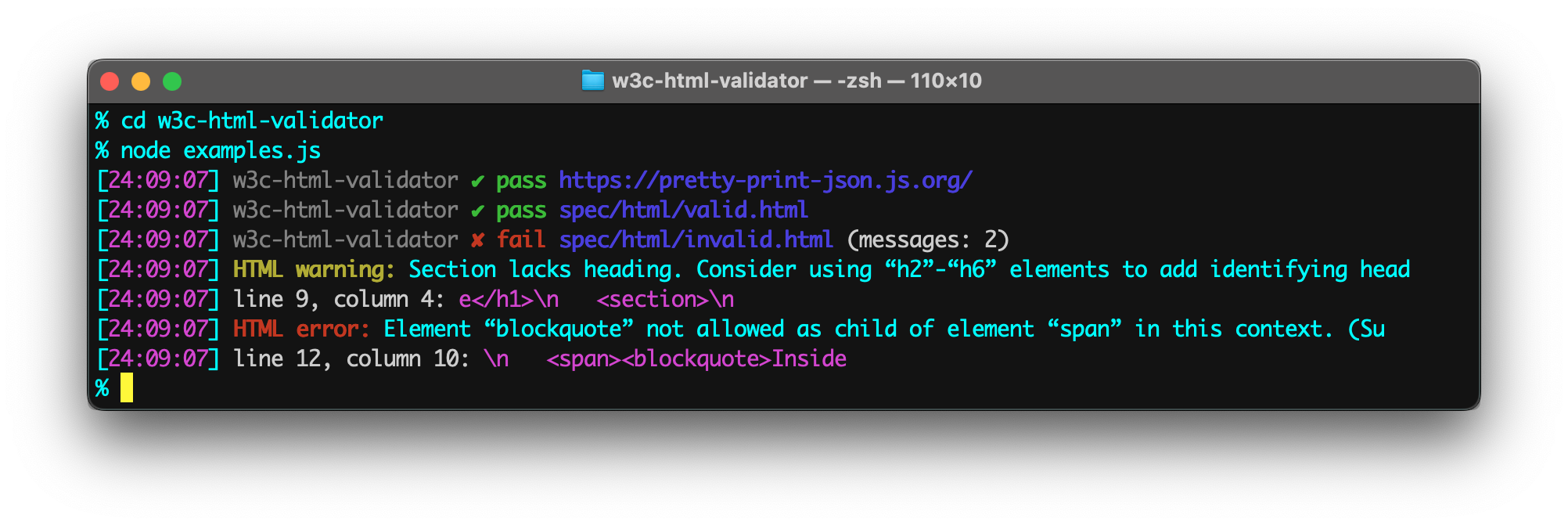
To see some example validation results, run the commands:
```shell
$ cd w3c-html-validator
$ node examples.js
```
### 2. Options
#### `w3cHtmlValidator.validate(options)`
| Name (key) | Type | Default | Description |
| :--------------- | :---------------------- | :------------------------------- | :------------------------------------------------------ |
| `checkUrl` | **string** | `'https://validator.w3.org/nu/'` | W3C validation API endpoint. |
| `defaultRules` | **boolean** | `false` | Apply additional built-in opinionated ignore list. |
| `dryRun` | **boolean** | `false` | Bypass validation (for usage while building your CI). |
| `filename` | **string** | `null` | HTML file to validate. |
| `html` | **string** | `null` | HTML string to validate. |
| `ignoreLevel` | `'info'` or `'warning'` | `null` | Skip unwanted messages.* |
| `ignoreMessages` | **array** | `[]` | Skip messages containing a string or matching a regex.* |
| `output` | `'json'` or `'html'` | `'json'` | Get results as an array or as a web page. |
| `website` | **string** | `null` | URL of website to validate. |
*The `ignoreMessages` and `ignoreLevel` options only work for `'json'` output.
Setting `ignoreLevel` to `'warning'` skips both `'warning'` level and `'info'` level validation messages.
#### `w3cHtmlValidator.reporter(results, options)`
| Name (key) | Type | Default | Description |
| :--------------- | :---------- | :------ | :-------------------------------------------------------------- |
| `continueOnFail` | **boolean** | `false` | Report messages but do not throw an error if validation failed. |
| `maxMessageLen` | **number** | `null` | Trim validation messages to not exceed a maximum length. |
| `quiet` | **boolean** | `false` | Suppress status messages for successful validations. |
| `title` | **string** | `null` | Override display title (useful for naming HTML string inputs). |
### 3. TypeScript Declarations
See the TypeScript declarations at the top of the
[w3c-html-validator.ts](src/w3c-html-validator.ts) file.
The output of the `w3cHtmlValidator.validate(options: ValidatorOptions)` function is a **promise**
for a `ValidatorResults` object:
```typescript
type ValidatorResults = {
validates: boolean,
mode: 'html' | 'filename' | 'website';
html: string | null,
filename: string | null,
fileCount: number | null,
website: string | null,
output: 'json' | 'html',
status: number,
messages: ValidatorResultsMessage[] | null, //for 'json' output
display: string | null, //for 'html' output
dryRun: boolean,
};
```
### 4. Mocha Example
```javascript
import assert from 'node:assert';
import { w3cHtmlValidator } from 'w3c-html-validator';
describe('Home page', () => {
it('validates', (done) => {
const handleResults = (results) => {
assert(results.status === 200, 'Request succeeded');
assert(results.validates, 'Home page validates');
done();
};
const options = { filename: 'docs/index.html' };
w3cHtmlValidator.validate(options).then(handleResults);
});
});
```
---
[MIT License](LICENSE.txt)
[🛡️ npm Security Aggregator](https://center-key.github.io/npm-security-aggregator/?package=w3c-html-validator)
See the `runScriptsConfig` section of [`package.json`](package.json) for a clean way to organize build tasks:
- 🎋 [`add-dist-header`](https://github.com/center-key/add-dist-header) — _Prepend a one-line banner comment (with license notice) to distribution files_
- 📄 [`copy-file-util`](https://github.com/center-key/copy-file-util) — _Copy or rename a file with optional package version number_
- 📂 [`copy-folder-util`](https://github.com/center-key/copy-folder-util) — _Recursively copy files from one folder to another folder_
- 🪺 [`recursive-exec`](https://github.com/center-key/recursive-exec) — _Run a command on each file in a folder and its subfolders_
- 🔍 [`replacer-util`](https://github.com/center-key/replacer-util) — _Find and replace strings or template outputs in text files_
- 🔢 [`rev-web-assets`](https://github.com/center-key/rev-web-assets) — _Revision web asset filenames with cache busting content hash fingerprints_
- 🚆 [`run-scripts-util`](https://github.com/center-key/run-scripts-util) — _Organize npm package.json scripts into groups of easy-to-manage commands_
- 🚦 [`w3c-html-validator`](https://github.com/center-key/w3c-html-validator) — _Check the markup validity of HTML files using the W3C validator_
 _Check the markup validity of HTML files using the W3C validator_
[](https://github.com/center-key/w3c-html-validator/blob/main/LICENSE.txt)
[](https://www.npmjs.com/package/w3c-html-validator)
[](https://github.com/center-key/w3c-html-validator/actions/workflows/run-spec-on-push.yaml)
**w3c-html-validator** takes HTML files and returns detailed validation results.
The reporter produces formatted output indented for use in build scripts and test suites.
 ## A) Setup
Install package for node:
```shell
$ npm install --save-dev w3c-html-validator
```
## B) Usage
### 1. Synopsis
```
html-validator [INPUT1] [INPUT2] [INPUT3] [...]
```
Parameters:
Each parameter is a folder or file to be sent to the HTML validator.
### 2. npm `package.json` Scripts
Run `html-validator` from the `"scripts"` section of your **package.json** file.
The parameters are folders and files to be validated.
Example **package.json** scripts:
```json
"scripts": {
"validate": "html-validator docs flyer.html",
"one-folder": "html-validator docs",
"all": "html-validator --quiet"
},
```
Passing no parameters defaults to validating all HTML files in the project (skipping the
**node_modules** folder).
### 3. Command-Line npx
Example terminal commands:
```shell
$ npm install --save-dev w3c-html-validator
$ npx html-validator docs
```
The above `npx` line validates all the HTML files in the **docs** folder.
You can also install **w3c-html-validator** globally (`--global`) and then run it anywhere directly from the terminal.
### 4. CLI Flags
Command-line flags:
| Flag | Description | Value |
| ----------------- | ------------------------------------------------------------------- | ---------- |
| `--check-url` | W3C validation API endpoint (example: `http://localhost/nu/`). | **string** |
| `--continue` | Report messages but do not throw an error if validation failed. | N/A |
| `--default-rules` | Apply additional built-in opinionated ignore list. | N/A |
| `--delay` | Debounce pause in milliseconds between each file validation. | **number** |
| `--dry-run` | Bypass validation (for usage while building your CI). | N/A |
| `--exclude` | Comma separated list of strings to match in paths to skip. | **string** |
| `--ignore-config` | File containing strings and regexes of validation messages to skip. | **string** |
| `--ignore` | Skip validation messages containing a string or matching a regex. | **string** |
| `--note` | Place to add a comment only for humans. | **string** |
| `--quiet` | Suppress messages for successful validations. | N/A |
| `--trim` | Truncate validation messages to not exceed a maximum length. | **number** |
### 5. Examples
- `html-validator`