# Vue3-Json-Edit
>**(fork vue-json-edit - credits original: [https://github.com/jinkin1995/vue-json-edit](#https://github.com/jinkin1995/vue-json-edit))**
>
>
>**Visual JSON Editor built as an vue component. Provides a basic GUI**
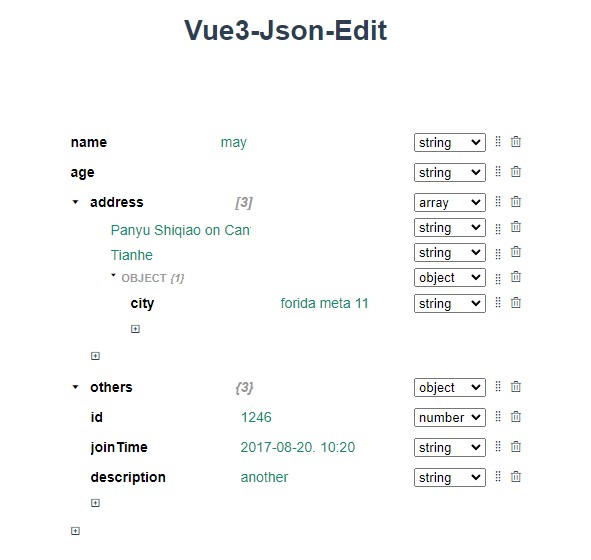


<p align="center">
  <img width="591px" height="560px" src="https://github.com/AnonX98/vue3-json-edit/blob/master/img/vue3-json-edit-example.jpg?raw=true">
</p>

## Demo

[Link](https://AnonX98.github.io/vue3-json-edit/)

## Getting Started

```sh
npm install vue3-json-edit --save
```

## Usage

To use it globally
```sh
import { createApp } from 'vue'
import App from './App.vue'
import JsonEditor from 'vue3-json-edit'

const app = createApp(App);
app.component("JsonEditor", JsonEditor);
app.mount("#app");

```

Otherwise to use it locally just

```sh
<script setup>
import JsonEditor from 'vue3-json-edit'


...

```

or

```sh
<script>
import JsonEditor from 'vue3-json-edit'


export default {
  components: {
    JsonEditor
  }
...

```


If you want to use the style made by me enter also

```sh
import "vue3-json-edit/dist/style.css";
```

## Example
Single file component


```sh
<template>
<JsonEditor
    :options="{
        confirmText: 'confirm',
        cancelText: 'cancel',
    }"
	v-model:objData="jsonData"
	/>
</template>
<script setup>
import JsonEditor from "vue3-json-edit";
import "vue3-json-edit/dist/style.css";

import { ref } from "vue";

const jsonData = ref({
  name: "may",
  age: null,
  address: [
    "Panyu Shiqiao on Canton",
    "Tianhe",
    {
      city: "forida meta 11",
    },
  ],
  others: {
    id: 1246,
    joinTime: "2017-08-20. 10:20",
    description: "another",
  },
});
</script>
```
## Props

* objData: json data
* options
  * confirmText: strings of the confirm button
  *   cancelText: strings of the cancel button
